How I could download the source code of an Indian e-commerce website!!
The .git directory of a development subdomain was accessible despite returning a 403 error, allowing the author to download the entire source code repository. An attacker could obtain the application's source code, which may contain sensitive information.
 Published on medium.com
Bug Bounty
The full write-up lives on its author's site
It belongs to its author, so we link to it rather than copy it. The other two tabs are our own rewrites, checked against it.
Context
During reconnaissance on an Indian e-commerce website, the author found several subdomains returning 200 OK. She chose the one in the development environment, referred to in the write-up as dev.domain.com, and ran dirbuster against it. The scan revealed a .git folder in the web directory, but requesting it returned a 403 Forbidden error code.
The question the write-up explores is whether a git repository can still be restored from a URL when the .git directory itself is forbidden. Developers sometimes host their version control repository in production, and as the author notes, this can let an attacker gain complete access to an application's source code even when .git is 403 Forbidden.
Setup
The only tool named in the report is dirbuster, used for directory brute forcing against the development subdomain. No accounts, roles or versions are mentioned. The precondition is a web server that exposes a .git directory which returns 403 on the directory itself but still serves individual files inside it.
Finding it
After dirbuster reported the .git folder with a 403, the author wanted to know whether the repository could still be restored. To understand how git stores a repository, she read up on git internals. Git mainly has four types of objects:
- blob: the data storage of a single file, or the actual source code.
- tree: a grouping of blobs together.
- commit: a commit object contains a reference to another tree object plus other information such as author and committer.
- tag: a tag object is another reference to a commit object, and just makes for easier referencing.
With that model in mind, she started requesting the standard files of a git repository directly from the URL in the browser. To her surprise, the following files were accessible in the browser:
HEADobjects/info/packsdescriptionconfigCOMMIT_EDITMSGindexlogs/HEAD
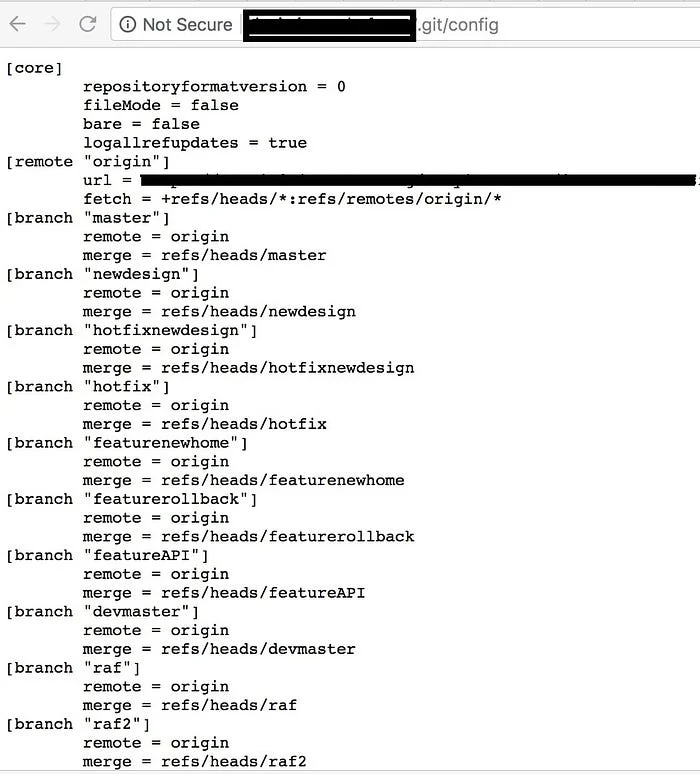
The screenshot shows the standard files of the git repository being served from the URL in the browser.
Exploitation
Step 1: Confirm the repository files are readable
The 403 on the .git directory did not extend to the files inside it: the author could access the listed files in the browser.
Step 2: Dump the repository to the local machine
Once the config files were accessible, the author wanted to download the code repository. She used the following command to dump the code on her local machine:
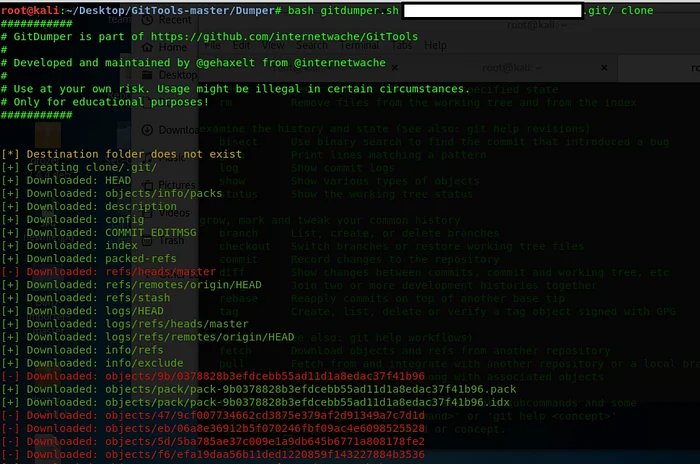
The screenshot shows the command used to dump the repository.
After this, a git folder was created inside the repository directory on the local machine, and the object files of the code were downloaded.
Step 3: Analyse the object files
To analyse the downloaded object files, the author used their hash values, as shown below:

The screenshot shows the hash values used against the object files.
She also notes that a list of all pack files can be found in .git/objects/info/packs, which is one of the files that was readable in the browser during the discovery step.
Step 4: Clean up the working copy
Lastly, she used the git reset --hard command to revert all the uncommitted changes. Because this is a potentially dangerous command, she notes that it should be used cautiously.

Root cause
The web server blocks access to the .git directory itself, returning 403, but does not block the individual files underneath it. Git's on-disk format is a set of plain files: HEAD, config, index, logs/HEAD, COMMIT_EDITMSG, description and the object store under objects/. Serving any of these over HTTP is enough to begin reconstructing the repository, because the object files contain the actual source code and the metadata files describe how to assemble it. The 403 on the directory is therefore only a surface control: it stops browsing, not retrieval. Why the server behaves this way is not stated in the report.
Impact
Under the conditions seen here, an attacker who finds an exposed .git directory can dump the code repository, as the author did for this development subdomain. The write-up frames the general risk as complete access to an application's source code when the version control repository is hosted in production. The report does not describe what was done with the downloaded code beyond analysing the object files, and it gives no bounty or severity information.
Fix
The report does not describe a fix or a vendor response. Based on the root cause, the server should deny access to the files inside .git, not only to the directory path, and version control data should not be deployed to web-accessible directories at all.
Variants to test
- Request the standard git files directly under a
.gitpath that returns 403 as a directory:HEAD,config,index,logs/HEAD,COMMIT_EDITMSG,descriptionandobjects/info/packs. A positive result is any of these returning content instead of 403 or 404. - Check
objects/info/packsfor a list of pack files, then fetch the corresponding pack and index files. A positive result is a downloadable pack that can be used to reconstruct objects locally. - Try the same file-by-file approach on other version control or backup artefacts that are commonly blocked only at the directory level. A positive result is any individual file being served while its parent directory is denied.
- Repeat the discovery on development and staging subdomains found during reconnaissance, since that is where the author found this one. A positive result is a
.gitpath that responds at all, whether with 200 or 403, followed by successful retrieval of the files above.
What happened, in plain words
A security researcher was looking at an Indian e-commerce website. Before testing anything, she did what is called reconnaissance: gathering information about the site's parts, the way you might walk around a building and note the doors and windows before trying any of them. During this she found several subdomains. A subdomain is a smaller address that belongs to the same organisation, for example shop.example.com next to example.com. Several of them answered with the code 200 OK, which is the standard web reply meaning "here is the page you asked for".
She picked the one used for development, written in the report as dev.domain.com. A development environment is a copy of the site that programmers use while building and testing, before changes go to the real, public site. Such copies often hold things that were never meant to be public.
She then ran a tool called dirbuster against that subdomain. Dirbuster is a program that tries a long list of common folder and file names against a website, one after another, and reports which ones exist. Think of it as trying every key on a big bunch in a lock, quickly, to see which ones turn. The scan found a .git folder in the web directory, but asking the server for that folder returned 403 Forbidden. That is the web code for "I know what you are asking for, and you are not allowed to have it".
The interesting part is what came next. The researcher asked whether a git repository could still be restored from that address even though the folder itself was forbidden. Git is the tool most programmers use to keep track of changes to their code, and a git repository is the store where that history lives. Some developers put that store on the same public web server as the live site. When that happens, as the report puts it, an attacker can gain complete access to an application's source code even when .git is 403 Forbidden. Source code is the human-written instructions that make the website work; having it is like having the full blueprint of a building rather than just a photo of its front door.
To understand how git keeps its files, she read about git internals. Git mainly has four types of objects:
- blob: the data storage of a single file, or the actual source code.
- tree: a grouping of blobs together.
- commit: a commit object contains a reference to another tree object plus other information such as author and committer.
- tag: a tag object is another reference to a commit object, and just makes for easier referencing.
An object here simply means a stored item inside the repository. A blob is one file's contents. A tree is like a folder listing that says which blobs belong together. A commit is a saved snapshot of the project at one moment, with a note of who saved it and when. A tag is a sticky label on a particular commit, so people can refer to it by name instead of by a long code.
With that picture in mind, she started requesting the standard files of a git repository directly from the URL in the browser. In other words, instead of asking for the folder, she asked for the individual files by name, the way you might be refused entry to a room but find that the drawers inside it still open. To her surprise, the following files were accessible in the browser:
HEADobjects/info/packsdescriptionconfigCOMMIT_EDITMSGindexlogs/HEAD
The screenshot shows the standard files of the git repository being served from the URL in the browser.
Each of these is an ordinary text or data file that git keeps on disk. HEAD is a small pointer that says which branch or commit is currently checked out. config holds the repository's settings. description is a short label for the repository. COMMIT_EDITMSG holds the message of the most recent commit. index is git's staging area, the list of what is about to be committed. logs/HEAD records where the current branch has pointed over time. objects/info/packs lists the pack files, which are bundles of many objects compressed together. None of these is the source code itself, but together they describe how to find and assemble it.
Once the config files were accessible, she wanted to download the code repository. She used the following command to dump the code on her local machine:
The screenshot shows the command used to dump the repository.
After this, a git folder was created inside the repository directory on the local machine, and the object files of the code were downloaded. In plain terms, the command created a git folder inside the repository on her local machine and downloaded the object files of the code.
To analyse the downloaded object files, she used their hash values, as shown below:
The screenshot shows the hash values used against the object files.
A hash value is a short code computed from a file's contents. Git names its objects by these codes, so if you know an object's hash you can ask git to show you that object. That is why the hashes matter here: they are the addresses of the individual pieces of code inside the downloaded store.
She also notes that a list of all pack files can be found in .git/objects/info/packs, which is one of the files that was readable in the browser during the discovery step. A pack file is a single archive holding many objects, which is how git saves space when a repository grows.
Lastly, she used the git reset --hard command to revert all the uncommitted changes. Because this is a potentially dangerous command, she notes that it should be used cautiously. Uncommitted changes are edits made on your own copy that have not yet been saved into the repository's history. git reset --hard throws those edits away and puts the working copy back to a chosen saved state. It is dangerous for the same reason that emptying a desk drawer into the bin is dangerous: anything not already filed elsewhere is gone.
Why the server let this happen
The web server blocks access to the .git directory itself, returning 403, but does not block the individual files underneath it. Git's on-disk format is a set of plain files: HEAD, config, index, logs/HEAD, COMMIT_EDITMSG, description and the object store under objects/. Serving any of these over HTTP is enough to begin reconstructing the repository, because the object files contain the actual source code and the metadata files describe how to assemble it. The 403 on the directory is therefore only a surface control: it stops browsing, not retrieval. Why the server behaves this way is not stated in the report.
A useful comparison is a filing cabinet with a locked door but open drawers. If the rule only says "do not open the cabinet", someone who knows the name of each drawer can still pull it out.
What the impact is
Under the conditions seen here, an attacker who finds an exposed .git directory can dump the code repository, as the author did for this development subdomain. The write-up frames the general risk as complete access to an application's source code when the version control repository is hosted in production. The report does not describe what was done with the downloaded code beyond analysing the object files, and it gives no bounty or severity information.
How to fix it
The report does not describe a fix or a vendor response. Based on the root cause, the server should deny access to the files inside .git, not only to the directory path, and version control data should not be deployed to web-accessible directories at all.
Other places to try the same idea
- Request the standard git files directly under a
.gitpath that returns 403 as a directory:HEAD,config,index,logs/HEAD,COMMIT_EDITMSG,descriptionandobjects/info/packs. A positive result is any of these returning content instead of 403 or 404. - Check
objects/info/packsfor a list of pack files, then fetch the corresponding pack and index files. A positive result is a downloadable pack that can be used to reconstruct objects locally. - Try the same file-by-file approach on other version control or backup artefacts that are commonly blocked only at the directory level. A positive result is any individual file being served while its parent directory is denied.
- Repeat the discovery on development and staging subdomains found during reconnaissance, since that is where the author found this one. A positive result is a
.gitpath that responds at all, whether with 200 or 403, followed by successful retrieval of the files above.
Glossary
- Reconnaissance: the information-gathering phase before testing, where you map out a target's addresses and parts.
- Subdomain: an address that sits under a main domain, such as
dev.example.comunderexample.com. - 200 OK: the standard web reply meaning the requested page or file was returned.
- 403 Forbidden: the web reply meaning the server understood the request but refuses to serve it.
- 404 Not Found: the web reply meaning the requested page or file does not exist at that address.
- Development environment: a copy of a site used by programmers for building and testing, separate from the live site.
- Dirbuster: a tool that tries many common folder and file names against a website to discover what exists.
- Git: the version control system most programmers use to record changes to code over time.
- Repository: the store where git keeps a project's files and their history.
.gitfolder: the directory inside a project where git keeps its repository data.- Source code: the instructions written by programmers that make a program or website work.
- Blob: a git object holding the contents of a single file.
- Tree: a git object that groups blobs together, like a folder listing.
- Commit: a saved snapshot of a project at one moment, with author and message information.
- Tag: a named label pointing at a particular commit.
- Object: a stored item inside a git repository, such as a blob, tree, commit or tag.
- HEAD: a small file that points to the branch or commit currently checked out.
- Index: git's staging area, the list of changes about to be committed.
- Pack file: a single archive holding many git objects compressed together.
- Hash value: a short code computed from a file's contents, used by git to name and find objects.
- Uncommitted changes: edits made to your own copy that have not yet been saved into the repository's history.
git reset --hard: a git command that discards uncommitted changes and resets the working copy to a chosen saved state.- HTTP: the protocol browsers and web servers use to exchange pages and files.
- URL: the address you type or click to reach a page or file on the web.



