How I Discovered CVE-2026–102628 — From a WHOIS Lookup to a CISA CVE
A Laravel application had debug mode enabled in production, so an unexpected GET request to an API endpoint triggered an error page that dumped the full environment configuration. An attacker could obtain the application key, database root credentials, MongoDB credentials, an RSA private key and staff email addresses.
 Published on xhunter101.medium.com
Cisa
The full write-up lives on its author's site
It belongs to its author, so we link to it rather than copy it. The other two tabs are our own rewrites, checked against it.
Context
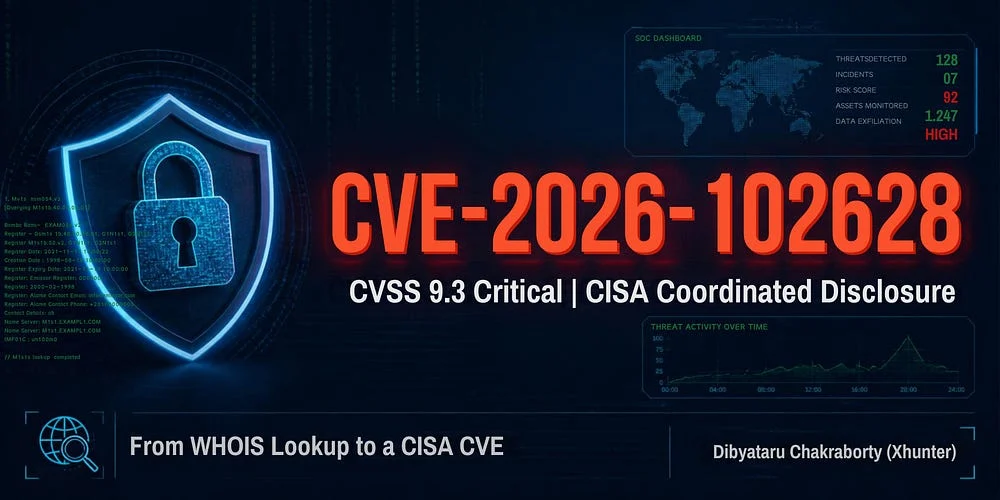
CVE-2026-102628 is a CVSS 9.3 Critical finding against the Cadmos LTI application, a Learning Tools Interoperability platform built on the Laravel PHP framework and hosted at cadmos.eummena.io. LTI applications connect external tools to Learning Management Systems, so a platform of this kind is likely to handle student data, authentication tokens and institutional credentials. The vulnerable feature is the route /api/verification, which the author describes as a verification route of the kind normally designed to accept POST requests carrying data payloads for validation and processing. The bug is not in that logic itself: it is that a request using a method the route does not handle produces an unhandled exception, and the application's debug configuration renders the full Laravel debug page, including the complete environment, to an unauthenticated client.
Setup
The work needed no accounts, no credentials and no special access. The tools used were WHOIS, Nmap, Subfinder and the openssl command line client, plus a browser for manual exploration. The only precondition was that the target was reachable from the internet, which it was: the application sat on the same public IP as the organisation's main domain, with a valid production certificate.
Finding it
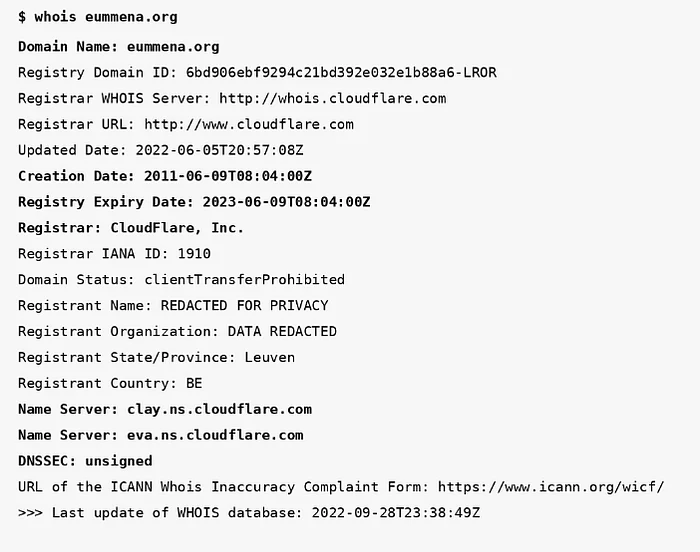
The chain began with a WHOIS lookup on eummena.org to understand the organisation behind the domain. The registrant organisation was Eummena, located in Leuven, Belgium, with Cloudflare, Inc as registrar and the domain created in 2022. What drew attention was the .io variant, eummena.io, on the reasoning that organisations often run their applications and platforms separately on .io domains.
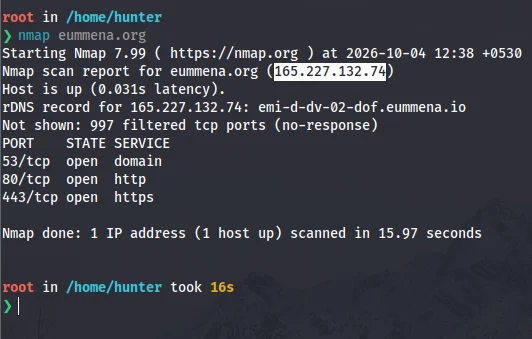
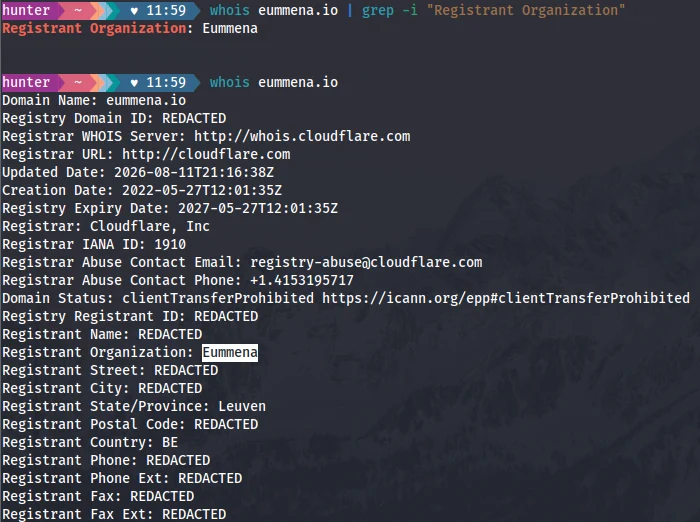
An Nmap scan of eummena.org returned ports 53, 80 and 443 open, and, more importantly, a reverse DNS record for the server IP pointing at emi-d-dv-02-dof.eummena.io. The dv in the subdomain name strongly suggested a development or staging environment exposed publicly on a production server. A WHOIS lookup on eummena.io confirmed the same registrant organisation, Eummena, so both domains and the server belonged to the same owner.
Subfinder against eummena.io surfaced cadmos.eummena.io. Navigating to it revealed the Cadmos LTI application, a Laravel PHP application hosted at the same server IP. An SSL certificate check confirmed the server was active and in use: the certificate had been issued recently, was valid production SSL, and sat on a dev-named subdomain. A development environment with a valid production certificate on a public IP is the classic misconfiguration signal.

Manual exploration of cadmos.eummena.io and mapping of its endpoints identified /api/verification. The route looked like a verification endpoint, the kind that expects POST requests with a data payload for validation and processing. That expectation is what made a GET request worth trying.
Exploitation
Step 1: WHOIS on the main domain
whois eummena.org
This established the organisation, its location, the registrar and the domain's creation year, and prompted the look at the .io variant.
Step 2: Nmap and reverse DNS
nmap eummena.org
The scan reported the host up with 0.031s latency and three open ports:
PORT    STATE  SERVICE
53/tcp  open   domain
80/tcp  open   http
443/tcp open   https
The reverse DNS line was the pivot:
rDNS record for [redacted]: emi-d-dv-02-dof.eummena.io
It tied the scanned IP to eummena.io and exposed a subdomain whose naming suggested a development environment.
Step 3: Confirming the second domain
whois eummena.io | grep -i "Registrant Organization"
Result:
Registrant Organization: Eummena
Same organisation, same server IP, and a development subdomain sitting publicly exposed.
Step 4: Subdomain enumeration
subfinder -d eummena.io
Among the results was cadmos.eummena.io, the Cadmos LTI application on Laravel, hosted at the same IP.
Step 5: Certificate check
echo | openssl s_client \
  -connect emi-d-dv-02-dof.eummena.io:443 \
  2>/dev/null | openssl x509 -noout \
  -dates -subject -issuer 2>&1
Results:
notBefore=Sep 19 21:34:46 2026 GMT
notAfter=Dec 18 21:34:45 2026 GMT
subject=CN=eummena.org
issuer=C=US, O=Let's Encrypt, CN=YE2
The certificate had been renewed recently, the server was actively maintained, and a valid production certificate was in use on a dev-named subdomain. The environment was live and in active use.
Step 6: The unexpected method
The endpoint expected POST. The author sent a GET with no body, no parameters and no authentication:
GET /api/verification HTTP/1.1
Host: cadmos.eummena.io
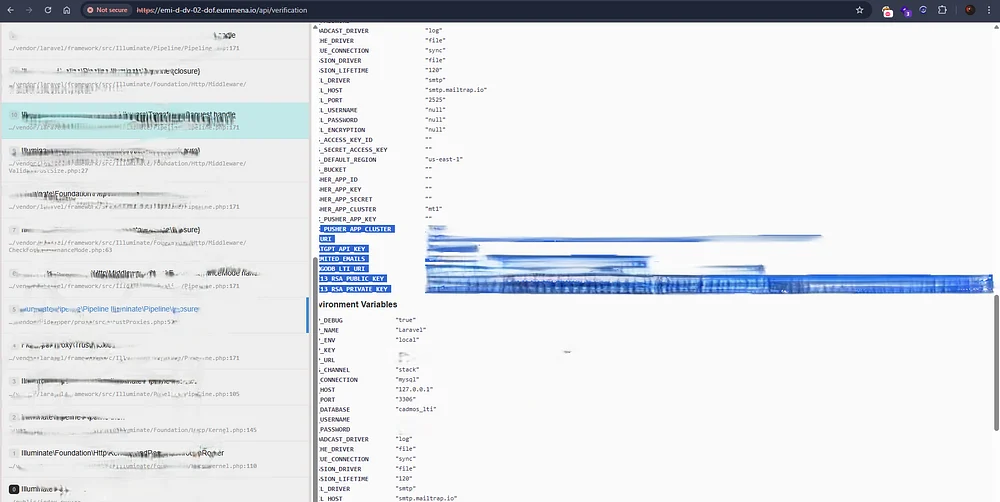
Laravel had no handler for a GET request on that route. The unhandled exception triggered Laravel's debug error handler, and because APP_DEBUG=true was set in the environment, the full debug page rendered directly in the browser. The entire server environment was returned in plaintext, with no authentication required.
Step 7: What the debug page contained
The debug page dumped the complete .env configuration. The author lists the exposed values and their risk:
| Exposed data | Risk |
|---|---|
APP_KEY (base64 Laravel encryption key) |
Session forgery, decrypt all app data |
DB_USERNAME: root plus DB_PASSWORD |
Full MySQL root database access |
DB_URI plus MONGODB_LTI_URI |
Full MongoDB Atlas cloud database access |
LTI13_RSA_PRIVATE_KEY |
Sign fraudulent LTI requests, impersonate LMS users |
PERMITED_EMAILS |
Internal privileged staff emails |
SCRIPT_FILENAME |
Full server filesystem path disclosed |
SERVER_ADDR: [redacted] |
Infrastructure mapping |
APP_ENV: local |
Confirms misconfigured production environment |
The author scored the finding as follows:
CVSS:3.1/AV:N/AC:L/PR:N/UI:N/S:C/C:H/I:H/A:N
Score: 9.3 — Critical
Root cause
The root cause is configuration, not application logic: APP_DEBUG=true and APP_ENV=local were set in a publicly accessible production environment. With debug mode on, Laravel's error handler renders the detailed debug page, including environment variables, whenever an exception is raised. The route /api/verification only handled POST, so a GET produced an unhandled exception, and the debug handler turned that exception into a full environment dump. The debug page is served by the framework itself, so the exception was rendered without any authentication.
Impact
An unauthenticated attacker could read the full environment configuration. The author's assessment of what that enables: forging sessions and decrypting application data with APP_KEY; full MySQL root access with the database username and password; full MongoDB Atlas access with the connection URIs; signing fraudulent LTI requests and impersonating LMS users with the RSA private key; and learning internal privileged staff email addresses from PERMITED_EMAILS. The filesystem path and server address aid further mapping. Because the platform is an LTI application, the affected parties are the institution and its LMS users, whose data and credentials the platform likely handles.
Fix
The report does not describe a fix beyond noting that the vendor silently patched the debug page after the disclosure email. The obvious configuration change is to run with APP_DEBUG=false and a production APP_ENV in any publicly reachable environment.
Variants to test
- Send methods the route does not expect (
GET,PUT,DELETE,OPTIONS) to API routes that only declare POST. A positive result is a framework error page rather than a 405 or a generic error. - Look for debug pages on staging and development subdomains, especially ones whose names contain
dv,dev,stgortest. A positive result is a stack trace or environment dump rendered to an unauthenticated client. - Check reverse DNS on every IP found during reconnaissance. A positive result is a hostname that reveals an internal or non-production naming scheme.
- Compare certificates on dev-named hosts. A positive result is a valid production certificate on a host that presents itself as development, which suggests the environment is live and maintained.
- Enumerate subdomains of the organisation's secondary domains, not just the primary one. A positive result is an application on a different TLD that shares the same server IP.
- Trigger exceptions on Laravel routes with malformed input and watch for the debug handler. A positive result is the Laravel debug page with environment variables in plaintext.
What happened, in plain words
A security researcher found a serious flaw in a website belonging to an education technology company. The flaw let anyone on the internet see the website's most private settings, including the passwords it uses to talk to its databases, without logging in at all. He reported it, the company never replied, and the case eventually went through two government bodies in the United States before being published as an official CVE, a public record of a security vulnerability. The final severity score was 9.3 out of 10, which is classed as Critical.
This article walks through the whole story from the beginning, assuming you have never done any security work before. You only need to be able to use a browser and a computer. Every command and request is shown exactly as it was used, and explained line by line afterwards.
A few words you will meet constantly, explained now so they do not slow us down later:
- A domain name is the human-friendly address of a website, like
example.org. Computers translate it into a numeric IP address, which is the actual location of a server on the internet, a bit like a phone number behind a saved contact name. - A server is a computer somewhere that answers requests from your browser. When you visit a site, your browser sends a request and the server sends back a page.
- A subdomain is a name placed in front of a domain, like
shop.example.org. Organisations use subdomains to separate different services, for example one for the public website and another for an internal tool. - An API (Application Programming Interface) is a way for software to talk to other software rather than to a person. Think of a restaurant: the menu and the waiter are the API. You do not walk into the kitchen yourself; you ask through a defined channel, and the kitchen responds. Websites often have API routes, which are addresses that accept data and return results rather than showing a normal page.
- A request method (also called an HTTP method) is the verb at the start of every web request.
GETmeans "give me this", and it is what your browser uses when you open a page.POSTmeans "here is some data, please process it", and it is what a form uses when you press submit. There are others, such asPUT,DELETEandOPTIONS. - A token or key is a secret string that proves identity or unlocks encryption, much like a physical key. If someone else gets a copy, they can act as you or open what you were protecting.
- A cookie is a small piece of data a website stores in your browser so it can recognise you on the next request, which is how you stay logged in.
- Credentials is the general word for usernames, passwords and similar secrets.
- Plaintext means readable text with no encryption, so anyone who sees it can read it directly.
- Authentication means proving who you are, usually by logging in. Something reachable without authentication can be used by anyone, logged in or not.
- A CVE (Common Vulnerabilities and Exposures) is a unique public identifier for a known security flaw, so that everyone discussing it refers to the same thing.
- CVSS is a standard scoring system for how severe a vulnerability is, from 0 to 10.
The target and the product
The application at the centre of this story is called Cadmos, an LTI platform. LTI stands for Learning Tools Interoperability: it is a standard that lets external teaching tools plug into a Learning Management System, the software a school or university uses to run courses, hand out material and record grades. Think of the LMS as the school's main office and an LTI tool as a specialist service the office calls in, such as an online quiz engine. Because of that role, an LTI platform is likely to handle student data, authentication tokens and institutional credentials, which makes it a high-value target.
Cadmos is built on Laravel, a popular framework for writing web applications in the PHP programming language. A framework is a set of ready-made building blocks: routing, database access, error handling and so on. One of Laravel's building blocks is a very detailed error page, intended to help developers while they work. That page is the heart of this story.
The vulnerable feature is a route at /api/verification. A route is a specific address inside an application that does a specific job, like a particular counter in a large office. This one is described as a verification route of the kind normally designed to accept POST requests carrying data for validation and processing. In other words, the developer intended it to receive a package of data and check it.
The bug is not in that checking logic. The bug is what happens when the route receives a request it was not built to handle. Laravel raises an exception, which is the programming term for an error the code did not plan for. Normally an application catches such an error and shows a polite generic message. But this application had a setting switched on that tells Laravel to show the full technical error page instead, including the complete environment configuration, to whoever triggered it. No login was required.
What you need to follow along
The work needed no accounts, no credentials and no special access. The tools were:
- WHOIS, a public lookup service that tells you who registered a domain.
- Nmap, a tool that probes a server to see which network ports are open and what services are running.
- Subfinder, a tool that finds subdomains of a domain.
- The
opensslcommand line client, used here to inspect a website's certificate. - A normal browser for clicking around the application.
The only precondition was that the target could be reached from the internet, which it could: the application sat on the same public IP address as the organisation's main domain, with a valid production certificate.
Finding it
The chain began with a WHOIS lookup on eummena.org to understand the organisation behind the domain. The registrant organisation was Eummena, located in Leuven, Belgium, with Cloudflare, Inc as registrar and the domain created in 2022. What drew attention was the .io variant, eummena.io, on the reasoning that organisations often run their applications and platforms separately on .io domains. A registrar is the company through which a domain is registered, a bit like the shop where you buy a licence plate.
An Nmap scan of eummena.org returned ports 53, 80 and 443 open, and, more importantly, a reverse DNS record for the server IP pointing at emi-d-dv-02-dof.eummena.io. A port is a numbered channel on a server; different services listen on different ports, the way a large building has different door numbers for different departments. Reverse DNS is the lookup that goes the other way round from normal DNS: instead of asking "what address does this name point to?", it asks "what name belongs to this address?". The dv in the subdomain name strongly suggested a development or staging environment exposed publicly on a production server. A development or staging environment is a copy of an application used for testing before changes go live; such copies often have weaker settings than the real thing.
A WHOIS lookup on eummena.io confirmed the same registrant organisation, Eummena, so both domains and the server belonged to the same owner.
Subfinder against eummena.io surfaced cadmos.eummena.io. Navigating to it revealed the Cadmos LTI application, a Laravel PHP application hosted at the same server IP. An SSL certificate check confirmed the server was active and in use. An SSL certificate is the digital document that lets your browser show the padlock and encrypt traffic to a site; it is issued by a certificate authority, and it carries dates and a subject name. The certificate had been issued recently, was valid production SSL, and sat on a dev-named subdomain. A development environment with a valid production certificate on a public IP is the classic misconfiguration signal: it suggests the testing copy is not a throwaway but a live, maintained system.
Manual exploration of cadmos.eummena.io and mapping of its endpoints identified /api/verification. An endpoint is simply a specific address an application responds to. The route looked like a verification endpoint, the kind that expects POST requests with a data payload for validation and processing. That expectation is what made a GET request worth trying: if the developer only planned for one kind of request, what happens with another?
Exploitation
Step 1: WHOIS on the main domain
whois eummena.org
whoisis the command that asks the public WHOIS service about a domain.eummena.orgis the domain being asked about.
This established the organisation, its location, the registrar and the domain's creation year, and prompted the look at the .io variant. The reasoning is simple: if a company owns one domain, it very often owns a near-identical one on another ending, and the second one may host something less carefully configured.
Step 2: Nmap and reverse DNS
nmap eummena.org
nmapis the network mapping tool.eummena.orgis the host being scanned.
The scan reported the host up with 0.031s latency and three open ports:
PORT    STATE  SERVICE
53/tcp  open   domain
80/tcp  open   http
443/tcp open   https
PORTis the column of port numbers.STATEsays whether the port isopen, meaning something is listening, or closed.SERVICEis Nmap's guess at what runs there.53/tcpwithdomainis the port used by DNS, the system that translates names into addresses.80/tcpwithhttpis the unencrypted web port.443/tcpwithhttpsis the encrypted web port, the one your browser uses for padlocked sites.
The reverse DNS line was the pivot:
rDNS record for [redacted]: emi-d-dv-02-dof.eummena.io
[redacted]is the IP address that was scanned.emi-d-dv-02-dof.eummena.iois the name that address points back to.
It tied the scanned IP to eummena.io and exposed a subdomain whose naming suggested a development environment. This is why reverse DNS matters: a scan tells you an address is alive, but the name behind it can tell you what kind of machine it is.
Step 3: Confirming the second domain
whois eummena.io | grep -i "Registrant Organization"
whois eummena.ioasks the WHOIS service about the second domain.- The vertical bar
|is a pipe: it takes the output of the command on the left and feeds it into the command on the right. grepsearches text for a pattern.-itellsgrepto ignore upper and lower case."Registrant Organization"is the field being searched for, the one naming the owner.
Result:
Registrant Organization: Eummena
Same organisation, same server IP, and a development subdomain sitting publicly exposed. The purpose of this step was to avoid wasting time on an unrelated domain that merely looked similar.
Step 4: Subdomain enumeration
subfinder -d eummena.io
subfinderis the subdomain discovery tool.-dmeans the following argument is the domain to search under.eummena.iois that domain.
Among the results was cadmos.eummena.io, the Cadmos LTI application on Laravel, hosted at the same IP. Enumeration just means listing things systematically; here, listing every subdomain so none is missed.
Step 5: Certificate check
 echo | openssl s_client \
  -connect emi-d-dv-02-dof.eummena.io:443 \
  2>/dev/null | openssl x509 -noout \
  -dates -subject -issuer 2>&1
echo |sends an empty line into the next command. The certificate tool waits for input, so this gives it something to finish on.openssl s_clientopens a connection to a server and shows the certificate it presents.-connect emi-d-dv-02-dof.eummena.io:443says which host and port to connect to; 443 is the encrypted web port.\at the end of a line means the command continues on the next line.2>/dev/nullthrows away error messages so they do not clutter the output.- The second
|pipes what came back into anotheropensslcommand. openssl x509works with certificates specifically.-nooutstops it printing the certificate itself in encoded form.-dates -subject -issuerasks for the validity dates, who the certificate is for, and who issued it.2>&1sends error messages into the normal output so nothing is lost.
Results:
notBefore=Sep 19 21:34:46 2026 GMT
notAfter=Dec 18 21:34:45 2026 GMT
subject=CN=eummena.org
issuer=C=US, O=Let's Encrypt, CN=YE2
notBeforeis the date the certificate became valid.notAfteris the date it expires.subjectis the name the certificate was issued for; here it is the main domain, not the dev-named subdomain.issueris the certificate authority that signed it; Let's Encrypt is a well-known free authority.
The certificate had been renewed recently, the server was actively maintained, and a valid production certificate was in use on a dev-named subdomain. The environment was live and in active use. The point of this step was to confirm the machine was not an abandoned test box before spending more time on it.
Step 6: The unexpected method
The endpoint expected POST. The author sent a GET with no body, no parameters and no authentication:
GET /api/verification HTTP/1.1
Host: cadmos.eummena.io
GETis the method, the verb asking for something./api/verificationis the path, the specific route on the server.HTTP/1.1is the version of the web protocol being spoken.Host: cadmos.eummena.iotells the server which site the request is for. One server can host many sites, so this header picks one, like an apartment number on an envelope.
There is no body and no login information, which is exactly the point: the request is as bare as possible.
Laravel had no handler for a GET request on that route. The unhandled exception triggered Laravel's debug error handler, and because APP_DEBUG=true was set in the environment, the full debug page rendered directly in the browser. The entire server environment was returned in plaintext, with no authentication required.
Step 7: What the debug page contained
The debug page dumped the complete .env configuration. A .env file is where an application keeps its settings and secrets, such as database passwords and encryption keys, so that they are not written into the code itself. It is meant to stay on the server and never be shown to visitors. The author lists the exposed values and their risk:
| Exposed data | Risk |
|---|---|
APP_KEY (base64 Laravel encryption key) |
Session forgery, decrypt all app data |
DB_USERNAME: root plus DB_PASSWORD |
Full MySQL root database access |
DB_URI plus MONGODB_LTI_URI |
Full MongoDB Atlas cloud database access |
LTI13_RSA_PRIVATE_KEY |
Sign fraudulent LTI requests, impersonate LMS users |
PERMITED_EMAILS |
Internal privileged staff emails |
SCRIPT_FILENAME |
Full server filesystem path disclosed |
SERVER_ADDR: [redacted] |
Infrastructure mapping |
APP_ENV: local |
Confirms misconfigured production environment |
Some of those terms deserve a plain explanation:
APP_KEYis the secret Laravel uses to protect sessions and encrypt data. Session forgery means creating a fake login state that the application trusts, so an attacker can appear to be another user. Base64 is just a way of writing binary data as ordinary characters.DB_USERNAMEandDB_PASSWORDare the login for the MySQL database, the software that stores the application's structured data.rootis the all-powerful account, the master key rather than a limited user key.DB_URIandMONGODB_LTI_URIare connection strings for MongoDB, another kind of database, here hosted in the cloud on MongoDB Atlas. A URI is a full address, including the credentials needed to reach it.LTI13_RSA_PRIVATE_KEYis the private half of a cryptographic key pair used to sign LTI messages. Signing is how one system proves a message really came from it. With the private key, someone could sign fraudulent messages and impersonate users.PERMITED_EMAILS(spelled that way in the configuration) lists internal staff addresses with special privileges.SCRIPT_FILENAMEreveals the full path of the file on the server's disk, which helps an attacker understand the layout of the machine.SERVER_ADDRis the server's own IP address.APP_ENV: localsays the application believes it is running on a developer's own machine, not in production.
The author scored the finding as follows:
CVSS:3.1/AV:N/AC:L/PR:N/UI:N/S:C/C:H/I:H/A:N
Score: 9.3 — Critical
This is a CVSS vector string, a compact way of recording each factor that went into the score:
CVSS:3.1is the version of the scoring system.AV:Nmeans the attack vector is Network, so it can be done remotely over the internet.AC:Lmeans attack complexity is Low, so no special conditions are needed.PR:Nmeans no privileges are required.UI:Nmeans no user interaction is required; nobody has to click anything.S:Cmeans the scope is Changed, so the impact can reach beyond the vulnerable component itself.C:Hmeans confidentiality impact is High: secrets can be read.I:Hmeans integrity impact is High: data can be changed.A:Nmeans availability impact is None: the service is not knocked offline.
The total is 9.3, which falls in the Critical band.
Root cause
The root cause is configuration, not application logic: APP_DEBUG=true and APP_ENV=local were set in a publicly accessible production environment. With debug mode on, Laravel's error handler renders the detailed debug page, including environment variables, whenever an exception is raised. The route /api/verification only handled POST, so a GET produced an unhandled exception, and the debug handler turned that exception into a full environment dump. The debug page is served by the framework itself, so the exception was rendered without any authentication.
In everyday terms: the front door was unlocked, and the error message on the door told anyone who knocked the wrong way where the safe was and what the combination was.
Impact
An unauthenticated attacker could read the full environment configuration. The author's assessment of what that enables: forging sessions and decrypting application data with APP_KEY; full MySQL root access with the database username and password; full MongoDB Atlas access with the connection URIs; signing fraudulent LTI requests and impersonating LMS users with the RSA private key; and learning internal privileged staff email addresses from PERMITED_EMAILS. The filesystem path and server address aid further mapping. Because the platform is an LTI application, the affected parties are the institution and its LMS users, whose data and credentials the platform likely handles.
Fix
The report does not describe a fix beyond noting that the vendor silently patched the debug page after the disclosure email. The obvious configuration change is to run with APP_DEBUG=false and a production APP_ENV in any publicly reachable environment.
Variants to test
These are the same ideas applied elsewhere, useful if you want to practise on systems you are allowed to test:
- Send methods the route does not expect (
GET,PUT,DELETE,OPTIONS) to API routes that only declarePOST. A positive result is a framework error page rather than a 405 or a generic error. A 405 is the standard status code meaning "method not allowed". - Look for debug pages on staging and development subdomains, especially ones whose names contain
dv,dev,stgortest. A positive result is a stack trace or environment dump rendered to an unauthenticated client. A stack trace is the list of function calls that led to an error. - Check reverse DNS on every IP found during reconnaissance. A positive result is a hostname that reveals an internal or non-production naming scheme.
- Compare certificates on dev-named hosts. A positive result is a valid production certificate on a host that presents itself as development, which suggests the environment is live and maintained.
- Enumerate subdomains of the organisation's secondary domains, not just the primary one. A positive result is an application on a different TLD that shares the same server IP. A TLD is the ending of a domain, such as
.orgor.io. - Trigger exceptions on Laravel routes with malformed input and watch for the debug handler. A positive result is the Laravel debug page with environment variables in plaintext.
Glossary
-
API: a defined way for software to talk to other software, rather than a page meant for a person to read.
-
APP_DEBUG: a Laravel setting that, when true, shows detailed technical error pages instead of generic ones.
-
APP_ENV: a Laravel setting naming the environment the application believes it is running in, such as local or production.
-
APP_KEY: the secret Laravel uses to protect sessions and encrypt data.
-
Authentication: proving who you are, usually by logging in.
-
Base64: a way of writing binary data using ordinary characters.
-
Certificate authority: an organisation trusted to issue SSL certificates.
-
Cookie: a small piece of data stored in your browser so a site can recognise you on later requests.
-
Credentials: usernames, passwords and similar secrets.
-
CVE: a unique public identifier for a known security vulnerability.
-
CVSS: a standard 0 to 10 scoring system for the severity of a vulnerability.
-
CVSS vector string: the compact code recording each factor behind a CVSS score.
-
Debug page: a detailed technical error page intended for developers, which can reveal internals.
-
Development or staging environment: a copy of an application used for testing before changes go live.
-
DNS: the system that translates domain names into IP addresses.
-
Domain name: the human-friendly address of a website.
-
Endpoint: a specific address an application responds to.
-
Enumeration: listing things systematically so none are missed.
-
.envfile: the file where an application keeps its settings and secrets. -
Exception: an error in a program that was not planned for.
-
Framework: a set of ready-made building blocks for writing software.
-
GET: the request method that asks for something, used when you open a page.
-
grep: a command that searches text for a pattern.
-
Header: extra information attached to a web request or response, such as which site is being requested.
-
HTTP: the protocol browsers and servers use to exchange web requests and responses.
-
HTTPS: HTTP with encryption, shown by the padlock.
-
IP address: the numeric location of a machine on the internet.
-
Laravel: a popular framework for building web applications in PHP.
-
LMS: Learning Management System, software a school uses to run courses and grades.
-
LTI: Learning Tools Interoperability, a standard for plugging teaching tools into an LMS.
-
Method: the verb at the start of a web request, such as GET or POST.
-
MongoDB: a type of database that stores data in flexible documents.
-
MongoDB Atlas: MongoDB's hosted cloud service.
-
MySQL: a widely used database that stores data in tables.
-
Nmap: a tool that probes a server to see which ports are open and what services run.
-
Pipe: the
|symbol, which feeds the output of one command into another. -
Plaintext: readable text with no encryption.
-
Port: a numbered channel on a server where a service listens.
-
POST: the request method that sends data for processing, used when submitting a form.
-
Privileges: the level of access an account has; root is the highest.
-
Registrar: the company through which a domain name is registered.
-
Reverse DNS: the lookup that asks what name belongs to an IP address.
-
Root: the all-powerful database account.
-
Route: a specific address inside an application that does a specific job.
-
Session: the state that keeps you logged in across requests.
-
Session forgery: creating a fake login state that an application trusts.
-
Signing: using a cryptographic key to prove a message really came from its sender.
-
SSL certificate: the digital document that encrypts traffic to a site and proves its identity.
-
Stack trace: the list of function calls that led to an error.
-
Subdomain: a name placed in front of a domain to separate services.
-
TLD: the ending of a domain, such as
.orgor.io. -
Token: a secret string that proves identity or unlocks encryption.
-
URI: a full address, often including the credentials needed to reach a resource.
-
405: the standard status code meaning "method not allowed".




