How I found 3 rare security bug in a day
The sign-in link's one-time use could be bypassed by changing a URL parameter from false to true, allowing the same link to be reused indefinitely. A credit card checker could be bypassed by altering the card length in the request, and an email notification feature lacked rate limiting, enabling email bombing.

Pentest
The full write-up lives on its author's site
It belongs to its author, so we link to it rather than copy it. The other two tabs are our own rewrites, checked against it.
Context
While waiting for test accounts to be provisioned for a mobile application pentest, the author picked a program on HackerOne and started testing it. The target was a travel and trip website. Three issues were found in a day: a one-time sign-in link that could be reused, a credit card checker that could be bypassed, and an e-mail notification feature with no rate limit. One was closed as a duplicate and two were accepted as informative, so no bounty was paid. The author still published them because the bugs were unusual.
Setup
The report does not name the program or the site. The only tool mentioned is Burp Proxy, used to modify a request. No accounts, roles or versions are described beyond the author's own e-mail address being used for the sign-in and notification flows.
Finding it
One-time sign-in link
The login page offered an e-mail login option. Entering an e-mail address caused the site to send a message containing a sign-in link. The message stated that the link could be used only once and would expire after 10 minutes.
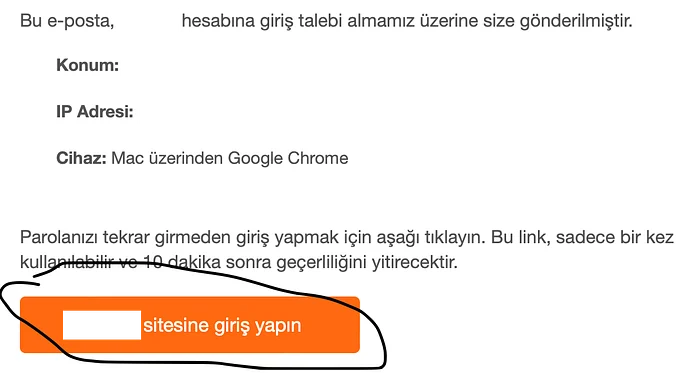
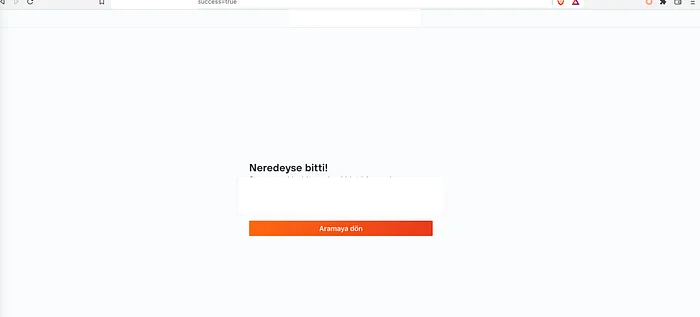
The author clicked the link and signed in successfully. The question was whether the link was really dead afterwards. Copying the link and opening it in a private tab produced an error page offering to send a new link.
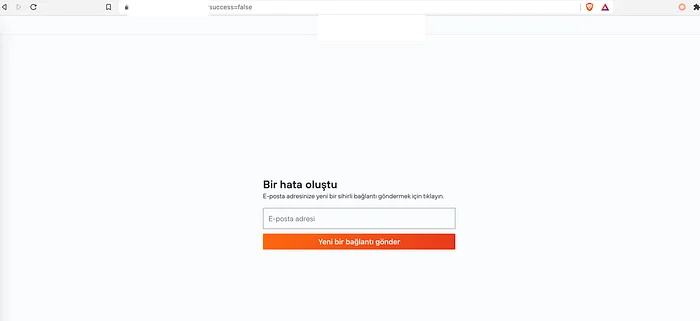
Looking at the URL of that error page, the author noticed a parameter success=false. The next step was to change it to true.

Credit card checker
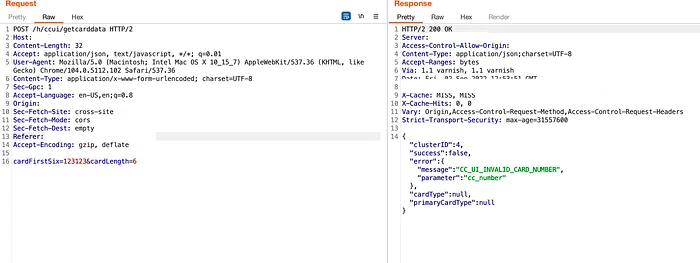
The site had a credit card checker so that customers could not enter random numbers as a card number. The check looked at the card length and the first six digits.
Notification signup
A button on the site asked whether the user wanted a notification when there was cheap travel. Clicking it prompted for an e-mail address.
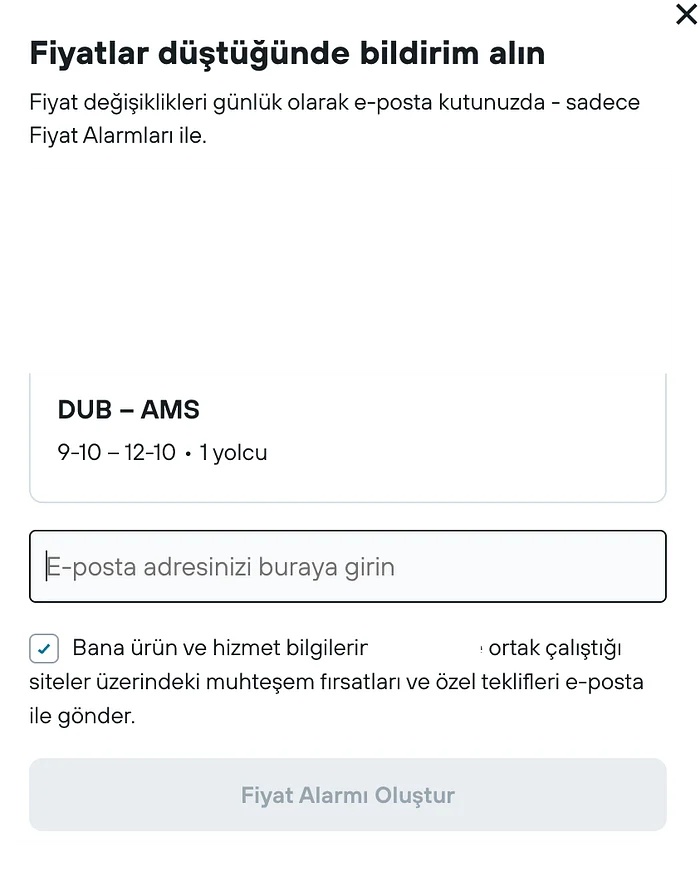
Exploitation
Step 1: reuse the sign-in link
- Request a sign-in link by entering an e-mail address on the login page.
- Open the link and sign in. The link is now supposed to be spent.
- Open the same link again in a private tab. The page reports an error and the URL contains
success=false. - Change the parameter to
success=trueand load the page again.
The result was a valid session from a link that had already been used. The same sign-in link could therefore be used forever to log in.
Step 2: bypass the credit card checker
- Use
454545as the first six digits of a VISA card. - Intercept the request in Burp Proxy and change the card length.
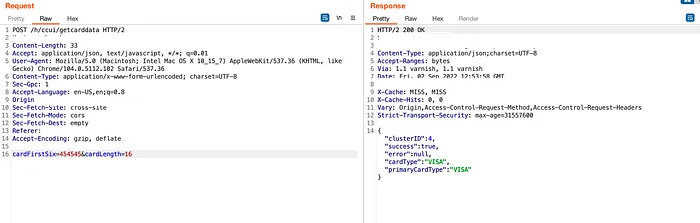
The modified request was accepted and 454545 was treated as a card. The check on length and on the first six digits did not hold once the request was edited.
Step 3: e-mail bombing through the notification feature
- Click the cheap travel notification button and submit an e-mail address.
- The site sends an apply mail to confirm that the address belongs to the user and that they really want notifications.
- Without applying, notifications start arriving anyway.
- Reviewing the request showed no rate limit when different e-mail addresses are entered.
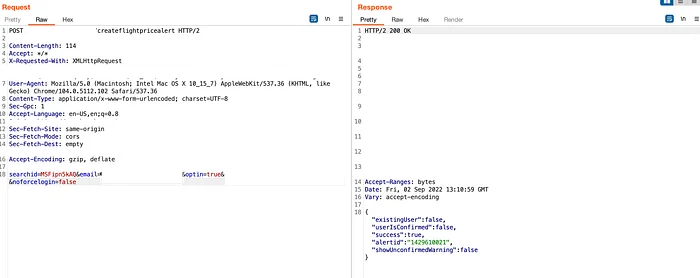
With a database of e-mail addresses, an attacker can send notifications from the site to all of them without their approval. The apply mail is sent first, but the cheap travel mails follow even when the application step is never completed.

Root cause
The error page carries success=false, and flipping it to true produced a session from a link that had already been used. The error page carries success=false, and flipping it to true is enough to get a session, so the one-time and 10-minute properties are not enforced on the server.
The check looked at card length and the first six digits, and editing the request in Burp Proxy changed the length that was accepted. Editing the request in Burp Proxy changes the length that reaches the server, and the check still passes.
There was no rate limit when different e-mail addresses were entered, and cheap travel mails arrived even though the apply mail was never confirmed.
Impact
A leaked or intercepted sign-in link stays valid indefinitely, so anyone holding it can log in as the user at any time, even after the intended single use and after the 10-minute window. The report does not describe how a link would be obtained.
The card checker bypass lets a random number pass as a card number. The author notes that bypassing some security functions of a company can still be closed as informative, which is what happened here.
The missing rate limit lets an attacker with a list of e-mail addresses send notifications from the site to all of them without consent, starting with an apply mail and continuing with cheap travel mails.
Fix
Based on the behaviour described, the sign-in link should be validated against server-side state that records whether the token has been used and when it expires, and the page should not take its outcome from a success parameter in the URL. The card check should not be bypassable by editing the request. The notification endpoint should rate limit requests per source and per address, and it should not send cheap travel mails until the confirmation step has been completed.
Variants to test
- Boolean parameters on result pages. Look for parameters such as
success,verified,validorerrorin URLs after a failed flow, and flip them. A positive result is a page that grants the same access as the successful flow. - Reuse of password reset and magic links. Complete a reset or sign-in, then replay the link and try editing any status parameter in the URL. A positive result is a second session from a spent link.
- Client-side validation of card or account numbers. Submit a value that passes the format check, then change the length or digits in an intercepting proxy. A positive result is acceptance of a value the front end would have rejected.
- Confirmation steps that are not enforced. Sign up for notifications or newsletters and never confirm. A positive result is mail arriving before confirmation.
- Rate limits across different recipients. Send the same request with many different e-mail addresses. A positive result is no throttling and messages delivered to addresses that never opted in.
What happened, in plain words
A security researcher had some spare time while waiting for test accounts to be set up for a different job. To use the time, they picked a bug bounty program on HackerOne and started testing a travel and trip website. In one day they found three problems: a sign-in link that was supposed to work only once but could be reused forever, a credit card checker that could be fooled, and an e-mail notification feature that would send messages to any address without a limit.
One of the three was closed as a duplicate (someone else had already reported it) and two were accepted as informative. Informative means the company acknowledged the report but decided it was not serious enough to pay a bounty for. The researcher published the write-up anyway because the bugs were unusual and might help other people spot similar ones.
This article walks through each finding slowly, explaining the ideas from scratch. You only need to know how to use a browser and a computer to follow along.
Background ideas you will need
Before the three bugs, a few words that come up constantly.
- Bug bounty program: a company invites outside people to test its systems and promises a reward (a bounty) for real problems. HackerOne is a website where many such programs are listed.
- Pentest: a penetration test, a planned security assessment of a system, usually done with permission.
- Request: when your browser wants a page or wants to send data, it sends a message to the website's server. That message is a request. The server answers with a response.
- Parameter: a small named value carried in a URL or in a request, like a label on a form field. In a URL it usually appears after a
?asname=value. - Session: the state of being logged in. After you sign in, the site gives your browser a small piece of data (often a cookie) so it can recognise you on the next request. Think of it as a wristband at an event: show it and you get back in without queueing at the entrance again.
- Token / sign-in link: a long, hard-to-guess string in a link that acts as proof that you control an e-mail address. Clicking it logs you in without a password. It is like a single-use key posted to you.
- Burp Proxy: a tool that sits between your browser and the website. It lets you pause a request, look at it, change it, and then send it on. Imagine intercepting a letter at the post office, editing a line, and resealing it.
- Rate limit: a cap on how many times something can be done in a period, for example "only 5 e-mails per minute". It is the digital equivalent of a bouncer letting only a few people in at a time.
- E-mail bombing: sending large numbers of e-mails to people, usually without their consent, often to annoy, overload or phish them.
Setting the scene
The report does not name the program or the website. The only tool mentioned is Burp Proxy, used to change a request. No accounts, roles or software versions are described beyond the researcher using their own e-mail address for the sign-in and notification flows.

Finding 1: the sign-in link that never dies
What the feature does
The login page offered an option to sign in with an e-mail address instead of a password. You type your address, the site sends you a message containing a link, and clicking that link signs you in. This is often called a magic link.
When the researcher entered their address, the e-mail arrived with a sign-in link. The message said the link could be used only once and would expire after 10 minutes.
They clicked the link and were signed in successfully. The natural next question: is the link really dead now? To check, they copied the link and opened it in a private tab. A private tab is a fresh browser window that does not share cookies or sessions with your normal window, so it is a clean way to test whether a link works without your existing login getting in the way.
The private tab showed an error page offering to send a new link. So far, so good: the link appeared to be spent. But the researcher looked at the URL of that error page and noticed a parameter called success=false.
Why that parameter matters
A URL parameter is just a value in the address bar. If the page decides what to show based on a value the visitor can edit, then the visitor controls the outcome. The researcher asked the obvious question: what happens if we change false to true?
The exploitation steps
- Request a sign-in link by entering an e-mail address on the login page.
- Open the link and sign in. The link is now supposed to be spent.
- Open the same link again in a private tab. The page reports an error and the URL contains
success=false. - Change the parameter to
success=trueand load the page again.
The result was a valid session from a link that had already been used. In other words, the same sign-in link could be used forever to log in. Changing the parameter to true produced a session from a link that had already been used, so the one-time and 10-minute promises did not hold.
Why this is a problem
If a sign-in link leaks, for example because it was forwarded, saved in a shared inbox, or captured somewhere, it normally becomes useless after one use or after 10 minutes. Here it stays valid indefinitely, so anyone holding it can log in as that user at any time. The report does not describe how a link would be obtained.
Finding 2: fooling the credit card checker
What the feature does
The site had a credit card checker so that customers could not enter random numbers as a card number. The check looked at two things: the length of the number and its first six digits.
Card numbers have a structure. The first digits identify the card network (for example, numbers starting with certain digits belong to VISA), and the total length is fixed per network. A checker that only looks at length and the first six digits is like a bouncer who only checks that you are wearing a suit and that your shoes are shiny: easy to satisfy without being who you claim.
The exploitation steps
- Use
454545as the first six digits of a VISA card. - Intercept the request in Burp Proxy and change the card length.
The modified request was accepted and 454545 was treated as a card. The check on length and on the first six digits did not hold once the request was edited.
Why this is a problem
Editing the request in Burp Proxy changed the card length, and the modified request was accepted. Burp Proxy lets you pause the request your browser sends and edit it before it reaches the server, so any rule that only exists in the browser, or that trusts a value the browser supplies, can be bypassed. The researcher notes that bypassing some security functions of a company can still be closed as informative, which is what happened here.
Finding 3: e-mail bombing through the notification feature
What the feature does
There was a button on the website asking, in effect, "do you want a notification if there is cheap travel?". Clicking it prompted for an e-mail address.
What went wrong
- Click the cheap travel notification button and submit an e-mail address.
- The site sends an apply mail to confirm that the address belongs to the user and that they really want notifications.
- Without applying, notifications start arriving anyway.
- Reviewing the request showed no rate limit when different e-mail addresses are entered.
A confirmation e-mail (often called a double opt-in) exists so that nobody can sign up someone else's address without permission. Here the confirmation step was not actually required: the cheap travel mails went out even when the application step was never completed. On top of that, there was no cap on how many different addresses could be submitted.
With a database of e-mail addresses, an attacker can send notifications from the site to all of them without their approval. The apply mail is sent first, but the cheap travel mails follow even when the application step is never completed.
Why these bugs happened
Looking at the behaviour described, three root causes stand out.
- The sign-in flow trusts the URL. The error page carries
success=false, and flipping it totrueis enough to get a session. Flippingsuccess=falsetotrueproduced a session from a link that had already been used. - **The card checker looked at length and the first six digits, and editing the request in Burp Proxy changed the length that was accepted. Editing the request in Burp Proxy changes the length that reaches the server, and the check still passes.
- **There was no rate limit when different e-mail addresses were entered, and cheap travel mails arrived even though the apply mail was never confirmed.
What the impact is
- A leaked or intercepted sign-in link stays valid indefinitely, so anyone holding it can log in as the user at any time, even after the intended single use and after the 10-minute window.
- The card checker bypass lets a random number pass as a card number.
- The missing rate limit lets an attacker with a list of e-mail addresses send notifications from the site to all of them without consent, starting with an apply mail and continuing with cheap travel mails.
How it should be fixed
Based on the behaviour described, the fixes would be:
- Validate the sign-in link against server-side state that records whether the token has been used and when it expires, and do not take the page's outcome from a
successparameter in the URL. - Make the card check resistant to editing the request in a proxy.
- Rate limit the notification endpoint per source and per address, and do not send cheap travel mails until the confirmation step has been completed.
Similar things to try on other sites
- Boolean parameters on result pages. Look for parameters such as
success,verified,validorerrorin URLs after a failed flow, and flip them. A positive result is a page that grants the same access as the successful flow. - Reuse of password reset and magic links. Complete a reset or sign-in, then replay the link and try editing any status parameter in the URL. A positive result is a second session from a spent link.
- Client-side validation of card or account numbers. Submit a value that passes the format check, then change the length or digits in an intercepting proxy. A positive result is acceptance of a value the front end would have rejected.
- Confirmation steps that are not enforced. Sign up for notifications or newsletters and never confirm. A positive result is mail arriving before confirmation.
- Rate limits across different recipients. Send the same request with many different e-mail addresses. A positive result is no throttling and messages delivered to addresses that never opted in.
Glossary
- Bug bounty program: a company's offer to reward outsiders for reporting security problems in its systems.
- Pentest: a planned security assessment of a system, usually done with permission.
- Request: the message your browser sends to a website's server asking for a page or sending data.
- Response: the server's answer to a request.
- Parameter: a named value carried in a URL or request, written as
name=value. - Session: the state of being logged in, usually kept alive by a cookie or token your browser holds.
- Cookie: a small piece of data a website stores in your browser so it can recognise you on later requests.
- Token: a long, hard-to-guess string used as proof of something, such as control of an e-mail address.
- Magic link / sign-in link: a link sent by e-mail that logs you in without a password.
- One-time link: a link intended to work only once, then become useless.
- Private tab: a browser window that does not share cookies or sessions with your normal windows.
- Burp Proxy: a tool that sits between your browser and a website so you can inspect and edit requests.
- Intercept: to pause a request in a proxy before it reaches the server.
- Rate limit: a cap on how many times an action can be performed in a period.
- E-mail bombing: sending large numbers of e-mails, usually without consent.
- Double opt-in: a signup flow where the address owner must confirm before messages are sent.
- Apply mail / confirmation mail: the message asking the address owner to confirm they want the service.
- Client-side validation: checks performed in the browser, which the user can bypass.
- Server-side validation: checks performed on the server, which the user cannot directly edit.
- Boolean parameter: a parameter whose value is
trueorfalse. - Duplicate: a report for a bug someone else already reported.
- Informative: a report the company acknowledges but does not treat as a payable vulnerability.
- Bounty: the reward paid for a valid bug report.
- HackerOne: a platform that lists bug bounty programs and handles reports.






