How i found a 1500$ worth Deserialization vulnerability
The JSF ViewState hidden field contained an unencrypted, base64-encoded serialized Java object, and a JMX console was exposed and vulnerable. An attacker could exploit these to achieve remote code execution and obtain a reverse shell.
 Published on medium.com
This was about 7:00 PM and last day of my broadband service expiry date, so i thought why not hunt for vulnerabilities and eat every bit of the remaining data.
The full write-up lives on its author's site
It belongs to its author, so we link to it rather than copy it. The other two tabs are our own rewrites, checked against it.
Context
The target is a private bug bounty program, referred to throughout as "Redacted.com". The researcher describes it as less tested, with a scope that contained only one in-scope asset; the other asset redirected to the main domain. The in-scope asset presented a login page, described as simple and classy in appearance. Registration existed but required the backend team to review and approve the account, so the researcher did not obtain an authenticated account and worked against the login functionality instead.
The feature at the centre of the finding is the Java Server Faces (JSF) ViewState. JSF uses ViewStates, in addition to sessions, to store the current state of the view, for example which parts of the view should currently be displayed. The ViewState can be stored on the server or on the client. JSF ViewStates are typically embedded automatically into HTML forms as a hidden field named javax.faces.ViewState, and are sent back to the server when the form is submitted.
With server-side ViewState, the hidden javax.faces.ViewState field contains an id that helps the server retrieve the correct state; in the case of MyFaces that id is a serialised Java object. With client-side ViewState, the hidden field contains a serialised Java object that is at least Base64 encoded. That is the configuration that turns the field into an attack surface, and it is why JSF ViewStates are nowadays encrypted and signed before being sent to the client.
Setup
The researcher was working from a Bugcrowd account and picked the program from the Bugcrowd listings. The tools involved were:
- Wappalyzer, used as a browser add-on to fingerprint the login page.
- Burp Suite, used to intercept and inspect the login request.
- Jexboss, the JBoss exploitation tool, run during exploitation.
- A VPS, used to set up a listener for the reverse shell.
No account was available on the target: registration required backend review and approval. The precondition for the finding is a JSF application whose ViewState value is serialised Java that is not encrypted.
Finding it
Fingerprinting the login page with Wappalyzer showed only one piece of technology: a JavaScript framework, Prototype 1.6.1.
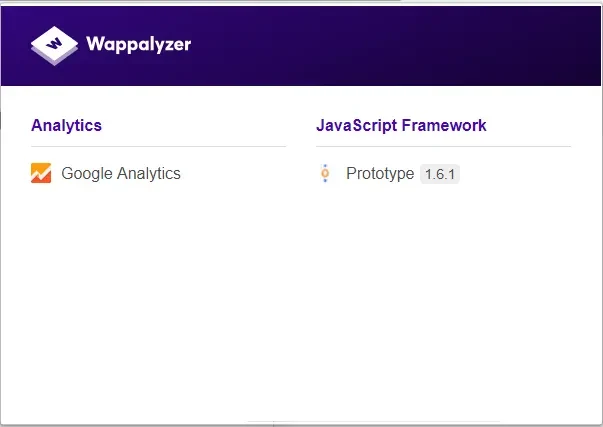
That version reminded the researcher of JBoss, an association that was initially ignored.
Intercepting the login request with Burp Suite showed the ViewState hidden field in the request body:
<input type=”hidden” name=”javax.faces.ViewState” id=” javax.faces.ViewState”" value=”[redacted]…………..<snipt>” autocomplete=”off” />
The value begins with rO0, which is the Base64 encoding of the Java serialisation magic bytes. The researcher lists the patterns in captured traffic that suggest data was sent in Java serialisation streams:
AC ED 00 05in HexrO0in Base64- Content-type =
application/x-java-serialized-object
A second deserialisation-relevant value was also found, this one encoded in gzip over Base64, starting with:
H4sIAAAAAAAAAJ
Together these cleared the researcher's doubt: the site was using Java Server Faces (JSF).

The next step was testing the hidden value. It was Base64 encoded, and decoding it revealed serialised Java values that were not even encrypted.
Exploitation
Step 1: Decode the ViewState
The hidden javax.faces.ViewState value was Base64 decoded, which produced serialised Java content in plain form. The value was unprotected serialised Java content, which the researcher treated as a deserialisation issue. That is the misconfiguration: the ViewState is neither encrypted nor signed, so nothing prevents a client from substituting its own serialised payload.
Step 2: Run Jexboss
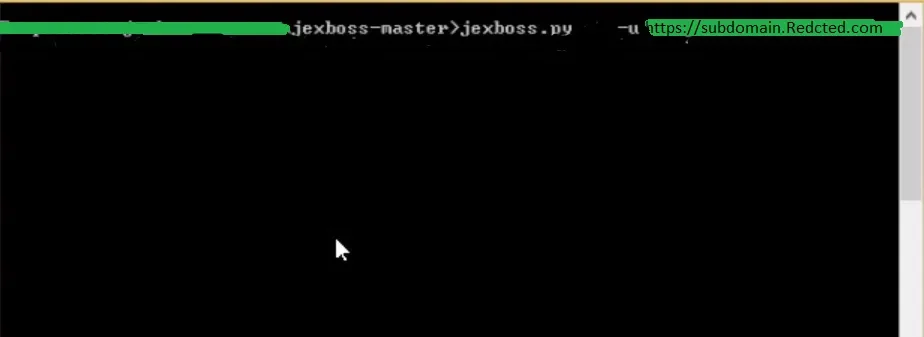
With the JBoss association in mind, the researcher ran the Jexboss tool against the target.
Step 3: Use the exposed JMX console
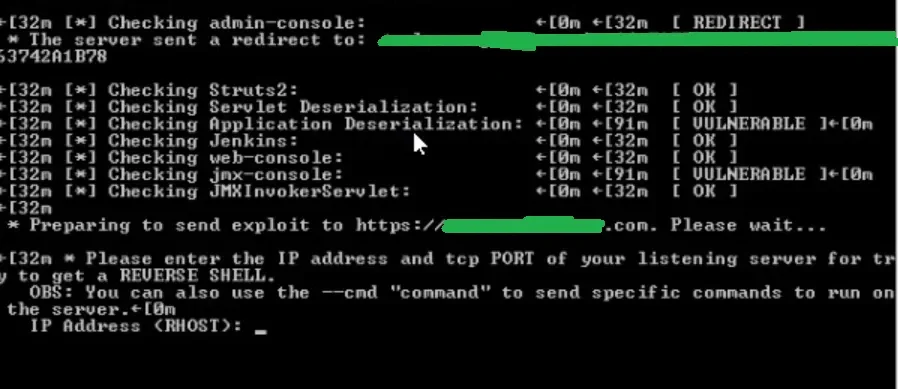
Jexboss found a JMX console that was exposed and vulnerable as well. The researcher used a VPS, set up a listener, set the remote host and port, and obtained a shell.

Root cause
The mistake is a misconfigured JSF ViewState. The application sent a ViewState value that decoded to serialised Java content that was not encrypted. The report's own explanation of the technology states that this is why JSF ViewStates are nowadays encrypted and signed before being sent to the client: an unprotected client-side ViewState is a serialised object under the attacker's control, and deserializing attacker-controlled Java objects is a route to remote code execution.
A second, separate weakness contributed to the outcome: a JMX console was exposed and vulnerable. The report does not describe how the two weaknesses relate, so the exact chain from the ViewState to the shell is not documented here.
Impact
The researcher obtained a shell on the target after running Jexboss. The researcher obtained a reverse shell through the exposed and vulnerable JMX console after running Jexboss, and the report frames the underlying issue as a deserialisation vulnerability in a misconfigured JSF ViewState. The report does not enumerate what was accessible from the shell, nor how many systems or users were affected.
Fix
The report does not state what the program changed. The direction implied by its own explanation is to stop sending unprotected serialised state to the client: configure the JSF ViewState so that it is encrypted and signed before being sent to the client, or keep the state on the server. Separately, the exposed JMX console should not be reachable, and if it must be, it should not be left in a vulnerable configuration.
Variants to test
- Look for
javax.faces.ViewStatein login and other JSF form submissions. A positive result is a hidden field whose value starts withrO0in Base64, orAC ED 00 05in Hex, or a request with Content-typeapplication/x-java-serialized-object. - Decode the ViewState value. A positive result is readable serialised Java content rather than ciphertext, showing the state is neither encrypted nor signed.
- Look for gzip-over-Base64 values in the same traffic, recognisable by the
H4sIAAAAAAAAprefix. A positive result is another serialised object the client can modify. - Fingerprint the stack for JBoss-related components, for example old Prototype versions on the page, and check for an exposed JMX console. A positive result is a reachable, vulnerable JMX console.
- Run Jexboss against in-scope JBoss-like targets. A positive result is the tool identifying an exploitable deployment, which can then be confirmed with a listener on a VPS and a remote host and port setting.
Reference
The report cites Peter Stöckli's article "Misconfigured JSF ViewStates can lead to severe RCE vulnerabilities" (14 Aug 2017) and the Jexboss repository at https://github.com/joaomatosf/jexboss.
What happened, in plain words
A security researcher spent an evening hunting for bugs on a private bug bounty program, which he calls "Redacted.com" because the program's real name cannot be published. He found that the site's login page was built with a technology called Java Server Faces (JSF), and that a hidden field in the login form carried serialised Java data that was not encrypted. That data was not encrypted. Using a tool called Jexboss, he also found an exposed management console (a JMX console) on the same target, set up a listener on his own server, and got a shell, meaning he could run commands on the target machine. He reported it, the report was triaged, and he was paid 1,500 US dollars and 40 points on the same day, within an hour.
This article walks through the same story from zero. You only need to know how to use a browser and a computer. Every technical word is explained the first time it appears, and there is a glossary at the end.
The setting: bug bounty programs
A bug bounty program is an arrangement where a company invites outside people to look for security weaknesses in its systems and pays them for reporting what they find, instead of punishing them. Reports go through a platform that hosts many such programs. The researcher logged into his Bugcrowd account and browsed the listings.

Thinking meme…
He was on the last day of his broadband service before it expired, so he decided to use the remaining data to hunt. Among the programs he saw one that was private (its name cannot be published, hence "Redacted.com") and described as less tested, which makes it more likely that something is still there to find.
Scope: what you are allowed to touch
Every program defines a scope: the list of systems you are permitted to test. Anything outside it is off limits, and testing it can get you removed from the program. This program's scope had only one asset. The other asset listed simply redirected to the main domain, so it offered nothing new to test.
The in-scope asset had a login page, which the researcher describes as simple and classy in appearance. Registration existed, but a new account had to be reviewed and approved by the backend team. That meant he could not get a logged-in account, so he worked against the login page itself, which anyone can reach without an account. This matters: the whole finding happens before login.
The technology behind the page: JSF and the ViewState
The feature at the centre of the finding is the Java Server Faces (JSF) ViewState. Two ideas need unpacking first.
Java is a programming language. Programs written in it run on a Java runtime, and objects created by a Java program can be written out as a stream of bytes and read back later. That writing-out is called serialisation, and reading back is deserialisation. Think of it as freezing a meal and reheating it later: the shape is preserved, and whoever reheats it gets whatever was frozen.
JSF is a framework for building web pages in Java. A framework is a set of ready-made building blocks a developer uses instead of writing everything from scratch.
JSF uses ViewStates, in addition to sessions, to store the current state of the view, for example which parts of the view should currently be displayed. A session is the server's memory of who you are across several page loads; a ViewState is the server's memory of what a particular page looked like when it was sent to you, so that when you submit the form it knows what you were looking at.
The ViewState can be stored on the server or on the client:
- Server-side ViewState: the hidden
javax.faces.ViewStatefield contains an id that helps the server retrieve the correct state. In the case of MyFaces (one implementation of JSF), that id is a serialised Java object. - Client-side ViewState: the hidden field contains a serialised Java object that is at least Base64 encoded.
Base64 is a way of writing arbitrary bytes using only ordinary text characters, so binary data can travel inside an HTML form. It is not encryption: anyone can decode it back to the original bytes with a single command or an online tool.
Client-side ViewState is the configuration that turns the field into an attack surface, meaning a place an attacker can push data into. It is also why JSF ViewStates are nowadays encrypted and signed before being sent to the client. Encrypting means scrambling the content so only the server can read it; signing means attaching a proof that the server itself produced the content, so a modified copy is rejected.
Setup: the tools
The researcher worked from a Bugcrowd account and picked the program from the Bugcrowd listings. The tools involved were:
- Wappalyzer, a browser add-on that fingerprints a website: it looks at the page and guesses which technologies (frameworks, servers, libraries) are behind it, like reading the ingredients list on a packet.
- Burp Suite, a tool that sits between your browser and the website and lets you see and edit every request and response. A request is the message your browser sends to a server ("give me this page", "here is my login"); a response is what the server sends back.
- Jexboss, a tool for finding and exploiting weaknesses in JBoss, a Java application server (a program that runs Java web applications).
- A VPS, a virtual private server: a computer you rent on the internet that you control, used here to listen for the incoming connection from the target.
No account was available on the target, because registration required backend review and approval. The precondition for the finding is simply that the login form is served by a JSF application whose ViewState is stored client-side and is neither encrypted nor signed.
Finding it
Step 1: Fingerprint the login page
Fingerprinting the login page with Wappalyzer showed only one piece of technology: a JavaScript framework, Prototype 1.6.1.
Prototype 1.6.1
JavaScript is the language browsers run to make pages interactive, and a JavaScript framework is a library of ready-made code for that. Prototype is one such library, and 1.6.1 is a version number. That version reminded the researcher of JBoss, an association that was initially ignored. Why would an old JavaScript library point at a Java server? Because old pages and old servers often travel together: a site built years ago with one set of tools tends to carry other old components too. It was a hunch, not proof, and he set it aside for the moment.
Step 2: Intercept the login request
Intercepting the login request with Burp Suite showed the ViewState hidden field in the request body:
<input type=”hidden” name=”javax.faces.ViewState” id=” javax.faces.ViewState”" value=”[redacted]…………..<snipt>” autocomplete=”off" />
Line by line, in plain words:
<inputstarts an HTML form field, the same kind of element as a text box or a button.type=”hidden”means the field is not shown on the page. It exists only in the page's code and in what the browser sends back.name=”javax.faces.ViewState”is the field's name. The server looks for this exact name to find the ViewState.javax.facesis the Java package name JSF uses, so seeing it is itself a clue about the technology.id=” javax.faces.ViewState”"is the field's identifier inside the page, used by scripts. The odd quoting is as it appears in the captured request.value=”rO0ABXVy...<snipt>”is the actual content. The<snipt>marks where the researcher cut the long value short for the write-up.autocomplete=”off”tells the browser not to remember or suggest values for this field.
The value begins with rO0, which is the Base64 encoding of the Java serialisation magic bytes. Magic bytes are a fixed sequence at the start of a file or stream that identifies its format, like the first letters of a document telling you it is a PDF. In Java's case the raw bytes are AC ED 00 05, and when those bytes are written in Base64 they begin with rO0. So the first three characters of that value are effectively a label saying "this is a serialised Java object".
The researcher lists the patterns in captured traffic that suggest data was sent in Java serialisation streams:
AC ED 00 05in HexrO0in Base64- Content-type =
application/x-java-serialized-object
Hex and Base64 are two different ways of writing raw bytes as text; the first pattern is the raw signature, the second is the same signature after Base64 encoding, and the third is the label a server can put on a response to say "the body is a serialised Java object".
A second deserialisation-relevant value was also found, this one encoded in gzip over Base64, starting with:
H4sIAAAAAAAAAJ
Gzip is a compression format, the same idea as zipping a file to make it smaller. Base64 over gzip means the compressed bytes were then written as text. The H4sIAAAAAAAA prefix is the signature of a gzip stream written in Base64, so seeing it tells you a compressed object is travelling in the page. Line by line there is only one line here: the opening characters of that value, enough to recognise the format.
Together these cleared the researcher's doubt: the site was using Java Server Faces (JSF).
Hmm (Deep Thinking)
Step 3: Decode the hidden value
The next step was testing the hidden value. It was Base64 encoded, and decoding it revealed serialised Java values that were not even encrypted. Decoding Base64 is not breaking anything; it is the reverse of a public, reversible encoding, like unfolding a letter that was folded, not sealed. What he saw after decoding was readable serialised Java content rather than scrambled ciphertext. That told him the client, meaning his browser, holds a real Java object that the server will deserialise when the form is submitted. If the object is neither encrypted nor signed, nothing stops a client from substituting its own serialised payload. A payload here means the content you choose to send instead of the original.
This is the misconfiguration: the ViewState value was serialised Java that was not encrypted.
Exploitation
Step 1: Decode the ViewState
The hidden javax.faces.ViewState value was Base64 decoded, which produced serialised Java content in plain form. Because the value is client-side and unprotected, the client controls a serialised Java object that the server will deserialise when the form is submitted. That is the misconfiguration: the ViewState is neither encrypted nor signed, so nothing prevents a client from substituting its own serialised payload.
Why does this matter so much? Deserializing attacker-controlled Java objects is a known route to remote code execution (RCE), meaning running your own commands on someone else's machine. When Java rebuilds an object from bytes, it can be made to run code as part of the rebuilding. Handing that power to whoever fills in a form is like letting a stranger write the instructions for reassembling a machine you will then switch on.
Step 2: Run Jexboss
With the JBoss association in mind, the researcher ran the Jexboss tool against the target.
Jexboss
reverse shell :)
Jexboss automates the search for known JBoss weaknesses, so running it is a way to check the hunch from the Prototype version against the actual server. The screenshots show the tool at work and the reverse shell it led to.
Step 3: Use the exposed JMX console
Jexboss found a JMX console that was exposed and vulnerable as well. JMX is Java's built-in management interface: a way to inspect and control a running Java application from outside. A JMX console is the web page that exposes that interface. Exposed means it was reachable from the internet, and vulnerable means it did not properly restrict what a visitor could do through it. Think of it as a service hatch on a building that was left unlocked and also had its controls miswired.
The researcher used a VPS, set up a listener, set the remote host and port, and obtained a shell. A listener is a program waiting for an incoming connection; the remote host and port are the address and door number the target should connect back to. A shell is a command line on the target machine, so once it connects back, the researcher can type commands there. This kind of connection, where the target connects out to you, is called a reverse shell.
Heck Yes!
The result
He reported it, and after a few days it was triaged, meaning the program confirmed the report was valid, and rewarded 1,500 US dollars and 40 points on the same day, within an hour.
Root cause
The mistake is a misconfigured JSF ViewState. The application sent a ViewState value that decoded to serialised Java content that was not encrypted. The report's own explanation of the technology states that this is why JSF ViewStates are nowadays encrypted and signed before being sent to the client: an unprotected client-side ViewState is a serialised object under the attacker's control, and deserializing attacker-controlled Java objects is a route to remote code execution.
A second, separate weakness contributed to the outcome: a JMX console was exposed and vulnerable. The report does not describe how the two weaknesses relate, so the exact chain from the ViewState to the shell is not documented here.
Impact
The researcher obtained a shell on the target after running Jexboss. Unauthenticated means without any account or login, which is exactly the situation here because registration needed approval. The researcher obtained a reverse shell through the exposed and vulnerable JMX console after running Jexboss, and the report frames the underlying issue as a deserialisation vulnerability in a misconfigured JSF ViewState. The report does not enumerate what was accessible from the shell, nor how many systems or users were affected.
Fix
The report does not state what the program changed. The direction implied by its own explanation is to stop sending unprotected serialised state to the client: configure the JSF ViewState so that it is encrypted and signed before being sent to the client, or keep the state on the server. Separately, the exposed JMX console should not be reachable, and if it must be, it should not be left in a vulnerable configuration.
Variants to test
If you want to look for the same kind of thing on a program you are allowed to test, these are the checks in order:
- Look for
javax.faces.ViewStatein login and other JSF form submissions. A positive result is a hidden field whose value starts withrO0in Base64, orAC ED 00 05in Hex, or a request with Content-typeapplication/x-java-serialized-object. - Decode the ViewState value. A positive result is readable serialised Java content rather than ciphertext, showing the state is neither encrypted nor signed.
- Look for gzip-over-Base64 values in the same traffic, recognisable by the
H4sIAAAAAAAAprefix. A positive result is another serialised object the client can modify. - Fingerprint the stack for JBoss-related components, for example old Prototype versions on the page, and check for an exposed JMX console. A positive result is a reachable, vulnerable JMX console.
- Run Jexboss against in-scope JBoss-like targets. A positive result is the tool identifying an exploitable deployment, which can then be confirmed with a listener on a VPS and a remote host and port setting.
Reference
The report cites Peter Stöckli's article "Misconfigured JSF ViewStates can lead to severe RCE vulnerabilities" (14 Aug 2017) and the Jexboss repository at https://github.com/joaomatosf/jexboss.
Glossary
- Base64: a way of writing raw bytes using only ordinary text characters, so binary data can travel inside text such as an HTML form. It is reversible by anyone and is not encryption.
- Bug bounty program: an arrangement where a company invites outside people to find and report security weaknesses in its systems in exchange for payment.
- Burp Suite: a tool that sits between your browser and a website so you can see and edit every request and response.
- Ciphertext: data that has been scrambled by encryption so it cannot be read without the key.
- Client: the program on your side, usually your browser, as opposed to the server.
- Content-type: a label on a request or response saying what kind of data the body contains.
- Deserialisation: turning a stream of bytes back into a live object in a program. If the bytes come from an attacker, this can run attacker code.
- Encryption: scrambling data so only someone with the right key can read it.
- Fingerprinting: working out which technologies a website uses by looking at its pages and responses.
- Framework: a set of ready-made building blocks a developer uses instead of writing everything from scratch.
- Gzip: a compression format, the same idea as zipping a file to make it smaller.
- Hex: a way of writing raw bytes using the characters 0 to 9 and A to F.
- Hidden field: a form field that is not shown on the page but is still sent to the server when the form is submitted.
- HTML form: the part of a page with fields you fill in and a button that sends them to the server.
- Java: a programming language whose programs run on a Java runtime and can write objects out as bytes and read them back.
- Java Server Faces (JSF): a framework for building web pages in Java.
- JavaScript: the language browsers run to make pages interactive.
- JBoss: a Java application server, a program that runs Java web applications.
- Jexboss: a tool for finding and exploiting weaknesses in JBoss.
- JMX: Java's built-in management interface, a way to inspect and control a running Java application from outside.
- JMX console: the web page that exposes the JMX interface.
- Listener: a program waiting for an incoming connection.
- Magic bytes: a fixed sequence at the start of a file or stream that identifies its format.
- Misconfiguration: a setting left in an unsafe state, as opposed to a flaw in the code itself.
- MyFaces: one implementation of JSF.
- Payload: the content you choose to send instead of the original.
- Port: the door number in an address that identifies which service on a machine you are connecting to.
- Prototype: a JavaScript library, here seen at version 1.6.1.
- Remote code execution (RCE): running your own commands on someone else's machine.
- Request: the message your browser sends to a server.
- Response: what the server sends back.
- Reverse shell: a shell where the target machine connects out to you, rather than you connecting in.
- Scope: the list of systems a program permits you to test.
- Serialisation: writing a live object out as a stream of bytes so it can be stored or sent.
- Server: the computer that holds the website and answers requests.
- Session: the server's memory of who you are across several page loads.
- Shell: a command line on a machine, where you can type commands.
- Signing: attaching a proof that content came from a trusted party, so a modified copy is rejected.
- Triaged: reviewed and confirmed as valid by the program.
- Unauthenticated: without any account or login.
- ViewState: JSF's record of what a page looked like when it was sent to you, so the server knows what you were looking at when you submit the form.
- VPS: a virtual private server, a computer you rent on the internet that you control.
- Wappalyzer: a browser add-on that fingerprints a website's technologies.




