How I found an internal compliance document in client-side code
An internal compliance document was hardcoded as a Markdown string inside a client-side JavaScript file used by the admin dashboard. Anyone could read the JavaScript file directly and extract the document without authenticating or having dashboard access.

medium.com
Published on medium.com
Bug Bounty
The full write-up lives on its author's site
It belongs to its author, so we link to it rather than copy it. The other two tabs are our own rewrites, checked against it.
Context
Lynko is a UK based provider of premium NFC smart business cards that share a digital profile, contact details, social links and booking tools with a single tap on an iPhone or Android device. The vulnerability described here was found in getlynko.com under the company's VDP programme and has since been resolved.
The issue is a case of information disclosure and broken access control, mapped by the author to OWASP Top 10 A01:2025 (Broken Access Control), CWE-200 (Exposure of Sensitive Information to an Unauthorized Actor) and CWE-540 (Inclusion of Sensitive Information in Source Code).
The affected feature is the admin area behind /lynko/admin, which includes a front-end function that lets a user download an internal compliance document. The document was not fetched from the server on demand: it was embedded in a client-side JavaScript file.
Setup
The write-up describes a reconnaissance-first approach rather than a prepared lab. No accounts, roles, tools or versions are named. The report names no accounts, roles, tools or versions. The stated time budget was a six hour pentest, and the finding came within the first fifteen minutes of recon.
Finding it
The researcher began with robots.txt to see what the site was trying to hide from crawlers. It listed a number of endpoints, including /api, /admin and others. Narrowing to the admin paths left two: /admin and /lynko/admin. The second stood out and was chosen for further digging.
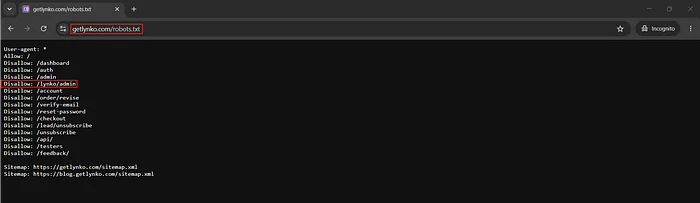
robots.txt, showing the endpoints the site tried to keep away from crawlers.
Visiting /lynko/admin redirected to the /auth endpoint. Instead of touching the login form, the researcher stayed on the recon schedule and opened Developer Tools to review source files, looking for JavaScript that might expose API endpoints or internal logic.
The assets directory held plenty of minified JS files. Rather than read all of them, the researcher filtered to files with interesting names, specifically those containing the word admin. One file starting with lynko.admin stood out. Reading it gave a picture of what sat behind the login portal at /lynko/admin, and then something less expected: what first looked like a developer comment was in fact an entire internal compliance document, hardcoded as a Markdown string directly inside a variable.
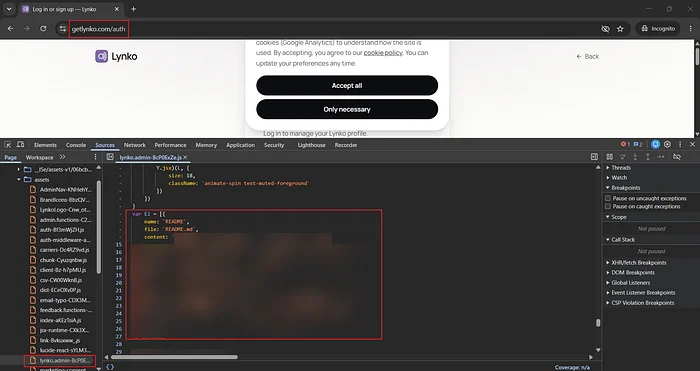
A JS file containing the internal compliance document hardcoded as a Markdown string.
The variable was referenced by a front-end function designed to let users download the compliance document on click. The correct design would fetch the document from the server only after the user had been authenticated and authorised. This function did neither. Anyone with access to the admin dashboard could download it, and, as the researcher had just established, dashboard access was not even required: anyone could read the JS file directly and extract the document from source.
Exploitation
Step 1: Enumerate hidden paths in robots.txt
Request robots.txt and read the disallowed entries. The file listed several endpoints, among them /api and /admin, plus a second admin path, /lynko/admin. The second path was the one worth following.
Step 2: Visit the admin path
Request /lynko/admin. The server responded with a redirect to /auth, the login endpoint. This is the expected behaviour for an unauthenticated visitor and does not, by itself, expose anything.
Step 3: Review the JavaScript served to the login page
Open Developer Tools and inspect the source files loaded by the page. Filter the minified bundles in the assets directory by name, keeping files that contain the word admin. A file whose name starts with lynko.admin is the interesting one.
Step 4: Read the bundle
Scroll through the file. Inside it, a variable holds an entire internal compliance document as a Markdown string. The surrounding code makes it look like a developer comment, which is why it is easy to skim past. The variable is referenced by a front-end function that downloads the document when a user clicks.
Step 5: Extract the document
No request beyond loading the JavaScript file is needed. The document is read straight out of the source, without authenticating and without ever reaching the admin dashboard.
Root cause
Two mistakes combine here.
- Sensitive content was hardcoded into a client-side file. The compliance document should live on the server and be served only to authorised users. Because it was embedded in a JavaScript file, anyone could read the file directly and extract the document from source.
- The download function performed no authentication or authorisation check. It neither verified that the user was logged in nor that the user was entitled to the document. The correct approach is to fetch the document from the server only after the user has been authenticated and authorised, and the function did neither.
The existing defences did not help. robots.txt kept crawlers away from the admin paths, but it is a crawler directive, not an access control, and it does not stop a person from requesting the paths or from reading the JavaScript the login page loads. The redirect from /lynko/admin to /auth did not prevent reading the JavaScript file. The report does not describe any further controls, such as bundle splitting or server-side gating of the admin assets.
Impact
An unauthenticated attacker could obtain the internal compliance document by reading a publicly served JavaScript file. No account, no dashboard access and no interaction with the login form were required. The report does not describe the contents of the document or the specific harm its disclosure would cause, so the practical severity beyond the exposure itself is not stated. The researcher characterises the issue as both information disclosure and broken access control: sensitive material intended strictly for internal users was reachable by anyone.
Fix
The vulnerability has been fixed since it was reported. The document now resides on the server as it should, and proper authorisation and access controls have been implemented so that only authorised internal users can access it.
Lessons learned
- Never hardcode sensitive information or documents into client-side source code. Decide deliberately what lives on the server and what is exposed to users.
- Scan code for sensitive information and hardcoded secrets before deployment. Security belongs in every stage of the SDLC, not bolted on at the end.
- Recon matters. The most interesting findings often appear before you touch the application itself.
Variants to test
- Admin bundles served to unauthenticated users. Request the admin path, follow the redirect to the login page, and list every script the login page loads. A positive result is an admin-named bundle that is retrievable without a session and contains endpoint names, internal logic or data.
- Documents embedded as strings. Search fetched bundles for Markdown, HTML or long string literals near download or export functions. A positive result is a document body, policy text or report template sitting in a variable rather than being fetched on demand.
- Download handlers without checks. Locate front-end functions that trigger downloads and trace the request they make, if any. A positive result is a handler that reads from a local variable, or calls an endpoint that returns the file without a valid session.
- robots.txt as a map. Read every disallowed entry and request each one directly. A positive result is a path that returns content, a redirect chain or an asset listing rather than a uniform denial.
- Name-filtered bundle review. On other targets, filter the assets directory by keywords such as admin, internal, compliance, export and report, then read only those files. A positive result is any of the sensitive patterns above appearing in a bundle reachable without authentication.
What happened, in plain words
Lynko is a UK company that sells smart business cards. The card has a small chip inside it (NFC, short for Near Field Communication, the same technology that lets a phone pay for a coffee by tapping it on a reader). When someone taps the card with an iPhone or Android phone, a digital profile opens: contact details, social links and booking tools. The company's website is getlynko.com.
The company runs a VDP programme. VDP stands for Vulnerability Disclosure Programme: a public promise that says "if you find a security problem in our systems, tell us here, and we will not be angry with you". It is different from a bug bounty, where a company pays money for findings. The report does not say whether any money changed hands here.
A security researcher (someone who looks for weaknesses in websites, either for a job or for fun) spent some time looking at the site. Within the first fifteen minutes of recon he found something he should not have been able to see, which led him to an internal compliance document. A compliance document is paperwork a company keeps about its own rules and obligations, for example how it handles data or what its policies are. It is meant for staff, not for the public.
The document was not behind a login. It was sitting inside a JavaScript file, which is a text file of instructions that a website sends to your browser so the page can do things. Anyone who opened that file could read the document. The researcher calls this two things at once:
- Information disclosure: private information was shown to people who were not supposed to see it.
- Broken access control: the website failed to check whether a visitor was allowed to see something before handing it over.
He maps it to OWASP Top 10 A01:2025 (Broken Access Control). OWASP is a non-profit organisation that publishes lists of the most common web security mistakes; the "Top 10" is its best-known list, and A01 is the first and most common category on the 2025 edition. He also maps it to two CWE numbers. CWE stands for Common Weakness Enumeration, a catalogue that gives every known kind of software weakness a number so people can talk about it precisely. CWE-200 means "Exposure of Sensitive Information to an Unauthorized Actor", and CWE-540 means "Inclusion of Sensitive Information in Source Code".
The affected feature is the admin area at /lynko/admin. "Admin" means administrator: the staff-only part of a site where employees manage things. That area has a button that lets a user download the compliance document. The button did not ask the server for the document when clicked. The document was already baked into the JavaScript file, so anyone could read the file directly and extract it.
The report says the problem has since been fixed.
The setup
There was no special lab, no test account and no tooling to install. The researcher simply browsed the website the way anyone with a browser can. The report does not name any accounts, roles, tools or software versions.
He mentions a personal time budget of six hours for a penetration test (a pentest: a planned session of trying to break into a system with permission). The finding arrived in the first fifteen minutes of what he calls recon. Recon, short for reconnaissance, is the looking-around phase: gathering information about a target before trying anything clever. Think of a burglar walking around a house first, noting which windows are open, before touching a door. The point of the story is that the open window was found during the walk-around.
Finding it
Step 1: Reading robots.txt
He started with robots.txt. This is a plain text file that websites put at the root of their domain, for example https://example.com/robots.txt. It is a set of instructions for automated programs called crawlers (also called spiders or bots), which search engines like Google use to index the web. A line saying a path is disallowed tells well-behaved crawlers not to visit it.
Two things are worth knowing about robots.txt from the start:
- It is a request, not a lock. A crawler that ignores it can still visit the path, and a person typing the address into a browser is not a crawler at all. Nothing stops them.
- Because it lists the paths a site wants to keep quiet, it works as a map for anyone curious. If a company hides
/adminfrom crawlers, it has just told you/adminexists.
That is why the researcher reads it first: it is free, it takes seconds, and it often points at the interesting parts of a site.
In this case the file listed a number of endpoints, including /api, /admin and others. An endpoint is simply an address on a server that does something when you request it, like a counter in a shop: you go to a specific window and ask for a specific thing. /api is conventionally the address where a site's API lives. An API (Application Programming Interface) is the set of addresses a website's own pages use to talk to its server behind the scenes, for example to fetch your profile data or save a change. It is not designed to be pretty for humans; it is designed for programs to call.
The screenshot shows the robots.txt file with the endpoints the site tried to keep away from crawlers.
He narrowed the list down to the admin paths, because admin areas are where staff tools and internal material usually live. There were two: /admin and /lynko/admin. The second one stood out, and he decided to dig into it.
Step 2: Visiting the admin path
He requested /lynko/admin in the browser. The server did not show the admin page. It responded with a redirect to /auth. A redirect is the server saying "not here, go there instead", and the browser follows it automatically, which is why the address bar changes. /auth is the login page.
This is normal and correct behaviour for a visitor who is not logged in: you ask for the staff area, you get sent to the sign-in screen. On its own it exposes nothing. It is worth pausing on why he did this at all. He wanted to see what the login page looked like and, more importantly, what files the browser loaded in order to display it. The redirect protects the page, but the page still has to be built out of something, and that something is sent to the browser.
Step 3: Looking at the JavaScript
Instead of typing a username and password into the login form, he opened the browser's Developer Tools. Every modern browser has them; you can usually reach them with the F12 key or by right-clicking a page and choosing Inspect. They let you see the files the page loaded, the requests it made and the code it ran. This is not hacking in any special sense: the browser already has all of this, and the tools just show it to you.
He was looking for JavaScript files that might reveal API endpoints or internal logic. JavaScript is the programming language of the browser. When you open a web page, the server sends HTML (the structure of the page), CSS (how it looks) and JavaScript (what it does). The JavaScript runs on your computer, inside your browser, which means you can read every line of it. This is a fundamental fact of the web: anything the browser needs in order to work, the visitor can see.
The site's assets directory held plenty of JavaScript files. "Assets" is the folder where a site keeps its supporting files: scripts, images, stylesheets. Many of them were minified. Minification is an automatic process that strips out spaces, line breaks and long variable names to make a file smaller and faster to download. The result is a dense wall of text that is hard for a human to read, though it behaves exactly the same.
He had no interest in reading all of them, so he filtered by filename, keeping only files whose names contained the word admin. This is a practical shortcut: developers name files after what they do, so a file called something like lynko.admin is likely to contain the code for the admin area. One file starting with lynko.admin stood out.
Step 4: Reading the file
Reading that file gave him a picture of what sat behind the login portal at /lynko/admin. Then came the surprise. As he scrolled through the code, something that first looked like a developer comment turned out to be an entire internal compliance document, hardcoded as a Markdown string directly inside a variable.
A few of those words need unpacking:
- A comment is a note in code that the computer ignores. Developers use comments to explain things to each other, so a block of text in a code file naturally looks harmless at a glance.
- A variable is a named box in a program that holds a value.
let name = "[redacted]"puts that text into a box calledname. The box can hold a number, a true/false value, or, as here, a long piece of text. - A string is programming jargon for a piece of text. It is called a string because it is a string of characters.
- Markdown is a simple way of writing formatted text using plain characters, for example
#for a heading or**bold**for bold. It is popular for documents because it is readable as-is and easy to convert to other formats. - Hardcoded means the value was typed directly into the source code by a developer, rather than being looked up from somewhere else, such as a database, when it is needed.
The screenshot shows the JavaScript file with the internal compliance document hardcoded as a Markdown string.
So the document was not stored on the server and fetched when needed. It was written into the code itself, and the code was sent to the browser.
Step 5: Extracting the document
The variable was referenced by a front-end function designed to let users download the compliance document on click. "Front-end" means the part of the software that runs in the visitor's browser, as opposed to the back-end, which runs on the company's server. A function is a named block of code that does a job when called, like a recipe you can invoke by name.
The correct approach, as the researcher puts it, is to fetch the document from the server only after the user has been authenticated and authorised. Two words that sound alike but mean different things:
- Authentication answers "who are you?", usually by checking a username and password.
- Authorisation answers "are you allowed to do this?", for example whether this particular logged-in employee may see compliance documents.
The download function did neither. It did not check that the user was logged in, and it did not check that the user was entitled to the document. Anyone with access to the admin dashboard could download it, and, as he had just established, dashboard access was not even required. Anyone could read the JavaScript file directly and pull the document out of the source.
No request beyond loading the JavaScript file was needed. He did not log in, did not reach the dashboard and did not interact with the login form. The document was simply there, in a file his browser had already downloaded.
Why it worked
Two mistakes combined.
- Sensitive content was hardcoded into a client-side file. "Client-side" means it runs on the visitor's machine. The compliance document should have lived on the server and been served only to authorised users. Because it was embedded in a JavaScript bundle, it was delivered to every visitor who loaded the page, logged in or not. A bundle here just means a file that packages code together.
- The download function performed no authentication or authorisation check. It neither verified that the user was logged in nor that the user was entitled to the document. The correct approach is to fetch the document from the server only after the user has been authenticated and authorised, and the function did neither.
The existing defences did not help.
robots.txt kept crawlers away from the admin paths, but as covered above it is a crawler directive, not an access control. It does not stop a person from requesting the paths, and it does not stop anyone from reading the JavaScript the login page loads. In fact, by listing the paths, it pointed at them.
The redirect from /lynko/admin to /auth did not stop anyone reading the JavaScript file. "Static" means the file is the same for everyone and is simply handed over as-is, with no check of who is asking. The redirect guards the door but not the delivery van.
What an attacker could do
An unauthenticated attacker, meaning someone with no account at all, could obtain the internal compliance document by reading a publicly served JavaScript file. No account, no dashboard access and no interaction with the login form were required.
The researcher characterises the issue as both information disclosure and broken access control: sensitive material intended strictly for internal users was reachable by anyone.
The fix
The vulnerability has been fixed since it was reported. The document now resides on the server as it should, and proper authorisation and access controls have been implemented so that only authorised internal users can access it.
Lessons learned
- Never hardcode sensitive information or documents into client-side source code. Decide deliberately what lives on the server and what is exposed to users.
- Scan code for sensitive information and hardcoded secrets before deployment. Security belongs in every stage of the SDLC, not bolted on at the end. SDLC stands for Software Development Life Cycle: the whole process of building software, from planning through writing code, testing and releasing it.
- Recon matters. The most interesting findings often appear before you touch the application itself.
Other places to look for the same mistake
These are variations on the same idea, useful if you want to check a site you are allowed to test.
- Admin bundles served to unauthenticated users. Request the admin path, follow the redirect to the login page, and list every script the login page loads. A positive result is an admin-named bundle that is retrievable without a session and contains endpoint names, internal logic or data. A session is the server's memory of "this browser is logged in", usually kept alive by a cookie, which is a small piece of data the site stores in your browser and sends back with each request.
- Documents embedded as strings. Search fetched bundles for Markdown, HTML or long string literals near download or export functions. A positive result is a document body, policy text or report template sitting in a variable rather than being fetched on demand.
- Download handlers without checks. Locate front-end functions that trigger downloads and trace the request they make, if any. A positive result is a handler that reads from a local variable, or calls an endpoint that returns the file without a valid session.
- robots.txt as a map. Read every disallowed entry and request each one directly. A positive result is a path that returns content, a redirect chain or an asset listing rather than a uniform denial.
- Name-filtered bundle review. On other targets, filter the assets directory by keywords such as admin, internal, compliance, export and report, then read only those files. A positive result is any of the sensitive patterns above appearing in a bundle reachable without authentication.
Glossary
- API (Application Programming Interface): the set of addresses a website's own pages use to talk to its server behind the scenes, for example to fetch or save data.
- Assets: the supporting files a site loads, such as scripts, images and stylesheets.
- Authentication: proving who you are, usually with a username and password.
- Authorisation: the check of whether an identified user is allowed to do or see something.
- Back-end: the part of a system that runs on the company's server, out of sight of the visitor.
- Broken access control: a weakness where a system fails to check whether a visitor is allowed to access something before handing it over.
- Bundle: a file that packages several pieces of code together for the browser to download.
- Client-side: code that runs on the visitor's own computer, inside the browser.
- Comment: a note in source code that the computer ignores, written for humans.
- Compliance document: internal paperwork recording a company's rules and obligations, meant for staff rather than the public.
- Cookie: a small piece of data a site stores in your browser and sends back with each request, often used to keep you logged in.
- Crawler: an automated program, such as a search engine's, that visits web pages to index them. Also called a spider or bot.
- CWE (Common Weakness Enumeration): a catalogue that assigns a number to each known kind of software weakness.
- Developer Tools: the built-in panel in a browser that shows the files, requests and code behind a page.
- Endpoint: an address on a server that performs an action when requested.
- Front-end: the part of a system that runs in the visitor's browser.
- Function: a named block of code that performs a job when called.
- Hardcoded: a value typed directly into source code rather than looked up from elsewhere when needed.
- Information disclosure: a weakness where private information is shown to people who should not see it.
- JavaScript: the programming language that runs in web browsers and makes pages interactive.
- Markdown: a simple way of writing formatted text with plain characters, such as
#for a heading. - Minification: automatic removal of spaces, line breaks and long names from code to make the file smaller.
- NFC (Near Field Communication): a short-range wireless technology that lets two devices exchange data when tapped together, as with contactless payments.
- OWASP Top 10: a widely used list of the most common web security mistakes, published by the non-profit OWASP.
- Penetration test (pentest): a planned, authorised attempt to break into a system in order to find its weaknesses.
- Recon (reconnaissance): the information-gathering phase before attempting anything against a target.
- Redirect: a server response telling the browser to go to a different address instead.
- robots.txt: a plain text file at a site's root that asks well-behaved crawlers not to visit certain paths. It is a request, not a security control.
- SDLC (Software Development Life Cycle): the whole process of building software, from planning through coding, testing and release.
- Session: the server's record that a particular browser is logged in, usually maintained with a cookie.
- Static file: a file served as-is to anyone who requests it, with no check of who is asking.
- String: programming jargon for a piece of text.
- Variable: a named box in a program that holds a value.
- VDP (Vulnerability Disclosure Programme): a public channel through which a company invites people to report security problems to it.



