How I Found and Bypassed a Spring Boot Actuator Information Disclosure Bug
A Spring Boot Actuator endpoint was exposed, leaking internal configuration, customer email addresses and SQL statements. After a firewall fix returned 401, the author bypassed it by appending a semicolon and an endpoint path to the Actuator URL, regaining access to sensitive data.
 Published on cametom006.medium.com
Greetings, community! Today, I want to share the fascinating journey of how I discovered an information disclosure bug in a Spring Boot Actuator while hunting on a bug bounty program on the Inspectiv platform, and the steps I took to bypass it.
The full write-up lives on its author's site
It belongs to its author, so we link to it rather than copy it. The other two tabs are our own rewrites, checked against it.
Context
This is a write-up about an information disclosure bug in a Spring Boot Actuator, found while hunting on a bug bounty program on the Inspectiv platform. The target is not named in the report; the only host shown is a placeholder, https://test.com, used to illustrate the bypass. The affected feature is the Actuator endpoint set, which Spring Boot applications can expose to give operators runtime information about the application: thread dumps, recent HTTP traces, log file contents, controller mappings, the configuration environment, metrics and lifecycle operations such as shutdown and restart.
When those endpoints are reachable without authorisation, they hand an attacker a view into the application's internals. That is what happened here, and the report also covers what happened when the team tried to fix it.
Setup
The report does not describe any accounts, roles or credentials on the target. The tooling used was:
- haktrails, available at
https://github.com/hakluke/haktrails, to enumerate subdomains through the SecurityTrails API. - httpx, to filter the subdomain list down to live hosts.
- A custom directory fuzzing wordlist tailored to the target, used for the fuzzing phase.
- 4-ZERO-3, available at
https://github.com/Dheerajmadhukar/4-ZERO-3, a collection of techniques for bypassing 403 and 401 restrictions, used later during the bypass attempt.
No versions are given for any of these tools.
Finding it
The methodology was a straightforward recon chain. First, haktrails gathered all subdomains associated with the target. Then httpx filtered out the live ones. With the active subdomains identified, the researcher moved to directory fuzzing using the custom wordlist.

After analysing the fuzzing results, one subdomain turned out to have an exposed /actuator directory. That directory revealed all the available Actuator endpoints, and the researcher decided to investigate further based on the responses received from the /actuator endpoint itself.

The endpoints listed in the report were:
| Endpoint | What it exposed |
|---|---|
/dump |
A clutter of threads, including stack traces |
/trace |
The last several HTTP messages, potentially including session identifiers |
/logfile |
The contents of the log file |
/shutdown |
The ability to shut down the application |
/mappings |
All the MVC controller mappings |
/env |
Access to the configuration environment |
/restart |
The ability to restart the application |
Two of these stood out. /env gave access to the configuration environment; the credentials in it were redacted, but some internal data was still exposed. /metrics/http.client.requests exposed email addresses of customers and SQL statements used internally.

The researcher reported the issue to the relevant team. They triaged it promptly, rewarded the report, acknowledged the potential security risks and took steps to mitigate them.
Exploitation
Step 1: Enumerate subdomains and live hosts
The recon used haktrails for subdomain enumeration and httpx to keep only live hosts, as described above. No commands are reproduced in the report.
Step 2: Fuzz for directories
A custom wordlist tailored to the target was used for directory fuzzing. The fuzzing results surfaced a subdomain with an exposed /actuator directory.
Step 3: Read the Actuator index
Requesting /actuator returned the list of available endpoints. From those responses the researcher selected the endpoints worth investigating, which produced the table above. The two noteworthy findings were the configuration environment at /env and the internal request metrics at /metrics/http.client.requests, the latter leaking customer email addresses and internal SQL statements.
Step 4: Report and wait for the fix
A couple of months later, while reviewing old reports, the researcher decided to recheck the subdomains to see whether any other Actuator hosts were still active. Examining the fuzzing results again, one host's IP address still had an exposed /actuator endpoint. This time, accessing it returned a 401 Unauthorized response. That indicated the team had implemented a fix, likely using firewall rules, to restrict unauthorised access to sensitive Actuator endpoints.
Step 5: Bypass the restriction with a semicolon
The researcher turned to 4-ZERO-3, which contains various techniques to bypass 403 and 401 restrictions.
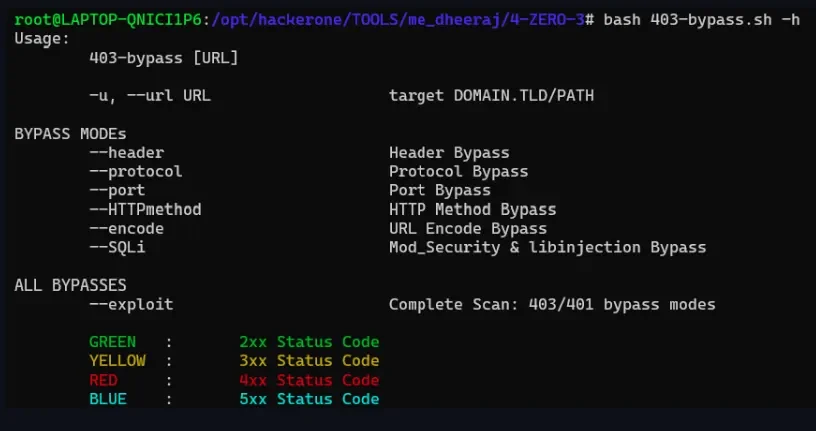
After the tool's results came out, the firewall rules could be bypassed by manipulating the Actuator URL. Specifically, appending a semicolon (;) followed by an additional endpoint, such as /env, to the Actuator URL allowed access to otherwise restricted information. The example given is:
https://test.com/actuator;/env
Here the path segment actuator; is followed by /env. The report says appending a semicolon and a further endpoint to the Actuator URL bypassed the firewall rules and gave access to otherwise restricted information. The report does not show the response body.
Step 6: Report the bypass
After the bypass was reported, the team promptly addressed the vulnerability. As a precautionary measure, they temporarily excluded the exposed Actuator endpoints from the program policy while actively working on implementing a robust fix.

Root cause
The initial exposure was an Actuator directory reachable without authorisation, revealing the available endpoints. so /env, /metrics/http.client.requests and the rest were readable by anyone who found them.
The bypass is a path-matching problem. The firewall rule that returned 401 for /actuator was written against that literal path. Appending a semicolon and a further path segment produced a URL that the firewall did not treat as the protected path, while the application still routed it to the Actuator endpoint.
Impact
With the endpoints open, an attacker could read the configuration environment (with credentials redacted in this case, but other internal data exposed), customer email addresses and internal SQL statements through the request metrics, thread dumps with stack traces, recent HTTP messages potentially including session identifiers, log file contents and controller mappings. The report also lists /shutdown and /restart as available endpoints.
The bypass gave access to the same restricted information after the team had put the firewall rules in place. The report does not quantify how many records or hosts were affected.
Fix
The team's first fix, restricting access with firewall rules, was insufficient because of the semicolon bypass. After the bypass was reported, they addressed the vulnerability and temporarily excluded the exposed Actuator endpoints from the program policy while working on a robust fix. In general terms, the durable options are to disable or restrict the sensitive Actuator endpoints in the application itself rather than relying only on a path-matching rule in front of it, and to normalise request paths before applying access rules so that variants such as /actuator;/env are matched as the protected path.
Variants to test
- Semicolon path parameters on other protected paths. Try appending
;and a further segment to any path that returns 401 or 403, for example/admin;/, and see whether the restriction disappears. A positive result is a 200 with content that the plain path refuses. - Other 4-ZERO-3 techniques. The tool bundles several bypass methods for 401 and 403 responses; run them against a confirmed restricted endpoint and look for any response that differs from the baseline denial.
- Actuator discovery on other subdomains. Re-run the fuzzing wordlist against the full subdomain list, including hosts that were previously clean, and check
/actuatorfor an endpoint index. A positive result is a JSON list of endpoint names. - Sensitive Actuator endpoints. Where
/actuatoris reachable, request/env,/metrics/http.client.requests,/trace,/dump,/logfileand/mappingsand check for configuration data, customer identifiers, SQL statements, session identifiers or stack traces. - Recheck after a fix. When a program reports that an Actuator exposure has been fixed, retest the same host and path with the bypass variants rather than assuming the 401 is final.
What happened, in plain words
A security researcher was taking part in a bug bounty programme. A bug bounty programme is a scheme where a company invites outside people to look for security problems in its systems and pays them for reporting what they find, instead of punishing them. This particular programme ran on a platform called Inspectiv, which acts as the middleman between companies and researchers.
The researcher found that a part of the company's website was accidentally left open to the public. That part is called a Spring Boot Actuator. Spring Boot is a popular way of building web applications in the Java programming language, and the Actuator is a built-in feature that gives the people who run the application a window into what it is doing: which pages it serves, what is in its configuration, what requests it has recently handled, and so on. It is meant for operators, not for visitors, so it should never be reachable from the open internet without protection.
Here it was reachable. Anyone who found the right address could read internal information: configuration details, customer email addresses, and the database queries the application was running behind the scenes. The researcher reported this, the company fixed it, and the researcher was paid.
A couple of months later the researcher went back to check. The fix was in place: trying to open the Actuator now returned a 401 Unauthorized response, which is the web's way of saying "you are not allowed in". But the researcher knew a trick. By writing the address in a slightly unusual way, with a semicolon in the middle, the request slipped past the protection and the internal information was readable again. That second report led the company to address the vulnerability and work on a robust fix.
This article walks through both halves of the story: how the exposure was found, and how the fix was bypassed. Every step is explained from scratch, so you only need to know how to use a browser.
The background you need
Before the steps make sense, a few ideas need to be clear. None of them require any prior security knowledge.
What a subdomain is
A website address like example.com is a domain. Companies often put different services on different subdomains, which are the prefixes in front of the domain: shop.example.com, mail.example.com, support.example.com. Think of the domain as a building's street address and the subdomains as the different departments inside it. Each department can have its own door, its own lock, and its own mistakes.
Finding all the subdomains of a target is therefore the first job in this kind of research. A company might protect its main website carefully and forget about an old testing server on a subdomain nobody remembers.
What an API and an endpoint are
An API (Application Programming Interface) is a way for one piece of software to talk to another. A useful comparison is a restaurant. You do not walk into the kitchen and cook; you look at a menu, order a specific dish, and the kitchen prepares it. The menu is the API: a fixed list of things you can ask for, each with a name.
In a web application, each item on that menu is called an endpoint. An endpoint is simply a specific address, a URL path, that the application knows how to answer. When you visit example.com/actuator, the part after the domain, /actuator, is the endpoint you are asking for. The application looks at that path and decides what to send back.
What a 401 response is
When your browser asks a web server for something, the server replies with a three-digit status code. You have probably seen 404, which means "not found". A 401 means "unauthorized": the server understood the request but refuses to serve it without proof that you are allowed. A 403 means "forbidden": the server knows who you are and still says no. In this story, the 401 is the sign that the company put a lock on the door.
What a firewall is, in this context
A firewall is a filter that sits in front of a server and inspects incoming requests before they reach the application. Picture a receptionist at the entrance of an office: visitors ask for a department, and the receptionist either lets them through or turns them away based on a list of rules. The firewall here had a rule that said, in effect, "requests for /actuator are turned away". The problem, as we will see, was that the rule matched one exact spelling of the address and not the others.
What information disclosure means
Information disclosure is a category of security bug where the problem is not that someone can change or delete data, but that they can read data they were never meant to see. It is the difference between a burglar breaking a window and a burglar finding that the blinds were left open. Nothing is damaged, but secrets leak: configuration values, internal addresses, customer details, database queries. Leaked information is often the first step towards a bigger attack, because it tells an attacker how the system is built.
What fuzzing is
Fuzzing, in this context, means trying a long list of possible addresses quickly and automatically to see which ones exist. Imagine trying every key on a large keyring on a door, one after another, to find the one that fits. The list of keys is called a wordlist: a file of common names such as admin, backup, login, actuator. A tool tries each name against the target and records which ones produce a different response from the rest, because a different response usually means something real is there.
What a session identifier is
When you log in to a website, the server needs a way to remember you on your next request. It gives your browser a small piece of text, often stored in a cookie, called a session identifier. Your browser sends it back with every request, and the server uses it to look up who you are. If someone else obtains your session identifier, they can often pretend to be you without knowing your password. That is why the report treats exposed session identifiers as serious.
The tools used
The researcher used four tools. The report gives no version numbers for any of them.
- haktrails, available at
https://github.com/hakluke/haktrails, to gather subdomains through the SecurityTrails API. SecurityTrails is a commercial service that keeps a large database of domain and subdomain records; haktrails is a small program that queries it and prints the results. - httpx, to filter the subdomain list down to hosts that are actually alive. Many subdomains in a list no longer exist; httpx checks each one and keeps only the ones that respond.
- A custom directory fuzzing wordlist tailored to the target, used for the fuzzing phase. "Custom" means the researcher wrote or adjusted the list of names to try, based on what the target looked like, rather than using a generic list.
- 4-ZERO-3, available at
https://github.com/Dheerajmadhukar/4-ZERO-3, a collection of techniques for getting past 403 and 401 restrictions. It was used later, during the bypass attempt.
Finding the exposure
The methodology was a straightforward chain of steps, each one narrowing the search.
First, haktrails gathered all the subdomains associated with the target. The reason is simple: you cannot check doors you do not know exist. Then httpx filtered out the dead ones, so the researcher would not waste time on addresses that no longer answer. With the active subdomains identified, the researcher moved to directory fuzzing using the custom wordlist, trying common names against each live host to see whether any of them existed.
After analysing the fuzzing results, one subdomain turned out to have an exposed /actuator directory. That directory revealed all the available Actuator endpoints, and the researcher decided to investigate further based on the responses received from the /actuator endpoint itself.
In other words, visiting /actuator on that host returned a list, like a table of contents, of everything else the Actuator was willing to show. The researcher read that list and picked out the entries worth looking at. The endpoints listed in the report were:
| Endpoint | What it exposed |
|---|---|
/dump |
A clutter of threads, including stack traces |
/trace |
The last several HTTP messages, potentially including session identifiers |
/logfile |
The contents of the log file |
/shutdown |
The ability to shut down the application |
/mappings |
All the MVC controller mappings |
/env |
Access to the configuration environment |
/restart |
The ability to restart the application |
A few of these terms deserve a plain explanation.
- A thread dump is a snapshot of everything the application is currently doing, one line per task. A stack trace is the list of function calls that led to a particular point in the code. Together they tell an outsider exactly how the software is built and where it is failing.
- HTTP messages are the requests and responses that have passed through the application. The last several of them, kept for debugging, can include the session identifiers mentioned earlier.
- A log file is the diary the application writes as it runs. It often contains error messages with internal paths, usernames and addresses.
- MVC controller mappings describe which piece of code answers which URL. It is effectively a map of the application's internal structure.
- The configuration environment is the set of settings the application was started with: database addresses, feature switches, and sometimes passwords or keys.
- Shutdown and restart are not reading at all; they are actions. If an outsider can trigger them, they can take the application offline.
Two of the endpoints stood out. /env gave access to the configuration environment; the credentials in it were redacted, but some internal data was still exposed. /metrics/http.client.requests exposed email addresses of customers and SQL statements used internally.
To unpack that: redacted means the sensitive values had been blanked out or masked, so the passwords themselves were not visible. But the surrounding settings still revealed how the system was put together. Metrics are counters the application keeps about its own behaviour, and /metrics/http.client.requests is the counter for outgoing HTTP requests the application made to other services. Because those requests carried customer data, the metrics recorded customer email addresses. SQL is the language used to talk to a database, so the recorded SQL statements show exactly which queries the application runs, which is a detailed look at its internals.
The researcher reported the issue to the relevant team. They triaged it promptly, rewarded the report, acknowledged the potential security risks and took steps to mitigate them. Triaged means the company's security team confirmed the report was real and assigned it for fixing, rather than dismissing it.
Trying to get past the fix
A couple of months later, while reviewing old reports, the researcher decided to recheck the subdomains to see whether any other Actuator hosts were still active. This is a habit worth understanding: a fix applied to one host does not automatically apply to its neighbours, and old findings are worth revisiting.
Examining the fuzzing results again, one host's IP address still had an exposed /actuator endpoint. An IP address is the numeric address of a machine on the internet, the equivalent of a phone number rather than a name; the same machine can be reached by several names. This time, accessing it returned a 401 Unauthorized response. That indicated the team had implemented a fix, likely using firewall rules, to restrict unauthorised access to sensitive Actuator endpoints.
So the door was still there, but the receptionist was now turning people away. The researcher turned to 4-ZERO-3, the collection of techniques for bypassing 403 and 401 restrictions.
After the tool's results came out, the firewall rules could be bypassed by manipulating the Actuator URL. Specifically, appending a semicolon (;) followed by an additional endpoint, such as /env, to the Actuator URL allowed access to otherwise restricted information. The example given is:
https://test.com/actuator;/env
Line by line, in plain words:
https://is the protocol, the language the browser and server use to talk.test.comis the placeholder host name. The report uses it to illustrate the technique; the real target is not named./actuator;is the path the firewall was watching for, but with a semicolon stuck on the end. In web addresses, a semicolon can act as a separator for extra parameters attached to a path segment. Different pieces of software disagree about what it means./envis the endpoint the researcher actually wanted to reach.
The report says appending a semicolon and a further endpoint to the Actuator URL bypassed the firewall rules and gave access to otherwise restricted information. The report does not show the response body.
Why does this work? Because the firewall and the application read the address differently. The firewall saw something that did not look exactly like /actuator and let it through. The application, on the other hand, treated the semicolon as a harmless separator and understood the request as "give me /env". It is like a receptionist who is told to turn away anyone asking for "the archive room", and who lets through anyone asking for "the archive room; please". The words are the same to the person inside, but not to the person at the door.
Reporting the bypass
After the bypass was reported, the team promptly addressed the vulnerability. As a precautionary measure, they temporarily excluded the exposed Actuator endpoints from the program policy while actively working on implementing a robust fix.
Excluding endpoints from the programme policy means the company temporarily told researchers that those addresses were out of scope, so that people would stop testing them while the real fix was being built. It is a way of pausing the game rather than ending it.
Why it happened
The initial exposure was an Actuator directory reachable without authorisation, revealing the available endpoints. so /env, /metrics/http.client.requests and the rest were readable by anyone who found them.
The bypass is a path-matching problem. The firewall rule that returned 401 for /actuator was written against that literal path. Appending a semicolon and a further path segment produced a URL that the firewall did not treat as the protected path, while the application still routed it to the Actuator endpoint. The report does not state which firewall or proxy product was in use, so the exact matching behaviour is not documented; the semicolon acting as a path parameter that intermediaries and the application parse differently is the likely explanation.
What the impact was
With the endpoints open, an attacker could read the configuration environment (with credentials redacted in this case, but other internal data exposed), customer email addresses and internal SQL statements through the request metrics, thread dumps with stack traces, recent HTTP messages potentially including session identifiers, log file contents and controller mappings. The report also lists /shutdown and /restart as available endpoints.
The bypass gave access to the same restricted information after the team had put the firewall rules in place. The report does not quantify how many records or hosts were affected.
How it should be fixed
The team's first fix, restricting access with firewall rules, was insufficient because of the semicolon bypass. After the bypass was reported, they addressed the vulnerability and temporarily excluded the exposed Actuator endpoints from the program policy while working on a robust fix.
In general terms, the durable options are to disable or restrict the sensitive Actuator endpoints in the application itself rather than relying only on a path-matching rule in front of it, and to normalise request paths before applying access rules so that variants such as /actuator;/env are matched as the protected path. Normalising a path means rewriting it into one standard form before comparing it against a rule, so that all the different spellings of the same destination are treated as one.
Things worth trying on your own targets
These are variants worth testing, written for someone who is learning.
- Semicolon path parameters on other protected paths. Try appending
;and a further segment to any path that returns 401 or 403, for example/admin;/, and see whether the restriction disappears. A positive result is a 200 with content that the plain path refuses. A 200 is the normal "here is your page" response. - Other 4-ZERO-3 techniques. The tool bundles several bypass methods for 401 and 403 responses; run them against a confirmed restricted endpoint and look for any response that differs from the baseline denial. The baseline is what the server says when you ask normally; anything different is worth a closer look.
- Actuator discovery on other subdomains. Re-run the fuzzing wordlist against the full subdomain list, including hosts that were previously clean, and check
/actuatorfor an endpoint index. A positive result is a JSON list of endpoint names. JSON is a plain text format for structured data, the kind of thing a machine reads easily. - Sensitive Actuator endpoints. Where
/actuatoris reachable, request/env,/metrics/http.client.requests,/trace,/dump,/logfileand/mappingsand check for configuration data, customer identifiers, SQL statements, session identifiers or stack traces. - Recheck after a fix. When a programme reports that an Actuator exposure has been fixed, retest the same host and path with the bypass variants rather than assuming the 401 is final.
Glossary
- 401 Unauthorized: a server response meaning the request was understood but refused without proof that you are allowed.
- 403 Forbidden: a server response meaning the server knows who you are and still refuses.
- 200 OK: the normal server response meaning the request succeeded and here is the content.
- 404 Not Found: a server response meaning nothing exists at that address.
- 4-ZERO-3: a public collection of techniques for getting past 401 and 403 restrictions.
- Actuator: a built-in Spring Boot feature that exposes runtime information about an application, such as configuration, metrics and logs.
- API (Application Programming Interface): a fixed menu of things one piece of software can ask another for.
- Bug bounty programme: a scheme where a company pays outside researchers for reporting security problems instead of punishing them.
- Configuration environment: the set of settings an application was started with, sometimes including credentials.
- Cookie: a small piece of text a website stores in your browser and asks for back on each visit, often used to remember who you are.
- Custom wordlist: a list of names to try during fuzzing, adjusted for a particular target rather than generic.
- Domain: the main part of a web address, such as
example.com. - Endpoint: a specific URL path an application knows how to answer.
- Firewall: a filter in front of a server that allows or blocks requests according to rules.
- Fuzzing: automatically trying a long list of possible addresses to discover which ones exist.
- haktrails: a tool that gathers subdomains through the SecurityTrails API.
- HTTP: the protocol browsers and servers use to exchange requests and responses.
- httpx: a tool that checks a list of hosts and keeps only the ones that respond.
- Information disclosure: a bug where data that should be private can be read by someone who should not see it.
- IP address: the numeric address of a machine on the internet.
- JSON: a plain text format for structured data.
- Log file: the diary an application writes as it runs, often containing internal details.
- Metrics: counters an application keeps about its own behaviour.
- MVC controller mappings: the list showing which piece of code answers which URL.
- Normalisation: rewriting a request path into one standard form before comparing it against a rule.
- Redacted: sensitive values blanked out or masked.
- SecurityTrails: a commercial service holding a large database of domain and subdomain records.
- Session identifier: a piece of text that lets a server recognise a logged-in user on later requests.
- Spring Boot: a popular framework for building web applications in Java.
- SQL: the language used to query databases.
- Stack trace: the list of function calls that led to a particular point in a program.
- Subdomain: a prefix on a domain, such as
shopinshop.example.com, often hosting a separate service. - Thread dump: a snapshot of everything an application is currently doing.
- Triaged: confirmed as a real issue and assigned for fixing by a security team.




