How I Found My First Bug: Information Disclosure via Exposed Directory Listing
A subdomain that appeared inactive had directory listing enabled on a static folder, exposing configuration scripts, administrative assets and version control artefacts. An attacker could use these files to map the application and look for further weaknesses.

Information Disclosure
The full write-up lives on its author's site
It belongs to its author, so we link to it rather than copy it. The other two tabs are our own rewrites, checked against it.
Context
This is an account of a first bug bounty finding: an exposed static directory listing on a subdomain belonging to a bug bounty program's organisation. The researcher, ATIT0, found it during a routine reconnaissance and asset discovery phase in January 2025. The affected asset is a subdomain of the target organisation; the report does not name the organisation or the program.
The feature involved is a static file directory served by the web server. Normally such a directory should either not be browsable at all, or should return an error such as 403 Forbidden when requested without a specific file name. In this case the server returned an open directory index instead, exposing the file tree of that directory to anyone on the internet.
Setup
The only tooling the report names is ffuf, used for directory and path fuzzing against a wordlist. The report does not give the ffuf version, the wordlist used, or the size of the wordlist.
Finding it
Subdomain enumeration produced a list of potential targets belonging to the organisation. One of the subdomains initially returned a Page not found, or seemed completely inactive when visited directly in the browser.

Rather than ignoring it, the researcher ran a directory and path fuzzing session with ffuf to look for hidden paths and directories beneath the surface.
Exploitation
Step 1: Fuzz the apparently dead subdomain
The fuzzing command was:
ffuf -u https://sub.domain.com/FUZZ -w wordlist.txt -mc 200
-u sets the target URL with FUZZ as the injection point for each wordlist entry, -w names the wordlist, and -mc 200 filters results to responses with HTTP status 200, so only paths that actually resolved successfully are shown.
Step 2: Identify the hidden directory
One specific path responded successfully, revealing a hidden directory named static:
https://sub.domain.com/static/
Step 3: Request the directory
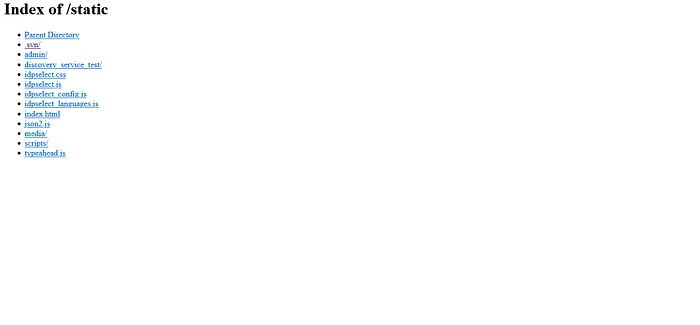
Navigating to that URL did not produce a standard 403 Forbidden or error page. The web server responded with an open directory index (Index of /static), meaning directory listing was enabled and the entire file tree structure of that directory was exposed to anyone on the internet.
Step 4: Inspect the exposed assets
Inspecting the directory index revealed several sensitive files, configuration scripts and version control artifacts:
- JavaScript configuration files: files such as
idpselect.jsandidpselect_config.jswere directly accessible, revealing internal logic and client-side setup parameters. - Administrative assets: sub-directories such as
/admin/js/jquery.min.jsand other internal script folders were visible. - Version control artifacts (
.svn): the presence of.svn/directories, though restricted with a403status in some parts, strongly indicated potential version control and source code exposure artifacts left over on the production server.
Root cause
Directory listing was enabled on the web server for the static directory, so a request for the directory itself returned a generated index of its contents instead of being refused.
Impact
The report lists three risks if the exposure is leveraged by a malicious actor:
- Information disclosure: exposed server-side configurations, internal file paths and naming conventions help an attacker map the application architecture.
- Attack surface expansion: exposed JavaScript and configuration files can sometimes contain hardcoded API endpoints, internal parameters or logic flaws that pave the way for further exploitation.
- Source code leakage risks: remnants such as
.svncan potentially allow an attacker to reconstruct parts of the application's internal structure.
The report does not demonstrate any of these being exploited further, and does not state what the exposed files actually contained beyond their names.
Program response
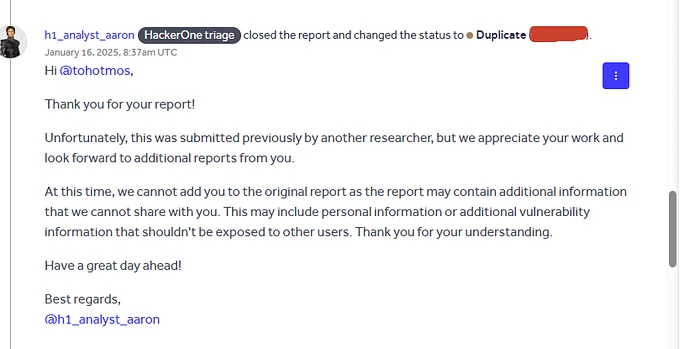
After submission, the triage team closed the report as a duplicate, because another researcher had reported it slightly earlier.
Fix
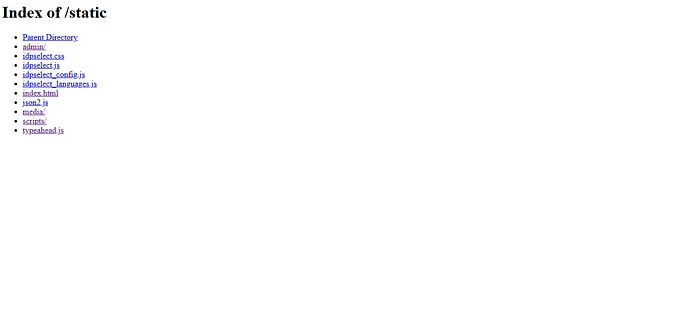
Later, when the researcher looked for the exact same static endpoint (/static/) again, a significant change was visible: the organisation had cleaned up its assets, and the sensitive version control folders .svn/ and internal testing paths had been removed. The organisation had cleaned up its assets.
Variants to test
- Fuzz subdomains that look dead. Run a path fuzzer such as ffuf against subdomains returning 404 or appearing inactive. A positive result is a 200 response for a path that was not expected to exist, as happened here with
static. - Request directories without a trailing file. Ask for common static and asset directories directly. A positive result is an
Index of /...page rather than a403or a redirect to an application page. - Look for version control metadata. Check for
.svn/, and by extension other VCS artifacts, inside exposed directories. A positive result is a directory listing or a retrievable metadata file. - Check administrative script folders. Look for paths such as
/admin/js/under a static root. A positive result is a browsable listing or direct access to internal scripts. - Read exposed configuration scripts. Fetch files like
idpselect_config.jsand inspect them for internal endpoints, parameters and setup values. A positive result is any internal detail that is not meant to be public. - Re-check after remediation. Return to the same endpoint later. A positive result for a fix is the sensitive folders and paths being gone.
What happened, in plain words
A security researcher was looking around the public internet for weaknesses in a company that runs a bug bounty program. A bug bounty program is a deal a company makes with outside researchers: find a security problem in our systems, tell us about it privately, and we may reward you. This was the researcher's first such finding.
The weakness was simple. A folder on one of the company's subdomains, which should have refused to show its contents, actually showed a list of every file inside it. That kind of list is called a directory listing. Anyone on the internet could open it in a browser and read the file names, and some files were directly accessible.
Among the exposed files were configuration scripts, an administrative script folder, and leftovers from a version control system called Subversion. Version control is the software developers use to keep track of changes to their code over time; its hidden metadata folders can sometimes leak source code. The researcher reported the problem, and the company's triage team (the people who read incoming reports and decide what to do with them) closed it as a duplicate, because someone else had reported the same thing slightly earlier. Later, the researcher checked the same address again and saw that the company had cleaned it up.
The report does not name the company or the program, and it does not say what the exposed files actually contained beyond their names.
The words you need first
Before walking through the steps, here are the ideas that come up, explained from zero.
- Subdomain. A website's main address, like
example.com, can have smaller addresses in front of it, likeshop.example.comorstatic.example.com. These are subdomains. Companies often have many, and some are forgotten or barely used. Think of the main domain as an office building and subdomains as separate rooms with their own door numbers. - HTTP status code. When your browser asks a web server for a page, the server answers with a number that says how it went.
200means "here it is, all good".404means "I have nothing at that address" (the familiar Page not found).403means "I know what you are asking for, but you are not allowed to see it". You never see these numbers directly, but they decide what your browser shows you. - Directory. A folder on a web server, the same idea as a folder on your own computer. A website is a set of files arranged in folders.
- Directory listing. When you ask a web server for a folder rather than a specific file, the server can do one of three things: refuse (
403), send you to some other page, or generate a web page that lists every file in that folder, usually titled something likeIndex of /foldername. That last behaviour is directory listing, and it is what went wrong here. It is like asking a receptionist "what is in this room?" and being handed a full inventory instead of being told the room is private. - Fuzzing. Trying a large number of guesses automatically and looking at which ones get a reaction. A wordlist is simply a long text file with one guess per line, for example common folder names like
admin,backuporstatic. A fuzzer is the program that sends each guess to the server in turn. It is the automated version of trying every key on a keyring until one opens the door. - ffuf. A free command-line tool that does exactly that: it takes a URL containing a placeholder, replaces the placeholder with each word from a wordlist, sends the request, and reports which responses look interesting. The report names ffuf for the fuzzing step, and does not give its version or the wordlist.
- JavaScript file. Code that runs inside your browser rather than on the server. Websites use it to make pages interactive. A JavaScript configuration file is a small file that holds settings for that code, such as which addresses it should talk to.
- API. Short for Application Programming Interface. In web terms, it is a set of addresses a website's code uses to fetch or send data behind the scenes, separate from the pages you click. If a website is a restaurant's dining room, the API is the kitchen door the waiters use. Exposed configuration files sometimes mention API addresses that were never meant to be public.
.svn. Subversion is an older version control system. To work, it keeps a hidden folder named.svninside each folder of a project, holding bookkeeping data about the files. If a.svnfolder ends up on a public web server, outsiders may be able to read that bookkeeping data, and in some cases reconstruct source code. It is like leaving the architect's blueprints in the lobby.- Duplicate. In bug bounty, if two researchers report the same issue, the second report is marked duplicate. It is not a judgement on the quality of the work; it just means someone got there first.
The discovery: from "Page not found" to a hidden folder
The researcher was in the reconnaissance phase. Reconnaissance means mapping out what a company has on the internet before testing anything: which subdomains exist, which respond, and what they serve. This is the equivalent of walking around a building and noting every door before trying any handles.
The first step was subdomain enumeration, using tools that produce lists of subdomains belonging to an organisation. One of the subdomains found this way initially returned a Page not found, or seemed completely inactive when visited directly in the browser.
A page that says Page not found is easy to dismiss. But a 404 only means the server has nothing at the exact address you asked for. It does not mean the server has nothing at all. The researcher therefore decided to run a directory and path fuzzing session with ffuf, to check for hidden paths and folders that might be sitting beneath the surface.
Step 1: Fuzz the subdomain that looked dead
The command used was:
ffuf -u https://sub.domain.com/FUZZ -w wordlist.txt -mc 200
Line by line, in plain words:
ffufis the name of the program being run.-u https://sub.domain.com/FUZZtells ffuf which address to test. The wordFUZZis a placeholder. For every word in the wordlist, ffuf swaps that word in whereFUZZis and sends a request to the resulting address. So if the wordlist containsadmin, ffuf asks forhttps://sub.domain.com/admin; if it containsstatic, it asks forhttps://sub.domain.com/static, and so on.sub.domain.comstands in for the real subdomain, which the report does not name.-w wordlist.txtnames the file holding the guesses, one per line.-mc 200is a filter.mcstands for match code, and200is the HTTP status code for success. With this option, ffuf only shows results where the server answered200. Everything that came back as404or another error is hidden, so the output is short and only contains addresses that actually exist.
Why this step: the browser had shown only a Page not found, but the browser only asks for the one address you type. Fuzzing asks for hundreds or thousands of addresses automatically, which is how hidden folders get found.
Step 2: Spot the hidden folder
After the fuzzing run, one specific path responded successfully, revealing a hidden folder named static:
https://sub.domain.com/static/
This is the address ffuf reported as answering with 200. The name static is a common one on websites: it usually holds files that do not change per visitor, such as images, stylesheets and scripts. Because it answered successfully, it existed.
Step 3: Open the folder
Navigating to that address in the browser did not produce a standard 403 Forbidden or error page. Instead, the web server responded with an open directory index, a page titled Index of /static. This meant directory listing was enabled on the server, and the entire file tree structure of that folder was exposed to anyone on the internet.
Why this matters: a folder that answers with a list of its contents is telling a stranger the names and layout of everything inside. Even before opening a single file, an outsider learns how the site is organised, which is useful information for planning further attacks.
Step 4: Look at what was exposed
Inspecting the directory index revealed several sensitive files, configuration scripts and version control artifacts. The report groups them into three kinds:
- JavaScript configuration files. Files such as
idpselect.jsandidpselect_config.jswere directly accessible. These reveal internal logic and client-side setup parameters, meaning settings that the browser-side code uses. A configuration file is like a note left on a desk listing which phone numbers to call; it is not secret by design, but it was not meant for strangers either. - Administrative assets. Sub-folders such as
/admin/js/jquery.min.jsand other internal script folders were visible. The wordadminin a path suggests the folder is connected to administration features.jquery.min.jsis a well-known public JavaScript library, but its presence under anadminpath still reveals that an admin area exists and how it is built. - Version control artifacts (
.svn). The presence of.svn/folders, though restricted with a403status in some parts, strongly indicated potential version control and source code exposure artifacts left over on the production server. In other words, the hidden bookkeeping folders that Subversion creates had been copied onto the live server along with the website files. Some of those paths refused access, but the refusal itself confirmed they were there.
Why it happened
The direct cause is that directory listing was switched on for the static folder. When someone asked for the folder itself rather than a named file, the server generated a list of its contents instead of refusing.
Alongside normal website assets it contained configuration scripts, administrative script folders and leftover .svn metadata.
What an attacker could do with it
The report lists three risks if the exposure were used by a malicious actor:
- Information disclosure. Exposed server-side configurations, internal file paths and naming conventions help an attacker map how the application is built. Knowing the map makes every later step easier.
- Attack surface expansion. Exposed JavaScript and configuration files can sometimes contain hardcoded API addresses, internal parameters or logic flaws that pave the way for further exploitation. Attack surface means the total set of things an attacker can poke at; this exposure made that set bigger.
- Source code leakage risks. Remnants such as
.svncan potentially allow an attacker to reconstruct parts of the application's internal structure.
What the program said
After the report was submitted, the triage team closed it as a duplicate, because another researcher had reported it slightly earlier.
A duplicate is a normal outcome. It means the issue was real and worth reporting, and that someone else spotted it first.
What changed afterwards
Later, when the researcher looked for the exact same static endpoint (/static/) again, a significant change was visible. The organisation had cleaned up its assets: the sensitive version control folders .svn/ and internal testing paths had been removed, and the organisation had cleaned up its assets.
Things worth trying yourself
These are the checks the report suggests, written so you can follow the reasoning even with no tools yet:
- Fuzz subdomains that look dead. Run a path fuzzer such as ffuf against subdomains that return
404or seem inactive. A positive result is a200response for a path that was not expected to exist, as happened here withstatic. - Ask for folders without naming a file. Request common static and asset folders directly. A positive result is an
Index of /...page rather than a403or a redirect to an application page. - Look for version control metadata. Check for
.svn/, and by extension other version control artifacts, inside exposed folders. A positive result is a directory listing or a retrievable metadata file. - Check administrative script folders. Look for paths such as
/admin/js/under a static root. A positive result is a browsable listing or direct access to internal scripts. - Read exposed configuration scripts. Fetch files like
idpselect_config.jsand inspect them for internal addresses, parameters and setup values. A positive result is any internal detail that is not meant to be public. - Re-check after remediation. Return to the same endpoint later. A positive result for a fix is the sensitive folders and paths being gone.
Two lessons
The report closes with two points for anyone starting out:
- Never judge a subdomain by its 404. A
404or a page that looks dead only means nothing is at the exact address you tried. Careful reconnaissance and path fuzzing with a tool like ffuf can reveal hidden folders and misconfigurations that others overlook. - Never get discouraged by duplicates. A duplicate status is frustrating but normal. It means you were looking at the right targets. Keep going, learn from every submission, and the work eventually pays off.
Glossary
- API (Application Programming Interface): a set of addresses and rules that software uses to exchange data behind the scenes, separate from the pages a visitor clicks.
- Attack surface: the total set of entry points and features an attacker could try to abuse.
- Bug bounty program: an arrangement in which a company invites outside researchers to find and privately report security problems, sometimes for a reward.
- Client-side: happening in the visitor's browser rather than on the web server.
- Configuration file: a file holding settings that tell software how to behave, such as which addresses to contact.
- Directory: a folder on a computer or web server.
- Directory listing: a web page, often titled
Index of /..., that a server generates to list every file in a folder when someone requests the folder itself. - Duplicate: a report closed because the same issue had already been reported by someone else.
- Enumeration: systematically listing things that exist, such as all subdomains of a company.
- ffuf: a command-line tool that sends a URL with a placeholder replaced by each word from a wordlist, and reports which responses match chosen criteria.
- 403 Forbidden: an HTTP status code meaning the server understood the request but refuses to allow it.
- 404 Not Found: an HTTP status code meaning there is nothing at the requested address; browsers show it as Page not found.
- Fuzzing: automatically trying many guesses and watching for interesting responses.
- Hardening: reducing the ways a system can be attacked, for example by removing files or turning off features that are not needed.
- HTTP status code: a number a web server returns with every response to say how the request went, such as
200,403or404. - Information disclosure: a weakness where information that should be private is exposed to people who should not see it.
- JavaScript: the programming language that runs in web browsers to make pages interactive.
- Production server: the live machine that serves a website to real visitors, as opposed to a test machine.
- Reconnaissance: the mapping-out phase of security testing, gathering what exists before trying anything against it.
- Remediation: the act of fixing a security problem.
- Static files: files that are served as they are and do not change per visitor, such as images, stylesheets and scripts.
- Subdomain: a smaller address in front of a main domain, such as
shop.example.comunderexample.com. - Subversion (
.svn): an older version control system; it keeps hidden.svnfolders inside project folders, and those folders can leak source code if copied to a public server. - Triage team: the people at a bug bounty program who read incoming reports and decide what happens to them.
- Version control: software that records changes to code over time so developers can track and undo them.
- Wordlist: a text file with one guess per line, used by fuzzing tools.



