How I found my first RCE!
The WSO2 server had an unauthenticated arbitrary file upload vulnerability (CVE-2022-29464) that allowed uploading a JSP file to a web-accessible directory, leading to remote code execution. The same server also had an SSRF vulnerability in a proxy endpoint.
 Published on infosecwriteups.com
Remote code executions (RCEs) are dreams of all, but only some of them have found it. This story is about how I was able to find my RCE using simple fuzzing techniques and a little bit of recon.
The full write-up lives on its author's site
It belongs to its author, so we link to it rather than copy it. The other two tabs are our own rewrites, checked against it.
Context
This is a write-up of a first remote code execution (RCE) found through straightforward fuzzing and a little recon. The target was a WSO2 deployment reachable at the subdomain accounts.example.com. WSO2 is a middleware and identity server platform, and the vulnerable component here is its file upload handling, which the researcher identified as affected by CVE-2022-29464.
CVE-2022-29464, as described in the report, is a critical vulnerability on WSO2 discovered by Orange Tsai. It is an unauthenticated unrestricted arbitrary file upload that allows unauthenticated attackers to gain RCE on WSO2 servers by uploading malicious JSP files. The same WSO2 instance also turned out to be vulnerable to server-side request forgery (SSRF) through a proxy endpoint.

Setup
The methodology was deliberately simple:
- Gather the in-scope domains.
- Run active and passive subdomain enumeration. For passive enumeration the researcher used subfinder with API keys for services such as Shodan, Chaos, GitHub and Sublist3r. For active enumeration the Best DNS Wordlist from Assetnote Wordlist was used.
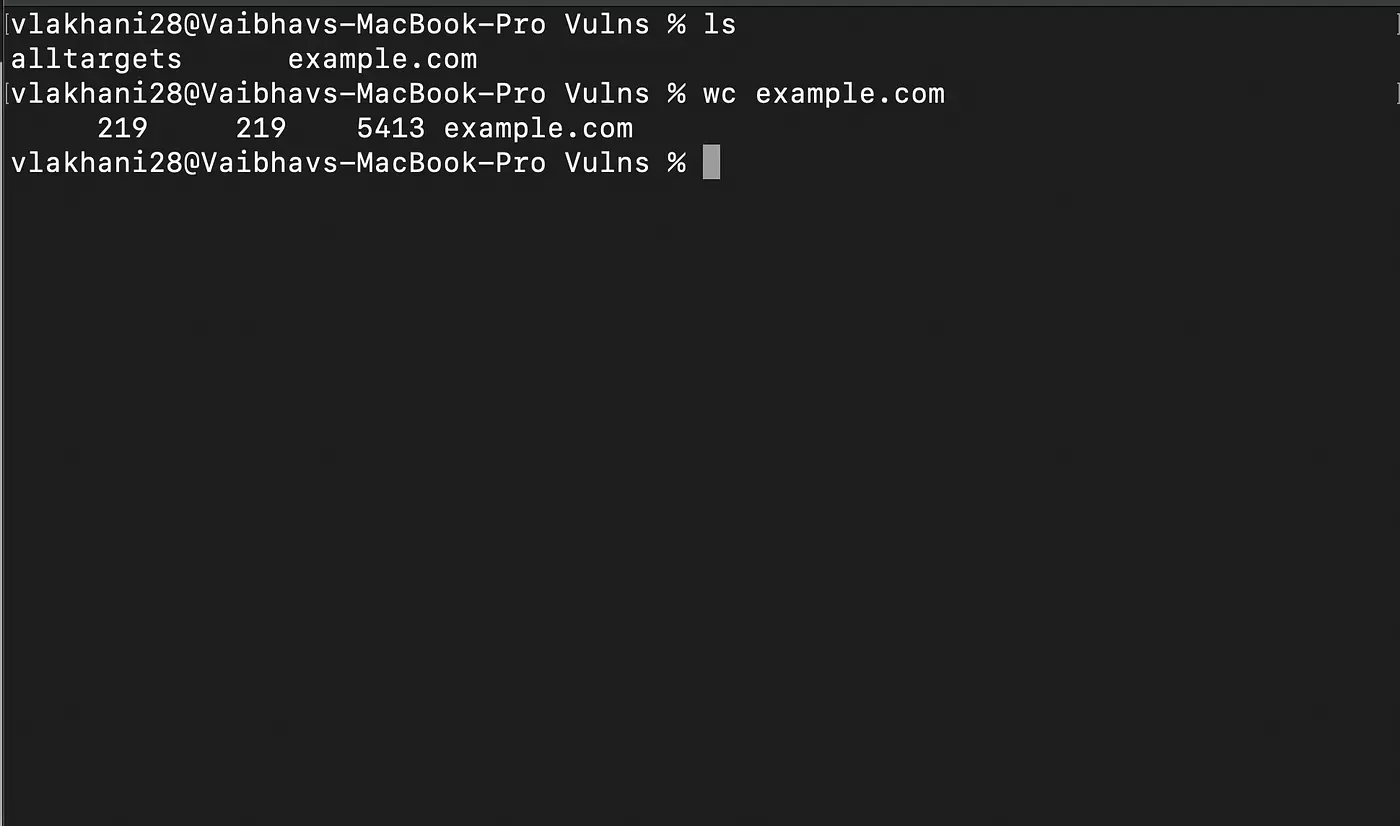
- Around 219 subdomains were found.
- Filter the live domains by status code.
- One subdomain stood out:
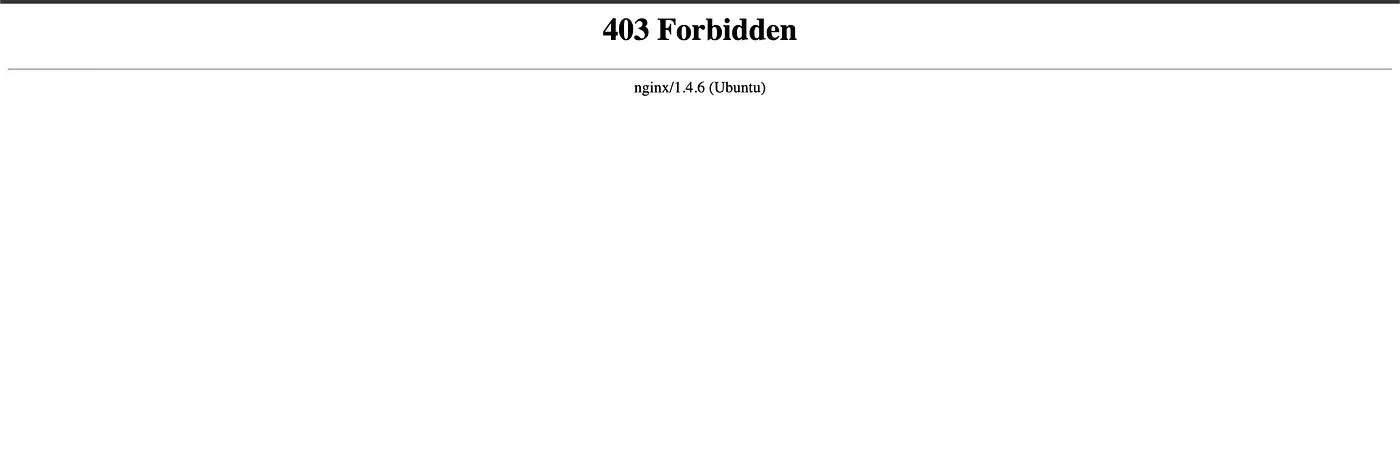
accounts.example.com, returning403 Forbidden.
- From there the actual work began.
For content discovery the researcher used FFuF together with a wordlist from SecLists.
Finding it
The fuzzing scan surfaced an endpoint, /fileupload/toolsAny, which appeared to be vulnerable to CVE-2022-29464. The vulnerable endpoint is /fileupload, and through it an attacker can upload a .jsp file, which can lead to a reverse shell on the victim machine.
Separately, while exploiting the RCE, the researcher ran waybackurls against the same domain, accounts.example.com. One endpoint from the archived URLs caught the eye:
https://accounts.example.com/shindig/gadgets/proxy?container=default&url=https://google.com
That proxy-style endpoint, taking a url parameter, is the classic shape of an SSRF candidate.
Exploitation
Once the vulnerability was confirmed, the next task was to find a proper exploit. The report describes two approaches: capturing the request in Burp and modifying it, or using a developed exploit.
Method 1: Using Burp
- Capture the endpoint request in Burp Suite.
- Change the method from GET to POST.
- Along with the
Content-Dispositionheader, enter the endpoint name together with the file name and the filename. For example:
Content-Disposition: form-data; name="../../../../repository/deployment/server/webapps/authenticationendpoint/MyShell.jsp";filename="MyShell.jsp"
The name value contains a path traversal sequence ending in the authenticationendpoint webapp, under the name MyShell.jsp. The uploaded JSP is then reachable at the authenticationendpoint path.
- In the POST body, enter the command the
file.jspshould perform. For example:
<% out.print("MyShell Uploaded here"); %>
- Navigate to
accounts.example.com/authenticationendpoint/MyShell.jspand the commands would be executed.
Method 2: Using an exploit
- Navigate to the public exploit at
https://github.com/hakivvi/CVE-2022-29464. - Git clone the file to the local machine.
- Run the exploit:
python3 exploit.py https://accounts.example.com MyShell.jsp
- Visit the endpoint:
https://accounts.example.com/authenticationendpoint/MyShell.jsp
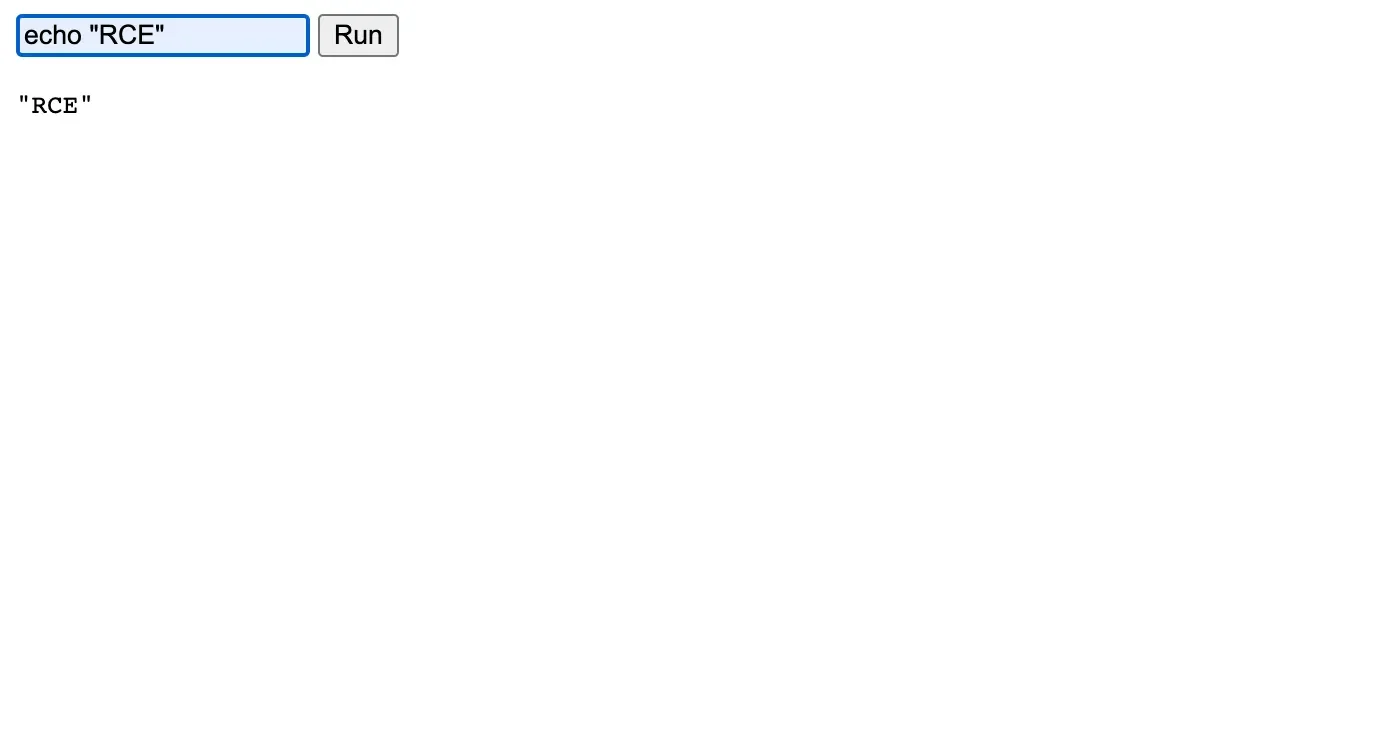
- You will be able to run any command.
The SSRF
While exploiting the RCE, the researcher opened the Interactsh client and pasted the payload into the proxy endpoint's url parameter.
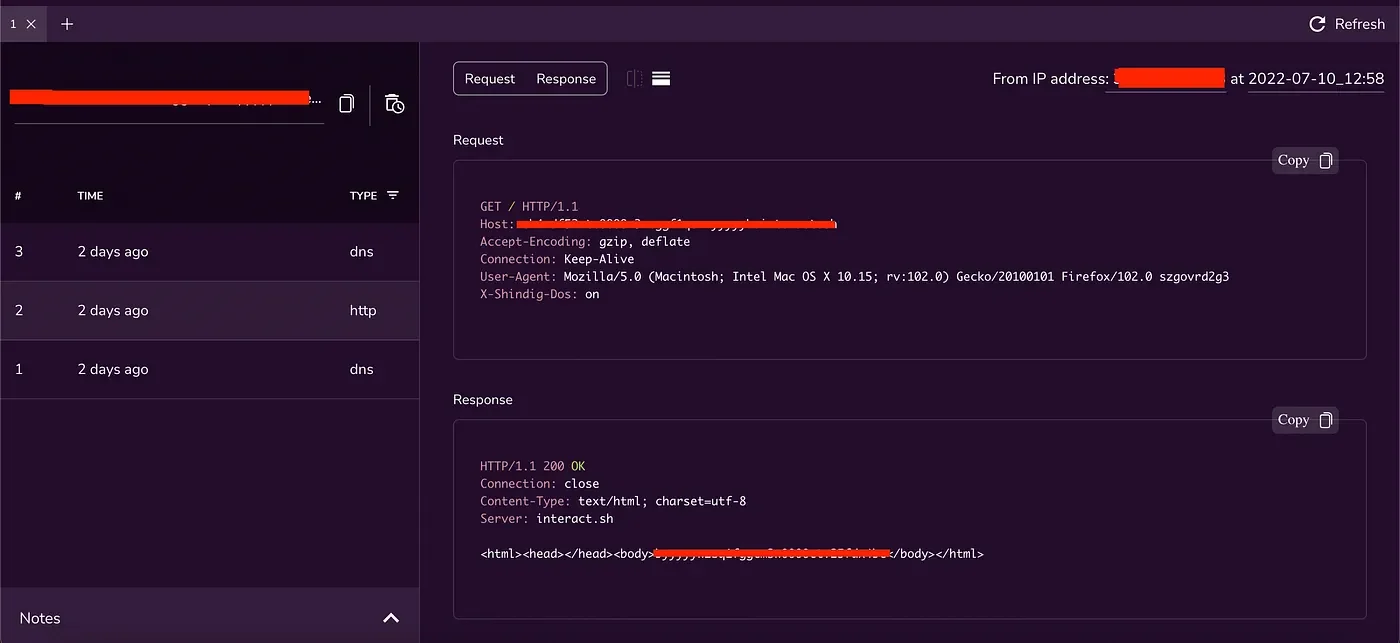
The result was SSRF: the same WSO2 instance was vulnerable to SSRF as well.

Root cause
The report attributes the RCE to CVE-2022-29464: an unauthenticated unrestricted arbitrary file upload in WSO2. The report does not go into the underlying code path beyond this.
The SSRF was demonstrated on the shindig/gadgets/proxy endpoint, which takes a url parameter. The report does not describe any validation logic or explain why the proxy accepted the Interactsh payload; it only records that the same WSO2 instance was vulnerable.
Impact
The CVE is described as an unauthenticated unrestricted arbitrary file upload that allows unauthenticated attackers to gain RCE on WSO2 servers by uploading malicious JSP files. The report notes this can lead to a reverse shell on the victim machine, and that after uploading the shell the attacker can run any command.
On the SSRF side, the researcher demonstrated the issue with an Interactsh payload and recorded that the same WSO2 instance was vulnerable. The report does not enumerate further impact from the SSRF.
Fix
The report does not describe any remediation applied by the target. The vulnerability is identified as CVE-2022-29464, and the report links to the WSO2 security advisory for it, which is where the vendor's guidance lives.
Variants to test
- WSO2
/fileuploadon other hosts. Look for the upload endpoint on any WSO2 deployment you are authorised to test. A positive result is an unauthenticated POST that accepts a JSP and a traversal path in theContent-Dispositionname, followed by the uploaded file being reachable and executing at a path such as/authenticationendpoint/<name>.jsp. shindig/gadgets/proxywith aurlparameter. Try the proxy endpoint with an out-of-band listener as theurlvalue. A positive result is a callback from the target server to your listener.- Waybackurls for forgotten endpoints. Run waybackurls against in-scope hosts and look for proxy, fetch or redirect style parameters. A positive result is an archived URL whose parameter causes the server to fetch an attacker-chosen destination.
- Status-code filtering during recon. A
403 Forbiddenon a subdomain is not a dead end; it can still front an application with reachable endpoints, as it did here.
Timeline
| Event | Date |
|---|---|
| Both vulnerabilities found | 10 July 2022 |
| Reported | 10 July 2022 |
| Initial response | 11 July 2022 |
| Hall of Fame awarded and letter of recommendation | 13 July 2022 |
What happened, in plain words
A security researcher found a way to make a company's web server run code of their choosing. This is called remote code execution, or RCE for short. It is one of the most serious kinds of security bug, because it means an outsider can take control of a machine that does not belong to them. The researcher also found a second, related bug on the same server: a way to make the server fetch a web address of the attacker's choosing. That one is called server-side request forgery, or SSRF.
The researcher found both by doing simple, patient work: listing the company's subdomains, checking which ones answered, guessing common file and folder names on one of them, and then exploiting a known flaw in the software that was running there. No deep knowledge of the application's source code was needed. The report is written as a first RCE, and the point of it is that the method was ordinary.
The starting point: what we are looking at
The target was a piece of software called WSO2, reachable at the web address accounts.example.com. WSO2 is a middleware and identity server platform. In everyday terms, think of it as the front desk of a large building: other systems ask it who a user is, whether they are allowed in, and it passes messages between services. Because it sits in the middle of everything, a flaw in it is valuable to an attacker.
The specific flaw here is tracked publicly as CVE-2022-29464. A CVE is a catalogue number for a known security bug, so that everyone in the world can refer to the same issue by the same name. According to the report, CVE-2022-29464 is a critical vulnerability on WSO2 discovered by Orange Tsai. It is an unauthenticated unrestricted arbitrary file upload that allows unauthenticated attackers to gain RCE on WSO2 servers by uploading malicious JSP files.
Let us unpack that sentence, because every word matters:
- Unauthenticated means the attacker does not need an account or a password. They do not have to log in first. The door is open.
- Unrestricted arbitrary file upload means the server accepts a file from the visitor and does not properly check what kind of file it is or where it gets stored.
- JSP stands for JavaServer Pages. It is a file format that a Java web server does not just hand back to the browser like a picture; it runs it as a small program on the server. So uploading a JSP is like posting a letter to a building and having the building's staff read it out and follow its instructions.
- RCE, remote code execution, is the result: the attacker's instructions run on the server, from a distance.
The same WSO2 instance also turned out to be vulnerable to SSRF through a proxy endpoint. A proxy is a service that fetches something on your behalf: you give it a web address, it goes and gets it, and gives you the result. If it will fetch any address you give it, including addresses inside the company's private network that you could never reach from outside, that is SSRF.
Step by step: how the researcher got there
The methodology was deliberately simple. Here it is as the researcher listed it, with the reasoning behind each step.
- Gather the in-scope domains. A bug bounty programme or a penetration test has rules about what you may touch. Collecting the in-scope domains first means you know the boundary of what you are allowed to test. It also gives you the starting list to expand from.
- Run active and passive subdomain enumeration. A domain like
example.comusually has many subdomains:mail.example.com,shop.example.com,accounts.example.comand so on. Each one is a separate system, and each one is a possible way in. Enumeration is the business of finding them.- Passive enumeration means finding subdomains without touching the target at all, by reading public sources. The researcher used a tool called subfinder, with API keys for services such as Shodan, Chaos, GitHub and Sublist3r. An API key is a secret string that lets a program use an online service on your behalf, a bit like a library card number that identifies you when you borrow a book. These services hold records of domains seen across the internet, so querying them reveals names the target may have forgotten about.
- Active enumeration means actually asking the target's DNS servers whether a guessed name exists. DNS is the internet's phone book: it turns a name like
accounts.example.cominto the numeric address of a machine. For this the researcher used the Best DNS Wordlist from Assetnote Wordlist, which is simply a long list of common subdomain names to try.
- Around 219 subdomains were found. That is the size of the haystack.
- Filter the live domains by status code. Not every name in the list points at something that is running. When your browser asks a web server for a page, the server replies with a three-digit status code.
200means here is the page.404means not found.403means forbidden: the server understood the request but will not let you have it. Filtering by status code is a quick way to throw away the dead ends and keep the machines that actually answered. - One subdomain stood out:
accounts.example.com, returning403 Forbidden. A beginner might assume a 403 means there is nothing to see. The researcher did not. A 403 tells you a real web application is sitting there and making decisions about who may access what. It is a locked door, not an empty field, and locked doors are worth investigating.
- From there the actual work began.
For content discovery the researcher used FFuF together with a wordlist from SecLists. Content discovery, also called fuzzing or directory brute forcing, means trying a long list of common paths against a web server and seeing which ones give a different answer. FFuF is a tool that does this quickly and shows you the responses. SecLists is a well-known collection of such wordlists. The idea is the same as trying every common key on a keyring: most will not fit, but the one that does opens the door.
Finding it
The fuzzing scan surfaced an endpoint, /fileupload/toolsAny, which appeared to be vulnerable to CVE-2022-29464. An endpoint is a specific address on a server that does a specific job, like a particular counter in a large office. The vulnerable endpoint is /fileupload, and through it an attacker can upload a .jsp file, which can lead to a reverse shell on the victim machine.
A reverse shell deserves a plain explanation. A normal shell is a command line on a computer: you type a command, the computer runs it and shows you the output. A reverse shell is one where the compromised server opens a connection back to the attacker's machine and hands over a command line through it. The word reverse is there because the connection goes from the victim outwards, which often slips past firewalls that block incoming connections but allow outgoing ones.
Separately, while exploiting the RCE, the researcher ran waybackurls against the same domain, accounts.example.com. Waybackurls is a tool that asks the Internet Archive, a public service that has been saving copies of web pages for years, for every URL it has ever recorded for a given domain. Old, forgotten addresses often still work, and they are not always tested as carefully as the current ones. One endpoint from the archived URLs caught the eye:
https://accounts.example.com/shindig/gadgets/proxy?container=default&url=https://google.com
Read this address from left to right. https://accounts.example.com is the server. /shindig/gadgets/proxy is the path, the particular counter in the office. Then comes a question mark, which begins the query string: extra information passed to the endpoint. Here there are two pieces, separated by an ampersand: container=default and url=https://google.com. Each piece is a parameter, a named value. The parameter called url holds a web address.
That proxy-style endpoint, taking a url parameter, is the classic shape of an SSRF candidate. If the server takes whatever address you put in url and fetches it, then you can ask it to fetch things you cannot reach yourself, such as internal machines. The example value in the archived URL is https://google.com, a harmless public site, which is exactly what you would expect from a legitimate feature being used normally.
Exploitation
Once the vulnerability was confirmed, the next task was to find a proper exploit. An exploit is the concrete recipe that turns a vulnerability into an actual result. The report describes two approaches: capturing the request in Burp and modifying it, or using a developed exploit.
Burp Suite is a tool that sits between your browser and the web server and lets you see and edit every request and response. Think of it as an interceptor that catches the letter before it is posted, lets you rewrite it, and then sends it on.
Method 1: Using Burp
- Capture the endpoint request in Burp Suite. You make the normal request once, and Burp holds it so you can inspect it.
- Change the method from GET to POST. The method is the verb at the start of an HTTP request. GET means give me this page. POST means here is some data, please process it. Uploading a file is a POST job, so the request has to be changed to match.
- Along with the
Content-Dispositionheader, enter the endpoint name together with the file name and the filename. A header is a labelled line of extra information sent with a request, like the address and handling notes on an envelope.Content-Dispositionis the header that describes a file being sent: what it is called and what field it belongs to. For example:
Content-Disposition: form-data; name="../../../../repository/deployment/server/webapps/authenticationendpoint/MyShell.jsp";filename="MyShell.jsp"
Line by line, in plain words:
Content-Disposition: form-datasays this is one part of a form submission, the kind a browser sends when you upload a file.name="../../../../repository/deployment/server/webapps/authenticationendpoint/MyShell.jsp"is the crucial part. Thenameis supposed to be a simple field label. Instead it contains a path. The../sequence means go up one folder. Four of them in a row climb four folders up from wherever the upload code thinks it is writing. This trick is called path traversal, or directory traversal: using relative path notation to escape the folder you were meant to stay in. After climbing out, the path descends intorepository/deployment/server/webapps/authenticationendpoint/, which is a folder the server uses to serve web applications, and names the fileMyShell.jsp.filename="MyShell.jsp"is the name the file will be given.
The name value contains a path traversal sequence ending in the authenticationendpoint webapp, under the name MyShell.jsp. The uploaded JSP is then reachable at the authenticationendpoint path. In everyday terms: the upload window was supposed to drop your parcel into a back room, but the label on the parcel said climb out of the back room and leave it on the kitchen counter, where the staff will pick it up and follow its instructions.
- In the POST body, enter the command the
file.jspshould perform. The body is the actual content of the request, the payload inside the envelope. For example:
<% out.print("MyShell Uploaded here"); %>
This is a tiny JSP snippet. The <% and %> marks tell the Java server that what is between them is code to run, not text to display. out.print("MyShell Uploaded here"); means print the words MyShell Uploaded here into the page. It is deliberately harmless: a proof that code runs, without doing anything destructive. A real attacker would put something far more dangerous in that spot, such as code that opens a reverse shell.
- Navigate to
accounts.example.com/authenticationendpoint/MyShell.jspand the commands would be executed. This is the confirmation step. You visit the file you uploaded, the server treats it as a program rather than a document, runs it, and you see the result. If you seeMyShell Uploaded here, the server has executed your code.
Method 2: Using an exploit
- Navigate to the public exploit at
https://github.com/hakivvi/CVE-2022-29464. GitHub is a website where people share code. Because the CVE is public, someone has already written a script that performs the upload for you. - Git clone the file to the local machine. Git is a version control tool for copying and tracking code. Cloning means downloading a copy of the project to your own computer.
- Run the exploit:
python3 exploit.py https://accounts.example.com MyShell.jsp
Line by line: python3 runs the Python programming language interpreter. exploit.py is the script you downloaded. https://accounts.example.com is the target server, and MyShell.jsp is the name to give the uploaded file. The script does the same work as Method 1, but automatically.
- Visit the endpoint:
https://accounts.example.com/authenticationendpoint/MyShell.jsp
- You will be able to run any command. That is the meaning of RCE: not just one fixed action, but the ability to issue arbitrary commands to the server.
The SSRF
While exploiting the RCE, the researcher opened the Interactsh client and pasted the payload into the proxy endpoint's url parameter.
Interactsh is a service that gives you a unique web address and then tells you whenever anything contacts it. It is a listening post. If you put that address into the url parameter and the target server fetches it, Interactsh records the visit, and you have proof that the server made a request on your behalf. A payload, in this context, just means the value you send to trigger the behaviour: here, the Interactsh address.
The result was SSRF: the same WSO2 instance was vulnerable to SSRF as well. The same WSO2 instance was vulnerable to SSRF as well.
Why it worked
The report attributes the RCE to CVE-2022-29464: an unauthenticated unrestricted arbitrary file upload in WSO2. The report does not go into the underlying code path beyond this. In plain terms, two protections were missing at once: nobody checked who was uploading, and nobody checked where the file was being written. Either check alone would have stopped the attack.
The SSRF was demonstrated on the shindig/gadgets/proxy endpoint, which takes a url parameter. The report does not describe any validation logic or explain why the proxy accepted the Interactsh payload; it only records that the same WSO2 instance was vulnerable.
What an attacker could do with it
The CVE is described as an unauthenticated unrestricted arbitrary file upload that allows unauthenticated attackers to gain RCE on WSO2 servers by uploading malicious JSP files. The report notes this can lead to a reverse shell on the victim machine, and that after uploading the shell the attacker can run any command.
On the SSRF side, the researcher demonstrated the issue with an Interactsh payload and recorded that the same WSO2 instance was vulnerable. The report does not enumerate further impact from the SSRF.
How it gets fixed
The report does not describe any remediation applied by the target. The vulnerability is identified as CVE-2022-29464, and the report links to the WSO2 security advisory for it, which is where the vendor's guidance lives. In general terms, the fix for a flaw like this is to make sure uploads are authenticated, that file names and paths cannot escape the intended folder, and that uploaded files are never stored somewhere the server will execute them.
Things worth trying elsewhere
- WSO2
/fileuploadon other hosts. Look for the upload endpoint on any WSO2 deployment you are authorised to test. A positive result is an unauthenticated POST that accepts a JSP and a traversal path in theContent-Dispositionname, followed by the uploaded file being reachable and executing at a path such as/authenticationendpoint/<name>.jsp. shindig/gadgets/proxywith aurlparameter. Try the proxy endpoint with an out-of-band listener as theurlvalue. A positive result is a callback from the target server to your listener.- Waybackurls for forgotten endpoints. Run waybackurls against in-scope hosts and look for proxy, fetch or redirect style parameters. A positive result is an archived URL whose parameter causes the server to fetch an attacker-chosen destination.
- Status-code filtering during recon. A
403 Forbiddenon a subdomain is not a dead end; it can still front an application with reachable endpoints, as it did here.
Timeline
| Event | Date |
|---|---|
| Both vulnerabilities found | 10 July 2022 |
| Reported | 10 July 2022 |
| Initial response | 11 July 2022 |
| Hall of Fame awarded and letter of recommendation | 13 July 2022 |
Glossary
- API key: a secret string that lets a program use an online service on your behalf, like a library card number that identifies you.
- Body: the main content of an HTTP request, as opposed to the headers that describe it.
- Burp Suite: a tool that sits between your browser and a web server so you can see and edit every request and response.
- Content-Disposition: the HTTP header that describes a file being sent, including its field name and file name.
- CVE: a public catalogue number for a known security vulnerability, so everyone can refer to the same issue by the same name.
- DNS: the internet's phone book, turning names like
accounts.example.cominto machine addresses. - Endpoint: a specific address on a server that performs a specific job.
- Exploit: the concrete recipe or script that turns a vulnerability into an actual result.
- FFuF: a tool that tries many paths or parameters against a web server quickly and shows the responses.
- GET: an HTTP method meaning give me this page.
- Header: a labelled line of extra information sent with an HTTP request or response.
- Interactsh: a service that gives you a unique address and tells you whenever anything contacts it, used to prove a server made a request.
- JSP (JavaServer Pages): a file format that a Java web server executes as a program rather than displaying as a document.
- Method: the verb at the start of an HTTP request, such as GET or POST.
- Middleware: software that sits between other systems and passes messages or requests between them.
- Parameter: a named value passed to an endpoint in the query string, such as
url=https://google.com. - Path traversal (directory traversal): using
../sequences in a path to escape the folder you were meant to stay in. - Payload: the value or content you send to trigger a behaviour.
- POST: an HTTP method meaning here is some data, please process it.
- Proxy: a service that fetches something on your behalf when you give it an address.
- Query string: the part of a URL after the question mark, carrying parameters.
- RCE (remote code execution): making a remote server run code of your choosing.
- Reverse shell: a command line on a compromised machine that connects back to the attacker, giving them control.
- SecLists: a well-known collection of wordlists used for security testing.
- Shell: a command line interface where you type commands and the computer runs them.
- SSRF (server-side request forgery): making a server issue a request to an address of your choosing, including internal addresses you cannot reach yourself.
- Status code: the three-digit number a web server returns with every response, such as 200, 403 or 404.
- Subdomain: a name that sits under a main domain, such as
accounts.example.comunderexample.com. - Subdomain enumeration: finding the subdomains of a domain, either passively from public sources or actively by asking DNS.
- Unauthenticated: reachable without logging in or having an account.
- Waybackurls: a tool that retrieves every URL the Internet Archive has recorded for a domain.
- WSO2: a middleware and identity server platform, used to manage users, authentication and messages between services.
- Wordlist: a long list of common names or paths that a tool tries one by one.


