How I Found Security Vulnerabilities in Dutch Government.
A reflected cross-site scripting flaw was found in a parameter on a Dutch government website after bulk recon and filtering of historical URLs. The payload executed in the browser, and the report was reproduced and fixed.
 Published on medium.com
Secuirty
The full write-up lives on its author's site
It belongs to its author, so we link to it rather than copy it. The other two tabs are our own rewrites, checked against it.
Context
This is a short account of a responsible disclosure made against Dutch Government infrastructure. The author had seen other hunters posting about their findings against Dutch Government targets and the t-shirt they received, and that prompted an attempt of his own. The report does not name the specific organisation, host or application that turned out to be vulnerable; it only says that the issue was reported to the NCSC, which reproduced it, informed the responsible organisation, and confirmed the fix.
The work described is entirely reconnaissance-driven: build a list of in-scope Dutch Government domains, find live hosts, pull historical URLs from the Wayback Machine, filter those URLs for parameters that look like XSS candidates, inject a payload into every parameter, and then triage the results by hand. The vulnerable feature is a reflected parameter: a value taken from the query string and echoed back into the response without adequate handling, so that a script payload in the parameter executes in the browser.
Setup
The scope came from publicly available sources rather than from a programme page. The author lists three:
- The
Dutch_Gov_Scoperepository on GitHub, described as a collection of Dutch Government domains:
https://github.com/zzzteph/Dutch_Gov_Scope
- A gist of domains:
https://gist.github.com/testerzs/[redacted]
- A second gist of domains:
https://gist.github.com/sushilphuyal/[redacted]
The toolchain is the familiar recon stack: httpx for probing live hosts, waybackurls for historical URLs, gf with its XSS pattern set for filtering, qsreplace for payload substitution, and freq for sending the crafted requests. The report gives no version numbers for any of these tools. No accounts, roles or credentials were needed; everything was done against public endpoints.
Finding it
The reasoning is straightforward. Historical URL data is a good source of forgotten parameters, and gf's XSS patterns are a cheap way to narrow a large URL set down to the ones worth testing. The author's own summary of the lesson is that recon is about adapting: when one approach does not work, change the technique and keep exploring.
Step 1: Build the target list
The three domain lists were combined and de-duplicated:
cat git1 git2 git3 | sort -u > all_subdomains_1.txt
cat joins the files, sort -u sorts and removes duplicate lines, and the result is written to all_subdomains_1.txt.
Step 2: Keep only reachable hosts
httpx -l all_subdomains_1.txt -o httpx_alive_2.txt
httpx reads the host list with -l, probes each one, and writes the hosts that respond to httpx_alive_2.txt. Unreachable hosts drop out here.
Step 3: Collect historical URLs
cat httpx_alive_2.txt | waybackurls | tee endpoint_3.txt
waybackurls queries the Wayback Machine for each live host and returns historical URLs. tee writes the stream to endpoint_3.txt while still passing it along. The author notes that this produced a much larger collection of URLs and parameters.
Step 4: Filter for XSS candidates
cat endpoint_3.txt | gf xss > gf_xss_4.txt
gf xss applies its XSS pattern set to the URL list, keeping the endpoints whose parameters look like plausible injection points. The output goes to gf_xss_4.txt.
Step 5: Substitute the payload
cat gf_xss_4.txt | qsreplace '"><img src=x onerror=alert(1)>' | tee qsxss_5.txt
qsreplace rewrites the value of every query-string parameter with the given payload, so each candidate URL now carries the same test string. The payload is a quote-breaker followed by an image tag whose failed load triggers onerror=alert(1):
"><img src=x onerror=alert(1)>
The leading "> is there to close an attribute value and the tag it sits in, so the injected <img> is parsed as a new element rather than as text.
Step 6: Send the requests
cat qsxss_5.txt | freq | tee -a possible-xss_6.txt
freq sends multiple HTTP requests using the crafted payloads and appends the results to possible-xss_6.txt. This produced a large number of potential XSS hits, but also plenty of false positives, so the author reviewed the results manually, one by one.
Exploitation
Step 1: Confirm the reflection
After filtering the false positives by hand, one parameter stood out as vulnerable to reflected XSS. The payload executed successfully. The report does not name the host, the path or the parameter, and it does not include the request or response that showed the reflection.
Step 2: Build a proof of concept
With execution confirmed, the author created a POC and reported the reflected XSS to the NCSC.
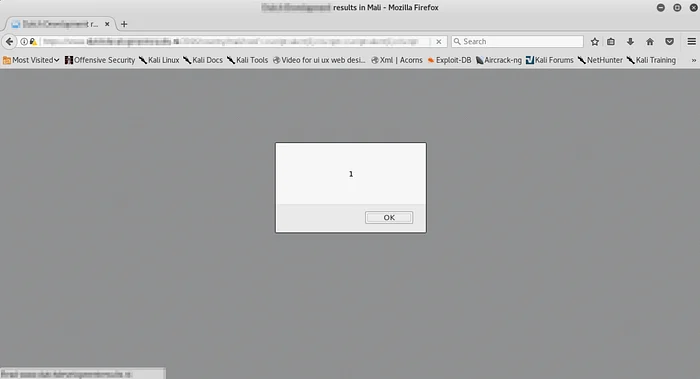
The image sits with the sentence about creating the POC and reporting to the NCSC; the report does not caption it or explain what it shows.
Step 3: Triage and fix
The NCSC reproduced the issue and informed the responsible organisation. The issue was confirmed fixed, and the author received appreciation for the responsible disclosure.
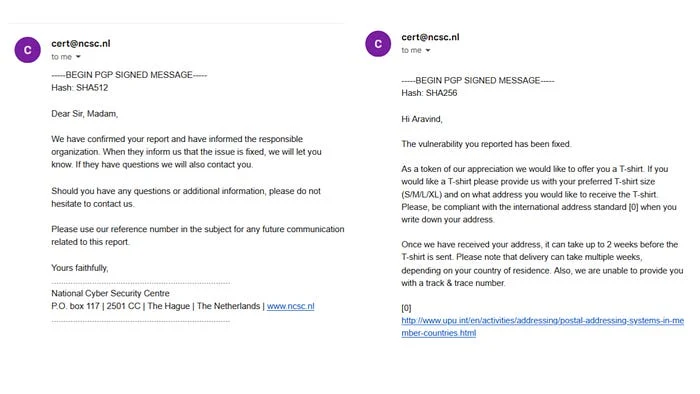
This second image sits with the sentence about the fix and the appreciation; again the report gives no caption or description of its contents.
Root cause
The report does not analyse the server-side code. What can be said from the behaviour is that a query-string parameter was reflected into the HTML response in a context where the injected "><img src=x onerror=alert(1)> was parsed as markup and its event handler ran. That means the value was not being output-encoded for the context it landed in, or was being placed inside an attribute or script context that the encoding did not cover. Which of those applies is not stated. The report also does not say whether any framework-level protection, CSP or input filter was present and why it failed to stop the payload.
Impact
A reflected XSS on a government domain lets an attacker run script in the browser of a user who follows a crafted link, in the origin of the affected site. What an attacker could then do depends on what that origin holds: session cookies without the HttpOnly flag, page content, and any action the site allows on the user's behalf. The author's own framing is limited to the class of issue and the fact that it was accepted and fixed.
Fix
The issue was confirmed fixed. The general remedy for reflected XSS is context-aware output encoding of the reflected value, plus a restrictive Content Security Policy as defence in depth; which of these was applied here is not stated.
Variants to test
- Run the same pipeline against other government scope lists: concatenate the domain files, de-duplicate, probe with
httpx, pull historical URLs withwaybackurls, filter withgf xss, substitute withqsreplace, and send withfreq. A positive result is a response in which the payload appears unencoded in a position where the browser parses it as markup. - Test parameters that
gfmisses, such as ones whose names do not match common XSS patterns. A positive result is the same reflection behaviour on a parameter that never appeared in the filtered list. - Try payloads for contexts other than the attribute-breaking case, for example values reflected inside a
<script>block or inside a JavaScript string. A positive result is script execution without needing to close an HTML attribute. - Re-check historical URLs that now return errors or redirects; parameters are sometimes still processed after a redirect. A positive result is the payload surviving the redirect and executing on the final page.
- Review the false positives from
freqmanually rather than discarding them. A positive result is a reflection that the automated check scored as a miss but that a browser still executes.
What happened, in plain words
A security researcher found a bug on a website belonging to the Dutch Government. The bug is called reflected cross-site scripting, or reflected XSS for short. In simple terms: a website took a piece of text from the address bar of a visitor's browser and pasted it straight into the page without cleaning it first. If that text is actually a small piece of code, the browser runs it as if the website itself had written it.
The researcher did not have a special invitation or a list of targets handed to him. He had seen other people posting online about finding bugs in Dutch Government systems and getting a t-shirt as a thank-you. That made him curious, so he built his own list of Dutch Government websites from public sources, used free tools to look for weak spots, and tested them. When he found one, he wrote a short demonstration (a proof of concept, or POC) and sent it to the NCSC, the Dutch national body that coordinates this kind of report. The NCSC reproduced the bug and told the organisation responsible, and the issue was confirmed fixed. The researcher got a thank-you.
This article walks through exactly what he did, step by step, and explains every tool and term along the way. You only need to be comfortable using a browser and a computer to follow it.
Setup
Where the list of targets came from
Before you can test anything, you need to know what you are allowed to test. In bug bounty work this is called the scope: the set of systems that are fair game. Testing something outside the scope is not research, it is unauthorised access, which is a crime in most countries.
Normally a bug bounty programme publishes its scope on a platform page. Here the researcher did not use a programme page. He used publicly available lists of Dutch Government domains instead. A domain is the part of a web address that identifies a site, like example.nl. A subdomain is a smaller name in front of it, like portal.example.nl.
He lists three sources:
- A GitHub repository called
Dutch_Gov_Scope, described as a collection of Dutch Government domains:
https://github.com/zzzteph/Dutch_Gov_Scope
- A gist of domains. A gist is a small public snippet page on GitHub, often used to share a plain list of text:
https://gist.github.com/testerzs/[redacted]
- A second gist of domains:
https://gist.github.com/sushilphuyal/[redacted]
Why start here? Because a list of real government domains is the raw material for everything that follows. Without a target list, there is nothing to probe.
The tools
The researcher used a small set of free command-line tools. A command line (also called a terminal or shell) is a text window where you type instructions instead of clicking buttons. Each tool below does one job:
httpx: knocks on each host and reports which ones answer.waybackurls: asks the Wayback Machine for old addresses of a site.gf: filters a long list of addresses down to the ones that look interesting for a particular bug type.qsreplace: swaps the values in an address for a test string.freq: sends the crafted requests and collects the answers.
The Wayback Machine is an internet archive that has been saving copies of web pages for years. It is useful because old addresses often still work even after a site has been redesigned, and forgotten parameters are a common source of bugs.
The report gives no version numbers for any of these tools. No accounts, roles or credentials were needed: everything was done against public endpoints. An endpoint is simply a specific address on a server that accepts a request, like a particular page or a particular service behind a page.
Finding it
The logic is simple. Old address data is full of forgotten parameters, and gf's XSS patterns are a cheap way to shrink a huge list down to the handful worth testing by hand. The researcher's own summary of the lesson is that reconnaissance is about adapting: when one approach does not work, change the technique and keep exploring.
Reconnaissance (often shortened to recon) means gathering information about a target before attacking it: what hosts exist, what pages exist, what parameters they accept. It is the map-making phase.
Step 1: Build the target list
The three domain lists were joined together and cleaned of duplicates:
cat git1 git2 git3 | sort -u > all_subdomains_1.txt
Line by line:
cat git1 git2 git3prints the contents of three files, one after another. The namesgit1,git2andgit3stand for the three downloaded lists.- The vertical bar
|is a pipe. It takes the output of the command on its left and feeds it as input to the command on its right. Think of it as a conveyor belt between two machines. sort -usorts the lines alphabetically and removes duplicates. The-umeans unique.>writes the result into a new file calledall_subdomains_1.txt, replacing anything already there.
Why do this? Because the three lists overlap. If the same domain appears three times, you would probe it three times for no reason. De-duplicating saves time and keeps the results clean.
Step 2: Keep only reachable hosts
httpx -l all_subdomains_1.txt -o httpx_alive_2.txt
Line by line:
httpxis the probing tool.-l all_subdomains_1.txttells it to read the list of hosts from that file. The-lstands for list.-o httpx_alive_2.txttells it to write the hosts that answered into that file. The-ostands for output.
Why do this? A domain list contains many names that no longer exist, or that never answered in the first place. Probing each one and keeping only the live ones means every later step works on real, reachable sites instead of dead ends.
Step 3: Collect historical URLs
cat httpx_alive_2.txt | waybackurls | tee endpoint_3.txt
Line by line:
cat httpx_alive_2.txtprints the list of live hosts.- The pipe sends that list into
waybackurls. waybackurlsasks the Wayback Machine for every historical URL it has recorded for each host, and prints them out.tee endpoint_3.txtwrites what it receives intoendpoint_3.txtwhile also passing it along. The name comes from a plumbing tee: water goes two ways at once.
A URL is a full web address, like https://example.nl/page?name=value. The part after the question mark is the query string, and each name=value pair in it is a parameter. Parameters are how a page receives input from the address bar: a search term, a page number, a language choice.
Why do this? The researcher notes that this produced a much larger collection of URLs and parameters. More parameters means more possible places for a bug to hide.
Step 4: Filter for XSS candidates
cat endpoint_3.txt | gf xss > gf_xss_4.txt
Line by line:
cat endpoint_3.txtprints the collected URLs.- The pipe feeds them into
gf. gf xssapplies a built-in set of patterns for cross-site scripting. It keeps the URLs whose parameter names look like plausible injection points and drops the rest.>writes the survivors intogf_xss_4.txt.
Why do this? The historical URL list can be enormous. Testing every URL by hand is impossible. gf is a cheap first pass that throws away the obviously uninteresting ones, so a human only has to look at a much smaller pile.
Step 5: Substitute the payload
cat gf_xss_4.txt | qsreplace '"><img src=x onerror=alert(1)>' | tee qsxss_5.txt
Line by line:
cat gf_xss_4.txtprints the filtered URLs.- The pipe feeds them into
qsreplace. qsreplacerewrites the value of every query-string parameter in each URL with the test string you give it. So?name=valuebecomes?name=<the payload>.tee qsxss_5.txtsaves the rewritten URLs to a file while passing them along.
The payload itself is:
"><img src=x onerror=alert(1)>
What each part does:
">is a quote-breaker. It is designed to close an attribute value and the tag the value sits inside, so that whatever comes next is treated as new HTML rather than as text.<img src=x onerror=alert(1)>is an image tag.src=xpoints at an image that does not exist, so the image fails to load.onerror=alert(1)says: when that failure happens, run the JavaScriptalert(1), which pops up a small dialog box with the number 1 in it.
A payload is the piece of input you send to test whether a bug exists. HTML is the language web pages are written in, made of tags like <img> and attributes like src. JavaScript is the programming language browsers run. alert(1) is the simplest possible proof that JavaScript ran: if a box appears, your code executed.
Why this payload? Because it works in a very common situation: when a page pastes your input inside an HTML attribute. The quote-breaker escapes the attribute, and the image tag gives the browser something to run.
Step 6: Send the requests
cat qsxss_5.txt | freq | tee -a possible-xss_6.txt
Line by line:
cat qsxss_5.txtprints the URLs with the payload inserted.- The pipe feeds them into
freq. freqsends multiple HTTP requests using the crafted payloads and prints the results.tee -a possible-xss_6.txtappends those results to the file. The-ameans append: add to the end instead of overwriting.
An HTTP request is the message your browser sends to a server to ask for a page. The server answers with an HTTP response, which contains the page content and some headers. Headers are small labelled lines of extra information, like the type of content or rules about caching.
Why do this? Because you cannot know whether a payload works until you send it and look at what comes back. freq automates the sending so you can test many URLs quickly.
This produced a large number of potential XSS hits, but also plenty of false positives: results that look like a hit but are not. A page might echo your payload back in a place where the browser treats it as plain text, not code. So the researcher reviewed the results manually, one by one. That manual step is where the real judgement happens.
Exploitation
Step 1: Confirm the reflection
After filtering the false positives by hand, one parameter stood out as vulnerable to reflected XSS. The payload executed successfully.
Reflected XSS means the malicious input is not stored on the server. It travels in the URL, the server echoes it straight back into the page it sends, and the browser runs it. The word reflected is literal: your input bounces off the server and comes back in the response. A reflection is the moment your input appears in the returned page.
The report does not name the host, the path or the parameter, and it does not include the request or response that showed the reflection.
Step 2: Build a proof of concept
With execution confirmed, the author created a POC and reported the reflected XSS to the NCSC.
A POC (proof of concept) is a minimal, repeatable demonstration that a bug is real. It is not an exploit kit; it is just enough evidence for the receiving team to see the problem with their own eyes. The NCSC is the National Cyber Security Centre of the Netherlands, which coordinates vulnerability reports affecting Dutch organisations.
The report does not describe the contents of the POC.
The image sits with the sentence about creating the POC and reporting to the NCSC; the report does not caption it or explain what it shows.
Step 3: Triage and fix
The NCSC reproduced the issue and informed the responsible organisation. The issue was confirmed fixed, and the author received appreciation for the responsible disclosure.
Triage is the process of sorting reports: checking whether a bug is real, how serious it is, and who needs to fix it. Responsible disclosure is the practice of telling the owner privately, giving them time to fix it, and only then talking about it publicly. It is the opposite of dumping a bug on the internet for anyone to abuse.
This second image sits with the sentence about the fix and the appreciation; again the report gives no caption or description of its contents.
Root cause
The report does not analyse the server-side code. What can be said from the behaviour is that a query-string parameter was reflected into the HTML response in a context where the injected "><img src=x onerror=alert(1)> was parsed as markup and its event handler ran.
In plain words: the server took the value from the address bar and pasted it into the page without output encoding. Output encoding means converting special characters like <, > and " into harmless versions so the browser shows them as text instead of treating them as code. Because that did not happen, the browser saw a real image tag and ran its onerror handler.
That means the value was not being output-encoded for the context it landed in, or was being placed inside an attribute or script context that the encoding did not cover. Which of those applies is not stated. The report also does not say whether any framework-level protection, CSP or input filter was present and why it failed to stop the payload. A CSP (Content Security Policy) is a rule set a site sends to the browser saying which scripts are allowed to run; a good CSP can stop injected scripts even when encoding fails.
Impact
A reflected XSS on a government domain lets an attacker run script in the browser of a user who follows a crafted link, in the origin of the affected site. The origin is the combination of scheme, host and port, like https://example.nl; scripts from one origin are treated as belonging to that site, which is why this matters.
What an attacker could then do depends on what that origin holds: session cookies without the HttpOnly flag, page content, and any action the site allows on the user's behalf. A cookie is a small piece of data a site stores in your browser so it can recognise you on the next request; a session cookie is the one that proves you are logged in. The HttpOnly flag tells the browser to hide that cookie from JavaScript, so a script injected into the page cannot read it.
The author's own framing is limited to the class of issue and the fact that it was accepted and fixed.
Fix
The issue was confirmed fixed. The general remedy for reflected XSS is context-aware output encoding of the reflected value, plus a restrictive Content Security Policy as defence in depth; which of these was applied here is not stated.
Context-aware encoding means encoding depends on where the value lands: inside HTML text, inside an attribute, inside a script block and inside a URL each need different treatment. Defence in depth means layering protections so that if one fails, another still holds.
Variants to test
- Run the same pipeline against other government scope lists: concatenate the domain files, de-duplicate, probe with
httpx, pull historical URLs withwaybackurls, filter withgf xss, substitute withqsreplace, and send withfreq. A positive result is a response in which the payload appears unencoded in a position where the browser parses it as markup. - Test parameters that
gfmisses, such as ones whose names do not match common XSS patterns. A positive result is the same reflection behaviour on a parameter that never appeared in the filtered list. - Try payloads for contexts other than the attribute-breaking case, for example values reflected inside a
<script>block or inside a JavaScript string. A positive result is script execution without needing to close an HTML attribute. - Re-check historical URLs that now return errors or redirects; parameters are sometimes still processed after a redirect. A redirect is a server answer that tells the browser to go to a different address instead. A positive result is the payload surviving the redirect and executing on the final page.
- Review the false positives from
freqmanually rather than discarding them. A positive result is a reflection that the automated check scored as a miss but that a browser still executes.
Glossary
- Attribute: a setting inside an HTML tag, like
srcin<img src=x>. - Bug bounty: a programme that rewards people for reporting security bugs responsibly.
- Command line: a text window where you type instructions instead of clicking.
- Cookie: a small piece of data a site stores in your browser to recognise you later.
- CSP (Content Security Policy): rules a site sends to the browser saying which scripts may run.
- Defence in depth: layering protections so one failure does not mean total failure.
- Domain: the main name of a website, like
example.nl. - Endpoint: a specific address on a server that accepts requests.
- False positive: a result that looks like a hit but is not.
- Gist: a small public snippet page on GitHub, often a plain text list.
- Header: a small labelled line of extra information in an HTTP request or response.
- HTML: the language web pages are written in, made of tags and attributes.
- HTTP request: the message a browser sends to a server to ask for something.
- HTTP response: the server's answer, containing content and headers.
- HttpOnly: a cookie flag that hides the cookie from JavaScript.
- Impact: what an attacker could actually do if the bug is abused.
- JavaScript: the programming language browsers run.
- NCSC: the Dutch National Cyber Security Centre, which coordinates vulnerability reports.
- Origin: scheme plus host plus port, like
https://example.nl; scripts from one origin belong to that site. - Output encoding: converting special characters so the browser shows them as text, not code.
- Parameter: a
name=valuepair in a URL's query string, used to pass input to a page. - Payload: the test input you send to check whether a bug exists.
- Pipe: the
|symbol, which feeds one command's output into the next command. - POC (proof of concept): a minimal demonstration that a bug is real.
- Query string: the part of a URL after the question mark, holding parameters.
- Reconnaissance (recon): gathering information about a target before testing it.
- Redirect: a server answer telling the browser to go to a different address.
- Reflected XSS: a bug where input from the URL is echoed back into the page and run as code.
- Reflection: the moment your input appears in the returned page.
- Responsible disclosure: telling an owner privately, giving time to fix, then talking publicly.
- Scope: the set of systems you are allowed to test.
- Session cookie: the cookie that proves you are logged in.
- Subdomain: a smaller name in front of a domain, like
portal.example.nl. - Triage: sorting reports to check whether a bug is real, how serious it is, and who fixes it.
- URL: a full web address.
- Wayback Machine: an internet archive that saves copies of web pages over time.
- XSS (cross-site scripting): a bug class where an attacker gets code to run in another user's browser on a site's origin.




