How I Found Sql Injection on 8x8 , Cengage,Comodo,Automattic,20 company
The author claims to have found SQL injection vulnerabilities in multiple companies by using time-based payloads that cause delays when injected into parameters and login forms. The text does not provide specific details about any individual vulnerability, only a general method and a list of affected organisations.
 Published on ahmadaabdulla.medium.com
https://www.cybershield.krd/Courses/Course/28
The full write-up lives on its author's site
It belongs to its author, so we link to it rather than copy it. The other two tabs are our own rewrites, checked against it.
Context
This write-up describes a time-based blind SQL injection technique that the researcher, Ahmad A Abdulla (@lu3ky13), says was used against a list of organisations: 8x8, Cengage, Comodo, Automattic, Intel, IBM, MTN Group, uis.cam.ac.uk, volvocars.biz and asus.com. The report gives no endpoint, parameter, hostname or HTTP request for any of them. The only concrete technical content is the payload family and the timing measurements taken through Burp.
SQL injection, as the report defines it, is a web security vulnerability that lets an attacker interfere with the queries an application makes to its database. It generally allows an attacker to view data they are not normally able to retrieve, including data belonging to other users or any other data the application itself can access. In many cases an attacker can modify or delete that data, causing persistent changes to the application's content or behaviour.
The feature being tested is any input that reaches a database query: URL parameters and login forms are the two the report names.
Setup
The only tool mentioned is Burp, used to send requests and observe response times. No account, role, version or other precondition is described. The researcher states that the method is easy: find SQL injection on the website, and use Burp to test it.
Finding it
The signal is response time. The researcher sends a payload containing a conditional sleep() and compares how long the response takes with the value passed to sleep(). If the delay tracks the number, the input is reaching a SQL expression that the database evaluates.
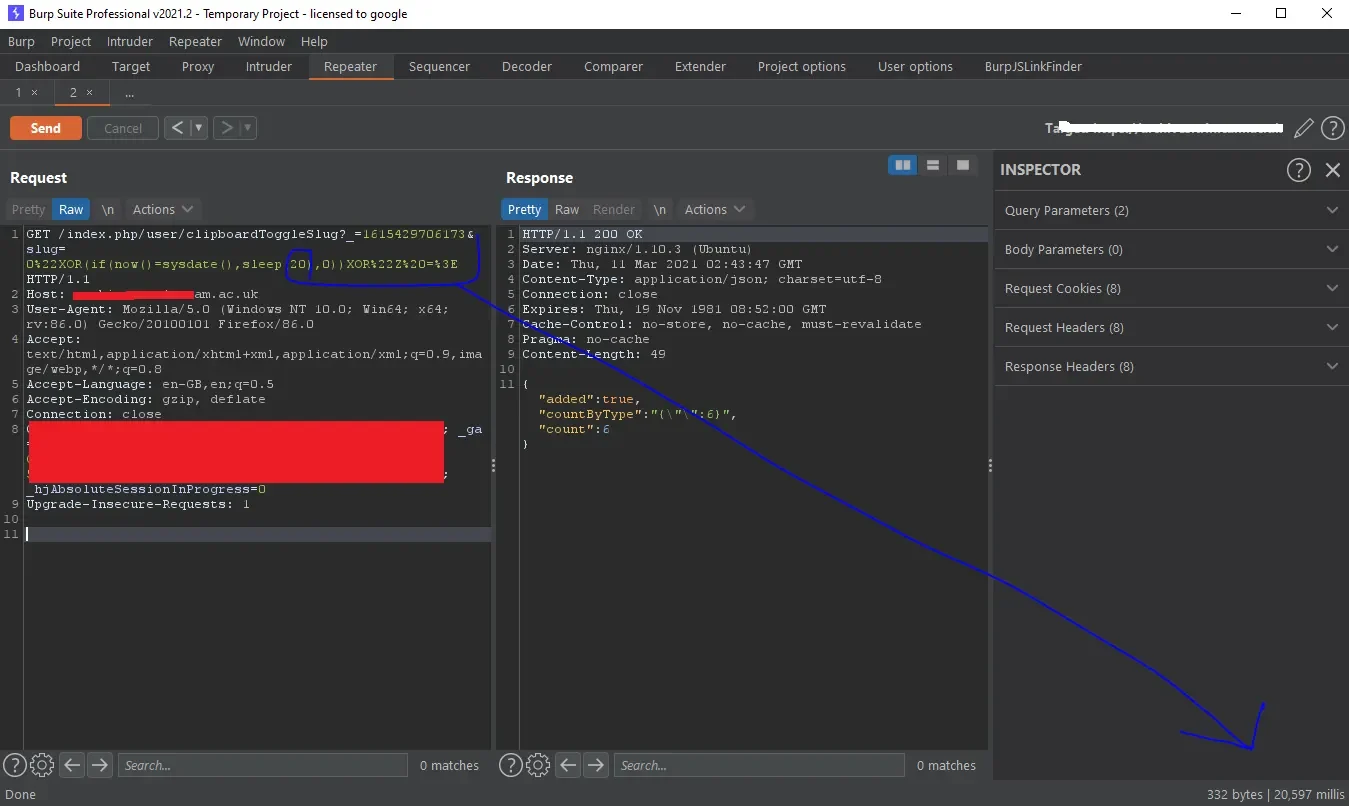
The image is presented as the single illustration of the method used across all the listed companies.
Exploitation
Step 1: send the conditional sleep payload
The payload used is:
0"XOR(if(now()=sysdate(),sleep(12),0))XOR"Z
The researcher explains the command by its effect: if you add sleep(12) the response needs 12 seconds to come back, and if you add sleep(20) the browser and Burp show the response after 20 seconds. The researcher explains the command by its effect: the response time follows the value passed to sleep().
Step 2: vary the sleep value and record the time
The measurements given are:
| Payload | Response time (s) |
|---|---|
0"XOR(if(now()=sysdate(),sleep(12),0))XOR"Z |
12.508 |
0"XOR(if(now()=sysdate(),sleep(12),0))XOR"Z |
12.543 |
0"XOR(if(now()=sysdate(),sleep(0),0))XOR"Z |
0.523 |
0"XOR(if(now()=sysdate(),sleep(6),0))XOR"Z |
6.565 |
0"XOR(if(now()=sysdate(),sleep(3),0))XOR"Z |
3.518 |
0"XOR(if(now()=sysdate(),sleep(0),0))XOR"Z |
0.502 |
0"XOR(if(now()=sysdate(),sleep(12),0))XOR"Z |
12.491 |
0"XOR(if(now()=sysdate(),sleep(6),0))XOR"Z |
6.508 |
0"XOR(if(now()=sysdate(),sleep(0),0))XOR"Z |
0.695 |
The pattern is the evidence: sleep(0) returns in about half a second, sleep(3) in about 3.5, sleep(6) in about 6.5 and sleep(12) in about 12.5. The extra fraction is ordinary request overhead. Repeating the same value gives similar results. The researcher states that this schedule was used to find SQL injection and that 20 companies were found this way.
Step 3: apply it to every input
The second method given is to put the command in all parameters and login forms. The report does not show a request or a result for this variant.
Root cause
The report does not analyse the application code. The report does not analyse the application code or state the cause. The report does not say which database engine was involved, though the now(), sysdate() and sleep() functions are MySQL-style. Why existing defences did not stop it is not discussed.
Impact
The report repeats the general consequences of SQL injection: viewing data the attacker should not retrieve, including other users' data, and modifying or deleting data with persistent effects on content or behaviour. It does not demonstrate data extraction, only the timing signal.
Fix
No fix is described. The measure implied by the technique is to stop building queries by string concatenation and to use parameterised queries or prepared statements, so that injected fragments are never parsed as SQL.
Variants to test
- Send the same payload with
sleep(0)and with a longer value to the same parameter. A positive result is a response time that follows the sleep value and repeats consistently. - Try the payload in every parameter of a request, one at a time, and in login form fields. A positive result is the same delay pattern appearing from an input that previously looked static.
- Repeat each measurement at least twice. A positive result is a stable difference between the zero and non-zero sleep values, not a single slow response.
- Compare against a baseline request with no payload. A positive result is a baseline that stays fast while the injected request is delayed by the expected amount.
What happened, in plain words
A security researcher, Ahmad A Abdulla (@lu3ky13), wrote up a technique for finding a common web weakness called SQL injection. He says he used it against a list of organisations: 8x8, Cengage, Comodo, Automattic, Intel, IBM, MTN Group, uis.cam.ac.uk, volvocars.biz and asus.com. He says he reported the findings through HackerOne and by email to the companies.
The write-up does not show a single web address, form field or captured request from any of those organisations. What it does show is one family of text strings (called payloads) that you paste into a website's input, and a table of timings showing responses pausing for as long as the payload asks. That pause is the proof: it means the text you typed was not treated as harmless data but was run as part of a database command.
This beginner version walks through the same material in the same order: what SQL injection is, the tool used, how the timing trick works, the exact payload, the measurements, the second method of trying every input, why it happens, what harm it can do, how to fix it, and a short list of variations to try. Every payload and number below is copied from the write-up.
What SQL injection is
Almost every website with a login, a search box or a product page sits in front of a database. A database is an organised store of information: user accounts, orders, articles, anything the site needs to remember. When you type something into a page, the website builds a question for the database, called a query, and sends it off. The database answers, and the website shows you the result.
A simple comparison: imagine a librarian who takes your written request slip and reads it aloud to the archive. If you write "book about birds", you get a book about birds. But if you write "book about birds, and also please read out every member's address", a careless librarian might do exactly that, because your slip is just words and the librarian cannot tell your request from the archive's own instructions.
SQL injection works the same way. The write-up defines it like this: SQL injection is a web security vulnerability that allows an attacker to interfere with the queries that an application makes to its database. It generally allows an attacker to view data that they are not normally able to retrieve, including data belonging to other users, or any other data the application itself is able to access. In many cases, an attacker can modify or delete this data, causing persistent changes to the application's content or behaviour.
Two words in that definition are worth unpacking. "Retrieve" means reading data out. "Persistent changes" means the damage stays: if someone edits or deletes a record, it does not fix itself when they close the browser.
Where you would test it
The write-up names two kinds of input that reach a database query: URL parameters and login forms.
A URL parameter is the part of a web address after a question mark. In a shop address like example.com/search?item=shoes, the parameter is item and its value is shoes. The page takes that value and looks it up. If the site pastes shoes straight into a database question, then whatever you put in its place also goes into that question.
A login form is the username and password box. Behind it, the site checks your details against a stored record. That check is also a database question, so the boxes are another place where typed text can end up in a query.
The tool: Burp
The only tool the write-up mentions is Burp. Burp is a program that sits between your browser and a website, like a recording machine placed on a phone line. Normally your browser talks to the site directly. With Burp in the middle, you can see each request your browser sends and each response the site sends back, pause a request, change it, and send it again.
That last ability is the important one here. A browser will not easily let you put strange text into a request and watch how long the reply takes. Burp lets you edit the request by hand, press send, and read the time the response took. The researcher's stated method is simple: find SQL injection on the website, and use Burp to test it.
The idea behind the test: making the site wait
The trick in this write-up is called time-based blind SQL injection. "Blind" means you cannot see the database's answer on the page: the site does not print an error or show you data. So you need another signal that your text reached the database. The signal chosen here is time.
Databases have a function called sleep(). You give it a number of seconds, and it does nothing for that long. If you can make the database run sleep(12), the whole page will take about 12 seconds to come back, because the website is waiting for the database to finish before it can build the page.
The researcher explains the command by its effect: if you add sleep(12) the response needs 12 seconds to browse the webpage, and if you add sleep(20) the browser and Burp show the response after 20 seconds. The point is that the delay is under your control. If you ask for 3 seconds and get roughly 3 seconds, and you ask for 12 and get roughly 12, the number you typed is being executed, not just stored as text.
The payload
The payload used is:
0"XOR(if(now()=sysdate(),sleep(12),0))XOR"Z
Here is what each part does, in plain words:
0"is a number, a zero, followed by a double quote. The quote is there to close whatever quoted text the website's own query had opened, so that what follows is read as database language rather than as part of a string.XORis a logical operator, like "one or the other but not both". It is used here as scaffolding: it lets the injected fragment slot into the surrounding query without breaking its grammar, so the database still accepts the whole statement.if(now()=sysdate(),sleep(12),0)is a three-part question.now()is the current date and time,sysdate()is also the current date and time, sonow()=sysdate()is a comparison that is true in normal operation. When the condition is true, the database runssleep(12); when it is false, it uses0instead, which does nothing.XOR"Zcloses the structure and provides a trailing quoted value so the rest of the original query still parses.
In short: the payload asks the database a question whose answer is always "yes", and the reward for "yes" is a twelve-second pause. If the page pauses, your text was executed as database language.
The measurements
The researcher varied the number inside sleep() and recorded how long each response took:
| Payload | Response time (s) |
|---|---|
0"XOR(if(now()=sysdate(),sleep(12),0))XOR"Z |
12.508 |
0"XOR(if(now()=sysdate(),sleep(12),0))XOR"Z |
12.543 |
0"XOR(if(now()=sysdate(),sleep(0),0))XOR"Z |
0.523 |
0"XOR(if(now()=sysdate(),sleep(6),0))XOR"Z |
6.565 |
0"XOR(if(now()=sysdate(),sleep(3),0))XOR"Z |
3.518 |
0"XOR(if(now()=sysdate(),sleep(0),0))XOR"Z |
0.502 |
0"XOR(if(now()=sysdate(),sleep(12),0))XOR"Z |
12.491 |
0"XOR(if(now()=sysdate(),sleep(6),0))XOR"Z |
6.508 |
0"XOR(if(now()=sysdate(),sleep(0),0))XOR"Z |
0.695 |
Read the table as pairs. When the payload asks for no pause (sleep(0)), the reply arrives in about half a second: 0.523, 0.502 and 0.695. When it asks for three seconds, the reply takes about three and a half: 3.518. Six seconds gives about six and a half: 6.565 and 6.508. Twelve seconds gives about twelve and a half: 12.508, 12.543 and 12.491.
The extra half second is ordinary overhead: the network, the server building the page, your own machine. What matters is that the delay follows the number you chose. The same value repeated gives a similar result. A slow page would be slow regardless of what you typed; here, the page is fast when you ask for zero and slow when you ask for twelve.
The researcher states that he used this schedule to find SQL injection and that he hacked 20 companies this way.
The second method: try every input
The write-up gives a second way to look for the weakness: put the command in all parameters and login forms. The idea is coverage. You do not know in advance which box or which part of the address is glued into a database question, so you try each one in turn and watch for the delay pattern. The write-up does not show a request or a result for this variant.
The image is presented as the single illustration of the method used across all the listed companies.
Why this happens
A website builds its database question as a piece of text. If it builds that text by gluing together fixed wording and whatever the visitor typed, then the visitor's text becomes part of the instruction. The database has no way to tell which words came from the programmer and which came from the visitor, so it obeys both.
The behaviour shown here is consistent with exactly that: user input being concatenated into a SQL statement without parameterisation, so that a fragment such as 0"XOR(...)XOR"Z is parsed as SQL rather than treated as data. The write-up does not analyse the application code, does not say which database engine was involved, and does not discuss why existing defences did not stop it. The functions used, now(), sysdate() and sleep(), are MySQL-style, but that is an observation about the payload, not something the write-up states.
What harm it can do
The write-up repeats the general consequences of SQL injection rather than demonstrating them. Those consequences are: viewing data the attacker should not retrieve, including other users' data, and modifying or deleting data with persistent effects on content or behaviour. In other words, the same flaw that lets you make the page wait could, in principle, let someone read records they should not see or change records they should not touch.
What the write-up actually demonstrates is the timing signal, not data extraction.
How to fix it
The measure implied by the technique is to stop building queries by string concatenation and to use parameterised queries or prepared statements. In plain words: instead of gluing the visitor's text into the instruction, you hand the database the instruction and the visitor's text as two separate things, and the database is told that the second one is only data. Then a fragment like 0"XOR(...)XOR"Z is stored or compared as a literal string and never executed.
Variations to try
- Send the same payload with
sleep(0)and with a longer value to the same parameter. A positive result is a response time that follows the sleep value and repeats consistently. - Try the payload in every parameter of a request, one at a time, and in login form fields. A positive result is the same delay pattern appearing from an input that previously looked static.
- Repeat each measurement at least twice. A positive result is a stable difference between the zero and non-zero sleep values, not a single slow response.
- Compare against a baseline request with no payload. A positive result is a baseline that stays fast while the injected request is delayed by the expected amount.
Glossary
- SQL: the language websites use to ask a database questions and to change what it stores.
- Database: an organised store of information that a website reads from and writes to.
- Query: a single question or instruction sent to a database.
- SQL injection (SQLi): a weakness where a website glues visitor input into a database query, so the input can be executed as database language.
- Blind SQL injection: injection where the database's answer is not shown on the page, so you need another signal, such as a delay, to confirm it worked.
- Time-based blind SQL injection: blind injection that uses response time as the signal.
- Payload: the exact text you send to a website to test or exploit a weakness.
- Parameter: a named value in a URL, such as
itemin?item=shoes, or a field in a form. - Burp: a tool that sits between your browser and a website so you can view, edit and resend requests and see how long responses take.
- Request: the message your browser sends to a website asking for a page or an action.
- Response: the message the website sends back.
sleep(): a database function that pauses for a given number of seconds.now()/sysdate(): database functions that return the current date and time.if(condition, a, b): a database function that returnsawhen the condition is true andbwhen it is false.XOR: a logical operator meaning one or the other but not both; here used to keep the injected fragment grammatically valid.- Concatenation: gluing pieces of text together, which is how the vulnerable query is built.
- Parameterised query / prepared statement: a way of sending a query where the visitor's text is kept separate from the instruction and treated only as data.
- Baseline: a normal request with no payload, used for comparison.
- HackerOne: a platform where security researchers report vulnerabilities to organisations.





