How I Get Bounty From Takeover Account
An API endpoint that returned student data was found to accept an extra query parameter, which caused it to return another user's data. The author also found that the password reset flow sent the reset message to any phone number without validation, allowing account takeover.
 Published on medium.com
Hi everyone how are you?, I hope you guys are well. I’m RyuuKhagetsu, this is my article in English, sorry if there are any mistakes.
The full write-up lives on its author's site
It belongs to its author, so we link to it rather than copy it. The other two tabs are our own rewrites, checked against it.
Context
This is a short write-up by RyuuKhagetsu about a bug found on a learning website, referred to throughout the article only as "site.com". The author had a normal account, described as "user-account", and wanted the premium tier, "user-account-premium". The author wanted the premium tier, so they went looking for a vulnerability.
The feature involved is the student data API. The application exposes account data through a path of the form /api/siswa/<id>, where siswa is the Indonesian word for student. The report does not describe the rest of the product or how the premium tier is normally obtained.
Setup
The only tool mentioned is Burp Suite, used for intercepting requests, Repeater, and the Param Miner extension. The author also used the site's "forgot-password" flow. No versions are given.
Finding it
The author opened Burp Suite and looked at the requests the application sent. One of them was:
/api/siswa/82182
Sending it to Repeater and looking at the response returned the author's own account data.
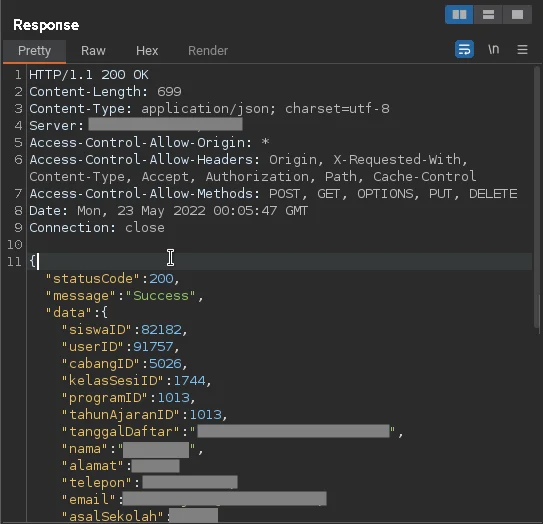
Because the identifier in the path is a plain number, the author suspected an IDOR and tried changing it to a neighbouring value, which would belong to another account:
/api/student/82181
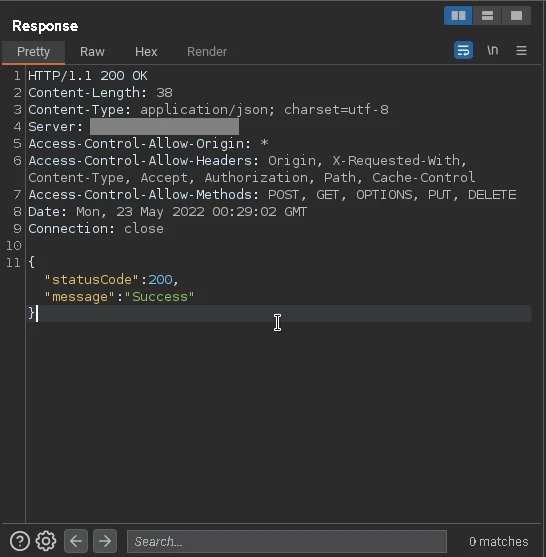
This did not work. Note that the path in this second attempt is written as /api/student/... rather than /api/siswa/...; the report shows it that way and does not comment on the difference.
Exploitation
Step 1: Look for hidden parameters with Param Miner
Since the direct identifier change failed, the author tried a different angle and ran the Param Miner extension against the base path /api/siswa/, using its "Guess headers" option. Param Miner is a Burp extension that identifies hidden, unlinked parameters.
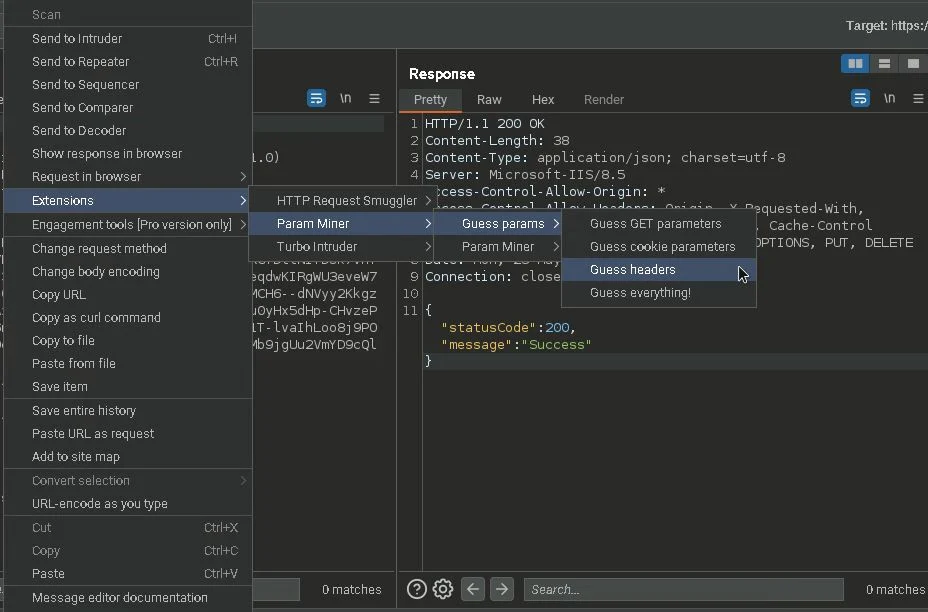
Step 2: Read another account's data through the guessed parameter
Param Miner changed the request to include a guessed parameter:
/api/siswa/?wy0kvoly1=1
With this request, the author received data belonging to another account.
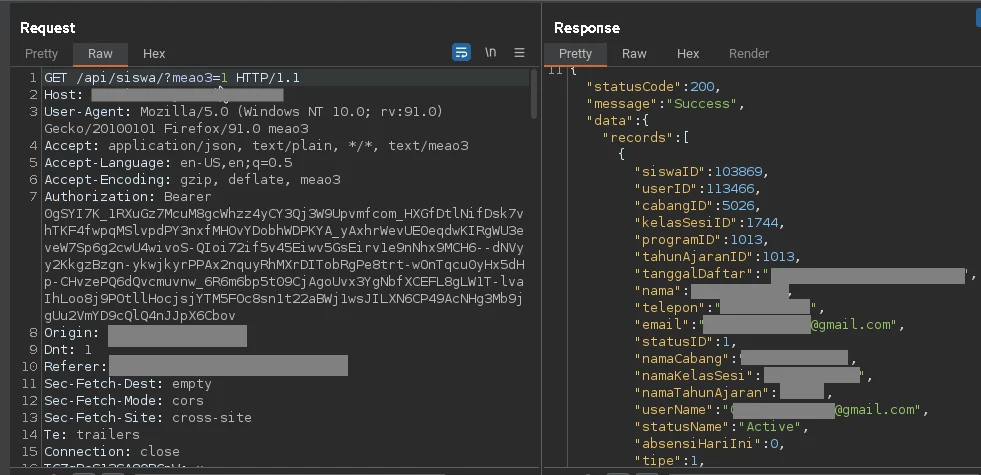
The report does not show the response body, the account identifier that came back, or which header or parameter name was actually responsible beyond the guessed wy0kvoly1 shown in the request.
Step 3: Reset the victim's password
With the victim's data in hand, the author moved to the "forgot-password" flow. The author entered the victim's email address together with their own phone number, and the site sent the password-change message to that number. In the author's words, the forgot-password function sent the message to anyone's number without any validation.
Timeline
| Date | Event |
|---|---|
| 10 May 2022 | Report sent to site.com |
| 11 May 2022 | Site.com responded to the report |
| 12 May 2022 | Bounty received |
Root cause
The report does not include the vendor's analysis, so the following is inferred from the behaviour shown.
The student API appears to accept a guessed parameter that changes which account's data is returned. The guessed parameter name produced another user's record, which suggests the endpoint trusts a client-supplied selector instead of deriving the account from the session. Why the plain numeric path change failed while the parameter worked is not explained in the report; likely the path segment is validated or ignored and the account is chosen elsewhere.
The password reset has a separate flaw: the destination for the reset message is taken from user input and is not bound to the account being reset, so the message can be delivered to a number the attacker controls.
Impact
An authenticated user could read another account's data through the student API, and then use the forgot-password flow to have the password-change message delivered to their own phone number, taking over the account.
Fix
Based on the behaviour described, the API should derive the account from the authenticated session rather than from a client-supplied parameter, and the password reset should send the message only to a destination already verified and stored on the account, never to a number supplied in the reset request.
Variants to test
- Numeric object identifiers in API paths: change the identifier to a neighbouring value and compare responses. A positive result is another user's record returned.
- Hidden parameters on API base paths: run Param Miner with header and parameter guessing against endpoints such as
/api/<resource>/. A positive result is a response that differs from the baseline, for example another account's data. - Password reset destination handling: submit a reset request with the victim's identifier and your own phone number or email. A positive result is a message delivered to your contact details for the victim's account.
- Identifier type changes: try the same identifier as a string, with padding, or in a different case. A positive result is a response that bypasses whatever check blocked the plain numeric change.
What happened, in plain words
A security researcher named RyuuKhagetsu had a normal account on a learning website, which the article calls "site.com". The account was a "user-account", and the researcher wanted the paid tier, "user-account-premium". The researcher went looking for a weakness in the website that would give access to the premium account.
The weakness turned out to be in two places. First, the website had a page (an API) that returns a student's account details, and it accepted a request that let the researcher read another person's data. Second, the website's "forgot-password" feature sent the password-change message to whatever phone number the person filling in the form typed, instead of to the number stored on the account. Put together, the researcher could read a victim's details and then have the victim's password reset message delivered to the researcher's own phone, which is account takeover.
The researcher reported it on 10 May 2022, got a reply the next day, and received a bounty on 12 May 2022.
Background: the words you need first
Before walking through the steps, here are the ideas the article relies on, explained from scratch.
- API: an API is a way for one piece of software to ask another for data or to do something, without a human clicking around a page. A useful comparison is a restaurant: you (the browser) do not walk into the kitchen; you tell the waiter what you want, and the waiter brings it back. The API is the waiter. On a website, the browser quietly calls APIs in the background to fill pages with data.
- Endpoint: the specific address of one API operation, for example the address that returns a student's details. Think of it as one particular counter in the restaurant, not the whole restaurant.
- Request and response: the browser sends a request (what you want) and the server sends back a response (the answer, usually with data inside).
- IDOR (Insecure Direct Object Reference): this is when a website lets you ask for a specific record by its identifier (a number or code) and does not check that the record belongs to you. The everyday comparison is a cloakroom: if the attendant hands over any coat whose ticket number you say, without checking that the ticket is yours, you can walk off with someone else's coat. The identifier here is the number in the address.
- Parameter: an extra piece of information attached to a request, usually after a
?in the address, in the formname=value. It is like adding a note to your order: "extra sauce". Websites often read these notes to decide what to return. - Header: extra information sent alongside a request, separate from the address. Headers carry things like what browser you use or what kind of answer you accept. They are like the label on an envelope rather than the letter inside.
- Hidden parameter: a parameter the website's own pages never use, but which the server still understands if you send it. Nobody sees it in normal browsing, so it is easy to miss.
- Burp Suite: a tool that sits between your browser and the website and lets you see, pause, change and resend requests. The comparison is a mailroom where you can open every letter, rewrite it, and post it again.
- Repeater: a part of Burp Suite that lets you take one captured request and send it again and again, changing one thing each time, and look at each response. It is the trial-and-error bench.
- Param Miner: an extension (an add-on) for Burp Suite that automatically tries many possible hidden parameter and header names against a request and tells you if any of them change the response. It is like trying a big bunch of keys on a lock to see which one turns.
- Forgot-password flow: the feature where you say "I lost my password", and the site sends you a way to set a new one, usually by email or text message.
- Account takeover: when someone else gains control of your account, typically by getting your password changed or reset to something they know.
- Bounty: a reward, usually money, that a company pays someone who reports a security problem to them responsibly.
Setup
The only tool the researcher mentions is Burp Suite, used for three things: watching the requests the site sends, resending them with Repeater, and running the Param Miner extension. The researcher also used the site's own "forgot-password" feature. No versions of anything are given.
In other words, you need to be logged in and to visit the page that shows your own student data, because that is the moment the browser makes the request you want to inspect.
Finding it
The researcher opened Burp Suite and looked at the requests the application sent while browsing. One of them was:
/api/siswa/82182
Line by line, in plain words:
/api/says this is an API address rather than a normal web page.siswais the Indonesian word for student, so this is the student part of the API.82182is an identifier: a number that tells the server which student's record to return. Here it is the researcher's own account.
Sending that request to Repeater and looking at the response returned the researcher's own account data. This step matters because it confirms the request works and returns the author's own data. If the number selects the account, the natural next question is what happens if you change the number.
Because the identifier in the address is a plain number, the researcher suspected an IDOR and tried changing it to a neighbouring value, which would belong to another account:
/api/student/82181
Line by line:
/api/student/is the same idea as before, but written in English rather than Indonesian.82181is one less than the researcher's own number, which the report says is someone else's account.
This did not work. One detail worth noticing: the address in this second attempt is written as /api/student/... rather than /api/siswa/.... The report shows it that way and does not comment on the difference, so we cannot say from the text whether the change of word mattered or whether the number change alone was rejected.
Exploitation
Step 1: Look for hidden parameters with Param Miner
Since simply changing the number failed, the researcher tried a different angle. Instead of guessing the identifier, the researcher guessed that the server might accept some extra piece of information that selects the account, something the site's own pages never send. To find such a thing automatically, the researcher ran the Param Miner extension against the base address /api/siswa/, using its "Guess headers" option.
Param Miner is a Burp extension that identifies hidden, unlinked parameters. The comparison is a person trying a large ring of keys on a door: most keys do nothing, but if the door opens, you have found the one that fits. The "Guess headers" option means it tries candidate header names as well as candidate parameters.
Step 2: Read another account's data through the guessed parameter
Param Miner changed the request to include a guessed parameter:
/api/siswa/?wy0kvoly1=1
Line by line:
/api/siswa/is the same student API base address as before, with no student number in it.?marks the start of the parameters, the extra notes attached to the request.wy0kvoly1=1is the guessed parameter: a random-looking name,wy0kvoly1, given the value1. The random name is deliberate; Param Miner generates names like this so that it is unlikely to collide with a real, known parameter.
With this request, the researcher received data belonging to another account. That is the IDOR: a guessed parameter returned another account's data.
The report does not show the response body, the account identifier that came back, or which header or parameter name was actually responsible beyond the guessed wy0kvoly1 shown in the request.
Step 3: Reset the victim's password
With the victim's data in hand, the researcher moved to the "forgot-password" flow. The researcher entered the victim's email address together with their own phone number, and the site sent the password-change message to that number. In the researcher's words, the forgot-password function sent the message to anyone's number without any validation.
Why this works, in plain terms: a password reset should only ever send the reset message to a contact detail that is already stored and verified on the account. Here the destination was taken from the form, so the person filling in the form could redirect the message to themselves. The comparison is a bank that posts your new bank card to whatever address you write on the form, rather than to the address on file.
The report does not show the request or the message contents for this step.
Timeline
| Date | Event |
|---|---|
| 10 May 2022 | Report sent to site.com |
| 11 May 2022 | Site.com responded to the report |
| 12 May 2022 | Bounty received |
Root cause
The report does not include the vendor's analysis, so the following is inferred from the behaviour shown.
The student API appears to accept a parameter that selects which account's data is returned, and that parameter is not tied to the authenticated session. The guessed parameter name produced another user's record, which suggests the endpoint trusts a client-supplied selector instead of deriving the account from the session. Why the plain numeric change in the address failed while the parameter worked is not explained in the report; likely the address segment is validated or ignored and the account is chosen elsewhere.
The password reset has a separate flaw: the destination for the reset message is taken from user input and is not bound to the account being reset, so the message can be delivered to a number the attacker controls.
Impact
An authenticated user could read another account's data through the student API, and then use the forgot-password flow to have the password-change message delivered to their own phone number, taking over the account.
Fix
Based on the behaviour described, the API should derive the account from the authenticated session rather than from a client-supplied parameter, and the password reset should send the message only to a destination already verified and stored on the account, never to a number supplied in the reset request.
Variants to test
If you want to look for similar problems on a site you are allowed to test, these are the same ideas generalised:
- Numeric object identifiers in API addresses: change the identifier to a neighbouring value and compare responses. A positive result is another user's record returned.
- Hidden parameters on API base addresses: run Param Miner with header and parameter guessing against endpoints such as
/api/<resource>/. A positive result is a response that differs from the baseline, for example another account's data. - Password reset destination handling: submit a reset request with the victim's identifier and your own phone number or email. A positive result is a message delivered to your contact details for the victim's account.
- Identifier type changes: try the same identifier as a string, with padding, or in a different case. A positive result is a response that bypasses whatever check blocked the plain numeric change.
Glossary
- API: a way for software to ask another system for data or actions, like a waiter carrying your order to the kitchen and back.
- Endpoint: the specific address of one API operation.
- Request: the message your browser sends to a server asking for something.
- Response: the server's answer to a request, usually containing data.
- Parameter: an extra name=value pair attached to a request, usually after a
?, that the server may read. - Header: extra information sent with a request, separate from the address.
- Hidden parameter: a parameter the site's own pages never send but the server still understands.
- IDOR (Insecure Direct Object Reference): a flaw where a site lets you fetch a record by its identifier without checking that the record belongs to you.
- Burp Suite: a tool that sits between your browser and a site so you can view, pause, change and resend requests.
- Repeater: the Burp Suite component for resending one captured request repeatedly with small changes.
- Param Miner: a Burp Suite extension that automatically tries many possible hidden parameter and header names and reports which ones change the response.
- Guess headers: the Param Miner option that also tries candidate header names, not just parameters.
- Forgot-password flow: the feature that lets you request a way to set a new password when you cannot log in.
- Account takeover: gaining control of someone else's account, for example by having their password reset to something you know.
- Bounty: a reward paid for reporting a security problem responsibly.
- 200 status: the standard HTTP code meaning the request succeeded and the answer follows.
- Session: the state of being logged in, which the server uses to know who you are.
- Root cause: the underlying reason a flaw exists, as opposed to its visible symptom.




