How I Get my first P1 (Sensitive Information Disclosure) using WPScan
A WordPress backup file of the configuration was publicly accessible, exposing database credentials and other sensitive settings. An attacker could read these secrets and potentially use them to access the database or further compromise the site.

I was started to do bug hunting on October 2019. I spent almost 4 months to learning on common vulneralibility and focusing on how to do Recon.
The full write-up lives on its author's site
It belongs to its author, so we link to it rather than copy it. The other two tabs are our own rewrites, checked against it.
Context
This is an account of a first P1, found on a private Bugcrowd program with a wildcard in-scope target. The researcher had started bug hunting in October 2019 and spent about four months learning common vulnerabilities while concentrating on reconnaissance. The finding itself is a sensitive information disclosure: a WordPress configuration backup file left reachable on the main domain, exposing database credentials and other sensitive values.
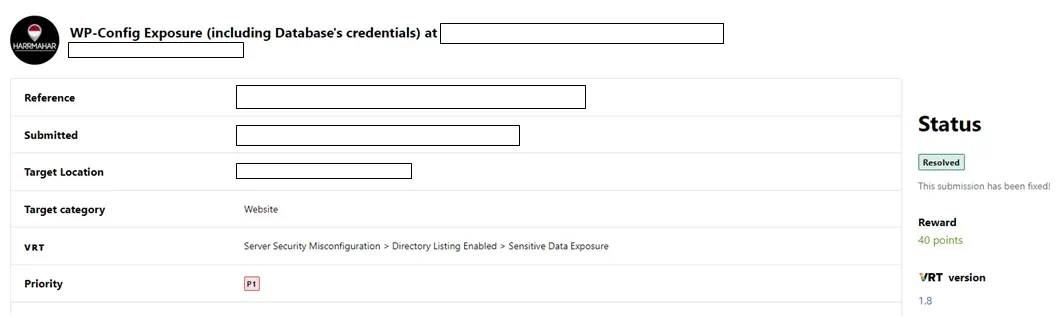
The report does not name the program or the domain; the URL in the write-up is shown as https://redacted.com/wp-config.php.bak. The submission was resolved after two days and awarded 40 points.
Setup
The work was done from a VPS, using command-line tooling for subdomain enumeration and a browser for manual review. The tools involved:
- crt.sh for certificate transparency lookups.
- httprobe by Tomnomnom, to check which subdomains respond.
- jq and sed for parsing and filtering the crt.sh JSON output.
- WPScan to scan the WordPress installation.
- Open Multiple URLs (Firefox and Chrome extension) to open many subdomains at once.
- Wappalyzer (Firefox and Chrome extension) to identify the technology stack of each site.
Finding it
The starting point was subdomain enumeration. The researcher combined crt.sh with httprobe in a single pipeline, run on the VPS:
curl -s https://crt.sh/\?q\=\%.$1\&output\=json | jq -r '.[].name_value' | sed 's/\*\.//g' | sort -u | httprobe | tee -a ./alive.txt
The stages, as described in the report:
curlqueries crt.sh for the target domain and saves the JSON output.jqandsedslice and filter the output so only domain names remain, stripping wildcard prefixes.sort -uremoves duplicates.httprobechecks whether each subdomain is active.tee -awrites the httprobe output both to the terminal and to./alive.txt.
Rather than retyping the pipeline, the researcher stored it as a shortcut in .bash_profile, following a YouTube video by Behrouz Sadeghipour and Nahamsec's recon_profile repository.
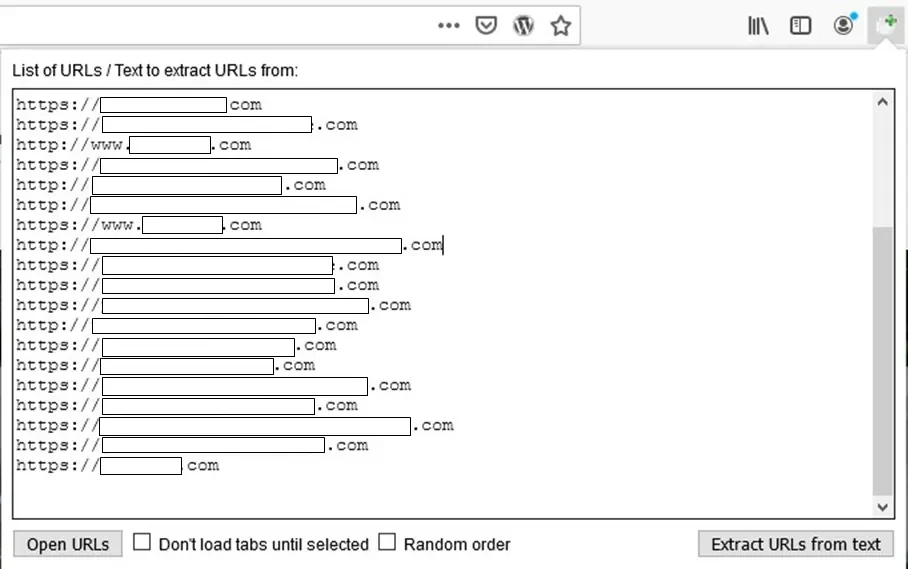
With a list of live subdomains, the next step was manual review. Opening each URL by hand was too slow, so the researcher used the Open Multiple URLs extension to launch 20 to 30 subdomains per click, keeping the load on the machine manageable, and then checked them one by one.
Wappalyzer was used on each site to see the CMS, web server, database and programming language in use.
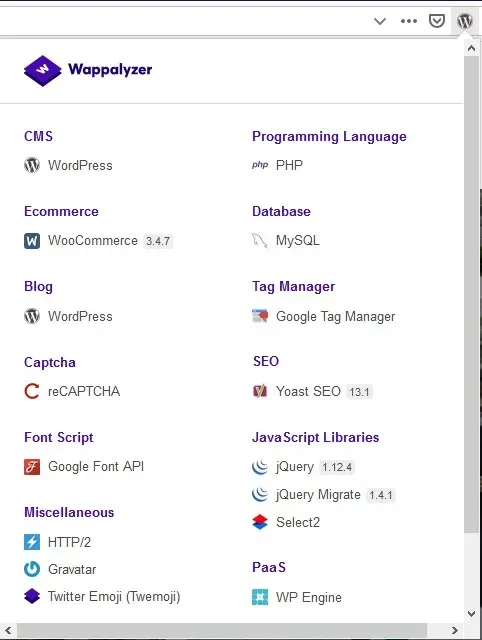
More than 50% of the subdomains, including the main domain, were running WordPress. The researcher decided to run WPScan against the main domain first.
Exploitation
Step 1: Run WPScan against the main domain
After the scan completed, WPScan raised an alert that a WordPress configuration backup file, wp-config.php.bak, had been found.
Step 2: Request the backup file directly
The researcher requested the file in the browser:
The file was served, and it contained db_name, db_password and other sensitive information.
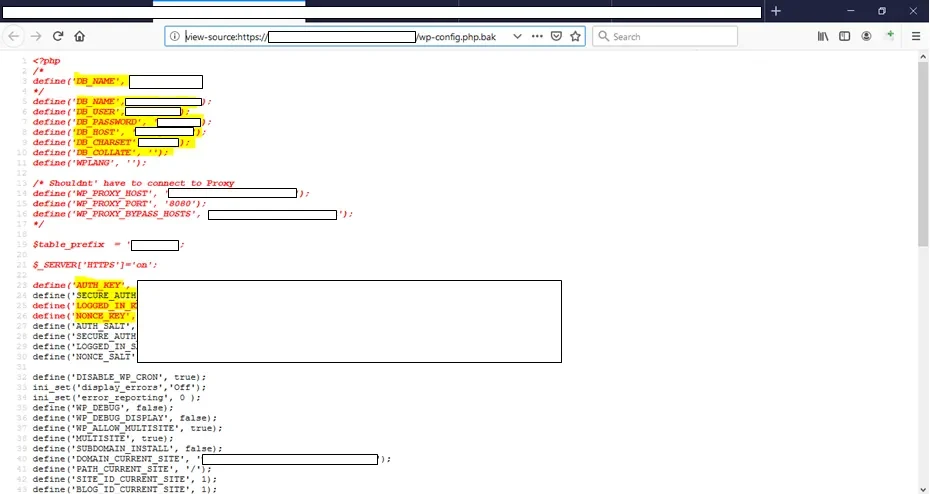
That was the whole exploitation: no chaining, no authentication bypass, just a direct request to a file that should never have been deployed.
Root cause
A backup copy of wp-config.php was left in the web root with a .bak suffix. The report does not explain why the file was served; the backup was simply reachable at that URL.
Impact
The exposed values include the database name and database password, plus other sensitive information in the configuration file. The file was reachable at that URL and contained the database name, password and other sensitive information. What an attacker does next depends on where the database is reachable from and what privileges the account holds; the report does not explore that follow-on access, so the practical blast radius beyond the disclosure itself is not established here.
Fix
Variants to test
- Other backup suffixes on the same file. Request
wp-config.php~,wp-config.php.old,wp-config.php.save,wp-config.php.swpandwp-config.php.txt. A positive result is any response containing PHP source withDB_NAMEorDB_PASSWORDdefinitions rather than a blank page or a PHP error. - Archived copies. Try
wp-config.php.zip,wp-config.php.tar.gzandwp-config.php.rarin the web root. A positive result is a downloadable archive whose contents include the configuration file. - Editor and VCS leftovers. Check for
.wp-config.php.swp,.git/configand similar artefacts. A positive result is a served file containing repository or editor state that references the application's secrets. - WPScan's own checks on other WordPress hosts. Run WPScan against every WordPress subdomain identified with Wappalyzer, not just the main domain, and review its findings for configuration backups and exposed files. A positive result is the same alert the researcher received, confirmed by a direct request.
- Enumeration coverage. Re-run the crt.sh and httprobe pipeline with additional sources and confirm that every live host is reviewed, since the finding depended on the main domain being in the list and being scanned.
What happened, in plain words
A security researcher who had been learning for about four months found their first P1, the highest severity rating on the Bugcrowd bug bounty platform. The target was a private program with a wildcard scope. The researcher used a basic reconnaissance technique to collect subdomains, noticed that most of them ran WordPress, scanned the main domain with a tool called WPScan, and learned that a backup copy of a WordPress configuration file was sitting on the web server. Opening that file in a browser revealed the database name, the database password and other sensitive settings. The submission was resolved after two days and awarded 40 points.
The screenshot shows the resolved P1 submission on Bugcrowd.
This kind of finding is called sensitive information disclosure: a file that should be private is reachable by anyone who knows or guesses its address. No password guessing, no clever trick, just a request to a file that should never have been left on the server.
The tools, explained from zero
Before the steps, here is what each tool does, in everyday terms.
- crt.sh is a public website that lists certificates issued for domains. Every time a site gets an HTTPS certificate, the issuance is recorded publicly, and those records often mention subdomains. Think of it as a public noticeboard where sites announce their addresses.
- httprobe is a small command-line program by Tomnomnom. You give it a list of hostnames and it tells you which ones actually answer on the web. Think of it as ringing doorbells on a street to see which houses are occupied.
- jq and sed are command-line text tools.
jqpicks fields out of JSON, a common data format that looks like structured text with curly brackets.sededits text on the fly, here to strip a leading wildcard marker. - sort is a command-line tool that sorts lines and, with the
-uoption, removes duplicates. - curl is a command-line tool that fetches a web address, like a browser without a window.
- tee is a command-line tool that copies its input to two places at once: the screen and a file.
- WPScan is a scanner made specifically for WordPress sites. It checks for known issues and for files that should not be publicly reachable.
- Open Multiple URLs is a browser extension for Firefox and Chrome that opens a list of web addresses in tabs with one click.
- Wappalyzer is a browser extension that looks at a website and reports what it is built with: the content management system (CMS, the software used to publish pages), the web server, the database and the programming language.
- VPS stands for virtual private server: a rented computer in a data centre that you control remotely, useful for running tools without tying up your own machine.
The researcher worked from a VPS for the command-line steps and used a browser for looking at sites by hand.
Step 1: Collect the subdomains
A wildcard scope means every name ending in the main domain counts, for example shop.example.com and blog.example.com if example.com were the target. Each subdomain is a separate site that may run different software, so the first job is to find as many as possible.
The researcher combined crt.sh with httprobe in one pipeline, run on the VPS:
curl -s https://crt.sh/\?q\=\%.$1\&output\=json | jq -r '.[].name_value' | sed 's/\*\.//g' | sort -u | httprobe | tee -a ./alive.txt
Line by line, in plain words:
curl -s https://crt.sh/\?q\=\%.$1\&output\=jsonasks crt.sh for every certificate record matching the target domain and requests the answer in JSON format. The-soption keeps curl quiet, so it does not print progress noise. The$1is a placeholder for the domain name you pass in.jq -r '.[].name_value'reads that JSON and pulls out just the domain names listed in each record, printing them as plain lines.sed 's/\*\.//g'removes a leading*.from names, because certificate records often list wildcard entries like*.example.com, and the wildcard itself is not a real hostname.sort -usorts the list and drops duplicates, so each name appears once.httprobetakes the list and checks which names actually respond on the web, keeping only the live ones.tee -a ./alive.txtcopies the result both to the screen and to a file calledalive.txt, appending rather than overwriting, so you can keep the list for later.
The pipe symbol | between the stages means the output of one tool becomes the input of the next, like a conveyor belt. The reason for doing all this in one command is speed: a single run produces a clean list of live subdomains.
Typing that long command every time would be tedious, so the researcher saved it as a shortcut in .bash_profile, a file that the command-line shell reads at startup and where you can define your own short commands. The technique came from a YouTube video by Behrouz Sadeghipour and from Nahamsec's recon_profile repository.
Step 2: Look at every subdomain
With a list of live subdomains, the next step is to visit them and see what each one offers. Doing this by hand, copying one address at a time and waiting for each page to load, is far too slow. The researcher used the Open Multiple URLs extension to open 20 to 30 subdomains in one click, a batch size chosen so the computer would not be overloaded, and then reviewed them one by one.
The screenshot shows the Open Multiple URLs extension in use.
While visiting each site, Wappalyzer reported the technology behind it: CMS, web server, database and programming language. This matters because knowing the software tells you which known issues and which files are worth checking.
The screenshot shows Wappalyzer's output for a site.
More than 50% of the subdomains, including the main domain, were running WordPress. WordPress is a very widely used CMS, and its configuration file, wp-config.php, holds the database connection details. That made WordPress the obvious place to look first, so the researcher decided to scan the main domain with WPScan.
Step 3: Scan the main domain with WPScan
WPScan checks a WordPress site for known weaknesses and for files that should not be publicly reachable. When the scan finished, it raised an alert: a backup file called wp-config.php.bak had been found. The .bak suffix is a common way to name a copy kept before editing a file, and such copies are easy to forget.
Step 4: Open the backup file in the browser
The researcher requested the file directly:
This is a single web request, the same kind your browser makes when you type an address. The domain is shown as redacted.com because the program and domain are not named in the write-up. The path /wp-config.php.bak points at the backup file in the site's main folder.
The server returned the file, and it contained db_name, db_password and other sensitive information. db_name is the name of the database the site uses, and db_password is the password for the database account. With those two values, someone could try to connect to the database directly, if it is reachable from where they are.
The screenshot shows the contents of the wp-config.php.bak file as served.
That was the entire exploitation. There was no chaining of bugs and no bypass of a login: just a direct request to a file that should never have been on the server.
Why the file was readable
The report does not explain why the backup file was served as-is. The report does not describe any server configuration or protection that was in place.
What the exposure means
The file exposed the database name, the database password and other sensitive values. The file was reachable at that URL and contained the database name, password and other sensitive values. What an attacker could do next depends on whether the database is reachable from outside and what permissions that account has. The report does not explore that follow-on access, so the practical reach of the leak beyond the disclosure itself is not established here.
How it should be fixed
Other things worth trying
These are variations on the same idea, useful when you meet a similar situation.
- Other backup suffixes on the same file. Request
wp-config.php~,wp-config.php.old,wp-config.php.save,wp-config.php.swpandwp-config.php.txt. You have a hit if the response contains PHP source withDB_NAMEorDB_PASSWORDdefinitions rather than a blank page or a PHP error. - Archived copies. Try
wp-config.php.zip,wp-config.php.tar.gzandwp-config.php.rarin the web root. You have a hit if a downloadable archive contains the configuration file. - Editor and version-control leftovers. Check for
.wp-config.php.swp,.git/configand similar artefacts. You have a hit if a served file contains repository or editor state that references the application's secrets. - Scan every WordPress host, not just the main one. Run WPScan against every WordPress subdomain found with Wappalyzer and review its findings for configuration backups and exposed files. You have a hit when you get the same alert the researcher received and confirm it with a direct request.
- Check your coverage. Re-run the crt.sh and httprobe pipeline with additional sources and make sure every live host is reviewed, since this finding depended on the main domain being in the list and being scanned.
Glossary
- Bug bounty program: an arrangement where an organisation invites researchers to report security problems in its systems, often with a reward.
- P1: the highest severity level in a bug bounty programme's rating, above P2 to P5.
- Bugcrowd: a platform that hosts bug bounty programmes and handles submissions and rewards.
- Private program: a bug bounty programme that only invited researchers can see and take part in.
- Wildcard scope: a scope where every subdomain of a domain is in scope, not just the main domain.
- Reconnaissance (recon): the information-gathering phase before testing, such as finding subdomains and identifying software.
- Subdomain: a name that sits under a main domain, such as
shop.example.comunderexample.com. - Sensitive information disclosure: a weakness where private data, such as passwords or configuration values, can be read by someone who should not have access.
- VPS: virtual private server, a rented computer in a data centre that you control remotely.
- crt.sh: a public website that lists HTTPS certificates issued for domains, useful for finding subdomains.
- Certificate: a digital document that proves a website's identity for HTTPS and is recorded publicly when issued.
- JSON: a text format for structured data, using curly brackets and key-value pairs.
- curl: a command-line tool that fetches web addresses.
- jq: a command-line tool that extracts fields from JSON.
- sed: a command-line tool that edits text, here used to strip a leading wildcard marker.
- sort -u: a command that sorts lines and removes duplicates.
- httprobe: a command-line tool that checks which hostnames respond on the web.
- tee: a command-line tool that copies input to both the screen and a file.
- Pipeline: a chain of commands where each one's output feeds the next, joined by the pipe symbol
|. - .bash_profile: a file the command-line shell reads at startup, where you can define shortcuts for long commands.
- Open Multiple URLs: a browser extension that opens a list of web addresses in tabs with one click.
- Wappalyzer: a browser extension that identifies the technologies a website is built with.
- CMS: content management system, software such as WordPress used to build and publish a website.
- WordPress: a widely used CMS; its configuration file holds the database connection details.
- WPScan: a scanner made specifically for WordPress sites, checking for known issues and exposed files.
- Web root: the folder on a web server whose contents are published to the internet.
- PHP: the programming language WordPress is written in; the web server runs
.phpfiles instead of sending their source. - wp-config.php: the WordPress configuration file, containing the database name, user and password.
- .bak: a common suffix for a backup copy of a file, which web servers treat as an ordinary file and send as-is.
- db_name: the name of the database a site uses.
- db_password: the password for the database account.
- Database: the system where a site stores its content and settings.
- HTTP request: a message a browser or tool sends to a web server asking for a page or file.
- Web server: the software that answers HTTP requests and sends back pages and files.



