How i got 100$ from one private website
A publicly reachable PHP information file was left on a Bitcoin-related website, exposing server configuration details. The finder reported it and the site removed the file within a day.
 Published on medium.com
I was searching for a site to hunt for vulnerabilities, and after a few minutes, I found one related to Bitcoin. I started thinking about what I should test on the site and began checking everything I could.
The full write-up lives on its author's site
It belongs to its author, so we link to it rather than copy it. The other two tabs are our own rewrites, checked against it.
What the report shows
The researcher picked a site related to Bitcoin to hunt on and spent time probing it without success. The first pass produced nothing, which the write-up marks with a disappointed face.

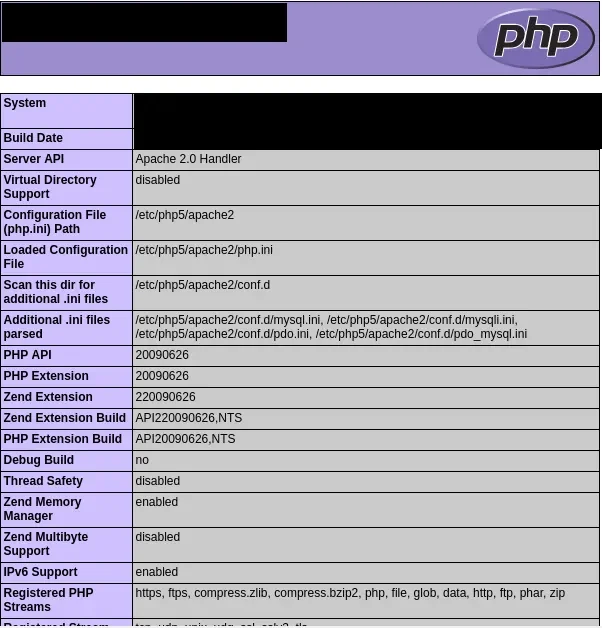
The researcher then started recon on the website. During that recon the researcher found a file that exposed PHP information. The report gives the location only in this form:
site.com/info.php
The write-up does not describe the contents of the page, the PHP version, the server software or any other detail returned by the file. It presents the discovery as the whole finding.

No severity rating, CVSS score or weakness classification is given.
Root cause
The likely cause is that a PHP information page was left on the web server. Such pages are generated by a PHP function call and are meant to be removed once the environment is configured.
Impact
The report does not discuss impact. In general terms, a PHP information page can disclose configuration details that help an attacker plan further work: loaded modules, configuration directives, file paths, and sometimes environment values.
How this kind of bug works
Web applications are often deployed with helper scripts that were useful during development: PHP info pages, debug consoles, health checks, test endpoints, installation wizards, database admin tools. These scripts are frequently copied to production along with the application, or left behind after a migration. Because they are not part of the normal application flow, they are rarely covered by authentication checks or by the routing rules that protect real features.
When such a file is reachable, it answers requests directly. A PHP information page, for example, is generated by a single function call and prints the interpreter's configuration. The risk is information disclosure: the page itself does not execute attacker input, but the details it reveals (paths, enabled extensions, configuration values, sometimes credentials in environment variables) reduce the work an attacker has to do to find a more serious flaw.
The defences are straightforward: do not deploy diagnostic scripts to production, block access to known diagnostic paths at the web server or proxy, and remove files that are no longer needed. Detection depends on knowing which paths exist, which is why discovery usually comes from content discovery rather than from application testing.
How to test for it
- Enumerate paths on the target with a wordlist that includes common diagnostic and setup names: PHP information pages, debug endpoints, server-status pages, installation directories, backup and configuration files. Use the response status, length and body to spot hits.
- Request each candidate directly, without cookies or authentication, and compare the response with the site's normal 404 page. A page that returns 200 and contains interpreter or server configuration is a strong signal.
- Confirm what is actually exposed: read the page and note which details are sensitive (absolute paths, configuration values, environment variables, credentials). A positive result is a reachable page that returns configuration data the application never intended to publish.
- Check whether the same path is reachable under other hostnames, subdomains or virtual hosts that share the deployment.
Common false positives: a custom 404 page that returns 200, a WAF or CDN interstitial that looks like a hit, a page that only echoes the requested path, or a diagnostic endpoint that is reachable only from an internal network and returns nothing useful from outside. Verify the body content, not just the status code.
How it is fixed
Remove the file from the web root and from the deployment pipeline so it is not reintroduced on the next release. Where a diagnostic page is genuinely needed, restrict it to internal addresses or protect it with authentication, and disable the underlying feature in production configuration. Add the path to web server or proxy deny rules as a second layer, and include a check for leftover diagnostic files in the release process.
Hunting notes
This class of bug hides in the gaps between what the application routes and what the web server serves: old directories, staging copies, files left by framework installers, and paths that appear in JavaScript, error messages or public code repositories. Recon signals worth following are directory listings, references to setup or info pages in client-side code, and hosts that respond differently to a handful of well-known diagnostic names.
Keep the demonstration minimal: do not use anything you find to go further than the program allows.
What happened, in plain words
A security researcher was looking for a website to test for weaknesses. After a few minutes of searching, they found a site connected to Bitcoin. They began checking everything they could think of, but the first pass turned up nothing at all.
The image above is the researcher's reaction to that empty first round: a disappointed face.
They then started recon, which simply means gathering information about a website before attacking it: what pages exist, what software it runs, what files are lying around. During this recon they found a file that exposed information about PHP, the programming language many websites are built with.
The report gives the location of that file only in this form:
site.com/info.php
Here site.com stands for the site's address and info.php is the name of the file. Accessing that address revealed a file related to PHP information. The report does not describe what was on that page, which PHP version it revealed, what server software was running, or any other detail the file returned. The discovery of the file is presented as the whole finding.
The image above captures the researcher's reaction to the find: a delighted face.
The outcome came quickly. After the report was submitted, the site deleted the file within a day and paid a bounty of $100. A bounty is a reward a company pays someone who reports a security problem to it. The report gives no severity rating, no CVSS score (a standard way of scoring how serious a flaw is) and no weakness classification.
Why the file was a problem
The likely cause is that a PHP information page was left on the web server. Such pages are generated by a PHP function call and are meant to be removed once the server is configured.
What harm it could do
The report does not discuss impact. In general terms, a PHP information page can reveal configuration details that help an attacker plan further work: which modules are loaded, configuration settings, file paths, and sometimes values stored in the server's environment.
In general, how this kind of bug works
Web applications are often deployed with helper scripts that were useful during development: PHP information pages, debug consoles, health checks, test endpoints, installation wizards, database admin tools. These scripts are frequently copied to the live site along with the application, or left behind after a move. Because they are not part of the normal application flow, they are rarely covered by login checks or by the routing rules that protect real features.
When such a file is reachable, it answers requests directly. A PHP information page, for example, is generated by a single function call and prints the interpreter's configuration. The risk is information disclosure: the page itself does not run anything an attacker sends, but the details it reveals (paths, enabled extensions, configuration values, sometimes credentials in environment variables) reduce the work an attacker has to do to find a more serious flaw.
The defences are straightforward: do not deploy diagnostic scripts to the live site, block access to known diagnostic paths at the web server or proxy, and remove files that are no longer needed. Detection depends on knowing which paths exist, which is why discovery usually comes from content discovery (guessing and checking file and folder names) rather than from testing the application itself.
In general, how to test for it
- Enumerate paths on the target with a wordlist that includes common diagnostic and setup names: PHP information pages, debug endpoints, server-status pages, installation directories, backup and configuration files. Use the response status, length and body to spot hits. A wordlist is simply a long list of likely file and folder names to try.
- Request each candidate directly, without cookies or authentication, and compare the response with the site's normal 404 page. A 404 is the standard "page not found" answer. A page that returns 200 (the normal "here is your page" answer) and contains interpreter or server configuration is a strong signal.
- Confirm what is actually exposed: read the page and note which details are sensitive (absolute paths, configuration values, environment variables, credentials). A positive result is a reachable page that returns configuration data the application never intended to publish.
- Check whether the same path is reachable under other hostnames, subdomains or virtual hosts that share the deployment.
Common false positives: a custom 404 page that returns 200, a WAF or CDN interstitial that looks like a hit, a page that only echoes the requested path, or a diagnostic endpoint that is reachable only from an internal network and returns nothing useful from outside. A WAF is a web application firewall, a filter that sits in front of a site, and a CDN is a content delivery network, a service that caches and serves pages. Verify the body content, not just the status code.
In general, how it is fixed
Remove the file from the web root and from the deployment pipeline so it is not reintroduced on the next release. Where a diagnostic page is genuinely needed, restrict it to internal addresses or protect it with authentication, and disable the underlying feature in production configuration. Add the path to web server or proxy deny rules as a second layer, and include a check for leftover diagnostic files in the release process.
In general, hunting notes
This class of bug hides in the gaps between what the application routes and what the web server serves: old directories, staging copies, files left by framework installers, and paths that appear in JavaScript, error messages or public code repositories. Recon signals worth following are directory listings, references to setup or info pages in client-side code, and hosts that respond differently to a handful of well-known diagnostic names.
Keep the demonstration minimal: do not use anything you find to go further than the program allows.
Glossary
- Recon: gathering information about a target before testing it, such as which pages and files exist.
- PHP: a programming language commonly used to build websites.
- PHP information page: a page generated by PHP that prints details about its configuration and the server.
- Bounty: a reward a company pays for a security problem reported to it.
- Severity rating: a label for how serious a flaw is.
- CVSS: a standard scoring system for the severity of a vulnerability.
- Information disclosure: a flaw where a system reveals data it should not.
- Diagnostic script: a helper file used during setup or debugging that is not meant for public use.
- Authentication: proving who you are, usually by logging in.
- Cookie: a small piece of data a website stores in your browser, often used to keep you logged in.
- Environment variable: a named value set on a server that programs can read, sometimes holding secrets.
- Wordlist: a long list of likely names used to guess files and folders.
- Status code: the number a server returns with a page, such as 200 for success or 404 for not found.
- 404: the standard answer meaning the requested page does not exist.
- 200: the standard answer meaning the request succeeded.
- WAF: a web application firewall, a filter placed in front of a site.
- CDN: a content delivery network, a service that caches and serves pages.
- False positive: a result that looks like a finding but is not one.
- Virtual host: one of several websites served from the same server.
- Web root: the folder on a server from which public files are served.
- Deployment pipeline: the automated process that builds and releases a website.
- Triage: the step where a program reviews a report and decides how to handle it.



