How I got $200 in 30 Seconds.
A publicly accessible Jira dashboard exposed user IDs, usernames, projects, filters and JQL queries to anyone. An attacker could view this information and potentially use the JQL for denial-of-service attacks.
 Published on medium.com
As every hunter gets Duplicate bugs from Program I also got 5 Duplicates before this report.
The full write-up lives on its author's site
It belongs to its author, so we link to it rather than copy it. The other two tabs are our own rewrites, checked against it.
Context
Jira Software is part of a family of products designed to help teams of all types manage work. Originally it was designed as a bug and issue tracker, but today it has evolved into a work management tool for all kinds of use cases, from requirements and test case management to agile software development.
The target in this write-up is a bug bounty program whose Jira panel was reachable at a host of the form xyz.atlassian.net. The researcher does not name the program. The weakness recorded for the report is information disclosure, and the asset listed is medium.com, which is where the write-up was published rather than the affected host.
Setup
The researcher, Yash, describes himself as working as a security researcher. No accounts, roles, tools or versions are described. The only precondition that matters is that the Jira panel of the target was visible for everyone: the dashboards, projects, filters and JQL could be seen.
Finding it
Before this report the researcher had received five duplicate bugs from programs, which is the ordinary experience of hunting. When he opened the program he saw that 12 reports had been resolved and 36 were waiting to be resolved, so he decided to look for something unique rather than repeat what others had already submitted.
While looking around the site he noticed that it had a Jira panel and that the panel was visible for everyone:
https://xyz.atlassian.net/jira/dashboards
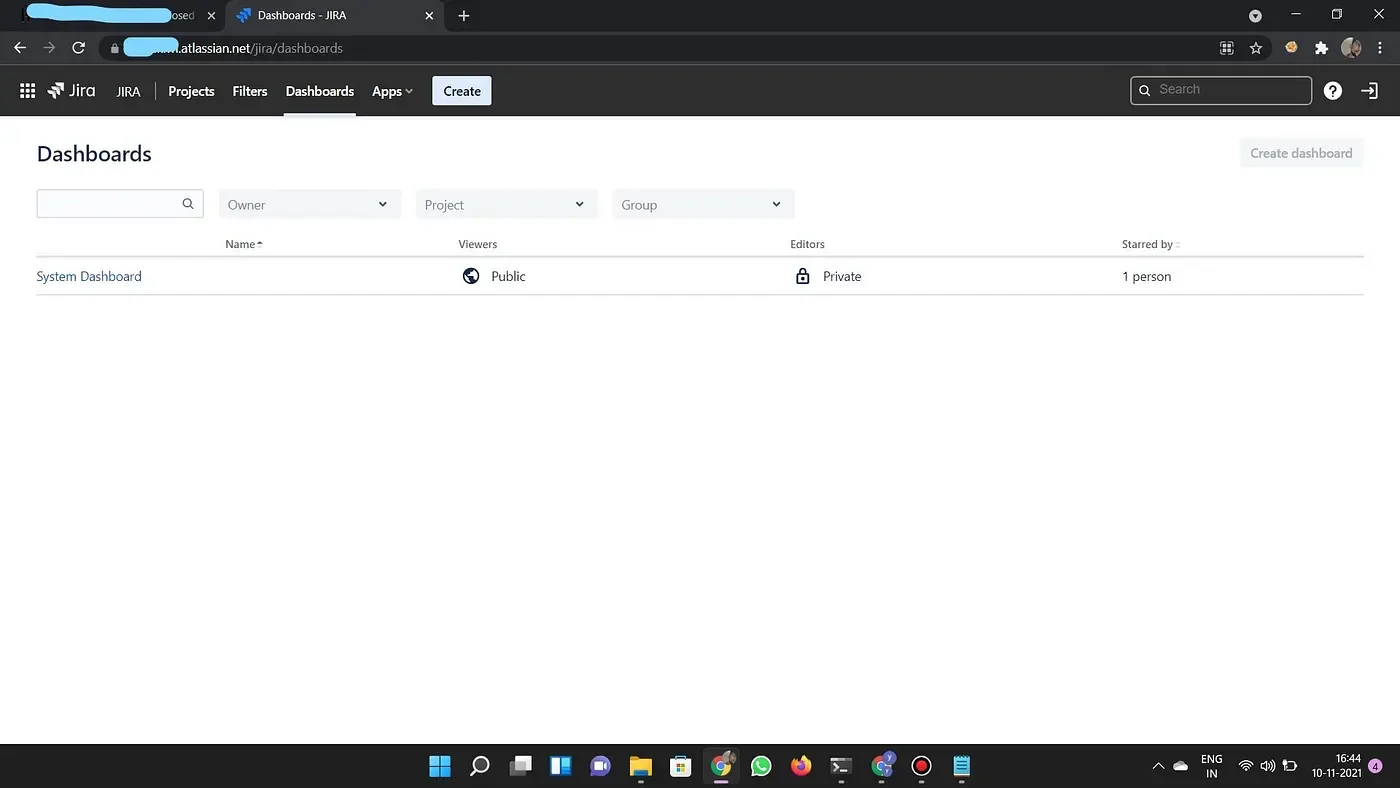
He opened his Jira testing notes and found that the instance exposed user IDs and user names, that the dashboard was public, and that projects, filters and JQL were also visible. He characterises the JQL exposure as usable for denial of service.
The filters view he points at is:
Exploitation
Step 1: Reach the Jira panel unauthenticated
The dashboards URL above was visible for everyone. No request or response is reproduced in the report; the evidence is the screenshot of the panel being reachable.
Step 2: Read what the panel exposes
The researcher could see user IDs and user names, the public dashboard, the projects, the filters and the JQL search. The filters URL above is the one he cites for the filter and JQL exposure. The report does not show the individual responses, only states what was visible.
Step 3: Report it
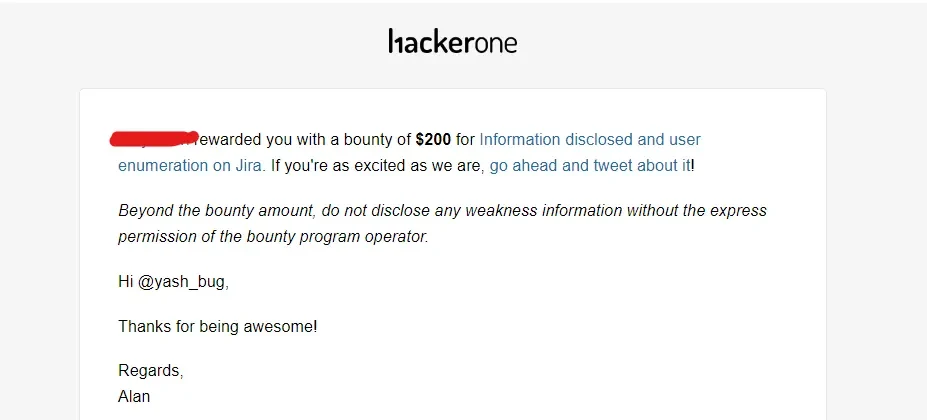
He reported the Jira issue to the program. Within 4 hours the report was resolved and he was paid $200.
Root cause
The report does not analyse the underlying configuration. What it describes is a Jira instance whose dashboards, projects, filters and JQL were visible for everyone. Whether that came from anonymous access being enabled, from a permission scheme that granted browse rights too broadly, or from something else is not stated, and any of those is only a likely explanation.
Impact
The exposure is information disclosure. User IDs and user names, the public dashboard, projects, filters and JQL were visible. The researcher also notes that the visible JQL could be used for denial of service. The report does not quantify how many users or projects were exposed, and it does not demonstrate the denial of service.
Fix
Variants to test
The researcher closes with a list of Jira paths to try. They are reproduced exactly as given:
/secure/ConfigurePortalPages!default.jspa?view=popular
/secure/ManageFilters.jspa?filterView=search&Search=Search&filterView=search&sortColumn=favcount&sortAscending=false
/secure/ContactAdministrators!default.jspa
/servicedesk/customer/user/login
/issues/?jql=
/plugins/servlet/oauth/users/icon-uri?consumerUri=http://google.com
/rest/api/latest/groupuserpicker?query=1&maxResults=50000&showAvatar=true
/plugins/servlet/gadgets/makeRequest?url=https://victomhost:[redacted]
/plugins/servlet/Wallboard/?dashboardId=10000&dashboardId=10000&cyclePeriod=alert(document.domain)
/secure/QueryComponent!Default.jspa
/secure/ViewUserHover.jspa
/ViewUserHover.jspa?username=Admin
/rest/api/2/dashboard?maxResults=100
/pages/%3CIFRAME%20SRC%3D%22javascript%3Aalert(‘XSS’)%22%3E.vm
/rest/api/2/user/picker?query=admin
/s/thiscanbeanythingyouwant/_/META-INF/maven/com.atlassian.jira/atlassian-jira-webapp/pom.xml
/rest/api/2/user/picker?query=admin
/s/
/plugins/servlet/oauth/users/icon-uri?consumerUri=https://www.google.nl
/secure/ConfigurePortalPages!default.jspa?view=search&searchOwnerUserName=x2rnu%3Cscript%3Ealert(1)%3C%2fscript%3Et1nmk&Search=Search
ConfigurePortalPages.jspa
/plugins/servlet/Wallboard/?dashboardId=10100&dashboardId=10101&cyclePeriod=(function(){alert(document.cookie);return%2030000;})()&transitionFx=none&random=true
What each is worth trying for, and what a positive result looks like:
/secure/ConfigurePortalPages!default.jspa?view=popularand/secure/ManageFilters.jspa?filterView=search&Search=Search&filterView=search&sortColumn=favcount&sortAscending=false: portal page and filter management views. A positive result is either view rendering for an unauthenticated visitor or returning filter and dashboard data that should require a login./secure/ContactAdministrators!default.jspaand/servicedesk/customer/user/login: contact and service desk entry points. A positive result is the form or login page being reachable and, for the contact form, accepting input without authentication./issues/?jql=and/secure/QueryComponent!Default.jspa: JQL search surfaces. A positive result is an unauthenticated JQL query returning issue data, which is the same class of exposure as the reported finding./plugins/servlet/oauth/users/icon-uri?consumerUri=http://google.comand the same path withconsumerUri=https://www.google.nl: an icon fetch that takes a URL. A positive result is the server fetching the supplied URL, which points to server-side request forgery./rest/api/latest/groupuserpicker?query=1&maxResults=50000&showAvatar=trueand/rest/api/2/user/picker?query=admin: user enumeration endpoints. A positive result is a list of users returned without authentication./plugins/servlet/gadgets/makeRequest?url=https://victomhost:[redacted]: a gadget request proxy. A positive result is the server making the request to the supplied host, again indicating SSRF./plugins/servlet/Wallboard/?dashboardId=10000&dashboardId=10000&cyclePeriod=alert(document.domain)and the variant withcyclePeriod=(function(){alert(document.cookie);return%2030000;})()&transitionFx=none&random=true: the wallboard cycle period parameter. A positive result is the script executing in the page, which is reflected cross-site scripting./secure/ViewUserHover.jspaand/ViewUserHover.jspa?username=Admin: user hover views. A positive result is user details being returned for an unauthenticated request./rest/api/2/dashboard?maxResults=100: the dashboard REST endpoint. A positive result is dashboard data returned without authentication./pages/%3CIFRAME%20SRC%3D%22javascript%3Aalert(‘XSS’)%22%3E.vm: a URL-encoded iframe with ajavascript:source. A positive result is the payload reflected into the page and executed./s/thiscanbeanythingyouwant/_/META-INF/maven/com.atlassian.jira/atlassian-jira-webapp/pom.xml: a path traversal attempt at a Maven metadata file. A positive result is thepom.xmlbeing served./s/: a short path worth probing for whatever the servlet mapping exposes.ConfigurePortalPages.jspa: the same portal pages action without the leading path, useful for checking how the servlet is mapped.
On any other target, the first check is whether the Jira instance answers these paths to an unauthenticated client at all; if it does, the second is whether the response contains user, project, filter or dashboard data that should have required a login.
What happened, in plain words
A security researcher found that a company's Jira panel, part of a tool teams use to track bugs and plan work, was visible for everyone. From that open door he could see user IDs, user names, dashboards, projects, filters and JQL search. He reported it to the company's bug bounty program and was paid $200 within four hours.
A bug bounty program is a deal a company makes with outside researchers: find a flaw in our systems, tell us privately, and we pay you a reward (the bounty) if it is real and not already known. The researcher here is Yash, who describes himself as working as a security researcher. Before this report he had received five duplicate bugs, meaning five findings that other people had already submitted, so he was looking for something nobody else had spotted.
What Jira is, and why it matters here
Jira Software is part of a family of products designed to help teams of all types manage work. Originally it was designed as a bug and issue tracker, but today it has evolved into a work management tool for all kinds of use cases, from requirements and test case management to agile software development.
In everyday terms: a team uses Jira like a shared noticeboard of tasks. Each task (an "issue") has a title, a description, an owner and a status such as open or done. Teams also group issues into "projects", save "filters" (saved searches) and write "JQL" (Jira Query Language, a small search language for asking Jira questions like "show me all open bugs assigned to me"). All of that is normally private to the company. If a stranger can read it, they learn who works there, what the company is building, and what problems it is currently fixing.
The target in this write-up is a bug bounty program whose Jira panel was reachable at a host of the form xyz.atlassian.net. The researcher does not name the program. The weakness recorded for the report is information disclosure, which simply means private information can be read by someone who should not see it. The asset listed is medium.com, which is where the write-up was published rather than the affected host.
Setup
The researcher, Yash, describes himself as working as a security researcher. No accounts, roles, tools or versions are described. The only precondition that matters is that the Jira panel of the target was visible for everyone: the dashboards, projects, filters and JQL could be seen.
"Without authentication" means the site did not ask for a username and password, or a session cookie (a small piece of data your browser stores after you log in so the site remembers you), before showing the content. Think of it as a staff room whose door has no lock: you do not need a key because there is no keyhole.
Finding it
Before this report the researcher had received five duplicate bugs from programs, which is the ordinary experience of hunting. When he opened the program he saw that 12 reports had been resolved and 36 were waiting to be resolved, so he decided to look for something unique rather than repeat what others had already submitted.
While looking around the site he noticed that it had a Jira panel and that the panel was visible for everyone:
https://xyz.atlassian.net/jira/dashboards
Line by line: https:// is the secure web protocol; xyz.atlassian.net is the host name of the company's Jira instance (Atlassian is the company that makes Jira, and atlassian.net is the domain it hosts customer sites on); /jira/dashboards is the path to the dashboards page, the page that lists saved overviews of work. The important part is not the URL itself but that the panel was visible for everyone.
He opened his Jira testing notes and found that the instance exposed user IDs and user names, that the dashboard was public, and that projects, filters and JQL were also visible. He characterises the JQL exposure as usable for denial of service.
A user ID is the internal number a system uses to identify an account; a user name is the human-readable login name. Together they let an outsider build a list of real people at the company, which is useful for phishing (sending fake emails that look real) and for guessing passwords. A denial of service (DoS) is an attack that makes a service unusable for its real users, for example by sending it so many heavy search requests that it slows to a crawl. The researcher says the visible JQL could be used that way, but he does not demonstrate it.
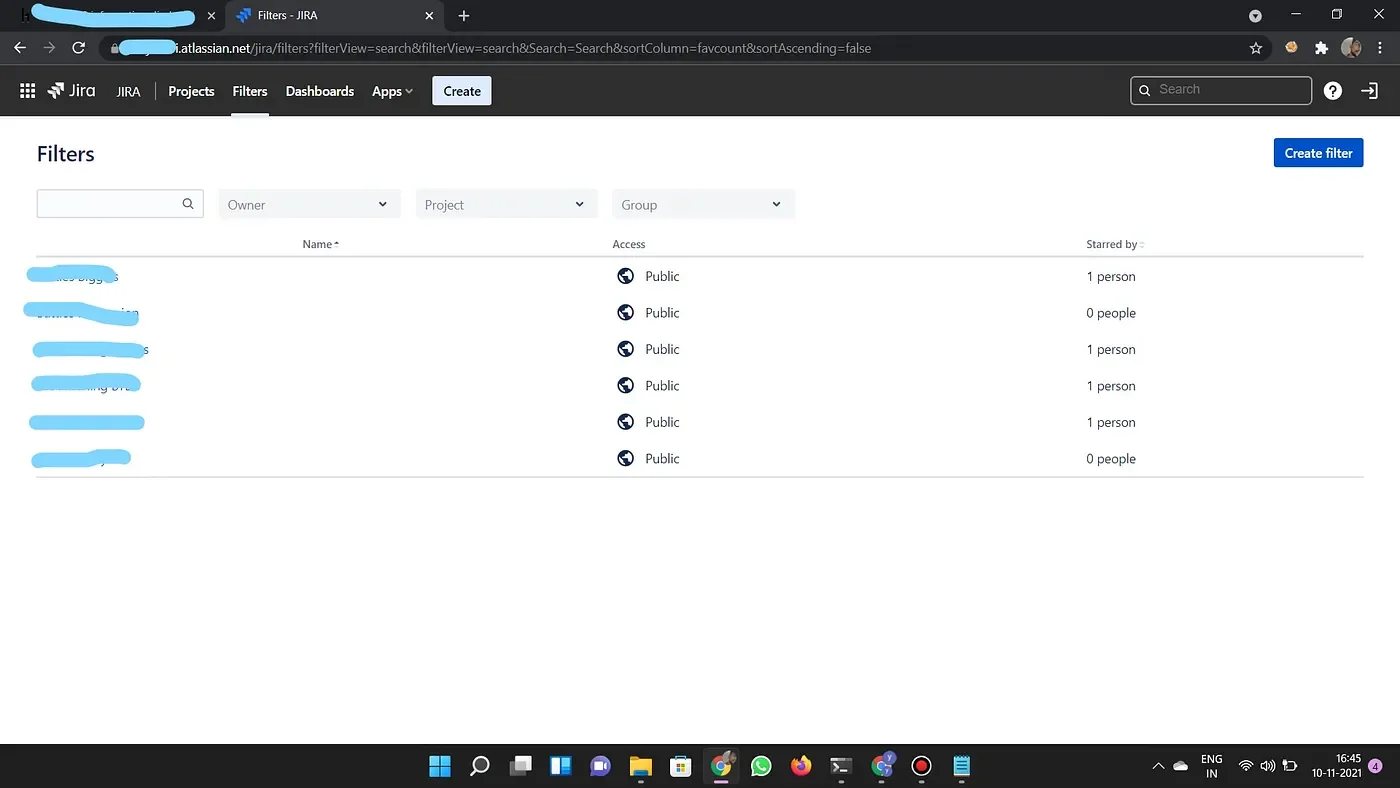
The filters view he points at is:
Line by line: /jira/filters is the page that lists saved filters. Everything after the space is the query string, the part of a URL that passes settings to the page. filterView=search tells the page to show the search view (it appears twice, which is harmless but sloppy). Search=Search is the value of the search button. sortColumn=favcount asks the page to sort by how many people have marked a filter as a favourite, and sortAscending=false means highest first. The point is that this page, with its filter data, was reachable by an anonymous visitor.
Exploitation
Step 1: Reach the Jira panel unauthenticated
The dashboards URL above was visible for everyone. No request or response is reproduced in the report; the evidence is the screenshot of the panel being reachable.
Step 2: Read what the panel exposes
The researcher could see user IDs and user names, the public dashboard, the projects, the filters and the JQL search. The filters URL above is the one he cites for the filter and JQL exposure. The report does not show the individual responses, only states what was visible.
Why this step matters: seeing the page is one thing; seeing the data inside it is the actual leak. User names and IDs identify people, projects reveal what the company is working on, and filters and JQL reveal how the team organises and searches its work. None of that should be readable by a stranger.
Step 3: Report it
He reported the Jira issue to the program. Within 4 hours the report was resolved and he was paid $200.
Why this step matters: a bug bounty only works if the researcher reports privately instead of exploiting the flaw or publishing it. The fast turnaround, four hours from report to resolution, shows the company treated it as a real issue.
Root cause
The report does not analyse the underlying configuration. What it describes is a Jira instance whose dashboards, projects, filters and JQL were visible for everyone. Whether that came from anonymous access being enabled, from a permission scheme that granted browse rights too broadly, or from something else is not stated, and any of those is only a likely explanation.
In plain terms: Jira has settings that decide who may see what. One setting can allow "anonymous" access, meaning people who are not logged in. Another is a permission scheme, a set of rules attached to a project that says which groups of users may browse it. If either is set too loosely, the door is open.
Impact
The exposure is information disclosure. User IDs and user names, the public dashboard, projects, filters and JQL were visible. The researcher also notes that the visible JQL could be used for denial of service. The report does not quantify how many users or projects were exposed, and it does not demonstrate the denial of service.
"Enumerate" means to list things one by one, in this case collecting the names and IDs of real employees. The practical risk is that an attacker now has a list of targets and a map of the company's work, which makes follow-up attacks such as phishing or password guessing easier.
Fix
In everyday terms: put a lock on the staff room door and give keys only to staff. In Jira that means turning off anonymous access and checking that each project's permission scheme only lets the right people browse it.
Variants to test
The researcher closes with a list of Jira paths to try. They are reproduced exactly as given:
/secure/ConfigurePortalPages!default.jspa?view=popular
/secure/ManageFilters.jspa?filterView=search&Search=Search&filterView=search&sortColumn=favcount&sortAscending=false
/secure/ContactAdministrators!default.jspa
/servicedesk/customer/user/login
/issues/?jql=
/plugins/servlet/oauth/users/icon-uri?consumerUri=http://google.com
/rest/api/latest/groupuserpicker?query=1&maxResults=50000&showAvatar=true
/plugins/servlet/gadgets/makeRequest?url=https://victomhost:[redacted]
/plugins/servlet/Wallboard/?dashboardId=10000&dashboardId=10000&cyclePeriod=alert(document.domain)
/secure/QueryComponent!Default.jspa
/secure/ViewUserHover.jspa
/ViewUserHover.jspa?username=Admin
/rest/api/2/dashboard?maxResults=100
/pages/%3CIFRAME%20SRC%3D%22javascript%3Aalert(‘XSS’)%22%3E.vm
/rest/api/2/user/picker?query=admin
/s/thiscanbeanythingyouwant/_/META-INF/maven/com.atlassian.jira/atlassian-jira-webapp/pom.xml
/rest/api/2/user/picker?query=admin
/s/
/plugins/servlet/oauth/users/icon-uri?consumerUri=https://www.google.nl
/secure/ConfigurePortalPages!default.jspa?view=search&searchOwnerUserName=x2rnu%3Cscript%3Ealert(1)%3C%2fscript%3Et1nmk&Search=Search
ConfigurePortalPages.jspa
/plugins/servlet/Wallboard/?dashboardId=10100&dashboardId=10101&cyclePeriod=(function(){alert(document.cookie);return%2030000;})()&transitionFx=none&random=true
Before walking through them, two ideas you will meet repeatedly. An API is a way for one program to ask another for data, like a waiter taking your order to the kitchen and bringing back a plate; here the /rest/api/... paths are Jira's API endpoints, which return data rather than web pages. Server-side request forgery (SSRF) is a trick where you give the server a URL and it fetches it for you, like asking a concierge to fetch a parcel from any address you name; if the server can reach internal addresses, you have made it your proxy. Cross-site scripting (XSS) is when an attacker's script ends up running in another user's browser, like slipping a note into a letter that the recipient then reads aloud.
What each is worth trying for, and what a positive result looks like:
/secure/ConfigurePortalPages!default.jspa?view=popularand/secure/ManageFilters.jspa?filterView=search&Search=Search&filterView=search&sortColumn=favcount&sortAscending=false: portal page and filter management views. A positive result is either view rendering for an unauthenticated visitor or returning filter and dashboard data that should require a login. In plain words: these are the pages where a logged-in user manages their own dashboards and saved filters; if a stranger can open them, the same door is open./secure/ContactAdministrators!default.jspaand/servicedesk/customer/user/login: contact and service desk entry points. A positive result is the form or login page being reachable and, for the contact form, accepting input without authentication. In plain words: the contact form is how a user emails the Jira administrators; if anyone can use it, it can be abused to send unwanted mail./issues/?jql=and/secure/QueryComponent!Default.jspa: JQL search surfaces. A positive result is an unauthenticated JQL query returning issue data, which is the same class of exposure as the reported finding. In plain words: these are the search pages; if a stranger can run a search and see the results, they can read the company's task list./plugins/servlet/oauth/users/icon-uri?consumerUri=http://google.comand the same path withconsumerUri=https://www.google.nl: an icon fetch that takes a URL. A positive result is the server fetching the supplied URL, which points to server-side request forgery. In plain words: theconsumerUriparameter is a URL the server is asked to fetch; if it does, the server can be made to visit addresses of your choosing./rest/api/latest/groupuserpicker?query=1&maxResults=50000&showAvatar=trueand/rest/api/2/user/picker?query=admin: user enumeration endpoints. A positive result is a list of users returned without authentication. In plain words: these API calls are meant to help a logged-in user pick a colleague from a list; if they answer a stranger, they hand over the staff directory./plugins/servlet/gadgets/makeRequest?url=https://victomhost:[redacted]: a gadget request proxy. A positive result is the server making the request to the supplied host, again indicating SSRF. In plain words: theurlparameter names a host the server is asked to contact; if it does, you have made the server your messenger./plugins/servlet/Wallboard/?dashboardId=10000&dashboardId=10000&cyclePeriod=alert(document.domain)and the variant withcyclePeriod=(function(){alert(document.cookie);return%2030000;})()&transitionFx=none&random=true: the wallboard cycle period parameter. A positive result is the script executing in the page, which is reflected cross-site scripting. In plain words:cyclePeriodis meant to be a number of seconds between screen refreshes; if the page accepts JavaScript there instead of a number, the script runs in the browser of whoever views the wallboard.alert(document.domain)pops up a box showing the site's address, andalert(document.cookie)pops up the visitor's session cookie, which is the data that proves who they are logged in as./secure/ViewUserHover.jspaand/ViewUserHover.jspa?username=Admin: user hover views. A positive result is user details being returned for an unauthenticated request. In plain words: this is the little profile card that appears when you hover over a user name; if a stranger can request it, they can harvest user details./rest/api/2/dashboard?maxResults=100: the dashboard REST endpoint. A positive result is dashboard data returned without authentication. In plain words: this API call asks for up to 100 dashboards; if it answers without a login, the dashboards are public./pages/%3CIFRAME%20SRC%3D%22javascript%3Aalert(‘XSS’)%22%3E.vm: a URL-encoded iframe with ajavascript:source. A positive result is the payload reflected into the page and executed. In plain words:%3Cand%3Eare the encoded forms of<and>, so the path decodes to an iframe tag whose source is a JavaScript snippet; if the page echoes it back and the browser runs it, that is XSS./s/thiscanbeanythingyouwant/_/META-INF/maven/com.atlassian.jira/atlassian-jira-webapp/pom.xml: a path traversal attempt at a Maven metadata file. A positive result is thepom.xmlbeing served. In plain words:pom.xmlis a build file that lists a project's dependencies and versions; it is not meant to be downloadable from the web, and path traversal means using../style tricks to climb out of the folder you are supposed to be in./s/: a short path worth probing for whatever the servlet mapping exposes. In plain words: a servlet is the Java program on the server that handles a request; a bare path like this is a quick way to see what the server does when asked for almost nothing.ConfigurePortalPages.jspa: the same portal pages action without the leading path, useful for checking how the servlet is mapped. In plain words: trying the same action with and without the folder in front shows whether the server treats the two forms differently.
On any other target, the first check is whether the Jira instance answers these paths to an unauthenticated client at all; if it does, the second is whether the response contains user, project, filter or dashboard data that should have required a login.
Glossary
- Anonymous access: letting visitors who have not logged in see or use parts of a site.
- API: a way for one program to ask another for data, usually returning structured data rather than a web page.
- Asset: the thing a bug bounty report is about, such as a website or host.
- Authentication: proving who you are, usually with a username and password.
- Bug bounty program: a scheme where a company pays outside researchers for reporting security flaws privately.
- Cookie: a small piece of data a site stores in your browser, often used to remember that you are logged in.
- Cross-site scripting (XSS): a flaw where an attacker's script runs in another user's browser.
- Denial of service (DoS): an attack that makes a service unusable for its real users.
- Duplicate: a report describing a flaw someone else already reported.
- Enumerate: to list things one by one, such as collecting user names.
- Filter: a saved search in Jira that shows issues matching certain conditions.
- Host: the name of a server on the internet, such as
xyz.atlassian.net. - Information disclosure: a flaw where private information can be read by someone who should not see it.
- Issue: a single task or bug tracked in Jira.
- Jira: a tool made by Atlassian for tracking issues and managing work.
- JQL (Jira Query Language): a small search language for asking Jira which issues to show.
- Path traversal: using tricks like
../to reach files outside the folder you are supposed to be in. - Permission scheme: a set of rules in Jira saying which users or groups may do what in a project.
- Phishing: sending fake messages that look real to trick people into giving away information.
- Project: a container in Jira that groups related issues.
- Query string: the part of a URL after
?that passes settings to the page. - REST endpoint: a URL in an API that returns data when requested.
- Server-side request forgery (SSRF): a flaw where an attacker makes the server fetch a URL of their choosing.
- Servlet: a Java program on a server that handles web requests.
- Session: the period during which a site remembers you are logged in, usually tracked with a cookie.
- User ID: the internal number a system uses to identify an account.
- User name: the human-readable login name of an account.
- Wallboard: a Jira screen meant to be displayed on a monitor showing dashboards on a cycle.



