How I Got 4 SQLI Vulnerabilities At One Target Manually Using The Repeater Tab
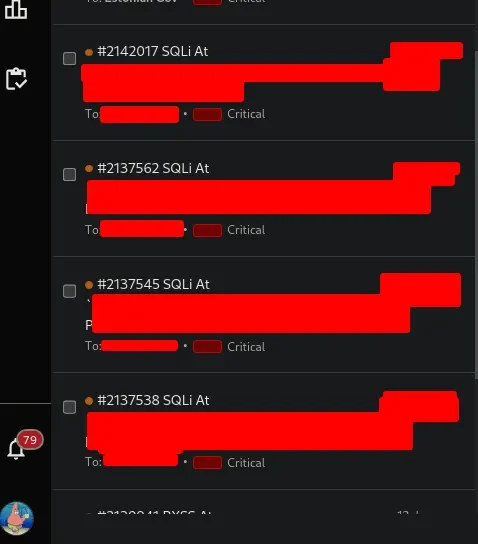
Four SQL injection vulnerabilities were found in different endpoints of a private target. An attacker could manipulate database queries to extract information or cause time delays.

For the sake of your valuable time, if you are a SQLI Hunter professional who comes here looking for payloads that worked with me, go and read from the second bug until the fourth bug and leave the first bug cuz I explained in it a very useful principle details to those that are not hunting Manual at all, so yeah it’s…
The full write-up lives on its author's site
It belongs to its author, so we link to it rather than copy it. The other two tabs are our own rewrites, checked against it.
Context
The target is a private program, referred to throughout as bug4y0u.com. The write-up covers four separate SQL injection vulnerabilities found manually in different endpoints of the same application, using Burp Suite's Repeater and Intruder tabs rather than an automated scanner. The affected features are: an endpoint that downloads audio files for music, a store search endpoint that looks items up in the database, an endpoint that retrieves attributes about a piece of audio, and an endpoint that retrieves information about the author of an uploaded audio file.
The author notes that most hunters do not test SQL injection manually, and explains that he prefers manual testing because sqlmap's traffic is well known to WAFs and can get the tester blocked. The first bug is written as a teaching exercise in methodology; the remaining three are shorter.
Setup
The tools used are Burp Suite, specifically the Repeater tab for observing responses and the Intruder tab for fuzzing single characters, and waybackurls for discovering old endpoints. No account details, roles or software versions are given. The author notes that on this target there were no WAFs, so no bypass or obfuscation was needed for the first bug.
Finding it
The core detection technique, stated in the first bug and repeated for the fourth, is to inject a single quote or a double quote into a parameter and look for any tiny change in the response. The change can be in the response length, the response content, or the response time. The author is explicit that a custom 200 OK page saying the resource was not found does not count, because that comes from a different response path; what matters is a change within the same endpoint's response.
A second principle, repeated later, is to observe the response body and not only the length. In the third bug the body difference sits at the bottom of a small HTML response and is easy to miss without scrolling.
Exploitation
First bug: boolean-based injection in the audio download endpoint
The endpoint downloads audio for music. The parameter shown in the payloads is lugu, carrying the numeric id of the audio.
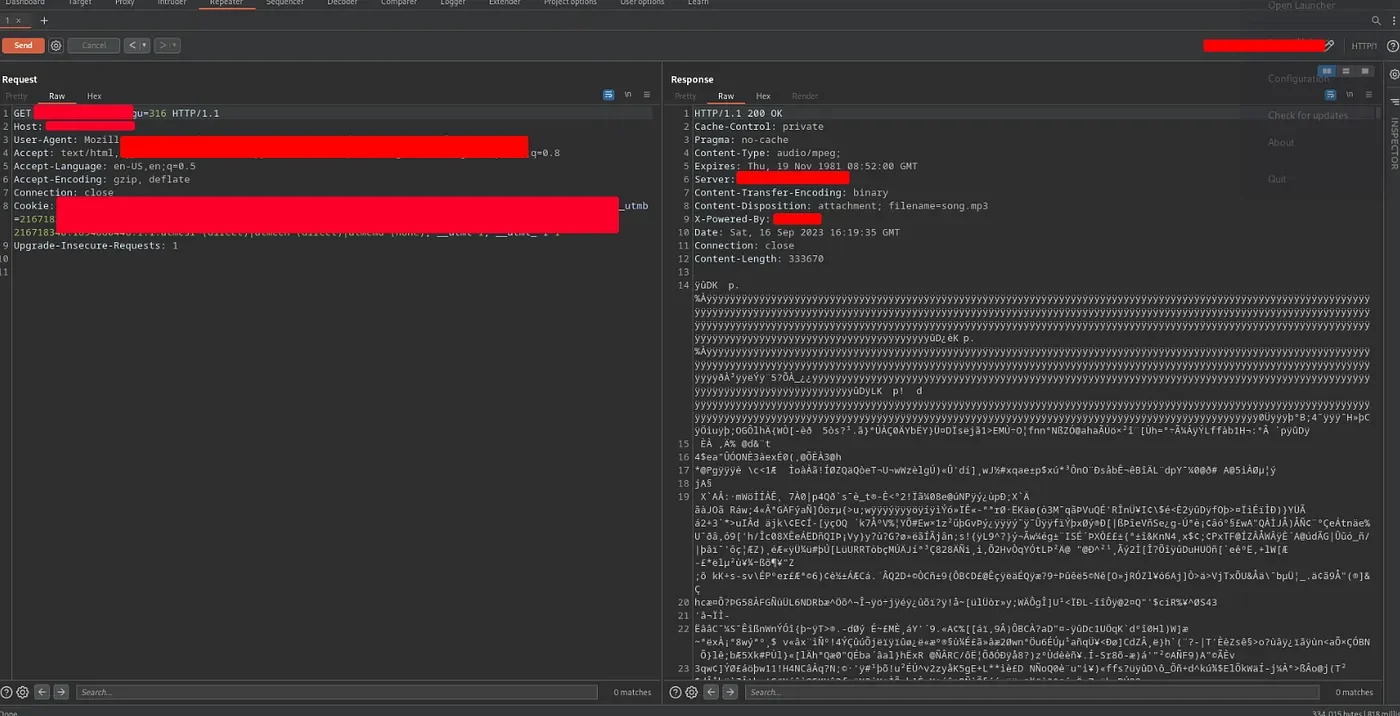
Injecting a single quote into the parameter stops the audio from coming back in the response.
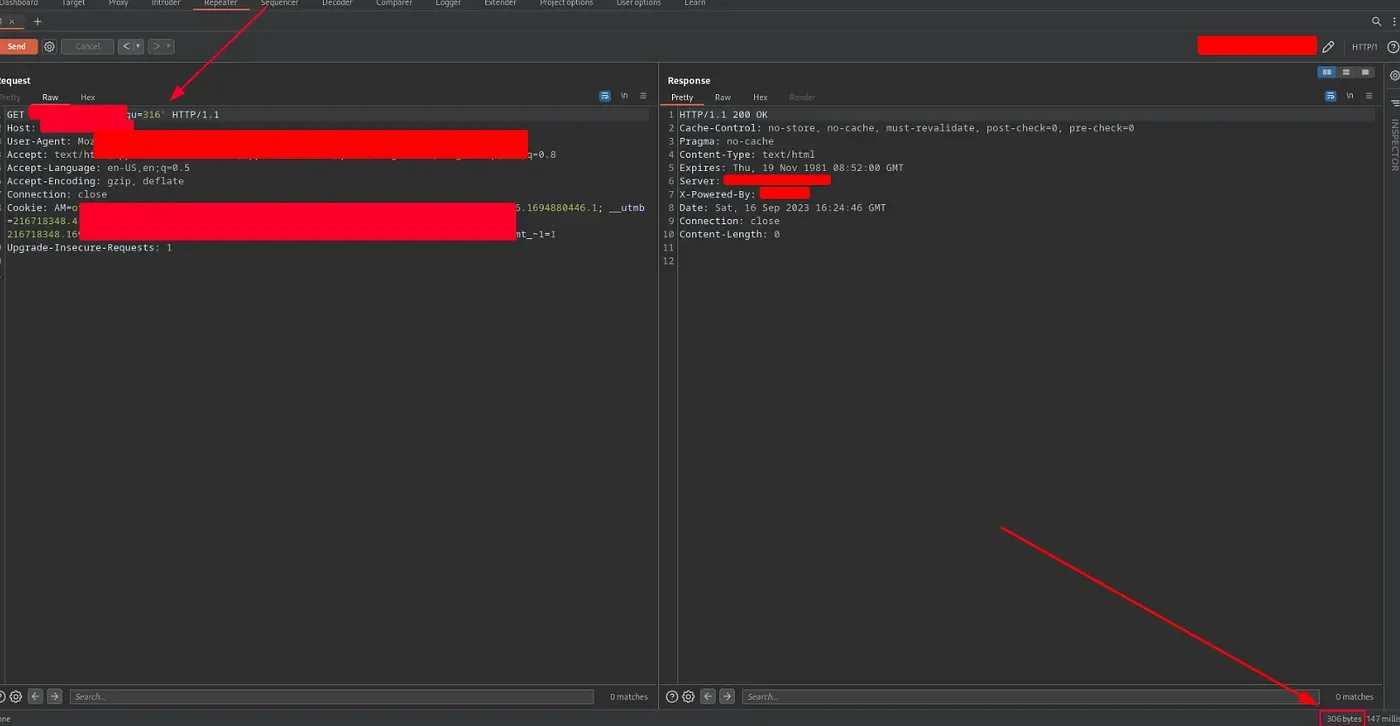
That confirms the input reaches a SQL statement closed with a single quote. The next attempt appends a boolean condition and tries to comment out the rest of the query:
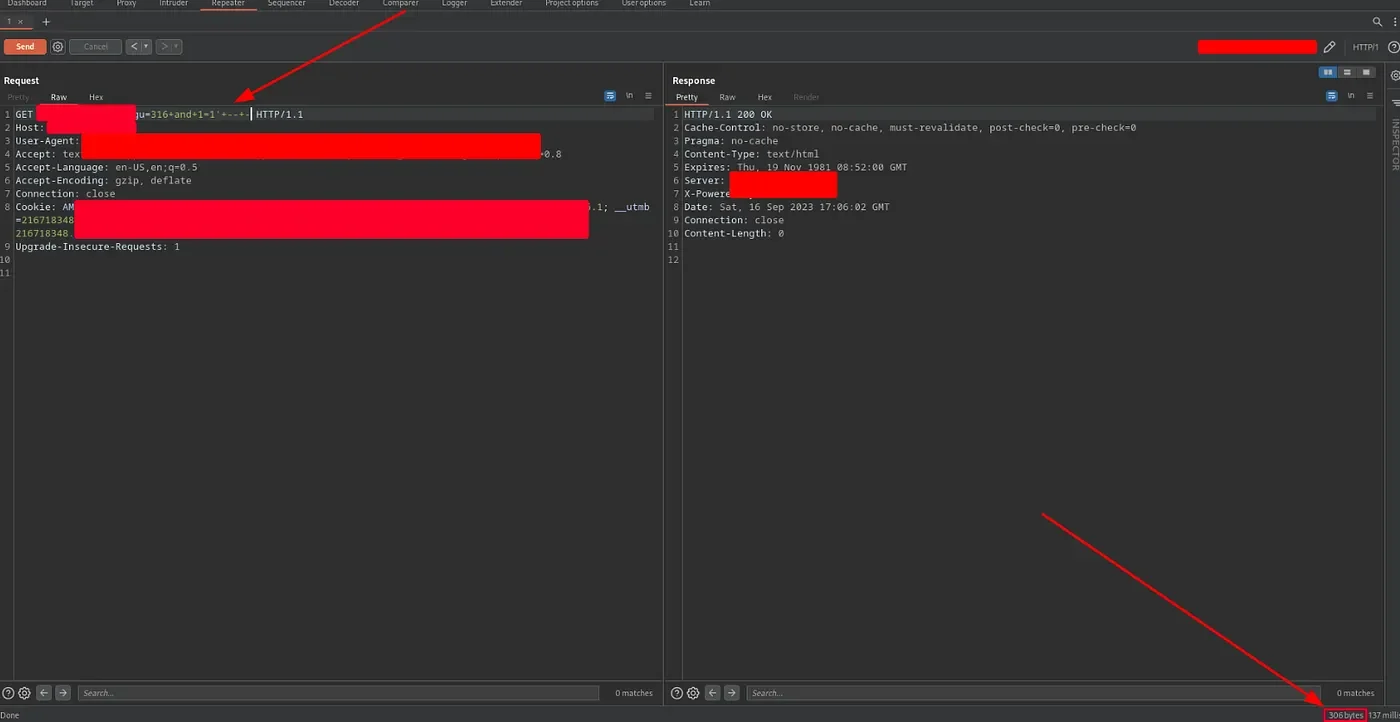
This does not work. Neither does the hash sign:
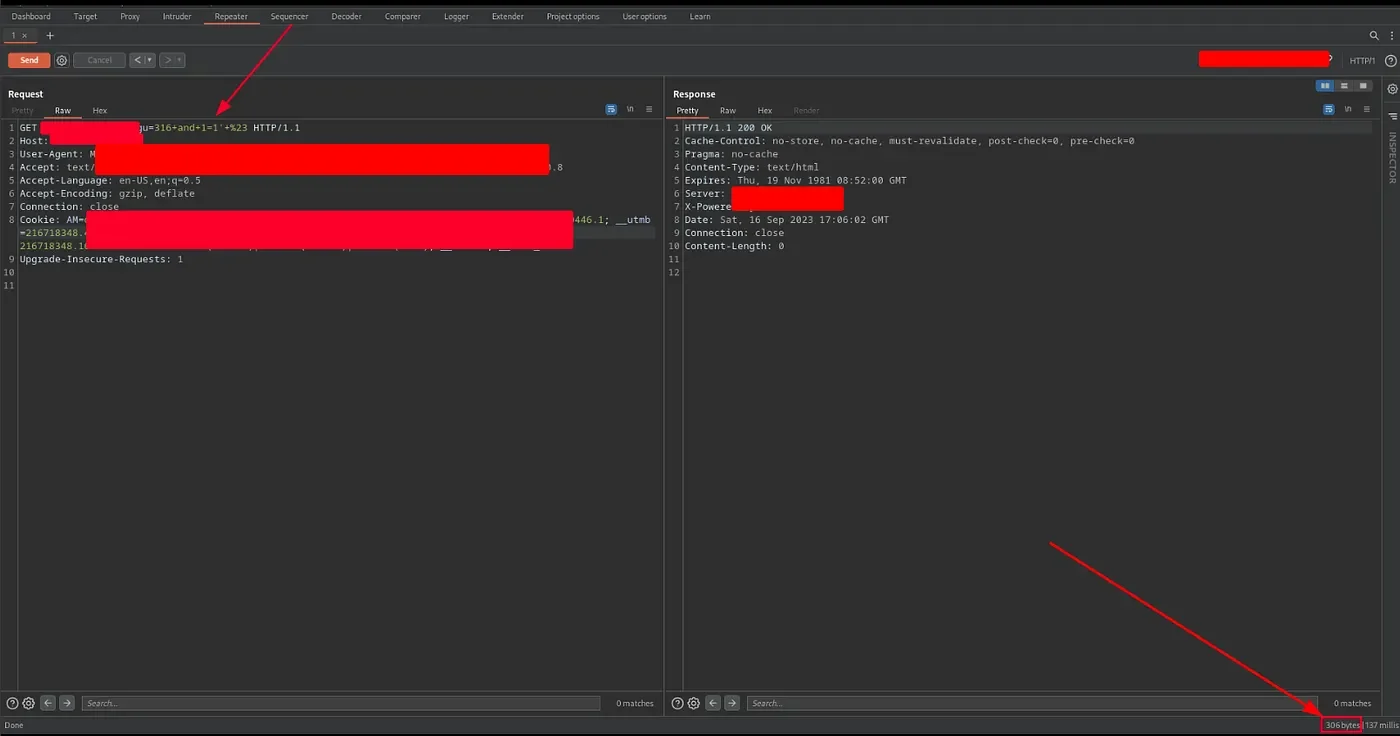
What does work is injecting the boolean condition alone, without commenting anything after it:
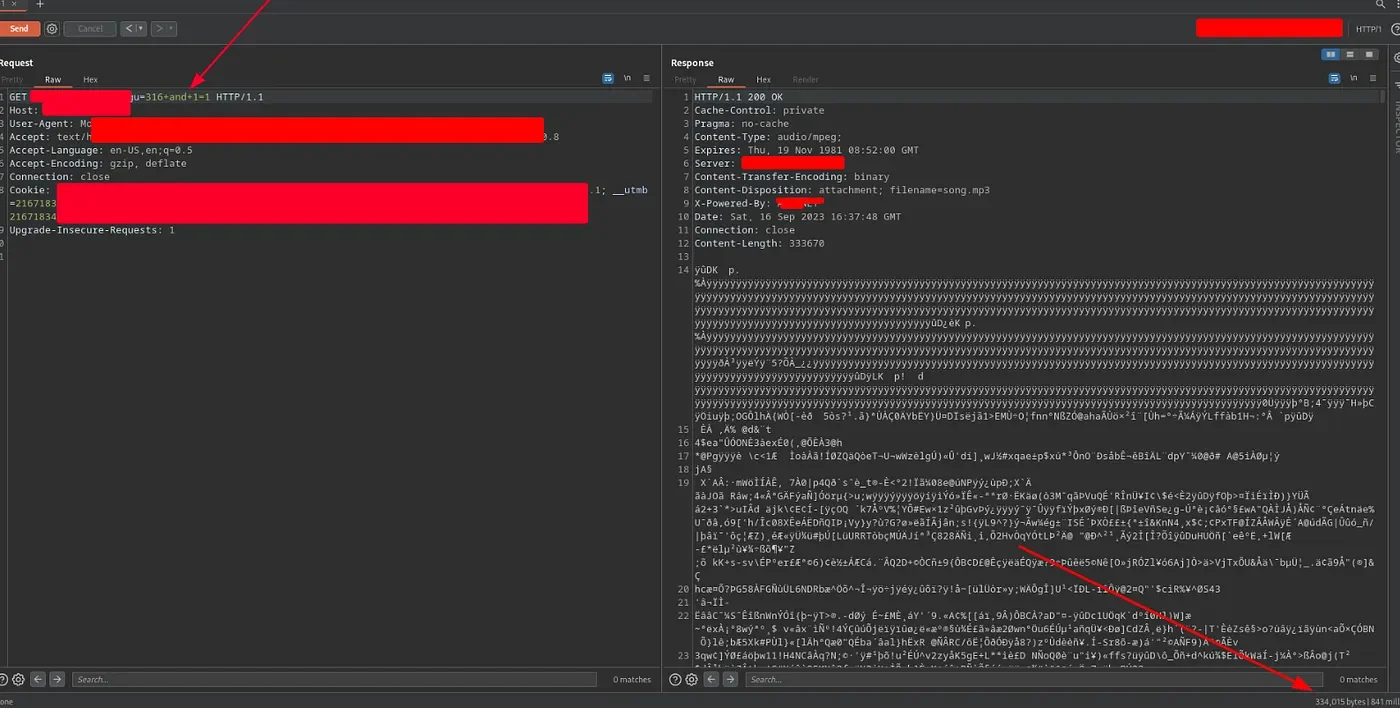
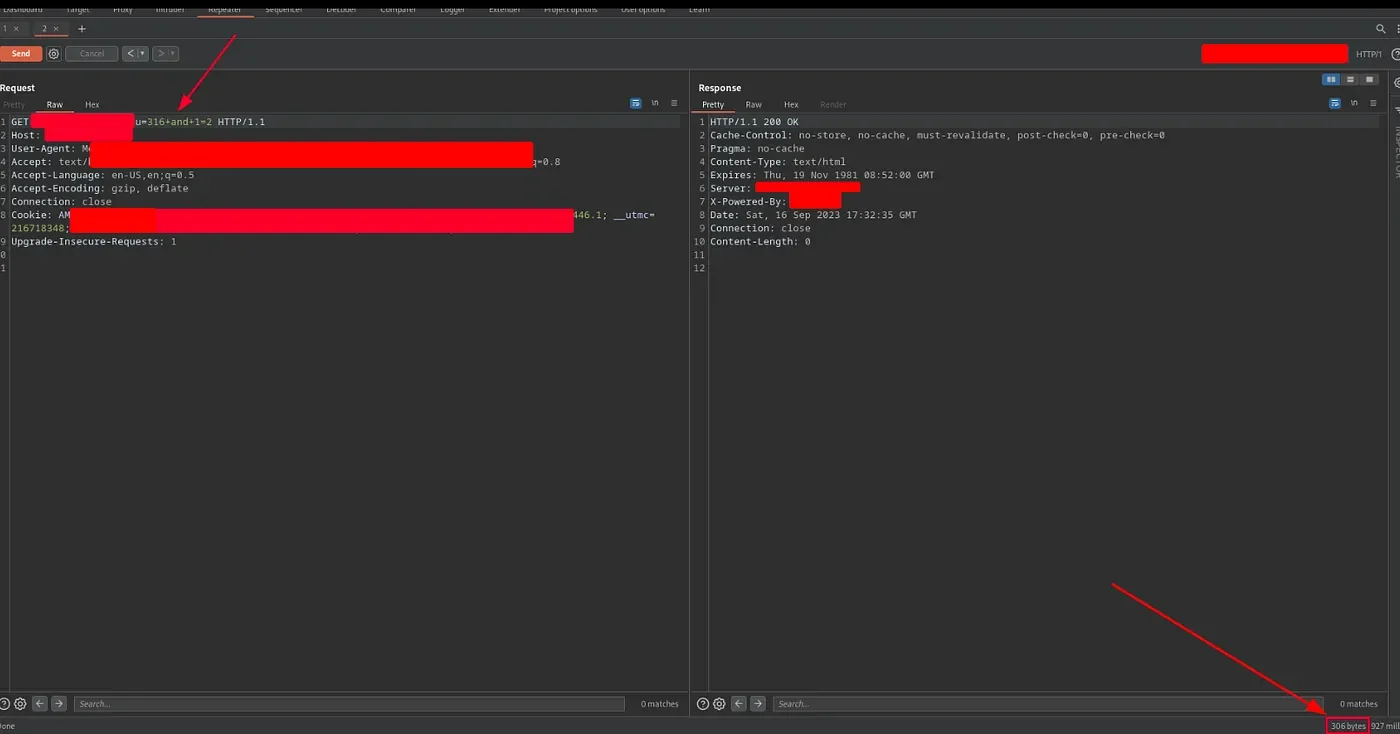
The lesson drawn is that closing quotes or commenting the remainder is not always required; the injection can simply continue the existing statement. The author also notes that in other situations the hash may need to be URL encoded as %23 or double encoded as %2523, and that a WAF may allow individual keywords such as ', /**/, AND, OR, FROM, SELECT, UPDATE, INSERT and SLEEP on their own but block them once combined into an exploitation payload.
With the injection point understood, the next objective is the database version, because the version determines what the INFORMATION_SCHEMA payloads should look like. The version queries listed for each database are:
Oracle ==> SELECT banner FROM v$version
Microsoft SQL Server ==> SELECT @@version
PostgreSQL ==> SELECT version()
MySQL ==> SELECT @@version
The SUBSTRING method is explained first: it extracts part of a string from a specified offset with a specified length. Using the source string bug4y0u, position 5 (counting from 1) is the character y, and a length of 2 returns y0. The per-database forms given are:
Oracle ==> SUBSTR('bug4y0u', 5, 2)
Microsoft SQL Server ==> SUBSTRING('bug4y0u', 5, 2)
PostgreSQL ==> SUBSTRING('bug4y0u', 5, 2)
MySQL ==> SUBSTRING('bug4y0u', 5, 2)
The crafted payloads for fuzzing the first character of the version are:
MySQL & MSSQL: ?lugu=316+AND+(SELECT+SUBSTRING(@@version,1,1))='4'Oracle: ?lugu=316+AND+(SELECT+SUBSTR(version(),1,1)+FROM+DUAL)='4'PostgreSQL: ?lugu=316+AND+(SELECT SUBSTRING(version(), 1, 1) = '4'
These are run through Intruder, fuzzing the character position.
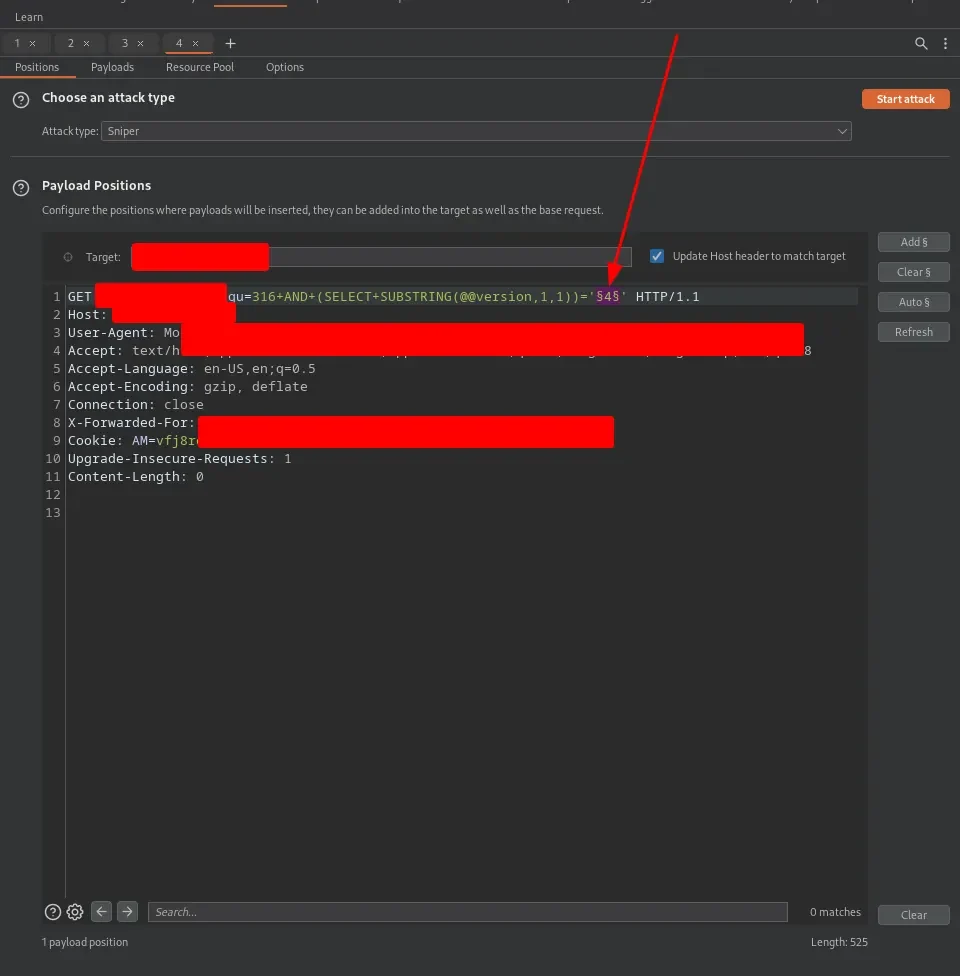
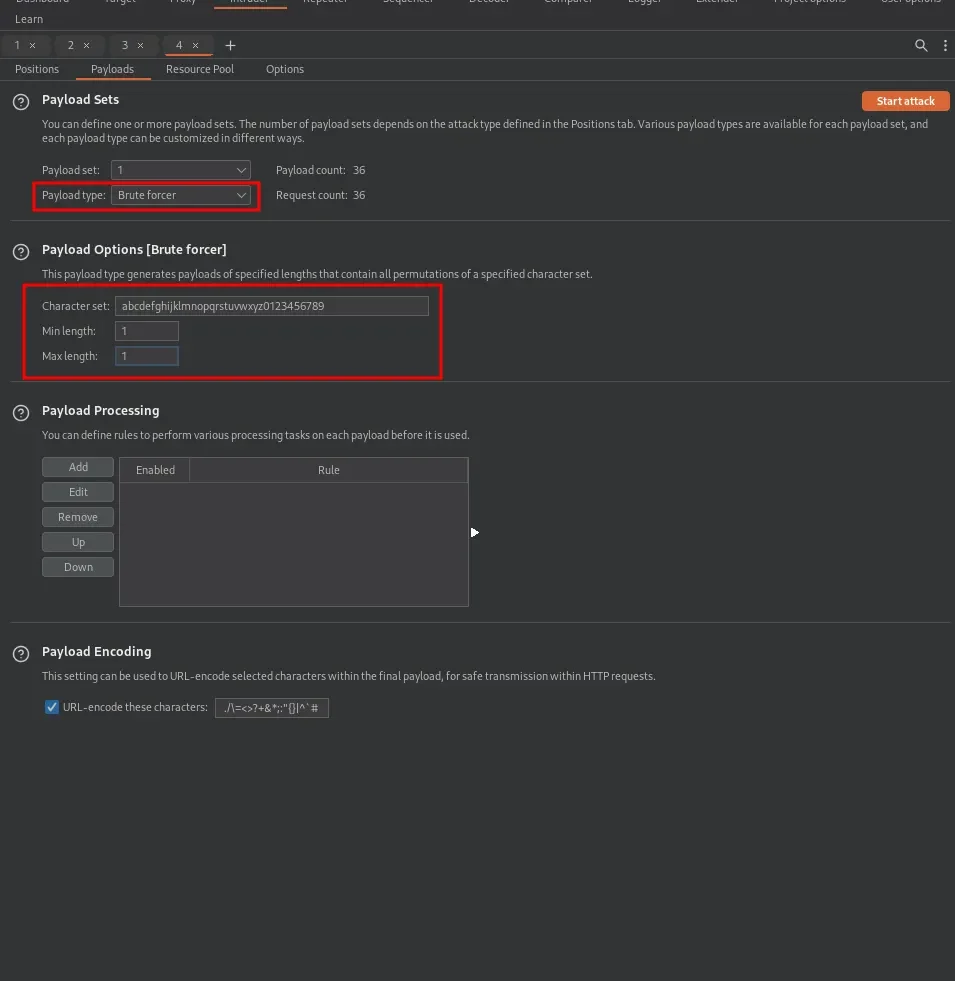
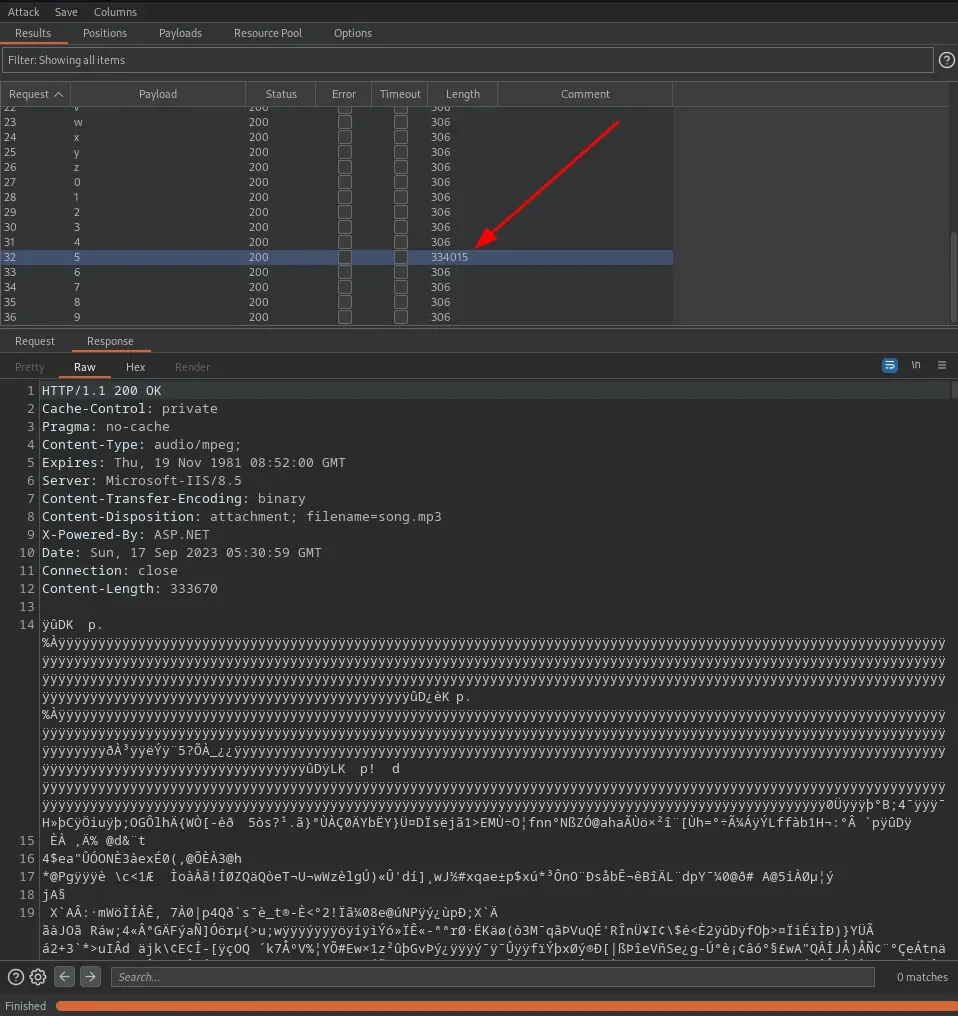
The payload that worked is:
SELECT+SUBSTRING(@@version,1,1)
This indicates a MySQL or MSSQL database, and the first character of the version is 5. To get the next character the same process is repeated with a small change: the SUBSTRING now returns the first two characters starting from position 1, so the result is compared against the two-character prefix.
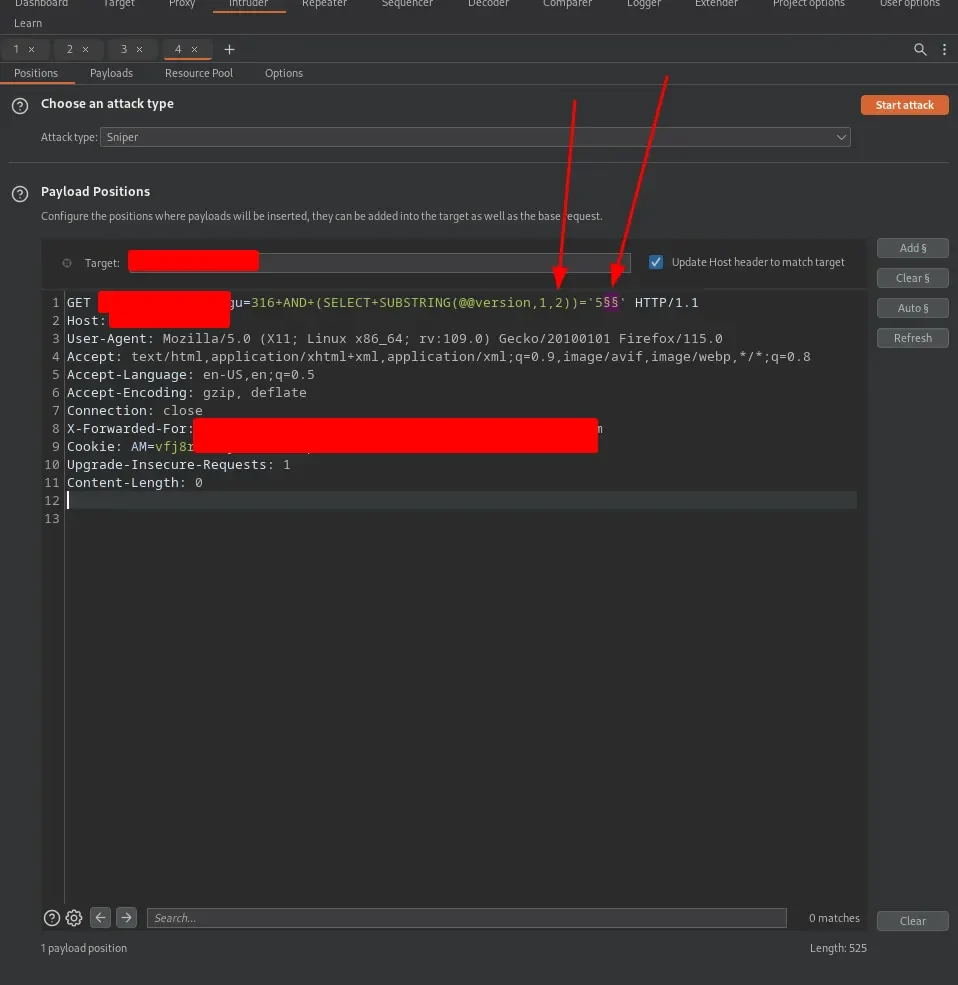
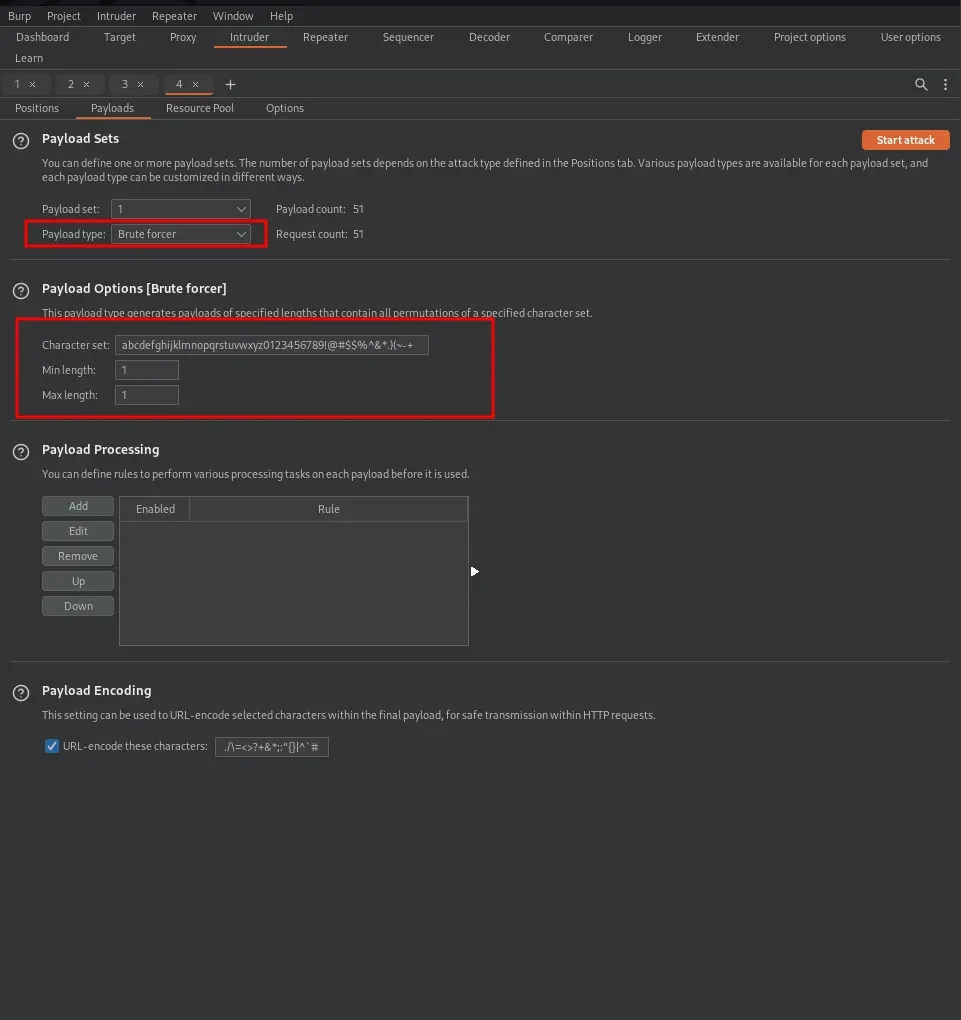
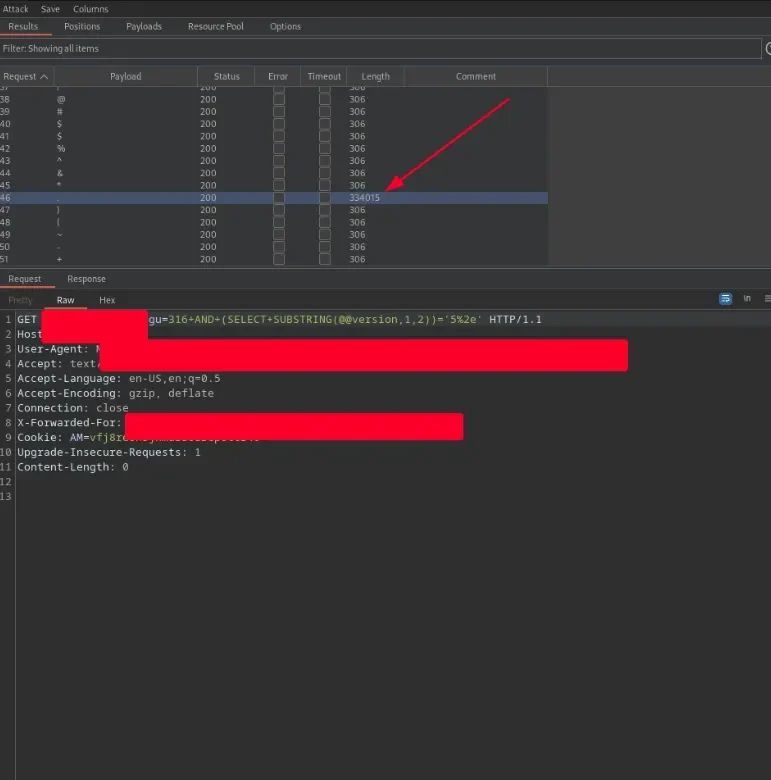
The first two characters are 5., and the process repeats until the full version is recovered. The author notes this is already enough to report, and argues for reporting before anyone runs sqlmap, since sqlmap's traffic is well known to WAFs and sqlmap could give an error even if the endpoint is vulnerable.
To show more impact, the next step dumps database names. The MySQL documentation for the INFORMATION_SCHEMA.SCHEMATA table is referenced, and the query to understand is:
SELECT 1 FROM INFORMATION_SCHEMA.SCHEMATA WHERE SCHEMA_NAME LIKE 'a%'
INFORMATION_SCHEMA.SCHEMATA is the system catalogue table holding database metadata, SCHEMA_NAME is the column holding database names, and LIKE 'a%' filters to names starting with a. The query returns 1 if such a database exists.
The injected payload is:
AND+(SELECT+1+FROM+INFORMATION_SCHEMA.SCHEMATA+WHERE+SCHEMA_NAME+LIKE+'a%')%3d1
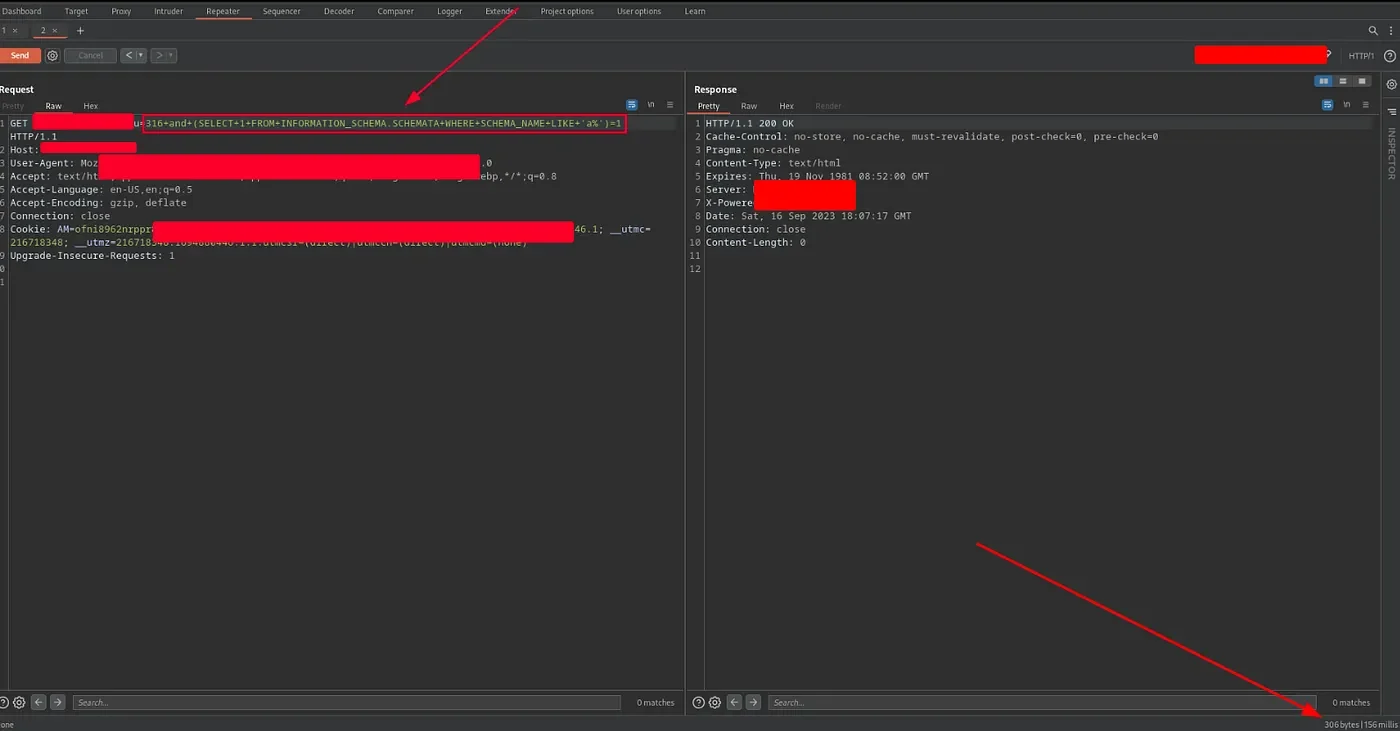
If a database starting with a exists, the subquery returns 1 and the whole expression evaluates as:
316 AND (1)=1
which, as established earlier, returns the normal response. The character is then fuzzed with Intruder.
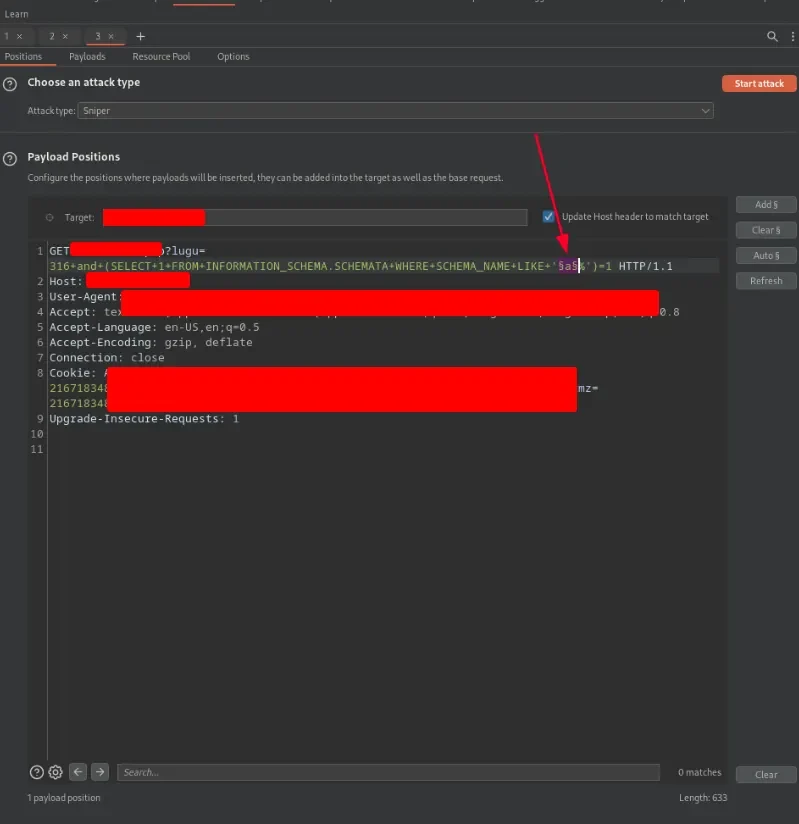
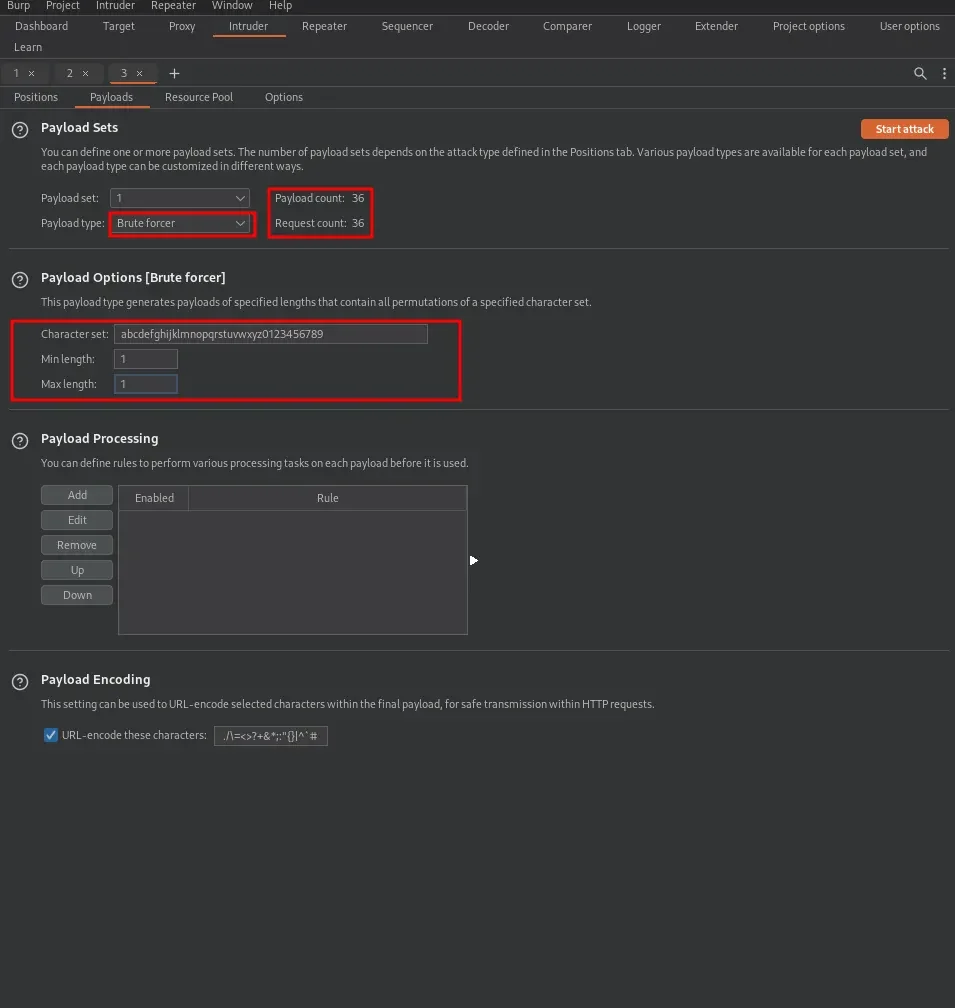
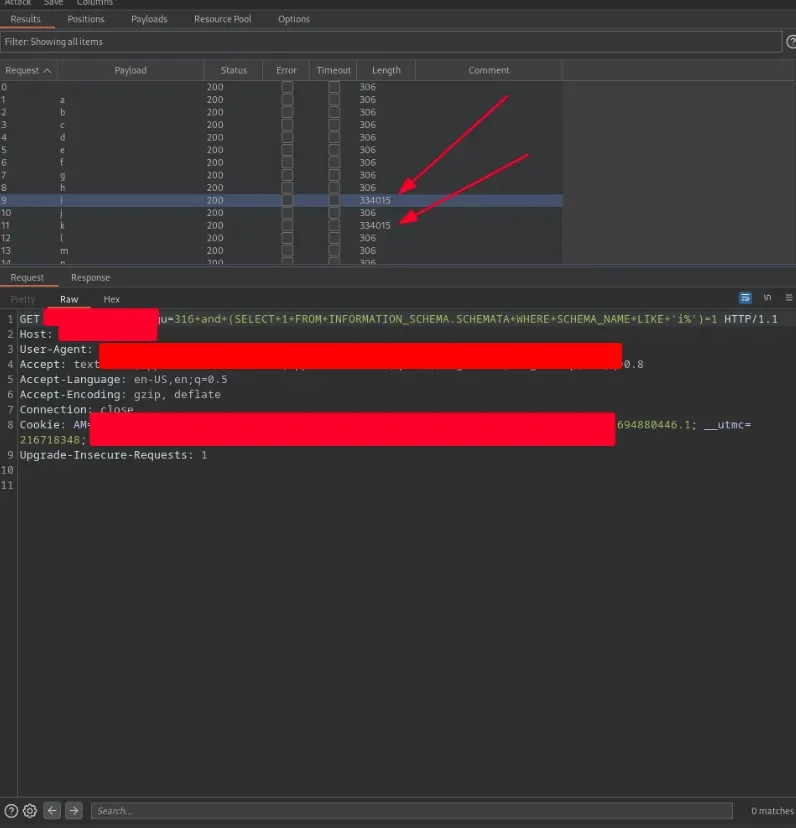
The results show two databases, one whose name starts with i and one whose name starts with k. Returning to Repeater confirms the hit:
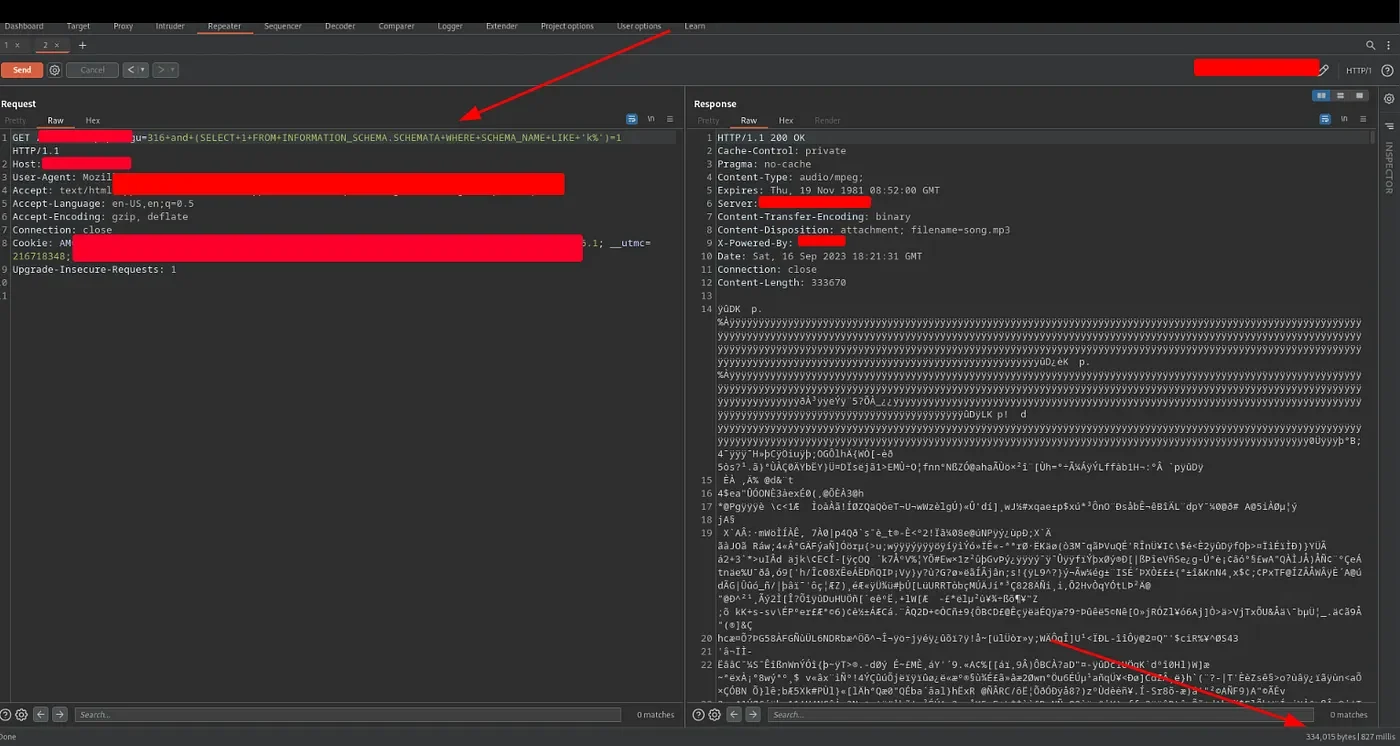
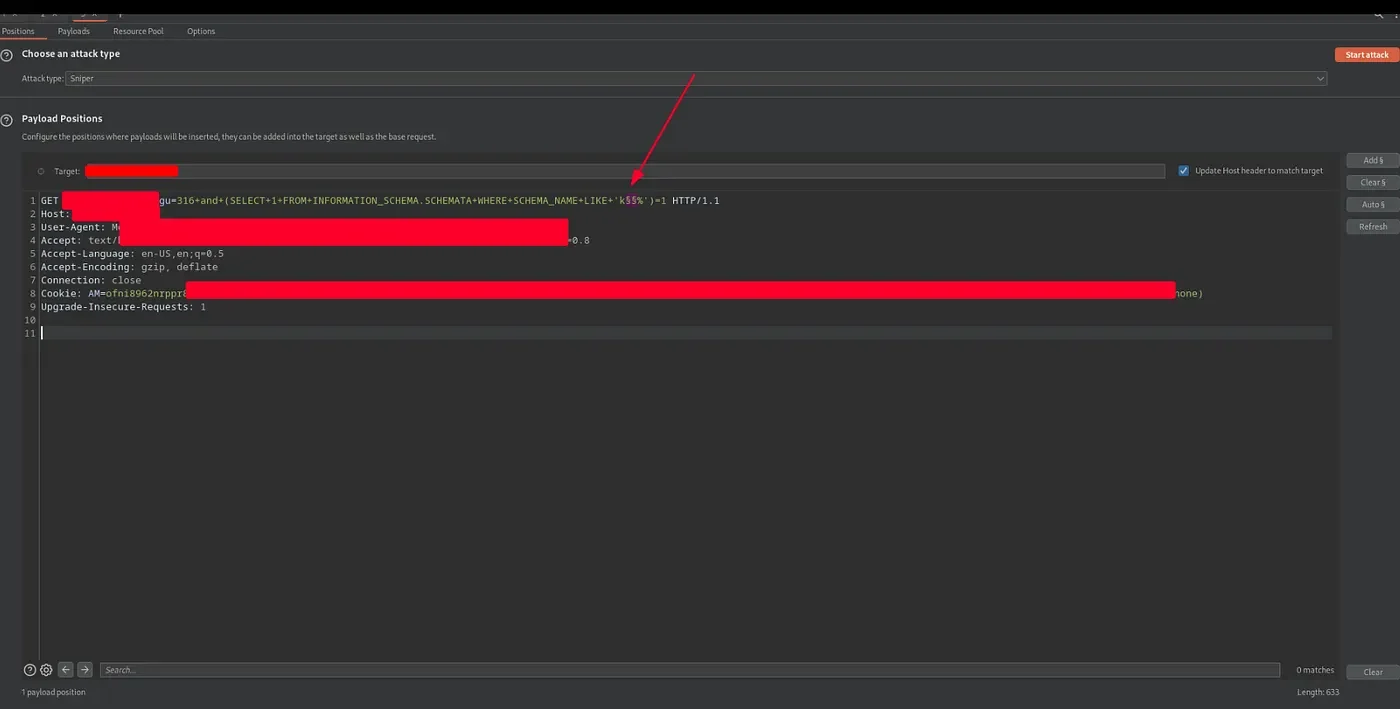
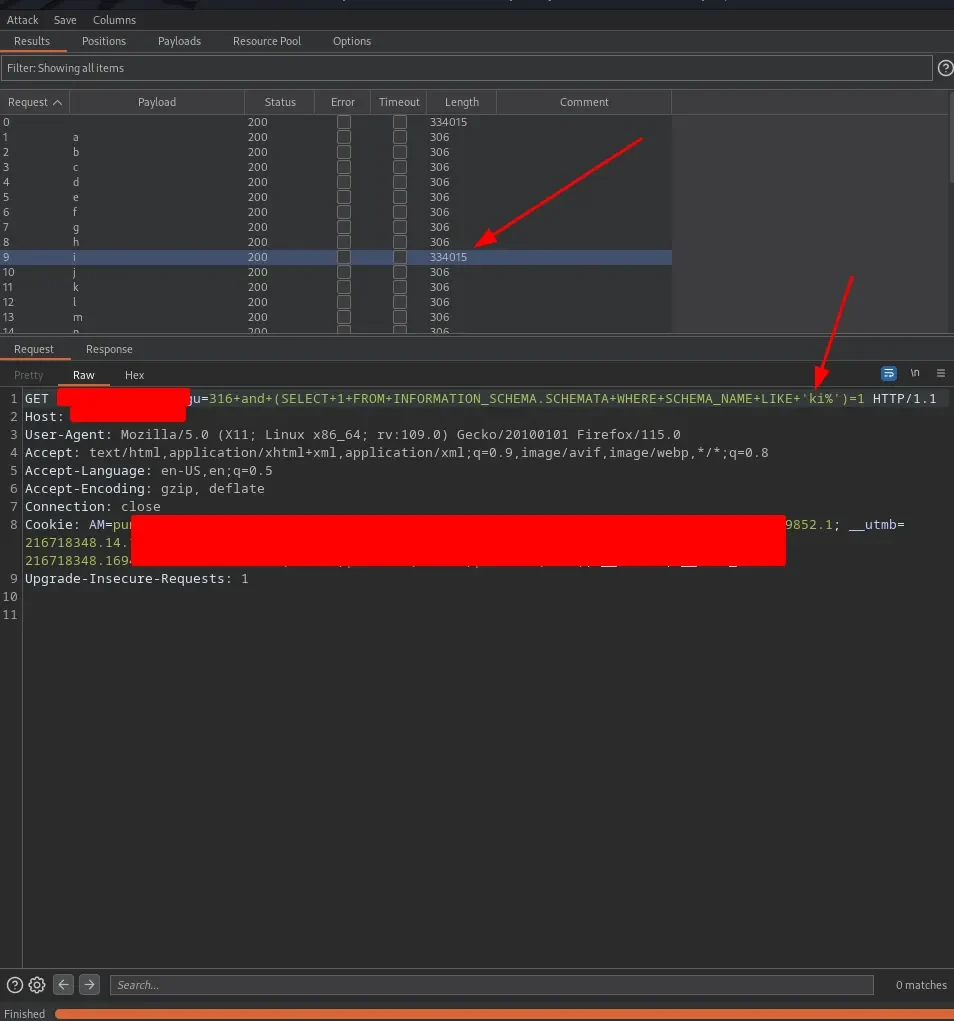
The same process is repeated for the second character and onwards until the full database names are recovered.
For table names, the query given is:
SELECT table_nameFROM information_schema.tablesWHERE table_schema = 'your_database_name';
Both MySQL and PostgreSQL support information_schema, so this query works against either. Combined with the boolean condition, the payload is:
?lugu=316+AND+(SELECT+1+FROM+INFORMATION_SCHEMA.TABLES+WHERE+TABLE_SCHEMA+%3d+'your_database_name'+AND+TABLE_NAME+LIKE+'w%';)%3d1
This checks whether a table in that database starts with w, and the same Intruder process dumps the full table name. Column names follow the same idea via INFORMATION_SCHEMA.COLUMNS. The author stopped at this point and reported; the report was triaged in roughly 5 to 8 minutes.
Second bug: time-based injection in the store search endpoint
The store search endpoint looks items up in the database, and its search parameter is not sanitised at the backend.
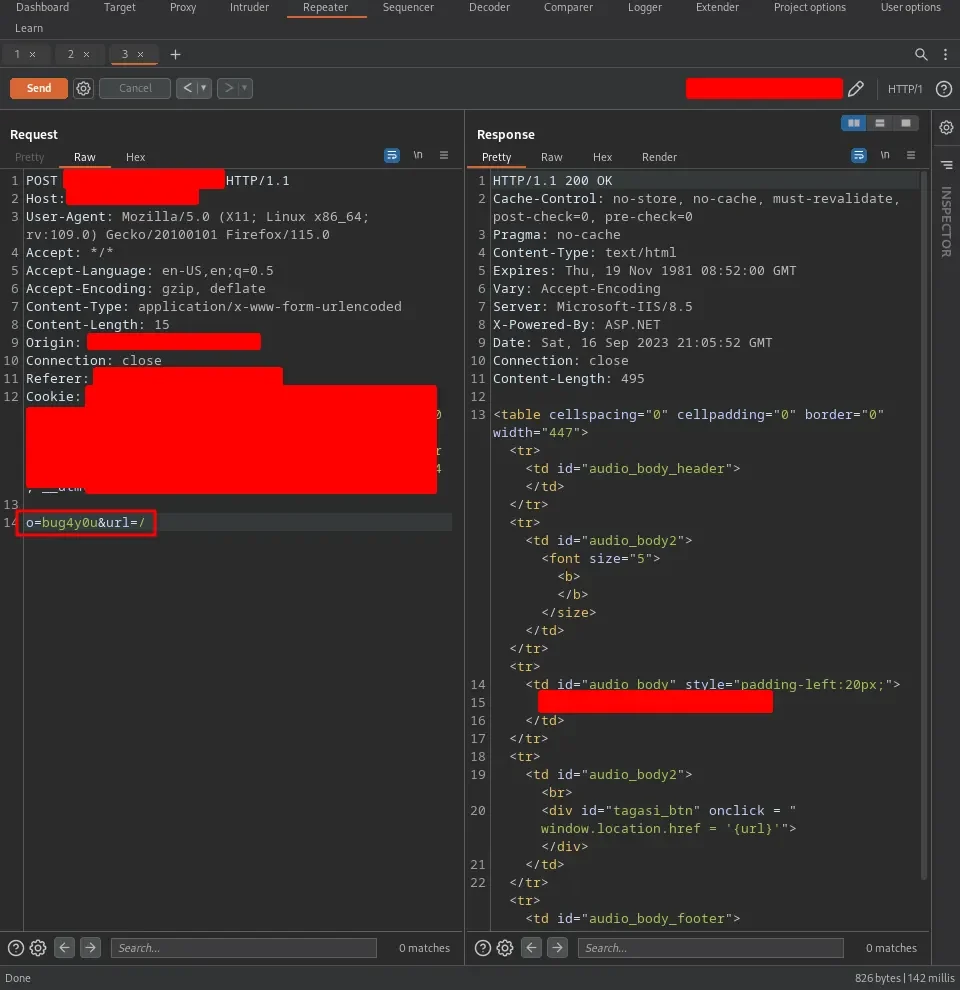
A single quote produces an error from the mysql_fetch_array() method, so this one is easier to confirm than the boolean-based first bug.
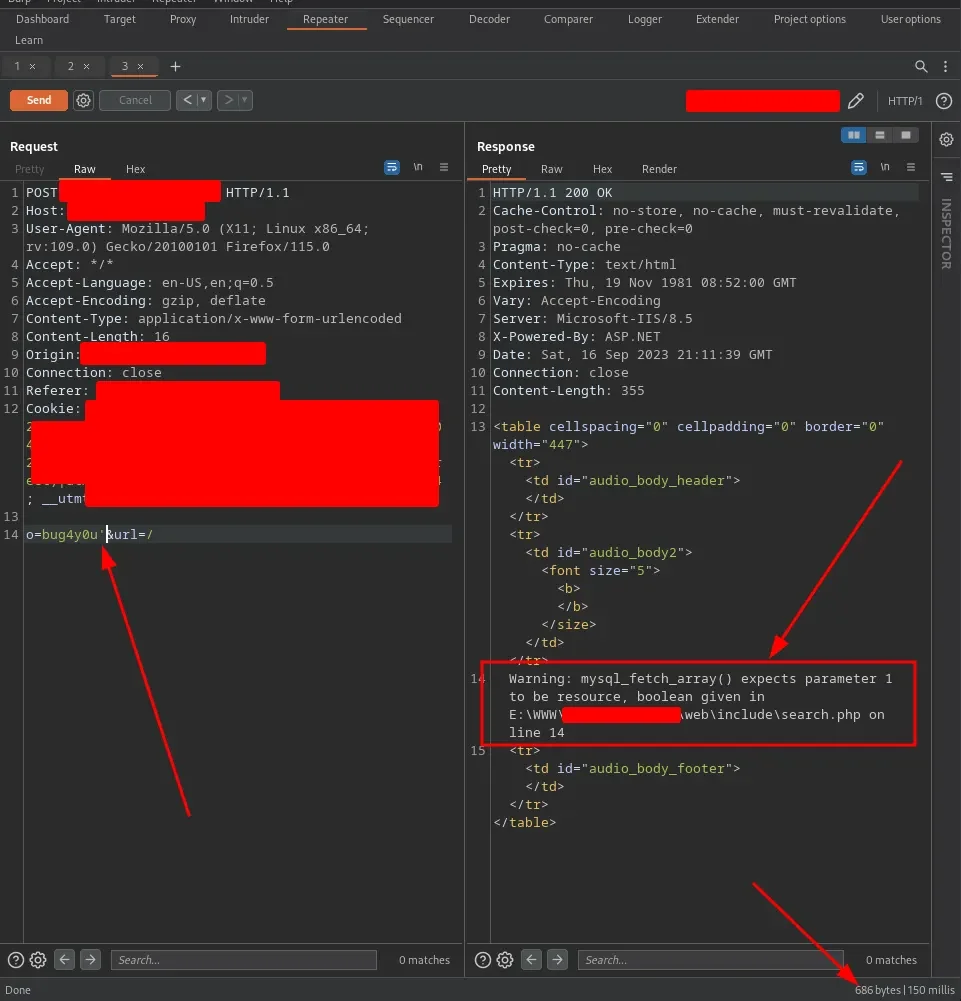
The first payload tried is:
bug4y0u'+AND+(SELECT+1+FROM+(SELECT(SLEEP(10)))a)+AND+'bug4y0u'%3d'bug4y0u
This was blocked, which the author attributes to firewall rules rather than a full WAF. The bypass used URL encoding of some characters plus /**/ comments, with no Unicode encoding. After about an hour of being detected, the working payload was:
bug4y0u'+AND+/**/(%53ELEcT+1+/**/+fRoM/**/+(SE%4cEC%54(sL%45%45P(3%29%29%29a)+A%4ed+'bug4y0u'%3d'bug4y0u
The author notes that in 2023 most modern WAFs will block this payload, but that it is worth adding to a wordlist; another researcher used it in 2020 and received a 2.2k bounty, so success depends on the target and the firewall rules in place alongside the WAF.
The endpoint itself was found with waybackurls, on the observation that developers often leave old PHP files on servers. The command used is:
echo 'bug4y0u.com' | waybackurls -dates
The -dates switch shows file dates, so the author goes for the oldest ones. This surfaced very old endpoints that were still publicly accessible and vulnerable.
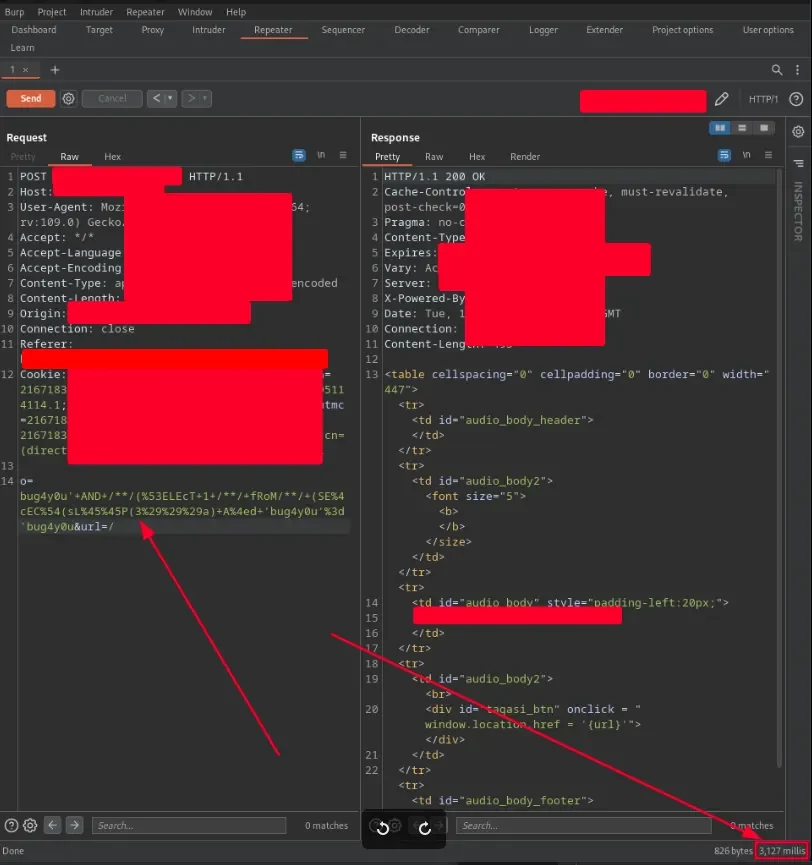
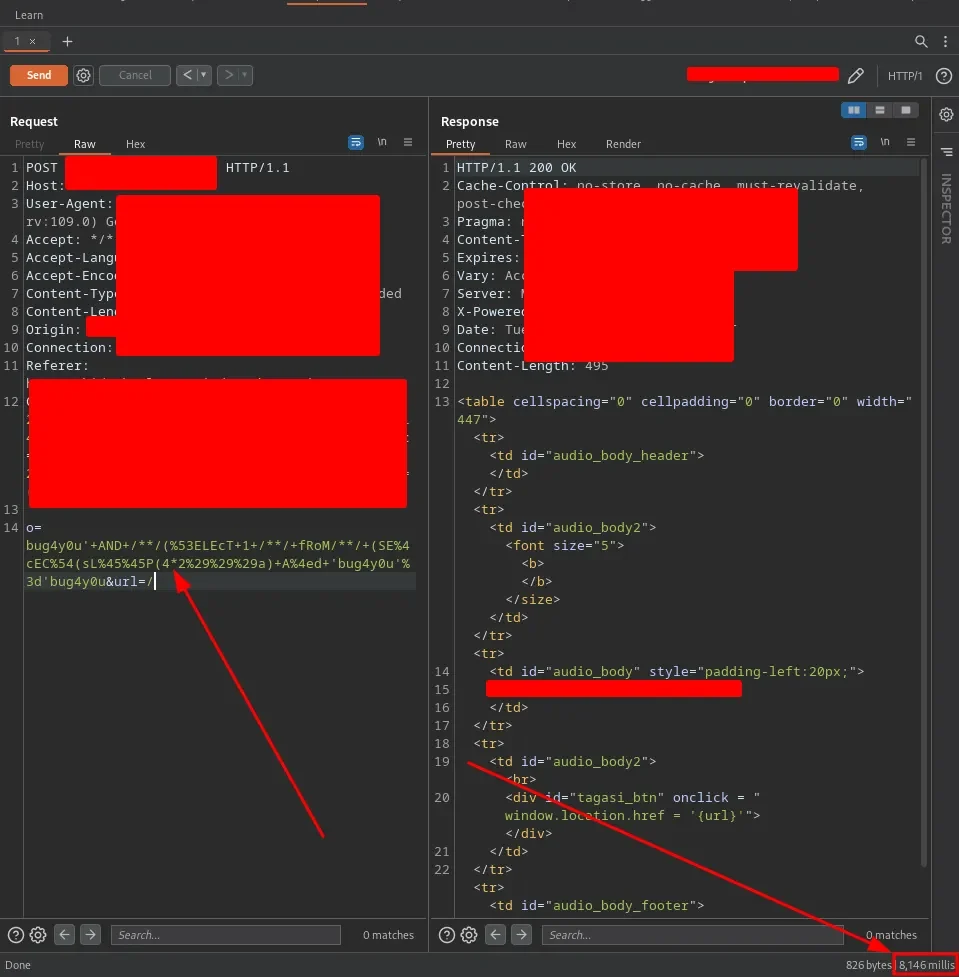
The proof of concept forced the database server to sleep for 3 seconds and for 8 seconds.
Third bug: time-based injection in the audio information endpoint
The endpoint retrieves attributes about a piece of audio, and its parameter is not sanitised at the backend.
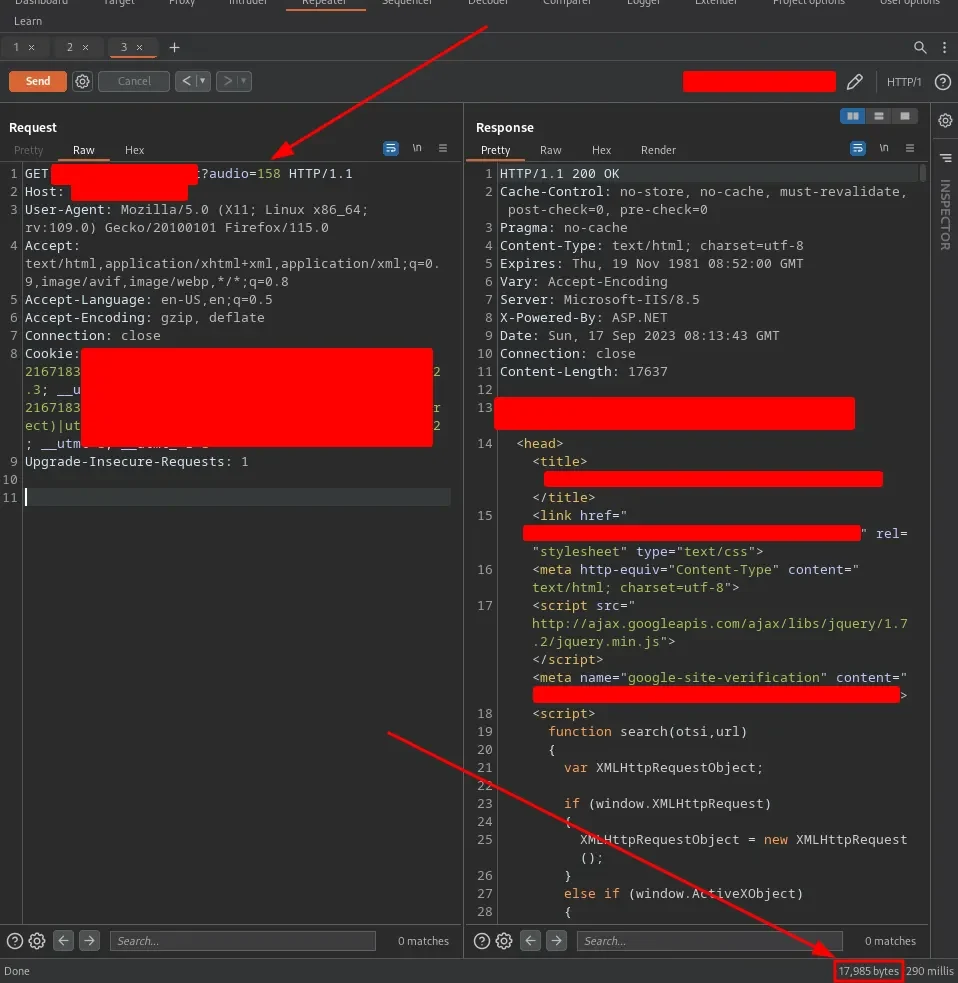
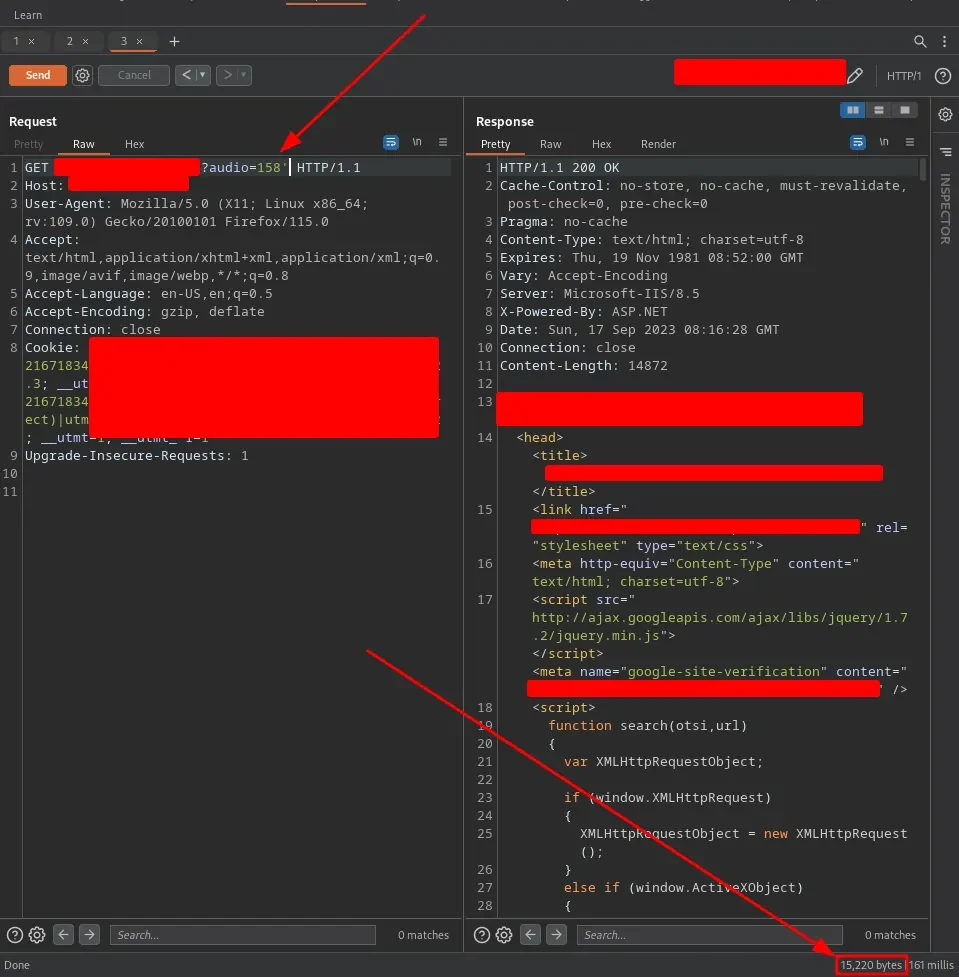
The point of these two screenshots is the response body, not the length. The endpoint returns a small HTML response with the audio information (file name, author, upload date and similar attributes) printed at the end of the page. When a single quote is injected, the response length drops by almost 2500 bytes, but the visible part of the page looks identical, so the difference is only at the bottom of the HTML and requires scrolling. The author's assumption is that the backend exits from the query entirely when it sees a malicious character, so no information about that audio is returned. The general lesson is that the same response length can still hide a completely different body.
The working payload, found after many attempts at concatenation, is:
bug4y0u'|(IF((now())LIKE(sysdate()),SLEEP(6),0))|'bug4y0u
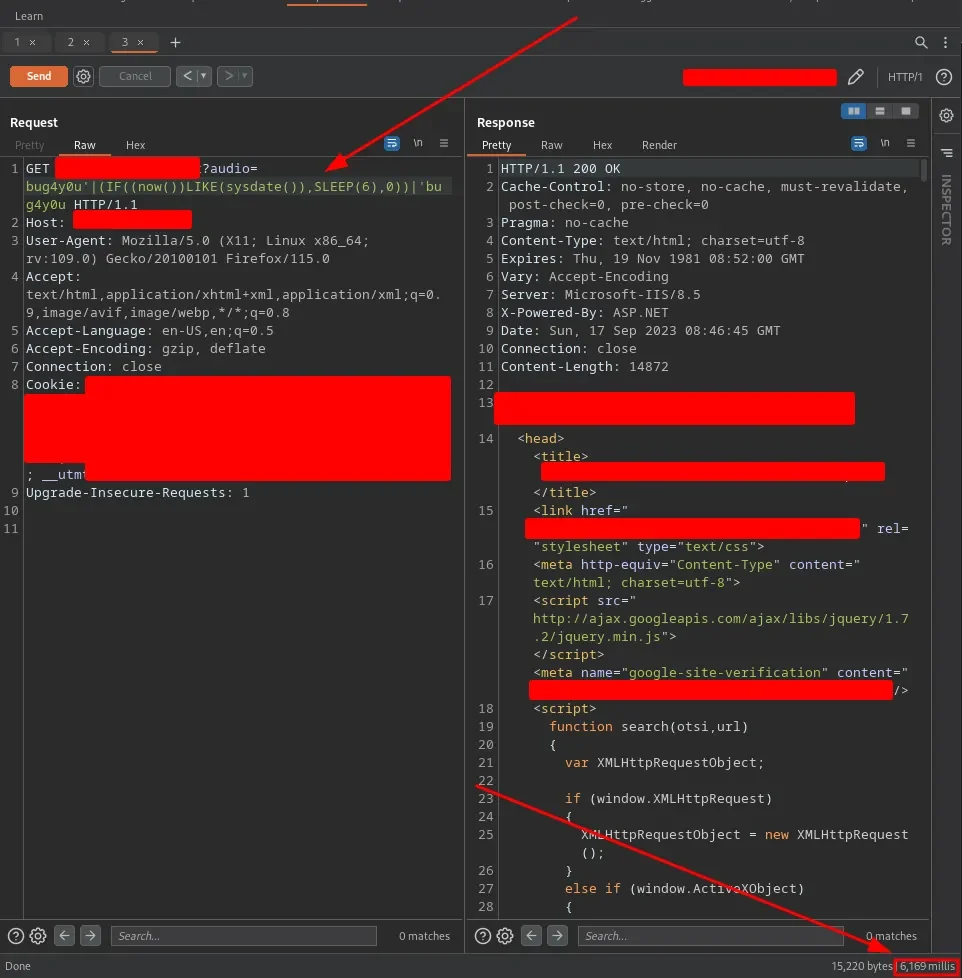
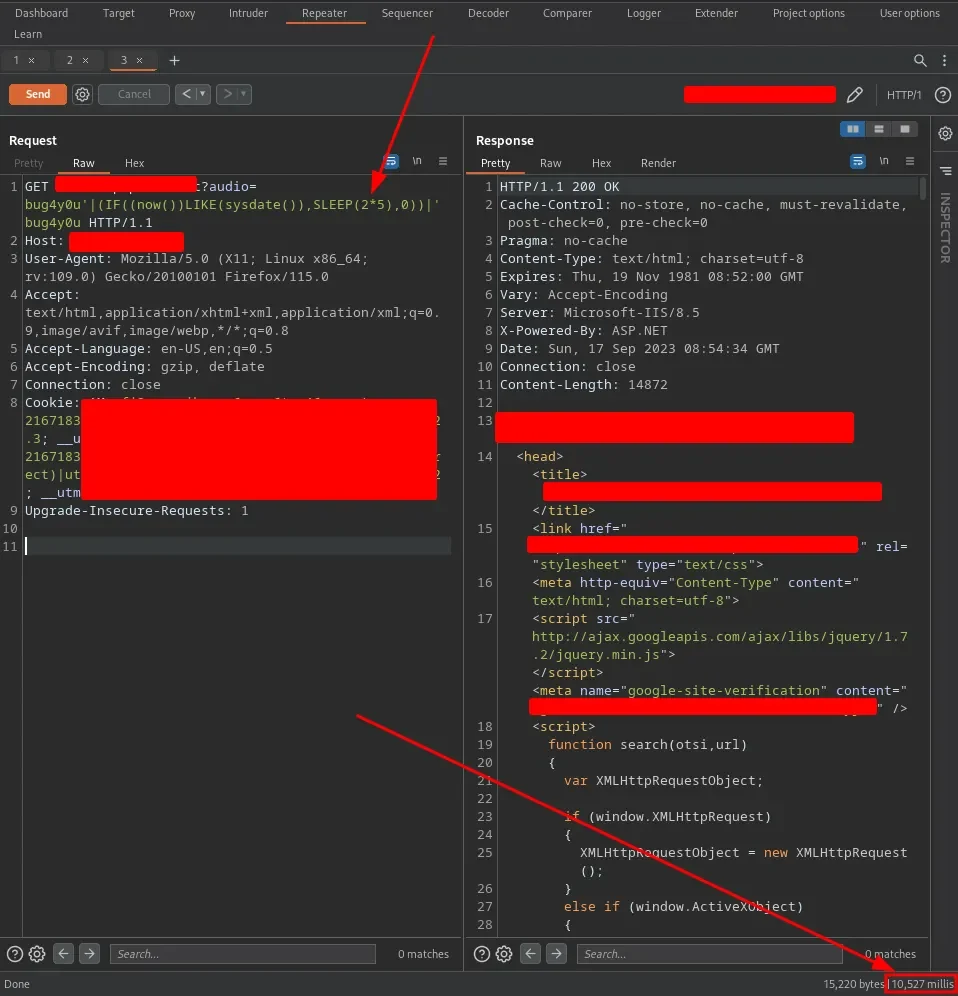
Many obfuscation techniques were tried to dump data from the database without success, so the author brought in a collaborator; the collaborator also could not dump anything, not even the banner. The bug was reported as it is, a time-based SQL injection.
Fourth bug: error-based attempt that ended as time-based
The endpoint retrieves information about the author of an uploaded audio file. As always, the first step is a single or double quote and a look at the response.
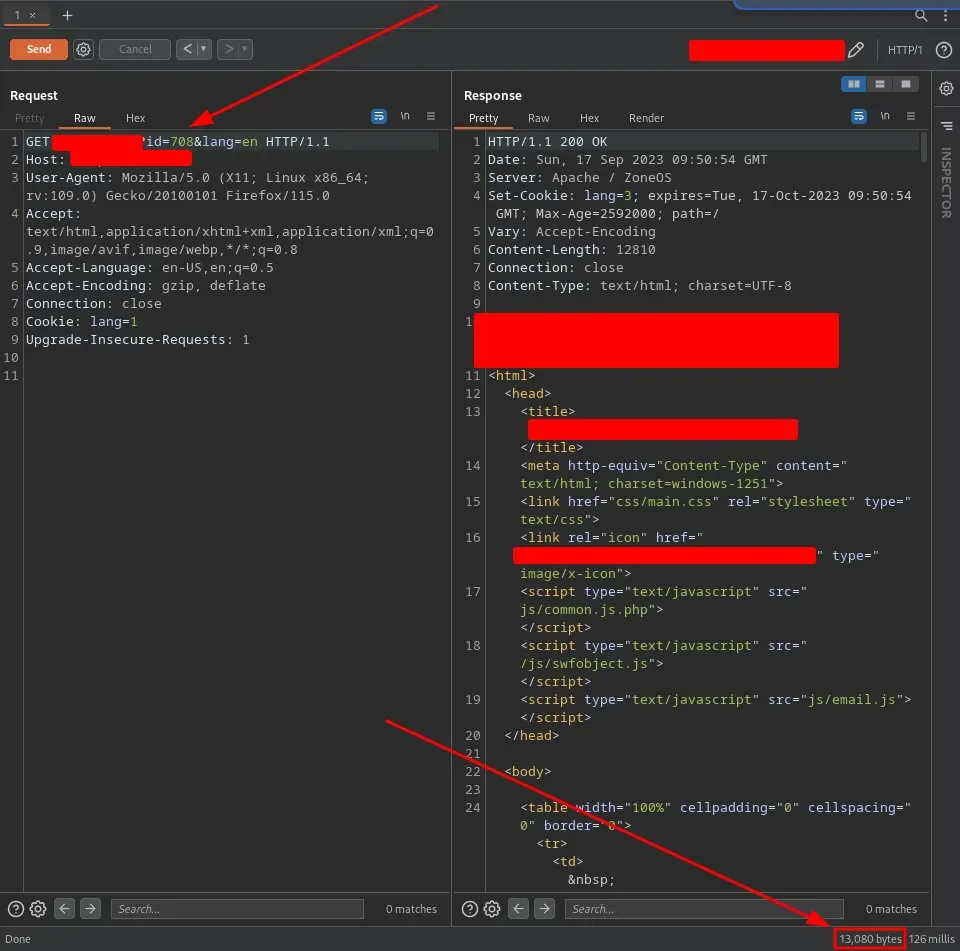
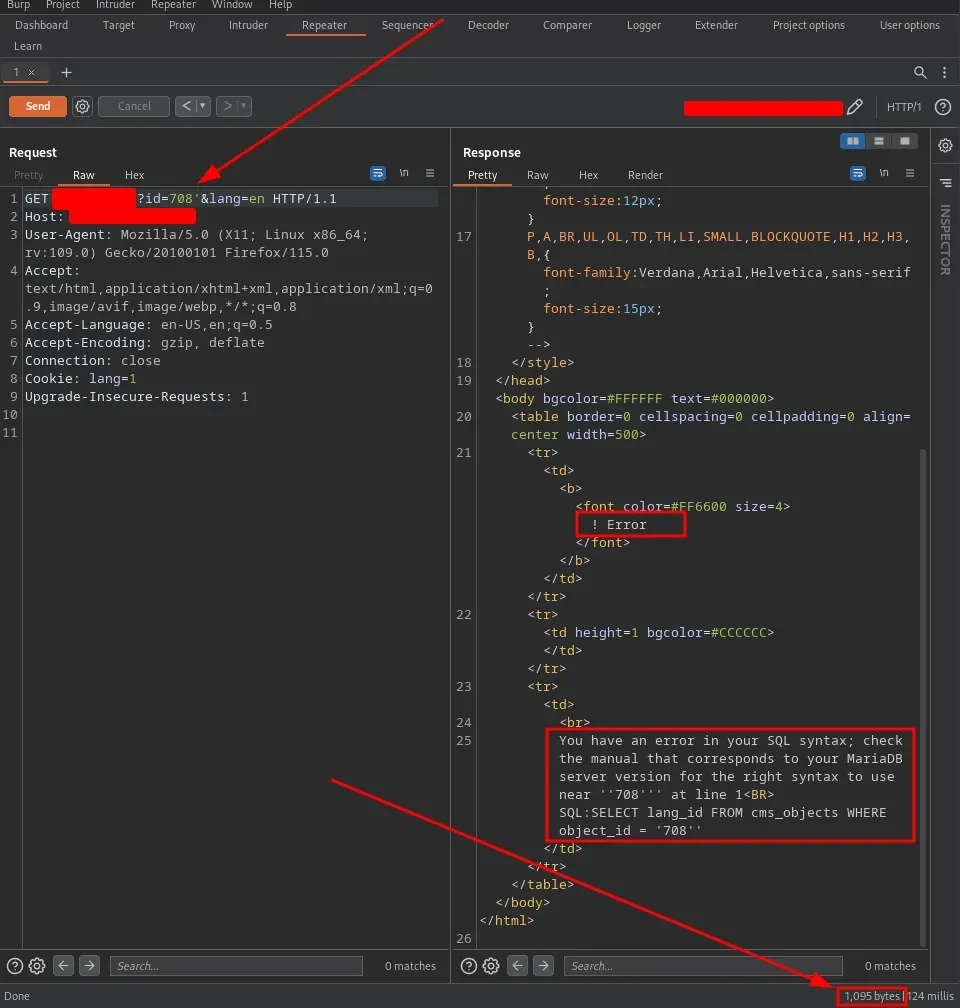
The error in the response reveals the column name lang_id, the table name cms_objects, and another column name, object_id. None of this should be returned to the client, so the author moved to error-based injection.
The methodology for error-based injection is three steps. First:
' || (select '') || '
The || operators concatenate strings in SQL. A 200 OK here means MySQL or MSSQL; an error means it is neither, because this is a valid query in MSSQL and MySQL but not in Oracle, which requires a FROM clause. Second:
' || (select '' from dual) || '
A 200 OK here means Oracle. The DUAL table in Oracle SQL is a one-row, one-column table used to evaluate expressions or retrieve single values without referencing a real table, for example:
SELECT 1 + 2 FROM DUAL;
Third:
' || (select '' from bug4y0u) || '
Since bug4y0u is not a real table, this should produce an error, which confirms the tester's understanding of the case. The author notes that these payloads were sometimes encoded in multiple formats or had /**/ comments inserted between parts.
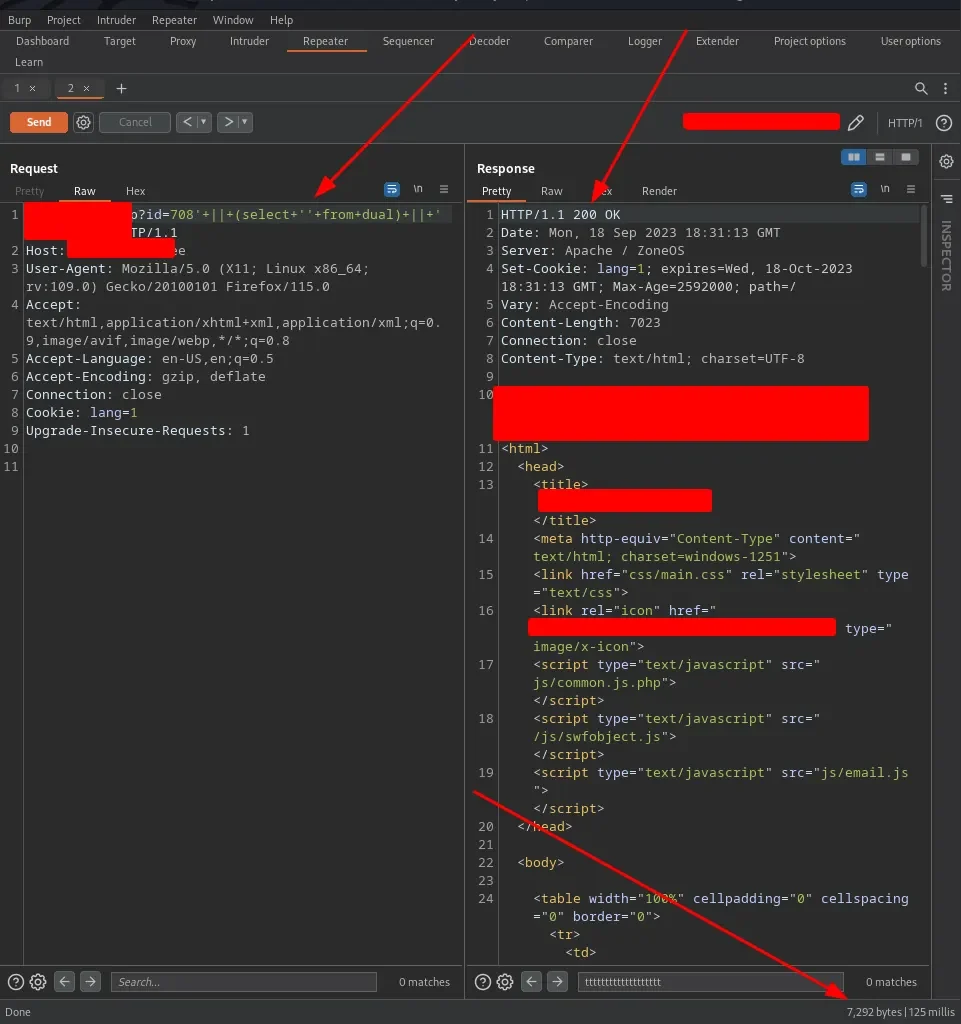
The third payload returned 200 OK, indicating Oracle, but with a completely different response length. The author says they still do not understand why the length changed, and that they are not strong at error-based injection. They abandoned error-based and went to time-based to report quickly. After a number of attempts, the working payload was:
?id=708'+ANd+E%4cT/**/(1337%3d1337,/**/sL%45EP%283*4)/**//**//**/)+OR+/**/'1337'%3d'bug4y0u
The parts are explained as follows. ELT(1337=1337,SLEEP(12)) attempts to make the database pause for 12 seconds when the condition 1337=1337 is true. OR combines conditions. '1337'='bug4y0u' evaluates to false, and since AND binds before OR, the trailing OR looks useless. In practice, adding an OR with a false condition such as '1337'='bug4y0u', or '1'='2', can sometimes bypass firewall rules, and sometimes proper encoding and a little obfuscation are needed for it to pass.
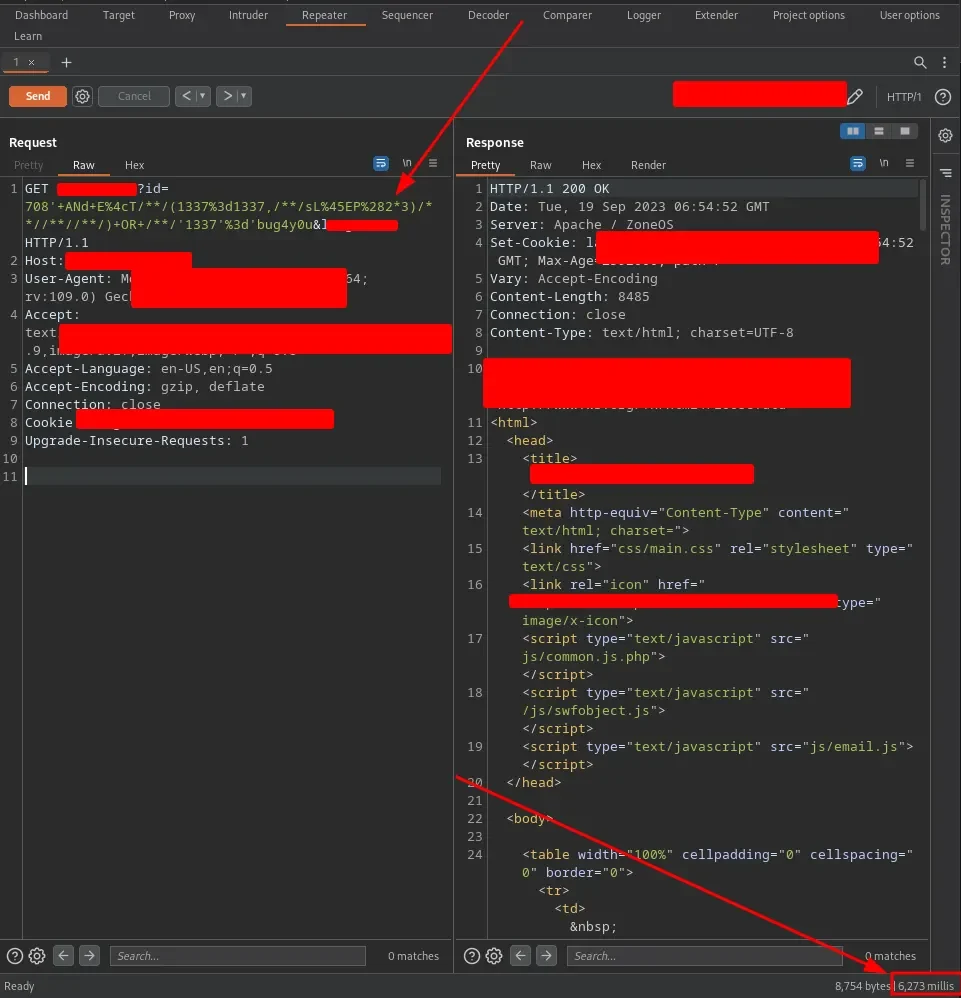
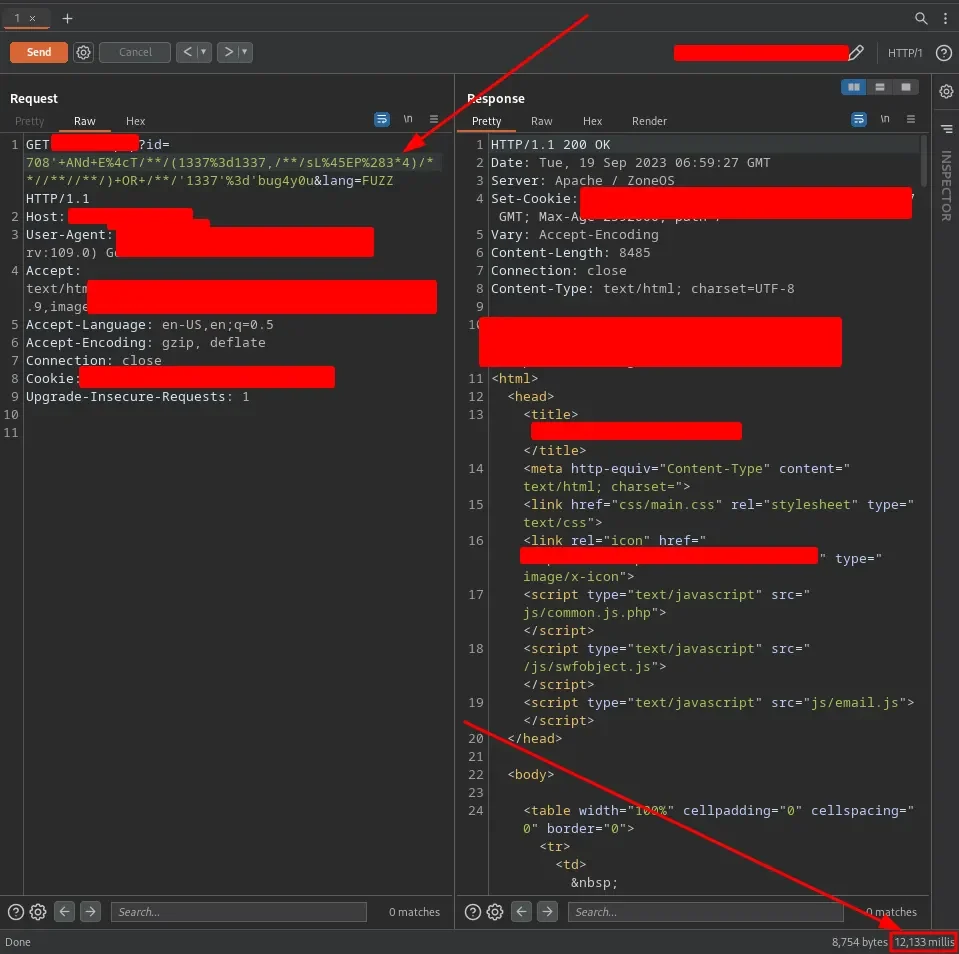
So the fourth bug was also reported as time-based rather than error-based.
Root cause
In all four cases the parameters reach SQL statements without proper sanitisation at the backend, which is what the author states directly for the second and third bugs and demonstrates for the first and fourth. The first bug shows the value is placed inside a statement closed with a single quote, and that a boolean condition can be appended without needing to close or comment anything. The second bug produces a mysql_fetch_array() error on a single quote. The fourth bug leaks column and table names (lang_id, cms_objects, object_id) in an error message, which is itself a separate information disclosure problem.
On defences: the first bug had no WAF at all. The second bug had firewall rules that blocked the initial SLEEP payload but were bypassed with URL encoding and /**/ comments. The author's view is that manual, low-volume traffic avoids the signatures that get sqlmap blocked.
Impact
For the first bug, the demonstrated impact is recovery of the database version and the names of databases and tables, with column names reachable by the same method. For the second bug, the demonstrated impact is arbitrary time delay in the database server, shown at 3 and 8 seconds. For the third bug, the impact is limited to a confirmed time-based injection: neither the author nor the collaborator could dump anything, including the banner. For the fourth bug, the impact is again a confirmed time-based injection, plus the error message disclosure of table and column names. The author does not state what data, users or systems were ultimately reachable beyond these demonstrations.
Fix
No fix is described in the report. The report describes no fix. The only measure it touches on is the old endpoints that waybackurls surfaced, which the author says developers had forgotten to remove.
Variants to test
- Inject a single quote and then a double quote into every parameter and compare the response length, body and timing. A positive result is any change within the same endpoint's response, including a body difference at the bottom of the page.
- Append a boolean condition without closing the quote or commenting the rest, as in
AND 1=1. A positive result is the normal response returning where a quote alone broke it. - If commenting is needed, try
-- -,#,%23and%2523. A positive result is the query executing normally with the remainder commented out. - Fuzz the first character of
@@versionwith the MySQL, MSSQL, Oracle and PostgreSQL payloads above. A positive result identifies the database family and the first version character. - Use
INFORMATION_SCHEMA.SCHEMATAwithLIKE 'a%'and fuzz the character to enumerate database names. A positive result is the normal response returning for a given letter. - Use
INFORMATION_SCHEMA.TABLESwithTABLE_SCHEMAandTABLE_NAME LIKE 'w%'to enumerate tables, thenINFORMATION_SCHEMA.COLUMNSfor columns. - Run
waybackurls -datesagainst the target and test the oldest endpoints and their parameters. A positive result is an old, still-accessible endpoint that behaves like any of the four bugs above. - Send a
SLEEPpayload and, if blocked, URL encode characters and insert/**/comments. A positive result is a measurable delay in the response. - Try the
' || (select '') || ',' || (select '' from dual) || 'and' || (select '' from bug4y0u) || 'sequence. A positive result is 200 OK, then 200 OK, then an error, which points to Oracle. - Add a trailing
ORwith a false condition such as'1337'='bug4y0u'to a time-based payload. A positive result is the payload passing where it was previously blocked.
What happened, in plain words
A security researcher spent time testing a website by hand, without using any automated attack tool, and found four separate places where the site let him slip his own instructions into the database queries it runs behind the scenes. That kind of flaw is called SQL injection. The site is private, so he calls it bug4y0u.com throughout.
The four places were: a feature that downloads audio files for music, a search box in an online store, a page that shows details about a piece of audio, and a page that shows information about whoever uploaded an audio file. In each case the site took something the visitor typed or clicked (a number, a search word) and placed it into a database command without cleaning it first, which the author states directly for the second and third bugs. By adding a stray quote mark or a small extra condition, the researcher could make the database behave differently, and from those small differences he could work out what the database was, what databases and tables it held in the first bug, and make it pause on demand.
He did all of this with two features of a tool called Burp Suite: Repeater, which lets you send one request over and over and look closely at the reply, and Intruder, which sends the same request many times with one small piece changed each time. He also used a command-line tool called waybackurls to find old pages the developers had forgotten about. He reports that on this target there was no web application firewall (WAF) protecting the first bug, so no trickery was needed to get past one there.
His stated reason for working by hand is that automated tools like sqlmap send a lot of traffic that firewalls recognise, so sqlmap could give an error even when the site is genuinely vulnerable. Slow, careful, hand-made requests keep the traffic low and let you learn how the query is built.
The one idea behind all four bugs
Before the individual bugs, the researcher states the core detection trick, and it is the same in all four cases: put a single quote (') or a double quote (") into a parameter, then look for any tiny change in the reply. A parameter is simply one of the values a page sends to the server, such as the id of a song or the word you searched for.
Why a quote? Database commands are written in a language called SQL, and text values inside those commands are wrapped in quotes. If the site pastes your input inside such a quoted value, your own quote mark ends the value early and leaves the rest of the command broken. The database then complains or returns nothing, and that visible difference tells you your input reached the command.
The change can show up in three places:
- the length of the response (how many bytes came back),
- the content of the response (the page looks different),
- the time the response took (the server pauses before answering).
He is careful about one thing: if the site returns a normal-looking page saying the resource was not found, that does not count, because that page comes from a different part of the site. What matters is a change within the same endpoint's own reply. An endpoint is one specific address on a server that does one job, like /download or /search.
A second principle, repeated later, is to read the whole response body and not just glance at its length. In the third bug the difference sits at the very bottom of a small HTML page and you have to scroll to see it.
First bug: a true/false question in the audio download endpoint
The first endpoint downloads audio for music. The parameter in the payloads is called lugu and carries the numeric id of the audio.
Putting a single quote into that parameter stops the audio from coming back at all.
That confirms the input lands inside a SQL command that is closed with a single quote. The next attempt is to add a condition that is always true and then try to comment out whatever comes after it in the command:
This does not work. Neither does the hash sign, which is another way to start a comment in some databases:
What does work is adding the true condition on its own, without commenting anything after it:
The lesson: you do not always need to close a quote or comment out the rest of the command. Sometimes you can simply continue the existing statement. He adds that in other situations the hash may need to be URL encoded as %23 or double encoded as %2523. URL encoding is how special characters are written safely inside a web address: a space becomes %20, and so on. He also notes that a firewall may allow individual keywords such as ', /**/, AND, OR, FROM, SELECT, UPDATE, INSERT and SLEEP on their own, but block them once they are combined into an attack payload. /**/ is a comment marker in SQL, used here to break up words so a filter does not recognise them.
With the injection point understood, the next goal is the database version, because the version tells you which family of database you are dealing with, and that decides what the follow-up queries should look like. The version queries listed for each database family are:
Oracle ==> SELECT banner FROM v$version
Microsoft SQL Server ==> SELECT @@version
PostgreSQL ==> SELECT version()
MySQL ==> SELECT @@version
Line by line: each line is a command that asks a particular database product to tell you its version. Oracle, Microsoft SQL Server, PostgreSQL and MySQL are four popular database products, and each has its own way of answering that question. @@version and version() are built-in shortcuts that return the version text; v$version is an Oracle system view that holds version information.
Before using those, he explains the SUBSTRING method: it takes part of a piece of text, starting at a given position and taking a given number of characters. Using the example text bug4y0u, position 5 (counting from 1, not 0) is the letter y, and a length of 2 returns y0. The per-database forms are:
Oracle ==> SUBSTR('bug4y0u', 5, 2)
Microsoft SQL Server ==> SUBSTRING('bug4y0u', 5, 2)
PostgreSQL ==> SUBSTRING('bug4y0u', 5, 2)
MySQL ==> SUBSTRING('bug4y0u', 5, 2)
Line by line: SUBSTR or SUBSTRING is the function name (Oracle spells it SUBSTR), 'bug4y0u' is the text to cut, 5 is where to start, and 2 is how many characters to take. All four return y0.
Why bother with this? Because you often cannot see the whole version string at once. You ask one character at a time: is the first character a 4? a 5? and so on. The crafted payloads for testing the first character of the version are:
MySQL & MSSQL: ?lugu=316+AND+(SELECT+SUBSTRING(@@version,1,1))='4'Oracle: ?lugu=316+AND+(SELECT+SUBSTR(version(),1,1)+FROM+DUAL)='4'PostgreSQL: ?lugu=316+AND+(SELECT SUBSTRING(version(), 1, 1) = '4'
Line by line: ?lugu=316 sets the audio id to 316. + is how a space is written in a URL. AND joins two conditions, so the whole thing is true only if both sides are true. (SELECT+SUBSTRING(@@version,1,1)) asks the database for the first character of its version. ='4' compares that character to 4. If the guess is right, the page behaves normally; if wrong, it behaves like the broken-quote case. The Oracle line uses SUBSTR(version(),1,1) and adds FROM+DUAL, because Oracle requires a FROM clause; DUAL is a dummy one-row table Oracle provides for exactly this purpose. The PostgreSQL line is the same idea with slightly different spacing.
These are run through Intruder, which tries a different character in the comparison each time.
The payload that worked is:
SELECT+SUBSTRING(@@version,1,1)
Line by line: SELECT asks for a value, SUBSTRING(@@version,1,1) takes the first character of the version text. Because @@version is the MySQL and MSSQL spelling, this tells him the database is MySQL or MSSQL, and the first character of the version is 5.
To get the next character, the same process repeats with a small change: SUBSTRING now returns the first two characters starting from position 1, and the result is compared against the two-character prefix.
The first two characters are 5., and the process repeats until the full version is recovered. He notes this is already enough to report, and argues for reporting before anyone runs sqlmap, because sqlmap's traffic is well known to firewalls and can get the tester blocked even on a vulnerable endpoint.
To show more impact, the next step dumps database names. He points to the MySQL documentation for the INFORMATION_SCHEMA.SCHEMATA table, and the query to understand is:
SELECT 1 FROM INFORMATION_SCHEMA.SCHEMATA WHERE SCHEMA_NAME LIKE 'a%'
Line by line: INFORMATION_SCHEMA.SCHEMATA is a built-in catalogue table where the database keeps a list of all its databases. SCHEMA_NAME is the column in that table holding each database's name. LIKE 'a%' means "starts with the letter a" (the % stands for "anything after"). SELECT 1 returns the number 1 if any row matches. So the whole query answers: does a database whose name starts with a exist?
The injected payload is:
AND+(SELECT+1+FROM+INFORMATION_SCHEMA.SCHEMATA+WHERE+SCHEMA_NAME+LIKE+'a%')%3d1
Line by line: AND adds a condition to the original query. (SELECT+1+FROM+INFORMATION_SCHEMA.SCHEMATA+WHERE+SCHEMA_NAME+LIKE+'a%') is the same catalogue query as above, returning 1 if a matching database exists. %3d is the URL encoding of =, so the tail reads =1, comparing the subquery result to 1.
If a database starting with a exists, the subquery returns 1 and the whole expression evaluates as:
316 AND (1)=1
Line by line: 316 is the audio id, AND joins conditions, (1)=1 is true, so the whole thing is true and the page returns normally. That is the same "true condition" behaviour established earlier. The character is then fuzzed with Intruder.
The results show two databases, one whose name starts with i and one whose name starts with k. Returning to Repeater confirms the hit:
The same process repeats for the second character and onwards until the full database names are recovered.
For table names, the query given is:
SELECT table_nameFROM information_schema.tablesWHERE table_schema = 'your_database_name';
Line by line: SELECT table_name asks for the names of tables. FROM information_schema.tables is the catalogue table listing every table in every database. WHERE table_schema = 'your_database_name' restricts the answer to tables inside one named database. Both MySQL and PostgreSQL support information_schema, so this works against either. Combined with the true condition, the payload is:
?lugu=316+AND+(SELECT+1+FROM+INFORMATION_SCHEMA.TABLES+WHERE+TABLE_SCHEMA+%3d+'your_database_name'+AND+TABLE_NAME+LIKE+'w%';)%3d1
Line by line: ?lugu=316 sets the audio id. AND adds a condition. The subquery asks the catalogue for a table inside your_database_name whose name starts with w (TABLE_NAME+LIKE+'w%'). %3d is =, so the tail compares the result to 1. If such a table exists, the page returns normally. The same Intruder process dumps the full table name. Column names follow the same idea via INFORMATION_SCHEMA.COLUMNS. He stopped at this point and reported; the report was triaged in roughly 5 to 8 minutes.
Second bug: making the database pause in the store search endpoint
The store search endpoint looks items up in the database, and its search parameter is not cleaned at the backend.
A single quote produces an error from the mysql_fetch_array() method, so this one is easier to confirm than the true/false first bug. mysql_fetch_array() is a PHP function that reads a row of results from a database query; the error means the query itself failed, which is a strong sign your quote broke it.
The first payload tried is:
bug4y0u'+AND+(SELECT+1+FROM+(SELECT(SLEEP(10)))a)+AND+'bug4y0u'%3d'bug4y0u
Line by line: bug4y0u' is the search word followed by a quote to break out of the text value. AND adds a condition. (SELECT+1+FROM+(SELECT(SLEEP(10)))a) is a nested query: the inner SELECT(SLEEP(10)) tells the database to wait 10 seconds, and the outer part wraps it so it can be used as a value. a is just a name given to that inner result so the database accepts it. The final AND+'bug4y0u'%3d'bug4y0u' is a condition that is always true ('bug4y0u'='bug4y0u'), keeping the overall query valid. If the page takes about 10 seconds to answer, the injection worked.
This was blocked, which he attributes to firewall rules rather than a full WAF. The bypass used URL encoding of some characters plus /**/ comments, with no Unicode encoding. After about an hour of being detected, the working payload was:
bug4y0u'+AND+/**/(%53ELEcT+1+/**/+fRoM/**/+(SE%4cEC%54(sL%45%45P(3%29%29%29a)+A%4ed+'bug4y0u'%3d'bug4y0u
Line by line: this is the same idea as before, but the words are disguised. %53ELEcT is SELECT with the S URL encoded as %53. SE%4cEC%54 is SELECT with the L and T encoded. sL%45%45P is SLEEP with the two Es encoded as %45. %29 is ). A%4ed is AND with the n encoded as %4e. The /**/ comments sit between words so a filter looking for SELECT or FROM as whole words does not match. The mixed upper and lower case (sL%45%45P) is another way to dodge simple pattern matching. The (3%29%29%29 part means the sleep is now 3 seconds.
He notes that in 2023 most modern WAFs will block this payload, but that it is worth adding to a wordlist; another researcher used it in 2020 and received a 2.2k bounty, so success depends on the target and the firewall rules in place alongside the WAF.
The endpoint itself was found with waybackurls, on the observation that developers often leave old PHP files on servers. waybackurls is a command-line tool that asks the Internet Archive (the Wayback Machine) for every address it has ever recorded for a domain. The command used is:
echo 'bug4y0u.com' | waybackurls -dates
Line by line: echo 'bug4y0u.com' prints the domain name. The | pipe passes that output into the next command. waybackurls -dates reads the domain and lists archived addresses, with the -dates switch adding the date each one was captured. He goes for the oldest ones, because old pages are often forgotten and still live. This surfaced very old endpoints that were still publicly accessible and vulnerable.
The proof of concept forced the database server to sleep for 3 seconds and for 8 seconds.
Third bug: a hidden difference in the audio information endpoint
The endpoint retrieves attributes about a piece of audio, and its parameter is not cleaned at the backend.
The point of these two screenshots is the response body, not the length. The endpoint returns a small HTML page with the audio information (file name, author, upload date and similar attributes) printed at the end of the page. When a single quote is injected, the response length drops by almost 2500 bytes, but the visible part of the page looks identical, so the difference is only at the bottom of the HTML and requires scrolling. His assumption is that the backend exits from the query entirely when it sees a malicious character, so no information about that audio is returned. The general lesson is that the same response length can still hide a completely different body.
The working payload, found after many attempts at concatenation, is:
bug4y0u'|(IF((now())LIKE(sysdate()),SLEEP(6),0))|'bug4y0u
Line by line: bug4y0u' is the input followed by a quote to break out. | is a string concatenation operator in some databases (it joins two pieces of text). IF(condition, a, b) returns a when the condition is true and b otherwise. (now())LIKE(sysdate()) compares the current date and time with today's date; LIKE here is a pattern comparison. SLEEP(6) makes the database wait 6 seconds. 0 is the value returned when the condition is false. The trailing |'bug4y0u' closes the expression and keeps the query valid. If the page takes about 6 seconds, the injection worked.
Many obfuscation techniques were tried to dump data from the database without success, so he brought in a collaborator; the collaborator also could not dump anything, not even the banner. The bug was reported as it is, a time-based SQL injection.
Fourth bug: an error-based attempt that ended as time-based
The endpoint retrieves information about the author of an uploaded audio file. As always, the first step is a single or double quote and a look at the response.
The error in the response reveals the column name lang_id, the table name cms_objects, and another column name, object_id. None of this should be returned to the client, so he moved to error-based injection. Error-based injection means deliberately causing a database error whose message contains data you want, so the error itself becomes the leak.
The methodology for error-based injection is three steps. First:
' || (select '') || '
|| joins two pieces of text together in SQL. (select '') is a subquery that returns an empty string. A 200 OK here means MySQL or MSSQL; an error means it is neither, because this is a valid query in MSSQL and MySQL but not in Oracle, which requires a FROM clause. Second:
' || (select '' from dual) || '
Line by line: same as before, but the subquery now reads select '' from dual. dual is Oracle's dummy one-row table, so this only works on Oracle. A 200 OK here means Oracle. The DUAL table in Oracle SQL is a one-row, one-column table used to evaluate expressions or retrieve single values without referencing a real table, for example:
SELECT 1 + 2 FROM DUAL;
Line by line: SELECT 1 + 2 asks for the sum of 1 and 2, and FROM DUAL gives it a table to read from, which Oracle insists on. The answer is 3. Third:
' || (select '' from bug4y0u) || '
Line by line: same shape again, but now the subquery reads from bug4y0u, which is not a real table. Since bug4y0u is not a real table, this should produce an error, which confirms the tester's understanding of the case. He notes that these payloads were sometimes encoded in multiple formats or had /**/ comments inserted between parts.
The third payload returned 200 OK, indicating Oracle, but with a completely different response length. He says he still does not understand why the length changed, and that he is not strong at error-based injection. He abandoned error-based and went to time-based to report quickly. After a number of attempts, the working payload was:
?id=708'+ANd+E%4cT/**/(1337%3d1337,/**/sL%45EP%283*4)/**//**//**/)+OR+/**/'1337'%3d'bug4y0u
Line by line: ?id=708 sets the id to 708. ' breaks out of the text value. ANd is AND with mixed case. E%4cT is ELT with the L encoded as %4c. /**/ is a comment used as a spacer. (1337%3d1337, is (1337=1337,, a condition that is always true. sL%45EP%283*4) is SLEEP(3*4) with the Es encoded and ( written as %28; 3*4 is 12, so the sleep is 12 seconds. The extra /**/ comments are more spacers. ) closes the function. +OR+ adds an OR condition. /**/'1337'%3d'bug4y0u is '1337'='bug4y0u', a comparison that is always false.
The parts are explained as follows. ELT(1337=1337,SLEEP(12)) attempts to make the database pause for 12 seconds when the condition 1337=1337 is true. OR combines conditions. '1337'='bug4y0u' evaluates to false, and since AND binds before OR, the trailing OR looks useless. In practice, adding an OR with a false condition such as '1337'='bug4y0u', or '1'='2', can sometimes bypass firewall rules, and sometimes proper encoding and a little obfuscation are needed for it to pass.
So the fourth bug was also reported as time-based rather than error-based.
Why it worked
In all four cases the parameters reach SQL commands without proper cleaning at the backend, which he states directly for the second and third bugs and demonstrates for the first and fourth. The first bug shows the value is placed inside a command closed with a single quote, and that a true condition can be appended without needing to close or comment anything. The second bug produces a mysql_fetch_array() error on a single quote. The fourth bug leaks column and table names (lang_id, cms_objects, object_id) in an error message, which is itself a separate information disclosure problem.
On defences: the first bug had no WAF at all. The second bug had firewall rules that blocked the initial SLEEP payload but were bypassed with URL encoding and /**/ comments. His view is that manual, low-volume traffic avoids the signatures that get sqlmap blocked.
What it meant for the site
For the first bug, the demonstrated impact is recovery of the database version and the names of databases and tables, with column names reachable by the same method. For the second bug, the demonstrated impact is arbitrary time delay in the database server, shown at 3 and 8 seconds. For the third bug, the impact is limited to a confirmed time-based injection: neither he nor the collaborator could dump anything, including the banner. For the fourth bug, the impact is again a confirmed time-based injection, plus the error message disclosure of table and column names. He does not state what data, users or systems were ultimately reachable beyond these demonstrations.
How to stop it
No fix is described in the report. The report describes no fix. The only measure it touches on is the old endpoints that waybackurls surfaced, which he says developers had forgotten to remove. A parameterised query is one where the input is handed to the database separately from the command text, so a quote in the input can never change the command's meaning.
Things worth trying yourself
- Inject a single quote and then a double quote into every parameter and compare the response length, body and timing. A positive result is any change within the same endpoint's response, including a body difference at the bottom of the page.
- Append a true condition without closing the quote or commenting the rest, as in
AND 1=1. A positive result is the normal response returning where a quote alone broke it. - If commenting is needed, try
-- -,#,%23and%2523. A positive result is the query executing normally with the remainder commented out. - Fuzz the first character of
@@versionwith the MySQL, MSSQL, Oracle and PostgreSQL payloads above. A positive result identifies the database family and the first version character. - Use
INFORMATION_SCHEMA.SCHEMATAwithLIKE 'a%'and fuzz the character to enumerate database names. A positive result is the normal response returning for a given letter. - Use
INFORMATION_SCHEMA.TABLESwithTABLE_SCHEMAandTABLE_NAME LIKE 'w%'to enumerate tables, thenINFORMATION_SCHEMA.COLUMNSfor columns. - Run
waybackurls -datesagainst the target and test the oldest endpoints and their parameters. A positive result is an old, still-accessible endpoint that behaves like any of the four bugs above. - Send a
SLEEPpayload and, if blocked, URL encode characters and insert/**/comments. A positive result is a measurable delay in the response. - Try the
' || (select '') || ',' || (select '' from dual) || 'and' || (select '' from bug4y0u) || 'sequence. A positive result is 200 OK, then 200 OK, then an error, which points to Oracle. - Add a trailing
ORwith a false condition such as'1337'='bug4y0u'to a time-based payload. A positive result is the payload passing where it was previously blocked.
Glossary
- SQL: the language databases use to store and fetch data.
- SQL injection: a flaw where user input is pasted into a SQL command, letting the user change what the command does.
- Parameter: one of the values a page sends to the server, such as an id or a search word.
- Endpoint: one specific address on a server that performs one job.
- Request: the message your browser sends to a server asking for a page or data.
- Response: the message the server sends back, including a status code, headers and a body.
- Response body: the actual content of the response, such as the HTML of a page.
- Response length: how many bytes the response contains.
- Status code: a number at the start of a response saying what happened, such as 200 OK (success) or 403 Forbidden (blocked).
- 200 OK: the standard status code meaning the request succeeded.
- 403 Forbidden: the status code meaning the server refused to serve the request.
- HTML: the language web pages are written in.
- Burp Suite: a tool for intercepting and editing web traffic between your browser and a server.
- Repeater: a Burp Suite tab that lets you send one request repeatedly and inspect each reply.
- Intruder: a Burp Suite tab that sends the same request many times with one part changed each time.
- Fuzzing: trying many variations of an input automatically to see which one behaves differently.
- sqlmap: an automated tool that finds and exploits SQL injection; it is noisy and easily blocked.
- WAF: web application firewall, a filter that inspects traffic and blocks requests that look malicious.
- Firewall rules: specific filter conditions that decide which requests are allowed or blocked.
- Bypass: getting past a filter or protection without triggering it.
- Obfuscation: disguising a payload so filters do not recognise it, for example with encoding or comments.
- URL encoding: writing special characters as
%plus two hex digits, such as%20for a space. - Double encoding: encoding an already-encoded value, so
%23becomes%2523. - Unicode encoding: representing characters with Unicode escape sequences, another way to disguise input.
- Comment (SQL): text the database ignores;
/**/is a block comment,#and-- -start line comments in some databases. - Concatenation: joining two pieces of text together, often with
||. - Subquery: a query nested inside another query.
- Boolean-based injection: injection that asks true/false questions and watches whether the page behaves normally.
- Time-based injection: injection that makes the database pause and measures how long the reply takes.
- Error-based injection: injection that deliberately causes an error whose message leaks data.
- Blind injection: injection where you cannot see the data directly and must infer it from behaviour.
- SLEEP(): a database function that pauses for a given number of seconds.
- IF(): a database function that returns one value when a condition is true and another when false.
- ELT(): a database function used here to trigger a delay.
- SUBSTRING / SUBSTR: functions that take part of a piece of text.
- LIKE: a comparison that matches patterns, where
%stands for any characters. - @@version: a MySQL and MSSQL shortcut that returns the database version.
- version(): a MySQL and PostgreSQL function that returns the database version.
- v$version: an Oracle system view holding version information.
- INFORMATION_SCHEMA: a built-in catalogue of metadata about databases, tables and columns.
- SCHEMATA: the
INFORMATION_SCHEMAtable listing databases. - TABLES: the
INFORMATION_SCHEMAtable listing tables. - COLUMNS: the
INFORMATION_SCHEMAtable listing columns. - SCHEMA_NAME / TABLE_SCHEMA / TABLE_NAME: columns in those catalogue tables holding database, schema and table names.
- DUAL: Oracle's dummy one-row table used to evaluate expressions.
- FROM clause: the part of a SQL query that says which table to read from.
- MySQL / MSSQL / Oracle / PostgreSQL: four popular database products, each with its own SQL dialect.
- mysql_fetch_array(): a PHP function that reads a row of results from a database query.
- PHP: a programming language commonly used for websites.
- Banner: the version string a database reports about itself.
- waybackurls: a command-line tool that lists addresses archived by the Wayback Machine for a domain.
- Wayback Machine: an Internet Archive service that stores old copies of web pages.
- Pipe (
|): a shell symbol that passes the output of one command into another. - Triage: the step where a bug bounty programme reviews a report and confirms it is valid.
- Bug bounty: a programme that pays researchers for reporting security flaws.
- Bounty: the payment made for a valid report.
- Proof of concept (POC): a small demonstration that proves a flaw is real.
- Impact: what an attacker could actually do with the flaw.
- Parameterised query / prepared statement: a way of sending input to a database separately from the command text, so input cannot change the command.
- Information disclosure: leaking internal details such as table or column names.
- Private program: a bug bounty programme whose details are not public.



