How I Got My First €€€€ Bounty
A SQL injection vulnerability was found in the 'selectedSources' parameter of a web application, allowing an attacker to execute arbitrary SQL queries and extract database information. The attacker could retrieve database names and potentially other sensitive data.
 Published on machiavellli.medium.com
Better reading experience > machiavelli.me
The full write-up lives on its author's site
It belongs to its author, so we link to it rather than copy it. The other two tabs are our own rewrites, checked against it.
Context
This is a short account of a first paid bounty, found on a program whose scope was a set of URLs belonging to different services. The report lists three example hosts in scope:
https://ex.admin.service.example.comhttps://ex.service.service.example.comhttps://ex.abc.service.example.com
The interesting feature was a sorting/filtering control on a history page. The parameters behind it, selectedSources and SelectedTemplateNames, had already been spotted in JavaScript files, which suggested they were passed to the back end rather than handled purely client side. The application was a Java application running on Apache Tomcat, and the back-end DBMS was PostgreSQL.
Setup
The program supplied credentials so that different roles could be tested. Traffic was proxied through Burp while the researcher browsed the sites and exercised functionality as a normal user. Two tools were used for the injection work: sqlmap and, after that failed to extract data, ghauri.
Finding it
Browsing the application like a normal user turned up no particularly interesting features apart from the sorting functionality. The two parameters seen in the JavaScript files, selectedSources and SelectedTemplateNames, looked like they might be used to fetch data from a database, so they were probed with special characters: {, a single quote, and }.
A single quote produced a 500 Internal Server Error. A second quote brought the response back to 200 OK. That pattern, an error on one quote and recovery on two, is the classic signature of a value being concatenated into a SQL statement: the first quote breaks the syntax, the second closes an empty string and restores it.
Exploitation
Step 1: Confirm the quote behaviour
https://ex.service.example.com/history?selectedSources=someSources' > 500
https://ex.service.example.com/history?selectedSources=someSources'' > 200
The first request breaks the query and returns a server error; the second balances the quotes and returns a normal page. This is a strong indication of injection, but not yet proof of what the back end is doing.
Step 2: Confirm with a backslash
A backslash was used as a second confirmation. Because the application is Java on Tomcat, the backslash had to be URL-encoded as %5c; sent raw it produced a 400 Bad Request.
https://ex.service.example.com/history?selectedSources=someSources\' > 400
A backslash before a quote escapes the quote in SQL string syntax, so the query again becomes unbalanced. Because the application is Java on Tomcat, the backslash had to be URL-encoded as %5c.
Step 3: Try sqlmap
sqlmap was run against the parameter to extract the database version. It did not retrieve anything beyond identifying the DBMS as PostgreSQL.
Step 4: Switch to ghauri
Rather than give up, the researcher moved to ghauri:
ghauri -u "https://ex.service.example.com/history?selectedSources=someSources" --dbms=postgres --cookie="JSESSIONID=[redacted]" --dbs
The --dbms=postgres flag tells the tool which back end to assume, the cookie carries the authenticated session, and --dbs asks it to enumerate databases. The tool resumed an injection point from a stored session and reported two techniques:
- boolean-based blind, with the payload
selectedSources=someSources') OR 06690=6690 OR ('04586'='4586 - time-based blind, with the payload
selectedSources=someSources') AND 4564=(SELECT 4564 FROM PG_SLEEP(6)) OR ('04586'='4586
Both payloads show the same structural detail: the injected value sits inside a parenthesised expression that is closed with '), and the remainder of the original query is neutralised with a trailing comment or a balanced string. The time-based payload uses PG_SLEEP(6), which is PostgreSQL-specific.
The tool confirmed PostgreSQL and enumerated the database names. It retrieved three databases: information_schema, pg_catalog and public. The output shows the retrieval taking several minutes, which is normal for blind extraction over a time-based channel.
Root cause
The value of selectedSources is concatenated into a SQL query rather than passed as a bound parameter. The evidence is the quote behaviour (one quote breaks the query, two restore it), the backslash behaviour, and the fact that both working payloads had to close a parenthesis and a quote before injecting their own logic. The parameter is reachable from the history page, and the enumeration returned pg_catalog and information_schema. Why the application did not use prepared statements is not stated in the report; likely the query is assembled as a string somewhere in the history/sorting code path.
Impact
A user able to reach the history page could inject SQL through selectedSources and enumerate the databases on the PostgreSQL instance, as demonstrated by the three database names. The report does not describe extraction of table contents, credentials or data belonging to other users, so the demonstrated impact stops at database enumeration. The full impact depends on the privileges of the database account the application uses, which the report does not state.
Fix
The appropriate fix is to stop concatenating the parameter into the query and use parameterised statements (prepared statements) for selectedSources and any similar list or sort parameter, including SelectedTemplateNames. Where a parameter controls ordering or a list of columns, validate it against an allowlist rather than binding it, since identifiers cannot be parameterised. Error handling should also stop returning raw 500 responses that reveal query breakage.
Variants to test
- Other parameters from JavaScript files. Grep the JS bundles for parameter names that look like they feed queries, then send a single quote and a doubled quote to each. A
500followed by a200is the signal. - Sort and filter parameters. Try
sort=,order=,filter=and similar with a quote and with a backslash. A change in status code or response length indicates the value reaches the query. - Backslash encoding. On Java/Tomcat targets, send
%5cbefore a quote. A400on the raw form and a database error on the encoded form both point at string concatenation. - Time-based confirmation. Where boolean responses are ambiguous, use a database-specific sleep such as
PG_SLEEP(6)on PostgreSQL and measure the delay. A consistent delay on the injected request and none on the control confirms the injection. - Tool fallback. When one tool reports only the DBMS, try another with the DBMS pinned explicitly and the session cookie supplied. A resumed injection point with a reported payload structure is a good sign the parameter is genuinely injectable.
Final thoughts
The report closes with a reminder not to limit yourself to a single tool, technique or program you do not fully understand, since that only burns you out. The internet is already full of vulnerabilities waiting to be discovered.
What happened, in plain words
A security researcher found a bug in a website that a company had invited people to test, and the company paid them money for it. That kind of payment is called a bounty. The bug was a SQL injection: a way of sneaking database instructions into a website through an ordinary-looking input, so that the site's database answers questions it was never meant to answer.
The researcher was allowed to test a set of web addresses belonging to different services run by the same company. They clicked around the sites like a normal user, with a tool in the middle that records every request and response. Nothing looked interesting except one control that sorted or filtered a list on a history page. Two names kept appearing in the site's JavaScript files: selectedSources and SelectedTemplateNames. Those names looked like they were sent to the server and used to look things up in a database, so the researcher poked them with odd characters. A single quote character made the server return an error; two quotes made it work again. That is the classic fingerprint of a value being pasted straight into a database command.
One automated tool, sqlmap, only managed to say which kind of database was behind the site. A second tool, ghauri, got further: it confirmed the injection and listed the names of the databases on the server. The researcher reported it, the report was passed to the company within an hour, the company acknowledged it, and the next day paid a bounty.
The setup
The targets
The company's testing programme listed a set of web addresses in scope, meaning these were the only things the researcher was allowed to attack. Three examples are given:
https://ex.admin.service.example.comhttps://ex.service.service.example.comhttps://ex.abc.service.example.com
Each address is a hostname: the part of a URL that says which server to talk to. The report describes these as URLs related to different services. The programme also provided credentials so that testers could test different roles.
The tools
Two ideas need explaining before the steps make sense.
A proxy is a program that sits between your browser and the website. Instead of your browser talking directly to the server, it talks to the proxy, and the proxy forwards the request and hands back the reply. Because everything passes through it, the proxy can show you the exact text of every request and response, and let you edit a request before it goes out. The researcher used Burp, a well-known proxy for this kind of work. Think of it as a post office clerk who lets you read and rewrite every letter you send.
A cookie is a small piece of text that a website asks your browser to store and send back with every later request. It is how a website remembers that you are logged in: after you sign in, the server gives your browser a cookie containing a session identifier, and on each following request the browser presents it, like a wristband at an event that proves you already paid to get in. If you copy that cookie into a command-line tool, the tool can act as you, already logged in.
The application
The site was a Java application running on Apache Tomcat. Java is a programming language; Tomcat is a program that runs Java web applications and answers browser requests. Behind the application sat a PostgreSQL database. A database is an organised store of data, and PostgreSQL is one popular brand of it. The application asks the database questions in a language called SQL, and the database replies with rows of data.
Finding the bug
The researcher browsed the sites as a normal user, with Burp in the middle, and tried the features on offer. Most of them were unremarkable. One stood out: a sorting or filtering control on a history page. Sorting means putting a list in order (newest first, for example); filtering means showing only some of the items. Both usually mean the page has to ask the database to do the work, because the browser does not hold all the data.
While reading the site's JavaScript files, the researcher noticed two parameter names: selectedSources and SelectedTemplateNames. JavaScript is the code that runs inside your browser to make pages interactive, and those files are downloaded by every visitor, so anyone can read them. Seeing parameter names there is a hint: the page is likely to send those names, with values, to the server. A parameter is simply a named value attached to a request, the part after the ? in a URL, such as ?colour=blue. The server reads the name and the value and decides what to do.
The researcher guessed these parameters might be used to fetch data from the database, so they tried special characters that mean something in SQL: {, a single quote ', and }. The single quote is the important one. In SQL, text values are wrapped in single quotes, so a quote typed into a value can end the text early and confuse the database.
Exploitation, step by step
Step 1: one quote breaks it, two fix it
The first test sent a single quote inside the selectedSources value:
https://ex.service.example.com/history?selectedSources=someSources' > 500
Reading it piece by piece: https://ex.service.example.com is the server; /history is the page being requested; ? starts the parameters; selectedSources=someSources' sets the parameter named selectedSources to the value someSources', quote included. The > 500 at the end is the researcher's shorthand for the result: the server answered with HTTP status code 500.
An HTTP status code is a three-digit number every web response carries to say how it went. 200 means fine, 404 means not found, and 500 means the server hit an unexpected problem while handling the request, an internal server error. A 500 on a page that normally works is a signal that something in the server's logic broke.
The second test added one more quote:
https://ex.service.example.com/history?selectedSources=someSources'' > 200
Now the value is someSources'', two quotes in a row, and the server answered 200, meaning the page came back normally.
Why does this matter? Imagine the server builds its database question by gluing text together, something like ... WHERE source = ' plus whatever the user sent plus '. With one quote, the glued result has an odd number of quotes, the database cannot parse it, and the request fails with a 500. With two quotes, the extra quote closes an empty piece of text and the total number of quotes is even again, so the database is happy and the page loads. That pattern, broken by one quote and repaired by two, is the standard sign that user input is being pasted directly into a SQL command instead of being passed safely as data.
Step 2: confirming with a backslash
A second confirmation used a backslash character:
https://ex.service.example.com/history?selectedSources=someSources\' > 400
Here the value is someSources\', a backslash followed by a quote. In SQL, a backslash before a quote means "this quote is just a character, not the end of the text". So the backslash swallows the quote, the quotes become unbalanced again, and the query should break. The result was a 400, meaning bad request: the server rejected the request before it even got to the database.
The researcher explains why: because the application is Java on Tomcat, a raw backslash in a URL is not acceptable, and it has to be URL-encoded as %5c. URL encoding is a way of writing characters that are not allowed in a URL by replacing them with a percent sign and a code. So the encoded version of the same test would carry %5c where the backslash was. The 400 here is the server refusing the malformed URL, not the database complaining, which is why the encoding detail matters.
Step 3: trying sqlmap
With the quote behaviour looking suspicious, the researcher ran sqlmap, a well-known free tool that automates the search for SQL injection. You give it a URL with a parameter, and it tries many payloads, which are crafted input values designed to reveal or exploit a weakness, and reports what it finds. In this case sqlmap did not manage to pull any data out; the only thing it established was that the database management system, or DBMS, was PostgreSQL. A DBMS is the software that stores and serves the database; PostgreSQL, MySQL and Microsoft SQL Server are examples.
Step 4: switching to ghauri
Rather than stop there, the researcher switched to another tool, ghauri, which does a similar job:
ghauri -u "https://ex.service.example.com/history?selectedSources=someSources" --dbms=postgres --cookie="JSESSIONID=[redacted]" --dbs
Line by line, though it is a single line: ghauri is the program being run. -u gives the target URL, here the history page with selectedSources=someSources and no quote, so the tool can try its own variations. --dbms=postgres tells the tool to assume a PostgreSQL back end, which saves it from guessing. --cookie="JSESSIONID=[redacted]" supplies the session cookie, the wristband described earlier, so the tool's requests are treated as coming from a logged-in user; without it the site would probably redirect to a login page. --dbs asks the tool to list the names of the databases on the server.
The tool reported that it had picked up an injection point it had already found in an earlier run, stored in a session file, and it described two techniques that worked:
- boolean-based blind, with the payload
selectedSources=someSources') OR 06690=6690 OR ('04586'='4586 - time-based blind, with the payload
selectedSources=someSources') AND 4564=(SELECT 4564 FROM PG_SLEEP(6)) OR ('04586'='4586
Blind injection means the page never shows database output directly, so the attacker has to infer answers from indirect signals. In boolean-based blind, you ask the database a yes/no question and watch whether the page changes at all, for example whether it loads normally or slightly differently. In time-based blind, you ask the database to pause for a fixed number of seconds if a condition is true, and you measure how long the reply takes.
If the page behaves as if the condition were true, the injection works. The second payload does the same shape but uses PG_SLEEP(6), a PostgreSQL function that makes the database wait six seconds. If the reply takes about six seconds longer than usual, the injected condition ran.
The tool then confirmed PostgreSQL and listed the databases. It found three: information_schema, pg_catalog and public. information_schema and pg_catalog are built-in catalogues that every PostgreSQL database has, describing its own structure; public is the default schema where a application's own tables usually live. The output shows the retrieval taking several minutes, which is normal for blind extraction: each answer has to be teased out one bit at a time, often by waiting for delays.
Reporting and the reward
The researcher wrote up the finding and submitted it. Within an hour, the person who triages reports, meaning the first reviewer who checks a submission and routes it to the right team, forwarded it to the company. The company acknowledged the issue quickly.
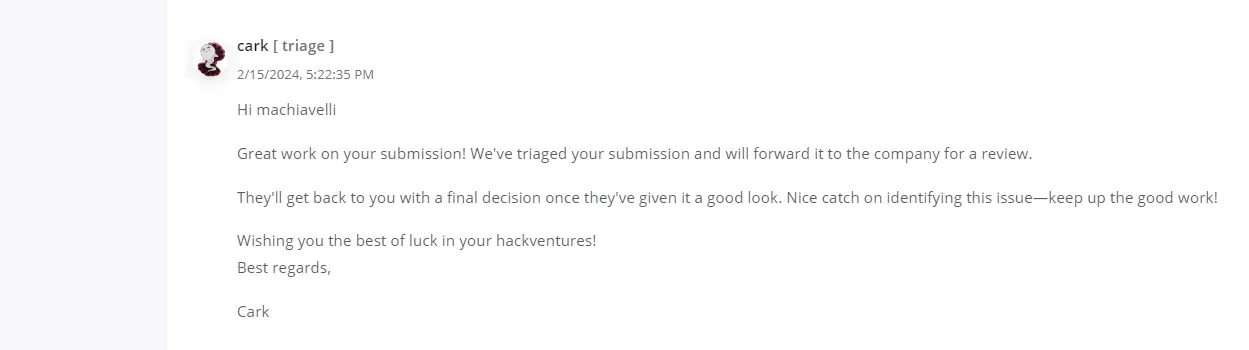
The next day, the company awarded a bounty.

Why it worked
The root cause is that the value of selectedSources is glued into a SQL command as text, rather than being passed as a separate, bound value. The evidence is the quote behaviour (one quote breaks the query, two restore it), the backslash behaviour, and the fact that both working payloads had to close a bracket and a quote before adding their own logic. The parameter is reachable from the history page, and the enumeration returned the built-in catalogues. The report does not say why the application was built this way; most likely the query is assembled as a string somewhere in the history or sorting code.
What the impact was
A user who could reach the history page could inject SQL through selectedSources and enumerate the databases on the PostgreSQL server, as shown by the three database names. The report does not describe pulling out table contents, passwords or other users' data, so the demonstrated impact stops at listing databases.
How it should be fixed
The right fix is to stop gluing the parameter into the query and use parameterised statements, also called prepared statements: the database receives the command and the values separately, so a quote in a value can never change the command's structure. That applies to selectedSources and to any similar list or sort parameter, including SelectedTemplateNames. Where a parameter chooses a column to sort by or a list of columns, it cannot be bound as a value, so it should be checked against a fixed allowlist of permitted names. Error handling should also stop returning raw 500 responses that reveal when a query has broken.
Other places to look
- Other parameters found in JavaScript files. Search the JavaScript bundles for names that look like they feed queries, then send a single quote and a doubled quote to each. A 500 followed by a 200 is the signal.
- Sort and filter parameters. Try names such as
sort=,order=andfilter=with a quote and with a backslash. A change in status code or response length suggests the value reaches the query. - Backslash encoding. On Java and Tomcat targets, send
%5cbefore a quote. A 400 on the raw form and a database error on the encoded form both point at string concatenation. - Time-based confirmation. Where yes/no responses are ambiguous, use a database-specific sleep such as
PG_SLEEP(6)on PostgreSQL and measure the delay. A consistent delay on the injected request and none on a control request confirms the injection. - Tool fallback. When one tool reports only the DBMS, try another with the DBMS pinned explicitly and the session cookie supplied. A resumed injection point with a reported payload structure is a good sign the parameter is genuinely injectable.
Final thoughts
The report closes with a reminder not to limit yourself to a single tool, technique or programme you do not fully understand, because that only burns you out. The internet is already full of vulnerabilities waiting to be discovered.
Glossary
- Bounty: money a company pays a researcher for reporting a security bug in its systems.
- SQL injection: a weakness where user input is pasted into a database command, letting the input change what the command does.
- SQL: the language used to ask questions of a relational database.
- Database: an organised store of data that a program can query.
- DBMS: database management system, the software that runs a database, such as PostgreSQL.
- PostgreSQL: a popular open-source database management system.
- Java: a programming language; many large web applications are written in it.
- Apache Tomcat: a program that runs Java web applications and answers browser requests.
- JavaScript: code that runs inside the browser to make pages interactive; its files are readable by anyone.
- Parameter: a named value attached to a request, usually after the
?in a URL. - Proxy: a program that sits between browser and server, letting you see and edit every request and response.
- Burp: a widely used proxy tool for web security testing.
- Cookie: a small piece of text a site asks your browser to store and send back, often used to prove you are logged in.
- Session: the server-side record of your logged-in state, identified by a cookie value.
- HTTP status code: a three-digit number in every response saying how the request went, such as 200 (OK), 400 (bad request) or 500 (server error).
- URL encoding: writing characters that are not allowed in a URL as a percent sign plus a code, such as
%5cfor a backslash. - Payload: a crafted input value designed to reveal or exploit a weakness.
- sqlmap: a free tool that automates the search for SQL injection.
- ghauri: another free tool that automates SQL injection testing.
- Blind injection: injection where the page never shows database output, so answers must be inferred from indirect signals.
- Boolean-based blind: inferring answers by asking yes/no questions and watching whether the page changes.
- Time-based blind: inferring answers by asking the database to pause when a condition is true and measuring the delay.
PG_SLEEP: a PostgreSQL function that makes the database wait a given number of seconds.- Schema: a named grouping of tables inside a database;
publicis PostgreSQL's default. information_schema/pg_catalog: built-in catalogues that describe a PostgreSQL database's own structure.- Triager: the first reviewer of a bug report, who checks it and routes it to the right team.
- Parameterised (prepared) statement: a way of sending a database command and its values separately, so values cannot change the command's structure.
- Allowlist: a fixed list of permitted values that input is checked against.




