How I got RCE in one of Bugcrowd's Public Programs
An Apache Struts 2 endpoint on an old Tomcat server was vulnerable to OGNL injection, allowing an attacker to run operating system commands on the server. The author used a known payload against a login action to execute the 'id' command and obtain remote code execution.
 Published on medium.com
Today I am going to share how I got RCE on one of Bugcrowd Public Programs. This is my first bug bounty write-up so, pardon me for my mistakes.
The full write-up lives on its author's site
It belongs to its author, so we link to it rather than copy it. The other two tabs are our own rewrites, checked against it.
Context
This is a write-up of a remote code execution finding on an asset belonging to a Bugcrowd public program. The researcher, Yousef Mohamed Elsaid, describes himself as a cybersecurity engineer and part-time bug bounty hunter, and this was his first bug bounty write-up.
The asset itself was an IP address hosting Apache Tomcat. Two versions appear in the report: the Shodan results showed ports running Tomcat/8.5.32, and a later port, 8333, ran "another version of Tomcat". The report does not state which version that second one was. The application on port 8333 exposed a /sdp/ path with a Struts login flow (validateUser.action, showLogin.action) and a Struts web console path.
Setup
No credentials, roles or special preconditions are described. The tools used, in the order they appear, were:
- Shodan, to find assets belonging to the company.
naabufor a full port scan, piped intohttpxto identify HTTP services.searchsploitto look for CVEs matching the Tomcat version.dirsearchfor directory and file fuzzing, first with the default wordlist and then with the short list from OneListForAll.hydrato try default credentials against the Tomcat manager.nucleitemplates for CVE-2017-5638.- Burp Suite, whose history tab later provided the missing endpoint.
The whole chain starts from an unauthenticated position.
Finding it
Asset selection
The researcher prefers wide, open-scope programs because they give freedom to pick assets that match his skills. After subdomain enumeration on one public program, he turned to Shodan with this query:
org: Company. Inc
He picked one asset because it had non-normal ports open, both running Tomcat/8.5.32.
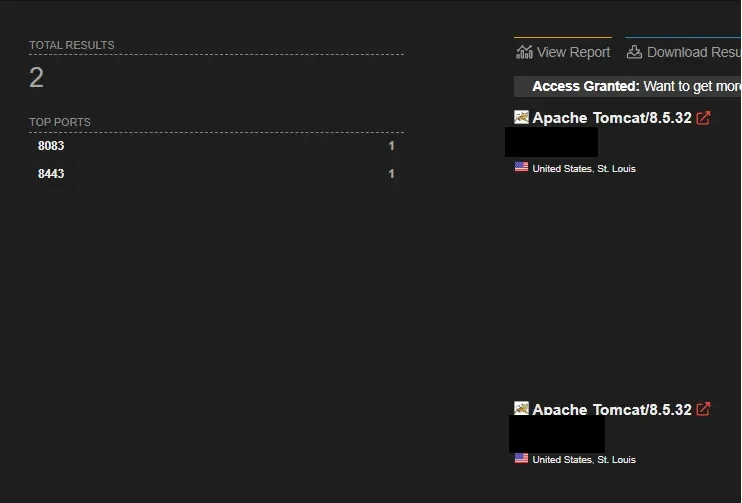
The screenshot shows the Shodan results for that IP.
Port scanning
The first action on the IP was a full port scan, with the output piped into httpx to check which ports speak HTTP:
naabu -host <ip> -p - -Pn -o portscan | httpx -sc -td -server

The scan turned up more open ports than Shodan had shown, and one of the newly discovered ones had an HTTP service running.

That port was 8333, running another version of Tomcat. This became the main target.
CVE hunting on Tomcat
The first investigation step was to search for exploits matching the Tomcat version:
searchsploit "tomcat 7"

None of the results worked against the target, including CVE-2017-12617 and CVE-2020-1938.

Directory fuzzing and the manager
Back on the home page, he started directory and file fuzzing with the default wordlist:
dirserach -u http://x.x.x.x:8333
Nothing interesting came back except the manager and host-manager directories, which returned 401. He then tried default credentials against the manager with Hydra:
hydra -L ~/tomcat-usernames -P ~/tomcat-passwords x.x.x.x -s 8333 http-get /manager/html
No valid user was found.

A bigger wordlist and the /sdp/ path
He went back to fuzzing, this time with the OneListForAll short list:
dirsearch -u <http://x.x.x.x:8333/> -w ~/wordlist/OneListForAll/onelistforallshort.txt
This found a new directory, /sdp/, which returned a 302 redirect to /sdp/validateUser.action, a page with a login form. He tested that form for SQL injection without success. He then remembered CVE-2017-5638 and ran the nuclei templates against the endpoint, again with no results.

The Struts web console
Continuing directory fuzzing past the /sdp/ endpoint, he found:
/sdp/struts/webconsole.html?debug=console
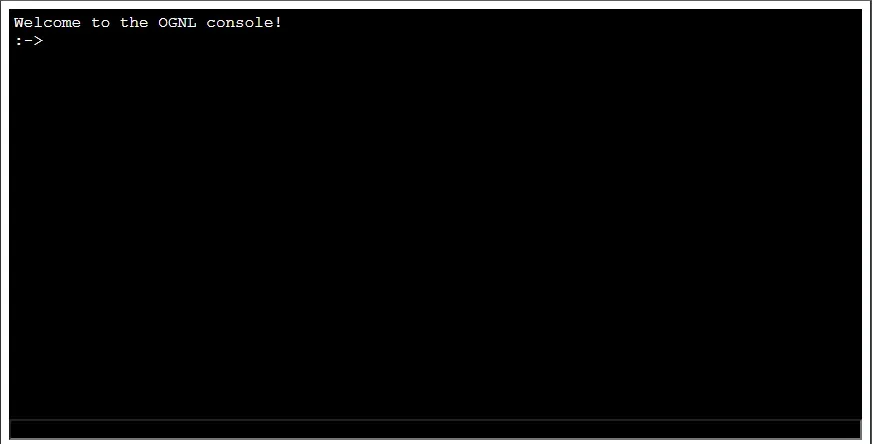
This is the Struts 2 OGNL console. He believed at that point that he had his RCE, but the console kept throwing JavaScript errors: every time he fixed one, another appeared. In the end he could only print HTML code in the OGNL console, with no command execution.
Exploitation
Step 1: find the action endpoint in Burp history
Going back through the history tab of his Burp session, he noticed a file called showLogin.action. This is the endpoint he had not yet tested.
Step 2: send the OGNL payload
Out of desperation he tried a payload he had found while reading labs and write-ups about Apache Struts 2 and OGNL injection. The payload executes the command id on the server:

He added the payload to showLogin.action and sent it as a GET request.
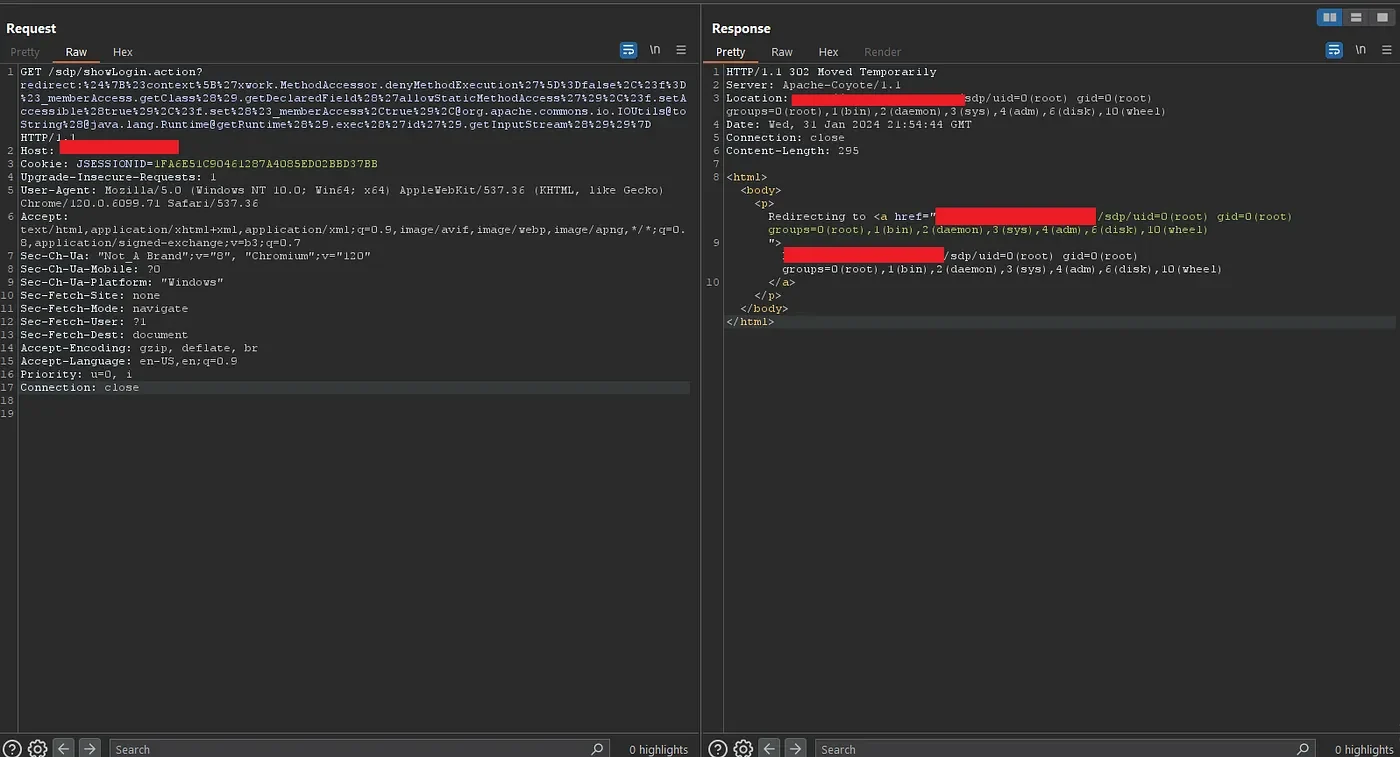
The command executed. The report does not reproduce the raw request line or the response body; the evidence is the screenshot above.

Step 3: report and triage
He reported the issue to Bugcrowd, which triaged it immediately. The program later downgraded it to P2, on the grounds that the asset was old, and resolved it by deleting the IP.

Root cause
The report does not analyse the vulnerable code. What it shows is that a Struts 2 action, showLogin.action, evaluated attacker-supplied OGNL from a GET request, which is the classic Struts 2 OGNL injection pattern. The path /sdp/struts/webconsole.html?debug=console was found on the same application, though the researcher could not get command execution through it because of persistent JavaScript errors. though the researcher could not get command execution through it because of persistent JavaScript errors.
The earlier defences he tried did not stop the attack: the Tomcat manager was protected by a 401 and no default credentials worked, and the known Tomcat CVEs he tested did not apply. The vulnerability was in the application layer, not in the container.
Impact
Successful exploitation gave command execution on the server, demonstrated with id. From there an unauthenticated attacker could run arbitrary commands on the host. The report does not describe any further post-exploitation, data access or lateral movement, and the program treated the asset as old, downgrading the severity to P2 and removing the IP rather than patching it.
Fix
The program's resolution was to delete the IP. For a Struts 2 OGNL injection the appropriate fix would be to upgrade Struts to a version that does not evaluate OGNL from request parameters, and to ensure the Struts web console is not exposed in production.
Variants to test
- Other Struts actions on the same application. Enumerate
.actionendpoints with a wordlist and send the same OGNL payload as a GET parameter. A positive result is command output from the server, as happened withshowLogin.action. - The Struts webconsole path. Request
/struts/webconsole.html?debug=consoleon any Struts 2 application. A positive result is a working OGNL console; even without command execution, HTML output from OGNL expressions confirms evaluation. - CVE-2017-5638 via nuclei. Run the nuclei templates against login and action endpoints. A positive result is a template match, which did not occur here.
- Tomcat manager default credentials. Try Hydra against
/manager/htmlon non-standard ports. A positive result is a 200 with the manager UI rather than a 401. - Full port scans beyond what Shodan shows. Pipe
naabuintohttpxas in this report. A positive result is an HTTP service on a port that the passive data did not list, which is how port 8333 was found here.
What happened, in plain words
A security researcher found a way to make a company's web server run commands of his choosing. This is called remote code execution, or RCE for short. Think of it as finding a door on a building that, instead of opening into a room, lets you reach the building's control panel and press any button you like.
The server was running a piece of software called Apache Tomcat, which is a program that serves web pages and web applications to visitors. The application exposed Struts paths such as validateUser.action and showLogin.action. The known Tomcat flaws he tested did not apply.
The researcher found the server by searching a public database of internet-connected machines, scanned it for open doors (ports), tried a series of known attacks that did not work, and finally found one specific page that accepted a crafted request and ran the command id on the server. He reported it to Bugcrowd, a platform where companies invite researchers to test their systems, and the company eventually removed the server instead of fixing it.
This was his first public write-up, and he describes himself as a cybersecurity engineer and part-time bug bounty hunter. A bug bounty is a scheme where a company pays researchers for reporting security problems responsibly instead of exploiting them.
The vocabulary you need before we start
A few ideas come up again and again, so here they are up front.
- IP address: the numeric address of a machine on the internet, like a postal address for computers. The report hides the real one as
x.x.x.x. - Port: a numbered channel on a machine. One machine can run many services, each listening on its own port. Web pages normally arrive on port 80 (plain) or 443 (encrypted). Ports like 8333 are unusual for a website, which is exactly why the researcher took notice.
- HTTP service: a program that answers web requests. If a port speaks HTTP, you can talk to it with a browser or a command-line tool.
- Subdomain: a named section of a company's website, such as
shop.example.comorsupport.example.com. Listing them all is called subdomain enumeration, and it is often the first step in mapping what a company exposes. - Shodan: a search engine for internet-connected devices. Instead of indexing web pages, it indexes machines and the services they run, so you can search for everything belonging to an organisation.
- CVE: a public catalogue number for a known security flaw, for example CVE-2017-5638. When a flaw becomes public, it gets one of these identifiers so everyone can refer to the same thing.
- Exploit: a concrete technique or piece of code that abuses a flaw.
- Directory fuzzing: guessing file and folder names on a website by trying thousands of common ones from a list (a wordlist) and seeing which ones answer. It is like trying every key on a big keyring to see which ones fit a lock.
- 401: the HTTP status code for "you are not allowed in without proving who you are". A login prompt is the usual result.
- 302: the HTTP status code for "this page has moved, go here instead". Browsers follow it automatically, which is why a fuzzer can reveal a page you did not ask for directly.
- SQL injection: a flaw where user input is pasted into a database query, letting an attacker change the query. It is a different class of bug from the one that was eventually found.
- OGNL: Object-Graph Navigation Language, an expression language used inside Java applications, including Struts 2. It is meant to let developers read and manipulate objects with short expressions. If an attacker can get their own OGNL expression evaluated by the server, they can often make it run system commands. That is OGNL injection.
- GET request: the simplest kind of web request, normally used to ask for a page. Its inputs travel in the URL itself, after a question mark.
- Burp Suite: a tool that sits between your browser and a website, recording every request and response so you can inspect and replay them. Its history tab is a log of everything you sent.
- nuclei: a scanner that runs ready-made checks (templates) for known flaws against a target.
- hydra: a tool that tries many username and password combinations automatically, used here to test for default credentials.
Finding the target
Choosing an asset
The researcher prefers programs with a wide, open scope, because a broad scope lets him pick the systems that match his skills rather than being confined to a narrow list. After doing subdomain enumeration on one public program, he turned to Shodan to find machines belonging to the company. The query he used was:
org: Company. Inc
This asks Shodan for everything it has indexed that is registered to that organisation. He then picked one machine because it had unusual ports open, and both of them were running Tomcat version 8.5.32.
The screenshot shows the Shodan results for that IP, which is where the Tomcat version and the unusual ports came from.
Scanning the ports
Shodan only knows what it has seen before, so the first thing he did on the machine was scan it himself, and feed the result into a second tool that checks which of those ports actually speak HTTP:
naabu -host <ip> -p - -Pn -o portscan | httpx -sc -td -server
Line by line:
naabuis a port scanner. It knocks on ports to see which ones answer.-host <ip>says which machine to scan. The real address is replaced with a placeholder here.-p -means scan all ports, not just the common ones.-Pntells the scanner to skip the initial "are you alive" check and just scan.-o portscanwrites the list of open ports to a file calledportscan.- The
|symbol takes that output and passes it to the next command instead of writing it to the screen. httpxtakes a list of hosts and ports and probes them to see which ones answer HTTP.-scasks it to show the status code of each response.-tdasks it to show the page title.-serverasks it to show the server software reported in the response headers.
The scan found more open ports than Shodan had listed, and one of the newly discovered ones was running an HTTP service.
That port was 8333, and it was running another version of Tomcat. The report does not say which version. This port became the main target for the rest of the work.
Looking for known flaws
Before trying anything clever, the sensible move is to check whether this version of Tomcat has known, published flaws. That is what searchsploit is for: it searches a local library of public exploits.
searchsploit "tomcat 7"
searchsploitsearches the Exploit-DB collection of public exploit code."tomcat 7"is the search phrase, quoted so it is treated as one string.
None of the results worked against this target, including CVE-2017-12617 and CVE-2020-1938, two well-known Tomcat flaws.
Guessing folder names, and the manager page
Back on the home page, he started guessing directory and file names with the tool's default wordlist:
dirserach -u http://x.x.x.x:8333
dirserachis the tool name as written in the report. The usual spelling isdirsearch; the report uses this spelling here.-u http://x.x.x.x:8333is the address to test, with the real IP replaced by a placeholder.
Nothing interesting turned up except two folders, manager and host-manager, which both returned 401. Those are Tomcat's administrative pages: the place where an administrator deploys and manages applications. A 401 means they exist but demand a login. That is a promising sign, so the next step was to see whether the login was protected by a weak, default password:
hydra -L ~/tomcat-usernames -P ~/tomcat-passwords x.x.x.x -s 8333 http-get /manager/html
hydrais the password-guessing tool.-L ~/tomcat-usernamesis a file containing a list of usernames to try.-P ~/tomcat-passwordsis a file containing a list of passwords to try.x.x.x.xis the target address.-s 8333says the service is on port 8333 rather than the default.http-get /manager/htmlsays to test the login by sending a plain GET request to that path and watching for a successful response.
No valid username and password combination was found.
A bigger wordlist and the /sdp/ path
He returned to fuzzing, this time with a much larger, curated list of common paths called OneListForAll:
dirsearch -u <http://x.x.x.x:8333/> -w ~/wordlist/OneListForAll/onelistforallshort.txt
dirsearchis the directory and file guessing tool.-u <http://x.x.x.x:8333/>is the address to test.-w ~/wordlist/OneListForAll/onelistforallshort.txtpoints at the wordlist file to try, here the short version of OneListForAll.
This found a new directory, /sdp/, which answered with a 302 redirect to /sdp/validateUser.action, a page containing a login form. The .action ending is a Struts 2 convention: it marks a page that runs application logic rather than just displaying a static file.
He tested that login form for SQL injection, with no success. He then remembered CVE-2017-5638, a famous Struts 2 flaw, and ran the nuclei templates for it against the endpoint. Again, nothing was found.
The Struts web console
Continuing to fuzz past the /sdp/ endpoint, he found this path:
/sdp/struts/webconsole.html?debug=console
/sdp/struts/webconsole.htmlis a page that ships with Struts 2 for developers.?debug=consoleis a parameter asking for the interactive console view.
This is the Struts 2 OGNL console: a developer tool that lets you type OGNL expressions and see them evaluated by the server. It is meant for development machines, not for the public internet. At that point he believed he had his RCE, because a console that evaluates expressions is exactly the kind of thing that can be turned into command execution.
It did not work out that way. The console kept throwing JavaScript errors, and every time he fixed one, another appeared. In the end he could only get HTML code printed in the console, with no command execution. JavaScript is the language browsers run to make pages interactive; errors in it meant the console page itself was not functioning properly for him.
Getting the command to run
Step 1: find the endpoint in Burp history
He went back through the history tab of his Burp session, which is a log of every request and response that passed through the tool. Scrolling through it, he noticed a file called showLogin.action. This was an endpoint he had not yet tested, and it is the same kind of Struts action page as validateUser.action.
Step 2: send the OGNL payload
Out of desperation, he tried a payload he had come across while reading labs and write-ups about Apache Struts 2 and OGNL injection. The payload executes the command id on the server. The id command reports the identity of the user running it, which proves command execution is real.
The screenshot shows the payload itself. He added it to showLogin.action and sent it as a GET request, meaning the payload travelled in the URL.
The command executed. The report does not reproduce the raw request line or the response body; the evidence is the screenshot above.
That second screenshot is his reaction to seeing it work.
Step 3: report and triage
He reported the issue to Bugcrowd, which triaged it immediately. Triaging means confirming that a report is genuine and assessing how serious it is. The program later downgraded it to P2, on the grounds that the asset was old, and resolved it by deleting the IP rather than patching the application. P2 is a severity level the program assigned after downgrading the report.
Why it worked
The report does not analyse the vulnerable code. What it shows is that a Struts 2 action, showLogin.action, evaluated attacker-supplied OGNL from a GET request. That is the classic Struts 2 OGNL injection pattern: the application takes a value from the request and hands it to the expression engine, which dutifully evaluates it as code.
The path /sdp/struts/webconsole.html?debug=console was found on the same application, though the researcher could not get command execution through it because of the persistent JavaScript errors. though the researcher could not get command execution through it because of the persistent JavaScript errors.
The defences he tried earlier did not stop the attack. The Tomcat manager was protected by a 401 and no default credentials worked, and the known Tomcat flaws he tested did not apply. The weakness was in the application layer, not in the container underneath it.
What an attacker could do
Successful exploitation gave command execution on the server, demonstrated with id. From there an unauthenticated attacker, meaning someone with no account at all, could run arbitrary commands on the host. The report does not describe any further post-exploitation, data access or lateral movement, and the program treated the asset as old, downgrading the severity to P2 and removing the IP rather than patching it.
How it should be fixed
The program's resolution was to delete the IP. For a Struts 2 OGNL injection the appropriate fix would be to upgrade Struts to a version that does not evaluate OGNL from request parameters, and to ensure the Struts web console is not exposed in production.
Things to try on other targets
- Other Struts actions on the same application. Enumerate
.actionendpoints with a wordlist and send the same OGNL payload as a GET parameter. A positive result is command output from the server, as happened withshowLogin.action. - The Struts webconsole path. Request
/struts/webconsole.html?debug=consoleon any Struts 2 application. A positive result is a working OGNL console; even without command execution, HTML output from OGNL expressions confirms evaluation. - CVE-2017-5638 via nuclei. Run the nuclei templates against login and action endpoints. A positive result is a template match, which did not occur here.
- Tomcat manager default credentials. Try Hydra against
/manager/htmlon non-standard ports. A positive result is a 200 with the manager UI rather than a 401. - Full port scans beyond what Shodan shows. Pipe
naabuintohttpxas in this report. A positive result is an HTTP service on a port that the passive data did not list, which is how port 8333 was found here.
Glossary
- 302: HTTP status meaning the requested page has moved and the client should follow a redirect.
- 401: HTTP status meaning authentication is required and was not supplied.
- Apache Struts 2: a Java framework for building web applications, which uses action pages and the OGNL expression language.
- Apache Tomcat: a Java web server and servlet container that runs Java web applications.
- Bug bounty: a programme where a company rewards researchers for reporting security flaws responsibly.
- Bugcrowd: a platform that hosts bug bounty programmes for companies.
- Burp Suite: a proxy tool that records and lets you replay web requests and responses.
- CVE: a public identifier for a known security vulnerability.
- dirsearch: a tool that guesses directory and file names on a web server from a wordlist.
- Exploit: a technique or piece of code that abuses a vulnerability.
- GET request: an HTTP request that asks for a resource, with inputs carried in the URL.
- hydra: a tool that automatically tries many username and password combinations.
- httpx: a tool that probes hosts and ports to identify HTTP services and report details such as status codes and server headers.
- IP address: the numeric address of a machine on a network.
- naabu: a port scanner.
- nuclei: a scanner that runs ready-made templates to detect known vulnerabilities.
- OGNL: Object-Graph Navigation Language, an expression language used in Java applications, including Struts 2.
- OGNL injection: a flaw where attacker-supplied OGNL is evaluated by the server, often leading to command execution.
- OneListForAll: a curated collection of common web paths used as a wordlist for fuzzing.
- P2: a severity level on the bug bounty platform's scale, below the most critical.
- Port: a numbered channel on a machine through which a service listens.
- RCE (remote code execution): a flaw that lets an attacker run their own commands on a remote server.
- searchsploit: a command-line tool for searching a local copy of the Exploit-DB exploit archive.
- Shodan: a search engine that indexes internet-connected devices and the services they expose.
- SQL injection: a flaw where user input alters a database query.
- Subdomain enumeration: discovering the named sections of a company's web presence.
- Triage: the process of confirming a reported vulnerability and assessing its severity.
- Wordlist: a file of common names or passwords that a tool tries one by one.


