How I Manipulated One Parameter to Love Another User’s Comment -IDOR & Broken Authorization
The comment 'love' action was restricted in the frontend so users could not love other users' comments, but the backend did not check whether the authenticated user was allowed to act on the supplied comment identifier. By swapping the comment identifier in the request, an attacker could apply a persistent love interaction to another user's comment, which was then shown as if the victim had performed it.
Ankit Rathva aka Gujarati Hacker Follow
 Published on medium.com
Bug Bounty
The full write-up lives on its author's site
It belongs to its author, so we link to it rather than copy it. The other two tabs are our own rewrites, checked against it.
Context
The target was a web application with a Community section where users post comments. Comments support several interactions: replying, upvoting, downvoting, and a love (like) action. The researcher describes the finding as an IDOR + Broken Authorization + Business Logic vulnerability, and the company accepted it as High severity.
The behaviour that stood out was this: through the normal frontend interface, a user could not use the love functionality on another user's comment. The question the researcher set out to answer was whether the backend enforced that restriction or whether it was only a frontend restriction.
Setup
The report does not name the application or program. The researcher used an attacker account and a victim account. Requests were captured and modified with an HTTP interception proxy. No versions, endpoints, hostnames or headers are given in the report.
Finding it
While testing the Community interaction functionality, the researcher noticed that the application behaved differently around the love action depending on who owned the comment. A user could not love another user's comment through the UI.
That raised the standard question: was the backend actually preventing the action, or was the frontend simply hiding or restricting it? Whenever a restriction is implemented in the UI, it is worth checking whether the server independently enforces the same authorization rule.
Exploitation
Step 1: perform the legitimate action on your own comment
Instead of relying on what the frontend allowed, the researcher performed the legitimate love action on a comment belonging to the attacker account, and intercepted the request with an HTTP interception proxy.
The request contained a parameter called comment_ids, which identified the comment the action was being performed on. The report does not reproduce the full request, only the parameter name.
Step 2: swap the comment identifier
The hypothesis was simple: what happens if the comment identifier belonging to the attacker account is replaced with the identifier of another user's comment?
This is a common authorization-testing technique. Crucially, the authentication credentials were not changed. The only thing being tested was whether the server would verify that the authenticated user was authorised to perform the requested action against the supplied object.
Step 3: check the victim account
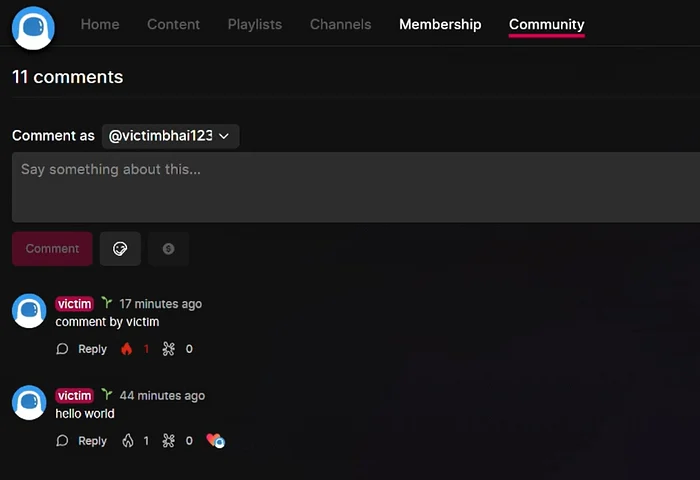
The behaviour became more interesting when the victim account was checked. The victim's own comment displayed:
"You loved this"
But the victim had never performed that action. The application had incorrectly attributed the interaction to the victim. The researcher had been authenticated as the attacker, yet the resulting state was presented as though the victim had performed the interaction. That made the issue significantly more interesting than a simple ability to manipulate a comment identifier.
Step 4: test whether the victim can revert it
After the unauthorised love action was applied, the victim could not simply dislike or revert the interaction from their own account. The attacker could therefore cause a persistent change to another user's interaction state, which means the issue affected data integrity, not merely what was displayed temporarily in the browser.
Root cause
The core problem was not simply that the comment ID could be changed. The bigger issue was that the backend failed to answer one question: is this authenticated user actually allowed to perform this action on this particular comment?
Authentication answers "who are you?". Authorization answers "are you allowed to do this?". The application correctly knew who the requester was, but it did not properly enforce whether that user was authorised to perform this specific action against another user's comment. The restriction existed in the frontend only, and the server did not enforce the same rule on the supplied comment_ids value. The report does not show the server-side code, so the exact implementation gap is inferred from behaviour.
Impact
An authenticated attacker could apply a love interaction to another user's comment, and the application presented that interaction as if the victim had performed it. The change persisted and the victim could not revert it from their own account, so the impact is on data integrity of other users' interaction state rather than a temporary display artefact.
Fix
The check that was missing is a server-side authorization decision: on every interaction request, the backend should confirm that the authenticated user is permitted to perform that action on the object identified by comment_ids, rather than trusting the identifier supplied by the client.
Variants to test
- Other interaction types on the same object. Repeat the swap for reply, upvote and downvote, not just love. A positive result is any of them succeeding against another user's comment when the UI forbids it.
- Identifier formats. Try the same substitution with different encodings of the identifier (numeric, UUID, base64, array of IDs) if the parameter accepts them. A positive result is the server accepting an identifier for an object the user does not own.
- Attribution check. After a successful cross-user action, log in as the victim and inspect the comment state. A positive result is the interaction being shown as performed by the victim rather than by the attacker.
- Revert path. As the victim, attempt to undo the interaction. A positive result is the victim being unable to remove state they never created.
- Batch parameters. If
comment_idsis plural, try supplying several identifiers at once, mixing owned and unowned comments. A positive result is partial success on the unowned entries without an error for the whole request.
Final thoughts
This finding started with a simple question: why can't I love another user's comment? Instead of stopping at the frontend behaviour, the researcher inspected the underlying request and tested whether the backend enforced the same restriction. Changing a single object identifier was enough to cross an authorization boundary, and the vulnerability showed how IDOR, broken authorization and business-logic flaws can overlap. Don't just test what the application lets you do; test what the backend actually allows you to do.
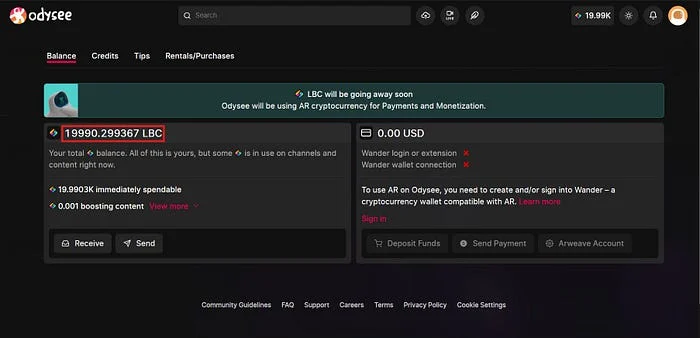
The company investigated the report and accepted the vulnerability as High severity. The reward was 20,000 LBRY Credits (LBC).

What happened, in plain words
A security researcher was testing a website that has a Community area, a place where people leave comments and react to each other's comments. Comments could be replied to, upvoted, downvoted, and given a love (a like).
The researcher noticed one rule: through the normal website interface, you could not give a love to a comment that belonged to someone else. The love button simply was not offered on other people's comments.
That raised a question every tester should ask: is the rule really enforced by the computer that stores the data (the backend), or is it only enforced by the page shown in your browser (the frontend)? If it is only the frontend, then anyone who sends the request by hand, skipping the page, can break the rule.
It turned out the backend did not enforce the rule. By taking a normal love request made on their own comment and changing one value inside it, the researcher could love another user's comment. Worse, the website then showed that comment as if the victim had loved it, and the victim could not undo it.
The company investigated and accepted the report as High severity. The reward was 20,000 LBRY Credits (LBC). The researcher describes the bug as an IDOR + Broken Authorization + Business Logic vulnerability, three labels that overlap here; each is explained below.
Who wrote this and what they were testing
The author is Ankit Rathva, who also goes by Gujarati Hacker. He describes himself as an MCA second-year student, an ethical hacker and security researcher, and says he looks for logic, authorization and data-integrity flaws in web applications. He publishes write-ups and mitigation advice and links to his LinkedIn profile.

The report does not name the application or the bug bounty program. What it does tell us is the shape of the target: a web application with a Community section where users post comments, and where comments support replying, upvoting, downvoting and a love action.
The researcher used two accounts:
- an attacker account, the one sending the manipulated request;
- a victim account, standing in for another user, used to see what that other user would experience.
Using your own second account is the standard way to test access rules without touching a real person's data.
Requests were captured and changed with an HTTP interception proxy, a tool that sits between your browser and the website and lets you read and edit each request before it is sent. The report gives no versions, endpoints, hostnames or headers.
The functionality, and the question it raised
In the Community section, users could interact with comments in several ways:
- Reply to comments
- Upvote comments
- Downvote comments
- Love/like comments
During testing, one behaviour stood out: a user could not use the love functionality on another user's comment through the normal frontend interface.
That is a restriction, but restrictions in a web page are only suggestions. A web page is just text and code your browser runs; anything it can send, you can send yourself, with different values. So the real question was whether the backend actually prevented the action, or whether the frontend was simply hiding or restricting it.
Whenever you see a restriction implemented in the interface, it is worth checking whether the server independently enforces the same rule. If the server does not check, the interface is decoration.
Step 1: make a normal request on your own comment
Instead of relying only on what the frontend allowed, the researcher performed the legitimate love action on a comment belonging to the attacker account, and intercepted the request with the HTTP interception proxy.
The point of doing the allowed action first is to see what a correct request looks like. You cannot sensibly tamper with a request you have never seen. By loving your own comment, you get a genuine, working example that you can then copy and change one piece at a time.
The request contained a parameter called comment_ids. A parameter is a named value sent along with a request, a bit like a field on a paper form: the name says what the value means, and the value says which thing it refers to. Here, comment_ids identified the comment on which the action was being performed.
The report does not reproduce the full request, only the parameter name, so there is no complete request to show here.
Step 2: swap the comment identifier
The hypothesis was simple: what happens if the comment identifier belonging to the attacker account is replaced with the identifier of another user's comment?
An identifier (often shortened to ID) is the unique label a system gives each object so it can tell them apart, like a ticket number. If your comment is number 123 and the victim's comment is number 456, then changing 123 to 456 in the request asks the server to act on the victim's comment instead.
This is a common authorization-testing technique. The crucial detail is that the authentication credentials were not changed. Authentication credentials are whatever proves who you are: a session cookie, a token, a login. The researcher kept his own, so the server still knew exactly who was asking. The only thing being tested was whether the server would check that this authenticated user was authorised to perform the requested action against the supplied object.
That distinction matters. Changing someone else's credentials would be impersonation. Changing only the object identifier tests whether the server checks permission, which is a different question.
Step 3: look at the victim account
The behaviour became more interesting when the victim account was checked. The victim's own comment displayed:
"You loved this"
But the victim had never performed that action. The application had incorrectly attributed the interaction to the victim.
Think of it like a guest book where the signature line is filled in with the name of the person the entry is about, rather than the person who wrote it. The researcher had been authenticated as the attacker, yet the resulting state was presented as though the victim had performed the interaction. That made the issue significantly more interesting than a simple ability to manipulate a comment identifier: it was not just that the wrong comment was touched, the record of who did it was wrong too.
Step 4: can the victim undo it?
After the unauthorised love action was applied, the victim could not simply dislike or revert the interaction from their own account.
This is the part that turns a curiosity into a real problem. The attacker could cause a persistent change to another user's interaction state. Persistent means it is stored on the server and stays there, rather than being a temporary display glitch in one browser. The issue therefore affected data integrity, the guarantee that stored data is correct and only changed by people entitled to change it, not merely what was displayed temporarily in the browser.
Why this is also broken authorization
The core problem was not simply that the comment ID could be changed. The bigger issue was that the backend failed to answer one question: is this authenticated user actually allowed to perform this action on this particular comment?
Two words get confused constantly, so keep them apart:
- Authentication answers "who are you?". It is the login, the cookie, the token.
- Authorization answers "are you allowed to do this?". It is the permission check that happens after identity is known.
The application correctly knew who the requester was, but it did not properly enforce whether that user was authorised to perform this specific action against another user's comment. The restriction existed in the frontend only, and the server did not enforce the same rule on the supplied comment_ids value.
The report does not show the server-side code, so the exact implementation gap is inferred from behaviour.
What an attacker could do with it
An authenticated attacker could apply a love interaction to another user's comment, and the application presented that interaction as if the victim had performed it. The change persisted and the victim could not revert it from their own account, so the impact is on the integrity of other users' interaction state rather than a temporary display artefact.
How it should be fixed
The check that was missing is a server-side authorization decision: on every interaction request, the backend should confirm that the authenticated user is permitted to perform that action on the object identified by comment_ids, rather than trusting the identifier supplied by the client.
In everyday terms: the server should look at who is asking and at which comment is named, and refuse if the two do not fit the rule.
Other things worth testing on the same feature
- Other interaction types on the same object. Repeat the swap for reply, upvote and downvote, not just love. A positive result is any of them succeeding against another user's comment when the UI forbids it.
- Identifier formats. Try the same substitution with different encodings of the identifier (numeric, UUID, base64, array of IDs) if the parameter accepts them. A positive result is the server accepting an identifier for an object the user does not own.
- Attribution check. After a successful cross-user action, log in as the victim and inspect the comment state. A positive result is the interaction being shown as performed by the victim rather than by the attacker.
- Revert path. As the victim, attempt to undo the interaction. A positive result is the victim being unable to remove state they never created.
- Batch parameters. If
comment_idsis plural, try supplying several identifiers at once, mixing owned and unowned comments. A positive result is partial success on the unowned entries without an error for the whole request.
The result
The company investigated the report and accepted the vulnerability as High severity. The reward was 20,000 LBRY Credits (LBC).
Final thoughts
This finding started with a simple question: why can't I love another user's comment? Instead of stopping at the frontend behaviour, the researcher inspected the underlying request and tested whether the backend enforced the same restriction. Changing a single object identifier was enough to cross an authorization boundary, and the vulnerability showed how IDOR, broken authorization and business-logic flaws can overlap.
For anyone starting out, the lesson is not to memorise a payload. It is to build the habit: when a page refuses something, ask what request it would have sent if it had allowed it, then send that request yourself and see what the server says. Don't just test what the application lets you do; test what the backend actually allows you to do.
Glossary
- API: the set of requests a website's frontend sends to its backend to read or change data; think of it as the counter where orders are placed, separate from the menu you see.
- Attacker account: in this report, the researcher's own account that sends the manipulated request.
- Authentication: proving who you are, usually by logging in; it answers "who are you?".
- Authorization: deciding whether an identified user is allowed to do a particular thing; it answers "are you allowed to do this?".
- Backend: the server-side part of an application that stores data and makes the real decisions.
- Broken authorization: a flaw where the server knows who you are but fails to check whether you may perform the action you asked for.
- Business logic flaw: a flaw in the rules of the feature itself, rather than in low-level code, where the application allows a sequence of actions that its own rules should forbid.
- Comment: a message a user posts in the Community section, which other users can react to.
comment_ids: the parameter in the captured request that identifies which comment the love action applies to.- Community section: the part of the application where users post comments and interact with them.
- Cookie: a small piece of data your browser stores for a site and sends back with each request, often used to keep you logged in.
- Credentials: whatever proves your identity, such as a session cookie or token.
- Data integrity: the guarantee that stored data is correct and only changed by people entitled to change it.
- Frontend: the part of the application that runs in your browser, the pages and buttons you see and click.
- High severity: a rating a company gives a reported vulnerability to say how serious it considers the impact.
- HTTP interception proxy: a tool placed between your browser and the website that lets you read and edit requests before they are sent.
- IDOR (Insecure Direct Object Reference): a flaw where the server accepts an identifier supplied by the client and acts on that object without checking that the client is allowed to access it.
- Identifier (ID): the unique label a system gives each object, such as a comment, so it can tell them apart.
- LBC (LBRY Credits): the currency in which this reward was paid, as stated in the report.
- Parameter: a named value sent with a request, like a field on a form, whose name says what it means and whose value says which thing it refers to.
- Persistent: stored on the server and lasting, rather than a temporary display effect in one browser.
- Request: the message your browser sends to a server asking it to do something or return something.
- Session: the period during which a site remembers you as logged in, usually carried by a cookie or token.
- Token: a value, similar in purpose to a cookie, that proves you are logged in when sent with a request.
- UI (user interface): everything you see and interact with on screen, buttons, menus and forms.
- Victim account: in this report, the researcher's second account, standing in for another user whose comment is targeted.
- Vulnerability: a weakness in an application that lets someone make it behave in a way its owners did not intend.



