When Deleting the Default Workspace Made the Entire Account Unusable
The application's backend did not enforce the protection on the Default Workspace, so an authenticated user could delete it by changing the workspace ID in a legitimate deletion request. This left the account unusable, with other workspaces inaccessible and the login flow stuck on a loading page.
Ankit Rathva aka Gujarati Hacker Follow
 Published on medium.com
Bug Bounty
The full write-up lives on its author's site
It belongs to its author, so we link to it rather than copy it. The other two tabs are our own rewrites, checked against it.
Context
While testing a web application for broken access control issues, I came across a case where a workspace that was supposed to be protected could still be deleted by manipulating the workspace ID. What initially looked like a simple frontend restriction turned into a backend authorization issue that could make the affected account practically unusable.
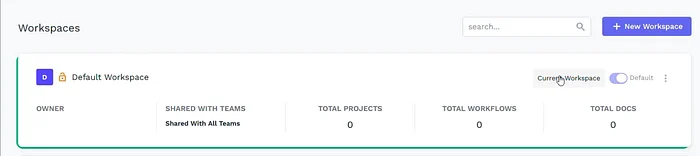
The feature in question is workspace deletion. The application had a workspace called "Default Workspace", and from the normal user interface this workspace was protected and could not be deleted. The account could hold multiple workspaces, and ordinary workspaces could be deleted through the UI.
Setup
- An authenticated account on the target application.
- Burp Suite, used to capture and modify the workspace deletion request.
- A second workspace named
test, created so that a legitimate deletion request could be captured.
The account contained multiple workspaces, including:
- Default Workspace
- test
No special role or privilege is described beyond being an authenticated user.
Finding it
Seeing that the Default Workspace could not be deleted from the UI raised an immediate question: is the restriction actually enforced by the backend, or is it only a frontend restriction? The working principle I apply when testing authorization is simple: never assume that something is protected just because the UI does not allow you to perform an action. So I started looking at the actual API request.
I could normally delete the test workspace. When I captured that deletion request in Burp Suite, I noticed that the workspace ID was directly included in the request. The request looked conceptually like:
GET /customer-service/workspace/v1/delete-workspace/{workspace_id}
The interesting part was the {workspace_id}: the server was receiving the workspace ID directly from the client. That is the classic shape of an object-level authorization problem, where the client decides which object the server acts on and the server may not check whether the caller is allowed to act on that particular object.
Exploitation
Step 1: Confirm the normal deletion flow
With the test workspace present, I deleted it through the interface and captured the legitimate request in Burp Suite. The request contained the workspace ID of test as a path segment:
GET /customer-service/workspace/v1/delete-workspace/<test_workspace_id>
This established the exact request shape and confirmed that the identifier in the path is what selects the workspace to be deleted.
Step 2: Try the protected workspace through the UI
I then tried deleting the Default Workspace through the normal interface. The application did not provide an option to delete it. At this point it would have been easy to stop testing, but the frontend restriction was not enough evidence that the backend was secure.
Step 3: Swap only the workspace ID
I captured a legitimate workspace deletion request and, instead of changing anything else, modified only the workspace ID, replacing the test workspace ID with the Default Workspace ID:
GET /customer-service/workspace/v1/delete-workspace/<default_workspace_id>
I forwarded the request, and the server returned:
200 OK

The protected workspace had been deleted. Only the workspace ID was modified; the backend accepted the request.
Step 4: Observe the resulting state
The issue was not limited to deleting a workspace that the UI considered protected. After deleting the Default Workspace, the application entered an unexpected state. The other workspaces became inaccessible, and the application displayed a blank page.
When I attempted to log in again, the application became stuck on:
https://target.com/loading
So the result was not simply "a user can delete a protected workspace". The deletion appeared to break the normal workspace and account flow. The application seemed to rely on the existence of the Default Workspace, but the backend neither prevented its deletion nor properly handled the situation afterwards.
Root cause
The deletion endpoint receives the workspace identifier from the client. The UI hides the delete action for the Default Workspace, but that restriction is not enforced server-side: the backend accepted a request naming the Default Workspace and returned 200 OK. In other words, the protection existed only in the frontend, and the restriction appeared to exist only in the frontend.
On top of the missing authorization check, the application appears to depend on the Default Workspace existing. Deleting it left the account in a state the application could not recover from, which points to a business-logic failure: the application seemed to rely on the Default Workspace existing and did not properly handle its removal.
Impact
An authenticated user could manipulate the workspace ID in a legitimate deletion request and delete a workspace that was intended to be protected. The resulting impact included:
- Protected Default Workspace deletion
- Loss of access to other workspaces
- Blank application state
- Login flow becoming stuck on the loading page
- Potential denial of service against the affected account/workspace environment
The most interesting part was that the vulnerability crossed the boundary between a simple authorization bypass and a business-logic failure. The attacker was not just deleting an ordinary workspace; they were deleting an object that the application appeared to depend on.
Fix
The report does not describe any remediation applied by the company. Based on the finding, the deletion endpoint should enforce server-side that the Default Workspace cannot be deleted, rather than relying on the UI to hide the action, and the application should handle the absence of the Default Workspace gracefully instead of leaving the account stuck.
Reporting
The company investigated the report and validated the vulnerability. Later, the finding was also recognised on the company's Hall of Fame page.
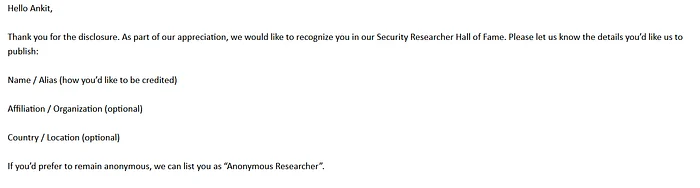
That was a good confirmation that the testing methodology and the described impact were valid.
Variants to test
- Other protected objects with client-supplied IDs. Look for objects the UI marks as undeletable or unmodifiable (default projects, owner accounts, system groups) and replay a legitimate request with that object's ID. A positive result is a success response where the UI offered no such action.
- Other verbs on the same endpoint. If deletion is a
GET, try the same ID substitution on update, rename, transfer-ownership or archive endpoints. A positive result is any state change on the protected object. - Dependency-breaking deletions. Delete objects the application may rely on (default workspace, primary organisation, last admin group) and observe the account afterwards. A positive result is a broken state such as blank pages, inaccessible resources or a login flow that never completes.
- Cross-account ID substitution. Replace your own workspace ID with one belonging to another account where such IDs are exposed. A positive result is a success response or any observable effect on the other account's object.
- ID format variations. Try numeric IDs, UUIDs and encoded forms of the same identifier to see whether any parsing path skips the check. A positive result is the protected object being affected through a variant the normal flow never sends.
What happened, in plain words
A web application let people organise their work into separate areas called workspaces. Think of a workspace as a folder on a shared drive: each folder holds its own files, and you can create new folders and throw away the ones you no longer need. One of these workspaces was called "Default Workspace", and it was special: the application's normal screens offered no button to delete it. The delete option simply was not there.
The researcher who wrote this report asked a simple question that turns out to be very powerful in security work: is the Default Workspace really protected, or does the application only hide the button? Those are two very different things. Hiding a button is like putting a "do not enter" sign on a door. It stops polite people, but the door is still unlocked. Real protection means the lock itself refuses the key.
To find out, the researcher used a tool called Burp Suite, which sits between the browser and the website and lets you read and edit the messages they exchange. He created a second, ordinary workspace called test, deleted it normally, and watched the exact message the browser sent. That message contained the workspace's identifier, a short code that tells the server which workspace to delete. He then sent the same message again, changing only that identifier to the Default Workspace's identifier. The server replied 200 OK, which is the standard web answer meaning "done, no problem". The protected workspace was gone.
Worse, the application then fell apart. The other workspaces could no longer be opened, the page went blank, and logging in again left the browser stuck on a loading page. The application clearly depended on the Default Workspace existing, yet nothing on the server stopped anyone from deleting it.
The company investigated, confirmed the vulnerability, and later listed the researcher on its Hall of Fame page. This kind of flaw has two names that you will meet throughout this article: a broken access control issue (the server did not check whether the user was allowed to do the action) and a business-logic failure (the application's own rules about how it is meant to work were broken).
The pieces you need to know first
Before walking through the steps, here are the basic ideas, explained from zero.
Website versus web application. A website mostly shows you pages. A web application lets you do things: create accounts, send messages, delete files. Every action you take in a web application is really a message sent to a computer somewhere else, called the server, which carries out the action and sends back an answer.
The frontend and the backend. The frontend is everything that runs in your browser: the buttons, the menus, the pages you see. The backend is the program on the server that does the real work. A useful comparison is a restaurant. The menu is the frontend; the kitchen is the backend. If the menu does not list a dish, that does not prove the kitchen cannot cook it. You can still walk up and ask. Security problems often live exactly in that gap.
API and API request. An API (application programming interface) is the set of doors through which the frontend asks the backend to do things. Each action has its own address, and the frontend sends a small message, called a request, to that address. The server answers with a response. When you click a button, your browser is really sending one of these requests for you.
HTTP methods. Requests start with a word that says what kind of action is wanted. GET normally means "give me something" or "read". It is worth remembering that here, oddly, a GET request is used to delete something, which is not the usual convention.
URL path and path segment. A web address like /customer-service/workspace/v1/delete-workspace/123 is made of pieces separated by slashes. Each piece is a path segment. In this application, the last segment is the workspace identifier.
Identifier (ID). An ID is a unique label for a thing, like a student number or a parcel tracking code. The server needs it to know which workspace you mean. If the ID comes from your browser, then in principle you can change it before it reaches the server. That is the heart of this whole story.
Status codes. Every response carries a three-digit number. 200 OK means the server did what was asked. 403 Forbidden would mean "I understood you, but you are not allowed". Seeing 200 OK where you expected a refusal is often the first sign of a security hole.
Authentication and authorization. These sound alike but mean different things. Authentication is proving who you are, like showing your passport at the airport. Authorization is what you are allowed to do once inside, like which gates your boarding pass opens. This report is entirely about authorization: the user was properly logged in, but the server never checked whether that user was allowed to delete that particular workspace.
Broken access control. This is the name for the whole family of flaws where the server fails to check permissions properly. It is one of the most common categories of web vulnerability.
IDOR. Short for Insecure Direct Object Reference. It describes the specific pattern seen here: the application lets the client name an object directly by its ID, and the server acts on whatever ID it is given without checking that this user may touch that object. The everyday comparison is a cloakroom ticket. If the attendant hands you whatever coat the number on your ticket says, without checking that the ticket is yours, you can write a different number on your ticket and walk off with someone else's coat.
Burp Suite. A tool used by security testers. It places itself between your browser and the website, so every request and response passes through it and can be read, paused and edited before being sent on. Think of it as an interception desk on the road between the menu and the kitchen.
Intercepting and forwarding. In Burp, intercepting means catching a request and holding it. Forwarding means releasing it so it continues to the server. This is how the researcher changed one detail of an otherwise genuine request.
Workspace. The feature under test. A workspace is a container inside the account that groups a user's work. An account can hold several. The application treats one of them, the Default Workspace, as special.
Denial of service. A situation where a service becomes unusable, either for everyone or, as here, for the affected account. It is not about stealing data; it is about breaking availability.
Setting up the test
The researcher needed three things:
- An ordinary account on the target application, logged in normally. No administrator role or special permission is mentioned; being a regular logged-in user was enough.
- Burp Suite, to capture and edit the deletion request.
- A second workspace named
test, created on purpose so that there would be a legitimate deletion to capture.
At that point the account contained several workspaces, including:
- Default Workspace
- test
Creating test was not busywork. To study how a deletion request is built, you need a deletion you are actually allowed to perform. You cannot capture the shape of a request for an action the interface refuses to offer you. So the researcher made a disposable workspace, deleted it the normal way, and studied that message.
Spotting the problem
The Default Workspace had no delete option in the interface.
That absence is exactly what prompted the question: is the restriction enforced by the backend, or is it only a frontend restriction? The principle the researcher applies when testing permissions is worth memorising even as a beginner: never assume something is protected just because the interface does not let you do it. The interface is the menu, not the kitchen.
So instead of trusting the screen, he looked at the actual API request behind a deletion.
Reading the deletion request
Deleting the test workspace worked normally. Captured in Burp Suite, the request looked conceptually like this:
GET /customer-service/workspace/v1/delete-workspace/{workspace_id}
Line by line:
GETis the method, the word that says what kind of action is requested. Here it is used to trigger a deletion, which is unusual, sinceGETis normally for reading./customer-service/workspace/v1/delete-workspace/is the path, the address of the action on the server. Thev1part is a version marker in the address.{workspace_id}is a placeholder standing for the actual identifier. The curly braces are not sent literally; they show where the real ID goes.
The important observation is that the workspace ID travels in the request, supplied by the client. The server does not look up "the workspace this user is allowed to delete"; it is told which one to delete. That is the classic shape of an object-level authorization problem: the client chooses the object, and the server may not check whether the caller is permitted to act on that particular object.
Trying to delete the protected workspace
Next, the researcher tried deleting the Default Workspace through the normal interface. The application offered no way to do it.
It would have been easy to stop there and conclude the workspace was safe. But a missing button is not evidence that the server is secure. It is only evidence that the button is missing. The real test is to send the request anyway and see what the server does.
Step 1: capture a real deletion
With the test workspace present, he deleted it through the interface and captured the genuine request in Burp Suite. The request carried the ID of test as the last part of the path:
GET /customer-service/workspace/v1/delete-workspace/<test_workspace_id>
Line by line:
GETis again the method used for this deletion action.- The path is the same deletion address as before.
<test_workspace_id>is the real identifier of the disposabletestworkspace, shown here as a placeholder rather than the actual value.
This step established two things: the exact shape of a working deletion request, and the fact that the identifier in the path is what selects which workspace gets deleted. The identifier in the path is what selects which workspace gets deleted.
Step 2: confirm the interface refuses
He then tried deleting the Default Workspace through the normal interface, and the application provided no option to do so. This confirmed the restriction existed on the screen. It said nothing yet about the server.
Step 3: change only the ID
Here is the actual test. He took the captured, legitimate deletion request and changed exactly one thing: the workspace ID. The test ID was replaced with the Default Workspace ID, and nothing else was touched.
GET /customer-service/workspace/v1/delete-workspace/<default_workspace_id>
Line by line:
GETand the path are identical to the legitimate request.<default_workspace_id>is now the identifier of the protected Default Workspace instead of the disposabletestworkspace.- Only the workspace ID was changed; nothing else was modified.
He forwarded the request, and the server answered:
200 OK
Line by line:
200is the status code for success.OKis its short description.
The protected workspace had been deleted. The server had accepted the request naming the Default Workspace. If the backend had been checking permissions, the expected answer would have been a refusal such as 403 Forbidden. It never came.
Step 4: watch what breaks
The story did not end with one deleted workspace. After the Default Workspace was removed, the application entered an unexpected state. The other workspaces became inaccessible, and the application displayed a blank page.
Trying to log in again did not help. The application became stuck on:
https://target.com/loading
Line by line:
https://is the secure web protocol prefix.target.comstands for the application's domain, shown here as a placeholder rather than the real one./loadingis the page the browser was left sitting on, apparently waiting for something that never arrived.
So the outcome was not simply "a user can delete a protected workspace". The deletion broke the normal workspace and account flow. The application appeared to rely on the Default Workspace existing, yet the backend neither prevented its removal nor handled the situation afterwards.
Why it happened
Two separate failures combined.
First, the deletion endpoint takes the workspace identifier from the client and acts on it. The interface hides the delete action for the Default Workspace, but that restriction is not enforced on the server. The backend accepted a request naming the Default Workspace and returned 200 OK, so the protection appeared to exist only in the frontend.
Second, the application appears to depend on the Default Workspace existing. Deleting it left the account in a state the application could not recover from. That is the business-logic failure: the application seemed to rely on the Default Workspace existing and did not properly handle its removal. The everyday comparison is a building whose lift needs a master key card to run at all. If a tenant can cancel that master card, the whole building stops working, not just one flat.
What an attacker could do with it
An authenticated user could manipulate the workspace ID in a legitimate deletion request and delete a workspace that was intended to be protected. The resulting impact included:
- Protected Default Workspace deletion
- Loss of access to other workspaces
- Blank application state
- Login flow becoming stuck on the loading page
- Potential denial of service against the affected account or workspace environment
The most interesting part was that the vulnerability crossed the boundary between a simple authorization bypass and a business-logic failure. The attacker was not just deleting an ordinary workspace; they were deleting an object the application appeared to depend on.
How it should be fixed
The report does not describe any remediation applied by the company. Based on the finding, the deletion endpoint should enforce on the server that the Default Workspace cannot be deleted, rather than relying on the interface to hide the action, and the application should handle the absence of the Default Workspace gracefully instead of leaving the account stuck.
Reporting it
The company investigated the report and validated the vulnerability. Later, the finding was also recognised on the company's Hall of Fame page.
That was a good confirmation that the testing methodology and the described impact were valid.
Other places to look for the same pattern
Once you understand the shape of this bug, you can look for it elsewhere. These are the variants worth testing:
- Other protected objects with client-supplied IDs. Look for objects the interface marks as undeletable or unmodifiable, such as default projects, owner accounts or system groups, and replay a legitimate request with that object's ID. A positive result is a success response where the interface offered no such action.
- Other verbs on the same endpoint. If deletion is a
GET, try the same ID substitution on update, rename, transfer-ownership or archive endpoints. A positive result is any state change on the protected object. - Dependency-breaking deletions. Delete objects the application may rely on, such as the default workspace, the primary organisation or the last admin group, and observe the account afterwards. A positive result is a broken state such as blank pages, inaccessible resources or a login flow that never completes.
- Cross-account ID substitution. Replace your own workspace ID with one belonging to another account where such IDs are exposed. A positive result is a success response or any observable effect on the other account's object.
- ID format variations. Try numeric IDs, UUIDs and encoded forms of the same identifier to see whether any parsing path skips the check. A positive result is the protected object being affected through a variant the normal flow never sends.
Glossary
- API: the set of addresses through which a browser asks a server to perform actions.
- API request: the message a browser sends to a server to ask for an action or some data.
- Authentication: proving who you are, for example by logging in.
- Authorization: what you are allowed to do once you are identified.
- Backend: the program on the server that does the real work.
- Broken access control: a flaw where the server fails to check permissions properly.
- Burp Suite: a tool that sits between browser and website so requests and responses can be read, paused and edited.
- Business-logic failure: a flaw where the application's own rules about how it should work are broken.
- Denial of service: a situation where a service becomes unusable.
- Forward (in Burp): releasing a captured request so it continues to the server.
- Frontend: everything that runs in your browser, such as buttons, menus and pages.
- GET: an HTTP method normally used to read something; here used to trigger a deletion.
- HTTP method: the word at the start of a request that says what kind of action is wanted.
- ID: a unique label that identifies a particular object.
- IDOR (Insecure Direct Object Reference): a flaw where the client names an object by its ID and the server acts on it without checking that this user may touch that object.
- Identifier: same as ID.
- Intercept: catching a request in a tool and holding it before it reaches the server.
- Path: the part of a web address that points to a particular action or resource on the server.
- Path segment: one piece of a path, between two slashes.
- Response: the message a server sends back after a request.
- Server: the computer that carries out the real work behind a web application.
- Status code: the three-digit number in a response saying how it went, such as
200 OKfor success. 200 OK: the status code meaning the server did what was asked.403 Forbidden: the status code meaning the server understood the request but refuses to allow it.- URL: a web address.
- Workspace: a container inside an account that groups a user's work; the feature under test here.

