How I turned 0000 into $600: Phone Verification Bypass
The phone verification step accepted a default code of 0000 before any phone number was entered, so an attacker could verify an account without receiving a call. This let someone create verified accounts without completing the intended phone check.
 Published on shrirangdiwakar.medium.com
Hello Hunters, This is a Tale of how I decoded the Verification flow of a well-known web application & bypassed the Phone Verification process because of the Initial code set at the Backend ❤
The full write-up lives on its author's site
It belongs to its author, so we link to it rather than copy it. The other two tabs are our own rewrites, checked against it.
Context
The target was a web application described as a Server Hosting Management System, offering 24x7 support and datacentre facilities. After creating an account, a user can have a server of their choice hosted, which means a resource is being utilised. The author notes that unnecessary creation of accounts could lead to excessive exploitation of available resources.
To limit that, the application implemented a phone verification mechanism: the user has to enter a 4 digit code which is told on a call received on the entered mobile number. Only upon entering the correct code did the user have access to the functionalities offered.
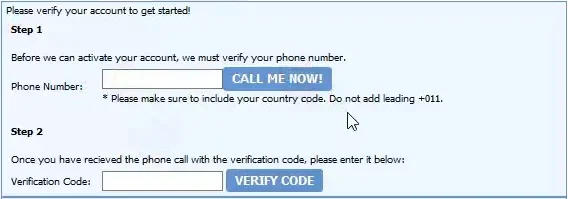
The verification screen as the author captured it: a phone number field, a "Call me Now" action and a "Verification Code" input with a "Verify Code" button.
Setup
The author was testing the application and had to create multiple accounts, and going through the verification process each time seemed hectic, so the goal became to bypass it. No specific tools, versions or roles are described beyond creating accounts and working through the verification screen. The inputs available to test were the phone number and the verification code.
Finding it
Out of many test cases formed for those two inputs, one stood out on logic: the "Verification code" input is already placed on the page without entering the phone number. The normal flow should have been to ask for the phone number first and then the verification code, but here things seemed different.
That observation produced two questions:
- What if I enter any value in the "Verification Code" input box before entering the phone number and click on "Verify Code"?
- What if the developer had set a variable at the backend that held some initial value before the user clicks on "Call me Now"?
Exploitation
Step 1: Create an account
An account is created on the hosting management system. At this point the phone verification mechanism is presented, with the verification code input available at the same time as the phone number input.
Step 2: Submit a code without a phone number
Without entering the phone number, enter 0000 in the "Verification Code" input box and submit it with "Verify Code".
0000
The value is a guess at the initial value of a backend variable that, in the author's reasoning, exists before the user clicks "Call me Now". Earlier guesses were tried first: 1234, 1111, 8421 and others, and none of them worked. For 0000 the account got verified successfully, meaning the phone verification was bypassed.

The result shown after submitting 0000: the account is marked as verified successfully.
Step 3: Confirm the account is verified
The account is verified successfully, so the functionalities gated behind phone verification become available.
Root cause
The author's conclusion is that a variable was set at the backend that held an initial value 0000 before the user clicks on "Call me Now".
The verification code input was placed on the page at the same time as the phone number input, rather than only after a code had been requested. That ordering is what made the test case possible to try in the first place. The report does not describe any rate limiting, attempt limit or server-side check that the guesses of 1234, 1111 and 8421 would have tripped.
Impact
An attacker can create accounts and have them verified without controlling the phone number and without receiving the call, which removes the barrier the mechanism was meant to provide. The author frames the risk in terms of resource abuse: unnecessary creation of accounts could lead to excessive exploitation of available resources on a hosting platform where each account can have a server hosted. The report does not go further into what else the verified state grants.
The submission was triaged and rewarded with a $600 bounty under the P3 category.

The author's summary of the finding: a backend variable holding the initial value 0000 before the user clicks "Call me Now".
Fix
The report does not state what was changed. Based on the root cause, the code should not be compared against any default or initial value: a code should only be valid once it has been generated for a specific phone number and delivered, and verification should be rejected while no code has been issued. The verification code input should also not be accepted before the phone number step has completed.
Variants to test
- Submit a code before requesting one. On any phone or email verification flow, enter a guessed code before pressing the send/call button. A positive result is the account becoming verified without a code being issued.
- Try common defaults. Submit values such as
0000,1234,1111and similar short codes as the first attempt. A positive result is verification succeeding on a value that was never delivered. - Check the order of the inputs. If the code field is rendered alongside the phone number field rather than after it, test whether the server accepts a code for a number that was never submitted. A positive result is a successful verification response with no phone number in the request.
- Test the state before and after the call. Request a code for one number, then submit a guessed code for a different or empty number. A positive result is the account being verified against a code that does not belong to the number on record.
- Watch for missing attempt limits. Submit a series of wrong codes and see whether the endpoint throttles or locks. A positive result is unlimited guesses against a 4 digit space.
What happened, in plain words
A security researcher found a way to skip the phone verification step on a website that rents out servers. The site sent a 4-digit code by phone call, and you had to type that code to use your account. The researcher discovered that if you typed 0000 into the code box before asking for a call, the account got verified anyway. No phone number, no call, no real code. The company paid a $600 bounty for the finding. This article walks through exactly how that happened, explaining every term along the way.
Background: what the site does and why it checks phones
The target was a Server Hosting Management System. Think of it like a landlord for computers: you sign up, and the company gives you a computer (a server) that runs around the clock, with support and a datacentre (a building full of such computers). Each account uses up a resource, since a server of the user's choice is hosted. If someone creates lots of fake accounts, those resources get wasted. So the site added a phone verification step: after you enter your mobile number, the site calls you and tells you a 4-digit code. You type that code into a box. Only then do you get access to the features.
This is a common pattern. The idea is that a real phone number is hard to get in bulk, so requiring one limits abuse. The code is a one-time password (OTP): a short number that is valid only for that one verification.
The screenshot shows the verification screen: a field for the phone number, a button labelled "Call me Now", and a separate field labelled "Verification Code" with a "Verify Code" button.
The setup: why the researcher was poking at this
The researcher was testing the application and needed many accounts, and going through the phone call each time was slow and annoying. So the goal became: can I get past this check? The only inputs available on the screen were the phone number and the verification code. No special tools or versions are mentioned; the work was done through the normal web page.
The observation that started it
Looking at the page, the researcher noticed something odd: the "Verification Code" box is already there, even before you enter a phone number. In a well-designed flow, you would first type your number, press "Call me Now", receive the call, and only then see a box for the code. Here, both boxes were present at the same time.
That led to two questions:
- What if I type something into the "Verification Code" box before entering a phone number, and press "Verify Code"?
- What if the developer left a variable in the backend (the server-side code) that holds some starting value before the user presses "Call me Now"?
A variable is just a named storage slot in a program, like a whiteboard where a value is written. If the program creates that slot with a default value and never clears it before checking, then typing that default value could pass the check.
Step by step: how the bypass was done
Step 1: Create an account
The researcher signed up on the hosting management system. At that point the phone verification screen appeared, with the code box available immediately.
Step 2: Submit a code without a phone number
Without entering any phone number, the researcher typed 0000 into the "Verification Code" box and pressed "Verify Code".
0000
This is not a request or a command; it is simply the four characters typed into the box. The reasoning: if the backend has a default value, it might be something simple like 0000. Before trying 0000, the researcher had already tried 1234, 1111, 8421 and others, and none worked. With 0000, the account was verified successfully. That means the phone verification was bypassed: the site believed the code was correct even though no call had been made and no phone number had been supplied.
The screenshot shows the result: the account is marked as verified successfully.
Step 3: Confirm the account is verified
After that, the account was verified, so the features that were locked behind phone verification became available. No phone number was entered.
Why it worked (root cause)
The researcher's conclusion: a variable was set in the backend that held an initial value 0000 before the user clicks "Call me Now". The author's conclusion: a variable was set in the backend that held an initial value 0000 before the user clicks "Call me Now". So a code submitted before the call step could match.
The verification code input was shown at the same time as the phone number input, instead of only after a code had been requested. That ordering is what made the test possible in the first place. The report does not mention any rate limiting (a limit on how many attempts you can make), attempt limit, or server-side check that would have stopped the guesses of 1234, 1111 and 8421.
Impact: what an attacker could do
An attacker can create accounts and have them verified without controlling the phone number and without receiving the call. That removes the barrier the mechanism was meant to provide. The author frames the risk in terms of resource abuse: unnecessary creation of accounts could lead to excessive exploitation of available resources on a hosting platform where each account can have a server hosted. The report does not go further into what else the verified state grants.
The submission was triaged (reviewed and accepted as valid) and rewarded with a $600 bounty under the P3 category (a severity rating used by the bug bounty platform).
The author's summary image: a backend variable holding the initial value 0000 before the user clicks "Call me Now".
Fix
The report does not state what was changed. Based on the root cause, the code should not be compared against any default or initial value: a code should only be valid once it has been generated for a specific phone number and delivered, and verification should be rejected while no code has been issued. The verification code input should also not be accepted before the phone number step has completed.
Variants to test
These are general ideas for testing similar flows, not things the report says were tested.
- Submit a code before requesting one. On any phone or email verification flow, enter a guessed code before pressing the send/call button. A positive result is the account becoming verified without a code being issued.
- Try common defaults. Submit values such as
0000,1234,1111and similar short codes as the first attempt. A positive result is verification succeeding on a value that was never delivered. - Check the order of the inputs. If the code field is rendered alongside the phone number field rather than after it, test whether the server accepts a code for a number that was never submitted. A positive result is a successful verification response with no phone number in the request.
- Test the state before and after the call. Request a code for one number, then submit a guessed code for a different or empty number. A positive result is the account being verified against a code that does not belong to the number on record.
- Watch for missing attempt limits. Submit a series of wrong codes and see whether the endpoint throttles or locks. A positive result is unlimited guesses against a 4-digit space.
Glossary
- Server Hosting Management System: a web application that lets users rent and manage servers (computers that run continuously).
- Datacentre: a building full of servers and networking equipment.
- Phone verification: a step where the site sends a code to your phone and you must enter it to prove you control that number.
- OTP (one-time password): a short code valid for a single use, often sent by SMS or call.
- Backend: the server-side part of an application, where the logic and data live, as opposed to the frontend (what you see in the browser).
- Variable: a named storage slot in a program that holds a value.
- Bypass: getting past a security check without satisfying it.
- Rate limiting: a limit on how many requests or attempts you can make in a period.
- Triaged: reviewed and accepted as a valid report by the bug bounty programme.
- Bounty: a reward paid for a valid security report.
- P3: a severity category used by bug bounty platforms, typically medium.
- Endpoint: a specific URL or function in an application that accepts requests.
- Throttle: to slow down or block repeated attempts.
- 4-digit space: the set of all possible 4-digit codes, from 0000 to 9999 (10,000 possibilities).




