How I Turned a Language Parameter Into DOM-Based XSS Across Multiple Affiliate Portals
A language parameter was read from the URL and concatenated into an HTML string that was passed to jQuery, which parsed it as markup. An attacker could craft a link that, when opened, executed JavaScript in the affiliate portal's origin.
 Published on medium.com
Cybersecurity
The full write-up lives on its author's site
It belongs to its author, so we link to it rather than copy it. The other two tabs are our own rewrites, checked against it.
Context
During a bug bounty investigation of a production affiliate platform, the researcher found a reflected DOM-based cross-site scripting (XSS) vulnerability affecting multiple regional affiliate portals. The entry point was a lang query parameter used to control the language displayed by the application. Normally it should hold a supported language identifier such as en, pt or el, but the application read the value straight from the URL and inserted it into an HTML string without validation or encoding. That string was then handed to an outdated jQuery, which parsed it as HTML rather than as text.
The affected functionality was the client-side language selector on several affiliate portal pages, including login, password-recovery and landing-page interfaces. The vulnerable request followed this general structure:
GET /login.asp?lang=<USER_INPUT>
The same vulnerable code pattern was present across multiple regional portals.
Setup
No account or authentication was needed: the vulnerability required no authentication, and the only user interaction was opening a crafted URL. The researcher traced the client-side internationalisation script, identified the source and the sink, and then validated execution in a real Chromium browser driven through Playwright. The application used jQuery 1.11.1, and the language-picker construction was gated on a multilingual configuration, so the template had to support more than one language for the sink to be reachable.
Finding it
The investigation began by examining how the portal handled language selection. Legitimate requests looked like this:
/login.asp?lang=en
or:
/login.asp?lang=pt
The interesting question was what happens when lang contains something other than a valid language code. A secure implementation would restrict the value to the languages the application supports. Instead, the JavaScript accepted the raw parameter value and reused it while constructing the language selector, creating this data flow:
URL query parameter
        |
        v
JavaScript reads lang
        |
        v
Value stored without validation
        |
        v
HTML string construction
        |
        v
jQuery parses string as HTML
The next step was identifying exactly how the value reached the HTML parser.
Exploitation
Step 1: Trace the source
The vulnerable functionality lived in a client-side internationalisation script. The application read the language parameter using the browser's URL parsing APIs. Conceptually, the code performed:
const currentUrl = new URL(window.location.href);
const langidactive =
    currentUrl.searchParams.get("lang");
At this point langidactive contained whatever the user supplied, and there was no effective allowlist limiting it to known language identifiers. The application then loaded its language configuration and constructed a language-picker element.
Step 2: Identify the sink
The dangerous code followed this pattern:
jQuery(
    '<a langid="' + langidactive + '">Language</a>').appendTo("#langpicker");
This is the critical sink. The application was not inserting the language value as text; it was building an HTML string and passing the entire string to jQuery. In jQuery 1.11.1 that string is parsed as HTML, so special HTML characters inside langidactive can change the structure of the generated DOM. This turns the language parameter into an HTML injection primitive.
Step 3: Break out of the attribute
The intended output was something like:
<a langid="en">English</a>
The application expected the langid attribute to contain a short language identifier, but the value was concatenated directly into the attribute:
'<a langid="' + langidactive + '">Language</a>'
An attacker could supply characters that terminate the attribute and introduce additional markup. A controlled test value followed this structure:
1"><img src=x onerror=alert(document.domain)>
When inserted into the HTML string, the resulting markup becomes:
<a langid="1"> <img src=x onerror=alert(document.domain)> ">Language</a>
The browser no longer interprets the entire attacker-controlled value as an attribute; it creates an additional HTML element. Because the image source is invalid, the browser triggers the image's error event, and the event handler executes JavaScript.
Step 4: Build the proof of concept
After identifying the source and sink, the researcher created a harmless proof-of-concept payload whose objective was to confirm JavaScript execution without accessing sensitive information or modifying application data. The decoded payload was:
1"><img src=x onerror=alert(document.domain)>
The crafted URL followed this structure:
https://affiliate.example/login.asp?lang=<URL_ENCODED_PAYLOAD>
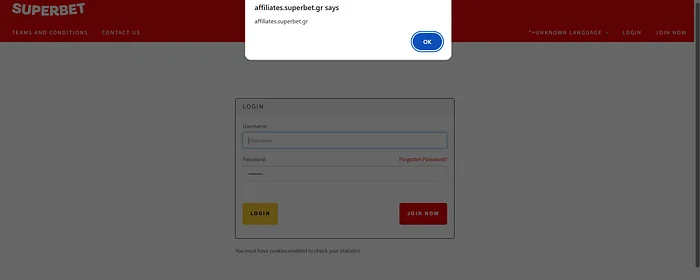
The payload was URL-encoded so that it could be transported safely inside the query string. When the page loaded, the application extracted the parameter, constructed the language-picker HTML and passed it to jQuery; the browser then parsed the injected element. The proof of concept caused a JavaScript alert displaying the page's origin, demonstrating that the injected code executed within the security context of the affected affiliate portal.
Step 5: Confirm execution in a real browser
Source-code analysis showed that the vulnerable pattern existed, but a potentially vulnerable code path is not the same as confirmed XSS. To establish exploitability, the researcher validated the behaviour in a real Chromium browser through Playwright, following this sequence:
- Open the crafted URL.
- Allow the application to load its language configuration.
- Wait for the language picker to be constructed.
- Observe whether the injected event handler executes.
- Confirm the browser's execution origin.
The browser displayed the expected JavaScript alert, and the alert contained the affected portal's domain, confirming that the payload executed within that origin. The execution chain was:
Attacker-controlled lang parameter
               |
               v
URLSearchParams reads input
               |
               v
Unvalidated value stored
               |
               v
HTML string concatenation
               |
               v
jQuery 1.11.1 parses HTML
               |
               v
Injected image element created
               |
               v
Image error event fires
               |
               v
Attacker-controlled JavaScript executes
This established actual browser-side script execution rather than simple parameter reflection.
Step 6: Satisfy the hidden condition
An interesting aspect of the vulnerability was that the dangerous code did not execute unconditionally. The application first loaded a language configuration file, and the language-picker construction was gated by a condition equivalent to:
if (langcount > 1) {
    }
This means the vulnerable sink was reachable only when the active template supported more than one language. That detail mattered during validation: a single-language template might never enter the vulnerable branch. The affected regional portals used multilingual configurations, one template supporting two languages and another supporting four, and both satisfied langcount > 1, so the vulnerable language-picker construction executed on both portals. Identifying the sink alone is not always enough; a complete investigation must also establish whether the conditions required to reach that sink are satisfied.
Step 7: Map the affected surface
The investigation identified the same vulnerable JavaScript logic across two regional affiliate portals. Both applications used the same language-selection implementation, both read the attacker-controlled lang parameter, both loaded multilingual templates and both reached the unsafe jQuery HTML constructor. The relevant pages included:
/login.asp/password_reminder.asp/default.asp
This suggested that the vulnerability was not an isolated issue in a single page but originated from a shared client-side component. The first portal was confirmed with a real-browser JavaScript execution test. The second portal contained the same source-to-sink pattern and satisfied the same multilingual condition; the supplied evidence did not include a separately documented alert trace for that second host.
Step 8: Check the Content Security Policy
After confirming the injection, the researcher examined whether the application used a Content Security Policy to restrict script execution. The response contained a policy equivalent to:
Content-Security-Policy: frame-ancestors 'self'
This directive controls which origins are permitted to embed the page in a frame; it does not restrict inline JavaScript execution. There was no effective script-src directive blocking the injected event handler, so the browser was permitted to execute the inline JavaScript introduced through the HTML injection.
Root cause
The vulnerability resulted from three interacting design decisions.
- Untrusted input was accepted without validation. The application read the language identifier directly from the query string:
const langidactive =
    new URLSearchParams(window.location.search)
        .get("lang");
The input was not restricted to the application's supported language codes.
- The value was concatenated into HTML. The application constructed markup using string concatenation:
'<a langid="' + langidactive + '">Language</a>'
This allowed special characters to change the resulting HTML structure.
- The HTML string was parsed by jQuery. The application passed the constructed string to jQuery:
jQuery(htmlString);
The result was interpreted as HTML markup, completing the source-to-sink chain. The underlying trust-boundary failure was:
Untrusted URL parameter
          |
          v
Application assumes language code
          |
          v
Raw value inserted into HTML
          |
          v
HTML parser interprets attacker input
          |
          v
JavaScript event handler executes
The outdated jQuery version increased maintenance and security concerns, but the fundamental vulnerability was unsafe HTML construction using untrusted input. Simply upgrading jQuery would not automatically make this coding pattern safe; the application must also stop treating untrusted values as HTML. The policy seen contained only frame-ancestors 'self', which says nothing about inline script execution.
Impact
The confirmed vulnerability allowed an unauthenticated attacker to execute JavaScript in the affected affiliate portal's origin when a victim opened a crafted link. This is significantly different from CSS injection or harmless HTML reflection: JavaScript running in a page's origin can interact with the DOM and make requests subject to the browser's same-origin and cookie rules.
- Credential phishing. The vulnerable functionality was present on login-related pages, so an attacker-controlled script could potentially modify the visible login interface or insert deceptive elements. Because the victim is viewing a legitimate application origin, malicious UI changes could be more convincing than those on an unrelated phishing website. The investigation demonstrated JavaScript execution, not an actual credential-harvesting attack.
- Reading accessible page content. JavaScript executing within the origin can read DOM content accessible to the page, which could include information rendered into the page during the victim's session. Access to specific sensitive records was not demonstrated.
- Session-riding opportunities. The injected JavaScript could potentially issue same-origin requests while the victim is authenticated, since browsers automatically attach eligible cookies to requests according to their normal cookie rules. An XSS payload does not necessarily need to read the session cookie directly to interact with authenticated functionality. Whether meaningful authenticated actions can be performed depends on the application's endpoints, authorisation controls and session behaviour, and no specific authenticated state-changing action was demonstrated in the proof of concept.
An important observation during testing was that the session cookie used the HttpOnly attribute. That prevents JavaScript from reading the cookie through document.cookie, but it does not stop JavaScript from running in the page, nor does it prevent the browser from attaching an eligible session cookie to requests made by the page. The difference matters:
Reading a session cookie
         |
         v
Blocked by HttpOnly
versus:
JavaScript executes in the origin
         |
         v
Browser sends eligible authenticated requests
         |
         v
Server processes requests according to permissions
The second behaviour can still occur even when the cookie is protected by HttpOnly, so the absence of readable session cookies does not make an XSS vulnerability harmless; it changes the possible exploitation paths.
A possible cross-origin data-access scenario was also considered, but that larger chain was not proven end-to-end and was kept separate from the confirmed XSS finding. The proven facts were that the attacker controlled the lang parameter, the parameter reached an unsafe HTML constructor, the vulnerable code path executed in a multilingual template, the browser parsed attacker-controlled markup, an injected event handler executed JavaScript, the execution occurred in the vulnerable application's origin, and no authentication was required to deliver the crafted link. The investigation did not establish theft of an HttpOnly session cookie, successful account takeover, cross-origin extraction of sensitive customer information, successful execution of a privileged authenticated action, or persistent or stored XSS.
Fix
The most effective remediation is to eliminate the unsafe HTML construction pattern. The report recommends the following, rather than describing changes that were made.
- Strictly allowlist language identifiers. If the application supports only known languages, it should reject every other value:
const allowedLanguages = new Set([
    "en",
    "pt",
    "fr",
    "es",
    "el"]);
const requestedLanguage =
    new URLSearchParams(window.location.search)
        .get("lang");const activeLanguage =
    allowedLanguages.has(requestedLanguage)
        ? requestedLanguage
        : "en";
Ideally the allowed values should come from the active template's language configuration rather than a global list, so the parameter cannot contain arbitrary HTML markup.
- Use safe DOM construction. Instead of building HTML strings, construct elements through DOM APIs:
const link = document.createElement("a");
link.setAttribute("langid", activeLanguage);link.textContent = "Language";document.querySelector("#langpicker")
    .appendChild(link);
This treats the language identifier as an attribute value rather than executable HTML.
-
Upgrade outdated dependencies. The application should move from the obsolete jQuery version to a maintained release, but the unsafe HTML-construction pattern must still be corrected; a dependency upgrade alone is not a reliable remediation.
-
Deploy a restrictive CSP. A restrictive
script-srcpolicy can help prevent injected inline event handlers from executing. The application should avoid unsafe inline execution patterns and adopt a policy compatible with its legitimate scripts. CSP should be treated as defence-in-depth; the primary fix remains removing the unsafe HTML injection sink. -
Review shared components. Because the vulnerability originated from shared language-selection functionality, every page and regional deployment using that component should be reviewed. Fixing only one affected URL may leave the same vulnerable code active elsewhere.
Variants to test
- Other language-style parameters. Try
?lang=,?locale=,?language=,?redirect=and?returnUrl=on other targets, since these parameters often influence client-side behaviour. A positive result is the value being read by client-side code and reaching an HTML-parsing sink, confirmed by a harmless marker executing in the browser. - Other sources. Search for
URLSearchParams,location.searchandlocation.hashand trace where the resulting values are stored and reused. A positive result is an unvalidated value flowing from one of these sources into a sink. - Other HTML sinks. Look for
jQuery(htmlString),.innerHTMLandinsertAdjacentHTML()receiving untrusted data. A positive result is markup injected through the sink changing the DOM structure. - Attribute-context escaping. When untrusted input appears inside an HTML attribute, test whether it can terminate the attribute and introduce new markup, starting with harmless markers and controlled test cases. A positive result is a new element appearing in the DOM where only an attribute value was expected.
- Conditional code paths. Check whether the vulnerable branch is gated, as here by
langcount > 1, and whether the deployment satisfies the condition. A positive result is the sink being reached only on templates or configurations that meet the gate. - Shared components. If the vulnerability exists in a common JavaScript file, identify other pages and applications that use it and confirm which deployments actually reach the vulnerable branch. A positive result is the same source-to-sink pattern reproducing on additional hosts.
- Browser defences. Review Content Security Policy, cookie attributes, same-origin restrictions, session behaviour and accessible DOM content. A positive result is a policy without an effective
script-srcthat permits the injected handler to run, as with theframe-ancestors 'self'policy seen here.
Final takeaway
This vulnerability began with a simple language parameter. The application expected a harmless value such as:
But instead of validating the input and treating it as data, the application concatenated it into an HTML string, and the resulting markup was passed to jQuery 1.11.1, which parsed the attacker-controlled content as HTML. The complete chain was:
Attacker-controlled lang parameter
                |
                v
URLSearchParams extracts input
                |
                v
No effective language allowlist
                |
                v
Raw value inserted into HTML string
                |
                v
jQuery parses the constructed markup
                |
                v
Injected HTML element created
                |
                v
JavaScript event handler executes
                |
                v
Arbitrary JavaScript runs in the page's origin
Shared frontend components and multilingual configuration expanded the affected surface across multiple pages and regional portals. Never assume a parameter is safe because its intended purpose is harmless: security depends on where the value flows, how it is interpreted, and whether untrusted data can cross into an executable context. Trace the source, identify the sink, understand the parser, verify the execution conditions, confirm the result in a real browser, and report only the impact supported by evidence.
What happened, in plain words
A security researcher was looking at an affiliate platform, which is a website that lets people promote products and earn a commission when someone buys through their link. While testing it, the researcher found a bug in the way the site handled a small piece of text in the web address: the lang parameter, which tells the site which language to display.
Normally that parameter holds a short language code such as en (English), pt (Portuguese) or el (Greek). The site took whatever was in that spot in the address and pasted it straight into a piece of HTML, which is the language web pages are written in. It did not check the value first and did not neutralise special characters. The resulting HTML was then handed to an old version of jQuery, a popular JavaScript library, which treated the text as real page markup instead of as harmless text.
By putting a few special characters into the lang value, the researcher could close the HTML attribute early and add a new element of their own, one that runs JavaScript (the programming language browsers execute) when it loads. When a victim opened the crafted link, that JavaScript ran inside the real affiliate portal's own origin, meaning the browser treated it as coming from the legitimate site. The researcher confirmed this end to end in a real Chromium browser.
The same flawed code appeared on more than one regional portal, which pointed to a shared piece of front-end code rather than a one-off mistake on a single page. This kind of bug is called reflected DOM-based cross-site scripting, or XSS for short. "Reflected" means the bad value comes in with the request and is echoed back into the page; "DOM-based" means the dangerous handling happens in the browser's copy of the page (the DOM, or Document Object Model) rather than on the server.
Introduction
During a bug bounty investigation of a production affiliate platform, the researcher discovered a reflected DOM-based cross-site scripting (XSS) vulnerability affecting multiple regional affiliate portals. A bug bounty is a programme where a company invites outside researchers to look for security flaws and report them, often for a reward.
The entry point was surprisingly simple: a lang parameter used to control the language displayed by the application. Normally this parameter should contain a supported language identifier, such as en, pt or el. However, the application read the value directly from the URL and inserted it into an HTML string without proper validation or encoding. Validation means checking that a value is one of the allowed ones; encoding means converting special characters so they cannot change the structure of the page.
The dangerous part was what happened next. The application passed the constructed string into an outdated version of jQuery, which interpreted the string as HTML rather than harmless text. By breaking out of the intended HTML attribute, the researcher was able to inject a new element containing an event handler, which is a small piece of JavaScript that the browser runs when something happens, such as an image failing to load.
When the victim opened the crafted URL, the browser executed the injected JavaScript in the legitimate affiliate portal's origin. An origin is the combination of scheme, host and port that the browser uses to decide which site a page belongs to; code running in a site's origin is treated as part of that site. The researcher confirmed the behaviour end to end in a real Chromium browser. The same vulnerable code pattern was also present across multiple regional portals.
This case study explains the methodology behind the discovery, the root cause, the proof of concept, and the security implications.
1. Vulnerability Overview
| Property | Detail |
|---|---|
| Vulnerability | Reflected DOM-Based Cross-Site Scripting |
| Classification | CWE-79 |
| Entry point | lang query parameter |
| Vulnerable component | Client-side language selector |
| JavaScript library | jQuery 1.11.1 |
| Authentication required | No |
| User interaction | Opening a crafted URL |
| Root cause | Unsafe HTML-string construction |
| Execution context | Vulnerable page's origin |
| Confirmed result | JavaScript execution in Chromium |
CWE-79 is a standard catalogue number for cross-site scripting flaws, used so that different teams and tools can refer to the same class of bug. A query parameter is the part of a web address after the question mark, made of name and value pairs such as lang=en. A client-side language selector is the part of the page, running in the browser, that lets a visitor pick a language.
The vulnerability affected language-selection functionality on several affiliate portal pages, including login, password-recovery, and landing-page interfaces. The vulnerable request followed this general structure:
GET /login.asp?lang=<USER_INPUT>
This is an HTTP request line. GET is the HTTP method used here to request the page. /login.asp is the path of the page being requested. ?lang=<USER_INPUT> is the query string, where lang is the parameter name and <USER_INPUT> is a placeholder for whatever value is supplied. The report uses this placeholder to show the shape of the request without committing to a particular payload.
The language parameter was supposed to select one of the application's supported languages. Instead, it became an attacker-controlled HTML injection source.
2. Finding the Entry Point
The investigation began by examining how the affiliate portal handled language selection. The application supported multiple languages and used a query parameter to determine which language should be active. For example:
/login.asp?lang=en
or:
/login.asp?lang=pt
These are ordinary page addresses. The first asks for the login page with English selected; the second asks for the same page with Portuguese selected. These requests were legitimate.
But the interesting question was: what happens if the lang parameter contains something other than a valid language code? A secure implementation would restrict the value to the languages supported by the application. Instead, the JavaScript accepted the raw parameter value and reused it while constructing the language selector. This created a potentially dangerous data flow:
URL query parameter
        |
        v
JavaScript reads lang
        |
        v
Value stored without validation
        |
        v
HTML string construction
        |
        v
jQuery parses string as HTML
This diagram is a data flow: it follows one value from where it enters the application to where it is used. The value starts in the URL, is read by JavaScript, is stored without any check, is glued into an HTML string, and finally is parsed as HTML by jQuery. Each arrow is a step where a check could have stopped the value but did not. The next step was identifying exactly how the value reached the HTML parser.
3. Tracing the Vulnerable JavaScript
The vulnerable functionality was implemented in a client-side internationalisation script. Internationalisation is the part of an application that adapts it to different languages and regions. The application read the language parameter using the browser's URL parsing APIs. An API here simply means a built-in set of functions the browser offers to programs. Conceptually, the code performed the following operation:
const currentUrl = new URL(window.location.href);
This line takes the address of the current page, window.location.href, and turns it into a structured object called currentUrl using the browser's built-in URL constructor. Think of it as taking a long handwritten address and filling it into separate boxes for street, city and postcode, so each part can be read reliably.
const langidactive =
    currentUrl.searchParams.get("lang");
This line asks that structured address for the query parameter named lang and stores its value in a variable called langidactive. searchParams is the part of the URL object that holds the query string, and get("lang") returns the value for that name. At this point, langidactive contained whatever the user supplied. There was no effective allowlist limiting the value to known language identifiers. An allowlist is a list of values that are permitted; anything not on the list should be rejected.
The application then loaded its language configuration and constructed a language-picker element. The dangerous code followed this pattern:
jQuery(
    '<a langid="' + langidactive + '">Language</a>').appendTo("#langpicker");
This is the critical sink. A sink is the place where a value finally gets used in a way that can be dangerous. Here, the code builds a piece of HTML by gluing three pieces together: the opening <a langid=", then the value of langidactive, then the closing ">Language</a>. The + signs join strings together. The finished string is passed to jQuery(...), and .appendTo("#langpicker") places the result inside the page element whose id is langpicker.
The application was not inserting the language value as text; it was building an HTML string and passing the entire string to jQuery. In jQuery 1.11.1, that string is parsed as HTML. Therefore, special HTML characters inside langidactive can change the structure of the generated DOM. This turns the language parameter into an HTML injection primitive, meaning a way to insert markup of the attacker's choosing.
4. Understanding the Root Cause
The intended output was something like:
<a langid="en">English</a>
This is a link element. <a> opens the element, langid="en" is an attribute (a named setting on the element) whose value is en, English is the visible text, and </a> closes the element. The application expected the langid attribute to contain a short language identifier. However, the value was concatenated directly into the attribute. The vulnerable construction was:
'<a langid="' + langidactive + '">Language</a>'
This is the same glue-together pattern as before, shown on its own. The single quotes mark the fixed text, and langidactive is dropped in between. An attacker could supply characters that terminate the attribute and introduce additional HTML markup. For example, a controlled test value could follow this structure:
1"><img src=x onerror=alert(document.domain)>
This payload is built from pieces. 1 is an ordinary value. " is a double quote, the character that closes the attribute value. > closes the opening tag. <img src=x onerror=alert(document.domain)> is a new image element whose source is x (which does not exist) and whose onerror handler runs alert(document.domain) if the image fails to load. alert shows a pop-up box, and document.domain is the current page's domain name.
When inserted into the HTML string, the resulting markup becomes:
<a langid="1"> <img src=x onerror=alert(document.domain)> ">Language</a>
Reading this left to right: <a langid="1"> is now a complete, valid opening tag because the attacker's quote closed the attribute. The <img ...> element follows as a separate element. The leftover ">Language</a> is now just stray text and a closing tag. The browser no longer interprets the entire attacker-controlled value as an attribute; it creates an additional HTML element.
Because the image source is invalid, the browser triggers the image's error event, and the event handler executes JavaScript. The underlying vulnerability is not the language parameter itself; it is the decision to interpret untrusted input as HTML markup.
5. Building the Proof of Concept
After identifying the source and sink, the researcher created a harmless proof-of-concept payload. A proof of concept is a minimal demonstration that a bug is real, without causing harm. The objective was to confirm JavaScript execution without accessing sensitive information or modifying application data. The decoded payload was:
1"><img src=x onerror=alert(document.domain)>
This is the same payload as above, shown as the researcher would write it before putting it into a URL. "Decoded" means in its plain, readable form rather than the percent-encoded form used inside addresses.
The crafted URL followed this structure:
https://affiliate.example/login.asp?lang=<URL_ENCODED_PAYLOAD>
Here https://affiliate.example is a placeholder host name, /login.asp is the page, and <URL_ENCODED_PAYLOAD> stands for the payload after URL encoding. URL encoding replaces characters that have special meaning in an address with percent codes, so the payload travels as data instead of breaking the address apart. The payload was URL-encoded so that it could be transported safely inside the query string.
When the page loaded, the application extracted the parameter, constructed the language-picker HTML, and passed it to jQuery. The browser then parsed the injected element. The proof of concept caused a JavaScript alert displaying the page's origin. This demonstrated that the injected code executed within the security context of the affected affiliate portal.
6. Confirming Execution in a Real Browser
Source-code analysis showed that the vulnerable pattern existed. But a potentially vulnerable code path is not the same as confirmed XSS. To establish exploitability, the researcher validated the behaviour using a real Chromium browser through Playwright. Playwright is a tool that drives a real browser automatically, so tests run the same way a person's browser would. The test followed this sequence:
- Open the crafted URL.
- Allow the application to load its language configuration.
- Wait for the language picker to be constructed.
- Observe whether the injected event handler executes.
- Confirm the browser's execution origin.
Each step exists for a reason. Opening the URL starts the flow. Waiting for the language configuration matters because the picker is built only after that configuration loads. Waiting for the picker matters because that is when the dangerous code runs. Observing the handler shows whether the injected JavaScript actually fired. Confirming the origin shows that it ran as the real site, not as some unrelated page.
The browser displayed the expected JavaScript alert. The alert contained the affected portal's domain, confirming that the payload executed within that origin. The execution chain was:
Attacker-controlled lang parameter
               |
               v
URLSearchParams reads input
               |
               v
Unvalidated value stored
               |
               v
HTML string concatenation
               |
               v
jQuery 1.11.1 parses HTML
               |
               v
Injected image element created
               |
               v
Image error event fires
               |
               v
Attacker-controlled JavaScript executes
This diagram lists the same steps as the data flow earlier, but continues all the way to the final effect. The value enters through the parameter, is read by URLSearchParams, is stored unchecked, is glued into HTML, is parsed by jQuery, becomes an image element, the image fails to load, its error handler fires, and the attacker's JavaScript runs. This established actual browser-side script execution rather than simple parameter reflection. Simple reflection would mean the value merely appears in the page as text; here it changed the page's structure and ran code.
7. The Hidden Condition: Multiple Languages
An interesting aspect of this vulnerability was that the dangerous code did not execute unconditionally. The application first loaded a language configuration file. The language-picker construction was gated by a condition equivalent to:
if (langcount > 1) {
    }
This is an if statement. The code inside the braces runs only when the condition in the parentheses is true. langcount is a count of how many languages the active template supports, and > 1 means "more than one". So the picker is built only when there is more than one language to choose from. A template here is the page layout and code that the site uses for a particular regional version.
This means the vulnerable sink was reachable only when the active template supported more than one language. That detail mattered during validation. A single-language template might never enter the vulnerable branch. But the affected regional portals used multilingual configurations. One template supported two languages. Another supported four. Both satisfied:
langcount > 1
This line restates the gate: both counts, two and four, are greater than one, so the condition is true on both portals. Therefore, the vulnerable language-picker construction executed on both portals. This demonstrates why identifying the sink alone is not always enough. A complete investigation must also establish whether the conditions required to reach that sink are satisfied.
8. The Same Vulnerability Across Multiple Portals
The investigation identified the same vulnerable JavaScript logic across two regional affiliate portals. Both applications used the same language-selection implementation. Both read the attacker-controlled lang parameter. Both loaded multilingual templates. Both reached the unsafe jQuery HTML constructor. The relevant pages included:
/login.asp/password_reminder.asp/default.asp
This block lists three page paths: the login page, the password reminder page and the default landing page. This suggested that the vulnerability was not an isolated issue in a single page. Instead, it originated from a shared client-side component, meaning one piece of JavaScript used by several pages.
The first portal was confirmed with a real-browser JavaScript execution test. The second portal contained the same source-to-sink pattern and satisfied the same multilingual condition. The supplied evidence did not include a separately documented alert trace for that second host. The broader lesson is important: when a vulnerability exists in a shared JavaScript component, its impact may extend across every application that imports that component and reaches the vulnerable code path.
9. Why the Outdated jQuery Version Mattered
The application used jQuery 1.11.1. The vulnerable code relied on jQuery's ability to create DOM elements from HTML strings. For example:
jQuery('<a langid="en">English</a>');
This line passes a fixed, trusted HTML string to jQuery, which turns it into a link element. This is legitimate functionality when the HTML string is trusted. The problem appears when untrusted data is concatenated into that string. For example:
jQuery(
    '<a langid="' + userInput + '">English</a>');
Here userInput stands for a value that comes from outside the application. Because the value is glued into the HTML before jQuery sees it, jQuery cannot tell the difference between the developer's markup and the attacker's markup. Now the browser's HTML parser can interpret attacker-controlled markup.
It is important to distinguish two things. The old jQuery version increased maintenance and security concerns. However, the fundamental vulnerability was unsafe HTML construction using untrusted input. Simply upgrading jQuery would not automatically make this coding pattern safe. The application must also stop treating untrusted values as HTML.
10. Investigating Content Security Policy
After confirming the injection, the researcher examined whether the application used a Content Security Policy to restrict script execution. A Content Security Policy, or CSP, is a set of instructions a site sends to the browser saying which kinds of content are allowed to load and run. The response contained a policy equivalent to:
Content-Security-Policy: frame-ancestors 'self'
This is an HTTP response header. Content-Security-Policy is the header name, and frame-ancestors 'self' is its value. This directive controls which origins are permitted to embed the page in a frame. A frame is a page shown inside another page. 'self' means only the same origin may do so. It does not restrict inline JavaScript execution. There was no effective script-src directive blocking the injected event handler. script-src is the part of a CSP that says which scripts may run.
Therefore, the browser was permitted to execute the inline JavaScript introduced through the HTML injection. A restrictive CSP could have provided an additional layer of protection. For example, a properly deployed policy that disallows inline event handlers could prevent this particular execution technique. However, CSP should be treated as defence-in-depth, meaning an extra safety layer rather than the main fix. The primary fix remains removing the unsafe HTML injection sink.
11. Understanding the Security Impact
The confirmed vulnerability allowed an unauthenticated attacker to execute JavaScript in the affected affiliate portal's origin when a victim opened a crafted link. Unauthenticated means the attacker does not need an account or login. This is significantly different from CSS injection or harmless HTML reflection. CSS is the language that controls how a page looks; injecting CSS can change appearance but not run code. JavaScript running in a page's origin can interact with the DOM and make requests subject to the browser's same-origin and cookie rules. A cookie is a small piece of data the browser stores for a site and sends back with later requests, often used to keep a user logged in.
Credential phishing
The vulnerable functionality was present on login-related pages. An attacker-controlled script could potentially modify the visible login interface or insert deceptive elements. Because the victim is viewing a legitimate application origin, malicious UI changes could be more convincing than those on an unrelated phishing website. The investigation demonstrated JavaScript execution, not an actual credential-harvesting attack.
Reading accessible page content
JavaScript executing within the origin can read DOM content accessible to the page. This could include information rendered into the page during the victim's session. However, access to specific sensitive records was not demonstrated.
Session-riding opportunities
The injected JavaScript could potentially issue same-origin requests while the victim is authenticated. Browsers automatically attach eligible cookies to requests according to their normal cookie rules. This means that an XSS payload does not necessarily need to read the session cookie directly to interact with authenticated functionality. Whether meaningful authenticated actions can be performed depends on the application's endpoints, authorisation controls, and session behaviour. An endpoint is a specific address the application responds to. No specific authenticated state-changing action was demonstrated in the supplied proof of concept.
12. HttpOnly Cookies Do Not Eliminate XSS
An important observation during testing was that the session cookie used the HttpOnly attribute. A session cookie is the cookie that identifies a logged-in session. HttpOnly is a setting that tells the browser to keep that cookie away from JavaScript. That is a useful security control. It prevents JavaScript from reading the cookie through:
document.cookie
This is the browser property that normally lets a page read its cookies. With HttpOnly, the session cookie is not included in what this returns. However, HttpOnly does not stop JavaScript from running in the page. It also does not prevent the browser from attaching an eligible session cookie to requests made by the page. This distinction is critical. Consider the difference:
Reading a session cookie
         |
         v
Blocked by HttpOnly
This path shows that stealing the cookie's value is blocked. Versus:
JavaScript executes in the origin
         |
         v
Browser sends eligible authenticated requests
         |
         v
Server processes requests according to permissions
This path shows that even without reading the cookie, injected code can cause the browser to send requests that carry the cookie automatically, and the server processes them according to its permissions. The second behaviour can still occur even when the cookie is protected by HttpOnly. Therefore, the absence of readable session cookies does not make an XSS vulnerability harmless. It changes the possible exploitation paths.
13. Avoiding Unsupported Escalation Claims
During the investigation, a possible cross-origin data-access scenario was also considered. Cross-origin means involving a different site's origin. However, that larger chain was not proven end to end. The researcher therefore kept it separate from the confirmed XSS finding. The proven facts were:
- The attacker controlled the
langparameter. - The parameter reached an unsafe HTML constructor.
- The vulnerable code path executed in a multilingual template.
- The browser parsed attacker-controlled markup.
- An injected event handler executed JavaScript.
- The execution occurred in the vulnerable application's origin.
- No authentication was required to deliver the crafted link.
The investigation did not establish:
- Theft of an
HttpOnlysession cookie - Successful account takeover
- Cross-origin extraction of sensitive customer information
- Successful execution of a privileged authenticated action
- Persistent or stored XSS
Stored XSS would mean the malicious value is saved on the server and shown to other users later. This separation between proven behaviour and potential consequences makes the finding more technically defensible.
14. Root Cause Analysis
The vulnerability resulted from three interacting design decisions.
First: Untrusted input was accepted without validation
The application read the language identifier directly from the query string.
const langidactive =
    new URLSearchParams(window.location.search)
        .get("lang");
This line reads the query string of the current page with URLSearchParams and gets the value named lang, storing it in langidactive. The input was not restricted to the application's supported language codes.
Second: The value was concatenated into HTML
The application constructed markup using string concatenation.
'<a langid="' + langidactive + '">Language</a>'
This glues the value between fixed pieces of HTML. This allowed special characters to change the resulting HTML structure.
Third: The HTML string was parsed by jQuery
The application passed the constructed string to jQuery.
jQuery(htmlString);
Here htmlString stands for the finished string. The result was interpreted as HTML markup. That completed the source-to-sink chain. A source is where untrusted data enters; a sink is where it is used dangerously. The underlying trust-boundary failure was:
Untrusted URL parameter
          |
          v
Application assumes language code
          |
          v
Raw value inserted into HTML
          |
          v
HTML parser interprets attacker input
          |
          v
JavaScript event handler executes
A trust boundary is a line between parts of a system that trust each other differently. Here the application assumed everything in the URL was a safe language code, but the URL is controlled by whoever sends the link.
15. Recommended Remediation
The most effective remediation is to eliminate the unsafe HTML construction pattern.
1. Strictly allowlist language identifiers
If the application supports only known languages, it should reject every other value. For example:
const allowedLanguages = new Set([
    "en",
    "pt",
    "fr",
    "es",
    "el"]);
This creates a Set, which is a collection that can quickly answer whether a value is in it. It contains the five permitted language codes.
const requestedLanguage =
    new URLSearchParams(window.location.search)
        .get("lang");const activeLanguage =
    allowedLanguages.has(requestedLanguage)
        ? requestedLanguage
        : "en";
This reads the requested language from the URL, then checks whether it is in the allowed set. The ? : expression means: if the requested language is allowed, use it; otherwise fall back to "en". Ideally, the allowed values should come from the active template's language configuration rather than a global list. This ensures the parameter cannot contain arbitrary HTML markup.
2. Use safe DOM construction
Instead of building HTML strings, construct elements through DOM APIs. For example:
const link = document.createElement("a");
This asks the browser to create a new, empty link element in memory, without any HTML text being parsed.
link.setAttribute("langid", activeLanguage);link.textContent = "Language";document.querySelector("#langpicker")
    .appendChild(link);
This sets the langid attribute to the checked language value, sets the visible text to Language, finds the element with id langpicker, and adds the link to it. This approach treats the language identifier as an attribute value rather than executable HTML.
3. Upgrade outdated dependencies
The application should upgrade from the obsolete jQuery version to a maintained release. However, the unsafe HTML-construction pattern must still be corrected. A dependency upgrade alone is not a reliable remediation.
4. Deploy a restrictive CSP
A restrictive script-src policy can help prevent injected inline event handlers from executing. The application should avoid unsafe inline execution patterns and adopt a policy compatible with its legitimate scripts.
5. Review shared components
Because the vulnerability originated from shared language-selection functionality, every page and regional deployment using that component should be reviewed. Fixing only one affected URL may leave the same vulnerable code active elsewhere.
16. My Bug Bounty Methodology
This case illustrates a practical workflow for investigating DOM-based XSS.
Step 1: Identify user-controlled inputs
Start with URL parameters and other browser-controlled sources. Examples include:
?lang=?locale=?language=?redirect=?returnUrl=
This lists five parameter names that often appear in addresses: lang, locale, language, redirect and returnUrl. These parameters often influence client-side behaviour.
Step 2: Trace input into JavaScript
Search for operations such as:
URLSearchParamslocation.searchlocation.hash
These are three ways JavaScript reads parts of the address: URLSearchParams reads the query string, location.search gives the raw query string, and location.hash gives the part after the #. Determine where the resulting values are stored and reused.
Step 3: Identify dangerous DOM sinks
Pay particular attention to operations that parse strings as HTML. For example:
jQuery(htmlString).innerHTMLinsertAdjacentHTML()
These are three common sinks: passing a string to jQuery, setting .innerHTML on an element, and calling insertAdjacentHTML(). These operations can become dangerous when their inputs contain untrusted data.
Step 4: Identify execution conditions
Determine whether the vulnerable code is reachable. In this case, the language-picker code executed only when:
langcount > 1
The multilingual template configuration was therefore an important part of the proof.
Step 5: Test attribute-context escaping
When untrusted input appears inside an HTML attribute, determine whether it can terminate the attribute and introduce new markup. Start with harmless markers and controlled test cases.
Step 6: Confirm in a real browser
Use a harmless execution marker or alert to demonstrate that JavaScript actually runs. Static reflection alone is insufficient to establish executable XSS.
Step 7: Check browser defences
Review:
- Content Security Policy
- Cookie attributes
- Same-origin restrictions
- Session behaviour
- Accessible DOM content
Step 8: Investigate shared components
If the vulnerability exists in a common JavaScript file, identify other pages and applications that use it. Confirm which deployments actually reach the vulnerable branch.
Step 9: Establish realistic impact
Separate demonstrated JavaScript execution from hypothetical account takeover or data theft. A precise report is more valuable than an exaggerated one.
17. Lessons Learned
This investigation reinforced several important lessons.
- Small parameters can create serious vulnerabilities. A language selector may appear low-risk, but its security depends on how the value is handled.
- DOM-based XSS is about data flow. The vulnerability becomes clear when tracing attacker-controlled input from the URL to an HTML-parsing sink.
- HTML-string construction is dangerous with untrusted data. Building markup through string concatenation can transform ordinary text into executable HTML.
- Conditional code paths matter. A vulnerable sink may only be reachable when particular configuration conditions are satisfied.
- Shared JavaScript can create shared vulnerabilities. One insecure component can affect multiple pages and regional deployments.
- HttpOnly is not an XSS fix. It protects cookie confidentiality but does not prevent JavaScript execution or all forms of session-riding.
- CSP must restrict scripts to mitigate XSS. A policy containing only
frame-ancestorsdoes not block injected event handlers. - Browser validation is essential. The decisive evidence was JavaScript execution in a real browser, not merely suspicious source code.
18. Final Takeaway
This vulnerability began with a simple language parameter. The application expected a harmless value such as:
But instead of validating the input and treating it as data, the application concatenated it into an HTML string. The resulting markup was passed to jQuery 1.11.1, which parsed the attacker-controlled content as HTML. The complete vulnerability chain was:
Attacker-controlled lang parameter
                |
                v
URLSearchParams extracts input
                |
                v
No effective language allowlist
                |
                v
Raw value inserted into HTML string
                |
                v
jQuery parses the constructed markup
                |
                v
Injected HTML element created
                |
                v
JavaScript event handler executes
                |
                v
Arbitrary JavaScript runs in the page's origin
The investigation also demonstrated how shared frontend components and multilingual configuration can expand the affected surface across multiple pages and regional portals. The most important lesson is straightforward: never assume a parameter is safe because its intended purpose is harmless. Security depends on where the value flows, how it is interpreted, and whether untrusted data can cross into an executable context.
For bug bounty hunters, the methodology is equally valuable: trace the source, identify the sink, understand the parser, verify the execution conditions, confirm the result in a real browser, and report only the impact supported by evidence. Sometimes, all it takes to turn an ordinary language selector into a serious client-side vulnerability is one unsafe HTML constructor.
Glossary
- Affiliate platform: a website that lets people promote products and earn a commission through their links.
- Allowlist: a list of values that are permitted, with everything else rejected.
- API: a built-in set of functions a program can call to do something, such as the browser's URL parsing functions.
- Attribute: a named setting on an HTML element, such as
langid="en". - Authentication: proving who you are, usually by logging in.
- Bug bounty: a programme where a company invites outside researchers to find and report security flaws.
- Chromium: the open-source browser engine used by several browsers, including Chrome.
- Client-side: running in the user's browser rather than on the server.
- Concatenation: joining strings together, often with the
+operator. - Content Security Policy (CSP): instructions a site sends to the browser saying which content may load and run.
- Cookie: a small piece of data the browser stores for a site and sends back with later requests, often used to keep a user logged in.
- Cross-origin: involving a different site's origin.
- CWE-79: the standard catalogue number for cross-site scripting flaws.
- Data flow: the path a value takes from where it enters an application to where it is used.
- Defence-in-depth: an extra safety layer on top of the main fix.
- DOM (Document Object Model): the browser's structured representation of a page, which scripts can read and change.
- DOM-based XSS: XSS where the dangerous handling happens in the browser's copy of the page rather than on the server.
- Encoding: converting special characters so they cannot change the structure of the page.
- Endpoint: a specific address the application responds to.
- Event handler: a small piece of JavaScript the browser runs when something happens, such as an image failing to load.
- Exploitability: whether a flaw can actually be triggered in practice.
- Frame: a page shown inside another page.
- GET: the HTTP method a browser uses to ask for a page.
- HTML: the language web pages are written in.
- HTTP: the protocol browsers and servers use to exchange requests and responses.
- HttpOnly: a cookie setting that keeps the cookie away from JavaScript.
- Internationalisation: the part of an application that adapts it to different languages and regions.
- JavaScript: the programming language browsers execute.
- jQuery: a popular JavaScript library that simplifies working with pages and requests.
- Origin: the combination of scheme, host and port that the browser uses to decide which site a page belongs to.
- Parameter: a name and value pair in a URL's query string, such as
lang=en. - Payload: the value an attacker supplies to trigger a bug.
- Playwright: a tool that drives a real browser automatically for testing.
- Proof of concept: a minimal demonstration that a bug is real, without causing harm.
- Query string: the part of a web address after the question mark, made of name and value pairs.
- Reflected XSS: XSS where the bad value comes in with the request and is echoed back into the page.
- Remediation: the fix for a vulnerability.
- Same-origin: belonging to the same scheme, host and port.
- Session cookie: the cookie that identifies a logged-in session.
- Sink: the place where a value finally gets used in a way that can be dangerous.
- Source: where untrusted data enters an application.
- Stored XSS: XSS where the malicious value is saved on the server and shown to other users later.
- Template: the page layout and code a site uses for a particular regional version.
- Trust boundary: a line between parts of a system that trust each other differently.
- URL encoding: replacing characters that have special meaning in an address with percent codes.
- Validation: checking that a value is one of the allowed ones.
- XSS (cross-site scripting): a flaw that lets an attacker get their own JavaScript to run in another site's origin.



