How I was able to bypass the admin panel without the credentials.
A publicly reachable directory contained a startup script and text files that exposed an admin session cookie and error logs. By replaying the captured admin request with that cookie, the author reached the admin dashboard without credentials.
 Published on pratikkhalane91.medium.com
This is my first article and I hope you guys will surely learn something new. Since I am not allowed to disclose the information about the company, let’s assume it as example.com.
The full write-up lives on its author's site
It belongs to its author, so we link to it rather than copy it. The other two tabs are our own rewrites, checked against it.
Context
This is a write-up of a bug found on a single main domain, which was the only asset in scope. The company is not named, so the author refers to it as example.com. The target ran a CMS with an administrative portal reachable at /sitemanager/, and the goal of the exercise was to get into that admin panel without valid credentials. The finding ended with the security team removing the sitemanager portal.
Setup
The only precondition was scope: the main domain. The tools used were:
- Wappalyzer, a browser extension for fingerprinting technologies.
- Wpscan, which comes pre-installed in Kali Linux.
- ffuf for directory brute forcing, run with an Assetnote wordlist.
- Burp Suite Repeater for replaying a captured request.
No account was created and no credentials were available at the start. The author tried default credentials on the admin login and they did not work.
Finding it
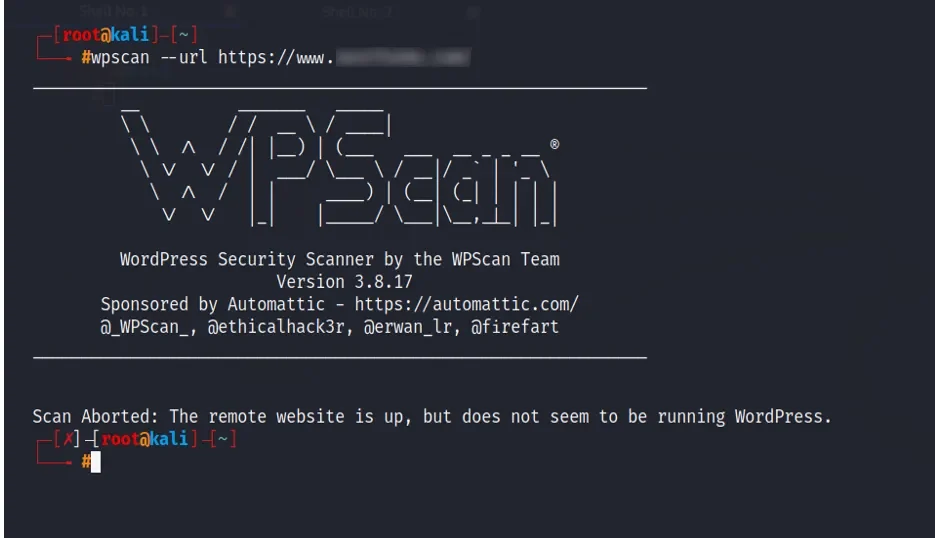
The first step was technology fingerprinting. Wappalyzer reported WordPress, which would normally send a tester straight to /wp-admin. The author treated that as a false positive and verified it with Wpscan.
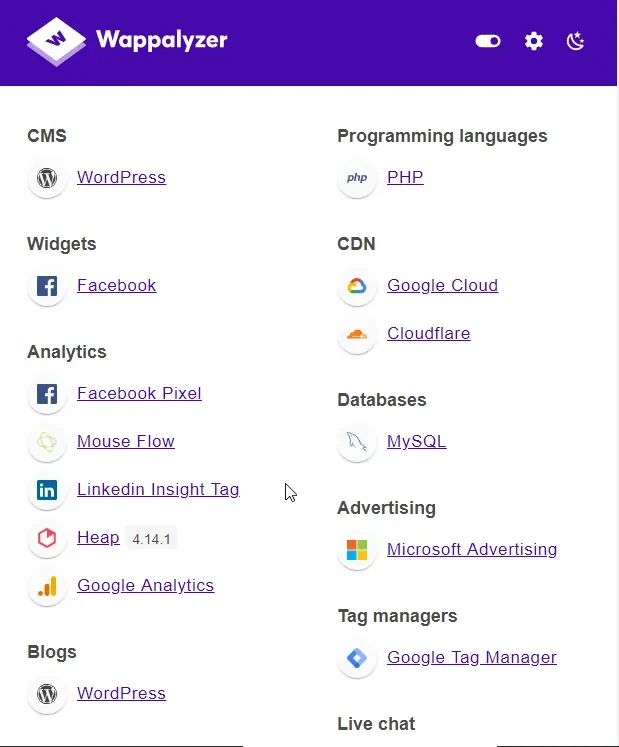
The author shows Wpscan output as the verification step and uses the result as an example of Wappalyzer producing a false positive. That left the question of what the actual CMS was, so the work moved to content discovery.
Exploitation
Step 1: directory brute forcing on the main domain
The author lists several brute-force tools (FFUF, GoBuster, DirDar) and several wordlists (SecList, DirSearch's dicc.txt, Assetnote). The command actually used was ffuf with the Assetnote list:
ffuf -c -w /wordlist -u /URL/FUZZ -mc 200,301,302 -t 500
This surfaced a directory called sitemanager, which served the company's CMS login page.
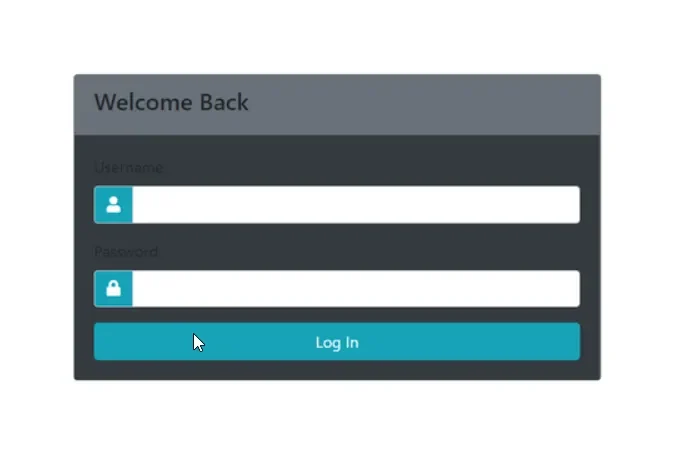
The login page was reached at a URL of this shape:
https://www.example.com/sitemanager/login.php?location=%2Fsitemanager%2F
Default credentials did not get the author in.
Step 2: brute forcing inside the portal
The next run targeted the subdirectory rather than the root:
/sitemanager/FUZZ
Most results were false positives returning 200 OK with a response size of 0. One entry from the wordlist was real: /startup.sh/.
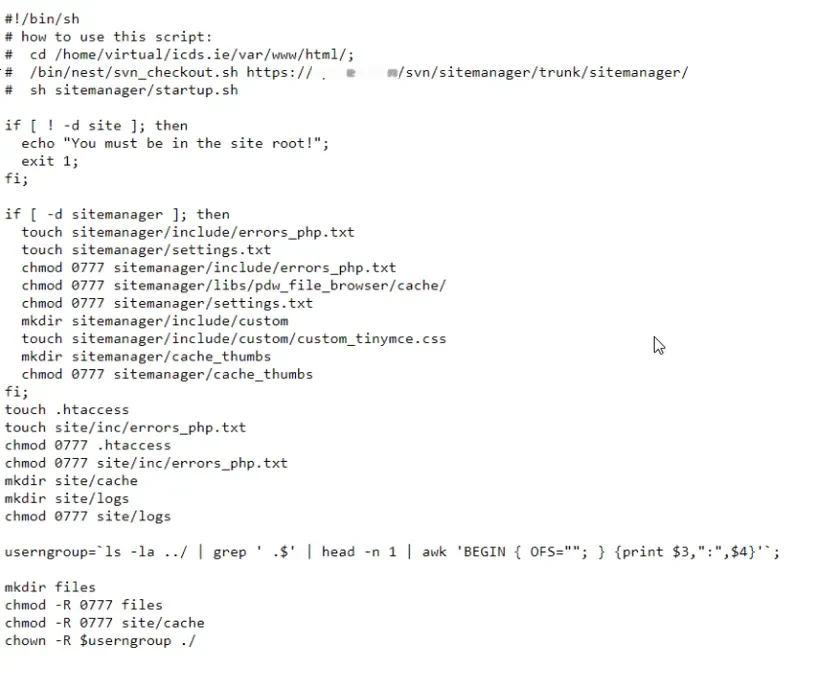
Step 3: reading the exposed files
With a working endpoint under the portal, the author looked for files that might leak credentials, specifically settings.txt and errors_php.txt. Both were readable.
errors_php.txt contained application error entries with timestamps, the username admin, the script path /sitemanager/admin.php, a partially masked client IP, ISP information, a session identifier, a browser user agent, and PHP notices about an undefined variable in /home/text/www/site/modrw.php. The author considered using this file to escalate into the portal but could not, and reported it separately, which was rewarded.
settings.txt was more useful: it held captured HTTP requests, this time including cookies, for the admin and for multiple users. The admin request as shown in the report is:
date: 2020-11-20 15:19:41
settings
headers: GET
 Host: www.example.com
 Connection: keep-alive
 Pragma: no-cache
 Cache-Control: no-cache
 Upgrade-Insecure-Requests: 1
 User-Agent: Mozilla/5.0 (Windows NT 10.0; Win64; x64) AppleWebKit/537.36 (KHTML, like Gecko) Chrome/70.0.3538.102 Safari/537.36
 Accept: text/html,application/xhtml+xml,application/xml;q=0.9,image/webp,image/apng,*/*;q=0.8
 Referer: https://www.example.com/sitemanager/admin.php
 Accept-Encoding: gzip, deflate, br
 Accept-Language: cs,en-GB;q=0.9,en;q=0.8,sk;q=0.7
 Cookie: __stripe_mid=[redacted]; _ga=[redacted]; __atuvc=0%7C41%2C0%7C42%2C0%7C43%2C0%7C44%2C1%7C45; language=cs; PHPSESSID=[redacted]; _gid=[redacted]; login_config=u%3admin; _gat=1
IP info:
 script: /sitemanager/settings.php
 IP:[redacted]
 ISP info: [redacted]
 Session: [redacted]
 Agent: Mozilla/5.0 (Windows NT 10.0; Win64; x64) AppleWebKit/537.36 (KHTML, like Gecko) Chrome/70.0.3538.102 Safari/537.36
The Cookie header carries a PHPSESSID together with a login_config value of u%3admin, and the Referer is /sitemanager/admin.php. The script field records that the captured request was to /sitemanager/settings.php.
Step 4: replaying the admin session
The request was pasted into Burp Suite Repeater, adjusted for the repeater (target section added, basic changes), and sent. It returned 200 OK.

With the admin session accepted, the author requested the directory /dashboard.php and got admin access to the portal.
Root cause
A file inside the web root, settings.txt, was being written with full HTTP requests including live session cookies for the admin and other users, and it was served to anyone who asked for it. The same directory also exposed errors_php.txt with session identifiers and internal paths. Nothing in front of those files required authentication, so the only barrier was knowing the path, which a wordlist supplied. Replaying the captured request returned 200 OK.
Impact
An unauthenticated attacker who finds the portal directory can read the captured requests and reuse the admin session to reach the portal. The author notes that the error log alone was not enough to escalate, so the practical impact here came from settings.txt.
Fix
The report states that the security team removed the sitemanager portal.
Variants to test
- Run a content discovery pass against every directory you find, not just the root, and filter out
200responses with a body size of0so the real hits stand out. - Look for log and settings artefacts next to admin panels:
settings.txt,errors_php.txt,startup.shand similar names from your wordlist. - When a log contains a
Cookieheader, replay the request in Repeater against the recordedRefererpath. - Treat fingerprinting output as a lead, not a fact: confirm the CMS with a second tool before committing to a path like
/wp-admin. - Check whether session identifiers in logs are still valid, and whether the application binds a session to anything beyond the cookie value.
What happened, in plain words
A security researcher was allowed to test one website, the company's main domain. The company is not named in the write-up, so it is called example.com throughout. The goal was simple to state: get into the website's admin area without knowing any username or password.
The way in turned out to be a file sitting on the website that was never meant to be public. That file contained records of requests that real users, including the administrator, had made to the site. Each record included the little piece of data the site uses to remember who you are after you log in. With the administrator's copy of that data, the researcher could pretend to be the administrator and open the admin area.
The report classifies the weakness as information disclosure: the site gave away information it should have kept private. The company's security team removed the sitemanager portal, and the researcher was paid a bounty.
This article walks through the same steps the researcher took, in the same order, explaining each idea from scratch. You only need to be comfortable using a browser and a computer to follow along.
The starting point: what was in scope
Before any testing, there is a rule about what you are allowed to touch. In bug bounty programmes, the company publishes a scope: a list of websites, domains or apps that researchers may test. Anything outside that list is off limits, even if it belongs to the same company.
Here the scope was a single item: the main domain. That is the address you would type to reach the company's main website, without any subdomain in front of it. Everything in this story happens on that one domain.
The researcher had no account and no password. The tools used were:
- Wappalyzer, a browser extension that looks at a website and guesses which software it is built with.
- Wpscan, a command-line tool that comes pre-installed in Kali Linux, a Linux distribution that ships with many security tools.
- ffuf, a command-line tool that tries a long list of names against a website to discover hidden files and folders.
- Burp Suite Repeater, a tool that lets you capture a request your browser made and send it again, edited, as many times as you like.
- A wordlist from Assetnote, which is a long text file of common file and folder names.
Step 1: working out what the site is built with
The first thing the researcher did was try to identify the technology behind the site. Many websites are built on a CMS, short for content management system. A CMS is software that lets people publish and edit pages without writing code, and it usually comes with a login page for administrators. Knowing which CMS a site uses tells you which known issues and default paths are worth trying.
For this, the researcher used Wappalyzer. Wappalyzer works a bit like recognising a car by its badge and shape: it looks at clues in the page and guesses the make.
Wappalyzer reported that the site ran WordPress, a very common CMS. The obvious next move would have been to visit /wp-admin, the standard WordPress admin address, and try to get in there. The researcher did not do that, because a guess from a fingerprinting tool is only a lead, not a fact. Tools like this can be wrong: a site can load a WordPress file for unrelated reasons, or a theme can leave WordPress-style traces on something else entirely.
So the researcher checked the claim with a second, independent tool: Wpscan. Running a second tool to confirm what the first one said is the same instinct as checking a rumour with a second source before repeating it.
The researcher shows Wpscan output as the verification step and treats the WordPress result as a false positive. The researcher uses this as a teaching example: fingerprinting output can mislead you, and confirming it costs little.
That left an open question. If the site was not WordPress, what was it? Rather than guess, the researcher moved on to looking for what was actually on the server.
Step 2: finding hidden folders by trying names
Websites are made of files and folders on a server, and many of them are not linked from anywhere on the visible site. They still exist, and anyone who knows or guesses the address can open them. Directory brute forcing (also called content discovery) is the practice of trying a long list of common names against a site to see which ones exist.
It works like trying every key on a big keyring on a door: most keys do nothing, but the door only needs one that fits. The list of names is the keyring, and it is called a wordlist.
The researcher lists several tools that can do this (FFUF, GoBuster, DirDar) and several sources of wordlists (SecList, DirSearch's dicc.txt, Assetnote). The one actually used was ffuf with the Assetnote list:
ffuf -c -w /wordlist -u /URL/FUZZ -mc 200,301,302 -t 500
Line by line, in plain words:
ffufis the program being run.-w /wordlistpoints to the wordlist file: the list of names to try./wordlistis a placeholder for wherever the file sits on the researcher's machine.-u /URL/FUZZis the address to test.FUZZis a marker: ffuf replaces it with each name from the wordlist in turn, so it tries/URL/admin,/URL/backup,/URL/imagesand so on./URLis a placeholder for the target site.- These are HTTP status codes, the three-digit numbers a server sends back with every answer.
200means OK, the page exists.301and302mean the server is redirecting you somewhere else, which often also means something is there. Without this option, ffuf would report every response, including the many "not found" ones. - More at once means the list finishes faster, at the cost of putting more load on the server.
This run turned up a folder called sitemanager. Opening it showed the company's CMS login page.
The login page was reached at an address of this shape:
https://www.example.com/sitemanager/login.php?location=%2Fsitemanager%2F
Reading that address piece by piece:
https://www.example.comis the site itself./sitemanager/is the folder that was discovered.login.phpis the page that shows the login form. The.phpending tells you the page is generated by a program written in the PHP language, which is common for CMS software.?location=%2Fsitemanager%2Fis extra information passed to the page. Everything after the?is a query string, a set of name and value pairs. Here the name islocationand the value is%2Fsitemanager%2F. The%2Fsequences are how a slash/is written when it has to travel inside a web address, so the value decodes to/sitemanager/. The page is being told where to send you after login.
With a login form in front of them, the researcher tried default credentials: the well-known username and password pairs that some software ships with, such as admin and admin. They did not work. This is worth noting because it rules out the easiest path and explains why the next steps were needed.
Step 3: trying names inside the portal folder
Having found one folder, the researcher ran the same kind of guessing again, but this time inside it. The target was:
/sitemanager/FUZZ
This means: keep the /sitemanager/ part fixed and try each wordlist name after it, looking for files and folders that live inside the portal folder. Testing inside a folder you have found is important, because a site's interesting files are often not at the top level.
Most of the results were false positives: the server answered 200 OK but the response body was empty, size 0. An empty page that says OK is not a real file; it is the site's way of answering politely to anything. Filtering those out is what makes the real hits visible.
One entry from the wordlist was real: /startup.sh/.
A .sh file is a shell script, a list of commands for a Linux or Unix system to run. Finding one inside a web folder is interesting because scripts and configuration files often contain details about how the site is set up, and sometimes secrets.
Step 4: reading files that should not have been readable
With a working path inside the portal, the researcher went looking for files that might leak credentials. Two names were tried specifically: settings.txt and errors_php.txt. Both could be opened by anyone who asked for them, with no login required.
The error log
errors_php.txt contained entries from the application's error log. Each entry recorded a timestamp, the username admin, the script path /sitemanager/admin.php, a partially masked client IP address, ISP information, a session identifier, a browser user agent, and PHP notices about an undefined variable in /home/text/www/site/modrw.php.
A few of those terms deserve a plain explanation:
- An error log is a file where a program writes down problems it ran into, so that developers can look at them later. It is like a diary of things that went wrong.
- A session identifier is a long random-looking string the server gives your browser when you log in, so it can recognise you on your next request. It is the closest thing to a temporary password, and it should be treated as secret.
- A user agent is the text your browser sends to identify itself, such as the name and version of the browser and operating system.
- An IP address is the numeric address of a computer on the internet, roughly like a postal address for a machine.
- An ISP is an internet service provider, the company that connects a user to the internet.
The researcher considered using this file to get into the portal but could not. Instead, the file was reported separately, and that separate report was rewarded. This is a useful habit: a finding that does not lead anywhere on its own is still a finding worth reporting.
The settings file
The second file, settings.txt, was more useful. It contained captured HTTP requests, and this time they included cookies, for the admin and for several other users.
A cookie is a small piece of data that a website asks your browser to store and send back with every request to that site. It is how a site remembers you between page loads, because the web itself has no memory. Think of it as a wristband you get at an event: you show it at the door and you are let back in without queueing again. The most important cookie for login purposes is usually the session cookie, which holds the session identifier mentioned above.
An HTTP request is the message your browser sends to a server when you open a page or click something. It has a first line saying what you want (for example GET, meaning "give me this page"), a set of headers (extra details such as which browser you use and which cookies you hold), and sometimes a body with data. The server answers with a response, which includes a status code such as 200 OK.
The admin request as shown in the report is:
date: 2020-11-20 15:19:41
settings
headers: GET
 Host: www.example.com
 Connection: keep-alive
 Pragma: no-cache
 Cache-Control: no-cache
 Upgrade-Insecure-Requests: 1
 User-Agent: Mozilla/5.0 (Windows NT 10.0; Win64; x64) AppleWebKit/537.36 (KHTML, like Gecko) Chrome/70.0.3538.102 Safari/537.36
 Accept: text/html,application/xhtml+xml,application/xml;q=0.9,image/webp,image/apng,*/*;q=0.8
 Referer: https://www.example.com/sitemanager/admin.php
 Accept-Encoding: gzip, deflate, br
 Accept-Language: cs,en-GB;q=0.9,en;q=0.8,sk;q=0.7
 Cookie: __stripe_mid=[redacted]; _ga=[redacted]; __atuvc=0%7C41%2C0%7C42%2C0%7C43%2C0%7C44%2C1%7C45; language=cs; PHPSESSID=[redacted]; _gid=[redacted]; login_config=u%3admin; _gat=1
IP info:
 script: /sitemanager/settings.php
 IP:[redacted]
 ISP info: [redacted]
 Session: [redacted]
 Agent: Mozilla/5.0 (Windows NT 10.0; Win64; x64) AppleWebKit/537.36 (KHTML, like Gecko) Chrome/70.0.3538.102 Safari/537.36
Line by line, in plain words:
date: 2020-11-20 15:19:41records when the request was made.settingsandheaders: GETare labels in the log file describing what follows.GETis the method: the browser is asking to fetch a page, not to submit data.Host: www.example.comsays which site the request was aimed at. One server can host many sites, so the server needs to be told which one is wanted.Connection: keep-aliveasks the server to keep the network connection open for the next request, saving time.Pragma: no-cacheandCache-Control: no-cacheask that the response not be stored and reused from a cache. A cache is a copy kept to speed things up; these headers say "do not use a stale copy".Upgrade-Insecure-Requests: 1tells the server the browser prefers the securehttpsversion of the page.User-Agentidentifies the browser and operating system, here Chrome on Windows.Acceptlists the kinds of content the browser can handle, with quality values such asq=0.9ranking preferences.Referersays which page the user was on when they made this request. Here it ishttps://www.example.com/sitemanager/admin.php, so the request came from the admin page. Note the spelling: the header really is calledReferer, a long-standing misspelling in the standard.Accept-Encodinglists the compression formats the browser understands, so the server can send a smaller response.Accept-Languagelists the user's language preferences, here Czech first, then English and Slovak.Cookieis the important line. It carries several cookies separated by semicolons.PHPSESSIDis the PHP session cookie: the identifier the server uses to recognise this logged-in user.login_config=u%3adminis another cookie whose value decodes tou:admin, again pointing at the admin user. The other cookies (__stripe_mid,_ga,__atuvc,_gid,_gat,language) belong to payment and analytics services and to a language preference; they are not the login credential.- The
IP infoblock records where the request came from: thescriptfield says the captured request was to/sitemanager/settings.php, and theIP,ISP info,SessionandAgentfields record the client's address, provider, session and browser.
The takeaway is that the Cookie header holds the admin's PHPSESSID together with a login_config value of u%3admin, and the Referer shows the request was made against /sitemanager/admin.php. In other words, the file had recorded a logged-in admin's wristband, and anyone who could read the file could wear it.
Step 5: using the captured session
The researcher pasted the captured request into Burp Suite Repeater. Repeater is a tool that lets you take a request, change parts of it, and send it again to see what comes back. It is like being able to re-post a letter after editing it, and reading each reply.
The request was adjusted for the repeater: the target section was added, so the tool knew which server to send it to, and some basic changes were made. It was then sent, and the server answered 200 OK.
The replayed request returned 200 OK, and the researcher then reached the admin area.
With the admin session accepted, the researcher requested the directory /dashboard.php and got admin access to the portal. A dashboard is the main control page of an admin area, the place where the site's settings and content are managed.
Why this worked
A file inside the website's public folder, settings.txt, was being written with full HTTP requests, including live session cookies for the admin and for other users, and it was served to anyone who asked for it. The same folder also exposed errors_php.txt, with session identifiers and internal file paths.
Nothing in front of those files required a login. The only barrier was knowing the path, and a wordlist supplied that. Replaying the captured request returned 200 OK.
What the impact was
Someone with no account who finds the portal folder can read the captured requests and reuse the admin session to reach the portal. The error log alone was not enough to escalate, so the practical impact came from settings.txt.
How it was fixed
The report states that the security team removed the sitemanager portal.
Things worth trying on your own targets
- Run a content discovery pass against every folder you find, not just the root, and filter out
200responses with a body size of0so the real hits stand out. - Look for log and settings artefacts next to admin panels:
settings.txt,errors_php.txt,startup.shand similar names from your wordlist. - When a log contains a
Cookieheader, replay the request in Repeater against the recordedRefererpath. - Treat fingerprinting output as a lead, not a fact: confirm the CMS with a second tool before committing to a path like
/wp-admin. - Check whether session identifiers in logs are still valid, and whether the application binds a session to anything beyond the cookie value.
Glossary
- Admin panel: the part of a website where administrators manage content and settings, usually behind a login.
- Bounty: a payment a company makes to a researcher who reports a valid security problem.
- Brute forcing: trying many possibilities automatically, such as a long list of names or passwords, until one works.
- Burp Suite Repeater: a tool for capturing a web request, editing it and sending it again to see the response.
- Cache: a stored copy of data kept to speed up later requests.
- CMS (content management system): software for building and editing a website without writing code, usually with an admin login.
- Cookie: a small piece of data a site asks your browser to store and send back with each request, used to remember you.
- Credentials: the username and password (or similar) used to prove who you are.
- Dashboard: the main control page of an admin area.
- Default credentials: the well-known username and password some software ships with, such as
admin/admin. - Directory brute forcing: trying a long list of common file and folder names against a site to find ones that exist.
- Error log: a file where a program records problems it encountered.
- False positive: a tool result that claims something is present when it is not.
- ffuf: a command-line tool for trying wordlists of names against a web address.
- Fingerprinting: identifying the software and technologies a website uses from clues in its responses.
- GET: an HTTP method meaning "fetch this page".
- Header: an extra line of information in an HTTP request or response, such as the browser type or a cookie.
- HTTP request: the message a browser sends to a server asking for a page or action.
- HTTP status code: the three-digit number a server returns with a response, such as
200(OK) or301/302(redirect). - Information disclosure: a weakness where a site reveals data it should keep private.
- IP address: the numeric address of a computer on the internet.
- ISP: internet service provider, the company that connects a user to the internet.
- Kali Linux: a Linux distribution that ships with many security tools pre-installed.
- PHPSESSID: the name PHP commonly gives to its session cookie.
- Query string: the part of a web address after the
?, carrying name and value pairs. - Referer: an HTTP header saying which page the user came from (spelled that way in the standard).
- Response: the message a server sends back to an HTTP request.
- Scope: the list of systems a researcher is authorised to test.
- Session: a period during which a server recognises you as a logged-in user, tracked by a session cookie.
- Session identifier: the long random string in a session cookie that the server uses to recognise you.
- Shell script: a file of commands for a Linux or Unix system to run, often ending in
.sh. - User agent: the text a browser sends to identify itself, such as its name and version.
- Wappalyzer: a browser extension that guesses which technologies a website uses.
- Wordlist: a text file of common names or passwords used by brute-force tools.
- Wpscan: a command-line tool for checking whether a site runs WordPress and what it exposes.