How I was able to inject XSS payload into any user's mailbox
An IP update endpoint reflected user-supplied input without sanitisation, allowing an attacker to inject script code. By manipulating the X-Client-IP header, the attacker could cause the malicious payload to be emailed to any user, leading to reflected XSS in the victim's mailbox.
 Published on noobx.in
First of all thanks for giving lots of love to my first writeup ! If you haven't read my first writeup yet, take a look here .
The full write-up lives on its author's site
It belongs to its author, so we link to it rather than copy it. The other two tabs are our own rewrites, checked against it.
Context
This write-up describes a reflected cross-site scripting (XSS) issue found on noobx.in, in a feature that lets a user update the IP address associated with an email address. The feature is reached through a simple GET link, and the same mechanism is used to mail that link to a user so they can confirm an IP for verification purposes. The researcher's goal was to turn a reflected XSS in that link into something that could be delivered remotely to any user's mailbox.
The report was published on 21 April 2021 and describes work done the previous year.
Setup
The researcher began with reconnaissance and found the email address of an administrator. The first attempt was to try default passwords against that account. That attempt did not succeed: instead of a login, the response was a warning asking the user to complete email confirmation for IP verification.
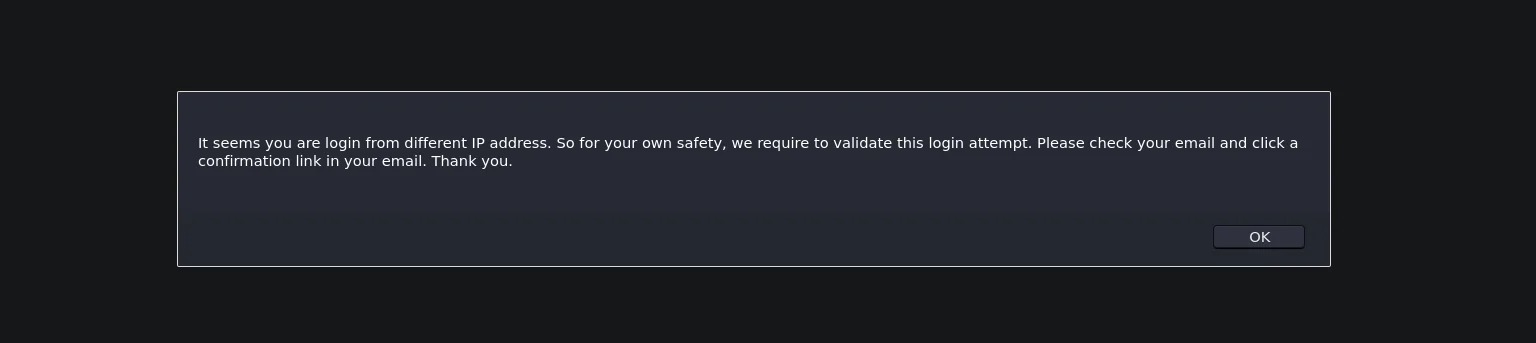
The researcher then registered an account on the target and tried logging in from another device to observe the behaviour. The same IP confirmation step appeared, which showed that the check applied to every account, not only to the administrator login.
Finding it
Two things stood out. First, the IP confirmation flow is driven by a link with a very simple structure:
https://example.com/ip_update.php?email=[redacted]&new_ip=[redacted]
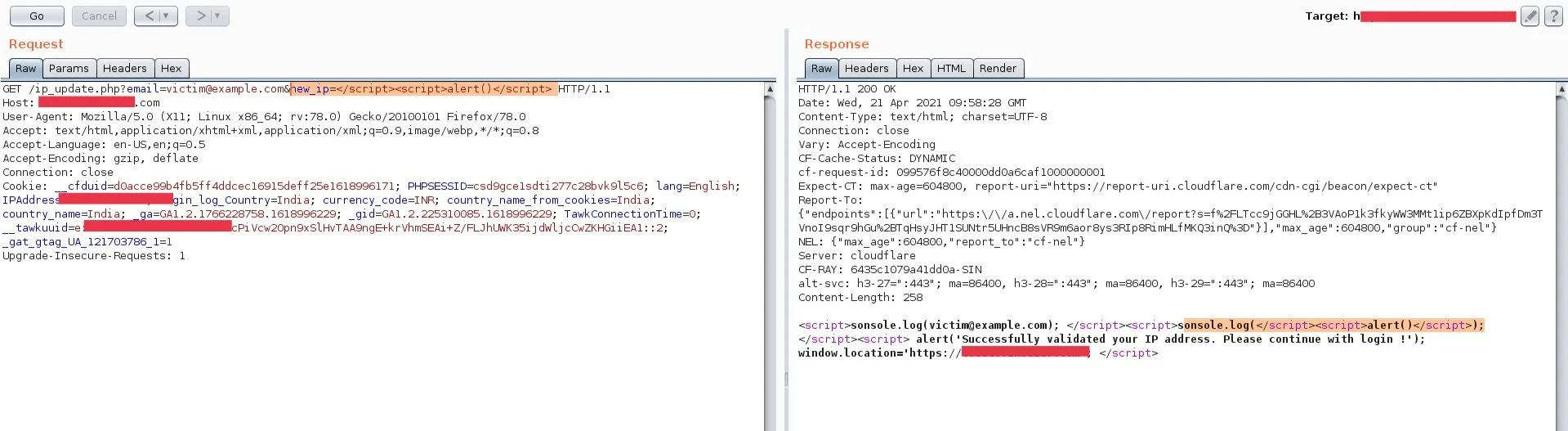
Second, the value submitted through that link is stored and rendered without any special handling. Whatever IP is detected and submitted through the link is saved as-is. The researcher demonstrated this with a value that is not an IP address at all:
<script>sonsole.log("info")</script>
Note the typo in the payload: sonsole.log, not console.log. The point is not that the JavaScript runs, but that the string is accepted and stored verbatim.
Exploitation
Step 1: Confirm the reflected XSS
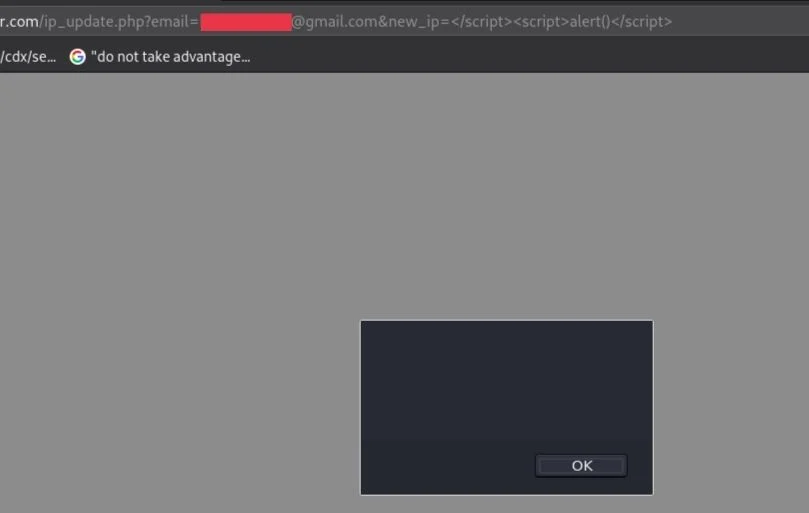
Since the submitted value is saved without validation, the next step was to break out of the surrounding script context and inject a new script. Closing the existing tag and opening a new one worked:
https://example.com/ip_update.php?email=[redacted]&new_ip=</script><script>alert()</script>
Both the email and the new_ip parameters were found to be vulnerable. This is a reflected XSS: the payload is echoed back in the response to the request that carries it.
Step 2: Look for a remote delivery vector
A reflected XSS that only fires in the attacker's own browser has limited value, so the researcher looked for a way to escalate it to a remote vector. The feature already has a mechanism to mail the link to a user, which makes delivery easier: if the payload can be placed where that mailed link will carry it, the victim receives the attack by email.
The first idea was to store the payload in an IPAddress= cookie parameter, in the hope that the application would read the IP from there. That did not work; the application uses a different technique to obtain the IP.
Step 3: Supply the IP through a header
The researcher then searched for alternative ways to send an IP address to the server and found the X-Client-IP header. Supplying the IP through that header worked.
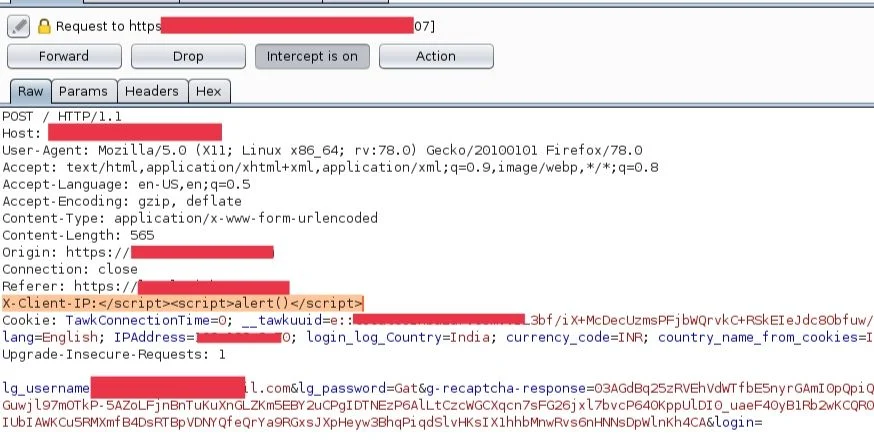
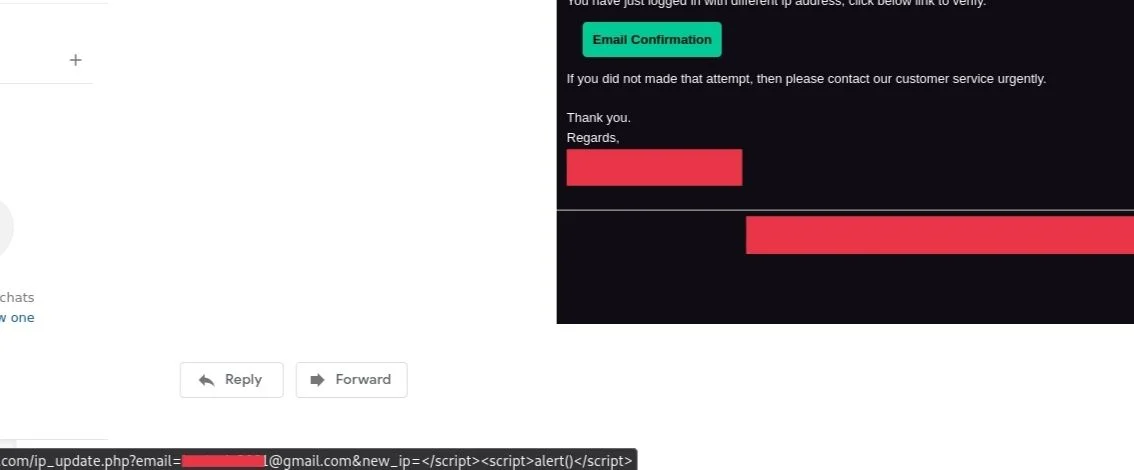
With the header accepted as the source of the client IP, the payload can be injected remotely, and the researcher states that the XSS payload can now be injected into any user's email.
Root cause
Supplying the IP through the X-Client-IP header worked, and the value was used in the IP update flow without validation or encoding. The value is then written into a page inside a script context, so a value containing </script><script>...</script> breaks out and executes. The feature already mails the link to users, so a payload placed where that link carries it reaches the victim by email.
Likely contributing factors are the absence of output encoding for the script context and the absence of validation that the submitted value is actually an IP address. The report does not describe any server-side defence that was present and bypassed.
Impact
An attacker who can set the X-Client-IP header can inject a script payload, and the researcher states it can be injected into any user's email. When the victim opens the link, the injected script runs in the context of the target site. The report does not describe what actions the payload could perform beyond the alert() proof of concept, and it does not state which accounts or roles were affected beyond "any user".
Fix
Based on the root cause, the value taken from X-Client-IP should be validated as an IP address before use, and any value rendered into the page should be encoded for the context it appears in, so that characters such as < and > cannot terminate the surrounding script.
Variants to test
- Header-derived values in other flows. Look for features that read the client IP from headers such as
X-Client-IP,X-Forwarded-Foror similar and then render it. A positive result is a response where the header value appears unencoded in a script or HTML context. - Email-driven links. Check any feature that mails a link containing user-controlled values. A positive result is a mailed link whose parameters carry a payload that executes when opened.
- Parameter pollution on simple update endpoints. Try adding the same parameter more than once on endpoints like
ip_update.php. A positive result is the application accepting an unexpected value or assigning it to another account. - Cookie-based IP sources. Try supplying the IP through a cookie parameter such as
IPAddress=. A positive result is the application using the cookie value instead of the real client IP. - Both parameters on the same endpoint. Test
emailas well asnew_ipfor reflection. A positive result is either parameter echoing a payload into an executable context.
What happened, in plain words
A security researcher found a way to make a website send an email to any of its users that contained a booby-trapped link. When the user clicked that link, small pieces of code written by the attacker would run inside the user's browser, on the website's own pages. This kind of attack is called cross-site scripting, usually shortened to XSS.
The website had a feature that let someone confirm which IP address belongs to an email address. An IP address is the number that identifies a device on the internet, a bit like a postal address for a computer. The feature worked through a simple web link, and the site would also email that link to a user so they could confirm their address. The researcher found that supplying the IP through a request header (X-Client-IP) worked, and that the value was put into the page without cleaning it up. By putting code into that value, the researcher could inject the payload, and the feature that mails the link to users made delivery easier.
The report was published on 21 April 2021 and describes work done the previous year.
Some background before we start
A few ideas come up again and again below, so here they are in everyday terms.
- A web request is what your browser sends to a website when you click a link or load a page. It is like posting a letter with a question inside, and the website posts back an answer, which your browser draws on the screen.
- A URL is the address of a page, the thing in the address bar. The part after a
?carries extra details, called parameters, in pairs of a name and a value, joined by&. Think of a form where you write "name: Gaurav" and "city: Pune". - A header is a small note attached to a request, separate from the address. Browsers add some automatically (what browser you use, what language you prefer), and tools let you add your own. Think of it as the writing on the back of the envelope rather than the letter inside.
- A cookie is a small piece of text a website asks your browser to keep and send back with later requests, so the site can remember who you are. It is like a cloakroom ticket: you show it again and the site knows which coat is yours.
- XSS (cross-site scripting) means getting your own code to run inside someone else's browser while they are on a website. The site thinks the code is part of its own page, so the browser runs it with the site's permissions. A reflected XSS is one where the code comes back in the immediate response to the request that carried it, rather than being stored on the server for later.
- A script tag is the piece of HTML that tells a browser "the text between here and the closing tag is code to run". If a page puts your text inside a script tag without cleaning it, you can close the tag early and open your own.
- Reconnaissance (recon) is the information-gathering phase: looking around a target before attacking it, the way a burglar might note which windows are open.
Setting up
The researcher started with reconnaissance and found the email address of an administrator. The first idea was to try default passwords against that account. Default passwords are the factory settings that devices and accounts sometimes ship with, like a new padlock whose key is the same for every box. That attempt did not succeed. Instead of a login, the response was a warning asking the user to complete email confirmation for IP verification.
That warning is interesting on its own: it means the site wanted the user to prove that a particular IP address belonged to them before letting them in. The researcher then registered an account on the target and tried logging in from another device to watch what happened. The same IP confirmation step appeared. That showed the check applied to every account, not only to the administrator login, so it was a general feature of the site rather than a quirk of one account.
Finding the weak spot
Two things stood out.
First, the IP confirmation flow is driven by a link with a very simple structure:
https://example.com/ip_update.php?email=[redacted]&new_ip=[redacted]
Reading it left to right: the page is ip_update.php, and after the ? there are two parameters. email holds the address being confirmed, here [redacted]. new_ip holds the IP address to attach to it, here [redacted]. The link carries the email and the new IP as parameters, and the site also mails this link to a user for confirmation.
Second, the value submitted through that link is saved and shown without any special handling. Whatever IP is detected and submitted through the link is stored as-is. The researcher proved this with a value that is not an IP address at all:
<script>sonsole.log("info")</script>
Line by line: <script> opens a script block, the text sonsole.log("info") is meant to be code, and </script> closes the block. Note the typo: sonsole.log, not console.log. The point is not that this code runs. The point is that the site accepted a string that is obviously not an IP address and saved it verbatim, without complaint. A site that checks its inputs would have rejected this immediately.
Exploiting it
Step 1: Confirm the reflected XSS
Since the submitted value is saved without validation, the next step was to break out of the surrounding script context and inject a new script. Closing the existing tag and opening a new one worked:
https://example.com/ip_update.php?email=[redacted]&new_ip=</script><script>alert()</script>
Line by line: the page presumably places the value inside a script block of its own. The leading </script> closes that block early. The <script> that follows opens a fresh block, and alert() is a tiny piece of JavaScript that makes the browser show a pop-up box. The final </script> closes the new block. If the pop-up appears, the injected code ran, which is the proof of concept.
Both the email and the new_ip parameters were found to be vulnerable. This is a reflected XSS: the payload is echoed back in the response to the request that carries it. In other words, the code travels in the link and comes straight back in the page the site returns.
Step 2: Look for a remote delivery vector
A reflected XSS that only fires in the attacker's own browser has limited value. The attacker can make their own browser pop an alert, but that harms nobody. So the researcher looked for a way to escalate it to a remote vector, meaning a way to make the attack reach someone else's browser.
The feature already has a mechanism to mail the link to a user, which makes delivery easier. If the payload can be placed where that mailed link will carry it, the victim receives the attack by email, clicks the link, and the code runs in their browser on the target site.
The first idea was to store the payload in an IPAddress= cookie parameter, in the hope that the application would read the IP from there. That did not work. The application uses a different technique to obtain the IP.
Step 3: Supply the IP through a header
The researcher then searched for alternative ways to send an IP address to the server and found the X-Client-IP header. Supplying the IP through that header worked.
Why does this matter? Normally a server learns your IP address from the network connection itself, which you cannot forge. But some applications are built to sit behind a proxy or load balancer, a middle machine that forwards requests, and in that setup the real client IP has to be passed along in a header. If the application trusts that header from anyone, then anyone can claim to be any IP address. Here supplying the IP through X-Client-IP worked, so the attacker could put the payload into the header.
With the header accepted as the source of the client IP, the payload can be injected remotely, and the researcher states that the XSS payload can now be injected into any user's email.
Why it worked
Supplying the IP through the X-Client-IP header worked, and the value was used in the IP update flow without validation or encoding. Validating means checking that the value really is an IP address. Encoding means rewriting special characters so they are shown as text rather than treated as code, for example turning < into something the browser will not mistake for the start of a tag.
The value is then written into a page inside a script context, so a value containing </script><script>...</script> breaks out and executes. The feature already mails the link to users, so a payload placed where that link carries it reaches the victim by email.
Likely contributing factors are the absence of output encoding for the script context and the absence of validation that the submitted value is actually an IP address. The report does not describe any server-side defence that was present and bypassed.
What an attacker could do
An attacker who can set the X-Client-IP header can inject a script payload, and the researcher states it can be injected into any user's email. When the victim opens the link, the injected script runs in the context of the target site. Running in the site's context means the code is treated as part of the site: it can read what the page can read and act as the logged-in user can act. The report does not describe what actions the payload could perform beyond the alert() proof of concept, and it does not state which accounts or roles were affected beyond "any user".
How to fix it
Based on the root cause, the value taken from X-Client-IP should be validated as an IP address before use, and any value rendered into the page should be encoded for the context it appears in, so that characters such as < and > cannot terminate the surrounding script.
Things worth trying elsewhere
- Header-derived values in other flows. Look for features that read the client IP from headers such as
X-Client-IP,X-Forwarded-Foror similar and then render it. A positive result is a response where the header value appears unencoded in a script or HTML context. - Email-driven links. Check any feature that mails a link containing user-controlled values. A positive result is a mailed link whose parameters carry a payload that executes when opened.
- Parameter pollution on simple update endpoints. Try adding the same parameter more than once on endpoints like
ip_update.php. A positive result is the application accepting an unexpected value or assigning it to another account. - Cookie-based IP sources. Try supplying the IP through a cookie parameter such as
IPAddress=. A positive result is the application using the cookie value instead of the real client IP. - Both parameters on the same endpoint. Test
emailas well asnew_ipfor reflection. A positive result is either parameter echoing a payload into an executable context.
Glossary
- API: a way for one piece of software to talk to another, like a service counter where you ask for something specific and get a defined answer back.
- Cookie: a small piece of text a website asks your browser to store and send back with later requests, so the site can remember you.
- Cross-site scripting (XSS): getting your own code to run in someone else's browser while they are on a website, because the site placed your text into its page without cleaning it.
- Default password: the factory-set password an account or device ships with, often the same for every unit.
- Encoding (output encoding): rewriting special characters so a browser displays them as text instead of treating them as code.
- GET request: a request that asks a server for something, with any details carried in the URL itself.
- Header: a small note attached to a web request or response, separate from the address and the body.
- HTML: the language that describes the structure of a web page, including where scripts sit.
- IP address: the number that identifies a device on a network, like a postal address for a computer.
- JavaScript: the programming language browsers run to make pages interactive.
- Parameter: a name and value pair carried in a URL after the
?, joined with&. - Parameter pollution: sending the same parameter more than once in a request, to see whether the application handles the duplicates safely.
- Payload: the piece of code or data an attacker wants the target to accept and act on.
- Proof of concept: a minimal demonstration that a vulnerability is real, here a pop-up box.
- Reconnaissance (recon): gathering information about a target before attacking it.
- Reflected XSS: XSS where the payload comes back in the immediate response to the request that carried it, rather than being stored on the server.
- Request: what a browser sends to a website when you click a link or load a page.
- Script tag: the HTML element that marks text as code for the browser to run.
- URL: the address of a page, as shown in the address bar.
- Validation: checking that a value is of the expected kind, for example that an IP address really looks like an IP address.
- Vector: the route by which an attack reaches its victim.
- X-Client-IP: a request header some setups use to pass along the client's IP address when a proxy sits in front of the server.




