How reading robots.txt file got me 4 XSS reports ?
Several subdomains exposed an admin directory listed in robots.txt, and a legacy ASP page in that directory reflected a query parameter inside a script tag without filtering. An attacker could inject a closing script tag and an image with an error handler to run JavaScript in a victim's browser and read cookies.
 Published on c0nqr0r.medium.com
Hello mates, Back again with new writeup, I hope it will be useful for you Inshallah , In this write-up, I’m gonna share with you how I was able to score more than 5 XSS at old program private 2019 using recon,
The full write-up lives on its author's site
It belongs to its author, so we link to it rather than copy it. The other two tabs are our own rewrites, checked against it.
Context
This write-up covers a private bug bounty program from 2019, described as an "old program". The scope was unusually narrow: 10 or 8 subdomains, spread across more than one domain and including some different TLDs. Because the assets did not share a single parent domain, subdomain enumeration was not an option, and the work had to start from the listed hosts themselves.
The researcher's goal was cross-site scripting. The entry point that mattered in the end was an administrative directory, /admin, discovered through robots.txt, and a page inside it that reflected user-supplied data into the body of the response.
Setup
The report does not describe any accounts, roles or credentials. Testing was done against the in-scope subdomains as an ordinary visitor: the researcher first exercised normal functions such as login and register to look for something interesting, found nothing, and moved to reconnaissance to collect endpoints, JS files, parameters and links that could be used later when returning to those functions.
The tools named in the report are:
- Google dorking, the Wayback Machine and
robots.txtfor passive reconnaissance. gospiderorJsscanner(or manual reading) for extracting secrets and endpoints from JavaScript files.ffuffor content discovery against the/admindirectory.arjunfor parameter discovery.
No versions are given for any of these tools.
Finding it
The reconnaissance ran in three passes, and the first two produced nothing:
- Google dorking to see whether anything was indexed: nothing found.
- Searching the domain name in the Wayback archive: nothing found.
- Opening
robots.txtto see what the developers were hiding.
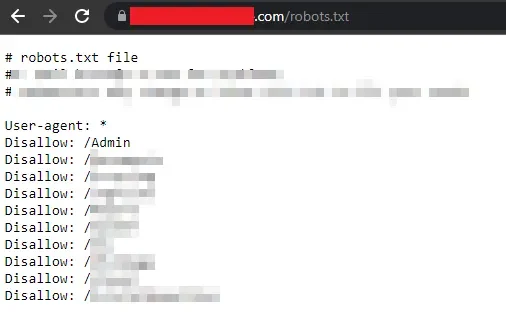
The robots.txt file disclosed /admin. That path redirected to /admin/login.asp with a 302, which is why the researcher started there: the other directories listed did not redirect to any .asp endpoint.
On /admin/login.asp the source code and the JavaScript files were reviewed for secrets and endpoints, using gospider or Jsscanner as well as manual analysis. Nothing was found. With passive and source-level review exhausted, the next step was fuzzing.
Exploitation
Step 1: content discovery under /admin
ffuf -u https://sub.domain.com/admin/FUZZ -w aspfiles.txt -mc 200
The wordlist aspfiles.txt is the ASPX file list from the SecLists repository (the SVNDigger cat/Language/aspx.txt list). The -mc 200 flag keeps only responses with status 200.
This surfaced a page that looked static: only HTML and CSS, with buttons that did nothing when clicked.
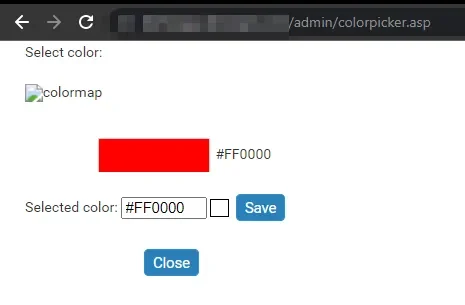
Step 2: reading the source of the static-looking page
The page behaved like a dead end in the browser, but the source code was live. Reading the JavaScript files and the HTML source revealed an interesting endpoint.
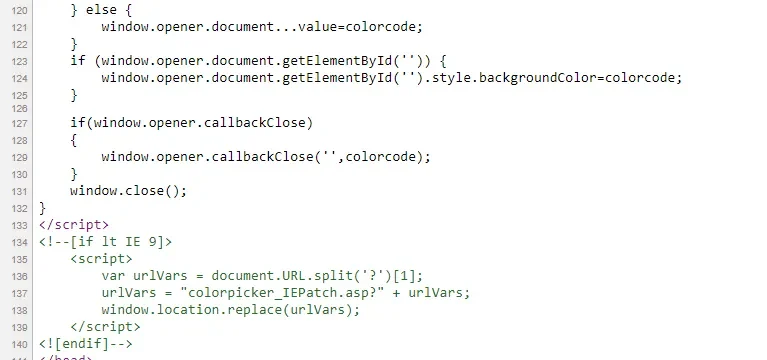
Step 3: requesting the endpoint directly
The endpoint was changed to the following URL and requested:
https://sub.domain.com/admin/colorpicker_IEPatch.asp
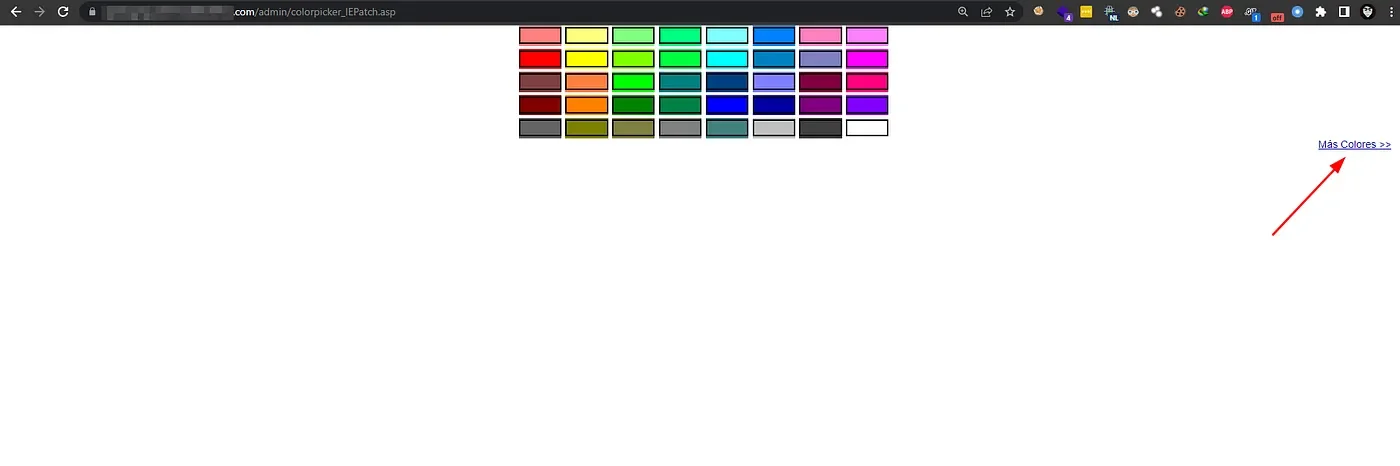
Clicking the colours and every button still did nothing. The page gave no interaction with the server or the client side, so the next question was whether any parameters existed that would let data be sent to it.
Step 4: parameter discovery with Arjun
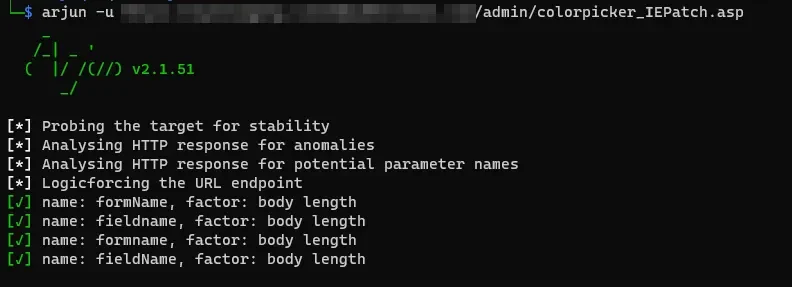
Arjun was left running against the endpoint in the background while the JavaScript files and source code were reviewed again. The second source review found something, and at the same time Arjun returned parameters from the source code, which established that the page reflects data into the body of the page source.
arjun -u https://sub.domain.com/admin/colorpicker_IEPatch.asp
Step 5: confirming reflection and breaking out of the script tag
Typing >qaramany< into any of the discovered parameters reflected the value inside a script tag, and the > and < characters came back without filtering. That makes it possible to close the script tag and insert a new tag that runs script.
The payload used was:
</script><img src=x onerror=alert(document.cookie)>
The leading </script> terminates the script context the value is reflected into, and the img element with a failing src fires onerror, executing alert(document.cookie).
This produced the first XSS. The same steps were applied to the other in-scope subdomains, which were also vulnerable.
Root cause
The vulnerable page reflects a request parameter into the body of the response inside a script tag, and it does not filter or encode the angle brackets > and <. Because the reflection sits inside a script context, an attacker who controls the parameter value can close the tag and inject arbitrary markup and script.
The report does not describe any output encoding, content security policy or other defence on the endpoint. The only barrier encountered was discovery: the page looked static in the browser and its buttons did nothing, so the reflection was only visible by reading the source and by testing parameters found with Arjun.
Impact
An attacker who can get a victim to load a crafted URL for the affected endpoint can run script in the victim's browser in the context of the site, and the payload shown reads document.cookie.
The same weakness was present on the other in-scope subdomains, so the issue was not isolated to a single host.
Fix
The fix implied by the finding is to encode or reject the reflected parameter value so that it cannot terminate the surrounding script context, and to avoid placing user-controlled data inside script tags without proper escaping.
Variants to test
- Read
robots.txton every in-scope host and follow each disclosed directory. A positive result is a path that redirects to a server-side page such as/admin/login.asprather than a static file. - Fuzz the disclosed directory with a language-specific wordlist and a status filter, as in the
ffufcommand above. A positive result is a 200 response for a script or page that was not linked from the UI. - Treat pages that look static as candidates: read the HTML and JavaScript source even when the buttons do nothing. A positive result is an endpoint referenced in the source that is not reachable through the interface.
- Run parameter discovery against such endpoints. A positive result is a parameter that changes the response body.
- Send a marker containing
>and<into each discovered parameter and inspect the raw response. A positive result is the marker reflected unencoded inside a script tag, which allows a</script>breakout as in the payload above. - Repeat the same directory and parameter checks on the other in-scope hosts. A positive result is the same reflection on another in-scope host.
What happened, in plain words
A security researcher found several cross-site scripting (XSS) bugs on a private bug bounty program from 2019. The program covered a small set of subdomains (10 or 8) that belonged to different domains and top-level domains (TLDs), so the usual technique of finding subdomains by guessing names was not possible. The researcher started by using the listed hosts directly.
The researcher's goal was to find XSS, a type of bug where a website takes something a user types or sends and puts it into a page without cleaning it up, so that an attacker can make the site run their own code in someone else's browser. The way in was an administrative folder called /admin, which was listed in a file called robots.txt, and a page inside that folder that echoed back whatever was sent to it.
This is a beginner-friendly retelling of that hunt. It explains every term and step from scratch, using the same commands and payloads as the original report.
Background and scope
The program was private and old (from 2019). The scope was a list of 10 or 8 subdomains, not all under one parent domain, and some had different TLDs (like .com, .net, .org). Because they did not share a single parent, you cannot do subdomain enumeration, which is the process of guessing or brute-forcing subdomain names (like blog.example.com, shop.example.com) to find hidden ones. Here the researcher had to work with the hosts that were given.
The researcher's aim was to find XSS. XSS happens when a website includes user-supplied data in its pages without proper handling, so an attacker can inject JavaScript that runs in a victim's browser. This can steal cookies (small pieces of data a site stores in your browser, often used to keep you logged in), change what you see, or perform actions as you.
Getting started
The report does not mention any accounts, roles or credentials. Testing was done as an ordinary visitor. The researcher first tried normal features like login and register to see if anything interesting could be played with, but found nothing. So the next step was reconnaissance (recon): gathering information about the target, such as endpoints (URLs that the site responds to), JavaScript files, parameters (inputs the site accepts), and links from web archives. This information would be used later when returning to those features.
The tools mentioned in the report are:
- Google dorking: using advanced search operators in Google to find pages that are not easily found otherwise.
- Wayback Machine: an archive of old versions of websites.
robots.txt: a file at the root of a website that tells search engines which pages not to crawl. It can reveal hidden directories.gospiderorJsscanner: tools to extract secrets and endpoints from JavaScript files, or you can do it manually.ffuf: a tool for fuzzing, which means sending many requests with different values to discover hidden files or directories.arjun: a tool for discovering parameters that a URL accepts.
No versions are given for any of these tools.
Finding it
The recon had three parts, and the first two found nothing:
- Google dorking to see if anything was indexed: nothing found.
- Searching the domain name in the Wayback archive: nothing found.
- Opening
robots.txtto see what the developers were hiding.
The robots.txt file revealed the path /admin. That path redirected to /admin/login.asp with a 302 status code (a redirect). The researcher started there because the other directories listed did not redirect to any .asp endpoint (an Active Server Pages file, a server-side script).
On /admin/login.asp, the researcher reviewed the source code and JavaScript files for secrets and endpoints, using gospider or Jsscanner as well as manual analysis. Nothing was found. With passive and source-level review exhausted, the next step was fuzzing.
Exploitation
Step 1: content discovery under /admin
ffuf -u https://sub.domain.com/admin/FUZZ -w aspfiles.txt -mc 200
This command runs ffuf, a fuzzing tool. -u https://sub.domain.com/admin/FUZZ sets the target URL, where FUZZ is a placeholder that will be replaced by each word from the wordlist. -w aspfiles.txt specifies the wordlist file, which contains a list of common ASP file names. -mc 200 tells ffuf to only show responses with HTTP status code 200 (OK).
The wordlist aspfiles.txt is the ASPX file list from the SecLists repository (specifically the SVNDigger cat/Language/aspx.txt list). This step found a page that looked static: only HTML and CSS, with buttons that did nothing when clicked.
Step 2: reading the source of the static-looking page
The page seemed like a dead end in the browser, but the source code was live. Reading the JavaScript files and the HTML source revealed an interesting endpoint.
Step 3: requesting the endpoint directly
The endpoint was changed to the following URL and requested:
https://sub.domain.com/admin/colorpicker_IEPatch.asp
Clicking the colours and every button still did nothing. The page gave no interaction with the server or the client side, so the next question was whether any parameters existed that would let data be sent to it.
Step 4: parameter discovery with Arjun
Arjun was left running against the endpoint in the background while the JavaScript files and source code were reviewed again. The second source review found something, and at the same time Arjun returned parameters from the source code, which established that the page reflects data into the body of the page source.
arjun -u https://sub.domain.com/admin/colorpicker_IEPatch.asp
Step 5: confirming reflection and breaking out of the script tag
Typing >qaramany< into any of the discovered parameters reflected the value inside a script tag, and the > and < characters came back without filtering. That makes it possible to close the script tag and insert a new tag that runs script.
The payload used was:
</script><img src=x onerror=alert(document.cookie)>
The leading </script> terminates the script context the value is reflected into, and the img element with a failing src fires onerror, executing alert(document.cookie).
This produced the first XSS. The same steps were applied to the other in-scope subdomains, which were also vulnerable.
Root cause
The vulnerable page reflects a request parameter into the body of the response inside a script tag, and it does not filter or encode the angle brackets > and <. Because the reflection sits inside a script context, an attacker who controls the parameter value can close the tag and inject arbitrary markup and script.
The report does not describe any output encoding, content security policy or other defence on the endpoint. The only barrier encountered was discovery: the page looked static in the browser and its buttons did nothing, so the reflection was only visible by reading the source and by testing parameters found with Arjun.
Impact
An attacker who can get a victim to load a crafted URL for the affected endpoint can run script in the victim's browser in the context of the site, and the payload shown reads document.cookie.
The same weakness was present on the other in-scope subdomains, so the issue was not isolated to a single host.
Fix
The fix implied by the finding is to encode or reject the reflected parameter value so that it cannot terminate the surrounding script context, and to avoid placing user-controlled data inside script tags without proper escaping.
Variants to test
- Read
robots.txton every in-scope host and follow each disclosed directory. A positive result is a path that redirects to a server-side page such as/admin/login.asprather than a static file. - Fuzz the disclosed directory with a language-specific wordlist and a status filter, as in the
ffufcommand above. A positive result is a 200 response for a script or page that was not linked from the UI. - Treat pages that look static as candidates: read the HTML and JavaScript source even when the buttons do nothing. A positive result is an endpoint referenced in the source that is not reachable through the interface.
- Run parameter discovery against such endpoints. A positive result is a parameter that changes the response body.
- Send a marker containing
>and<into each discovered parameter and inspect the raw response. A positive result is the marker reflected unencoded inside a script tag, which allows a</script>breakout as in the payload above. - Repeat the same directory and parameter checks on the other in-scope hosts. A positive result is the same reflection on another in-scope host.
Glossary
- XSS (Cross-Site Scripting): A vulnerability where an attacker can inject malicious scripts into web pages viewed by other users.
- Subdomain: A domain that is part of a larger domain, like
blog.example.comis a subdomain ofexample.com. - TLD (Top-Level Domain): The last part of a domain name, like
.com,.org,.net. - Subdomain enumeration: The process of finding subdomains of a target domain, often by brute-forcing or using public data.
- Endpoint: A URL that a web application responds to, often an API or a page.
- Parameter: A variable in a URL (like
?name=value) or in a request that the server uses to customise the response. - Reconnaissance (recon): The information-gathering phase of a security test.
- Google dorking: Using advanced search operators in Google to find specific information.
- Wayback Machine: An archive of the web that stores old versions of websites.
- robots.txt: A file that tells search engines which pages not to crawl; it can reveal hidden directories.
- 302 redirect: An HTTP status code indicating a temporary redirect to another URL.
- ASP (Active Server Pages): A server-side scripting technology from Microsoft.
- Fuzzing: Sending many requests with different inputs to discover hidden resources or bugs.
- Wordlist: A file containing a list of words or paths used in fuzzing.
- HTTP status code: A number that indicates the result of an HTTP request, like 200 for OK, 302 for redirect, 404 for not found.
- JavaScript: A programming language that runs in the browser and makes web pages interactive.
- Source code: The HTML, CSS, and JavaScript that make up a web page, which can be viewed in the browser.
- Reflection: When a web application includes user-supplied data in its response without proper handling.
- Script tag: An HTML tag
<script>used to embed or reference JavaScript code. - Payload: The malicious code or data an attacker sends to exploit a vulnerability.
- Cookie: A small piece of data stored in the browser by a website, often used for sessions or tracking.
- document.cookie: A JavaScript property that allows reading and writing cookies for the current domain.
- Output encoding: The process of converting special characters into a safe format to prevent injection.
- Content Security Policy (CSP): A security header that tells the browser which sources of content are allowed to load.
- Authentication: The process of verifying a user's identity, typically via username and password.




