How Scanning for Patches can result in complete System Compromise
The ManageEngine Endpoint Central patch scan process runs as SYSTEM and extracts JAR files into a predictable folder named ExtractVmpDriveScan without checking permissions. A local non-admin user can plant a fake JAR and use a junction and pseudo-symlink to make the privileged process write an arbitrary DLL to a protected location, leading to privilege escalation to SYSTEM.

medium.com
Published on medium.com
Cybersecurity
The full write-up lives on its author's site
It belongs to its author, so we link to it rather than copy it. The other two tabs are our own rewrites, checked against it.
Context
ManageEngine Endpoint Central is an endpoint management product for Windows that gives companies a central view of their digital inventory, including missing patches and vulnerabilities. One of its features is Patch Scan, which checks the installation base of a computer for missing patches and reports back to the central console. A scan can be triggered manually by a local user or runs automatically on a regular basis, and it walks the whole file system looking for outdated software and libraries, Java archive (.jar) files included.
That scanning behaviour is what this write-up is about. During a private penetration test of Endpoint Central on Windows, the researcher found that the patch scan feature allowed a local, non-administrative user to escalate to NT AUTHORITY\SYSTEM. The issue is tracked as CVE-2026-77697.

Setup
The engagement was a private penetration test against Endpoint Central on Windows. The exploit was designed to be executed entirely from a non-admin user account, which is the key precondition: everything below is done as a low-privileged local user.
The base folder used for the proof of concept is C:\Temp\ec-test\jar-test. The tools involved are:
- The SystemCmdLauncher project, compiled into a payload DLL that opens a SYSTEM terminal when loaded.
- Google Project Zero's symlink testing tools, compiled with Visual Studio; only
CreateSymlink.exeis used. - Microsoft Sysinternals'
winobj64.exeto inspect the object manager namespace, andprocmon64.exeto observe the exploit. - The on-screen keyboard
osk.exeand the Windows Secure Desktop (Ctrl-Alt-Del) to trigger the payload.
Finding it
Tests showed that the patch scan only considers specific JAR files, namely log4j-a.b.c.jar where a.b.c is a three-digit version number, so that it can scan for the Log4Shell vulnerability. When the scan finds such a file, it calls 7za.exe, the command line version of 7zip, and extracts the JAR, including META-INF/MANIFEST.MF, into a newly created sub folder named ExtractVmpDriveScan in the same folder the JAR resides in. The extraction is performed by the patch scan process, which runs in NT AUTHORITY\SYSTEM context.
The problem is what happens when that folder already exists: it is used as-is, without being recreated and without any change to its file permissions. Since the scan walks the whole file system, including locations writable by non-admin users, a low-privileged user can plant a fake JAR in such a folder and control the extraction target. That combination, a privileged process extracting into a directory the attacker can influence, is what makes vertical local privilege escalation possible.
Exploitation
The exploit needs to run as a non-admin user, so it relies on a few Windows tricks. Native NTFS symbolic links cannot be created by non-admin users. The workaround, first documented by James Forshaw of Google Project Zero, uses the Object Manager Namespace to create a so-called pseudo-symbolic link. Windows also supports NTFS junctions, which can be seen as links to a directory and can be created without administrative permissions. A pseudo-symlink requires creating a junction to the object namespace named RPC Control and then setting a symlink in it to a destination file; no specific permissions are required for that.
Because a junction is needed first to create a symlink as a non-privileged user, the exploit needs a folder that will be extracted, so that it can serve as the junction. That is why META-INF is convenient: it is a folder that gets extracted, so it can serve as the junction. The exploit uses META-INF as the junction to RPC Control and hijacks the extraction of the JAR. It supplies a renamed DLL as META-INF/MANIFEST.MF inside a fake log4j-2.0.1.jar. By making the pseudo-symlink ExtractVmpDriveScan\META-INF\MANIFEST.MF point to the destination DLL name, arbitrary files can be created in locations a non-admin user normally cannot write to.
For the destination file, the proof of concept uses C:\Program Files\Common Files\microsoft shared\ink\HID.DLL. HID.DLL was chosen because it can be used for privilege escalation in all current Windows variants: the HID.DLL in that directory is loaded in SYSTEM context when the on-screen keyboard osk.exe is open while switching to the Windows Secure Desktop by hitting Ctrl-Alt-Del (see the linked ZDI post).
The combination of junction, object manager namespace involvement and pseudo-symlink is illustrated below:
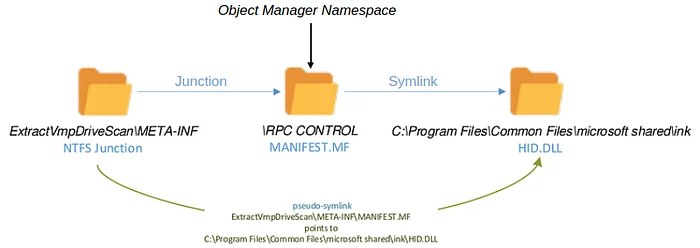
Pseudo-symlink to final destination DLL
Any other destination file can be used to plant arbitrary files for elevation of privilege, provided the planted file is executed by a privileged process. Depending on the process to be hijacked, this could be another DLL (DLL hijacking), an exe file, or even a PowerShell script or batch file (command injection) where the privileged process executes such files. Local services or scheduled tasks, which are often run as SYSTEM, are candidates.
Step 1: Create the payload DLL
Create the payload DLL, for example by compiling the SystemCmdLauncher project. It opens a SYSTEM terminal when the DLL is loaded.
Step 2: Create the META-INF folder
Open a Windows terminal and create a folder named META-INF in the base folder:
mkdir C:\Temp\ec-test\jar-test\META-INF
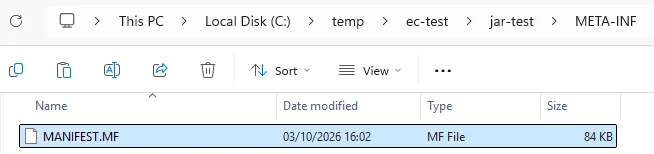
Step 3: Place the DLL as MANIFEST.MF
Copy SystemCmdLauncher.dll into META-INF and rename it as MANIFEST.MF:
Step 4: Build the fake JAR
Create the JAR file by zipping the folder META-INF. It should look like this:
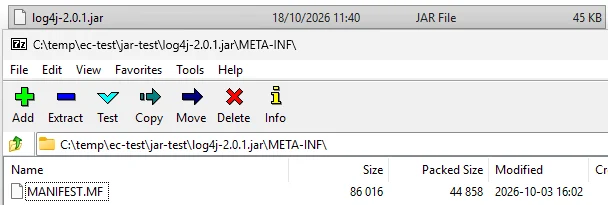
Fake JAR file
Step 5: Get the symlink tooling
Download Google Project Zero's symlink testing tools and compile them using Visual Studio. Only CreateSymlink.exe is used in this case.
Step 6: Create and enter the extraction folder
In the Windows terminal, change to C:\Temp\ec-test\jar-test, create a subfolder named ExtractVmpDriveScan and switch into it:
cd C:\Temp\ec-test\jar-testmkdir ExtractVmpDriveScancd ExtractVmpDriveScan
Step 7: Create the pseudo-symlink
In the same terminal, run the following command using CreateSymlink.exe from step 5:
“\path\to\CreateSymlink.exe” C:\Temp\ec-test\jar-test\ExtractVmpDriveScan\META-INF\MANIFEST.MF “C:\Program Files\Common Files\microsoft shared\ink\HID.DLL”Opened Link \RPC Control\MANIFEST.MF -> \??\C:\Program Files\Common Files\microsoft shared\ink\HID.DLL: 000000000000014CPress ENTER to exit and delete the symlink
This command creates the pseudo-symlink using the object manager, redirecting MANIFEST.MF to C:\Program Files\Common Files\microsoft shared\ink\HID.DLL. The output confirms the link was opened from \RPC Control\MANIFEST.MF to the destination path, and the tool waits for ENTER before deleting the symlink.
To reveal the correct link, Microsoft Sysinternals' winobj64.exe can be used:
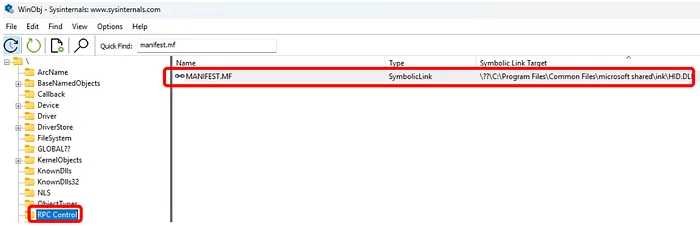
Pseudo-symlink in object manager namespace RPC Control
Step 8: Trigger the patch scan
At this point the patch scan needs to be triggered, either manually or automatically, and then you wait some minutes until the scan reaches the fake JAR file.
Step 9: Check the destination
Check the destination folder C:\Program Files\Common Files\microsoft shared\ink for the existence of the injected file HID.DLL.
Step 10: Observe the copy with Procmon
Using Sysinternals' procmon64.exe, the exploit looks like this:
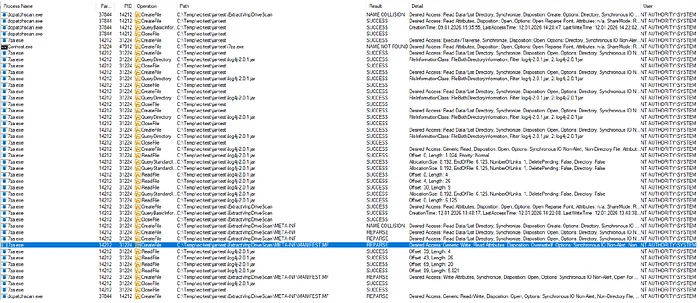
Procmon output of successful copy of HID.DLL as SYSTEM
Step 11: Trigger the DLL load
Now trigger the load of HID.DLL by opening the on-screen keyboard osk.exe and hitting Ctrl-Alt-Del. This provides the SYSTEM shell on the Windows Secure Desktop:
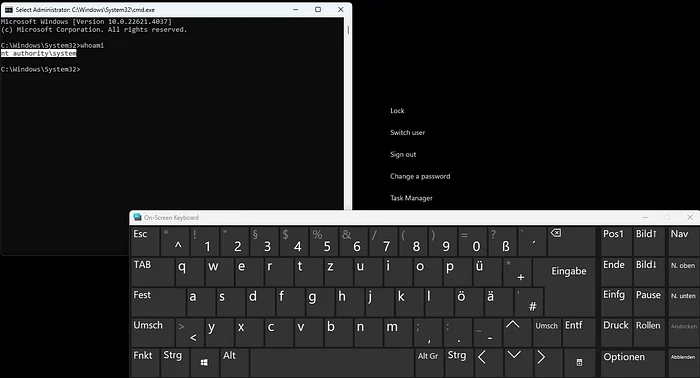
Exploit executed our HID.DLL
Step 12: Clean up
Delete HID.DLL from the folder so as not to leave a backdoor. This requires administrator rights, so ideally delete it from the SYSTEM shell created above.
Root cause
The attack exploits several weaknesses of the privileged patch scan process:
- When a privileged process creates temporary folders, it must make sure non-privileged users cannot write into them. This can be achieved with the Windows API function
GetTempPath2w(). - The process uses a hard coded initial temporary folder, even when it already exists. A random path name should always be used.
- Existing folders are reused.
- NTFS junctions are followed. This should be avoided entirely if not absolutely necessary; the Windows API
Profile Mitigation Policyexists exactly for this.
The extraction into ExtractVmpDriveScan happens as SYSTEM, and because an existing folder is reused without permission changes, the attacker's junction and pseudo-symlink are honoured by the privileged process. The write to C:\Program Files\Common Files\microsoft shared\ink\HID.DLL then succeeds with SYSTEM rights.
Impact
Any user can escalate their privileges to SYSTEM quite easily in this case, which the researcher notes would be a great opportunity for lateral movement for adversaries. From an enterprise environment's perspective, the researcher would have rated the vulnerability at least high or even critical, and proposed CVSS 8.8 high:
ManageEngine's vulnerability policy always rates DLL hijacking with local privilege escalation only as medium risk, which one has to respect.
Some further CVEs came out of the same engagement, all already fixed and published:
- CVE-2026-77698: Local privilege escalation due to Agent upgrade
- CVE-2026-77699: Local privilege escalation due to loading a dll from an untrusted path
- CVE-2026-85640: Privilege Escalation Due to Outdated Component
Fix
The vulnerability was fixed in Endpoint Central 11.5.2600.19 in February 2026. The write-up's conclusion lists recommendations for addressing the underlying weaknesses: create temporary folders that non-privileged users cannot write into, for example with GetTempPath2w(); always use a random path name instead of a hard coded initial temporary folder; do not reuse existing folders; and avoid following NTFS junctions where possible, using the Profile Mitigation Policy API.
Variants to test
- Other privileged extractors with predictable folders. Look for services or agents that unpack archives as SYSTEM into a fixed sub folder next to the archive. A positive result is that a pre-created folder with attacker-controlled junctions is reused without permission changes, and a file appears in a protected location.
- Other file names matched by scanners. The scan here only picked up
log4j-a.b.c.jar. Try other patterns a scanner may match (other library names or version formats) and see whether the privileged process extracts them the same way. - Other hijackable destination files. The write primitive is generic: any file loaded or executed by a privileged process can be targeted, including DLLs, executables, PowerShell scripts and batch files, and processes such as local services or scheduled tasks that run as SYSTEM. A positive result is code execution in the privileged context when the file is loaded.
- Junction-only variants. Where a pseudo-symlink is not possible, test whether a plain NTFS junction to a directory the privileged process writes into is enough to redirect the extraction. A positive result is a file created outside the intended folder.
What happened, in plain words
Imagine a large office building where every employee has a normal key, but the cleaning crew has a master key that opens every room. Now imagine someone finds a way to trick the cleaning crew into unlocking a door for them, and once that door is open, they can walk into any room in the building. That is roughly what happened here, except the building is a Windows computer, the cleaning crew is a background program that runs with the highest possible permissions, and the trick is a file that the program unpacks without checking where it is really putting things.
ManageEngine Endpoint Central is a piece of software that companies install to keep track of all the computers their staff use. It is an endpoint management product for Windows: it gives the IT team one central console where they can see what software is installed on each machine, which security patches are missing, and which known vulnerabilities are present. One of its features is called Patch Scan. A patch scan checks the installation base of a computer for missing patches and reports the results back to the central console. It can be started by hand by a local user, or it runs automatically on a regular schedule. To do its job it walks the whole file system looking for outdated software and libraries, and that includes Java archive files, which have the extension .jar.
That scanning behaviour is what this write-up is about. During a private penetration test of Endpoint Central on Windows, the researcher found that the patch scan feature allowed a local user without administrator rights to escalate to NT AUTHORITY\SYSTEM. In Windows, NT AUTHORITY\SYSTEM (usually just called SYSTEM) is the most powerful account on the machine. It is not a person; it is the account the operating system itself uses to run core services. If a normal user can get code running as SYSTEM, they effectively own the computer. The issue is tracked as CVE-2026-77697. A CVE is a public catalogue number for a known security flaw, so that everyone can refer to the same bug unambiguously.
The setup
The engagement was a private penetration test against Endpoint Central on Windows. A penetration test is an authorised attack simulation: the company that owns the software or the network pays a researcher to try to break in, so the problems can be fixed before a real attacker finds them. "Private" here means the results were not published as a live challenge for everyone; the researcher worked under an agreement.
The exploit was designed to be executed entirely from a non-admin user account. This is the key precondition: everything described below is done as a low-privileged local user, someone who can log in to the machine and use it but cannot install software, change system settings, or touch protected folders. If you already had administrator rights, there would be nothing to escalate.
The base folder used for the proof of concept is C:\Temp\ec-test\jar-test. A proof of concept (PoC) is a small, deliberate demonstration that a vulnerability is real, usually the minimum needed to show the effect without causing harm.
The tools involved are:
- The SystemCmdLauncher project, compiled into a payload DLL that opens a SYSTEM terminal when loaded. A DLL is a Dynamic Link Library: a file full of code that other programs load and run when they need it, a bit like a shared toolbox that many programs borrow from. "Compiled" means turned from human-readable source code into a file the computer can execute. A payload is the part of an attack that actually does the damage or opens the door.
- Google Project Zero's symlink testing tools, compiled with Visual Studio; only
CreateSymlink.exeis used. Project Zero is a security research team at Google that publishes tools for exactly this kind of Windows file-system trickery. Visual Studio is Microsoft's program for writing and building software. - Microsoft Sysinternals'
winobj64.exeto inspect the object manager namespace, andprocmon64.exeto observe the exploit. Sysinternals is a set of free diagnostic tools from Microsoft.winobj64.exelets you browse Windows' internal object tree, andprocmon64.exerecords every file, registry and process action on the machine in real time, like a security camera for the operating system. - The on-screen keyboard
osk.exeand the Windows Secure Desktop (Ctrl-Alt-Del) to trigger the payload. The on-screen keyboard is the accessibility tool that draws a keyboard on the screen. The Secure Desktop is the special locked-down screen Windows shows when you press Ctrl-Alt-Del, for example to log in or open the task manager; normal programs are not supposed to draw on it.
Finding it
Tests showed that the patch scan only considers specific JAR files, namely log4j-a.b.c.jar where a.b.c is a three-digit version number, so that it can scan for the Log4Shell vulnerability. A JAR file is a zip container for compiled Java classes, and Log4Shell is a famous vulnerability in a Java logging library called log4j that was widely exploited in 2021. The scanner is looking for old, vulnerable versions of that library, which is why it cares about the file name and the version number inside it.
When the scan finds such a file, it calls 7za.exe, the command line version of 7zip, and extracts the JAR, including META-INF/MANIFEST.MF, into a newly created sub folder named ExtractVmpDriveScan in the same folder the JAR resides in. To unpack a zip file you need an unpacking program; 7zip is a popular free one, and 7za.exe is its command-line edition, meaning it can be run from a script without a graphical window. Inside every JAR there is a folder called META-INF and, inside that, a file called MANIFEST.MF. The manifest is a small text file that stores metadata about the archive: what is inside it and how the Java Virtual Machine should run or handle the code. The extraction is performed by the patch scan process, which runs in NT AUTHORITY\SYSTEM context. In other words, the unpacking is done by the all-powerful account, not by the user who triggered the scan.
The problem is what happens when that folder already exists: it is used as-is, without being recreated and without any change to its file permissions. Permissions are the rules that say who may read, write or execute a file or folder. Normally, when a privileged program creates a working folder, it should make sure ordinary users cannot write into it. Here, if the folder is already there, the program simply trusts it. Since the scan walks the whole file system, including locations writable by non-admin users, a low-privileged user can plant a fake JAR in such a folder and control the extraction target. That combination, a privileged process extracting into a directory the attacker can influence, is what makes vertical local privilege escalation possible. "Vertical" privilege escalation means going from a lower level of permission to a higher one (as opposed to "horizontal", which means moving sideways to another user of the same level). "Local" means the attacker already has a foothold on the machine and does not need to come in over the network.
Exploitation
The exploit needs to run as a non-admin user, so it relies on a few Windows tricks. Native NTFS symbolic links cannot be created by non-admin users. NTFS is the file system Windows uses on its disks, and a symbolic link (symlink) is a file that acts as a shortcut pointing at another file or folder. Windows deliberately restricts who may create them, because a symlink can be used to redirect a privileged program's writes to somewhere it should not go. The workaround, first documented by James Forshaw of Google Project Zero, uses the Object Manager Namespace to create a so-called pseudo-symbolic link. The object manager namespace is an internal tree Windows keeps of every resource it knows about, not just files but also devices, named pipes and other objects; it is a bit like the index at the back of a very large book, listing everything the system can refer to. A pseudo-symlink is a link that lives in that internal tree rather than on disk, and it can be created by an ordinary user.
Windows also supports NTFS junctions, which can be seen as links to a directory and can be created without administrative permissions. A junction is like a signpost in a corridor that says "the room you want is actually down the other hall"; when a program opens the junction, Windows silently takes it to the real folder. A pseudo-symlink requires creating a junction to the object namespace named RPC Control and then setting a symlink in it to a destination file; no specific permissions are required for that. RPC Control is a well-known folder inside the object manager namespace that ordinary users are allowed to create entries in, which is exactly why it is useful here.
Because a junction is needed first to create a symlink as a non-privileged user, the exploit needs a folder that will be extracted, so that it can serve as the junction. That is why META-INF is convenient: it is a folder that gets extracted, so it can serve as the junction. The exploit uses META-INF as the junction to RPC Control and hijacks the extraction of the JAR. It supplies a renamed DLL as META-INF/MANIFEST.MF inside a fake log4j-2.0.1.jar. By making the pseudo-symlink ExtractVmpDriveScan\META-INF\MANIFEST.MF point to the destination DLL name, arbitrary files can be created in locations a non-admin user normally cannot write to. In plain terms: the privileged unpacker thinks it is writing a harmless manifest file into a folder it controls, but the folder is a junction and the file name is a link, so the bytes actually land wherever the attacker chose.
For the destination file, the proof of concept uses C:\Program Files\Common Files\microsoft shared\ink\HID.DLL. HID.DLL was chosen because it can be used for privilege escalation in all current Windows variants: the HID.DLL in that directory is loaded in SYSTEM context when the on-screen keyboard osk.exe is open while switching to the Windows Secure Desktop by hitting Ctrl-Alt-Del (see the linked ZDI post). This is a classic DLL hijacking pattern: a privileged program looks for a DLL in a folder it trusts, and if an attacker can put a file with the right name there first, the program loads the attacker's code instead of the real library. The ZDI post linked in the original covers abusing arbitrary file deletes to escalate privilege.
The combination of junction, object manager namespace involvement and pseudo-symlink is illustrated below:
Pseudo-symlink to final destination DLL
Any other destination file can be used to plant arbitrary files for elevation of privilege, provided the planted file is executed by a privileged process. Depending on the process to be hijacked, this could be another DLL (DLL hijacking), an exe file, or even a PowerShell script or batch file (command injection) where the privileged process executes such files. Local services or scheduled tasks, which are often run as SYSTEM, are candidates. A service is a background program that starts with Windows and runs without anyone logging in; a scheduled task is a job Windows runs at a set time or event. Both frequently run as SYSTEM, which makes them attractive targets.
Step 1: Create the payload DLL
Create the payload DLL, for example by compiling the SystemCmdLauncher project. It opens a SYSTEM terminal when the DLL is loaded. The reason for this step is that the exploit needs something to plant. The payload is the code that will run once the privileged program loads the file; here it simply opens a command prompt running as SYSTEM, which is enough to prove the escalation.
Step 2: Create the META-INF folder
Open a Windows terminal and create a folder named META-INF in the base folder:
mkdir C:\Temp\ec-test\jar-test\META-INF
Line by line: mkdir is the command that makes a new directory (folder). C:\Temp\ec-test\jar-test\META-INF is the full path of the folder to create. The base folder C:\Temp\ec-test\jar-test is a location the non-admin user can write to, which is the whole point: the attacker needs a place where they are allowed to plant files. The name META-INF is not arbitrary; it is the name the JAR format uses for its metadata folder, so the unpacker will expect it and will write into it.
Step 3: Place the DLL as MANIFEST.MF
Copy SystemCmdLauncher.dll into META-INF and rename it as MANIFEST.MF:
Why rename it? Because the unpacker is going to extract a file called MANIFEST.MF from the JAR. If the attacker's payload is already sitting under that name, the extraction will overwrite it with the payload's bytes, and the pseudo-symlink will redirect those bytes to the protected destination. The file's contents are a DLL, but its name is the one the unpacker expects.
Step 4: Build the fake JAR
Create the JAR file by zipping the folder META-INF. It should look like this:
Fake JAR file
A JAR is just a zip with a particular internal layout, so zipping the META-INF folder produces a file that the scanner will recognise. The name matters too: the scanner only picks up files matching log4j-a.b.c.jar, so the fake archive has to be named accordingly (the proof of concept uses log4j-2.0.1.jar). The reason for this step is to give the scanner something to find when it walks the file system.
Step 5: Get the symlink tooling
Download Google Project Zero's symlink testing tools and compile them using Visual Studio. Only CreateSymlink.exe is used in this case. Windows does not ship a simple command for creating a pseudo-symlink as a normal user, so the researcher uses a ready-made tool that does it. Compiling means building the executable from source; the tool is written in a language that needs to be built before it runs.
Step 6: Create and enter the extraction folder
In the Windows terminal, change to C:\Temp\ec-test\jar-test, create a subfolder named ExtractVmpDriveScan and switch into it:
cd C:\Temp\ec-test\jar-testmkdir ExtractVmpDriveScancd ExtractVmpDriveScan
Line by line: cd C:\Temp\ec-test\jar-test changes the current directory to the base folder. mkdir ExtractVmpDriveScan creates the folder the scanner would normally create itself. cd ExtractVmpDriveScan moves into it. The reason for pre-creating this folder is the bug: the scanner reuses an existing ExtractVmpDriveScan without recreating it or fixing its permissions, so the attacker gets to set it up first. If the scanner created it fresh with safe permissions, the trick would not work.
Step 7: Create the pseudo-symlink
In the same terminal, run the following command using CreateSymlink.exe from step 5:
“\path\to\CreateSymlink.exe” C:\Temp\ec-test\jar-test\ExtractVmpDriveScan\META-INF\MANIFEST.MF “C:\Program Files\Common Files\microsoft shared\ink\HID.DLL”Opened Link \RPC Control\MANIFEST.MF -> \??\C:\Program Files\Common Files\microsoft shared\ink\HID.DLL: 000000000000014CPress ENTER to exit and delete the symlink
Line by line: the first argument is the path to the tool itself, shown as a placeholder \path\to\CreateSymlink.exe. The second argument is the link to create: C:\Temp\ec-test\jar-test\ExtractVmpDriveScan\META-INF\MANIFEST.MF, which is the file the unpacker will try to write. The third argument is the destination: C:\Program Files\Common Files\microsoft shared\ink\HID.DLL, the protected file the attacker wants to overwrite. The output line Opened Link \RPC Control\MANIFEST.MF -> \??\C:\Program Files\Common Files\microsoft shared\ink\HID.DLL: 000000000000014C confirms the link was created in the RPC Control namespace and points at the destination; the long hexadecimal number is a handle value, an internal identifier Windows uses to refer to the open link. The final line, Press ENTER to exit and delete the symlink, tells you the tool keeps the link alive until you press ENTER, because the link only exists while the tool is running. This command creates the pseudo-symlink using the object manager, redirecting MANIFEST.MF to C:\Program Files\Common Files\microsoft shared\ink\HID.DLL. The output confirms the link was opened from \RPC Control\MANIFEST.MF to the destination path, and the tool waits for ENTER before deleting the symlink.
To reveal the correct link, Microsoft Sysinternals' winobj64.exe can be used:
Pseudo-symlink in object manager namespace RPC Control
This step is a sanity check: it lets you see with your own eyes that the link exists in the object manager namespace and points where you intended, before you trigger the scan.
Step 8: Trigger the patch scan
At this point the patch scan needs to be triggered, either manually or automatically, and then you wait some minutes until the scan reaches the fake JAR file. The scan is the privileged actor in this story; nothing happens until it runs. Because it walks the whole file system, it will eventually reach the folder where the fake JAR was planted, and when it does, it will unpack it as SYSTEM.
Step 9: Check the destination
Check the destination folder C:\Program Files\Common Files\microsoft shared\ink for the existence of the injected file HID.DLL. This is the moment of truth: if the trick worked, a file that a non-admin user could never write has appeared in a protected system folder. If it is not there, the scan has not reached the fake JAR yet, or the link was not set up correctly.
Step 10: Observe the copy with Procmon
Using Sysinternals' procmon64.exe, the exploit looks like this:
Procmon output of successful copy of HID.DLL as SYSTEM
Procmon records which process performed each file operation. The point of this step is to prove that the write to HID.DLL was done by the SYSTEM process, not by the attacker's own account. That is the evidence that privilege escalation actually occurred.
Step 11: Trigger the DLL load
Now trigger the load of HID.DLL by opening the on-screen keyboard osk.exe and hitting Ctrl-Alt-Del. This provides the SYSTEM shell on the Windows Secure Desktop:
Exploit executed our HID.DLL
A shell is a command prompt where you type commands. The on-screen keyboard, when it switches to the Secure Desktop, loads HID.DLL from that folder as SYSTEM. Because the attacker replaced that DLL with their payload, the payload runs as SYSTEM and opens a SYSTEM shell. The Secure Desktop is supposed to be a place normal programs cannot interfere with, which makes the result particularly striking.
Step 12: Clean up
Delete HID.DLL from the folder so as not to leave a backdoor. This requires administrator rights, so ideally delete it from the SYSTEM shell created above. Leaving the file behind would mean anyone who later triggers the same load gets the attacker's code, which is exactly what a backdoor is. The SYSTEM shell you just obtained is the easiest place to delete a file in a protected folder, because it has the rights to do so.
Root cause
The attack exploits several weaknesses of the privileged patch scan process:
- When a privileged process creates temporary folders, it must make sure non-privileged users cannot write into them. This can be achieved with the Windows API function
GetTempPath2w(). An API is a documented way for one program to ask the operating system to do something;GetTempPath2w()is the safe way to ask Windows for a temporary folder path, because it returns a location ordinary users cannot tamper with. - The process uses a hard coded initial temporary folder, even when it already exists. A random path name should always be used. "Hard coded" means the name is fixed in the program's code, so an attacker can predict it and prepare for it in advance.
- Existing folders are reused. If the program finds a folder already there, it should not trust it; it should create a fresh one or verify it.
- NTFS junctions are followed. This should be avoided entirely if not absolutely necessary; the Windows API
Profile Mitigation Policyexists exactly for this. A mitigation policy is a setting a program can apply to itself to refuse dangerous behaviours, such as following links out of its own folder.
The extraction into ExtractVmpDriveScan happens as SYSTEM, and because an existing folder is reused without permission changes, the attacker's junction and pseudo-symlink are honoured by the privileged process. The write to C:\Program Files\Common Files\microsoft shared\ink\HID.DLL then succeeds with SYSTEM rights. In everyday terms: the cleaner with the master key was told to put a parcel in a room, but the room's door had been swapped for a doorway that led somewhere else, and the cleaner never checked.
Impact
Any user can escalate their privileges to SYSTEM quite easily in this case, which the researcher notes would be a great opportunity for lateral movement for adversaries. Lateral movement is the step in an attack where someone who has a foothold on one machine uses it to reach other machines; if every ordinary user on a network can become SYSTEM on their own laptop, an attacker who phishes one password can spread much further. From an enterprise environment's perspective, the researcher would have rated the vulnerability at least high or even critical, and proposed CVSS 8.8 high:
CVSS is a standard scoring system for vulnerabilities. The score runs from 0 to 10, and 8.8 falls in the "high" band. The letters in the vector string each describe a property of the flaw: for example, AV:L means the attack is local (the attacker needs to be on the machine), PR:L means low privileges are required, and C:H/I:H/A:H means high impact on confidentiality, integrity and availability. You do not need to memorise the string; the point is that the researcher argued the flaw deserved a high score.
ManageEngine's vulnerability policy always rates DLL hijacking with local privilege escalation only as medium risk, which one has to respect. This is a disagreement about severity, not about whether the bug is real: the vendor's policy treats this class of issue as medium, while the researcher would have scored it higher.
Some further CVEs came out of the same engagement, all already fixed and published:
- CVE-2026-77698: Local privilege escalation due to Agent upgrade
- CVE-2026-77699: Local privilege escalation due to loading a dll from an untrusted path
- CVE-2026-85640: Privilege Escalation Due to Outdated Component
Fix
The vulnerability was fixed in Endpoint Central 11.5.2600.19 in February 2026. The write-up's conclusion lists recommendations for addressing the underlying weaknesses: create temporary folders that non-privileged users cannot write into, for example with GetTempPath2w(); always use a random path name instead of a hard coded initial temporary folder; do not reuse existing folders; and avoid following NTFS junctions where possible, using the Profile Mitigation Policy API. Each of these closes the door the attacker used: if the folder is fresh, unpredictable and not writable by ordinary users, and if the program refuses to follow links out of it, there is nothing to hijack.
Variants to test
- Other privileged extractors with predictable folders. Look for services or agents that unpack archives as SYSTEM into a fixed sub folder next to the archive. A positive result is that a pre-created folder with attacker-controlled junctions is reused without permission changes, and a file appears in a protected location. In other words, the same pattern may exist in other software that unpacks files with high privileges.
- Other file names matched by scanners. The scan here only picked up
log4j-a.b.c.jar. Try other patterns a scanner may match (other library names or version formats) and see whether the privileged process extracts them the same way. If a scanner looks for more than one library, each of those names is a potential entry point. - Other hijackable destination files. The write primitive is generic: any file loaded or executed by a privileged process can be targeted, including DLLs, executables, PowerShell scripts and batch files, and processes such as local services or scheduled tasks that run as SYSTEM. A positive result is code execution in the privileged context when the file is loaded. A "write primitive" is simply the ability to write a file somewhere you should not be able to; once you have that, what you write is a separate choice.
- Junction-only variants. Where a pseudo-symlink is not possible, test whether a plain NTFS junction to a directory the privileged process writes into is enough to redirect the extraction. A positive result is a file created outside the intended folder. This matters because a junction is even easier to create than a pseudo-symlink, so if a junction alone works, the bar for an attacker is lower.
Glossary
- API: a documented way for one program to ask the operating system or another program to do something, like a menu of allowed requests.
- Backdoor: a hidden way to get back into a system later, often a file or account left behind on purpose.
- Base folder: the starting folder used for the proof of concept, here
C:\Temp\ec-test\jar-test. - Batch file: a text file of Windows commands that the system can run in sequence.
- Compile: turn human-readable source code into a file the computer can execute.
- Console: the central management interface where an administrator sees and controls many machines.
- CVE: a public catalogue number for a known security vulnerability, so everyone can refer to the same bug.
- CVSS: a standard scoring system for vulnerabilities, from 0 to 10, with a vector string describing the properties of the flaw.
- DLL: Dynamic Link Library, a file of shared code that programs load and run when needed.
- DLL hijacking: tricking a privileged program into loading an attacker's DLL from a location it trusts.
- Endpoint: a computer or device managed by a central IT system, such as a staff laptop.
- Endpoint Central: ManageEngine's endpoint management product for Windows, which gives a central view of installed software, missing patches and vulnerabilities.
- Escalation of privilege: gaining a higher level of permission than you were given, for example from a normal user to SYSTEM.
- Extract: unpack the contents of an archive such as a zip or JAR file.
- Handle: an internal identifier Windows uses to refer to an open resource such as a file or link.
- Hard coded: a value fixed in a program's code, so it is predictable and the same on every machine.
- HID.DLL: the DLL in
C:\Program Files\Common Files\microsoft shared\inkthat the on-screen keyboard loads as SYSTEM on the Secure Desktop; the proof of concept overwrites it. - JAR: a zip container for compiled Java classes, with a
META-INFfolder and aMANIFEST.MFfile inside. - Junction: an NTFS link to a directory that ordinary users can create; programs that open it are silently taken to the real folder.
- Lateral movement: using a foothold on one machine to reach other machines in the same network.
- Local privilege escalation: gaining higher permissions on a machine you already have access to, without coming in over the network.
- Log4Shell: a widely exploited vulnerability in the Java logging library log4j, which the patch scan is looking for.
- Manifest (
MANIFEST.MF): a small metadata file inside a JAR that describes the archive and how Java should handle it. - Mitigation policy: a setting a program applies to itself to refuse dangerous behaviours, such as following links out of its own folder.
- NT AUTHORITY\SYSTEM: the most powerful account on Windows, used by the operating system itself to run core services.
- NTFS: the file system Windows uses on its disks.
- Object manager namespace: Windows' internal tree of every resource it knows about, including files, devices and named pipes.
- Patch: an update that fixes a bug or a security hole in software.
- Patch Scan: the Endpoint Central feature that walks the file system looking for missing patches and outdated libraries, including JAR files.
- Payload: the part of an attack that actually runs and does the damage or opens the door.
- Penetration test: an authorised attack simulation, paid for by the owner, to find problems before real attackers do.
- Permissions: the rules that say who may read, write or execute a file or folder.
- Pseudo-symbolic link: a link created in the object manager namespace rather than on disk, which ordinary users can create.
- Proof of concept (PoC): a small, deliberate demonstration that a vulnerability is real.
- Procmon (
procmon64.exe): a Sysinternals tool that records every file, registry and process action in real time. - RPC Control: a well-known folder in the object manager namespace that ordinary users may create entries in.
- Scheduled task: a job Windows runs at a set time or event, often as SYSTEM.
- Secure Desktop: the locked-down screen Windows shows for login and Ctrl-Alt-Del, which normal programs cannot draw on.
- Service: a background program that starts with Windows and runs without anyone logging in, often as SYSTEM.
- Shell: a command prompt where you type commands.
- Symbolic link (symlink): a file that acts as a shortcut pointing at another file or folder.
- Sysinternals: a set of free diagnostic tools from Microsoft, including
winobj64.exeandprocmon64.exe. - Temporary folder: a working folder a program uses for intermediate files and should clean up afterwards.
- Vertical privilege escalation: going from a lower permission level to a higher one, as opposed to moving sideways to another user of the same level.
- Winobj (
winobj64.exe): a Sysinternals tool for browsing the object manager namespace. - Write primitive: the ability to write a file somewhere you should not be able to; what you write is a separate choice.


