How Unauthenticated Queries Exposed User PII and Privileged Accounts
Two Convex backend queries could be called without authentication: one returned sensitive user fields such as email, IP address and subscription data for any known username, and another allowed enumeration of usernames including privileged accounts. An attacker could chain them to discover accounts and then retrieve private information for targeted phishing or social engineering.
 Published on medium.com
Api Security
The full write-up lives on its author's site
It belongs to its author, so we link to it rather than copy it. The other two tabs are our own rewrites, checked against it.
Context
The target was a manga-reading web application whose frontend is a client-side single-page application and whose backend is built on Convex. Convex deploys backend functions that the client calls directly, and the client bundle therefore contains the names of those functions along with implementation details that are useful for reconnaissance.
The researcher stresses that this is an application-level authorisation and data-exposure issue in the functions deployed on Convex, not a vulnerability in Convex itself.
Three issues were identified during the assessment:
- An exposed third-party geolocation API key in the client-side JavaScript bundle, rated Low.
- An unauthenticated query exposing sensitive user information through
users:getUserByUsername, rated High. - An unauthenticated user-enumeration endpoint through
users:searchPeople, rated Informational.
Setup
The testing was carried out as independent security research. The application has no public disclosure programme, and the findings were submitted privately to the respective team. The researcher created two accounts for testing; the application had approximately 14 user accounts during testing.
No specific tooling is named beyond reading the client-side JavaScript bundle and issuing requests to the Convex query endpoint. The severity ratings in the write-up are the researcher's own assessment based on observed impact, using CVSS 3.1 where applicable, and may differ from the affected programme's internal classification.
Finding it
The starting point was the client-side JavaScript bundle. It contained backend function names and implementation details, enough to identify functions such as:
users:getUserByUsernameusers:searchPeople
These two became the primary targets for authorisation and data-exposure testing. The bundle also contained a third-party API key for ipgeolocation.io, and the application made a browser-side request resembling:
https://api.ipgeolocation.io/ipgeo?[redacted]
Because the key was delivered to the browser, it could be obtained by any visitor and therefore could not be treated as a secret. The researcher confirmed that the exposed key could be used outside the application's normal UI, and also tested whether the API accepted an attacker-controlled ip parameter.
Depending on the provider's restrictions and billing model, an exposed API key can allow an attacker to consume the application's API quota, consume provider-side rate limits, potentially generate usage costs, and abuse functionality associated with the credential. The recommended remediation was to rotate the key, move the geolocation request server-side where practical, apply provider-side restrictions where supported, and apply quota and usage monitoring.
Exploitation
Step 1: Call the profile query without authentication
The users:getUserByUsername query was callable without authentication. A direct request to the Convex query endpoint with a username returned information from the corresponding user document without requiring an account, an Authorization header, or an authenticated session cookie.
The request structure was:
POST /api/query
{ "path": "users:getUserByUsername", "format": "json", "args": { "username": "<target username>" }}
The path selects the deployed function, format asks for a JSON response, and args carries the target username. No credentials are sent.
During testing, the response included sensitive fields such as:
emailipAddresslocation ip city country ispsubscriptionStatussubscriptionExpiresAtemailVerificationTimeroleinternal identifierscreation-related information
The exact fields varied between user records. These fields go beyond what would normally be required for a public profile. The function appears to support public username/profile lookup, but the response exposes private account information, so an unauthenticated attacker who knows a username can retrieve sensitive information without possessing an account or authentication credentials.
Step 2: Enumerate usernames
The users:searchPeople query was also callable without authentication. It accepts a user-controlled searchQuery and limit:
{ "path": "users:searchPeople", "format": "json", "args": { "searchQuery": "a", "limit": 32 }}
The response included fields such as:
_id, username, displayName, bio, image, role
The returned roles included:
user, creator, admin, founder
The researcher tested single-character searches from a through z. Across the complete a to z search set, the endpoint returned 14 unique accounts, matching the approximately 14 accounts observed in the application, including the two accounts created for testing. The searches also returned overlapping results for different characters, demonstrating that the endpoint could be used as an unauthenticated user-enumeration mechanism. The enumeration identified accounts with elevated roles, including founder, administrator and creator.
Step 3: Chain enumeration with the profile query
The two query behaviours can be combined without authentication:
- Query
users:searchPeoplewith different search terms to enumerate usernames. - Select a discovered username, including potentially privileged accounts.
- Supply that username to
users:getUserByUsername, which returns sensitive fields associated with the account.
The resulting workflow is:
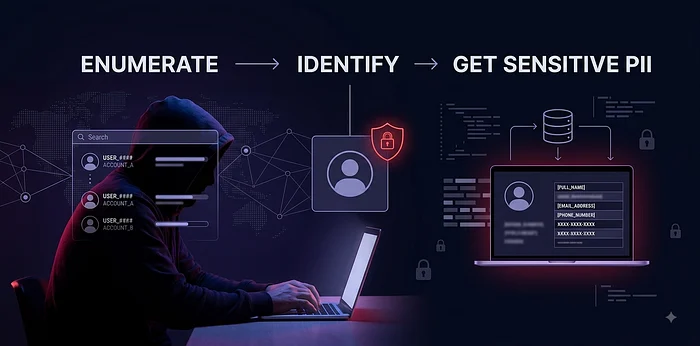
Unauthenticated search ↓Enumerate usernames ↓Identify privileged accounts ↓Query individual usernames ↓Retrieve sensitive user information
In testing, this allowed the 14 accounts observed in the application to be identified through the public search function and then individually queried for additional information. The researcher did not attempt to directly query the underlying database or perform destructive or excessive enumeration, and did not publish or retain unnecessary personal information.
Step 4: Test privileged functions separately
Because the application leaked sensitive information, the researcher went one step further and tested role-assignment and founder-analytics functionality using a lower-privileged authentication context. The server rejected the unauthorised requests, so no privilege escalation was demonstrated.
Root cause
The profile function appears to support public username/profile lookup, but it returns the underlying user document rather than a purpose-built public response. The server does not explicitly restrict the fields returned to unauthenticated callers, so private account information is included in the response. The client bundle exposing the function names made the functions easy to find, but the important issue is what the functions returned without authentication, not simply that they were callable from the browser.
For searchPeople, the role field is already displayed in the application's UI, so its presence in the API response is not by itself a private-information disclosure. The endpoint also exposes internal _id values, but the researcher did not demonstrate that these IDs could be used to access additional unauthorised information or perform unauthorised actions, so the _id exposure is not considered a strong standalone vulnerability. The security relevance of this endpoint is primarily that it provides a convenient way to discover usernames, including privileged accounts, which can then be supplied to getUserByUsername.
Impact
The unauthenticated profile query creates a direct confidentiality and privacy exposure. Potential consequences include targeted phishing, social engineering, correlation of usernames with email addresses, correlation of accounts with IP and geolocation information, and targeting of privileged accounts. The exposed information can include email addresses, IP addresses, approximate geographic information, ISP information, subscription status and account metadata.
The enumeration endpoint adds a practical way to discover usernames, including accounts with elevated roles, which can then be fed into the profile query. The exposed geolocation API key could, depending on the provider's restrictions and billing model, allow quota consumption, rate-limit consumption, potential usage costs and abuse of functionality associated with the credential.
Fix
The server should explicitly return only fields intended for public consumption. For example:
username, displayName, bio, avatar, public social links
Sensitive fields such as:
email, IP address, location, subscription information, internal identifiers should only be returned after appropriate authorization.
The safest implementation is to construct a dedicated public response rather than returning the underlying user document. For searchPeople, the response should be limited to fields genuinely required by the public search functionality, considering removal of internal database IDs and authorisation roles if they are not required, and reasonable rate limiting should be applied to automated enumeration. The exposed third-party credential should be treated as compromised and rotated, with provider-side restrictions and quota controls applied. Retention of IP and geolocation data should be minimised and only accessible to appropriately authorised functionality. Abuse controls should be added: rate-limit public profile and search queries and monitor unusual enumeration patterns.
The write-up does not state which of these changes were made.
Variants to test
- Enumerate other Convex function names from the client bundle. Search the JavaScript bundle for strings in the
module:functionform and call each one throughPOST /api/querywithout credentials. A positive result is a function that returns data without anAuthorizationheader or session cookie. - Test single-character search terms on other search endpoints. Send each character from
atozas the search term and compare the union of returned identifiers. A positive result is a set of unique accounts that matches or approaches the total user base, especially when results overlap between characters. - Check whether profile responses include fields beyond the public profile. Compare the fields returned by a username lookup with the fields shown in the UI. A positive result is the presence of email, IP, location, subscription or internal identifier fields in the API response.
- Look for privileged roles in search results. Inspect the
rolefield in search responses for values such asadminorfounder. A positive result is the identification of privileged accounts that can then be queried individually. - Test role-assignment and analytics functions with a low-privileged session. Call these functions with a lower-privileged authentication context. A positive result is a successful response rather than a rejection.
- Check for third-party API keys in client-side bundles. Search for provider key patterns and test the key outside the application's UI, including whether an attacker-controlled
ipparameter is accepted. A positive result is a key that works outside the application and accepts attacker-controlled parameters.
What happened, in plain words
A security researcher looked at a website for reading manga (Japanese comics). While poking around, he found three problems. The most serious one was that the website would happily hand over private information about any user to anyone who asked, without that person needing to log in at all. The information included email addresses, IP addresses (roughly, where a person is connecting from), location details, subscription status and internal account details. A second, related problem let anyone list the site's users, including the accounts with the most power (the founder, administrators and creators). The third, smaller problem was an API key for a geolocation service that was sitting in plain sight in the website's code, where any visitor could copy it.
None of this required breaking into anything. The website's own features were simply answering questions they should have refused to answer for a stranger.
Some background first: the pieces involved
Before the findings make sense, here are the basic building blocks. Each one is explained from zero.
What a web application is
A web application is a website that does things rather than just showing fixed pages. When you open it in your browser, your browser downloads a bundle of files (HTML, CSS and JavaScript) and then runs them. The part that runs inside your browser is called the frontend or client. The part that runs on the company's computers, out of your reach, is called the backend or server.
A useful comparison: the frontend is the shop counter you can see and touch, and the backend is the stockroom behind the door. You can ask the person at the counter for something, and they go into the stockroom to fetch it. You are never supposed to walk into the stockroom yourself.
What a single-page application is
A single-page application (SPA) is a website that loads once and then updates itself in place, without full page reloads. Think of a paper menu versus a waiter: with a normal website, every click brings a whole new printed page; with a single-page application, the waiter stays with you and just brings new dishes. The practical consequence for security is that almost all of the website's code arrives in your browser at once, in what is called the client bundle.
What a client bundle is, and why it matters
The client bundle is the collection of JavaScript files your browser downloads to run the application. Because it has to run on your machine, you can read it. You can open your browser's developer tools (usually with F12), go to the network or sources tab, and look at every file the site sent you. Nothing in there is hidden from you.
This is the key idea behind the whole report: the bundle is a map of the backend. If the frontend needs to call a backend function, the name of that function has to be written somewhere in the bundle. So reading the bundle tells you what the backend can do.
What an API is
An API (Application Programming Interface) is the set of doors through which the frontend asks the backend to do things. Each door has an address and expects a particular kind of request. When you click a button on a website and something happens, your browser is usually sending an API request behind the scenes.
A comparison: an API is like a restaurant's order system. The menu lists dishes with names, you say a name, and the kitchen prepares it. You do not need to know how the kitchen works; you just need to know the name of the dish. The danger, as this report shows, is when the kitchen will prepare any dish for anyone who knows its name, including dishes reserved for staff.
What Convex is
Convex is a service that companies use to build their backend. With Convex, developers write backend functions and the Convex platform makes them available to the frontend. The frontend calls these functions directly by name. The researcher is careful to point out that the problems here are in how the application's own functions were written, not in Convex itself. Convex is the delivery van; the mistake was in what was loaded into it.
What authentication and authorisation mean
These two words sound alike but mean different things.
- Authentication is proving who you are. Showing your passport at a border.
- Authorisation is what you are allowed to do once you are known. Your passport does not let you enter the cockpit; your ticket class and the airline's rules decide that.
A request that carries no proof of identity is called unauthenticated. The central problem in this report is that certain requests were answered even though they were unauthenticated, and the answers contained information that should have required authorisation.
What a cookie and a token are
When you log in to a website, the server needs a way to remember you on your next request. It usually gives your browser a small piece of data called a session cookie, which your browser automatically sends back with every request to that site. Think of it as a wristband you get at an event: the staff see the wristband and know you are a paying guest.
A token is a similar idea, often sent in an Authorization header. A header is a small labelled line of extra information attached to a request, like the address block on an envelope. The Authorization header is where a token proving your identity normally goes.
So when the report says a request worked without an account, without an Authorization header and without a session cookie, it means: the server answered a stranger with no wristband and no ID.
What an API key is
An API key is a long string of characters that identifies an application to a third-party service, a bit like a membership number at a warehouse store. The service uses it to know who is asking and to bill the right customer. If the key is secret, only the company's own servers should hold it. If it ends up in the browser, every visitor has it.
What PII is
PII stands for Personally Identifiable Information: data that can be tied to a specific person. Email addresses, IP addresses and location details are classic examples. Leaking PII is a privacy problem even when no password is stolen, because it enables targeting.
What enumeration is
Enumeration means listing things one by one. If a website lets you discover every username that exists, you have enumerated its users. It is like a hotel clerk reading out the guest list to anyone who asks.
What CVSS and severity ratings mean
CVSS (Common Vulnerability Scoring System) is a standard way of scoring how serious a security problem is, on a scale from 0 to 10. The researcher gives each finding a score and a short code describing it. You do not need to memorise the code; the important part is the plain label: Low, High and Informational.
- Low means a real but limited problem.
- High means a serious problem with significant impact.
- Informational means something worth noting that is not, on its own, a vulnerability.
The three findings at a glance
- An exposed third-party geolocation API key in the client-side JavaScript bundle, rated Low.
- An unauthenticated query exposing sensitive user information through
users:getUserByUsername, rated High. - An unauthenticated user-enumeration endpoint through
users:searchPeople, rated Informational.
The main finding is the second one. The third matters because it makes the second easier to exploit.
How the testing was set up
The testing was independent security research. The application has no public disclosure programme; the researcher sent the findings privately to the team instead.
He created two accounts for testing. During the testing period the application had approximately 14 user accounts in total. That number matters later, because the enumeration found all of them.
The write-up does not name any specific tools beyond reading the client-side JavaScript bundle and sending requests to the Convex query endpoint. The severity ratings are the researcher's own assessment based on what he observed, using CVSS 3.1 where applicable, and may differ from how the affected programme would classify them internally.
Finding it: reading the bundle
The starting point was the client-side JavaScript bundle. It contained backend function names and implementation details, enough to identify functions such as:
users:getUserByUsernameusers:searchPeople
What this block shows is two function names written in the module:function form. The part before the colon is the module (a group of related functions), and the part after is the specific function inside it. So users:getUserByUsername means "in the users module, the function called getUserByUsername". The names are run together here because that is how they appeared in the bundle text.
Why this step was taken: the researcher wanted a list of doors to knock on. The bundle told him the names of the doors. getUserByUsername sounds like it fetches a user's profile, and searchPeople sounds like it searches for users. Both are exactly the kind of function that might return too much data if not carefully written.
These two became the primary targets for authorisation and data-exposure testing.
Finding 1: the exposed geolocation API key
The bundle also contained a third-party API key for ipgeolocation.io, a service that turns an IP address into an approximate location. The application made a browser-side request resembling:
https://api.ipgeolocation.io/ipgeo?[redacted]
Line by line:
https://api.ipgeolocation.io/ipgeois the address of the third-party service's endpoint. It is the door at the other company.?starts the list of parameters, the extra details being passed along.[redacted] is the parameter carrying the key. In the published write-up the actual value is replaced withREDACTED`, which is the standard way of hiding a secret in a public document.
Why this matters: because the key was delivered to the browser, it could be obtained by any visitor and therefore could not be treated as a secret. Anyone who opens the developer tools can read it. A secret that every visitor receives is not a secret.
The researcher confirmed that the exposed key could be used outside the application's normal UI, meaning he could call the service directly himself rather than through the manga site. He also tested whether the API accepted an attacker-controlled ip parameter, that is, whether he could ask the service about an IP address of his choosing rather than the one the site would normally send.
Depending on the provider's restrictions and billing model, an exposed API key can allow an attacker to:
- consume the application's API quota (the allowance of requests the company has paid for);
- consume provider-side rate limits (the maximum number of requests allowed in a period);
- potentially generate usage costs (if the plan bills per request);
- abuse functionality associated with the credential.
The recommended fix was to rotate the key (replace it with a new one and disable the old), move the geolocation request server-side where practical (so the key stays on the company's own machines), apply provider-side restrictions where supported (such as limiting which addresses may use the key), and apply quota and usage monitoring.
Finding 2: private user data handed to anyone
What was wrong
The users:getUserByUsername query was callable without authentication. A direct request to the Convex query endpoint with a username returned information from the corresponding user document without requiring:
- an account;
- an
Authorizationheader; - an authenticated session cookie.
In plain terms: the function is supposed to look up a public profile, but it was returning the whole private record behind that profile.
The request
The request structure was:
POST /api/query
Line by line:
POSTis the type of request. It means "I am sending you some data". Other common types areGET(give me something) andPUT(replace something)./api/queryis the address on the server. It is the single door through which Convex queries are made.
{ "path": "users:getUserByUsername", "format": "json", "args": { "username": "<target username>" }}
Line by line:
- The outer
{ ... }is a JSON object, a way of writing structured data as text. Think of it as a labelled form. "path": "users:getUserByUsername"is the label saying which function to run. It is the dish name on the menu."format": "json"asks for the answer to come back in JSON, the same structured text format."args"is the label for the arguments, the inputs the function needs.- Inside
args,"username": "<target username>"supplies the username to look up. The angle brackets are a placeholder: you would put a real username there.
No credentials are sent. There is no cookie, no token, no header proving identity. The request is a stranger walking up to the counter and asking for a customer's file by name.
What came back
During testing, the response included sensitive fields such as:
emailipAddresslocation ip city country ispsubscriptionStatussubscriptionExpiresAtemailVerificationTimeroleinternal identifierscreation-related information
This block is a list of field names, run together as they appeared. Each one is a label in the returned record:
email: the user's email address.ipAddress: the IP address the user connected from.location, with sub-fieldsip,city,country,isp: approximate geographic information and the internet provider.subscriptionStatusandsubscriptionExpiresAt: whether the user pays and until when.emailVerificationTime: when the email was verified.role: the user's permission level.- internal identifiers and creation-related information: bookkeeping data the application uses internally.
The exact fields varied between user records. These fields go beyond what would normally be required for a public profile.
Why this is a security issue
The function appears to support public username/profile lookup, but the response exposes private account information. An unauthenticated attacker who knows a username can therefore retrieve sensitive information without possessing an account or authentication credentials.
The exposed information can include email addresses, IP addresses, approximate geographic information, ISP information, subscription status and account metadata.
Impact
This creates a direct confidentiality and privacy exposure. Potential consequences include:
- targeted phishing (sending a convincing fake message to a known email address);
- social engineering (manipulating someone using facts about them);
- correlation of usernames with email addresses;
- correlation of accounts with IP and geolocation information;
- targeting of privileged accounts.
The application had approximately 14 user accounts during testing. The enumeration process described next identified all 14 accounts observed in the application, and the sensitive-data query could then be used against individual usernames.
The researcher did not publish or retain unnecessary personal information.
Finding 3: listing every user without logging in
What was wrong
The users:searchPeople query was also callable without authentication. It accepts a user-controlled searchQuery and limit:
{ "path": "users:searchPeople", "format": "json", "args": { "searchQuery": "a", "limit": 32 }}
Line by line:
"path": "users:searchPeople"selects the search function."format": "json"asks for a JSON response."searchQuery": "a"is the text to search for. Here it is a single letter,a."limit": 32caps how many results come back, at 32.
Why a single letter: if the search matches any username containing that letter, then searching for every letter of the alphabet in turn should surface every username that contains at least one letter. That is a cheap way to sweep the whole user base.
What came back
The response included fields such as:
_id, username, displayName, bio, image, role
Line by line:
_id: the internal database identifier for the account. The leading underscore is a convention marking it as internal.username: the public handle.displayName: the name shown on the profile.bio: the profile description.image: the profile picture.role: the permission level.
The returned roles included:
user, creator, admin, founder
These are permission levels, from ordinary user up through creator, administrator and founder. Seeing admin and founder in a public search result tells an attacker which accounts are worth targeting.
The enumeration test
The researcher tested single-character searches from a through z. Across the complete a to z search set, the endpoint returned 14 unique accounts, matching the approximately 14 accounts observed in the application, including the two accounts created for testing. The searches also returned overlapping results for different characters, which is expected: a username containing both a and m appears in both searches. That overlap demonstrates that the endpoint could be used as an unauthenticated user-enumeration mechanism.
The enumeration identified accounts with elevated roles, including founder, administrator and creator.
Why this is only Informational
The role field is already displayed in the application's UI, so its presence in the API response is not by itself a private-information disclosure. The endpoint also exposes internal _id values, but the researcher did not demonstrate that these IDs could be used to access additional unauthorised information or perform unauthorised actions, so the _id exposure is not considered a strong standalone vulnerability.
The security relevance of this endpoint is primarily that it provides a convenient way to discover usernames, including privileged accounts, which can then be supplied to getUserByUsername.
Chaining the findings
The two query behaviours can be combined without authentication. A chain in security means using one small weakness to enable a bigger one, like using a found key to open a door behind which a stronger key is hanging.
- Enumerate users. Query
users:searchPeoplewith different search terms. Theatoztest identified 14 unique accounts in the application. - Identify a target. Select a discovered username, including potentially privileged accounts.
- Retrieve sensitive information. Supply that username to
users:getUserByUsername, which returns sensitive fields associated with the account.
The resulting workflow is:
Unauthenticated search ↓Enumerate usernames ↓Identify privileged accounts ↓Query individual usernames ↓Retrieve sensitive user information
Read top to bottom, this is the attacker's path: start with a search that needs no login, collect usernames, spot the powerful accounts, look each one up, and receive private data. Each arrow is a step that requires no credentials at all.
In testing, this allowed the 14 accounts observed in the application to be identified through the public search function and then individually queried for additional information. The researcher did not attempt to directly query the underlying database or perform destructive or excessive enumeration.
Testing the privileged functions separately
Because the application leaked sensitive information, the researcher went one step further and tested role-assignment and founder-analytics functionality using a lower-privileged authentication context. In other words, he used a lower-privileged authentication context and tried to use functions meant for administrators, such as changing someone's role or reading founder-level analytics.
The server rejected the unauthorised requests. So no privilege escalation was demonstrated. Privilege escalation means using a low-level account to gain higher-level powers. Here the server said no, so no privilege escalation was demonstrated.
Root cause
The functions appear to support legitimate public features, username/profile lookup and people search, but they return the underlying user document rather than a purpose-built public response. The server does not explicitly restrict the fields returned to unauthenticated callers, so private account information is included in the response.
A comparison: imagine a receptionist asked for a customer's name badge. Instead of printing a badge, the receptionist hands over the customer's entire file folder, because the folder happens to contain the name. The fix is to print the badge, not to hand over the folder.
The client bundle exposing the function names made the functions easy to find, but the important issue is what the functions returned without authentication, not simply that they were callable from the browser. Many functions are meant to be callable from the browser; the question is what they say back.
For searchPeople, the role field is already displayed in the application's UI, so its presence in the API response is not by itself a private-information disclosure.
Impact
The unauthenticated profile query creates a direct confidentiality and privacy exposure. Potential consequences include targeted phishing, social engineering, correlation of usernames with email addresses, correlation of accounts with IP and geolocation information, and targeting of privileged accounts.
The enumeration endpoint adds a practical way to discover usernames, including accounts with elevated roles, which can then be fed into the profile query. The exposed geolocation API key could, depending on the provider's restrictions and billing model, allow quota consumption, rate-limit consumption, potential usage costs and abuse of functionality associated with the credential.
The fix
The server should explicitly return only fields intended for public consumption. For example:
username, displayName, bio, avatar, public social links
This is the list of things a public profile should contain: the handle, the display name, the description, the picture and any social links the user chose to share. Nothing else.
Sensitive fields such as:
email, IP address, location, subscription information, internal identifiers should only be returned after appropriate authorization.
This block lists the fields that must stay behind an authorisation check: email, IP address, location, subscription information and internal identifiers. They should only be returned after appropriate authorisation, meaning only to someone who has proven they are allowed to see them.
The safest implementation is to construct a dedicated public response rather than returning the underlying user document. In other words, build the badge rather than handing over the folder.
For searchPeople, the response should be limited to fields genuinely required by the public search functionality, considering removal of internal database IDs and authorisation roles if they are not required, and reasonable rate limiting should be applied to automated enumeration. Rate limiting means capping how many requests a client can make in a period, so a script cannot sweep the whole alphabet in a second.
The exposed third-party credential should be treated as compromised and rotated, with provider-side restrictions and quota controls applied. Retention of IP and geolocation data should be minimised and only accessible to appropriately authorised functionality. Abuse controls should be added: rate-limit public profile and search queries and monitor unusual enumeration patterns.
The write-up does not state which of these changes were made.
Variants to test
These are the same ideas applied elsewhere, written so that someone learning can try them on a system they are allowed to test.
- Enumerate other Convex function names from the client bundle. Search the JavaScript bundle for strings in the
module:functionform and call each one throughPOST /api/querywithout credentials. A positive result is a function that returns data without anAuthorizationheader or session cookie. - Test single-character search terms on other search endpoints. Send each character from
atozas the search term and compare the union of returned identifiers. A positive result is a set of unique accounts that matches or approaches the total user base, especially when results overlap between characters. - Check whether profile responses include fields beyond the public profile. Compare the fields returned by a username lookup with the fields shown in the UI. A positive result is the presence of email, IP, location, subscription or internal identifier fields in the API response.
- Look for privileged roles in search results. Inspect the
rolefield in search responses for values such asadminorfounder. A positive result is the identification of privileged accounts that can then be queried individually. - Test role-assignment and analytics functions with a low-privileged session. Call these functions with a lower-privileged authentication context. A positive result is a successful response rather than a rejection.
- Check for third-party API keys in client-side bundles. Search for provider key patterns and test the key outside the application's UI, including whether an attacker-controlled
ipparameter is accepted. A positive result is a key that works outside the application and accepts attacker-controlled parameters.
Glossary
- API: the set of addresses and rules through which one piece of software asks another to do something.
- API key: a long string that identifies an application to a third-party service, like a membership number.
- API quota: the allowance of requests a company has paid for on a service.
args: the part of a request that carries the inputs a function needs.- Authentication: proving who you are.
- Authorisation: what you are allowed to do once you are known.
Authorizationheader: the labelled line on a request where a token proving identity normally goes.- Backend: the part of an application that runs on the company's servers, out of the visitor's reach.
- Bug bounty: a programme that pays people for reporting security problems.
- Client: the part of an application that runs in your browser.
- Client bundle: the collection of JavaScript files a website sends to your browser, which anyone can read.
- Client-side: happening inside your browser rather than on the server.
- Confidentiality: keeping information available only to those allowed to see it.
- Convex: a service that hosts backend functions which a frontend calls directly by name.
- Cookie: a small piece of data a website stores in your browser and receives back on later requests, often used to remember that you are logged in.
- Correlation: combining two pieces of data to link them, for example matching a username to an email address.
- CVSS: a standard 0 to 10 scoring system for the severity of a security problem.
- Data exposure: a situation where information is revealed to someone who should not see it.
- Endpoint: a specific address on a server that accepts requests.
- Enumeration: listing items one by one, such as discovering every username that exists.
- Field: a labelled piece of data inside a record, such as
email. - Frontend: the part of an application that runs in your browser.
- Function: a named piece of code that does a job when called.
- Geolocation: estimating where someone is, often from their IP address.
- Header: a small labelled line of extra information attached to a request or response.
- Informational: a finding worth noting that is not, on its own, a vulnerability.
- Internal identifier: a code the application uses to refer to a record, not meant for public use.
- IP address: the number that identifies a device's connection to the internet.
- ipgeolocation.io: a third-party service that turns an IP address into an approximate location.
- ISP: Internet Service Provider, the company that supplies someone's internet connection.
- JSON: a text format for writing structured data as labelled values.
limit: a cap on how many results a request may return.- Low / High: severity labels for how serious a finding is.
- Metadata: data about data, such as when a record was created.
- Parameter: an extra detail passed with a request, such as a search term.
path: in this report, the label in a request that names which backend function to run.- PII: Personally Identifiable Information, data that can be tied to a specific person.
- Phishing: sending a convincing fake message to trick someone into revealing information or clicking something harmful.
- POST: a request type meaning "I am sending you data".
- Privilege escalation: using a low-level account to gain higher-level powers.
- Rate limiting: capping how many requests a client may make in a period.
- Reconnaissance: gathering information about a target before acting.
- Role: a permission level attached to an account, such as user, creator, admin or founder.
- Rotate (a key): replace a secret with a new one and disable the old one.
- Search query: the text a search function looks for.
- Session: the period during which a website remembers who you are after you log in.
- Single-page application (SPA): a website that loads once and updates itself in place without full page reloads.
- Token: a piece of data proving identity, often sent in an
Authorizationheader. - Unauthenticated: carrying no proof of identity.
- User document: the full record a database holds about a user, including private fields.
- Username: the public handle that identifies an account.



