HTTP Parameter Pollution It’s Contaminated Again
The invite-member feature accepted an array of email addresses and only checked for duplicates on the client side, so an attacker could submit the same address many times in one request. This let them flood a victim's inbox with hundreds of invitation emails, bypassing the normal duplicate-invite restriction.
 Published on shahjerry33.medium.com
HTTP Parameter Pollution (HPP) means to pollute the HTTP parameters of a web application for achieving a specific malicious task. It refers to manipulating how a website treats parameters it receives during HTTP requests.
The full write-up lives on its author's site
It belongs to its author, so we link to it rather than copy it. The other two tabs are our own rewrites, checked against it.
Context
This write-up covers an HTTP Parameter Pollution (HPP) issue found on a private bug bounty program, in a feature that lets a user invite members by email. The feature sends an invitation to an email address. The application was supposed to stop the same address being invited twice, and it did show an error when the same email was submitted a second time through the normal interface.
The research was a collaboration between Jerry Shah, ethicalbughuntr and droppyy33. The report was triaged as low severity (P4) and paid a bounty of 50 USD.
HPP, as the report describes it, means manipulating how a website treats the parameters it receives during HTTP requests, so that the application behaves differently from what was intended. The pollution happens in code that runs on the server and is invisible to the tester; only the results are visible on screen, so the process in between is a black box.
The report also recalls the background of the query string: the part between the ? and the end of the URI as defined in RFC 3986, a series of field-value pairs separated by & or ;. It notes that the use of the semicolon is a W3C recommendation to avoid escaping, and that RFC 2396 defines two classes of characters:
- Unreserved:
a-z,A-Z,0-9and_ . ! ~ * ' ( ) - Reserved:
; / ? : @ & = + $ ,
Setup
The target was a private program on a bug bounty platform. The only feature involved is the invite member functionality. The report does not name the application, the endpoint, the HTTP method, the tool used to intercept requests, or any account or role details beyond the fact that the researchers could use the invite member feature.
Finding it
The starting point was the duplicate check. Adding an email through the invite member form worked, and adding the same email a second time produced an error. That error is what the application returned on the second submission.
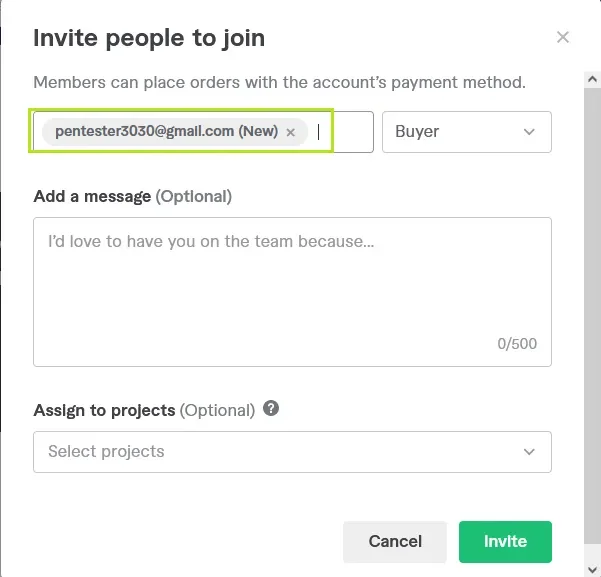
The invite member form as it appears in the interface.
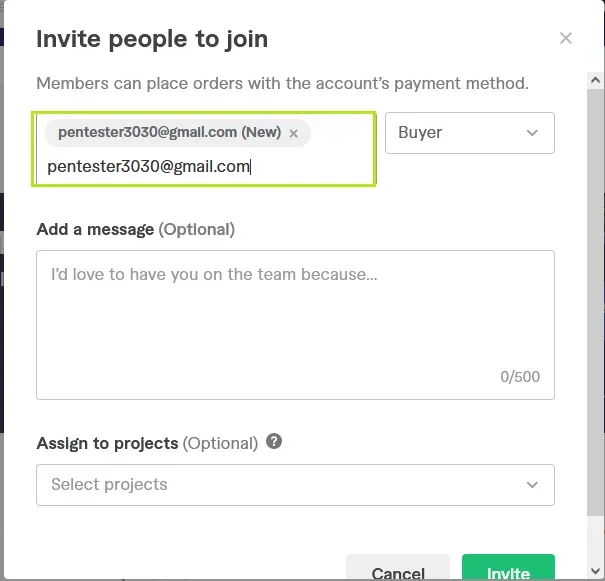
Submitting the same email a second time.
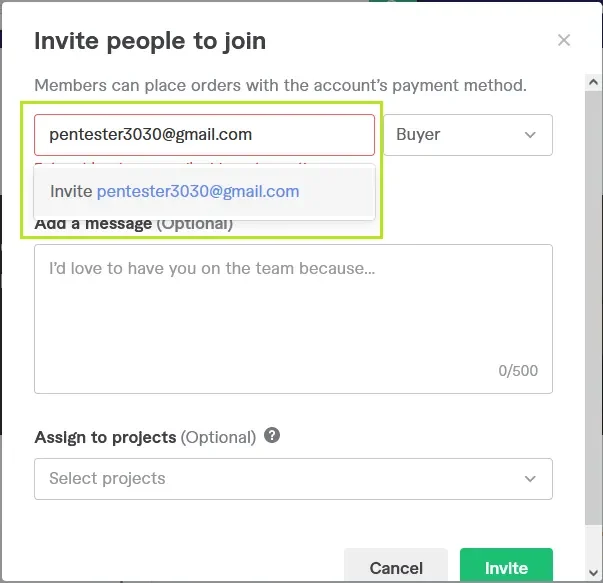
The error returned when the duplicate email is submitted.
Intercepting the invite request showed that the email field is sent as an array. That is what made the parameter worth polluting: if the server processes an array of addresses, the question is whether the duplicate check is applied to every element of that array, or only to the request as the client builds it.
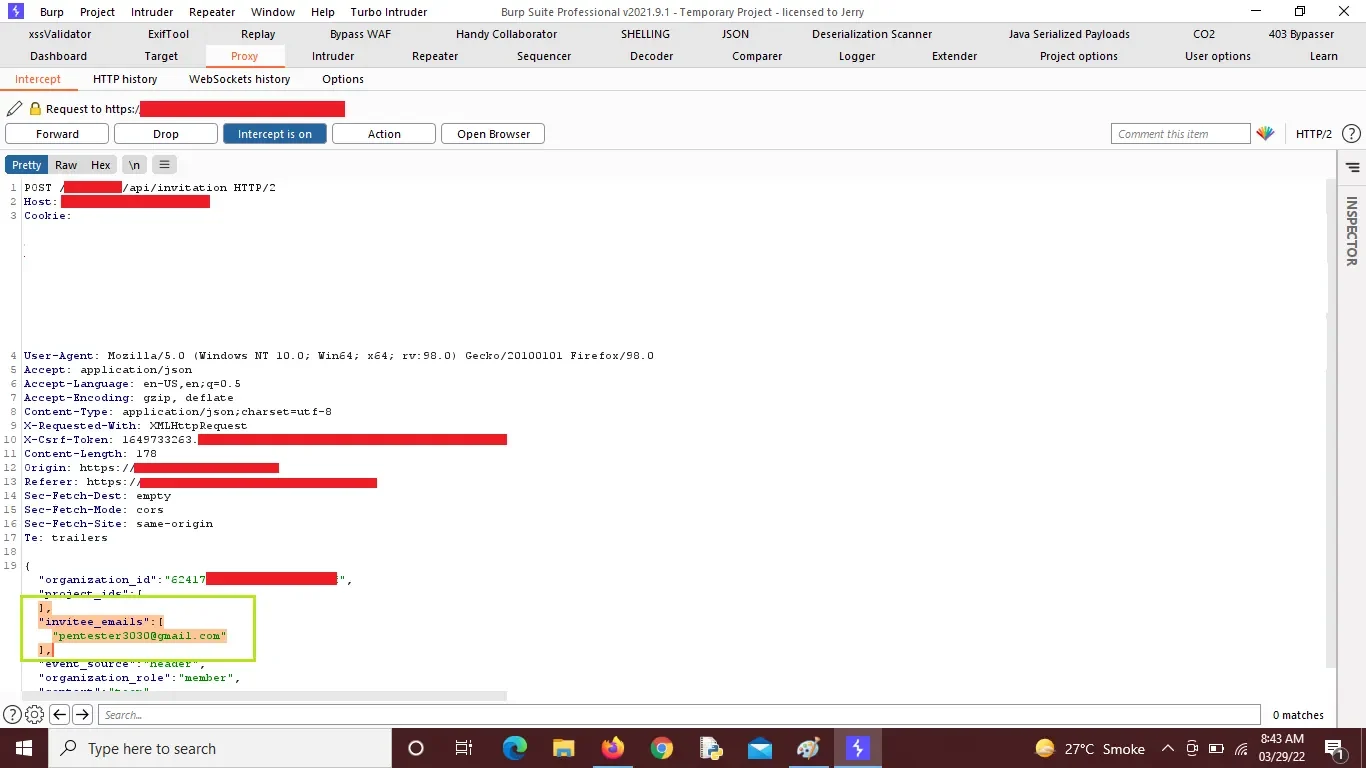
The intercepted invite request, showing that the email parameter is an array.
Exploitation
Step 1: pollute the parameter with three copies
The researchers passed the same email three times inside the array parameter. The report shows the polluted parameter as invitee_emails:[].
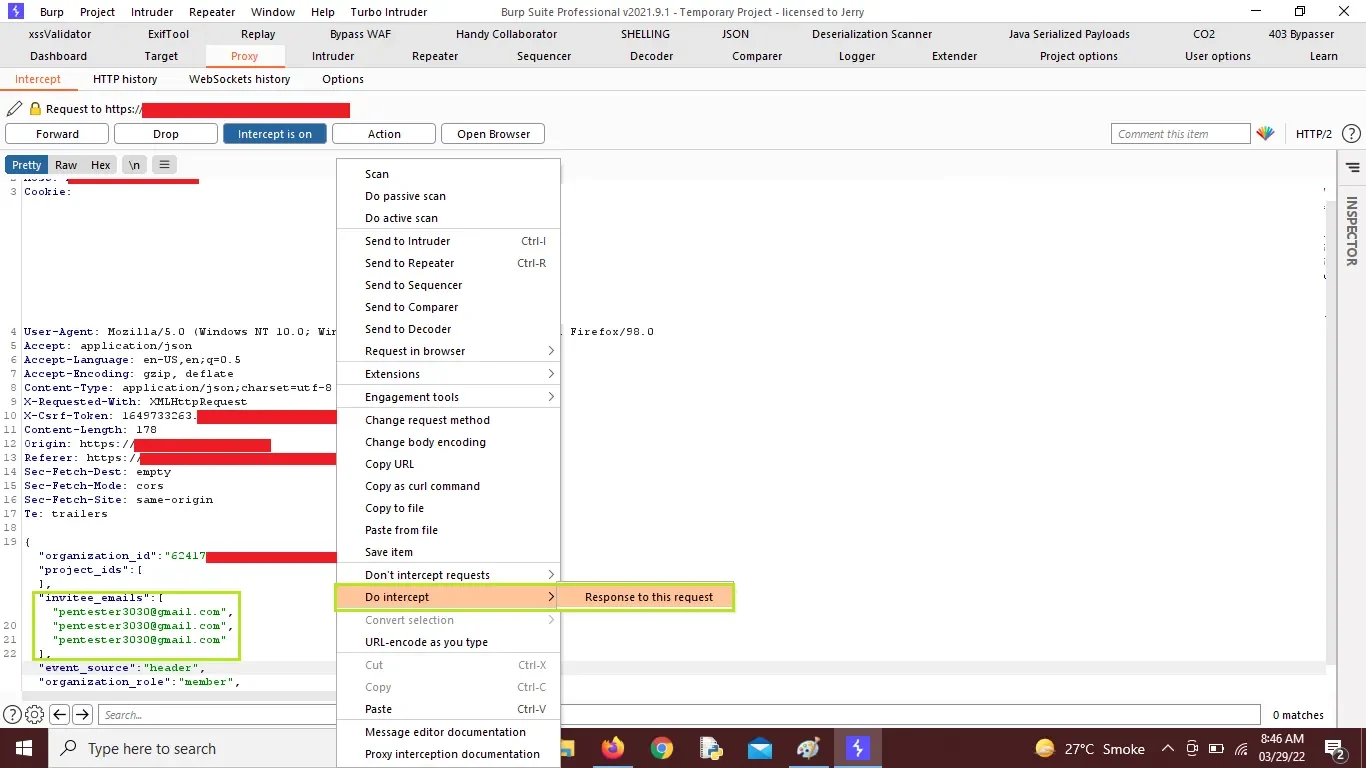
The parameter after the same email was inserted three times.
Step 2: read the response
The response came back with "success": true. The other parameter in the response, "failed_invitee_emails":[""], carried the email value that was passed, but no duplication check was performed on it. The report calls this a small misconfiguration.
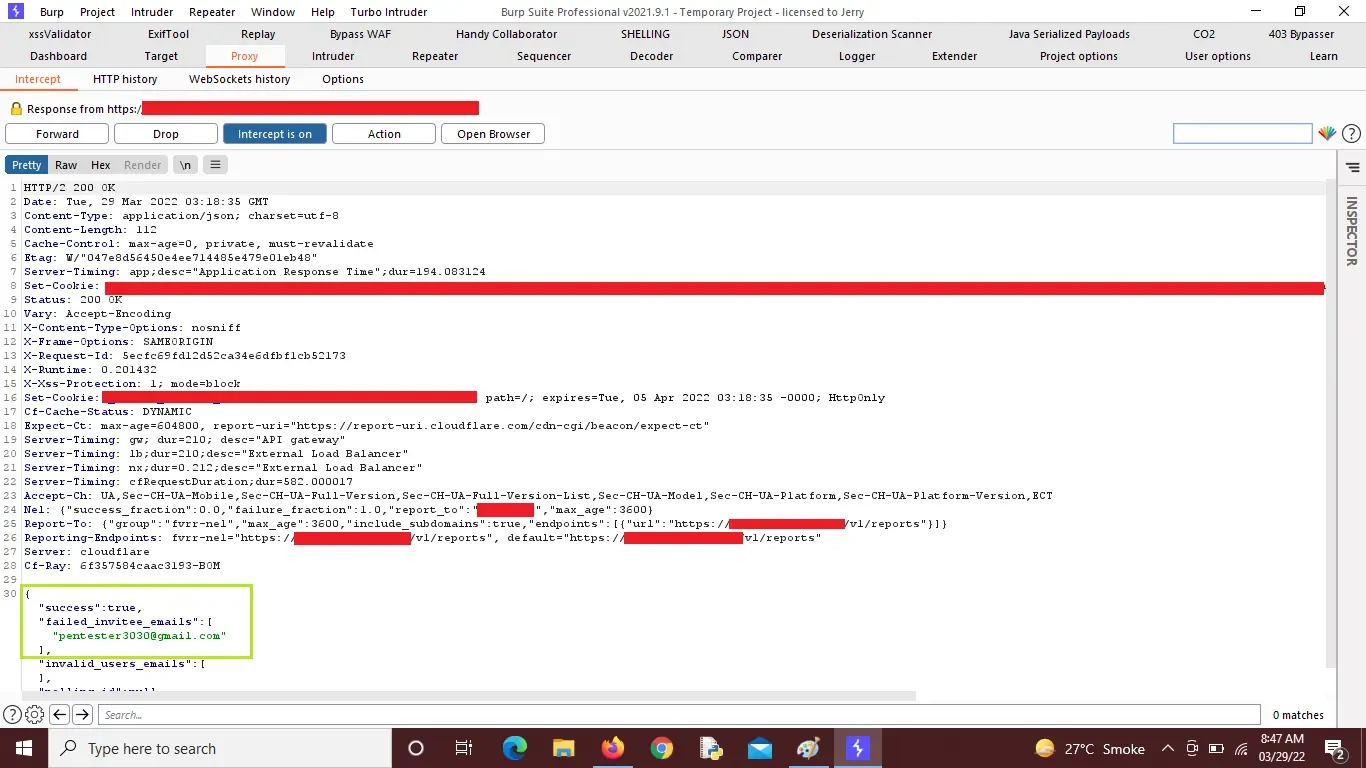
The response showing "success": true alongside the failed_invitee_emails value.
Step 3: confirm delivery
Checking the inbox showed three emails had arrived for the single address.
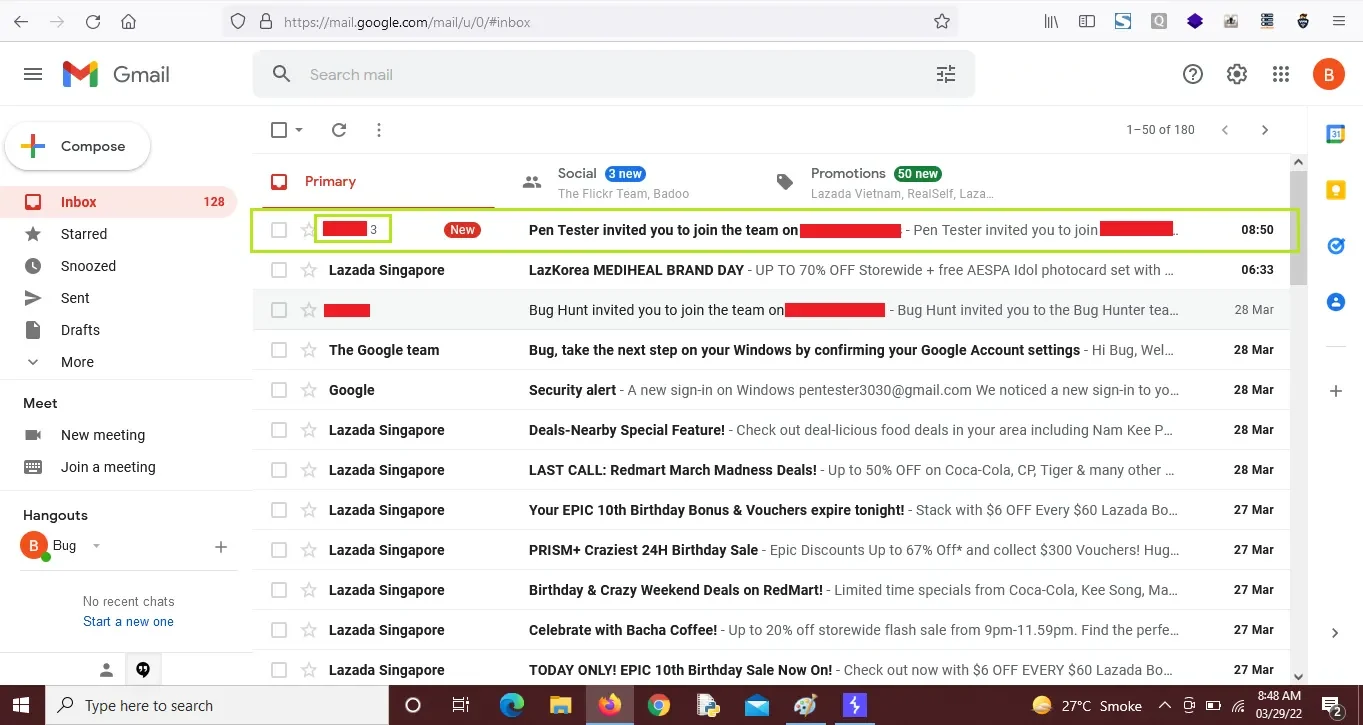
Three invitation emails delivered to the same inbox.
Step 4: scale to 200
To test flooding, the same email was passed 200 times in the invitee_emails:[] parameter, and the request succeeded.
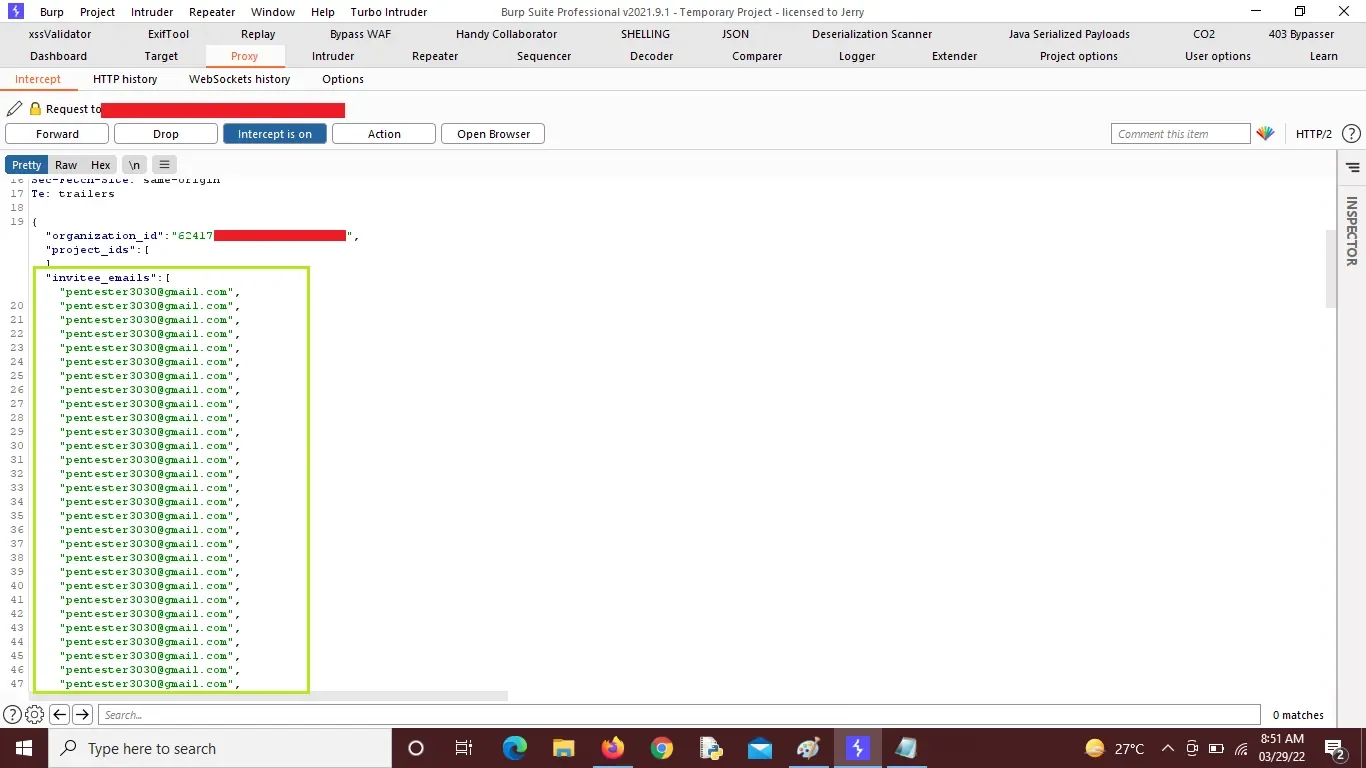
The intercepted request with the email repeated 200 times.
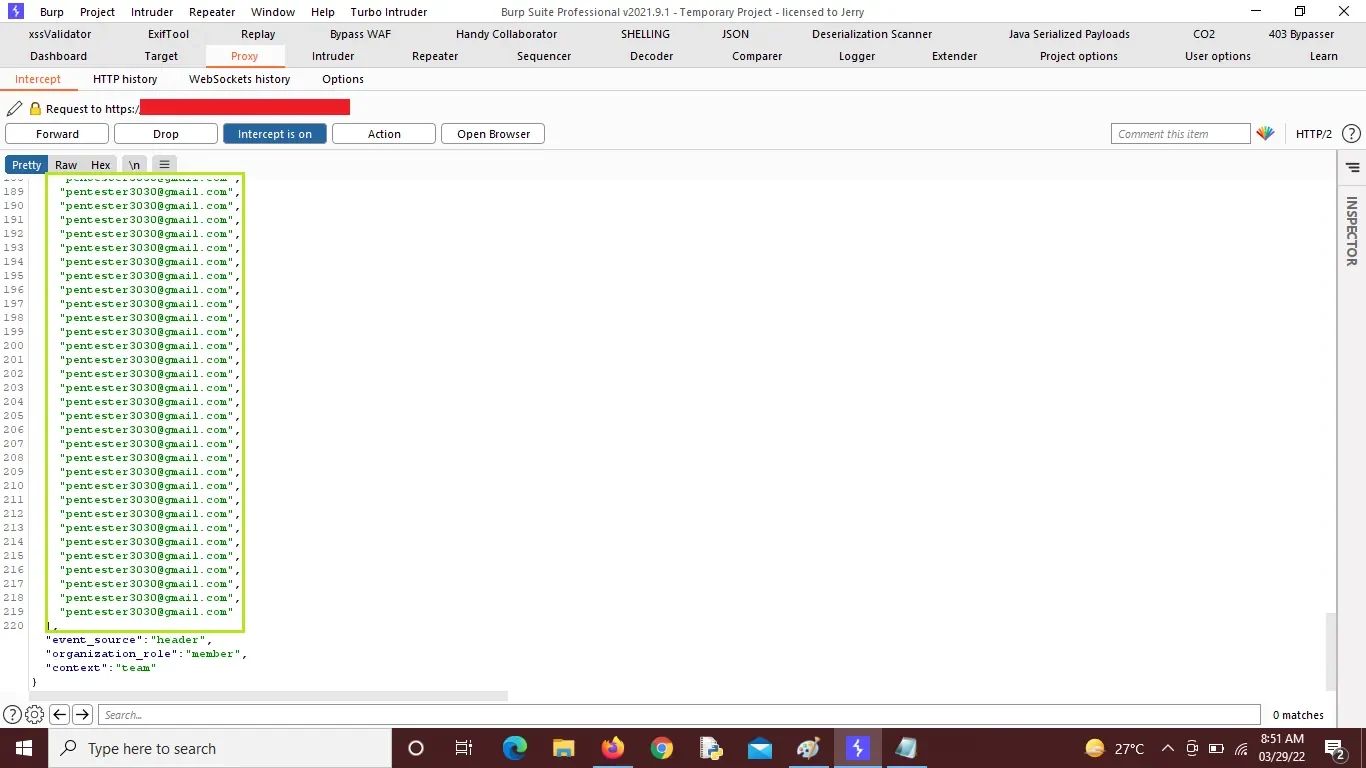
The request carrying 200 copies of the address.
Step 5: confirm the flood
The inbox was then flooded with 200 emails.
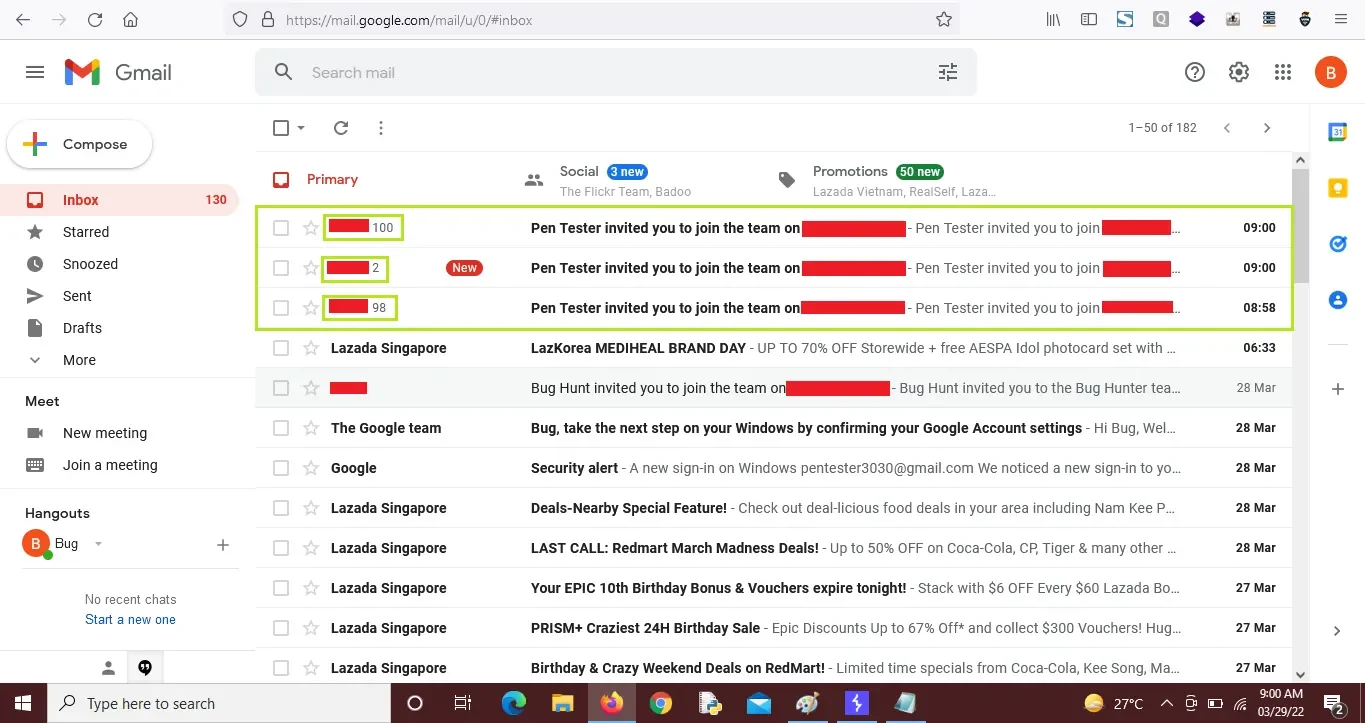
The inbox after the flood, filled with the invitation messages.
Root cause
In the researcher's opinion, the server-side check on the invitee_emails:[] array parameter was not being performed. The check existed only on the client side, The check existed only on the client side, which the researcher says caused the vulnerability.
A side observation: the size of the array can be inferred from the delivery pattern. In the inbox, after 100 emails the remaining emails arrived as a new message containing another 100 emails, which the researchers took as an indication of the size of the array.
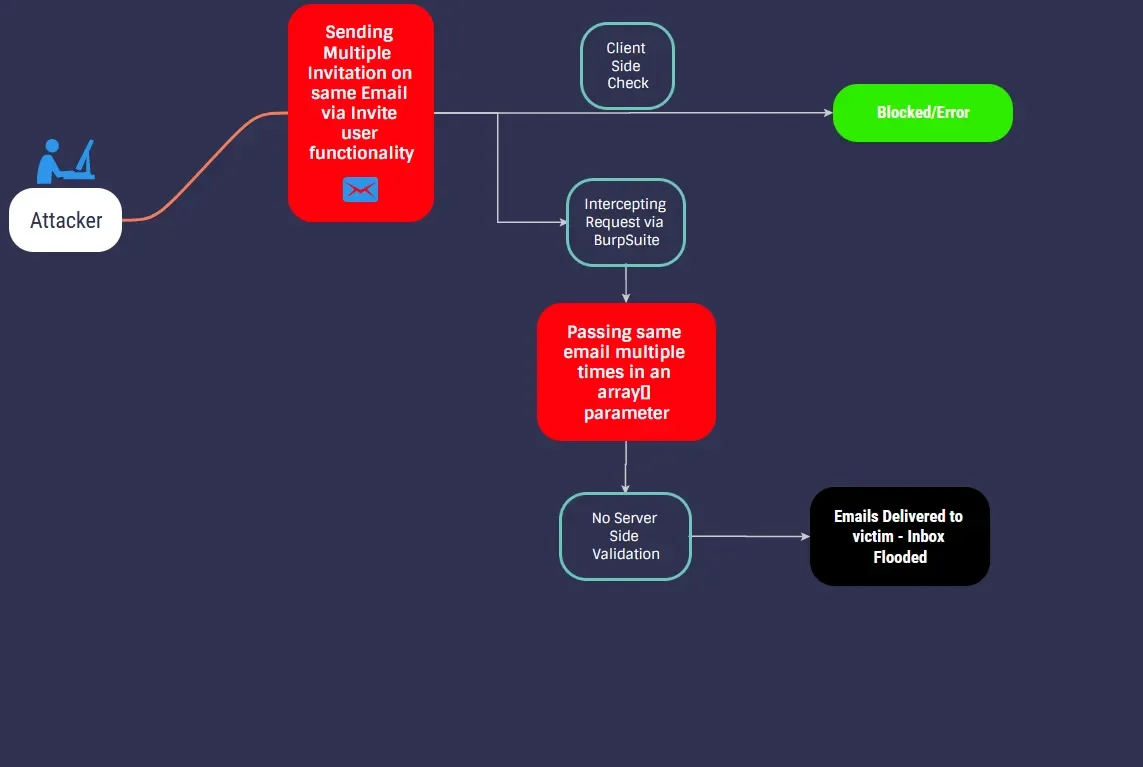
The delivery pattern showing the array being handled in batches.
Impact
The impact is the same as a missing rate limit on email flooding. The severity is low because an attacker can only flood the victim's inbox with n number of emails. The report gives the calculated CVSS as:
CVSS:3.0/AV:N/AC:H/PR:N/UI:N/S:U/C:N/I:N/A:L
That is a score of 3.7 (Low).
Fix
The report's recommendation is that the security check on the parameters should be performed on the client side as well as the server side. Separately, if the website restricts entering the same email more than once, a duplication check should be performed on both the client and the server side.

Variants to test
- Array parameters elsewhere in the application. Any endpoint that accepts a list (invitees, recipients, tags, IDs) is a candidate. A positive result is a response that reports success while the duplicate or excess elements are still processed.
- Repeating the same value inside the array. Send the same address or identifier several times and check the response and the resulting side effects, such as multiple emails or multiple records. A positive result is more than one delivery or record for a single logical value.
- Scaling the repetition. Increase the count (the report used 200) and watch for batching behaviour, such as deliveries split into groups of 100. A positive result is a large number of messages arriving for one address.
- Comparing client-side and server-side validation. Submit the request through the interface, then replay it with the array polluted. A positive result is the interface rejecting the duplicate while the crafted request is accepted.
- Watching the failure fields in the response. Fields such as
failed_invitee_emailscan reveal which values were rejected and which were not. A positive result is a value appearing there without the duplicate check having been applied.
What happened, in plain words
A website had a feature that lets you invite people to join something, by typing their email address. The site was supposed to stop you inviting the same person twice: if you typed an address that had already been invited, it showed an error. The researchers believe the rule was only enforced in the browser, in the form you see on screen. By capturing the request the browser sends and editing it before it reached the server, they could put the same email address into the request many times over. The server accepted the request and the emails arrived. With three copies, three emails arrived. With 200 copies, 200 emails arrived, flooding the person's inbox. The team reported it, it was rated low severity (P4), and they were paid 50 USD.
Before the details, a few ideas that the rest of this article depends on.
What a request is. When you fill in a form and press a button, your browser sends a message to the website's server (a computer somewhere else that runs the site). That message is called an HTTP request. It carries the values you typed. The server reads them, does something, and sends back a reply, called the response. Your browser then shows you the result.
What a parameter is. A parameter is one named value inside a request. If a form asks for an email address, the request contains something like email=[redacted]: email is the parameter name, and the address is its value. A parameter can also hold a list of values rather than a single one. Such a list is called an array. Think of a shopping list: one piece of paper, several items written on it.
What an API is. An API is the set of requests a website's server understands. It is like a restaurant menu: the menu lists what you can order and how to order it, and the kitchen (the server) prepares it. You do not walk into the kitchen yourself; you send an order in the expected form.
What intercepting means. Your browser and the server talk to each other directly, and normally you only see the finished page. A tool that sits between them can pause a request on its way out, show you its exact contents, let you edit it, and then send it on. This is called intercepting. It is like holding a letter before it goes in the postbox, reading it, changing a word, and posting it anyway.
What HTTP Parameter Pollution means. Parameter pollution means tampering with the parameters of a request so the website behaves in a way it did not intend. The report describes it as manipulating how a website treats the parameters it receives during HTTP requests, changing the site's behaviour from its intended one. It is a simple kind of attack but an effective one. The code that handles the polluted parameter runs on the server, out of sight; you only see the results on your screen, so everything in between is a black box.
What a query string is. The report recalls that the term query string commonly refers to the part of a web address between the ? and the end, as defined in RFC 3986. It is a series of field-value pairs, separated by & or ;. The report notes that using the semicolon is a W3C recommendation in order to avoid escaping. It also notes that RFC 2396 defines two classes of characters:
- Unreserved:
a-z,A-Z,0-9and_ . ! ~ * ' ( ) - Reserved:
; / ? : @ & = + $ ,
In plain terms: a web address can carry extra values after a question mark, and those values are written as name and value joined by =, with pairs separated by & or ;. Some characters have special meanings in addresses and some do not, which is why the standards split them into these two groups.

The setup
The target was a private program on a bug bounty platform. A bug bounty program is an arrangement where a company invites outside researchers to look for security problems in its systems and pays for valid reports. A private program is one you can only join by invitation. The report does not name the application, the address of the feature, the method used for the request, the tool used to intercept it, or any account details beyond the fact that the researchers could use the invite member feature.
The work was a collaboration between Jerry Shah, ethicalbughuntr and droppyy33. The issue was triaged as low severity (P4) and paid a bounty of 50 USD. Triage means the program's team reviewed the report and accepted it as a real issue.
How the vulnerability was found
The starting point was the duplicate check. Adding an email through the invite member form worked, and adding the same email a second time produced an error. That error is the behaviour the application intended: one invitation per address. The researchers wanted to know whether that rule held up when the request was not built by the form.
- They added an email in the invite member functionality.
The invite member form as it appears in the interface.
- They tried to add the same email another time, and it gave an error.
Submitting the same email a second time.
The error returned when the duplicate email is submitted.
- They intercepted the request and found that the parameter is an array.
The intercepted invite request, showing that the email parameter is an array.
Why this step matters: if the server processes an array of addresses, the question is whether the duplicate check is applied to every element of that array, or only to the request as the browser builds it. The form on screen can only build one kind of request. A hand-edited request can build another.
- They polluted the parameter by passing the same email three times. The report shows the polluted parameter as
invitee_emails:[].
The parameter after the same email was inserted three times.
- They checked the response and it showed
"success": true. The other parameter in the response,"failed_invitee_emails":[""],had the email value they passed, but it was not performing the duplication check. The report calls this a small misconfiguration.
The response showing "success": true alongside the failed_invitee_emails value.
Reading that response in plain words: "success": true is the server saying the request was accepted. failed_invitee_emails is another field in the response. The address the researchers sent appears in that field, yet no duplicate check was applied to it. In other words, the server noticed the address in one place while still accepting the request overall.
- They checked the inbox and found that there were three emails.
Three invitation emails delivered to the same inbox.
This is the confirmation that matters. A success message in a response only says the server accepted the request; three emails in the inbox show the side effect actually happened, once per copy of the address.
- They then thought of flooding the inbox with 200 emails, so they passed the same email 200 times in the
invitee_emails:[]parameter, and it was successful.
The intercepted request with the email repeated 200 times.
The request carrying 200 copies of the address.
- They checked the inbox again and it was flooded with 200 emails.
The inbox after the flood, filled with the invitation messages.
Why it happened
In the researcher's opinion, the server-side check on the invitee_emails:[] array parameter was not being performed. The check existed only on the client side. Client side means code that runs in your own browser, as part of the page. Server side means code that runs on the website's computer, after the request arrives. Browser-side validation never sees a request that was crafted by hand, so every duplicate in the array was accepted and processed.
A side observation: the size of the array can be inferred from the delivery pattern. In the inbox, after 100 emails the remaining emails arrived as a new message containing another 100 emails, which the researchers took as an indication of the size of the array.
The delivery pattern showing the array being handled in batches.
Impact
The impact is the same as a missing rate limit on email flooding. A rate limit is a cap on how often something can be done in a period of time, for example how many emails one person can trigger per minute. The report describes it as a bypass to rate limits on email flooding. The severity is low because an attacker can only flood the victim's inbox with n number of emails. The report gives the calculated CVSS as:
CVSS:3.0/AV:N/AC:H/PR:N/UI:N/S:U/C:N/I:N/A:L
That is a score of 3.7 (Low). CVSS is a standard scoring system for security issues. The string is a compact summary of the characteristics of the bug, and the number at the end is the resulting score.
Fix
The report's recommendation is that the security check on the parameters should be performed on the client side as well as the server side. Separately, if the website restricts entering the same email more than once, a duplication check should be performed on both the client and the server side. The client-side check is a convenience for the person using the form; the server-side check is the one that actually enforces the rule, because only the server sees every request, including edited ones.
Variants to test
These are general ideas for testing similar features.
- Array parameters elsewhere in the application. Any endpoint that accepts a list (invitees, recipients, tags, IDs) is a candidate. A positive result is a response that reports success while the duplicate or excess elements are still processed.
- Repeating the same value inside the array. Send the same address or identifier several times and check the response and the resulting side effects, such as multiple emails or multiple records. A positive result is more than one delivery or record for a single logical value.
- Scaling the repetition. Increase the count (the report used 200) and watch for batching behaviour, such as deliveries split into groups of 100. A positive result is a large number of messages arriving for one address.
- Comparing client-side and server-side validation. Submit the request through the interface, then replay it with the array polluted. A positive result is the interface rejecting the duplicate while the crafted request is accepted.
- Watching the failure fields in the response. Fields such as
failed_invitee_emailscan reveal which values were rejected and which were not. A positive result is a value appearing there without the duplicate check having been applied.
Glossary
- API: the set of requests a website's server understands, and the rules for sending them.
- Array: a parameter value that holds a list of items rather than a single item.
- Black box: a process whose inner workings you cannot see, only its inputs and outputs.
- Bug bounty program: an arrangement where a company invites outside researchers to report security problems and pays for valid reports.
- Client side: code that runs in your own browser, as part of the page.
- CVSS: a standard scoring system that summarises the characteristics and severity of a security issue as a vector string and a score.
- Duplicate check: a rule that refuses a value that has already been submitted.
- Endpoint: a specific address on a server that accepts a particular kind of request.
- Escaping: rewriting special characters in a value so they are treated as plain text rather than as instructions.
- HTTP: the protocol browsers and servers use to exchange requests and responses.
- HTTP Parameter Pollution (HPP): tampering with the parameters of a request so the website behaves differently from what was intended.
- Intercepting: pausing a request between browser and server so you can read and edit it before it is sent.
- Parameter: one named value inside a request, such as
email=[redacted]. - Private program: a bug bounty program you can only join by invitation.
- Query string: the part of a web address between the
?and the end, made of field-value pairs. - Rate limit: a cap on how often an action can be performed in a period of time.
- Request: the message your browser sends to a server, carrying the values you supplied.
- Reserved characters: characters with a special meaning in web addresses, listed in RFC 2396 as
; / ? : @ & = + $ ,. - Response: the reply the server sends back, which your browser displays.
- RFC 2396: the document that defines the two classes of characters, unreserved and reserved.
- RFC 3986: the document that defines the query string as the part between the
?and the end of the URI. - Server: the computer that runs the website and handles requests.
- Server side: code that runs on the website's computer, after the request arrives.
- Triage: the program team's review that decides whether a report is a real issue and how severe it is.
- Unreserved characters: characters with no special meaning in web addresses, listed in RFC 2396 as
a-z,A-Z,0-9and_ . ! ~ * ' ( ). - URI: a web address, or more generally an identifier for a resource on the web.
- W3C: the organisation that publishes recommendations for web standards.




