Humans Make Mistakes. That’s Where I Look
A publicly reachable URL returned a large memory dump of the application, which contained database credentials, access to the SMS login-code service, and a long-lived admin password. An attacker could have read one-time login codes for almost any customer and taken over their accounts without a password.
 Published on medium.com
Bug Bounty
The full write-up lives on its author's site
It belongs to its author, so we link to it rather than copy it. The other two tabs are our own rewrites, checked against it.
Context
This is a bug hunt story with no code, just the mindset behind it. The target was a company that did not run a paid bug bounty programme, and the researcher, writing as Charon Security, picked it almost at random. The report does not name the company, the platform, the framework or the endpoints involved, and it does not include any request, response, header or payload. What it does describe is a feature that should have been protected by a firewall: a request to something the researcher should not have had access to, which instead of returning a polite error page returned a file download.
The file was a live snapshot of the application's memory, everything the application was holding at that moment. The report does not say how the snapshot was generated or which component served it.
Setup
The researcher worked as an independent security researcher with no special access. The stated preconditions are methodological rather than technical: understand the business first (how it makes money, who its users are, what would hurt most if it leaked), then map how the platform works, how requests move, where the security checks sit, and what a regular user can and cannot see. The researcher was not familiar with the framework the target used and learned it from videos, AI explanations and reading until it made sense.
Finding it
The researcher did not start by scanning the tech stack. The reasoning given is that most companies are good at stopping obvious technical attacks, with frameworks, firewalls and whole teams for that, while human error is much harder to protect against: a setting someone forgot to turn off, a debug feature that slipped into production, a shortcut taken under a deadline. Technology follows rules, people do not always, and that is where the researcher looks.
While mapping how the platform worked, the researcher noticed a few URLs and signatures that felt off. They pointed to things a normal user should never be able to reach. That was the thread the researcher decided to pull.
Exploitation
Step 1: Send the request expecting it to fail
The researcher sent the request fully expecting it to fail, having seen the pattern before: you poke at something you should not have access to, the firewall steps in, you get a polite error page, and you move on. The report does not reproduce the request.
Step 2: Observe the download
Instead of the error page, the browser showed a download popup. The file was big, hundreds of megabytes big, and in the researcher's words had no business being handed to a stranger on the internet. The researcher sat staring at it.
Step 3: Inspect what the file contained
The file was a live snapshot of the application's memory. In plain terms, the report says it contained:
- the keys to the company's main database, where customer data lives;
- access to the service that sends login codes to users' phones;
- a long-lived admin pass.
Step 4: Stop at proof
The researcher states that it was possible to go further: there was enough in hand to log into the database and to pull anyone's login codes. The researcher touched neither. The principle applied was that a researcher never intentionally accesses an organisation's real data or its users' data: you prove the problem exists and stop. Going further does not make a report stronger, it makes you the very thing you are supposed to protect against.
Step 5: Document, report, delete
The researcher documented what was found, explained what an attacker could do with it, suggested fixes, and deleted everything that had been downloaded. The report does not include the report text or the suggested fixes.
Root cause
The report frames the cause as human error rather than a flaw in the framework: a setting someone forgot to turn off, a debug feature that slipped into production, or a shortcut taken under a deadline. The specific misconfiguration is not named in the report.
Impact
With the contents of the snapshot, an attacker could read the one-time login code for practically any customer and walk straight into their account, with no password needed, just one request and some patience. The report hedges this as practically any customer rather than all of them. Beyond account takeover, the keys to the main customer database and a long-lived admin pass were in the same file. The report says the damage would not stop at data: customer trust, the company's reputation and the business itself were all sitting in that one file, and in the wrong hands it could have broken them.
Fix
After the report was sent, the company's security team shut the exposed door on every server, changed every leaked key, and started watching for misuse. The researcher's general advice to builders is to watch for debug features left on, secrets sitting where they should not, and the attitude of we'll lock this down later.
Variants to test
- Look for debug or diagnostic routes that return more than an error page. A positive result is a response that hands back a file, a dump or internal state instead of a refusal.
- Watch for URLs and signatures that point to resources a normal user should not reach. A positive result is a reachable resource whose access does not match the role you hold.
- Test whether a firewall refusal is applied consistently across similar paths. A positive result is one path that returns the polite error and a sibling path that does not.
- Check what a memory or state snapshot would expose if one were reachable: database credentials, access to a service that sends login codes, and long-lived admin credentials are the categories the report lists.
- When you find something, stop at proof: document it, explain the attacker path, suggest fixes, and delete what you downloaded. The report treats this as the line that matters more than the finding itself.
What happened, in plain words
A security researcher found a way to make a company's web server hand over a large file that should never have been available to anyone outside the company. That file was a copy of everything the application was holding in its working memory at that moment, and inside it were the keys to the company's customer database, access to the service that sends login codes to people's phones, and a long-lived administrator pass. With those, someone could have read the one-time login code for practically any customer and signed in as them without a password. The researcher stopped as soon as the problem was proven, deleted the file, wrote a report, and the company fixed it and paid a reward.
The story is unusual because it contains no code, no URLs and no payloads. What it does contain is the way of thinking that led to the right place: understand the business first, then map how the platform works, then look for the human mistakes that technology alone does not catch. This version explains every idea from scratch, so you only need to be able to use a browser.
The setup: who was looking, and how
The researcher worked independently, with no special access to the company. The company did not run a paid bug bounty programme, which is a scheme where a company publicly offers money to people who report security problems in its systems. The researcher picked the target almost at random.
Before touching anything technical, the researcher asked business questions:
- How does the company make money?
- Who are its users?
- What would hurt it most if it leaked?
The reasoning is that most companies are now good at blocking obvious technical attacks. They have frameworks, firewalls and whole teams for that. A framework is a set of ready-made building blocks that developers use to assemble a web application, a bit like a prefabricated kitchen: the cupboards and worktops come ready to fit, and you add your own layout. A firewall is a filter that sits between the internet and the company's systems and decides which traffic is allowed through, like a bouncer at a door who checks a list before letting anyone in.
What is much harder to defend against is human error: a setting someone forgot to turn off, a debug feature that slipped into production, a shortcut taken under a deadline. Production means the live version of a service that real customers use, as opposed to a test version. A debug feature is a built-in tool that helps developers inspect what the application is doing; it is meant for development, and it should not be reachable by the public. Technology follows rules, people do not always, and that is where the researcher looks.
The researcher did not know the company's technology stack, meaning the particular set of frameworks, servers and services it is built from, and that was fine. Instead, a lot of time went into mapping how the platform worked: how requests moved, where the security checks sat, and what a regular user could and could not see. A request is what your browser sends to a server when you click a link or load a page: a message asking for something, a bit like handing a form to a clerk at a counter. The server is the computer on the other side that reads the request and sends back a response, which is the page, file or error message you receive.
The researcher was not familiar with the framework the target used, so they watched videos, asked an AI to explain the parts they did not understand, and kept reading until it made sense. The lesson offered to beginners is that you do not need to know everything first. You need curiosity and the patience to learn the one thing in front of you.
Finding it: the thread that felt off
While mapping the platform, the researcher noticed a few URLs and signatures that felt off. A URL is a web address, the text in your browser's address bar that says which page or resource you want. The report does not say what the signatures were. These addresses pointed to things a normal user should never be able to reach. That was the thread the researcher decided to pull. The report does not give the addresses or the signatures themselves.
Step 1: Send the request expecting it to fail
The researcher sent the request fully expecting it to fail. They had seen the pattern before: you poke at something you should not have access to, the firewall steps in, you get a polite error page, and you move on. An error page is what a server shows when it refuses a request, for example a page saying you are not allowed to view this. The report does not reproduce the request, so there is no code to show for this step.
Step 2: The download instead of the refusal
Instead of the error page, the browser showed a download popup. The file was big, hundreds of megabytes big, and in the researcher's words it had no business being handed to a stranger on the internet. The researcher sat staring at it.
This is the moment the story turns. A refusal would have been the expected, correct behaviour. A download was not the refusal the researcher expected.
Step 3: What was inside the file
The file was a live snapshot of the application's memory. Memory is the working space a running program keeps its current information in: settings, connection details, session data, anything it needs while it is running. A snapshot is a copy of that working space taken at one moment, like photographing a desk covered in notes instead of reading each note one by one. Applications hold a lot in memory, and that is exactly why a snapshot is dangerous.
In plain terms, the report says the file contained:
- the keys to the company's main database, where customer data lives;
- access to the service that sends login codes to users' phones;
- a long-lived admin pass.
A database is the organised store where a company keeps its records, in this case customer data. A key here means a credential, a secret string that proves to a system that you are allowed in, much like a physical key proves you may open a door. A login code is the short number a service sends to your phone so you can prove it is really you; it is often called a one-time code because it is meant to be used once and then expire. A long-lived admin pass is a credential for an administrator account that does not expire quickly, so whoever holds it can keep using it for a long time.
Put together, someone with bad intentions could read the one-time login code for practically any customer and walk straight into their account. No password needed. Just one request and some patience. The report hedges this as practically any customer rather than all of them.
The damage would not stop at data. Customer trust, the company's reputation and the business itself were all sitting in that one file. In the wrong hands, it could have broken them.
Step 4: The line the researcher did not cross
The researcher states that it was possible to go further: there was enough in hand to log into the database and to pull anyone's login codes. The researcher touched neither.
The principle applied is that a researcher never intentionally accesses an organisation's real data or its users' data. You prove the problem exists and stop. Going further does not make a report stronger; it makes you the very thing you are supposed to protect against. The researcher had spent years before hunting reading the laws and regulations around security work and learning how responsible disclosure works. Responsible disclosure is the practice of telling the owner of a system about a problem privately, giving them time to fix it, rather than using it or publishing it.
For a beginner, this is the most important part of the story. Finding a door that opens is not permission to walk through it. Showing that the door opens is enough.
Step 5: Document, report, delete
The researcher documented what was found, explained what an attacker could do with it, suggested fixes, and deleted everything that had been downloaded. The report does not include the report text or the suggested fixes.
After sending it, the researcher did what they always do: forgot about it and moved on to the next target. They do not hunt for rewards, and this company did not even run a paid bug bounty programme. For the researcher, every hunt is a lesson in someone else's mistake, and that is enough.
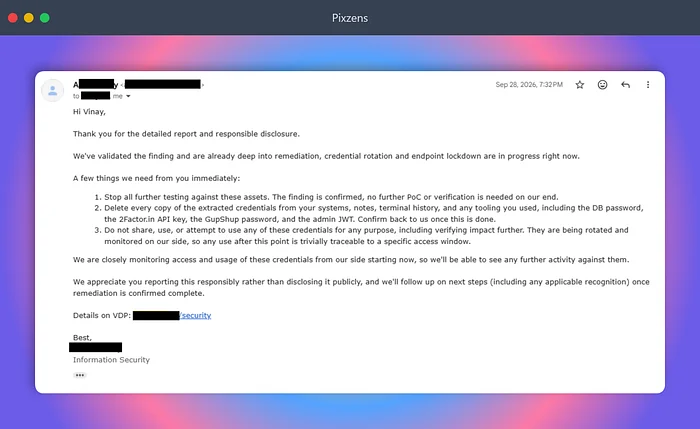
The image is captioned follow back email, the message that came back from the company's side.
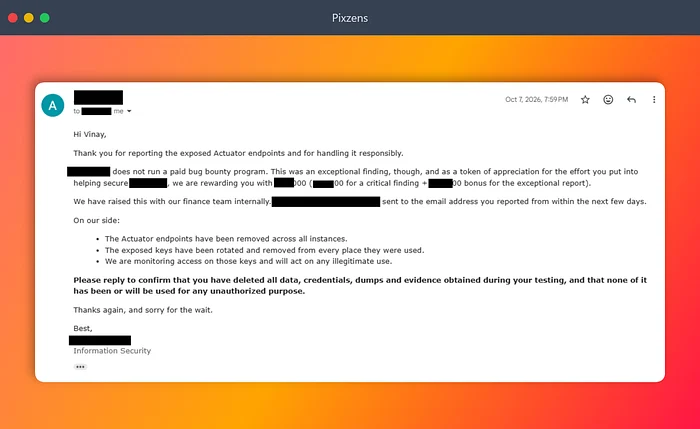
Then the company's security team wrote back. They had shut the exposed door on every server, changed every leaked key, and started watching for misuse. They also sent a five-digit bounty as a thank-you. That surprised the researcher and made every hour of research feel worth it.
Why this makes the researcher a better builder
The researcher is also a developer and builds products for a living.
The image is captioned reward, the payment the company sent as a thank-you.
Every bug found in someone else's system is a mistake the researcher now knows to watch for in their own: debug features left on, secrets sitting where they should not, and the attitude of we'll lock this down later. Having seen what those cost, the researcher reviews their own work very differently now.
The uncomfortable truth offered to anyone who builds software is that the biggest risk is probably not a genius hacker. It is a setting someone forgot.
Credit where it is due
The researcher ends by giving real credit to the company's security team. They took the report seriously, fixed it properly, and treated the researcher with respect throughout. Not every company does that. Good security is not about never making mistakes; it is about how you respond when someone points one out.
The one thing to remember: systems are built by humans, and humans make mistakes. Find the mistake, prove it, stop, and report it.
Glossary
- Bug bounty programme: a scheme where a company offers money to people who report security problems in its systems.
- Framework: a set of ready-made building blocks developers use to assemble a web application.
- Firewall: a filter between the internet and a company's systems that decides which traffic is allowed through.
- Production: the live version of a service that real customers use, as opposed to a test version.
- Debug feature: a built-in tool that helps developers inspect what an application is doing, meant for development and not for the public.
- Technology stack: the particular set of frameworks, servers and services a company's product is built from.
- Request: the message your browser sends to a server asking for something.
- Response: what the server sends back, such as a page, a file or an error message.
- Server: the computer on the other side that reads requests and sends responses.
- URL: a web address, the text in the address bar that says which page or resource you want.
- Signature: a recurring pattern in how addresses are built that hints at what sits behind them.
- Error page: what a server shows when it refuses a request, for example a page saying you are not allowed to view this.
- Memory: the working space a running program keeps its current information in.
- Snapshot: a copy of that working space taken at one moment.
- Database: the organised store where a company keeps its records.
- Key (credential): a secret string that proves to a system you are allowed in.
- Login code: the short number a service sends to your phone so you can prove it is really you, usually usable once.
- Long-lived admin pass: a credential for an administrator account that does not expire quickly.
- Responsible disclosure: telling the owner of a system about a problem privately and giving them time to fix it, rather than using it or publishing it.
- Account takeover: gaining access to someone else's account and acting as them.
- Bounty: the money a company pays as a thank-you for a valid security report.



