I Always Feel Like Somebody’s W̶a̶t̶c̶h̶i̶n̶g̶ Listening to Me
An unauthenticated attacker could connect to the camera's audio stream endpoint and listen to live audio without any credentials. The device exposed the audio feed over HTTP, allowing anyone with network access to eavesdrop.

medium.com
Published on medium.com
If you can believe Amazon’s customer review system, I’m one of many people to have purchased an Amcrest IP2M-841B IP camera.
The full write-up lives on its author's site
It belongs to its author, so we link to it rather than copy it. The other two tabs are our own rewrites, checked against it.
Context
The target is the Amcrest IP2M-841B, a consumer IP camera sold through Amazon. Pulling apart the firmware shows the device is a rebranded Dahua camera, and Dahua is one of several OEMs whose hardware is resold under other brand names. The feature at the centre of the issue is the camera's audio stream: the device exposes an endpoint called videotalk that serves live audio over HTTP. The researcher found that this stream could be reached without authentication, so a camera connected directly to the internet becomes an open listening device for anyone who can reach it. The issue was assigned CVE-2019-3948.
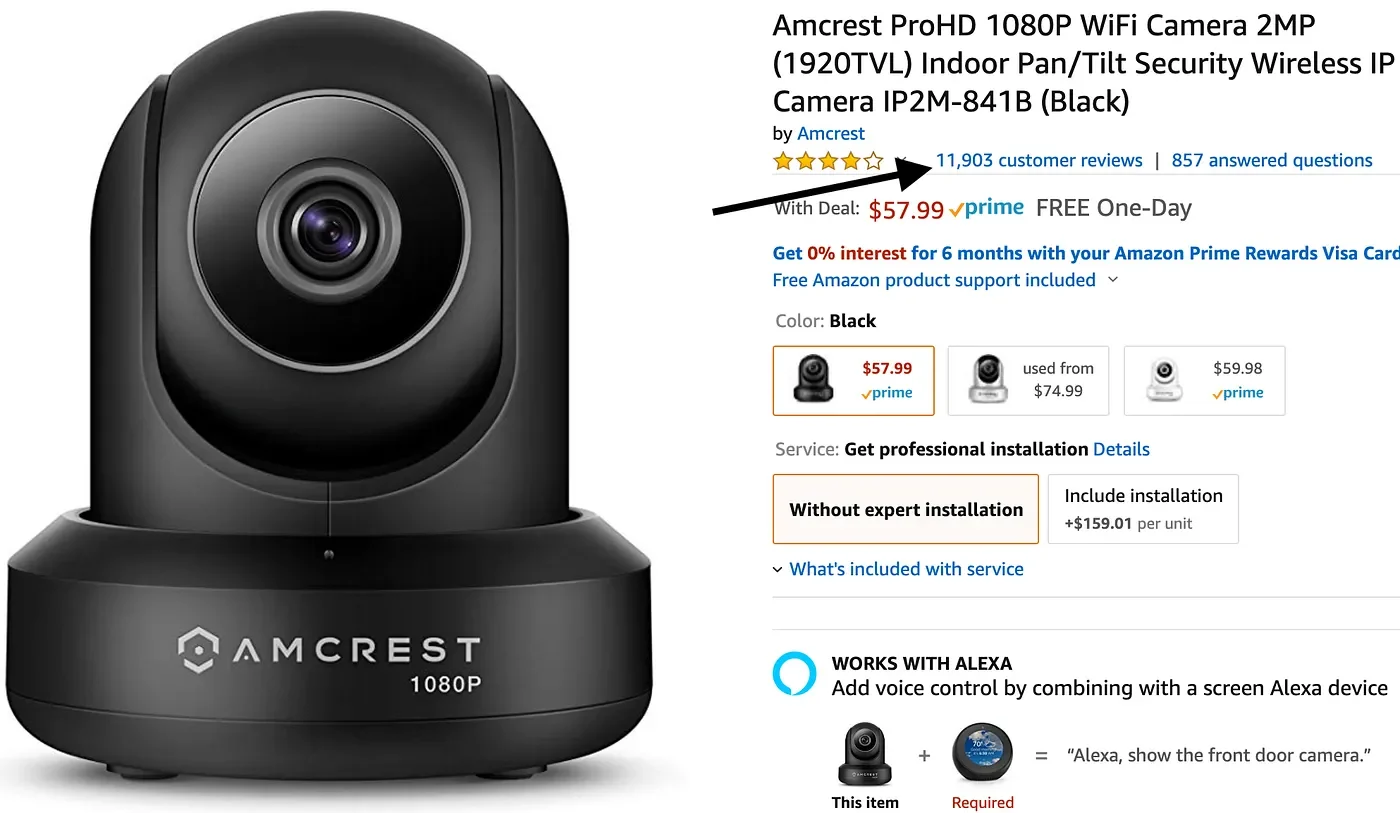
The screenshot shows the Amazon review page the researcher points to, with the tongue-in-cheek caption about the reviews being real.
Setup
No accounts, roles or special configuration are described. The researcher had the camera and its firmware, downloaded from Amcrest's firmware downloads page, and used a browser or a media player to reach the endpoint. The tools involved are:
- A browser or VLC, pointed at the videotalk endpoint.
- A script published in the researcher's proof-of-concept repository, which connects to the endpoint and extracts the audio.
- ffplay, to play the extracted audio.
- A Shodan search, used later to estimate how many devices are exposed.
The precondition for remote exploitation is that the camera is connected directly to the internet, so that the endpoint is reachable from outside.
Finding it
While examining the rebranded Dahua firmware, the researcher found that the IP2M-841B's audio could be listened to remotely over HTTP without authentication. The report notes that Dahua devices have had serious security issues disclosed in the past, but that several years had passed since anything significant, which is what made this find surprising.
Exploitation
Step 1: connect to the audio endpoint
Connecting to the stream is described as trivial: point a browser or a tool like VLC at the videotalk endpoint.
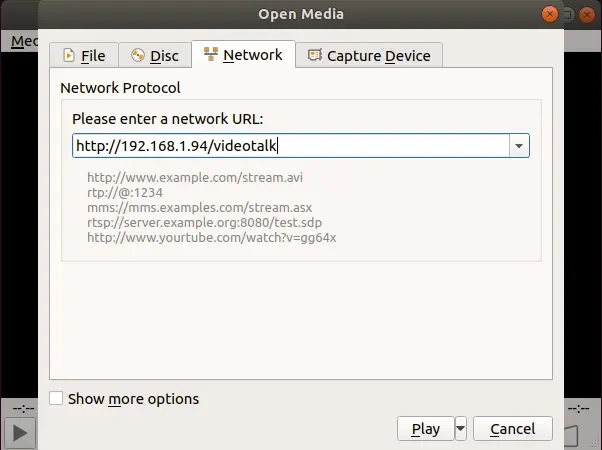
Step 2: observe the traffic
Once connected through VLC, nothing appears to happen on screen. Looking at the network traffic, however, shows that quite a bit is going on in the background.
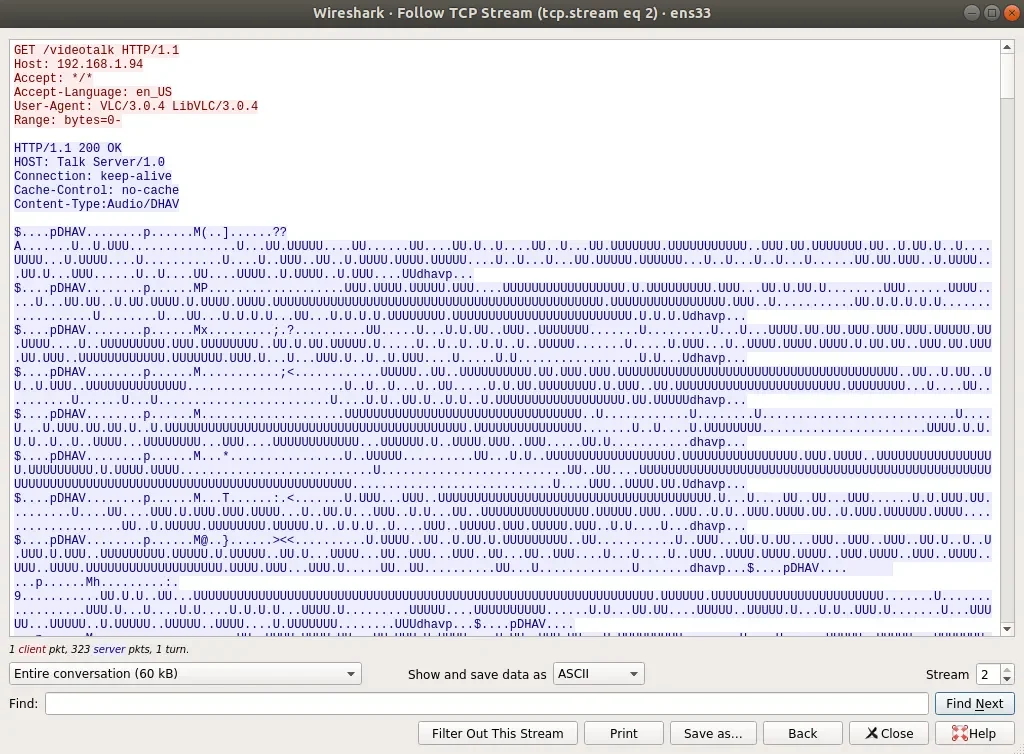
Step 3: handle the DHAV container
VLC does not understand the "DHAV" container the camera wraps the audio in, which is why playback appears to fail. The researcher wrote a script that connects to the endpoint and extracts the audio so it can be played with ffplay. The researcher published a script in a proof-of-concept repository that connects to the endpoint and extracts the audio.
Root cause
The report does not describe the code or configuration behind the endpoint. What it establishes is the observable behaviour: the videotalk audio stream is served over HTTP without authentication, so anyone who can reach the endpoint receives the audio. The audio is wrapped in a proprietary DHAV container, which is why generic players such as VLC do not play it directly. Why the endpoint lacks an authentication check is not stated.
Impact
If the camera is connected directly to the internet, it becomes anyone's listening device: a remote party can listen to the audio captured by the camera without authenticating. The exposure is not limited to Amcrest. Amcrest is one of many companies that rebrand Dahua products, and because each company keeps its devices at different patch levels or includes different features, it remains unclear how many vendors are affected by this particular issue. A Shodan search for devices matching html:"@WebVersion@" yields some non-Amcrest cameras that are vulnerable. Dahua was included in the disclosure timeline, so the researcher assumes patches exist or are forthcoming for those devices.
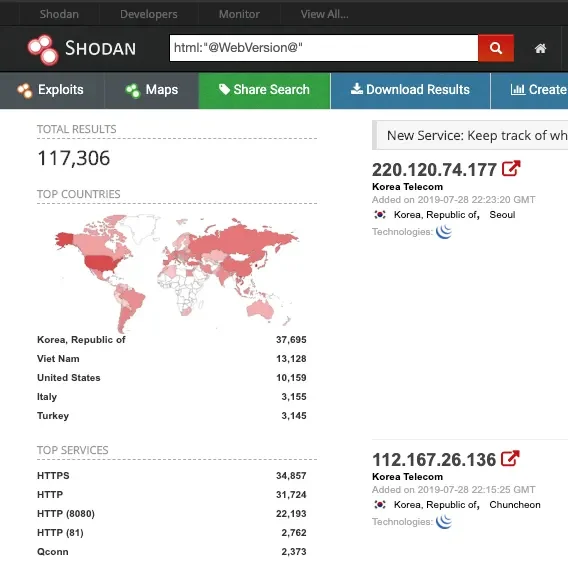
The screenshot shows Shodan results mixing OEM cameras and NVRs.
Fix
The report does not describe a specific code change or patch. Its guidance is to avoid exposing cameras to the internet and to be wary of IoT devices in general.

Variants to test
- Other rebranded Dahua devices. Request the videotalk endpoint on cameras from other vendors that resell Dahua hardware. A positive result is an audio stream returned without any authentication challenge.
- Dahua OEM devices found through Shodan. Use the same Shodan query,
html:"@WebVersion@", to find candidate devices and test the endpoint. A positive result is a device that serves the audio stream unauthenticated. - DHAV-wrapped streams on other endpoints. Where a player shows no output but traffic flows, capture the response and check whether it uses the DHAV container; extracting it with a script and playing it with ffplay confirms live audio is being served.
What happened, in plain words
A security researcher bought a home security camera, the Amcrest IP2M-841B, from Amazon. When they took apart the software that runs on it (the firmware), they found it was really a Dahua camera with a different brand name stuck on it. Dahua makes camera hardware that many companies resell under their own names.
The camera has a feature that lets you listen to live audio from it. The researcher found that this audio could be listened to over the internet by anyone, with no password and no login of any kind. If the camera is plugged directly into the internet, it effectively becomes an open microphone that any stranger can tune into. The problem was given the tracking number CVE-2019-3948.
This article walks through what the researcher did, step by step, and explains every technical idea along the way as if you have never touched security before. You only need to know how to use a browser and a computer.
The screenshot shows the Amazon review page the researcher points to, with the tongue-in-cheek caption about the reviews being real.
Some background ideas first
Before the steps, here are the concepts that come up, explained from zero.
- Firmware: the software built into a device like a camera, router or printer. It is not something you install like an app on a phone; it ships inside the device and controls everything the device does. Manufacturers publish firmware files so owners can update them, and anyone can download those files and inspect them.
- IP camera: a camera that connects to a network (your home network or the internet) and sends video and audio over that network, rather than storing everything on a memory card. You watch it through an app or a web page.
- HTTP: the language browsers and web servers use to talk to each other. When you type an address into a browser and a page appears, HTTP (or its encrypted cousin HTTPS) carried the request and the response. Many devices, not just websites, speak HTTP.
- Endpoint: a specific address on a device or server that does one particular job. Think of a building: the street address gets you to the building, but "the parcels desk on the second floor" is the endpoint that handles parcels. On a camera, one endpoint might serve video, another might serve audio, another might handle settings.
- Authentication: proving who you are, usually with a username and password. A page or endpoint that requires authentication asks you to log in first. One that does not require it will hand over whatever it serves to anybody who asks.
- Rebranded / OEM: OEM stands for original equipment manufacturer. One company builds the hardware and another company puts its own name, packaging and sometimes slightly different software on it. The same underlying camera can be sold under several brand names.
- CVE: a public catalogue number for a known security flaw, like a reference number for a bug. CVE-2019-3948 is the number assigned to this issue, so other people can look it up and refer to it unambiguously.
- Container (media): a wrapper format that holds audio or video data together with information about how to play it. Think of a parcel: the contents are the audio, the box and its labels are the container. If a player does not recognise the box, it cannot get at the contents even though they are there.
- VLC: a free media player that can open many kinds of streams and files, including network addresses.
- ffplay: a small command-line media player that comes with the FFmpeg tools, often used to play raw or unusual audio and video.
- Script: a short program written to automate a task. Here, a script connects to the camera and pulls out the audio.
- Shodan: a search engine for internet-connected devices. Instead of searching web pages, it searches for devices that are reachable from the internet, and you can search by clues in what those devices say about themselves.
- NVR: network video recorder, a box that records video from several cameras. It is a different kind of device from a single camera but can share the same underlying software.
The setup
The report does not describe any accounts, roles or special configuration. The researcher had the camera and its firmware, downloaded from Amcrest's firmware downloads page, and used a browser or a media player to reach the endpoint. The tools involved are:
- A browser or VLC, pointed at the videotalk endpoint.
- A script published in the researcher's proof-of-concept repository, which connects to the endpoint and extracts the audio.
- ffplay, to play the extracted audio.
- A Shodan search, used later to estimate how many devices are exposed.
The precondition for remote exploitation is that the camera is connected directly to the internet, so that the endpoint is reachable from outside. In other words, the camera has to be exposed to the public internet rather than sitting safely behind a home router that blocks incoming connections.
Finding it
While examining the rebranded Dahua firmware, the researcher found that the IP2M-841B's audio could be listened to remotely over HTTP without authentication. The report notes that Dahua devices have had serious security issues disclosed in the past, but that several years had passed since anything significant, which is what made this find surprising.
In plain terms: the researcher read through the software inside the camera, noticed a feature that serves live audio, and then checked whether that feature asked for a password. It did not.
Exploitation
Step 1: connect to the audio endpoint
Connecting to the stream is described as trivial: point a browser or a tool like VLC at the videotalk endpoint.
Why this step: the researcher already knew from the firmware that an endpoint called videotalk exists and serves audio. The quickest way to confirm it works without a login is simply to ask for it, the same way you would open a web page. No special tool is needed for this first check; a browser or VLC will do.
What is happening: your browser or VLC sends an HTTP request to the camera's address, asking for the videotalk endpoint. The report states the audio stream could be reached without authentication.
Step 2: observe the traffic
Once connected through VLC, nothing appears to happen on screen. Looking at the network traffic, however, shows that quite a bit is going on in the background.
Why this step: a media player that shows nothing could mean the stream is empty, or it could mean the player received data but could not make sense of it. To tell the difference, you look at the actual network traffic, the stream of data going back and forth between your computer and the camera. If data is flowing, the camera is sending something; the problem is then on the player's side, not the camera's.
What is happening: the network traffic view shows the camera continuously sending data in response to the request. So the endpoint is live and unauthenticated, and the audio is arriving. VLC simply cannot display or play it.
Step 3: handle the DHAV container
VLC does not understand the "DHAV" container the camera wraps the audio in, which is why playback appears to fail. The researcher wrote a script that connects to the endpoint and extracts the audio so it can be played with ffplay. The researcher published a script in a proof-of-concept repository that connects to the endpoint and extracts the audio.
Why this step: the audio is inside a wrapper called DHAV, a format specific to these cameras. VLC does not know how to open that wrapper, so it stays silent even though the data is arriving. Then ffplay, which can play the extracted audio, is used to listen.
What is happening, in order:
- The script connects to the camera's videotalk endpoint over HTTP, exactly as VLC did.
- It connects to the endpoint and extracts the audio from the DHAV wrapper.
- It extracts the audio so that it can be played by ffplay.
- ffplay plays the result, and the live audio from the camera can be heard.
The researcher's own note is that it is perhaps unnecessarily long, and that the audio plays towards the end, until the copyright strike takes effect.
Root cause
The report does not describe the code or configuration behind the endpoint. What it establishes is the observable behaviour: the videotalk audio stream is served over HTTP without authentication, so anyone who can reach the endpoint receives the audio. The audio is wrapped in a proprietary DHAV container, which is why generic players such as VLC do not play it directly. Why the endpoint lacks an authentication check is not stated.
In plain terms: the camera hands out its live audio to anyone who asks, without first checking who is asking. The DHAV wrapper is a separate detail: it explains why the audio does not simply play in an ordinary player, not why it is exposed.
Impact
If the camera is connected directly to the internet, it becomes anyone's listening device: a remote party can listen to the audio captured by the camera without authenticating. The exposure is not limited to Amcrest. Amcrest is one of many companies that rebrand Dahua products, and because each company keeps its devices at different patch levels or includes different features, it remains unclear how many vendors are affected by this particular issue. A Shodan search for devices matching html:"@WebVersion@" yields some non-Amcrest cameras that are vulnerable. Dahua was included in the disclosure timeline, so the researcher assumes patches exist or are forthcoming for those devices.
The screenshot shows Shodan results mixing OEM cameras and NVRs.
A few ideas in that paragraph, unpacked:
- Patch level: which version of the firmware a device is running. Two devices built from the same base can be on different versions, because each brand updates on its own schedule.
- Disclosure timeline: the agreed schedule for telling the manufacturer about a flaw and then telling the public, so the manufacturer has time to fix it before the details become widely known.
- The Shodan query:
html:"@WebVersion@"asks Shodan for devices whose web pages contain the text@WebVersion@. The query asks Shodan for devices whose web pages contain the text@WebVersion@. The results include cameras from other brands and NVRs, which is why the researcher says the problem is not limited to Amcrest.
Fix
Its guidance is to avoid exposing cameras to the internet and to be wary of IoT devices in general.
What the guidance means in practice: keep the camera on your home network behind your router, and do not set up your router to forward incoming connections to the camera. If the camera cannot be reached from the internet, a stranger on the internet cannot reach its audio endpoint either. The same caution applies to other internet-connected gadgets around the home.
Variants to test
- Other rebranded Dahua devices. Request the videotalk endpoint on cameras from other vendors that resell Dahua hardware. A positive result is an audio stream returned without any authentication challenge.
- Dahua OEM devices found through Shodan. Use the same Shodan query,
html:"@WebVersion@", to find candidate devices and test the endpoint. A positive result is a device that serves the audio stream unauthenticated. - DHAV-wrapped streams on other endpoints. Where a player shows no output but traffic flows, capture the response and check whether it uses the DHAV container; extracting it with a script and playing it with ffplay confirms live audio is being served.
Why these variants matter: the flaw lives in shared Dahua software, not in the Amcrest badge, so the same test is worth repeating on anything built from that base. The pattern to look for is always the same: a player that shows nothing while data is clearly flowing, followed by a check of whether the data is wrapped in DHAV and whether the endpoint asked for a login at all.
Glossary
- Authentication: proving who you are, usually with a username and password, before a device or service gives you access.
- Browser: the program you use to open web pages, such as Chrome, Firefox or Safari.
- Container (media): a wrapper format that holds audio or video data plus information on how to play it; DHAV is the container used here.
- CVE: a public catalogue number for a known security flaw, here CVE-2019-3948.
- DHAV: the proprietary container format the camera uses to wrap its audio, which VLC does not understand.
- Disclosure timeline: the agreed schedule for reporting a flaw to the manufacturer and later making it public.
- Endpoint: a specific address on a device or server that performs one particular job, such as serving audio.
- ffplay: a command-line media player that comes with the FFmpeg tools, used here to play the extracted audio.
- Firmware: the software built into a device that controls everything it does; manufacturers publish it for updates.
- HTTP: the language browsers and web servers use to exchange requests and responses; many devices speak it too.
- IP camera: a camera that connects to a network and sends video and audio over it.
- NVR: network video recorder, a device that records video from several cameras.
- OEM: original equipment manufacturer; a company that builds hardware which other companies resell under their own brand.
- Rebranded: hardware built by one company and sold under another company's name.
- Script: a short program written to automate a task, here connecting to the camera and extracting audio.
- Shodan: a search engine for internet-connected devices, searchable by clues in what those devices expose.
- Vulnerability: a weakness in software or configuration that lets someone do something the owner did not intend, such as listening to a camera without permission.



