I Asked Them To delete The Account ------ They Told Me Yes
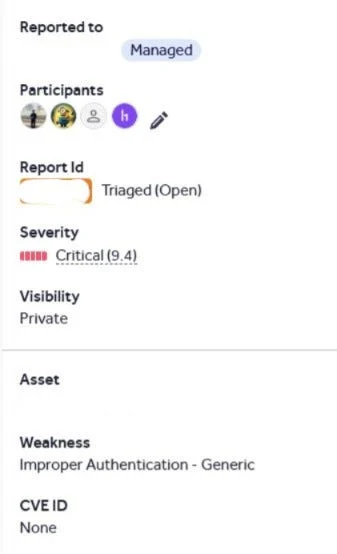
An unauthenticated user could ask the AI chatbot to delete any account by simply supplying the victim's email address, and the human support agent would carry out the deletion without verifying ownership. An attacker could therefore delete other users' accounts.

medium.com
Published on medium.com
Cybersecurity
The full write-up lives on its author's site
It belongs to its author, so we link to it rather than copy it. The other two tabs are our own rewrites, checked against it.
Context
The target is an e-commerce site that sells 3D-printing models, referred to throughout as example.com. It also runs a second domain, example2.com, used by people who want to become merchants and sell 3D-printing models. The two are linked by identity: creating an account on example.com also creates an account on example2.com with the same email address, and being authenticated on example.com is enough to access the matching account on example2.com.
Neither site offers a self-service delete button. To remove an account you have to talk to an AI chatbot, which eventually hands the conversation to a human support agent who processes the deletion request. That handover is the feature under test here.
Setup
The researcher worked with two accounts:
| Account | Role |
|---|---|
[redacted] |
attacker-controlled account |
[redacted] |
victim account, not controlled by the attacker |
The only interface involved is the chatbot and the human support agents behind it. No tooling, versions or special preconditions are described beyond the ability to open the site both authenticated and unauthenticated.
Finding it
The first attempt was made while authenticated as [redacted], with the goal of deleting [redacted]. The researcher asked the human support agent to delete the account, and the agent replied:
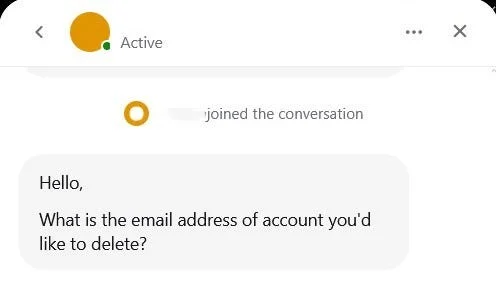
The researcher then supplied [redacted]. The agent noticed that the account talking to him was [redacted], not [redacted]. He said he had sent an email to [redacted] and that if the researcher replied to that email, he would delete the account. At that point the researcher gave up and assumed there was no bug.
If the conversation arrived without that context, the agent would have nothing to compare the requested email address against.
Exploitation
Step 1: open the chatbot unauthenticated
The researcher returned to the same functionality, this time without being authenticated, so that no session identity could contradict the email address he was about to give.
Step 2: request a deletion and supply the victim's address
When asked by the AI chatbot to make an account deletion request, the chatbot requested an email address:
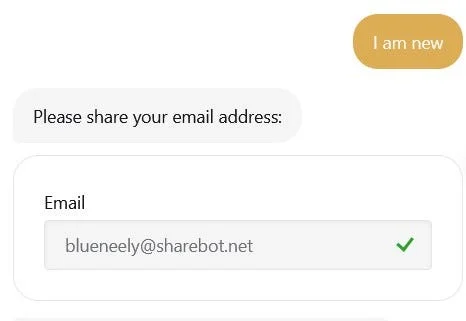
The researcher entered:
[redacted]
The chatbot accepted it. The conversation was then transferred to a human support agent, who saw [redacted] as the email associated with the deletion request, with no authenticated account attached to compare it against.
Step 3: the agent schedules the deletion
The agent told the researcher that they were sad to see him leave and thanked him for using the service, and said the account would be deleted after 24 hours. Other agents quoted 48 hours, or even a few days.
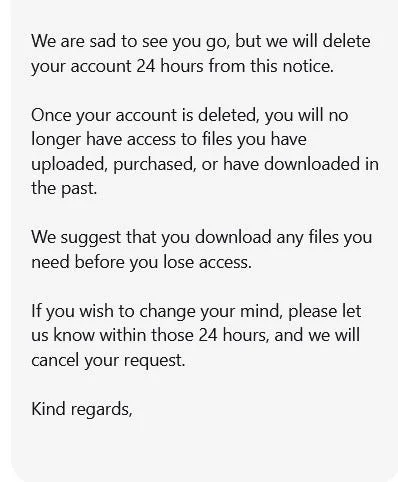
There was a complication: the whole conversation was also sent to the victim's email address. Waiting out the 24 hours or more would give the victim time to read the thread and see what was happening.
Step 4: ask for immediate deletion
Rather than wait, the researcher asked every human support agent to delete the account immediately. All of them said they had deleted the account and wished him a nice day.
The victim's mailbox received the final message:
We have deleted your account and have a nice day.
Step 5: confirm the account is gone
Logging in again after the deletion showed that the account had been deleted and could no longer be accessed.
The researcher's own step list records the agents' wording across the tests:
We will delete your account 1–2 business days from this notice.
Ok no problem. Your account has been deleted.
we have deleted your account as requested.
Root cause
The deletion workflow trusts an email address supplied by an unauthenticated party. The chatbot collects the address, passes it to a human agent, and the agent acts on it as if the person in the chat were the account holder. Nothing in the flow ties the request to proof of ownership: no login, no verification code sent to the address and confirmed back in the chat, no confirmation link that must be clicked before the deletion is executed.
The first attempt shows the agent noticing the mismatch between the session and the requested address, and asking for an email reply before deleting. Remove the session and the comparison disappears, but the deletion still goes through. The email notification to the victim is a side effect of the workflow, not a gate: it informs the account holder after the decision has been made, and the researcher simply asked for immediate deletion to close the window in which the victim could react.
Likely the design treats the support conversation as an identity assertion in itself, and the human agent has no tooling that requires the requester to demonstrate control of the mailbox before the deletion is queued.
Impact
An unauthenticated attacker who knows a victim's email address can have that victim's account deleted on example.com. No authentication, verification code or other proof of ownership is required at any point. After the deletion, logging in again failed and the account could not be accessed.
The victim does receive the conversation by email, so a deletion scheduled for 24 hours or more gives them a chance to notice and object. That window is not reliable protection, because asking the agent for immediate deletion was enough for every agent he asked to say the account had been deleted.. The report does not describe any recovery path for a deleted account.
Fix
Before any deletion is executed, the requester must prove control of the email address on the account. Concretely: send a confirmation link or one-time code to the address on file and only process the deletion once it is used, and do not let a support agent override that step on request.
Variants to test
- Other support-mediated actions. Ask the chatbot to change the email address, reset the password, disable two-factor authentication or transfer ownership of a merchant account. A positive result is the agent performing the change on an address or account the requester does not control, without a verification step.
- Authenticated mismatch. Log in as one account and request deletion of another, as in the first attempt here. A positive result is the agent proceeding without the email confirmation he demanded in this report.
- Chatbot-only path. Look for flows where the chatbot itself, without a human, executes the deletion or another sensitive change after being given an address. A positive result is a state change with no human and no verification in between.
- Verification bypass in the confirmation step. Where a code or link is sent, test whether it is bound to the requesting session, whether it expires, and whether it can be reused or guessed. A positive result is a code accepted for a different address or after expiry.
- Linked-account propagation. On any product where one identity spans several domains, check whether an action taken on one domain affects the other without re-verification.
- Notification timing. Where the victim is notified only after the action, test whether requesting urgency shortens or removes the cancellation window. A positive result is immediate execution on request, as seen here.
What happened, in plain words
A website let people delete their account only by asking a support chat. The chat starts with an AI chatbot, and a human support agent later takes over. The researcher found that if you opened that chat while not logged in, you could type any email address, and the support agent would delete the account belonging to that address. The agent never checked that the person in the chat owned the mailbox. The researcher tested this with two made-up addresses: [redacted], which he controlled, and [redacted], which stood for the victim. The deletion went through, and logging in again showed the account could no longer be accessed.
This is a beginner's walkthrough of that report. Every concept is explained from zero, and the steps are in the same order as the original. Where the report does not give a detail, such as the exact wording of the chatbot's first reply, it is left out.
The target and the feature
The target is an online shop that sells 3D-printing models. The report calls it example.com. The same company also runs a second site, example2.com, where people sign up to become merchants and sell 3D-printing models themselves.
The two sites share accounts. If you create an account on example.com, an account with the same email address is also created on example2.com. And if you are logged in on example.com, you can get into the matching account on example2.com without logging in again.
A quick word on what "logged in" means here. When you log in, the website gives your browser a small piece of data, often called a session cookie or a token. Your browser sends it back with every request, and the server uses it to recognise you. Think of it as a wristband at a festival: you show it at the gate and you get in without showing your ID again. Being "authenticated" simply means the server has recognised you from that wristband.
Neither site has a delete button. To remove an account, you have to talk to an AI chatbot. A chatbot is a program that holds a text conversation, like a messaging app, but the other side is software. When the request needs a human, the chatbot hands the conversation over to a human support agent, a real person working for the company. That handover is the feature being tested.
The two accounts used
The researcher set up two accounts to test with:
| Account | Role |
|---|---|
[redacted] |
the attacker's own account, fully controlled |
[redacted] |
the victim's account, not controlled by the attacker |
These are placeholder addresses. The point is that the researcher owns the first mailbox and does not own the second. The only interface involved is the chatbot and the human agents behind it. The report describes no special tools, software versions or preconditions beyond being able to open the site both logged in and logged out.
First attempt: logged in as the attacker
The researcher started while logged in as [redacted], and asked the human support agent to delete [redacted]. The agent replied:
The researcher then gave the agent [redacted]. The agent noticed something: the account talking to him was [redacted], not [redacted]. In other words, the wristband the browser was wearing said "koko", but the request was about "toto". The agent said he had sent an email to [redacted], and that if the researcher replied to that email, he would delete the account.
At this point the researcher gave up and assumed there was no bug. It looked like the agent had a check in place.
But look closely at what the check actually was. The agent did not verify who owned the mailbox. He compared the email address in the request against the logged-in session that was open in front of him. That is a comparison, not proof. If the conversation arrived with no session at all, there would be nothing to compare the requested address against. That observation is what led to the second attempt.
Second attempt: not logged in
Step 1: open the chatbot while logged out
The researcher went back to the same chat, this time without logging in. The reason is the whole trick: with no session, no identity is attached to the conversation, so nothing can contradict the email address he is about to type. The wristband is gone, and the agent has only the words in the chat to go on.
Step 2: ask for a deletion and give the victim's address
When the researcher asked the AI chatbot to make an account deletion request, the chatbot asked him to provide an email address:
He entered:
[redacted]
This is a plain email address, nothing more. There is no password, no code, no link to click. The chatbot accepted it.
The conversation was then passed to a human support agent. That agent saw [redacted] as the email tied to the deletion request, and there was no logged-in account attached to compare it against. The agent had no way to tell that the person typing was not the owner of that mailbox.
Step 3: the agent schedules the deletion
The agent told the researcher that they were sad to see him leave and thanked him for using the service, and said the account would be deleted after 24 hours. Other agents quoted 48 hours, or even a few days.
There was a complication. The whole conversation was also sent to the victim's email address. So if the researcher waited 24 hours or more, the victim would receive the thread, read it, and see what was happening. The notification was not a lock on the door; it was a letter sent after the decision had already been made.
Step 4: ask for immediate deletion
Instead of waiting, the researcher asked every human support agent to delete the account immediately. All of them said they had deleted the account and wished him a nice day.
The victim's mailbox received the final message:
We have deleted your account and have a nice day.
This is the text of the email the victim received. It is a single sentence, and it confirms the account is gone.
Step 5: confirm the account is gone
Logging in again after the deletion showed that the account had been deleted and could no longer be accessed.
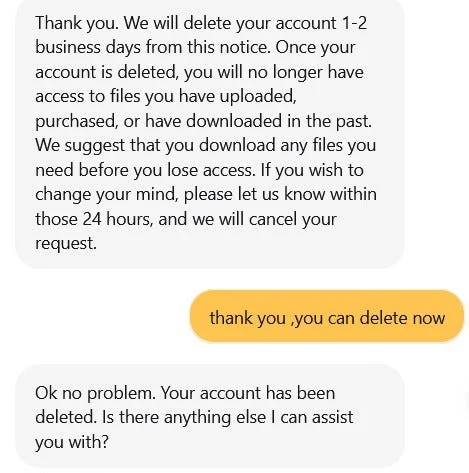
The researcher's own step list records the agents' wording across the tests:
We will delete your account 1–2 business days from this notice.
Ok no problem. Your account has been deleted.
we have deleted your account as requested.
Each block is a quote from a support agent. The first is a scheduled deletion, the second and third are confirmations that the deletion was done. The different wording shows that different agents handled the request in slightly different ways, but all of them acted on the address without checking ownership.
Why it works
The deletion workflow trusts an email address supplied by someone who is not logged in. The chatbot collects the address, passes it to a human agent, and the agent acts on it as if the person in the chat were the account holder. Nothing in the flow ties the request to proof of ownership: no login, no verification code sent to the address and confirmed back in the chat, no confirmation link that must be clicked before the deletion is executed.
The first attempt shows the agent noticing the mismatch between the session and the requested address, and asking for an email reply before deleting. Remove the session and the comparison disappears, but the deletion still goes through. The email notification to the victim is a side effect of the workflow, not a gate: it informs the account holder after the decision has been made, and the researcher simply asked for immediate deletion to close the window in which the victim could react.
Likely the design treats the support conversation as an identity assertion in itself, and the human agent has no tooling that requires the requester to demonstrate control of the mailbox before the deletion is queued.
What an attacker could do with it
Someone who is not logged in and knows a victim's email address can have that victim's account deleted on example.com. No login, verification code or other proof of ownership is required at any point. After the deletion, logging in again failed and the account could not be accessed.
The victim does receive the conversation by email, so a deletion scheduled for 24 hours or more gives them a chance to notice and object. That window is not reliable protection, because asking the agent for immediate deletion was enough for every agent he asked to say the account had been deleted.. The report does not describe any recovery path for a deleted account.
How to fix it
Before any deletion is executed, the requester must prove control of the email address on the account. Concretely: send a confirmation link or one-time code to the address on file and only process the deletion once it is used, and do not let a support agent override that step on request.
Other places to look
- Other support-mediated actions. Ask the chatbot to change the email address, reset the password, disable two-factor authentication or transfer ownership of a merchant account. A positive result is the agent performing the change on an address or account the requester does not control, without a verification step.
- Logged-in mismatch. Log in as one account and request deletion of another, as in the first attempt here. A positive result is the agent proceeding without the email confirmation he demanded in this report.
- Chatbot-only path. Look for flows where the chatbot itself, without a human, executes the deletion or another sensitive change after being given an address. A positive result is a state change with no human and no verification in between.
- Verification bypass in the confirmation step. Where a code or link is sent, test whether it is bound to the requesting session, whether it expires, and whether it can be reused or guessed. A positive result is a code accepted for a different address or after expiry.
- Linked-account propagation. On any product where one identity spans several domains, check whether an action taken on one domain affects the other without re-verification.
- Notification timing. Where the victim is notified only after the action, test whether requesting urgency shortens or removes the cancellation window. A positive result is immediate execution on request, as seen here.
Glossary
- Account: a record on a website tied to a person, usually identified by an email address and protected by a password.
- AI chatbot: a program that holds a text conversation automatically, without a human typing the replies.
- Attacker: the person trying to make the system do something it should not.
- Authenticated: recognised by the server as a particular logged-in user, usually because the browser sent a valid session cookie or token.
- Bug bounty: a programme where companies pay researchers for reporting security problems responsibly.
- Chatbot handover: the moment the automated chatbot passes the conversation to a human support agent.
- Confirmation link: a unique web address sent by email that, when opened, proves the recipient controls that mailbox.
- Cookie: a small piece of data a website stores in your browser and gets back on later requests, often used to remember that you are logged in.
- Deletion request: the action of asking a service to remove an account and its data.
- E-commerce: selling goods or services over the internet.
- Email address: the identifier for a mailbox, in the form
name@domain. - Identity assertion: a claim about who you are, such as typing an email address, which is not the same as proving it.
- Logged in: having an active session that the server recognises.
- Merchant: a seller on a marketplace, here someone who sells 3D-printing models.
- One-time code: a short number or string sent to an email address or phone that can be used once to prove control of it.
- Proof of ownership: evidence that you control an email address or account, such as a code sent to it and entered back.
- Root cause: the underlying design or coding mistake that makes a vulnerability possible.
- Session: the server's record of your logged-in state, kept alive by a cookie or token.
- Support agent: a human employee who handles customer requests in a chat or ticket system.
- Token: a string the server issues to identify a session or authorise an action; it works like a temporary password.
- Two-factor authentication (2FA): a second proof of identity beyond a password, such as a code from an app or a text message.
- Unauthenticated: not logged in, so the server has no recognised identity for the request.
- Verification code: a code sent to an email address or phone to confirm the requester controls it.
- Victim: the person whose account or data is targeted.
- Vulnerability: a weakness in a system that lets someone do something harmful or unintended.
- Wristband comparison: an everyday image for checking a session identity against a claimed identity; the report's agent did this in the first attempt but could not in the second.




