I Bypassed Email Verification in One Request
The profile update API accepted changes to email and phone fields even though the UI did not allow editing them, and it marked the new values as verified without any confirmation. An attacker could change their verified email and phone to arbitrary values, potentially taking over the account or bypassing verification.

medium.com
Published on medium.com
Cybersecurity
The full write-up lives on its author's site
It belongs to its author, so we link to it rather than copy it. The other two tabs are our own rewrites, checked against it.
Context
The target was a well known online store, referred to throughout as REDACTED. The feature under examination was account profile management: users could view their personal information, update their name and manage their account from the account settings page.
The profile held a first name, a last name, a phone number and an email address. During registration the platform required email verification once, and the verified state was shown in the interface as a green verified badge.
Setup
The researcher, Parth Narula, used an account of his own. His email on the account was [redacted], verified at registration, and the account also had a phone number. The only tool mentioned is Burp Suite, used to intercept the profile update request. No versions, roles or other preconditions are given.
Finding it
The profile interface showed all four fields, but only first name and last name were editable. Email and phone were visible and locked down, each carrying the green verified badge.
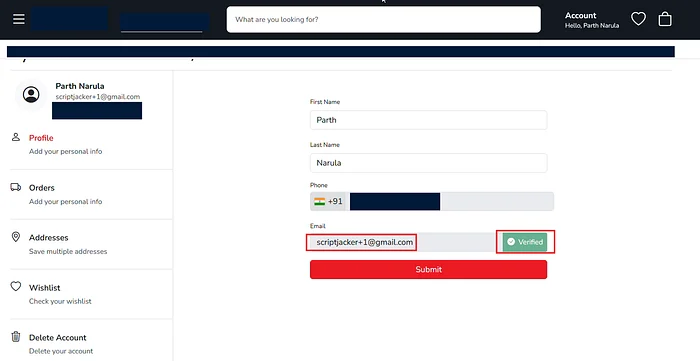
On the surface this looked like a deliberate decision: email and phone were treated as sensitive identity attributes and the edit capability was removed from the user interface. The researcher's view was that most users would stop there and assume the protection was real.
Exploitation
Step 1: intercept the profile update
With Burp Suite running, he edited his first name and clicked submit. The application sent a PATCH request to the backend.
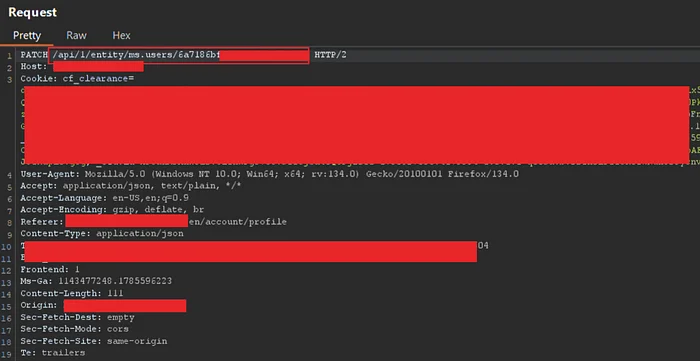
PATCH /api/1/entity/ms.users/6a7.......3e9Host: REDACTEDContent-Type: application/json{ "data": { "first_name": "Parth", "last_name": "Narula", "phone": "+91..........", "email": "[redacted]" }}
The important observation is in the body. Although the UI only allowed the name to be edited, the request still carried the phone and email fields. The frontend was sending the whole profile object back to the server on every update, and the server was accepting and processing it.
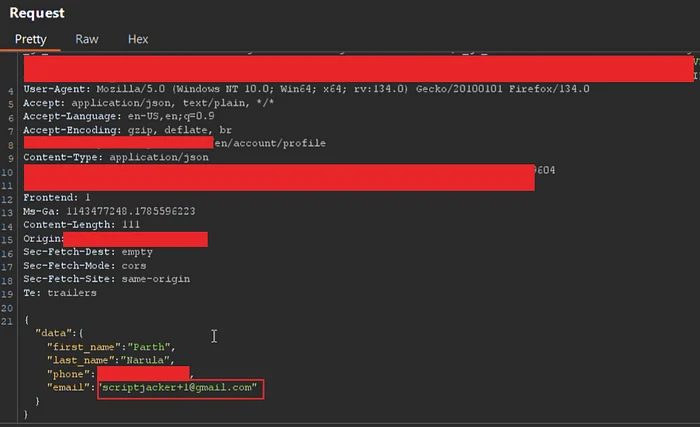
That was the first clue: the backend was not receiving only name changes, it was receiving the entire profile object every time.
Step 2: change the fields the UI does not allow
He took the exact same request and modified only the email field, from [redacted] to parthnarula@REDACTED. Everything else stayed identical.
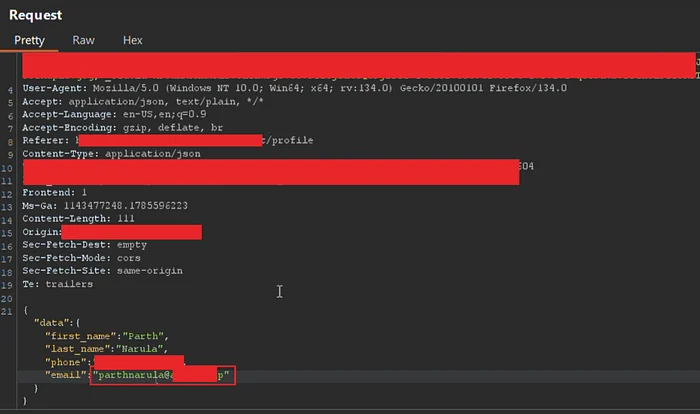
PATCH /api/1/entity/ms.users/6a71.......3e9Host: REDACTEDContent-Type: application/json{ "data": { "first_name": "Parth", "last_name": "Narula", "phone": "+91..........", "email": "parthnarula@REDACTED" }}
Step 3: read the response
The server answered with HTTP/2 200 OK and the following body:
{ "fileBaseUrl": "https://REDACTED", "data": {}, "messages": [ { "name": "ms.entity.users.edit", "level": "success" } ]}
The update was reported as successful. There was no error, no challenge, no verification link sent to the new address and no OTP sent to the phone number. The server simply processed the update and returned a success message.
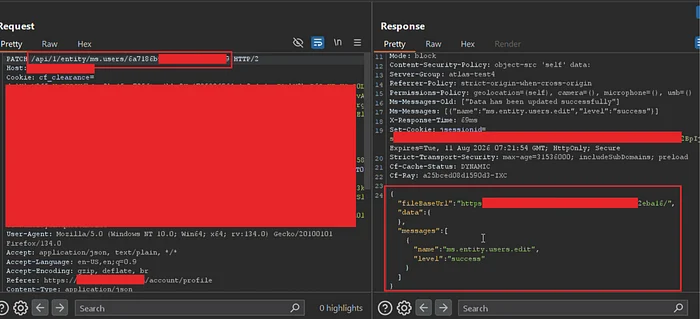
The backend knew the email address and the phone number had changed, yet it treated both as instantly verified without any proof that the new contact details belonged to the account holder.
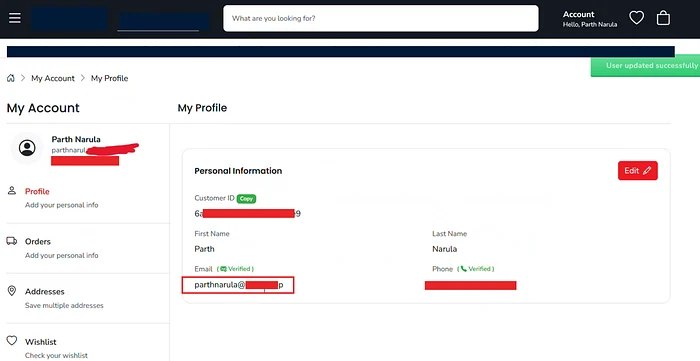
Step 4: confirm in the browser
To rule out a misleading response, he returned to the browser and refreshed the profile page. The email now displayed parthnarula@REDACTED, and the verified badge was still there, green and glowing. The platform was presenting the new address, to him and to any other system relying on that data, as fully verified and trustworthy.
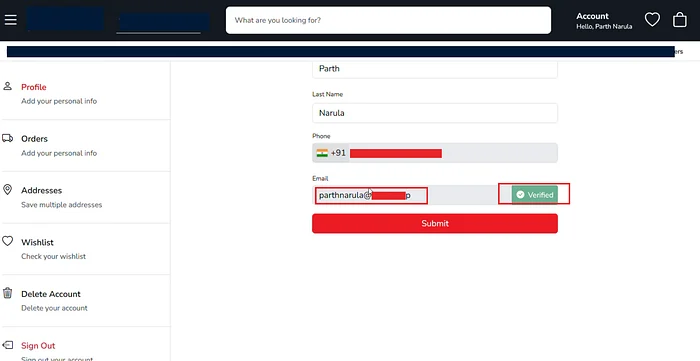
Root cause
The application relied on client side restrictions to protect sensitive fields. The frontend hid the edit capability for email and phone, but the backend never enforced the same rule, so the values sent in the PATCH body were accepted and written. This is the mass assignment pattern: the server binds fields from the request body that the interface never intended the user to control.
On top of that, the update path did not trigger any verification process for the changed contact details. The new values inherited the verified status of the old ones, which is why the badge remained after the change. The restrictions, a non-editable form field and the verified badge, existed only in the browser and had no counterpart on the server.
Impact
With one request, an authenticated user could set the account's email address and phone number to arbitrary values, with no confirmation link and no OTP, and the new details were immediately marked as verified. The researcher describes this as a clear and critical issue. Any other system that trusted this verified flag would be told that the new, unproven contact details were trustworthy. The report does not describe any further exploitation, such as account recovery or takeover, and does not state how the platform or its bug bounty programme rated the finding.
Fix
The report does not say what the platform changed. The lesson it draws is that the frontend must never be trusted to enforce security rules: The lesson it draws is that the frontend must never be trusted to enforce security rules.
Variants to test
- Intercept any profile or settings update and inspect the full request body. A positive result is a body containing fields the UI does not let you edit, such as email, phone, role or account status.
- Modify one of those hidden fields and resend. A positive result is a success response and the changed value visible after a page refresh.
- Change the email to an address you control and watch for a verification message. A positive result is the absence of any confirmation link or OTP combined with the value being accepted.
- Check whether the verified badge or flag survives the change. A positive result is the new, unproven value still being displayed as verified.
- Try the same body manipulation on registration and account recovery endpoints, where contact details are also set. A positive result is the same silent acceptance of unverified values.
What happened, in plain words
A security researcher named Parth Narula was looking at the profile page of an online store, referred to in his write-up as REDACTED. A profile page is the part of a website where you see and change your own account details: your name, your email address, your phone number. The store let people edit their first and last name there, but the email and phone fields were greyed out, not editable, each with a green badge next to it saying the detail was verified.
That looks safe. But the researcher knew a basic rule of web security: what you see in your browser is only one half of a website. The other half is a program on a server, a computer somewhere else that stores your data. Your browser and that server talk to each other by sending messages. If the browser is the only thing stopping you from changing your email, then anyone who can send messages to the server directly can change it too.
That is exactly what he did. He used a tool that lets you watch and edit the messages your browser sends. He found that when he saved a new first name, the browser was quietly sending his email and phone number along with it. He changed the email in that message to a different address and sent it. The server accepted it, said success, and the profile page then showed the new email with the green verified badge still on it. No confirmation email, no code sent to the phone, no proof at all that the new address belonged to him.

The rest of this article walks through the same steps he did, explaining each idea from scratch.
The target and the feature
The target was a well known online store. The feature under examination was account profile management: users could view their personal information, update their name and manage their account from the account settings page.
The profile showed four pieces of information:
- first name
- last name
- phone number
- email address
During registration the platform required email verification once. Verification means proving the address is really yours, usually by clicking a link sent to that address. The verified state was shown in the interface as a green verified badge.
Setup
The researcher used an account of his own. His email on the account was [redacted], verified at registration, and the account also had a phone number. The only tool mentioned is Burp Suite, used to intercept the profile update request. No versions, roles or other preconditions are given.
What Burp Suite is
When your browser loads a page or saves a form, it sends a message to a server and gets one back. Normally you never see these messages. Burp Suite is a program that sits between your browser and the server, like a postal worker who opens every letter, shows it to you, lets you rewrite it, and then delivers it. Security testers use it to see exactly what the browser is really sending, which is often more than the page makes obvious.
Finding it
The profile interface showed all four fields, but only first name and last name were editable. Email and phone were visible and locked down, each carrying the green verified badge.
On the surface this looked like a deliberate decision: email and phone were treated as sensitive identity attributes and the edit capability was removed from the user interface. The researcher's view was that most users would stop there and assume the protection was real.
Why does that matter? Because a locked field in a web page is only a visual instruction to your browser. It tells the browser "do not let the person type here". It does not tell the server anything. If the server has no rule of its own, then the lock is decoration.
Exploitation
Step 1: intercept the profile update
With Burp Suite running, he edited his first name and clicked submit. The application sent a PATCH request to the backend.
PATCH /api/1/entity/ms.users/6a7.......3e9Host: REDACTEDContent-Type: application/json{ "data": { "first_name": "Parth", "last_name": "Narula", "phone": "+91..........", "email": "[redacted]" }}
Line by line:
PATCH /api/1/entity/ms.users/6a7.......3e9is the request line.PATCHis the type of action being asked for; in web APIs, PATCH conventionally means "change part of an existing record"./api/1/entity/ms.users/6a7.......3e9is the address of the record being changed.apistands for application programming interface: a set of addresses a program (here, the browser) uses to talk to the server, as opposed to the human-facing web pages.ms.userslooks like the name of the users table or collection, and the long string after it identifies one particular user record. The dots in the middle stand for characters the researcher hid.Host: REDACTEDnames the website the request is going to. The real name was removed from the write-up.Content-Type: application/jsontells the server how to read the body that follows. JSON is a simple text format for structured data, made of names and values in curly braces.- The body,
{ "data": { ... } }, is the actual information being sent. Insidedatathere are four named values:first_name,last_name,phoneandemail.
The important observation is in the body. Although the UI only allowed the name to be edited, the request still carried the phone and email fields. The frontend was sending the whole profile object back to the server on every update, and the server was accepting and processing it.
That was the first clue: the backend was not receiving only name changes, it was receiving the entire profile object every time. The frontend is the part of the site that runs in your browser; the backend is the part that runs on the server. The browser was volunteering information the page had told the user they could not touch.
Step 2: change the fields the UI does not allow
He took the exact same request and modified only the email field, from [redacted] to parthnarula@REDACTED. Everything else stayed identical.
PATCH /api/1/entity/ms.users/6a71.......3e9Host: REDACTEDContent-Type: application/json{ "data": { "first_name": "Parth", "last_name": "Narula", "phone": "+91..........", "email": "parthnarula@REDACTED" }}
This is the same request as before with one value swapped. The reason for changing only one thing is discipline: if you change several things at once and something happens, you cannot tell which change caused it. By keeping the name and phone exactly as they were, he could be sure that any effect came from the email.
Step 3: read the response
The server answered with HTTP/2 200 OK and the following body:
{ "fileBaseUrl": "https://REDACTED", "data": {}, "messages": [ { "name": "ms.entity.users.edit", "level": "success" } ]}
Line by line:
HTTP/2 200 OKis the status line of the reply. HTTP is the language browsers and servers use to exchange requests and responses; HTTP/2 is a version of it.200 OKis the standard code meaning "the request worked"."fileBaseUrl": "https://REDACTED"is a setting the server sends back, an address used for files. It is not part of the attack."data": {}is an empty object, meaning no extra data came back with the reply."messages"is a list of notes for the interface. The single note has the namems.entity.users.editand the levelsuccess, which is the server telling the page "the user record was edited, and it went fine".
The update was reported as successful. There was no error, no challenge, no verification link sent to the new address and no OTP sent to the phone number. The server simply processed the update and returned a success message.
An OTP is a one-time password: a short code sent to your phone or email that you must type back to prove you control it. None was requested.
The backend knew the email address and the phone number had changed, yet it treated both as instantly verified without any proof that the new contact details belonged to the account holder.
Step 4: confirm in the browser
To rule out a misleading response, he returned to the browser and refreshed the profile page. A success message alone proves little; the real question is whether the change was actually saved. Refreshing forces the browser to ask the server for the current data again, so what you see afterwards is what the server really holds.
The email now displayed parthnarula@REDACTED, and the verified badge was still there, green and glowing. The platform was presenting the new address, to him and to any other system relying on that data, as fully verified and trustworthy.
Root cause
The application relied on client side restrictions to protect sensitive fields. The frontend hid the edit capability for email and phone, but the backend never enforced the same rule, so the values sent in the PATCH body were accepted and written. This is the mass assignment pattern: the server binds fields from the request body that the interface never intended the user to control.
A useful comparison: a form on a clipboard that says "name only" is not a security control. If the clerk behind the desk accepts whatever is written on the paper, then anyone can write anything. The rule has to exist at the desk, not on the paper.
On top of that, the update path did not trigger any verification process for the changed contact details. The new values inherited the verified status of the old ones, which is why the badge remained after the change. The restrictions, a non-editable form field and the verified badge, existed only in the browser and had no counterpart on the server.
Impact
With one request, an authenticated user could set the account's email address and phone number to arbitrary values, with no confirmation link and no OTP, and the new details were immediately marked as verified. The researcher describes this as a clear and critical issue. Any other system that trusted this verified flag would be told that the new, unproven contact details were trustworthy. The report does not describe any further exploitation, such as account recovery or takeover, and does not state how the platform or its bug bounty programme rated the finding.
Fix
The report does not say what the platform changed. The lesson it draws is that the frontend must never be trusted to enforce security rules: The lesson it draws is that the frontend must never be trusted to enforce security rules.
Variants to test
- Intercept any profile or settings update and inspect the full request body. A positive result is a body containing fields the UI does not let you edit, such as email, phone, role or account status.
- Modify one of those hidden fields and resend. A positive result is a success response and the changed value visible after a page refresh.
- Change the email to an address you control and watch for a verification message. A positive result is the absence of any confirmation link or OTP combined with the value being accepted.
- Check whether the verified badge or flag survives the change. A positive result is the new, unproven value still being displayed as verified.
- Try the same body manipulation on registration and account recovery endpoints, where contact details are also set. A positive result is the same silent acceptance of unverified values.
Glossary
- API: a set of addresses and rules that programs use to talk to a server, separate from the pages people click on.
- Authenticated user: someone who has logged in, so the server knows which account they are using.
- Backend: the part of a website that runs on the server and stores and processes data.
- Burp Suite: a tool that sits between your browser and a server so you can read and edit the messages they exchange.
- Client side: anything that happens in your browser, on your own computer, and can therefore be changed by you.
- Content-Type: a line in a request that tells the server what format the body is in, such as JSON.
- Endpoint: one specific address on a server that accepts a particular kind of request.
- Frontend: the part of a website you see and interact with in your browser.
- HTTP: the language browsers and servers use to send requests and replies.
- HTTP/2: a newer version of HTTP.
- Impact: what an attacker could actually do with a weakness, and how bad it is.
- Intercept: to catch a message in transit so you can look at it or change it before it reaches its destination.
- JSON: a plain text format for structured data, using names and values inside curly braces.
- Mass assignment: a weakness where a server accepts and saves fields from a request that the interface never meant the user to set.
- OTP: a one-time password, a short code sent to your phone or email to prove you control it.
- PATCH: an HTTP request type meaning "change part of an existing record".
- Payload: the part of a request that carries the data you are sending.
- Profile management: the feature where a user views and changes their own account details.
- Request: a message your browser sends to a server asking it to do something.
- Response: the message a server sends back.
- Root cause: the underlying reason a weakness exists, as opposed to its visible symptom.
- Sensitive fields: data that should only be changed under strict conditions, such as email, phone, role or account status.
- Server: a computer elsewhere that stores a website's data and answers requests.
- Status code: a number in a response saying how the request went, such as 200 for success.
- Verification: proving that an email address or phone number really belongs to you, usually with a link or a code.
- Verified badge: a marker in the interface showing that a detail has passed verification.
- Vulnerability: a weakness in a system that someone could abuse.




