I Changed ₹500 to ₹1 — How I Found a Payment Logic Bug in a QR Code
The payment QR code contained a client-modifiable amount parameter, and the backend accepted a payment of ₹1 for an order worth ₹500 as successful. An attacker could pay an arbitrarily small amount and still have the order marked as paid.
 Published on cybertamarin.medium.com
Bug Bounty
The full write-up lives on its author's site
It belongs to its author, so we link to it rather than copy it. The other two tabs are our own rewrites, checked against it.
Context
The target was a payment workflow on a site the author refers to as target.com. The feature is a standard checkout: a customer adds an item to the cart, goes through checkout, and lands on a payment page. At that point the application generates a UPI QR code that carries the payment information, which the customer scans with a UPI application to pay.
Normally the QR code is just a convenient encoding of a payment request: the amount, the payee and the transaction reference. The customer scans it, the UPI app shows the amount, and the payment is made for the order value. The interesting question for a tester is what the application does with the payment confirmation afterwards, and whether it checks that the amount actually paid matches the amount owed.
Setup
The write-up does not describe any accounts, roles, tooling versions or preconditions beyond a normal shopping flow. The author added an item to the cart, proceeded through checkout and reached the payment page, where the application generated the UPI QR code. The only tool implied is a QR decoder to read the payload and a UPI application to make the payment. No special access, no authenticated role beyond a customer, and no version numbers are given.
Finding it
The QR code looked ordinary. The author extracted the payload and inspected the parameters. One parameter stood out:
am=500
am appeared to represent the payment amount, and the order was worth ₹500, so the value matched the order. That raised the obvious question: what happens if the amount is changed?
Exploitation
Step 1: Change the amount in the QR payload
The author modified the amount from:
am=500
to:
am=1
No exploit chain and no sophisticated payload: just the payment amount changed in the QR payload.
Step 2: Pay with the modified QR code
The modified QR code was used with a UPI application and a payment of ₹1 was made. The author expected the transaction to fail. Instead the payment went through, and the application reported the payment as successful.
Step 3: Observe the result
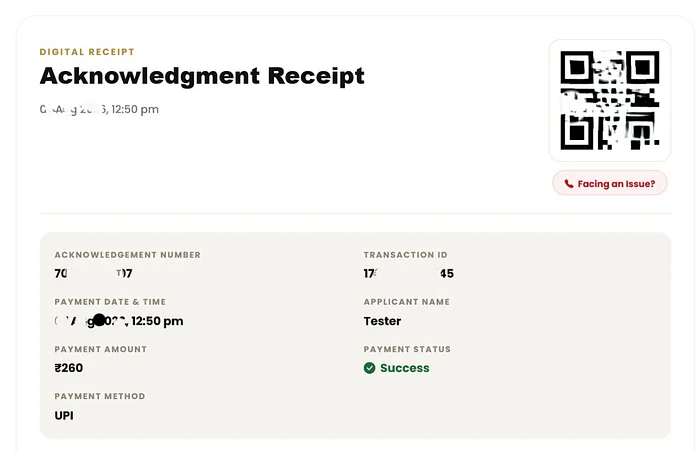
The image caption in the write-up says the receipt came back for ₹260, while the payment made was ₹1. The payment made was ₹1, and the application treated the transaction as a successful payment.
Root cause
The application accepted a payment whose amount did not match the order. The author's reading is that the backend was checking something along the lines of:
Payment received? ↓ YES ↓Mark order as paid
rather than enforcing a comparison between the expected amount and the paid amount:
Expected amount = ₹500Paid amount = ₹1 ↓ MISMATCH ↓ Reject payment
The core issue is trusting payment information that the client can influence. The QR code should not be the source of truth for the amount owed, because the server already knows the order value:
Order ID → ₹1,000
After receiving a payment confirmation, the backend should independently verify the transaction:
Order Amount: ₹1,000Gateway Amount: ₹1Result:❌ Amount mismatch❌ Order remains unpaid
Only when the values match should the order be completed:
Order Amount: ₹1,000Gateway Amount: ₹1,000Result:✓ Payment verified✓ Order marked as paid
The failure is one of design: a successful payment is not the same thing as the correct payment, and the application conflated the two.
Impact
If an attacker can modify the amount and the backend accepts the resulting payment without independently validating the expected amount, the attacker can potentially purchase goods or services for an artificially reduced price. The author frames this as a payment integrity failure rather than simple parameter tampering, because the manipulation happens before the payment and the backend accepts the consequence.
The write-up gives a generic illustration of the same pattern at a larger scale:
Actual Order Value: ₹1,000Modified QR:am=1Amount Paid:₹1Application:Payment Successful
The author frames the impact as potentially purchasing goods or services for an artificially reduced price. The report does not state how the program rated the issue, what bounty was paid, or how the vendor responded.
Fix
The most important fix is simple: never trust the payment amount supplied by the client. The backend should:
- Retrieve the expected amount directly from the database.
- Generate the payment transaction using that server-side amount.
- Associate the payment with a unique order/transaction ID.
- Verify the payment directly with the payment gateway.
- Compare the gateway-confirmed amount against the expected order amount.
- Reject transactions where the amounts don't match.
- Only mark the order as paid after successful server-side reconciliation.
Cryptographic signatures can also be used to protect payment payload integrity, but signatures should complement, not replace, server-side payment verification.
Variants to test
- Change the amount parameter in other payment QR or link payloads. A positive result is a payment accepted for less than the order value, with the order marked paid.
- Change the payee or transaction reference fields in the payload. A positive result is the backend accepting a payment that does not correspond to the intended recipient or order.
- Replay a QR payload from a cheaper order against a more expensive one. A positive result is the expensive order being marked paid on the strength of the cheaper payment.
- Pay the correct amount but tamper with the order ID in the confirmation. A positive result is the payment being credited to a different order than the one paid for.
- Test the same pattern on any client-supplied value the server later trusts: price, quantity, currency, discount. A positive result is the server acting on the client value without recomputing it from its own records.
The general lesson from the write-up: if the client can change it, test whether the server actually cares. A single parameter like am=500 looked harmless, but changing it to am=1 exposed the flaw. One parameter and one question, does the backend validate this, is sometimes enough.
What happened, in plain words
A security researcher was testing a shopping website (the write-up calls it target.com) and found a bug in the way it handled payments. The site let customers pay with a UPI QR code, which is a square barcode you scan with a phone payment app. The QR code contained the amount to pay, and the researcher noticed that the amount was written in a way that could be edited. They changed ₹500 to ₹1, paid ₹1, and the website still reported the payment as successful. That is the whole bug: the website believed the amount that came from the customer's side instead of checking the amount against its own records.
This article walks through the same story step by step, explaining every term as it appears. You only need to know how to use a browser and a computer to follow it.
The QR Code Looked Normal. The Payment Logic Wasn't.
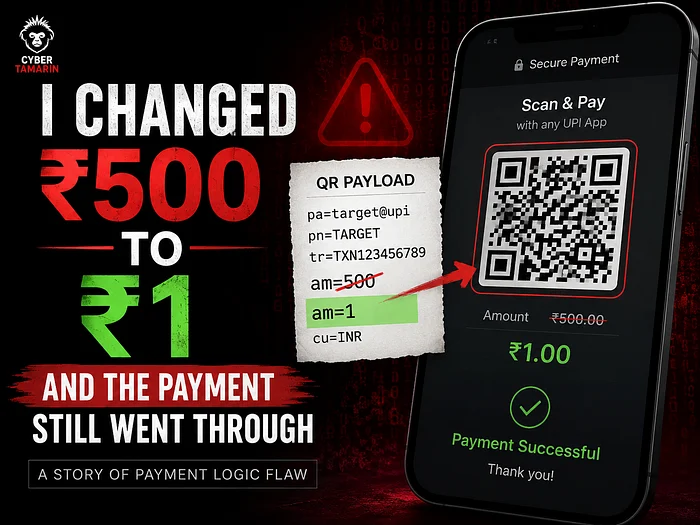
image by chatgpt
While testing target.com, the researcher came across a payment workflow. A workflow here just means the sequence of pages a customer goes through: cart, checkout, payment. Nothing unusual so far.
Everything initially looked normal. The researcher added an item to the cart, proceeded through checkout, and reached the payment page. The application generated a UPI QR code containing the payment information.
A quick word on what that means. UPI (Unified Payments Interface) is a payment system used in India. A QR code is a square pattern of black and white blocks that a camera can read and turn back into text. When you scan a UPI QR code with a payment app, the app reads the text inside it and shows you the payee and the amount so you can approve the payment. Think of the QR code as a printed note that says "pay this person this much money": the app reads the note and acts on it.
At this point, the researcher started wondering:
What exactly is inside this QR code?
That is a good habit in security testing. Anything your browser or phone receives can usually be read, and anything that can be read can often be changed. The question is whether the other side (the website's server) notices the change.
A server is the computer somewhere in a data centre that runs the website. Your browser is the client: the program on your own machine. The client asks, the server answers. A useful everyday comparison: the client is the customer at a restaurant counter, the server is the kitchen. The customer can say anything, but the kitchen should decide what actually gets cooked.
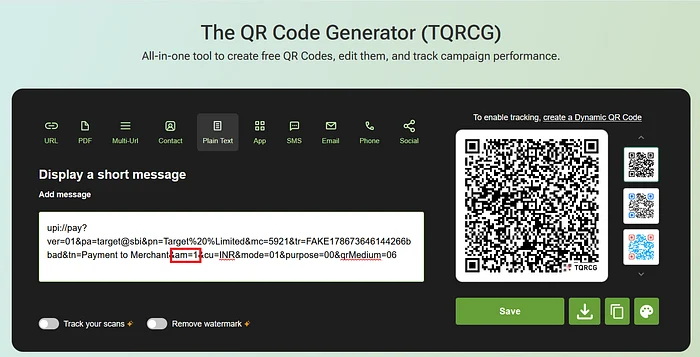
I extracted the QR payload and inspected the parameters. A payload is the actual content carried inside something, here the text encoded in the QR image. Parameters are the named pieces of that text, each written as a name, an equals sign and a value, like name=value. They are the same idea as the fields in a form: each field has a label and a value.
One parameter immediately caught the researcher's attention:
am=500
After each code block in this article, we will go through it in plain words.
amis the parameter name. The researcher guessed it stood for "amount".=separates the name from the value.500is the value, in rupees (₹).
am appeared to represent the payment amount. The order was worth ₹500, so this made sense: the QR code was asking for exactly the price of the order.
But then came the question every bug hunter eventually asks:
What happens if I change it?
Why ask that? Because the QR code is generated for the customer and then handled on the customer's side. If the amount lives in text that the customer's device can edit, then the customer can edit the amount. The only open question is whether the server, which knows the real price, checks the paid amount or just trusts whatever comes back.
The One-Character Test
The researcher modified the amount from:
am=500
to:
am=1
Line by line:
- The first block is the original parameter: amount equals 500 rupees.
- The second block is the edited parameter: amount equals 1 rupee.
- The only change is the value. The name
amstays the same, so the payment app still understands it as "amount".
Nothing complicated.
This is how the UPI QR looks in plain text.
No exploit chain. An exploit chain is a series of small weaknesses joined together, where each step makes the next one possible, like a chain of dominoes. Here there was no chain, no sophisticated payload (no cleverly crafted input designed to trick the software), just the payment amount changed.
I then used the modified QR code with a UPI application and made a payment of ₹1.
At this point, I expected the transaction to fail. That expectation is reasonable: a shop that is owed ₹500 should reject a ₹1 payment, or at least not treat it as payment in full.
Instead...
The payment went through.
The application reported the payment as successful.
After paying ₹1, I got the receipt for ₹260.
That was the moment the vulnerability became interesting. A vulnerability is a weakness in software that someone can use to make it behave in a way its owners did not intend. Here the unintended behaviour is: a ₹1 payment was reported as successful for a ₹500 order.
₹500 Order. ₹1 Payment.
The original order value was significantly higher than ₹1. Yet the application accepted the ₹1 transaction as a successful payment.
This suggested that the backend was checking something along the lines of:
Payment received? ↓ YES ↓Mark order as paid
What this diagram means, in plain words:
- The backend is the part of the website that runs on the server, out of the customer's reach. It is where the real decisions should be made.
- The backend asks one question: did a payment arrive?
- The arrow pointing down with
YESmeans: the answer was yes. - The second arrow means: because the answer was yes, the order is marked as paid.
Notice what is missing from that flow: any question about how much arrived. The backend checked that a payment happened, not that the right payment happened.
Instead of that, the backend should have been enforcing:
Expected amount = ₹500Paid amount = ₹1 ↓ MISMATCH ↓ Reject payment
Line by line:
Expected amount = ₹500: the price the server itself recorded for this order.Paid amount = ₹1: the amount that actually arrived from the payment.MISMATCH: the two values are not equal.Reject payment: the correct reaction when they differ. The order should not be marked paid.
That distinction is extremely important in payment systems. A payment being successful does not necessarily mean the correct payment was made. "Money arrived" and "the right amount of money arrived" are two different facts, and only the second one means the order is settled.
Why This Is Dangerous
At first glance, changing a QR parameter might look like a small client-side manipulation. Client-side means it happens on the customer's own device, in the browser or the payment app, where the customer has full control. It is easy to think: so what, it is only on my own phone.
It isn't, and here is why. The important question is what happens after the manipulation. If the server simply believes whatever the client sends, then a change made on the client can affect what the server records as paid.
If an attacker can modify the amount and the backend accepts the resulting payment without independently validating the expected amount, the attacker can potentially purchase goods or services for an artificially reduced price. Validating means checking a value against a trusted source, here the price stored in the shop's own database.
For example:
Actual Order Value: ₹1,000Modified QR:am=1Amount Paid:₹1Application:Payment Successful
Line by line:
Actual Order Value: ₹1,000: what the shop says the item costs.Modified QR:am=1: the QR code after the customer edited the amount parameter to 1.Amount Paid:₹1: the money that actually changed hands.Application:Payment Successful: the website's own verdict, which is wrong in the customer's favour.
That's no longer just parameter tampering. Parameter tampering means editing a value that is sent to a server, which on its own is harmless if the server ignores or rechecks the value. Here the server acted on the tampered value, so the author calls it a payment integrity failure: the record of what was paid no longer matches reality, and the shop relies on that record.
The Root Cause
The root cause is the underlying reason the bug exists, as opposed to the symptom you see. The core issue was trusting payment information that could be influenced by the client.
The QR code should not be treated as the source of truth for the amount owed. Source of truth means the authoritative record that everyone else is checked against. For a price, the source of truth must be the shop's database, not a note handed to the customer.
The server already knows:
Order ID → ₹1,000
Line by line:
Order IDis the unique identifier the shop gave this order, like a receipt number.- The arrow means: looking up that identifier in the shop's records gives the price.
₹1,000is the price the shop itself stored. The server does not need to ask the customer what the price is; it already has the answer.
Therefore, after receiving a payment confirmation, the backend should independently verify the transaction:
Order Amount: ₹1,000Gateway Amount: ₹1Result:❌ Amount mismatch❌ Order remains unpaid
Line by line:
Order Amount: ₹1,000: the price from the shop's own records.Gateway Amount: ₹1: the amount the payment gateway confirms was actually paid. A payment gateway is the service that actually moves the money between banks; it is the independent referee, and its confirmation is trustworthy in a way the client's word is not.Result:introduces the outcome of the comparison.❌ Amount mismatch: the two amounts differ.❌ Order remains unpaid: the correct consequence. The order is not marked paid.
Only when the values match should the application complete the order:
Order Amount: ₹1,000Gateway Amount: ₹1,000Result:✓ Payment verified✓ Order marked as paid
Line by line:
Order Amount: ₹1,000: the expected price.Gateway Amount: ₹1,000: the amount the gateway confirms was paid.Result:introduces the outcome.✓ Payment verified: the amounts agree, so the payment is genuine for this order.✓ Order marked as paid: only now does the order move forward.
The failure is one of design: a successful payment is not the same thing as the correct payment, and the application conflated the two.
What Should Be Fixed?
The most important fix is simple:
Never trust the payment amount supplied by the client.
The backend should:
- Retrieve the expected amount directly from the database. The database is the shop's own store of records; retrieving from it means the price comes from the shop, not from the customer.
- Generate the payment transaction using that server-side amount. Server-side means the work happens on the server, where the customer cannot edit it.
- Associate the payment with a unique order/transaction ID. This ties each payment to exactly one order, so a payment cannot be reused or credited to the wrong purchase.
- Verify the payment directly with the payment gateway. Ask the referee, not the customer.
- Compare the gateway-confirmed amount against the expected order amount. Two numbers, side by side.
- Reject transactions where the amounts don't match. If they differ, stop.
- Only mark the order as paid after successful server-side reconciliation. Reconciliation means matching up the shop's records with the gateway's records so both agree before anything is finalised.
Cryptographic signatures can also be used to protect payment payload integrity. A cryptographic signature is a mathematical stamp that proves a piece of data was produced by someone holding a secret key and has not been altered since. If the QR payload were signed by the server, an edited amount would no longer carry a valid stamp. But signatures should complement, not replace, server-side payment verification: a stamp proves the text was not changed, while the server-side check proves the right amount of money actually arrived. You want both.
The Takeaway
The lesson here is simple:
If the client can change it, test whether the server actually cares.
A single parameter like am=500 looked harmless, but changing it to am=1 exposed a serious payment logic flaw. Payment logic means the rules the software follows about money: what to charge, what counts as paid, and when to release the order.
You don't always need a complex exploit. Sometimes, one parameter and one question, does the backend validate this, is enough to find the bug.
Question the assumptions. That's where the interesting bugs hide.
Glossary
- Backend: the part of a website that runs on the server, out of the customer's reach, where the real decisions should be made.
- Client: the program on your own device, such as your browser or payment app, which sends requests to a server.
- Client-side manipulation: changing data on your own device, in the browser or app, where you have full control.
- Cryptographic signature: a mathematical stamp proving a piece of data came from the holder of a secret key and has not been altered.
- Database: the shop's own organised store of records, such as orders and prices.
- Exploit chain: a series of small weaknesses joined together, where each step enables the next.
- Gateway (payment gateway): the service that actually moves money between banks and can independently confirm what was paid.
- Order ID: the unique identifier a shop gives to one order, like a receipt number.
- Parameter: a named piece of data written as name=value, such as
am=500. - Parameter tampering: editing a value that is sent to a server, hoping the server acts on the edited value.
- Payload: the actual content carried inside something, here the text encoded in the QR image.
- Payment integrity failure: a situation where the record of what was paid no longer matches reality, and the shop relies on that record.
- Payment logic: the rules software follows about money: what to charge, what counts as paid, and when to release an order.
- QR code: a square pattern of black and white blocks that a camera can read and turn back into text.
- Reconciliation: matching the shop's records against the gateway's records so both agree before an order is finalised.
- Root cause: the underlying reason a bug exists, as opposed to the symptom you observe.
- Server: the computer in a data centre that runs the website and answers requests from clients.
- Server-side: work that happens on the server, where the customer cannot edit it.
- Source of truth: the authoritative record that everything else is checked against; for a price, the shop's database.
- UPI: Unified Payments Interface, a payment system used in India, where a payment app scans a QR code to pay.
- UPI QR code: a QR code carrying UPI payment information, such as payee and amount, which a payment app reads.
- Validating: checking a value against a trusted source, such as the price stored in the shop's database.
- Vulnerability: a weakness in software that someone can use to make it behave in a way its owners did not intend.
- Workflow: the sequence of pages or steps a user goes through to complete a task, such as cart, checkout and payment.




