I Counted to 2 Million and a Company’s Payment Data Fell Out
The payment-status endpoint returned any customer's payment details when the numeric reservation ID in the URL was changed, because it only checked that the caller was logged in, not that they owned the record. Separately, a Firebase Storage bucket listed and served customers' national ID card images to anyone without authentication.
 Published on medium.com
Bug Bounty
The full write-up lives on its author's site
It belongs to its author, so we link to it rather than copy it. The other two tabs are our own rewrites, checked against it.
Context
Redacted Corp is how the author refers to a large consumer company that ran a legitimate research program. The two findings described here both sit behind the same web application: a payment status lookup used by the reservation flow, and a Firebase Storage bucket used by the app to hold uploaded files.
The payment endpoint returns the status of a reservation payment. The bucket held application files, including identity card uploads under an app-identity-card/ prefix. The author anonymised domains, IDs, tokens and personal data, and states that both bugs were reported and fixed.

Setup
The only precondition was a normal free account, the same kind any of the company's millions of customers has. It owned no payments and had no privileges. The author confirmed the baseline by checking the profile:
http GET /api/web/profile
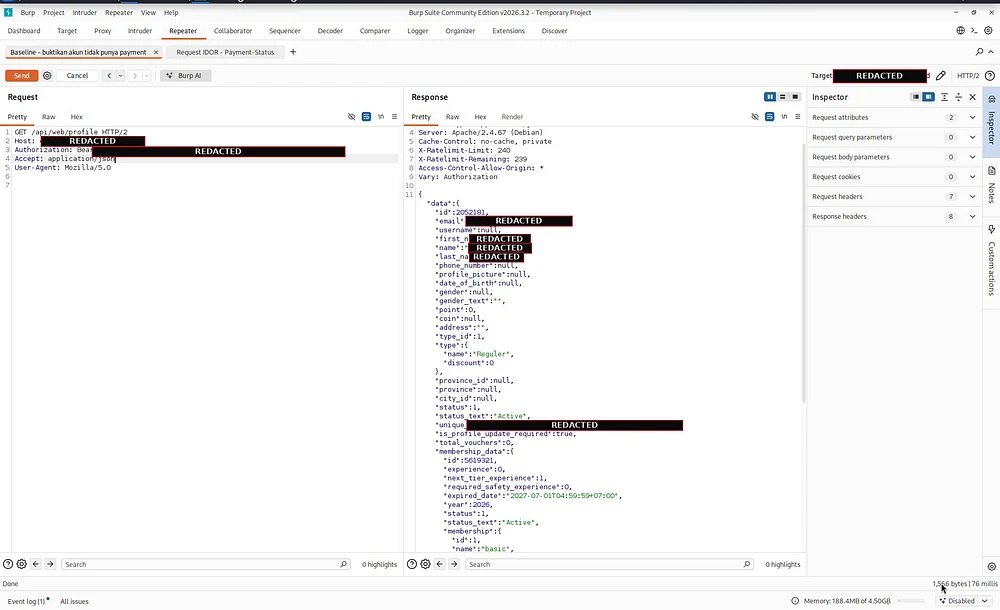
With an account that owns nothing, any payment visible from it belongs to someone else, which makes attribution of the leaked records unambiguous.
Finding it
The suspicious endpoint was:
GET /api/web/reservations/payment-status/{id}
Two questions drove the test. First, is the identifier a random UUID or a small integer? It was 500000, a friendly sequential number. Second, does the server check ownership of the object, or only that the caller is authenticated?
Removing the token produced a 401, so authentication was enforced. The author draws the distinction between being logged in and being allowed: a hotel key card that opens the building is not the key card for a specific room. The application checked the first and, as it turned out, not the second.
Exploitation
Step 1: request a payment owned by nobody in the session
With the token of the empty account, the author requested a payment ID that could not belong to it:
/api/web/reservations/payment-status/500000Authorization: Bearer [my account — owns nothing, remember]
The server returned the object:
{ "payment": { "id": 500000, "amount": 8000000, "type_text": "Bca", "status_text": "Completed", "invoice_url": "https://checkout.[processor].co/...", "user_ip_address": "112.215.[REDACTED]"}}
That is an 8,000,000 IDR transaction belonging to a stranger, returned to an account that owns nothing. The response includes the payment amount, the payment method, the status, a live invoice URL and the customer's IP address.
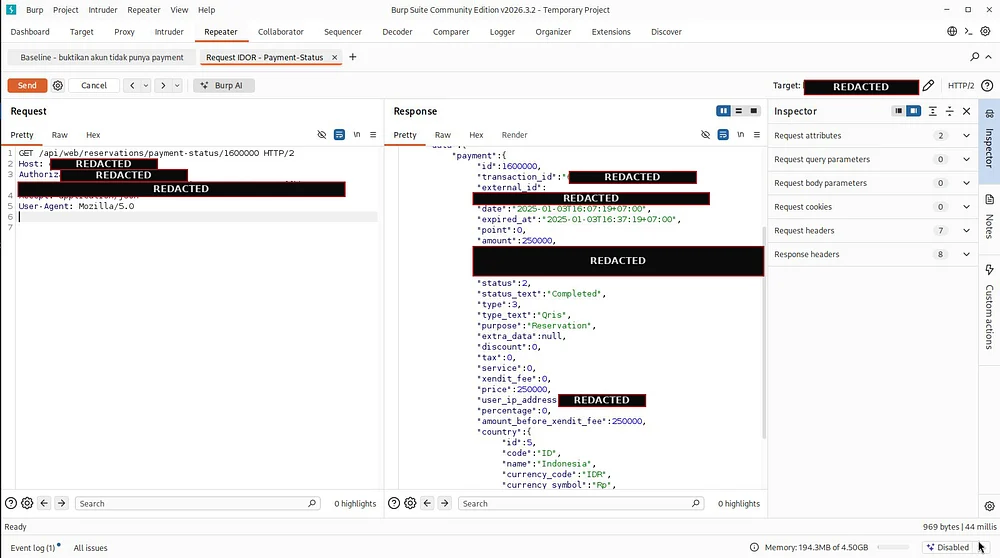
Step 2: walk the sequence
One hit could be luck, so the author tried further identifiers. 1600000 returned another customer's payment, and 2100500 returned a third. The IDs count upward, and the highest the author confirmed was north of 2.1 million. The IDs counted upward, and the highest the author confirmed was north of 2.1 million, so a loop could walk the sequence.
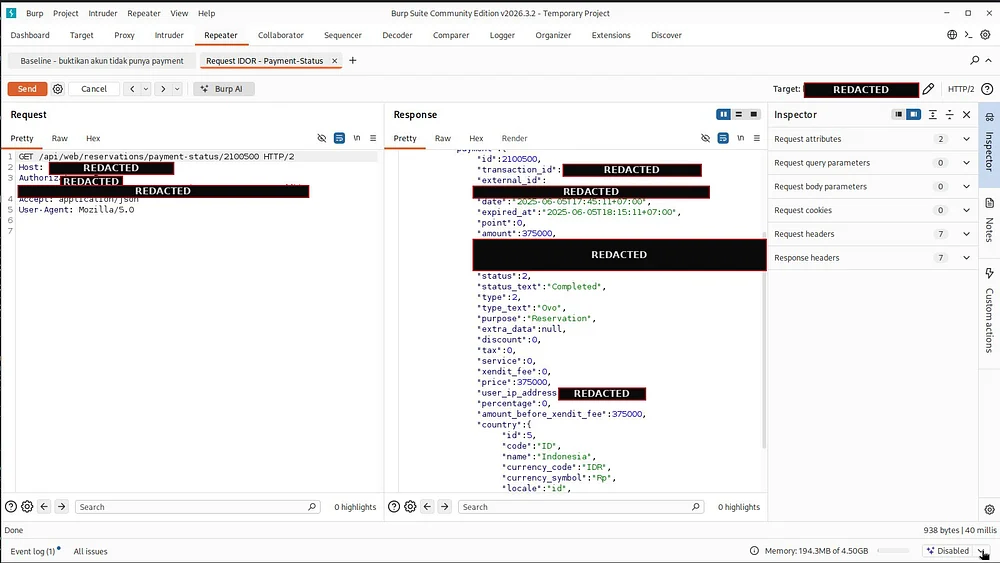
A neighbouring endpoint, reservation/{id}, behaved correctly: requesting an object the caller does not own returned a 404. Same application, same session, correct authorisation. The payment status endpoint simply did not apply the same check.
What leaked: customers' payment amount, method, date, IP address and live invoice links, reachable from a free account by changing one number.
Step 3: find the storage backend
While looking at where the application stored files, the author identified Firebase, Google's cloud backend. The bucket name followed the pattern redacted-xxxxx.appspot.com.
The key observation is that Firebase Storage has two front doors. The Google Cloud Storage door is guarded by IAM permissions. The Firebase Storage door is guarded by Firebase Security Rules, a separate mechanism. The author knocked on the first door and received a 403, correctly locked. The second door has its own guard that does not consult the first, so the author knocked there with no account and no token at all:
curl -s "https://firebasestorage.googleapis.com/v0/b/redacted-xxxxx.appspot.com/o?maxResults=20"
The response was 200, and it listed the bucket's objects to an unauthenticated stranger. Among the entries were objects under the app-identity-card/ prefix:
app-identity-card/1739…jpg
app-identity-card/1752…jpg
… (many, many more, with a nextPageToken for extra dread) …
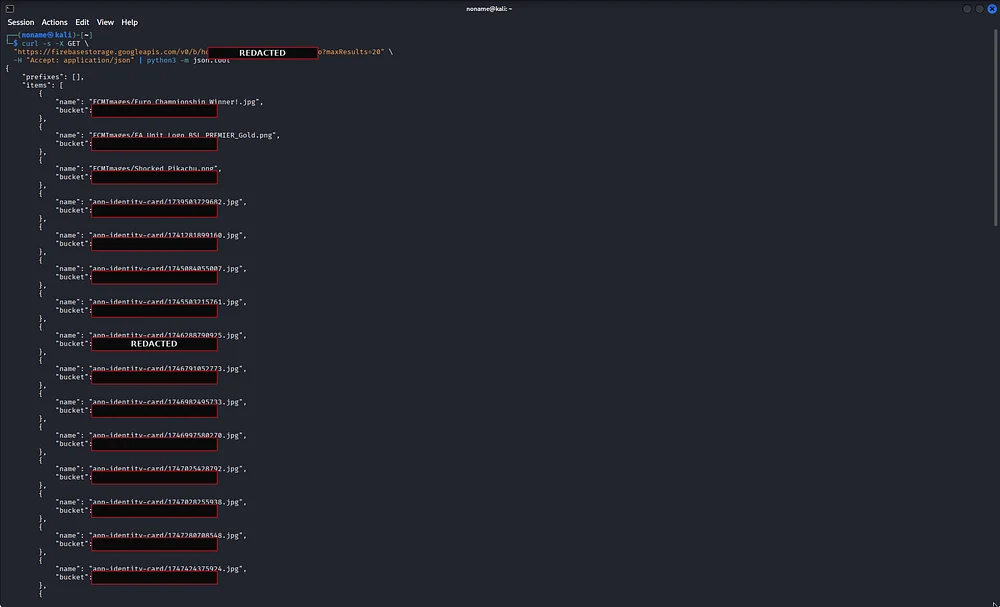
Step 4: download a single object
The objects were not only listable. The author fetched one:
curl -s "...app-identity-card%2F<object>.jpg?alt=media" -o evidence.jpg
The response was 200, and a real customer's identity card landed on disk: full name, NIK, address, date of birth and photo. No login and no token were involved.
The author downloaded exactly one object, confirmed it was a real KTP, redacted it and closed the tab. That established all three capabilities, listing, reading metadata and downloading, without hoarding a large number of identity cards.

Root cause
For the payment endpoint, the server enforced authentication but not object-level authorisation. The identifier was a sequential integer, so any authenticated user could iterate over the full range and read other customers' payment records. This is IDOR / BOLA; BOLA is the first entry on the OWASP API Security Top 10. The neighbouring reservation/{id} endpoint shows the correct pattern was known in the codebase: return 404 for objects the caller does not own.
For the bucket, the IAM door was locked and the team assumed the building was secure. Firebase Security Rules were effectively allow read: if true;, so the Firebase Storage door was open to anyone. IAM does not guard that door, and nothing else did.
Impact
Bug 1 exposes what a customer paid: amount, method, date, IP address and a live invoice link, for any payment whose sequential ID is guessed. Bug 2 exposes the customer's government identity card, including full name, NIK, address, date of birth and photo. Combined, the two allow a stranger's financial and legal identity to be reconstructed remotely.
Identity card photos are sensitive personal data under UU PDP, so a publicly listable bucket full of them is a reportable breach rather than a minor bug. Both bugs were reported through the target's program and fixed.
Fix
Both issues were reported and fixed; the report does not describe the specific changes made. The direction it points to is clear: scope object lookups to the authenticated user, as reservation/{id} already did, and lock the bucket on every door, not just the one guarded by IAM. Firebase Security Rules need to deny reads that are not explicitly authorised, independently of the Cloud Storage IAM policy.
Variants to test
- Sequential identifiers on authenticated endpoints. Look for integer IDs in paths and query strings on endpoints that return user-owned objects. A positive result is a
200with another user's object when using an account that owns nothing; a correct implementation returns403or404. - Authentication without authorisation. Remove the token to confirm a
401, then restore it and request an object you do not own. A200here is the bug; the401only proves the login check exists. - Neighbouring endpoints as a control. Compare sibling routes such as
reservation/{id}andpayment-status/{id}. If one returns404for foreign objects and the other returns data, the inconsistency localises the missing check. - Firebase Storage listing without credentials. Request the bucket's object listing directly, for example
https://firebasestorage.googleapis.com/v0/b/<bucket>/o?maxResults=20, with no token. A200with object names and anextPageTokenmeans the rules allow public listing. - Direct object download. Take a listed object name and request it with
?alt=media. A200returning file content confirms public read, not just public listing. - Both storage doors. Check the Cloud Storage IAM path and the Firebase Storage path separately. A
403on one says nothing about the other; test the second door on its own.
What happened, in plain words
A security researcher signed up for a free account on a large consumer company's website. He calls the company Redacted Corp in his write-up, and he has blacked out the real domain names, account IDs, access tokens and personal data. He found two separate problems, reported both through the company's research program, and both were fixed.
The first problem was in the part of the site that shows you the status of a payment for a reservation. The site looked up a payment by a number in the web address. The number was a simple counting number, and the server never checked whether the person asking actually owned that payment. So by changing the number, the researcher could read other customers' payment details: how much they paid, how, when, their IP address and a working link to their invoice.
The second problem was in the cloud storage the site used for uploaded files. That storage had a folder full of customers' national identity card photos, and anyone on the internet could list the folder and download the files without logging in at all.
On their own, each bug is serious. Together, they let a stranger rebuild someone's financial and legal identity from a laptop. The researcher downloaded exactly one identity card to prove it was possible, redacted it, and stopped there.
The short version
Two bugs, one free account:
- Bug 1 (rated High): the payment API returned anyone's payment information if you changed a number in the URL. The numbers went 1, 2, 3 and so on.
- Bug 2 (rated Critical): a Firebase storage bucket full of customers' national identity card photos was open to the entire internet. No login, no password.
Put them together and you get a stranger's payments and a photo of their government ID.
Some words you will need first
Before the steps make sense, here are the basic ideas, explained from zero.
A website is two programs talking. Your browser is one program. The company's server is another. The server holds the data and does the work; your browser asks for things and displays the answers.
An API is the counter where you place orders. When you click around a website, your browser does not usually fetch a finished page for every click. It sends small requests to specific addresses on the server, and the server sends back raw data, often in a format called JSON. Those addresses are called endpoints. An API is just the collection of endpoints a site offers, plus the rules for using them. Think of a restaurant: the menu and the waiter are the API, the kitchen is the server, and you never walk into the kitchen yourself.
A request is one order. It has a method (what kind of action you want), a URL (which endpoint), sometimes headers (extra information about the request) and sometimes a body (data you are sending). The requests in this story use GET, which means "give me something".
A response is the kitchen's answer. It has a status code, a three-digit number that says how it went, and usually a body with the data. The codes that matter here:
| Code | Meaning |
|---|---|
200 |
OK, here is what you asked for |
401 |
You are not logged in, or your login is not valid |
403 |
You are logged in, but you are not allowed to do this |
404 |
There is nothing here (or the server is pretending there is nothing here) |
A token is a temporary proof that you are logged in. When you sign in, the server gives your browser a long random string. Your browser sends it back with every request, usually in a header that looks like Authorization: Bearer <token>. "Bearer" means "whoever bears (carries) this token is treated as the user". It works like a wristband at a festival: show it at the gate and you get in, without showing your passport again. If someone else copies your wristband, they get in as you, which is why tokens are secret.
An ID is a name for a thing in a database. Every payment, user, photo and reservation has one. Some sites use long random strings (a UUID), which are practically impossible to guess. Others use simple counting numbers: 1, 2, 3, and so on. Counting numbers are easy to guess, and that matters a lot below.
Authentication and authorisation are not the same thing. Authentication asks "who are you?". Authorisation asks "are you allowed to do this?". A hotel is the classic comparison: your key card opens the front door (authentication), but it should only open your own room (authorisation). A system that checks the front door and forgets the room door is exactly the bug in this story.
IDOR, also called BOLA, is that forgotten room door. It stands for Insecure Direct Object Reference, or Broken Object Level Authorisation. It means the server takes an ID from the request, fetches the matching record, and hands it over without checking that the record belongs to the person asking. It is the first item on the OWASP API Security Top 10, a well-known list of the most common API mistakes.
A cloud storage bucket is a folder on someone else's computer. Companies rent storage from providers such as Google instead of running their own file servers. A bucket holds files, and each file inside it is called an object. Buckets have permission settings that decide who may list the files, read their details and download them.
Firebase is Google's set of building blocks for apps. One of those blocks is Firebase Storage, which sits on top of Google Cloud Storage. That detail is the heart of the second bug, and we will come back to it.
A bug bounty programme is a company paying people to report security holes. Instead of punishing someone who finds a flaw, the company invites them to report it privately and rewards them. That is why the researcher could test, report and publish this story without legal trouble.
Step 1: make the world's most boring account
The researcher signed up for a normal free account. It had no payments, no special permissions, nothing. It was the same kind of account any of the company's millions of customers has.
Why start there? Because it gives you a clean baseline. If an account that owns nothing can see a payment, that payment cannot possibly be its own. There is no ambiguity, no "maybe this is a shared family account", no argument later. It is a perfect alibi.
To confirm the baseline, he checked his own profile:
http GET /api/web/profile
Line by line:
httpis the name of the tool being used here, a command-line client for sending HTTP requests. It is not part of the address.GETis the method: "give me this information, I am not changing anything"./api/web/profileis the endpoint. Reading it left to right:apiis the section of the site meant for programs rather than pages,webis the part of the API used by the website, andprofileis the record of the logged-in user.
The answer confirmed what he expected: an account that owns nothing.
Bug 1: the number that snitched
The endpoint that caught his eye was this one:
GET /api/web/reservations/payment-status/{id}
Line by line:
GETagain means "give me something"./api/web/reservations/payment-status/is the path.reservationsis the section for bookings, andpayment-statusis the part that reports whether a booking has been paid.{id}is a placeholder. In a real request you replace it with an actual identifier, and the server looks up the payment with that identifier.
This endpoint exists for a good reason. When you book something and pay, the site needs to show you "your payment is completed". The page asks the server for the status of that particular payment, and the server answers. The feature is normal; the question is how carefully the server checks who is asking.
Two questions drove the test:
- Is the ID a scary random string, or a friendly little counting number? The answer was
500000. Friendly. A number like that can be guessed, and more importantly it can be walked through one by one. - Does the server check that I actually own this thing, or only that I am logged in? This is the authentication versus authorisation question from above.
To answer the second question, he first removed his token. The server answered 401, which means "you are not logged in". So the login check was definitely there. Good.
But here is the classic mix-up: being logged in is not the same as being allowed. The application checked that he had a key card for the building. It did not check that he had the key card for that specific room.
So he asked for a payment he had no business seeing, using the token of the empty account:
/api/web/reservations/payment-status/500000Authorization: Bearer [my account — owns nothing, remember]
This snippet is squashed onto one line in the write-up, but it is really two things:
/api/web/reservations/payment-status/500000is the address being requested. The{id}placeholder has been replaced with500000, a payment that belongs to somebody else.Authorization: Bearer [my account — owns nothing, remember]is the header carrying the token. The square brackets are the researcher's note to the reader, standing in for the real token, which has been removed.Bearertells the server "treat whoever carries this as the logged-in user".
And the server answered as if everything were fine:
{ "payment": { "id": 500000, "amount": 8000000, "type_text": "Bca", "status_text": "Completed", "invoice_url": "https://checkout.[processor].co/...", "user_ip_address": "112.215.[REDACTED]"}}
Line by line:
- The outer braces
{ }hold one JSON object, which is just a bundle of labelled values. "payment"is the label, and everything inside its own braces is the payment record."id": 500000is the identifier of the payment, the same number that was in the URL."amount": 8000000is the amount paid, in Indonesian rupiah (IDR)."type_text": "Bca"is the payment method, here a bank transfer via BCA, an Indonesian bank."status_text": "Completed"says the payment went through."invoice_url"is a link to the invoice. The processor's name has been replaced with[processor]and the rest shortened with...."user_ip_address": "112.215.[REDACTED]"is the customer's IP address, the number that identifies their internet connection. The end of it has been blacked out.
That is an 8,000,000 IDR transaction belonging to a complete stranger, handed to an account that owns nothing. The response includes the amount, the payment method, the status, a live invoice link and the customer's IP address.
Step 2: walk the sequence
One hit could be luck. Maybe payment 500000 happened to be a shared or test record. So he tried more numbers.
1600000 returned someone else's payment. 2100500 returned a third stranger's. The IDs simply counted upward, and the highest he confirmed was north of 2.1 million.
Think about what that means. The only thing standing between the public and roughly two million payment records was the attacker's willingness to count. A person can type a few numbers by hand. A short program can walk through the numbers one by one. The researcher's joke is that the security protecting two million records was his own inability to count, except he can count, and he can write a loop.
A neighbouring endpoint, reservation/{id}, did it correctly. When he asked for a reservation he did not own, the server returned 404, meaning "there is nothing here for you". Same application, same login, correct behaviour. That comparison is important: it shows the developers knew the right pattern and had used it elsewhere. The payment status endpoint simply did not follow the same rule.
What leaked: customers' payment amount, method, date, IP address and live invoice links, reachable from a free account by changing one number.
Step 3: find the storage backend
While looking at where the application stored files, the researcher spotted Firebase, Google's cloud backend. The bucket name followed the pattern redacted-xxxxx.appspot.com. The appspot.com ending is the giveaway: it is the domain Google uses for apps hosted on its platform.
Here is the trick that makes the whole second bug work. Firebase Storage has two front doors.
- The Google Cloud Storage door, guarded by IAM permissions. IAM stands for Identity and Access Management: the list of which accounts may do what with which cloud resources.
- The Firebase Storage door, guarded by Firebase Security Rules, a completely separate set of rules written for the Firebase side.
Two doors, two guards, and the guards do not talk to each other. Locking one says nothing about the other.
He knocked on the first door and got 403, correctly locked. Most people would go home happy at that point. But the second door has its own guard, who has never heard of the first one. So he knocked there, with no account and no token at all:
curl -s "https://firebasestorage.googleapis.com/v0/b/redacted-xxxxx.appspot.com/o?maxResults=20"
Line by line:
curlis a command-line tool for sending requests, the same job as thehttptool used earlier. It is available on most computers.-smeans silent: do not print progress or error chatter, just show the answer.- The quoted string is the URL.
firebasestorage.googleapis.comis the Firebase Storage service./v0/b/means "version 0, bucket", andredacted-xxxxx.appspot.comis the bucket's name, with the real part replaced byredacted-xxxxx. /omeans "objects", the files in the bucket.?maxResults=20is a parameter, an instruction attached to the URL after the question mark. It asks for at most 20 results, so the answer stays short.- There is no
Authorizationheader anywhere. That is the whole point: this request claims to be nobody.
The response was 200, and it listed the bucket's objects to an unauthenticated stranger. Among the entries were objects under the app-identity-card/ prefix:
app-identity-card/1739…jpg
app-identity-card/1752…jpg
… (many, many more, with a nextPageToken for extra dread) …
Line by line:
app-identity-card/is a folder-like prefix inside the bucket. The name says what it holds: identity cards uploaded through the app.1739…jpgand1752…jpgare file names, shortened with…. The numbers are part of the file names, and the.jpgextension means image files.nextPageTokenis the detail that turns a worrying answer into a very worrying one. When a list is too long to return at once, the server sends the first batch plus a token that says "ask again with this and I will give you the next batch". Its presence means there are more files than the batch returned.
Step 4: download a single object
The files were not only listable. He fetched one:
curl -s "...app-identity-card%2F<object>.jpg?alt=media" -o evidence.jpg
Line by line:
curl -sis the same tool with the same silent flag....stands for the beginning of the URL, left out here for brevity.app-identity-card%2F<object>.jpgis the object's name.%2Fis how a slash is written inside a URL when it must not be mistaken for a path separator; it decodes to/.<object>is a placeholder for the actual file name.?alt=mediatells Firebase "give me the file's contents", as opposed to its details. Without it you get information about the file; with it you get the file.-o evidence.jpgmeans "save the answer into a file called evidence.jpg" instead of printing it on screen.
The response was 200, and a real customer's identity card landed on disk: full name, NIK, address, date of birth and photo. NIK is the Indonesian national identity number. No login and no token were involved.
He downloaded exactly one object, confirmed it was a real KTP (the Indonesian identity card), redacted it and closed the tab. That was enough to prove all three capabilities: listing the files, reading their details and downloading them. Downloading a million identity cards would not have proved anything more, and hoarding them is how you turn a bug bounty into a court date.
Why it happened
For the payment endpoint, the server enforced authentication but not object-level authorisation. It checked that you were logged in, then fetched whatever ID you asked for. Because the identifier was a sequential integer, any logged-in user could walk the whole range and read other customers' payment records. That is IDOR, and the OWASP API Security Top 10 calls the API form BOLA. The neighbouring reservation/{id} endpoint shows the correct pattern was already known in the codebase: return 404 for objects the caller does not own.
For the bucket, the team locked the IAM door and assumed the building was secure. The Firebase Security Rules were effectively allow read: if true;, which in plain words means "let anyone read this, always". IAM does not guard that door, and nothing else did.
Why it matters
Bug 1 tells you what someone paid: amount, method, date, IP address and a live invoice link, for any payment whose sequential ID you guess. Bug 2 shows you their government identity card: full name, NIK, address, date of birth and photo. Stack the two and you can rebuild a stranger's financial and legal identity from your couch.
Identity card photos are sensitive personal data under UU PDP, Indonesia's personal data protection law. A publicly listable bucket full of them is not a cute bug; it is a reportable breach. That is the sentence that turns "we will fix it next sprint" into "everyone in the war room, now".
How it was fixed
Both issues were reported through the target's programme and fixed. The write-up does not describe the specific changes made. The direction is clear, though: scope object lookups to the logged-in user, as reservation/{id} already did, and lock the bucket on every door, not just the one guarded by IAM. Firebase Security Rules need to deny reads that are not explicitly authorised, independently of the Cloud Storage IAM policy.
How to look for the same thing
These are the checks the researcher points to, in the order they make sense for a beginner.
- Sequential identifiers on logged-in endpoints. Look for plain integer IDs in paths and query strings on endpoints that return things belonging to a user. A positive result is a
200with another user's object while using an account that owns nothing. A correct implementation returns403or404. - Authentication without authorisation. Remove the token to confirm a
401, then put it back and request an object you do not own. A200here is the bug; the401only proves the login check exists. - Neighbouring endpoints as a control. Compare sibling routes such as
reservation/{id}andpayment-status/{id}. If one returns404for foreign objects and the other returns data, the inconsistency points straight at the missing check. - Firebase Storage listing without credentials. Request the bucket's object listing directly, for example
https://firebasestorage.googleapis.com/v0/b/<bucket>/o?maxResults=20, with no token. A200with object names and anextPageTokenmeans the rules allow public listing. - Direct object download. Take a listed object name and request it with
?alt=media. A200returning file content confirms public read, not just public listing. - Both storage doors. Check the Cloud Storage IAM path and the Firebase Storage path separately. A
403on one says nothing about the other; test the second door on its own.
Glossary
- API: the set of addresses and rules a website offers so that programs, including your browser, can ask it for data and actions. The counter where you place orders.
- Authentication: proving who you are, usually by logging in. The front door of the hotel.
- Authorisation: deciding whether the person asking is allowed to do this particular thing. The lock on your own room.
- Bearer token: a long random string issued at login that your browser sends with each request to prove it is you. Whoever carries it is treated as you, so it must stay secret.
- BOLA: Broken Object Level Authorisation, another name for IDOR. The server fetches an object by ID without checking that it belongs to the caller.
- Bucket: a folder in cloud storage that holds files, with its own permission settings.
- Bug bounty programme: a scheme where a company invites researchers to report security flaws privately, often for a reward, instead of taking legal action.
- Cloud Storage: storage rented from a provider such as Google, instead of files kept on the company's own servers.
- curl: a command-line tool for sending web requests and showing the answers.
- Endpoint: one specific address on a server that does one specific job, such as returning a payment's status.
- Firebase: Google's collection of building blocks for apps, including storage, databases and login.
- Firebase Security Rules: the separate permission rules that guard the Firebase side of storage. They are not the same as IAM.
- GET: the request method that means "give me something" without changing anything.
- Header: extra information attached to a request, such as the token proving who you are.
- IAM: Identity and Access Management, the cloud provider's list of which accounts may do what with which resources. It guards the Cloud Storage door.
- IDOR: Insecure Direct Object Reference. The server takes an ID from the request and returns the matching record without checking ownership.
- IDR: Indonesian rupiah, the currency in the payment records.
- IP address: the number that identifies an internet connection, here recorded with each payment.
- JSON: a simple text format for data, made of labels and values inside braces. What APIs usually send back.
- KTP: the Indonesian national identity card.
- NIK: the Indonesian national identity number printed on the KTP.
- Object: one file inside a storage bucket.
- OWASP API Security Top 10: a well-known list of the most common API security mistakes. IDOR/BOLA is first on it.
- Parameter: an instruction attached to a URL after a question mark, such as
maxResults=20. - Prefix: a folder-like beginning of a file name inside a bucket, such as
app-identity-card/. - Response: the server's answer to a request, made of a status code and usually a body of data.
- Status code: the three-digit number in a response saying how it went, such as
200,401,403or404. - Token: see bearer token.
- UU PDP: Indonesia's personal data protection law, which treats identity card photos as sensitive personal data.
- UUID: a long random identifier, practically impossible to guess, as opposed to a counting number.
%2F: how a slash is written inside a URL when it must not be read as a path separator; it decodes to/.?alt=media: a parameter that asks storage for a file's actual contents rather than its details.



