I Logged In as Literally Nobody and Walked Off With 53,000 Strangers’ Data
An iOS app's Firebase Storage rules only checked that a request was authenticated, and anonymous sign-in was enabled, so anyone could obtain an anonymous token and list, read, write and delete files in the bucket. This exposed roughly 53,000 subscriber records and allowed tampering with the app's live video files.
 Published on medium.com
Bug Bounty
The full write-up lives on its author's site
It belongs to its author, so we link to it rather than copy it. The other two tabs are our own rewrites, checked against it.
Context
The target was a popular iOS app running an authorised bug bounty program, referred to in the write-up as Redacted. The app's backend was built on Firebase, and the component at the centre of the story is a Firebase Storage bucket. Firebase Storage is the file store attached to a Firebase project; clients read and write objects through the firebasestorage.googleapis.com API, and access is governed by storage rules that can inspect request.auth.
The bucket held daily transaction export files (.csv.gz) produced by a subscription-analytics platform, and it also held the app's .mp4 explainer videos, which every install fetched live. The bug was that the storage rules only asked whether a caller was logged in, not whether the caller was allowed, and the project had anonymous sign-in enabled. The result was that anyone holding the app's public Firebase API key could become "authenticated" and reach the data.
All names, identifiers, tokens and user data in the write-up are faked or blacked out. The bug was reported and fixed.
Setup
No accounts, roles or special tooling were needed beyond curl and jq. The preconditions were all properties of the shipped app and its Firebase project:
- The app's Firebase configuration, including the API key, ships inside the
.plistbundled in the IPA. The key is public by design. - Anonymous sign-in was enabled on the Firebase project.
- The storage rules guarding the bucket used an authentication-only check.
That is the whole setup. There was no prior access, no leaked credential and no insider knowledge beyond what any user who downloads the app can extract.
Finding it
The researcher started by requesting the bucket listing with no credentials at all, expecting the usual rejection.
curl -s -o /dev/null -w 'status=%{http_code}\n' \ "https://firebasestorage.googleapis.com/v0/b/<redacted>.appspot.com/o"
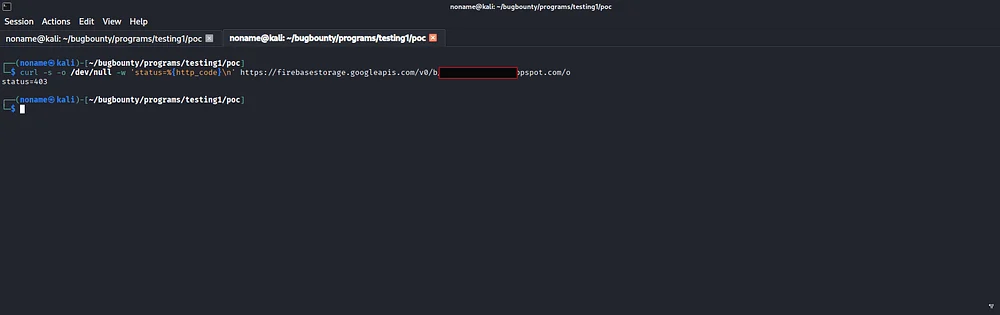
The response was a clean 403. On its face the bucket looked locked, and the write-up is explicit that this is the part that fools people: most testers stop here, which is exactly why the bug survived to production. The door was locked, but the lock only asked one question, and it was the wrong one.
The reasoning turns on how Firebase Storage rules are commonly written. A large number of tutorials, and allegedly one line in Google's own documentation marked "development only", suggest the following rule:
allow read, write: if request.auth != null;
Read literally, that rule means "let anyone in, as long as they are logged in". That sounds reasonable until anonymous sign-in is enabled, because Firebase treats an anonymous user as a perfectly valid logged-in user. The condition request.auth != null then behaves like request.auth != please_come_in. The door is not locked; it just requires a wristband, and the app hands out wristbands to anyone who asks.
Exploitation
Step 1: extract the Firebase API key
Every iOS app ships its Firebase configuration inside the .plist bundled in the IPA, including the API key. The write-up stresses that this key is not a secret: it is designed to be public. What matters is what the key can do, and with anonymous auth enabled it can mint a real Firebase ID token.
Step 2: mint an anonymous ID token
A single POST to the Identity Toolkit sign-up endpoint, using the public API key, returns a token.
curl -s -X POST \ "https://identitytoolkit.googleapis.com/v1/accounts:signUp?key=<redacted>" \ -H 'Content-Type: application/json' -d '{"returnSecureToken":true}' | jq -r .idToken

The key parameter is the public Firebase API key taken from the app bundle. The JSON body {"returnSecureToken":true} asks the endpoint to return an ID token, and jq -r .idToken extracts it from the response. No email, no password, no verification and no bot check were involved: Firebase simply returned a fresh ID token.
Step 3: confirm the token's nature
Decoding the token confirmed the claim that mattered.
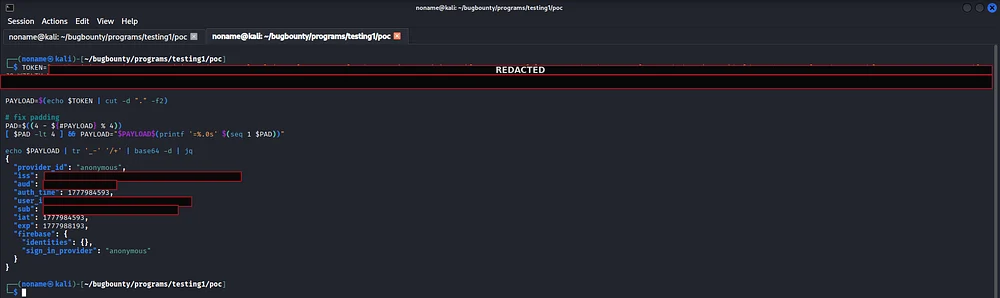
The token carried provider_id: anonymous (shown in the decoded payload as "sign_in_provider": "anonymous"). The researcher was, officially, Nobody. As far as the storage rules were concerned, Nobody was now a trusted, authenticated user.
Step 4: repeat the listing with the token
The exact same bucket listing was re-run, this time with the token attached.
Authorization: Firebase <token>
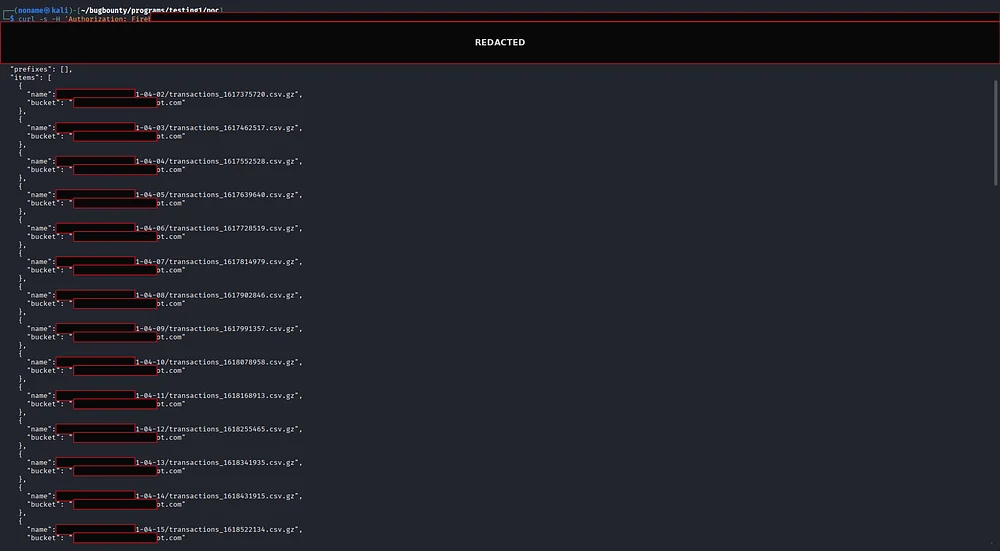
The 403 became a very generous 200. The listing returned a tidy row of daily transaction export files, *.csv.gz dumps covering a month of daily transaction exports of the kind a subscription-analytics platform produces.
Step 5: inspect one export
The researcher pulled exactly one file, unzipped it and looked at the header row.
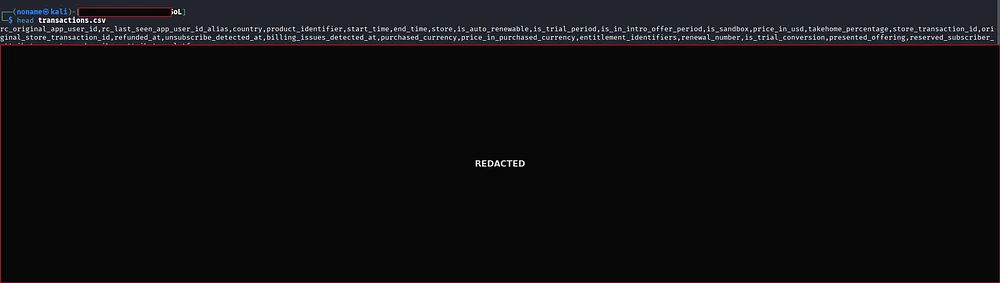
Every data row was blacked out; only the column names were shown. The schema alone told the story: advertising and device identifiers (the stable kind, useful for tracking people across apps), the price each subscriber paid, whether they received a refund, and their country. Multiplying by roughly 29 daily files gives approximately 53,000 records across 58 countries.
Step 6: confirm write and delete
Because the rule said read, write, the researcher checked the other verbs carefully, against a throwaway test object that was deleted immediately. Writing returned HTTP 200 and deleting returned HTTP 204.
The bucket also held the app's .mp4 explainer videos, fetched live by every install. Overwriting one of those would amount to content injection into everybody's app. The researcher did not do this, and noted only that it was possible.
Root cause
The mistake is a rule that checks authentication but not authorisation. allow read, write: if request.auth != null; is satisfied by any token Firebase will issue, and with anonymous sign-in enabled Firebase will issue one to anyone who asks, using a public API key that ships in every copy of the app. The rule therefore degenerates into "anyone may read and write".
The write-up points at two contributing factors. First, a large number of tutorials suggest the dangerous rule, and one line in Google's own documentation allegedly carries a "development only" label, which invites it into production. Second, the API key being public is by design, so the security has to live in the rules behind the key rather than in the hope that nobody finds it. The existing defence, the 403 returned to an unauthenticated caller, did not stop the attack because it only answered whether that particular request was authenticated, not whether the bucket was safe.
Impact
The exposure combined three elements:
- Mass PII exposure. IP addresses and device identifiers are personal data under GDPR and similar regimes, for roughly 53,000 records across 58 countries.
- Financial intelligence. Prices, refunds and per-country data of the kind a competitor would pay for.
- Content injection. Write and delete access to the live
.mp4explainer videos fetched by every install, which would allow content to be injected into everybody's app.
All of it was reachable by literally anyone, using a token the app mints for free. The write-up rates the issue CVSS 9.8, critical rather than a shrug, precisely because of that combination. The bounty paid was $3,000.
Fix
The report states that the bug was reported through the app's program and fixed. It does not describe the specific rule change made. The lesson it draws is that rules must distinguish anonymous from authorised: if a rule cannot tell those apart, it is decoration rather than access control. Concretely, anything private should not be guarded by if request.auth != null, and dangerous "development only" configurations should not be the copy-paste default anywhere.
Variants to test
- Authentication-only storage rules. On any Firebase-backed mobile app, extract the config from the IPA or APK, mint an anonymous token if anonymous auth is enabled, and repeat a bucket listing with
Authorization: Firebase <token>. A positive result is a403turning into a200with object names listed. - Anonymous auth enabled on other Firebase products. The same token can be tried against Firestore and Realtime Database endpoints. A positive result is any read of data that should require a real account.
- Write and delete on public-facing assets. Where read is open, test write and delete against a throwaway object you create yourself. A positive result is
HTTP 200on write andHTTP 204on delete, which turns a data leak into content injection. - Export files in buckets. Look for analytics or transaction exports (
.csv,.csv.gz,.json) in listings. A positive result is a header row containing identifiers, prices or refund fields. - Rule review where you have project access. Search storage rules for
request.auth != nullguarding private paths. A positive result is any such rule on a bucket holding user data or live app assets.
If you ship a mobile app on Firebase, read your storage rules now, and if you see if request.auth != null guarding anything private, assume a stranger is already logged in.
What happened, in plain words
A popular iPhone app kept its users' data in a cloud file store run by Google, called Firebase. The app's settings for that file store said, in effect, "anyone who is logged in may read and write everything here." The app also allowed people to log in anonymously, meaning you could get a valid login without an email address, a password or any proof of who you are. Put those two things together and the lock on the file store opens for anyone who asks. A security researcher asked, got in as a user with no identity at all, and found about 53,000 people's records: IP addresses, device identifiers, prices paid, refunds and countries. The same access also allowed overwriting and deleting the app's video files. The researcher reported it through the app's bug bounty programme, it was fixed, and a $3,000 bounty was paid. The write-up rates it CVSS 9.8, which is the top end of "critical".
Everything in the story is anonymised: the app, its identifiers, the tokens and the user data are faked or blacked out. The bug was reported and fixed.
A few words you will meet constantly, explained once here so the rest reads easily:
- Server: a computer somewhere else that holds data and answers requests from apps and browsers.
- Request: a message your computer sends to a server asking it to do something, such as "list the files in this folder".
- API: the fixed set of addresses and rules a server offers for those requests. Think of a restaurant menu: you cannot order anything that is not on it, and each dish has a name the kitchen recognises.
- Token: a short string of characters that a server gives you after you log in, which you show on later requests to prove who you are. Think of a cloakroom ticket: the attendant gives it to you, and you hand it back to collect your coat. You do not need to prove your name again, only show the ticket.
- Authentication versus authorisation: authentication asks "who are you?", authorisation asks "are you allowed to do this?". They are different questions, and this whole story turns on a system that answered the first and forgot the second.
- Bug bounty programme: a scheme where a company invites outside researchers to look for security flaws and pays for good reports instead of prosecuting them.
The setup: what the researcher started with
The target was a popular iOS app running an authorised bug bounty programme, called Redacted in the write-up. Its backend was built on Firebase. Firebase is Google's set of ready-made backend services for app developers: a database, a login system, a file store and more, all reachable over the internet through Google's APIs.
The piece at the centre of the story is a Firebase Storage bucket. A bucket is simply a folder in the cloud for files. Apps upload files to it and download files from it. Clients talk to it through the firebasestorage.googleapis.com API, and what they may do is decided by storage rules: small conditions the server checks on every request before answering.
This bucket held two kinds of content:
- Daily transaction export files, named
.csv.gz. A CSV file is a table saved as plain text, with one row per record and commas between columns;.gzmeans the file was compressed to take less space, like zipping it. These exports came from a subscription-analytics platform, a service that tracks who subscribes, what they pay and whether they ask for refunds. - The app's
.mp4explainer videos, which every installation of the app downloaded live from the bucket.
The flaw was that the storage rules only asked whether the caller was logged in, not whether the caller was allowed to be there, and the project had anonymous sign-in switched on. So anyone holding the app's public Firebase API key could become "authenticated" and reach the data.
No accounts, roles or special tools were needed beyond two command-line programs, curl and jq. curl sends requests to a server from a terminal and prints the answer; jq picks a value out of a JSON response. JSON is a common text format for structured data, built from names and values in curly braces. The preconditions were all properties of the shipped app and its Firebase project:
- The app's Firebase configuration, including the API key, ships inside the
.plistbundled in the IPA. An IPA is the file format of an iPhone app, and a.plistis a settings file inside it. The key is public by design. - Anonymous sign-in was enabled on the Firebase project.
- The storage rules guarding the bucket used an authentication-only check.
That is the whole setup. There was no prior access, no leaked credential and no insider knowledge beyond what any user who downloads the app can extract.
Finding it: the 403 that says "all good here"
The researcher started by asking the bucket for its list of files with no credentials at all, expecting the usual rejection.
curl -s -o /dev/null -w 'status=%{http_code}\n' \ "https://firebasestorage.googleapis.com/v0/b/<redacted>.appspot.com/o"
Line by line:
curlis the program that sends the request.-smeans silent: do not print progress chatter, only the result.-o /dev/nullthrows away the body of the answer, the actual content, and sends it to a nowhere place on the computer. The researcher only cared about the status code here.-w 'status=%{http_code}\n'prints a short line containing the HTTP status code, which is the three-digit number every web answer carries: 200 means success, 403 means forbidden, 404 means not found, and so on.\njust ends the line.- The URL is the bucket listing address.
<redacted>stands for the real project name, which was removed. The/oat the end is the part of the API that lists objects, meaning files.
The answer was a clean 403. On its face the bucket looked locked. The write-up is explicit that this is the part that fools people: most testers stop here, which is exactly why the bug survived to production. The door was locked, but the lock only asked one question, and it was the wrong one.
The reasoning turns on how Firebase Storage rules are commonly written. A large number of tutorials, and allegedly one line in Google's own documentation marked "development only", suggest the following rule:
allow read, write: if request.auth != null;
In plain words: allow reading and writing if the request carries a logged-in user. request.auth is the part of the request that describes who is calling, and != null means "is not empty". Read literally, the rule says "let anyone in, as long as they are logged in". That sounds reasonable until anonymous sign-in is enabled, because Firebase treats an anonymous user as a perfectly valid logged-in user. The condition then behaves like "let anyone in who is not nobody", except that the app happily creates a nobody for you. The door is not locked; it just requires a wristband, and the app hands out wristbands to anyone who asks.
Exploitation
Step 1: extract the Firebase API key
Every iOS app ships its Firebase configuration inside the .plist bundled in the IPA, including the API key. The write-up stresses that this key is not a secret: it is designed to be public. Think of it as the address and name of the restaurant, printed on the menu for all to see. What matters is what the key can do, and with anonymous auth enabled it can mint a real Firebase ID token.
Step 2: mint an anonymous ID token
A single POST to the Identity Toolkit sign-up endpoint, using the public API key, returns a token. A POST is one of the standard request types; it is the one used when you are sending something to the server rather than just asking for a page.
curl -s -X POST \ "https://identitytoolkit.googleapis.com/v1/accounts:signUp?key=<redacted>" \ -H 'Content-Type: application/json' -d '{"returnSecureToken":true}' | jq -r .idToken
Line by line:
curl -sagain sends the request quietly.-X POSTsays this is a POST request, not a plain fetch.- The URL is Google's sign-up endpoint for Firebase logins.
?key=<redacted>carries the public API key taken from the app bundle, the same way a web address can carry a search term after a question mark. -H 'Content-Type: application/json'is a header, a small label attached to the request telling the server what format the body is in. Here: JSON.-d '{"returnSecureToken":true}'is the body of the request. It asks the endpoint to return an ID token along with the answer.- The
|symbol pipes the answer into the next program,jq. jq -r .idTokenpicks the field namedidTokenout of the JSON answer and prints it raw, without quotes.
No email, no password, no verification and no bot check were involved: Firebase simply returned a fresh ID token. The researcher had done nothing except ask.
Step 3: confirm the token's nature
Decoding the token confirmed the claim that mattered. A Firebase ID token is not encrypted; it is a signed piece of text that anyone can read, and its contents are visible if you decode it.
The token carried provider_id: anonymous, shown in the decoded payload as "sign_in_provider": "anonymous". The researcher was, officially, Nobody. As far as the storage rules were concerned, Nobody was now a trusted, authenticated user. The wristband was real, it just had no name on it.
Step 4: repeat the listing with the token
The exact same bucket listing was re-run, this time with the token attached.
Authorization: Firebase <token>
This is a header, the same kind of label as the content type above. Authorization is the standard header for proving who you are, and Firebase <token> is the format Firebase expects: the word Firebase, a space, then the token itself. It is the cloakroom ticket being handed back.
The 403 became a very generous 200. The listing returned a tidy row of daily transaction export files, *.csv.gz dumps covering a month of daily transaction exports of the kind a subscription-analytics platform produces. The same request that was refused a moment earlier was now answered in full, and the only thing that changed was the presence of a token that anyone could obtain.
Step 5: inspect one export
The researcher pulled exactly one file, unzipped it and looked at the header row. The header row is the first line of a CSV, the one that names the columns.
Every data row was blacked out; only the column names were shown. The schema, meaning the list of columns and what they hold, alone told the story: advertising and device identifiers (the stable kind, useful for tracking people across apps), the price each subscriber paid, whether they received a refund, and their country. Multiplying by roughly 29 daily files gives approximately 53,000 records across 58 countries.
Step 6: confirm write and delete
Because the rule said read, write, the researcher checked the other verbs carefully, against a throwaway test object that was deleted immediately. Writing returned HTTP 200 and deleting returned HTTP 204. In other words, the same wristband that let the researcher look also let them change and remove things.
The bucket also held the app's .mp4 explainer videos, fetched live by every install. Overwriting one of those would amount to content injection into everybody's app: the app would show whatever file was put there instead of the real one. The researcher did not do this, and noted only that it was possible.
Root cause
The mistake is a rule that checks authentication but not authorisation. allow read, write: if request.auth != null; is satisfied by any token Firebase will issue, and with anonymous sign-in enabled Firebase will issue one to anyone who asks, using a public API key that ships in every copy of the app. The rule therefore degenerates into "anyone may read and write".
The write-up points at two contributing factors. First, a large number of tutorials suggest the dangerous rule, and one line in Google's own documentation allegedly carries a "development only" label, which invites it into production. Second, the API key being public is by design, so the security has to live in the rules behind the key rather than in the hope that nobody finds it. The existing defence, the 403 returned to an unauthenticated caller, did not stop the attack because it only answered whether that particular request was authenticated, not whether the bucket was safe.
Impact
The exposure combined three elements:
- Mass PII exposure. PII means personally identifiable information, data that can be tied to a person. IP addresses and device identifiers are personal data under GDPR and similar regimes, for roughly 53,000 records across 58 countries.
- Financial intelligence. Prices, refunds and per-country data of the kind a competitor would pay for.
- Content injection. Write and delete access to the live
.mp4explainer videos fetched by every install, which would allow content to be injected into everybody's app.
All of it was reachable by literally anyone, using a token the app mints for free. The write-up rates the issue CVSS 9.8, critical rather than a shrug, precisely because of that combination. CVSS is a standard scoring system for the severity of a security flaw, running from 0 to 10. The bounty paid was $3,000.
Fix
The report states that the bug was reported through the app's program and fixed. It does not describe the specific rule change made. The lesson it draws is that rules must distinguish anonymous from authorised: if a rule cannot tell those apart, it is decoration rather than access control. Concretely, anything private should not be guarded by if request.auth != null, and dangerous "development only" configurations should not be the copy-paste default anywhere.
Variants to test
- Authentication-only storage rules. On any Firebase-backed mobile app, extract the config from the IPA or APK, mint an anonymous token if anonymous auth is enabled, and repeat a bucket listing with
Authorization: Firebase <token>. A positive result is a403turning into a200with object names listed. - Anonymous auth enabled on other Firebase products. The same token can be tried against Firestore and Realtime Database endpoints, Firebase's two database products. A positive result is any read of data that should require a real account.
- Write and delete on public-facing assets. Where read is open, test write and delete against a throwaway object you create yourself. A positive result is
HTTP 200on write andHTTP 204on delete, which turns a data leak into content injection. - Export files in buckets. Look for analytics or transaction exports (
.csv,.csv.gz,.json) in listings. A positive result is a header row containing identifiers, prices or refund fields. - Rule review where you have project access. Search storage rules for
request.auth != nullguarding private paths. A positive result is any such rule on a bucket holding user data or live app assets.
If you ship a mobile app on Firebase, read your storage rules now, and if you see if request.auth != null guarding anything private, assume a stranger is already logged in.
Glossary
- API: the fixed set of addresses and rules a server offers for requests, like a menu you can order from.
- API key: a public identifier that tells a service which app or project is calling; it is not a password.
- APK: the file format of an Android app, the counterpart of an IPA on iPhone.
- Authentication: proving who you are, for example by logging in.
- Authorisation: deciding whether a known user is allowed to do a particular thing.
- Anonymous sign-in: a login mode that issues a valid account and token without any email, password or identity check.
- Bucket: a cloud folder for files, here a Firebase Storage bucket.
- Bug bounty programme: a scheme where a company invites outside researchers to report security flaws and pays for good reports.
- Content injection: replacing or adding content that an app serves to its users, so they see something the owner did not intend.
- CSV: a table saved as plain text, one row per record, columns separated by commas.
- curl: a command-line program that sends requests to servers and prints the answers.
- CVSS: a standard 0 to 10 score for the severity of a security flaw.
- Firebase: Google's set of ready-made backend services for app developers, including login, databases and file storage.
- Firebase Storage: the file store part of Firebase, reached through the
firebasestorage.googleapis.comAPI. - Firestore: one of Firebase's database products.
- GDPR: the European data protection law that treats things like IP addresses and device identifiers as personal data.
- Header: a small label attached to a request or response, such as the content type or the authorisation token.
- HTTP status code: the three-digit number in every web answer, such as 200 for success, 403 for forbidden and 204 for success with no content.
- ID token: a signed piece of text issued after login that proves who the caller is; its contents can be read by anyone.
- Identity Toolkit: the Google service behind Firebase logins, which issues ID tokens.
- IPA: the file format of an iPhone app, which contains its settings and bundled files.
- jq: a command-line program that picks values out of JSON text.
- JSON: a common text format for structured data, built from names and values in curly braces.
.plist: a settings file inside an iPhone app bundle.- PII: personally identifiable information, data that can be tied to a person.
- POST: a request type used when sending something to a server, as opposed to simply fetching a page.
- Realtime Database: the other database product in Firebase.
- Request: a message sent to a server asking it to do something.
- Storage rules: conditions a Firebase project checks on every storage request to decide who may read, write or delete.
- Subscription-analytics platform: a service that tracks subscribers, what they pay and whether they receive refunds.
- Token: a string of characters issued after login and shown on later requests to prove who you are, like a cloakroom ticket.
- Write and delete: the actions of creating or changing a file and of removing it, as opposed to reading it.

