I Found Basic XSS + Open Redirect in a Hidden Endpoint (And Got $100 For It)
A hidden endpoint used for handling authentication errors reflected user input without filtering, allowing script execution and redirection to arbitrary sites. An attacker could run script in a victim's browser or send them to another site via a crafted link.
 Published on 0x3rab.medium.com
Cybersecurity
The full write-up lives on its author's site
It belongs to its author, so we link to it rather than copy it. The other two tabs are our own rewrites, checked against it.
Context
The target is a web application whose login flow the researcher was testing. The report does not name the product, the domain or the technology stack. The feature involved is the application's authentication error handling: when an authentication request is malformed, the application sends the user to a separate endpoint built to display the error. That endpoint is the subject of the whole write-up. It was not linked from the site, did not appear in the page source and did not show up in the network requests, so the researcher describes it as hidden and reachable only by deliberately breaking the auth request.
Setup
The report describes no accounts, roles, tools or versions. The researcher was manually testing the login flow in a browser, intentionally sending a broken authentication request to observe the error message. Everything that follows was done by editing the URL in the address bar and reloading the page. No proxy, scanner or automation is mentioned.
Finding it
The researcher deliberately corrupted the authentication request to see which error message the application would return. After the failed request, the browser's URL bar showed a URL pointing at an endpoint the researcher had not seen before:

The endpoint appeared nowhere in the site: not in the source code, not in the network requests. The researcher's reading is that the developers created it solely to handle auth errors and assumed nobody would find it. That assumption is what made it interesting: an endpoint that is never linked is rarely reviewed, tested or hardened in the same way as the pages users normally reach.
Exploitation
Step 1: trigger the auth error and reach the hidden endpoint
By sending a malformed authentication request, the researcher was redirected to the error-handling endpoint, whose address then appeared in the URL bar. The report does not reproduce the malformed request or the full URL, so the exact parameter carrying the error content is not shown. What matters is that the endpoint takes input from the URL and reflects it into the page.
Step 2: inject a basic XSS payload
The researcher threw a basic XSS payload at the endpoint and loaded it:

The payload executed: an alert box appeared. There was no filtering and no encoding of the reflected value, so the script ran as-is in the page context. The report does not give the exact payload string, only that it was a basic XSS payload.
Step 3: turn the reflection into an open redirect
An alert proves execution but has little practical value, so the researcher replaced the script with one that performs a redirect:
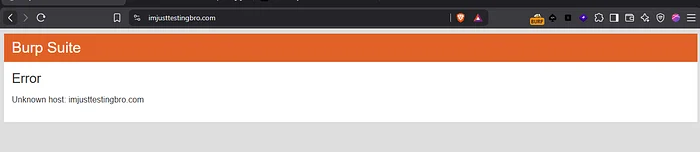
On loading the page, the browser was sent immediately to another site. The researcher notes there was no validation and no confirmation step: the page redirected straight away.
Root cause
The endpoint reflects user-controlled input from the URL into the response without filtering or encoding, which is what allows script execution. The researcher then replaced the script with one that performs a redirect, and the page sent the browser to another site. The report does not include the server-side code, so the precise mechanism (for example whether the redirect target is read from the same parameter or a second one) is not shown.
Existing defences did not help because the endpoint sat outside the normal application surface. It was not linked, not present in the source and not visible in network traffic, so it sat outside the normal application surface. The report states plainly that the developers buried the endpoint in the error handling and forgot to secure it.
Impact
An attacker who knows the endpoint's address can craft a link that, when opened by a victim, executes script in the application's origin and can also send the victim to an attacker-chosen site. Because the endpoint is unlinked, exploitation depends on the attacker knowing or discovering the URL; the researcher treats that obscurity as the only real obstacle. The report does not analyse what a script running in that origin could reach, such as session cookies or authenticated actions, so the concrete consequences beyond the alert and the redirect are not established. The researcher characterises the finding as basic XSS plus open redirect from a single hidden endpoint, reached by forcing an auth error.
Fix
It states that the issue was reported to the bug bounty program the same night, confirmed within a few hours, and paid $100, but that at the time of writing it was still unpatched. The researcher therefore withholds the real domain until a fix lands.
What the endpoint needs, based on the behaviour described, is output encoding of any reflected value so it cannot break out into script context, and validation of any redirect target against an allowlist of permitted destinations rather than accepting arbitrary URLs. The broader lesson the researcher draws is for developers to review their error pages, especially those built for edge cases, since those are the pages least likely to be looked at.
Variants to test
- Force errors on other flows. Submit malformed requests to login, password reset, registration, OAuth callbacks and payment steps, then watch the URL bar and the response body for redirects to error pages you have never seen. A positive result is an error page whose address or content you cannot find anywhere in the site's links or source.
- Reflect a marker into every parameter of the error endpoint. Replace each parameter value with a unique string and reload. A positive result is the string appearing unencoded in the HTML, especially inside a script block, an attribute or an event handler.
- Test the redirect parameter separately. If the error page takes a destination or return URL, supply an external host. A positive result is an immediate navigation off-site with no interstitial or validation.
- Try encoding and scheme tricks on the redirect. Use mixed case, encoded characters and alternative schemes against the same parameter. A positive result is any bypass of a filter that otherwise blocks external destinations.
- Check whether the hidden endpoint is reachable without the error flow. Request it directly with no preceding failed authentication. A positive result is the page rendering and reflecting input anyway, which widens who can be targeted.
- Look for the same pattern in API error responses. Send malformed JSON or missing fields to API endpoints and inspect error bodies for reflected values or links built from your input. A positive result is your marker echoed back in a content type the browser will render.
What happened, in plain words
A security researcher spent an evening poking at a website's login page. Not with any special tools, just a normal browser. He deliberately broke the login request so the site would show an error message. When the error appeared, he noticed the address bar had changed to a page he had never seen before: a page that was not linked from anywhere on the site.
That hidden error page had two problems. First, it took whatever text was in its web address and pasted it straight into the page without cleaning it up, so a snippet of code placed in the address would actually run in the browser. That is called cross-site scripting, or XSS. Second, the same unchecked input could be used to send the visitor to any other website the attacker chose. That is called an open redirect.
He reported both to the company's bug bounty programme (a scheme where companies pay people for reporting security flaws), the company confirmed the issue within a few hours, and he was paid $100. At the time he wrote the post, the flaw was still not fixed, so he did not publish the real web address.
This article walks through exactly what he did, in the same order, and explains every term along the way. You only need to know how to use a browser.
Background: what was being tested
The target is a web application with a login flow. The report does not name the product, the domain or the technology it runs on, so we do not know any of that either.
The feature involved is the application's handling of authentication errors. Authentication is simply the process of proving who you are, usually by entering a username and password. When something goes wrong during that process, for example because the request is malformed, the application does not just show an error on the login page. It sends the user to a separate page built specifically to display the error. That separate page is the subject of the whole write-up.
Why does a separate error page matter? Because it was not linked from the site, did not appear in the page source (the HTML code a browser downloads to build a page) and did not show up in the network requests (the list of files and data the browser fetches, visible in the browser's developer tools). The researcher calls it hidden, and found it by deliberately breaking the authentication request.
A useful comparison: think of a building where every door on the main corridor is locked and checked by a guard, but there is a small service door round the back that the architect added for deliveries and nobody ever walks past. The service door is still a door into the building. A page nobody links to is still a page a browser can load if you know its address.
Setup: what tools were used
The report describes no accounts, roles, tools or versions. The researcher was testing the login flow by hand in a browser, intentionally sending a broken authentication request to see what error message came back. Everything after that was done by editing the address in the URL bar and reloading the page. No proxy (a tool that sits between your browser and the site to inspect traffic), no scanner and no automation are mentioned.
This is worth pausing on for a beginner: the entire finding came from a browser and curiosity. You do not need a hacking toolkit to start looking at how a site behaves.
Finding it
The researcher deliberately corrupted the authentication request to see which error message the application would return. After the failed request, the browser's URL bar showed an address pointing at an endpoint he had not seen before.
An endpoint is simply a specific address on a server that does one job. If a website is a building, an endpoint is a particular counter inside it: one counter for logging in, one for resetting a password, one for showing errors. Each has its own address.
The screenshot shows the URL bar after the failed login, with the address of the error-handling endpoint visible.
The endpoint appeared nowhere on the site: not in the source code, not in the network requests. The researcher's reading is that the developers created it solely to handle authentication errors and assumed nobody would find it. That assumption is what made it interesting. An endpoint that is never linked is rarely reviewed, tested or hardened in the same way as the pages users normally reach.
Hardening means adding defences on purpose, the way you might fit a better lock to a door. The point here is that the main doors got the good locks, and the service door did not.
Exploitation
Step 1: trigger the auth error and reach the hidden endpoint
By sending a malformed authentication request, the researcher was redirected to the error-handling endpoint, whose address then appeared in the URL bar. The report does not reproduce the malformed request or the full URL, so the exact parameter carrying the error content is not shown.
A parameter is a named value attached to the end of a web address, usually after a question mark. In https://example.com/page?name=alice, the parameter is called name and its value is alice. Parameters are how a web address carries information to the page, for example which error to display or where to send the user next.
What matters for the rest of the story is that the endpoint takes input from the URL and reflects it into the page. Reflecting means the page copies your input back into the HTML it sends you. That is normal and often useful, for example when a search page shows the words you searched for. It only becomes a problem when the copied text is not cleaned up first.
Step 2: inject a basic XSS payload
The researcher threw a basic XSS payload at the endpoint and loaded it.
A payload here means the piece of text you put into the input to see what the page does with it. XSS, cross-site scripting, is a class of vulnerability where an attacker gets their own code to run inside someone else's website, in the visitor's browser. The code then runs with the same trust as the site itself, which is why it is dangerous.
An everyday comparison: imagine a noticeboard where visitors can pin notes, and the person in charge copies whatever is written on a note onto the official letterhead without reading it. If someone writes an instruction like "pay this person", it now looks like an official instruction from the organisation. Reflecting input without cleaning it is the same mistake in software.
The screenshot shows the basic XSS payload placed in the endpoint's URL.
The payload executed: an alert box appeared. There was no filtering and no encoding of the reflected value, so the script ran as-is in the page context.
Filtering means checking input and rejecting anything that looks dangerous. Encoding means converting special characters into harmless equivalents so the browser displays them as text instead of treating them as code. Neither happened here. The report does not give the exact payload string, only that it was a basic XSS payload.
An alert box is the browser's simplest pop-up. Researchers use it as a harmless proof: if a pop-up appears, the code ran. It proves the point without doing any damage.
Step 3: turn the reflection into an open redirect
An alert proves the code runs but has little practical value on its own, so the researcher replaced the script with one that performs a redirect.
A redirect is when a page tells the browser to go somewhere else automatically. Open redirect is a vulnerability where a site will send visitors to any destination an attacker supplies, without checking that the destination is allowed. The word open means there is no restriction on where you can be sent.
Comparison: a receptionist who will forward your call to any number you name, including a number belonging to someone impersonating the company. Because the call started from the real reception, the person answering sounds legitimate.
The screenshot shows the page after the redirect script was loaded, with the browser sent to another site.
On loading the page, the browser was sent immediately to another site. The researcher notes there was no validation and no confirmation step: the page redirected straight away.
Validation here means checking the destination against a list of allowed places before sending the visitor there. A confirmation step would be a page saying "you are about to leave this site, continue?", which at least gives the visitor a chance to stop. Neither existed.
Why it worked
The endpoint reflects user-controlled input from the URL into the response without filtering or encoding, which is what allows script execution. The researcher then replaced the script with one that performs a redirect, and the page sent the browser to another site. The report does not include the server-side code, so the precise mechanism is not shown, for example whether the redirect target is read from the same parameter or a second one.
Existing defences did not help because the endpoint sat outside the normal application surface. It was not linked, not present in the source and not visible in network traffic, so it sat outside the normal application surface. The report states plainly that the developers buried the endpoint in the error handling and forgot to secure it.
In short: the flaw itself is basic, but it survived because nobody was looking at that page.
What an attacker could do with it
An attacker who knows the endpoint's address can craft a link that, when opened by a victim, runs script in the application's origin and can also send the victim to an attacker-chosen site.
Origin is the combination of scheme, host and port that a browser uses to decide which site a page belongs to, for example https://example.com. Script running in a site's origin is treated as part of that site, which is why XSS matters.
Because the endpoint is unlinked, exploitation depends on the attacker knowing or discovering the URL. The report does not analyse what a script running in that origin could reach, such as session cookies or authenticated actions, so the concrete consequences beyond the alert and the redirect are not established.
A session cookie is a small piece of data the site stores in your browser after you log in, so it can recognise you on the next page. If someone else's script could read it, they might be able to act as you. The report does not claim that happened here; it simply does not examine it.
The researcher characterises the finding as basic XSS plus open redirect from a single hidden endpoint, reached by forcing an authentication error.
Fix
It states that the issue was reported to the bug bounty programme the same night, confirmed within a few hours, and paid $100, but that at the time of writing it was still unpatched. The researcher therefore withholds the real domain until a fix lands.
What the endpoint needs, based on the behaviour described, is output encoding of any reflected value so it cannot break out into script context, and validation of any redirect target against an allowlist of permitted destinations rather than accepting arbitrary URLs.
Output encoding means converting characters that have special meaning in HTML into safe equivalents before putting them in the page, so the browser shows them as text. An allowlist is a list of things that are permitted, with everything else refused by default. For a redirect, that would mean only sending visitors to destinations the site owners have approved.
The broader lesson the researcher draws is for developers to review their error pages, especially those built for edge cases, since those are the pages least likely to be looked at.
Things to try yourself
These are the same checks the technical write-up lists, explained for someone starting out. Only test sites you own or that explicitly invite testing through a bug bounty programme.
- Force errors on other flows. Submit malformed requests to login, password reset, registration, OAuth callbacks and payment steps, then watch the URL bar and the response body for redirects to error pages you have never seen. A positive result is an error page whose address or content you cannot find anywhere in the site's links or source. OAuth is a common way of logging in with another service, such as "sign in with" a large platform; its callback is the address the other service sends you back to.
- Reflect a marker into every parameter of the error endpoint. Replace each parameter value with a unique string and reload. A positive result is the string appearing unencoded in the HTML, especially inside a script block, an attribute or an event handler. A marker is just a distinctive word you can search for, so you know whether your input came back.
- Test the redirect parameter separately. If the error page takes a destination or return URL, supply an external host. A positive result is an immediate navigation off-site with no interstitial or validation. An interstitial is the warning page some sites show before sending you elsewhere.
- Try encoding and scheme tricks on the redirect. Use mixed case, encoded characters and alternative schemes against the same parameter. A positive result is any bypass of a filter that otherwise blocks external destinations. A scheme is the first part of a web address, such as
httporhttps, and filters sometimes check only one spelling. - Check whether the hidden endpoint is reachable without the error flow. Request it directly with no preceding failed authentication. A positive result is the page rendering and reflecting input anyway, which widens who can be targeted.
- Look for the same pattern in API error responses. Send malformed JSON or missing fields to API endpoints and inspect error bodies for reflected values or links built from your input. A positive result is your marker echoed back in a content type the browser will render. An API is the part of a site that other software talks to, usually exchanging data rather than web pages, and JSON is a common text format for that data.
Glossary
- Allowlist: a list of things that are explicitly permitted, with everything else refused by default.
- API: the part of a service that other software talks to, usually exchanging data rather than web pages.
- Authentication: the process of proving who you are, typically with a username and password.
- Bug bounty programme: a scheme where an organisation pays people for reporting security flaws responsibly.
- Cross-site scripting (XSS): a vulnerability where an attacker's code runs inside someone else's website, in the visitor's browser.
- Encoding: converting special characters into harmless equivalents so they are displayed as text rather than treated as code.
- Endpoint: a specific address on a server that performs one job, such as logging in or showing an error.
- Filtering: checking input and rejecting anything that looks dangerous.
- Hardening: deliberately adding defences to a system to make it harder to attack.
- HTML: the code a browser downloads and interprets to build a web page.
- Interstitial: a warning page shown before a site sends you somewhere else.
- JSON: a common text format for exchanging data between software.
- Marker: a distinctive string you place in an input so you can tell whether it comes back in the response.
- Network requests: the files and data a browser fetches when loading a page, visible in the browser's developer tools.
- OAuth: a common way of logging in to one service using an account from another.
- Open redirect: a vulnerability where a site will send visitors to any destination an attacker supplies, without checking it.
- Origin: the combination of scheme, host and port that a browser uses to decide which site a page belongs to.
- Output encoding: converting characters with special meaning in HTML into safe equivalents before placing them in a page.
- Parameter: a named value attached to a web address, usually after a question mark.
- Payload: the piece of text or code you put into an input to test what the page does with it.
- Proxy: a tool that sits between your browser and a site so you can inspect and modify the traffic.
- Redirect: an automatic instruction from a page telling the browser to go to another address.
- Reflection: when a page copies your input back into the HTML it sends you.
- Scheme: the first part of a web address, such as
httporhttps. - Session cookie: a small piece of data stored in your browser after you log in, used to recognise you on later pages.
- Source code: the HTML and related files a browser downloads to build a page.
- Validation: checking a value against rules, such as an allowlist, before using it.




