I found IDOR Vulnerability at Microsoft Subdomain
An API endpoint on a Microsoft subdomain exposed sensitive information, including email addresses, without authentication. An attacker could access this endpoint to obtain the leaked data.

medium.com
Published on medium.com
Idor Vulnerability
The full write-up lives on its author's site
It belongs to its author, so we link to it rather than copy it. The other two tabs are our own rewrites, checked against it.
Context
This is a short write-up of an information disclosure bug found in a Microsoft subdomain, submitted through a Microsoft bug bounty program. The author describes it as their first bug bounty write-up and says they hunt as a hobby in their free time.
The affected functionality, as described, is a diagnostics log endpoint that returns sensitive information about the website. The author does not name the real host or the product behind it. To respect the private program's guidelines, the real URL is replaced throughout with https://www.test.com, and the reproduction steps use http://example.com as a placeholder. The author notes that this substitution does not affect the story.
The author characterises information disclosure as a widely known web application vulnerability and states that it is hard to block information disclosure attacks with a WAF. No further technical detail about the endpoint's implementation is given.
Setup
No accounts, roles, tools or versions are described. The reproduction requires only the ability to open a URL in a browser. The author does not state whether authentication was needed, whether the endpoint was reachable without a session, or how the subdomain was discovered.
Finding it
The author does not describe the reconnaissance or the reasoning that led to the endpoint. The write-up moves directly from the general description of the bug class to the reproduction steps, so the only evidence of what looked wrong is what the endpoint returned: sensitive information about the website, including leaked email addresses.
Exploitation
Step 1: Open the diagnostics log endpoint
The first step is to open the following URL:
http://example.com/api/v1/log/diagnostics
The path suggests a versioned API (/api/v1/) exposing a log diagnostics resource. The author does not show the request headers, the HTTP method, or the status code returned.
Step 2: Observe sensitive information
Opening the URL returns sensitive information about the website. The author presents a screenshot of the response as evidence.
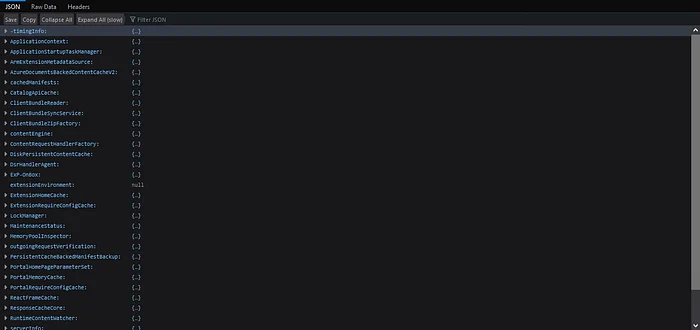
The screenshot is captioned as showing the information disclosure vulnerability and the website's sensitive information. The report does not enumerate the fields returned beyond the email addresses described in the next step.
Step 3: Observe leaked email addresses
Among the disclosed data, the response leaks email addresses. A second screenshot shows this.
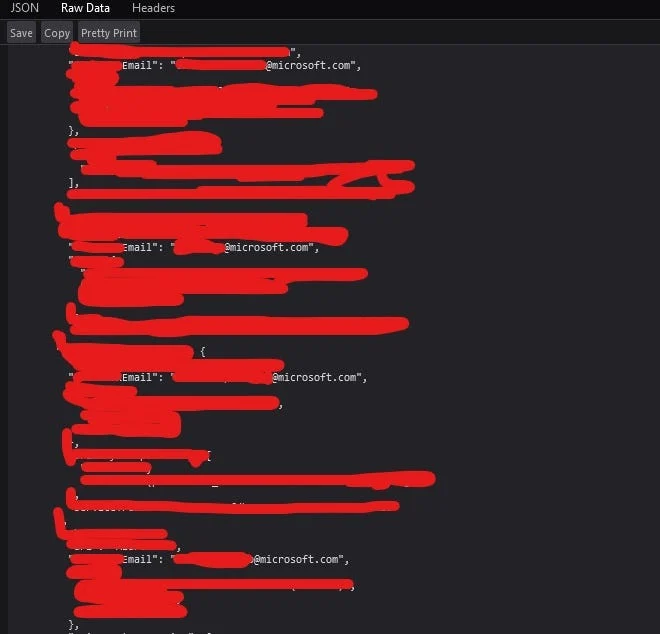
The caption reads "email address leaks". The report does not state how many addresses were exposed, whose they were, or whether they belonged to users, staff or internal systems.
Step 4: Hall of Fame recognition
The author received Hall of Fame recognition from the Microsoft Security Response Center account, @msftsecresponse, for the information disclosure report.
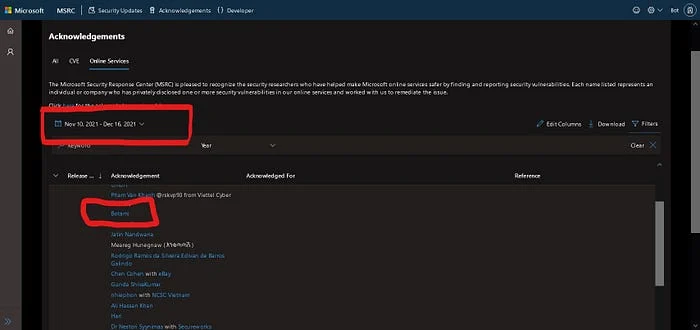
The caption reads "I got HOF from @msftsecresponse for information disclosure". The report does not state whether a monetary bounty was paid, what severity was assigned, or how long the fix took.
Step 5: Proof of concept video
The author also published a proof of concept video at https://youtu.be/_YRF9TOxOVk.
Root cause
Based on what is shown, a diagnostics log resource under /api/v1/log/ was reachable and returned log content, including email addresses, to the requester. The author's only comment on defences is that information disclosure attacks are hard to block with a WAF, which points to the exposure being a design or access control problem rather than an input filtering one. Whether the endpoint required any authentication at all is not stated.
Impact
The exposed data included sensitive information about the website and leaked email addresses. The report does not quantify the number of affected records, does not identify the data subjects, and does not describe any use of the leaked addresses beyond reading them. The author frames the finding as an information disclosure issue in a Microsoft subdomain and does not claim any further exploitation.
Fix
Given the nature of the finding, the appropriate fix is to enforce authorisation on the diagnostics log endpoint so that only privileged, intended users can retrieve log content, and to avoid returning email addresses and other sensitive fields in responses to requests that do not need them. Which of these was applied is not stated.
Variants to test
- Request other resources under the same versioned API prefix, such as sibling paths to
/api/v1/log/diagnostics, and check whether they return log or diagnostic content without authorisation. A positive result is a response containing log lines, stack traces, configuration values or personal data. - Repeat the request without a session cookie and with a low-privileged session, and compare the responses. A positive result is identical sensitive content in both cases.
- Look for log or diagnostics endpoints on other subdomains of the same organisation, since the same framework or deployment pattern may be reused. A positive result is any endpoint that returns internal log data to an unauthenticated or unauthorised requester.
- Check whether the response includes email addresses, internal hostnames or identifiers that can be correlated with other data. A positive result is personal or internal data that the endpoint's intended audience would not normally see.
What happened, in plain words
A security researcher who hunts bugs in their free time found a page on a Microsoft subdomain that handed back information it should have kept private. The page was a diagnostics log endpoint: a web address that, when opened, returns the internal log records a website keeps about itself. Opening the address showed sensitive information about the website, including email addresses.
The researcher reported it through a Microsoft bug bounty program. The researcher received a place in Microsoft's Hall of Fame, a public thank-you list for people who report security problems. The researcher wrote this up as their first bug bounty write-up.
A few words before we start, because they come up constantly:
- A subdomain is a named section of a larger domain. If
microsoft.comis a big office building,something.microsoft.comis a particular office inside it. Each office can run different software and have different rules. - A bug bounty program is a scheme where a company invites outsiders to look for security problems and report them, usually offering recognition or money in return. Some programs are public; others are private, meaning only invited researchers take part and the details are meant to stay confidential.
- Information disclosure means a system reveals data to someone who should not have it. Nothing is broken or changed; the problem is that something private became readable.
- A WAF (Web Application Firewall) is a filter that sits in front of a website and inspects incoming requests, blocking ones that look malicious. It is good at spotting attack patterns in what you send. It is poor at noticing that a perfectly normal request got an overly generous answer back.
The story
The researcher explains that they do bug bounties as a hobby in their spare time, and that this hobby led to an interesting information disclosure bug in one of the Microsoft subdomains covered by a bug bounty program.
Because the program is private, its rules say you must not publish the real address. So throughout the write-up the real URL is replaced with https://www.test.com, and the reproduction steps use http://example.com as a stand-in. The researcher notes that this substitution does not affect the story at all: the shape of the address and the behaviour behind it are what matter.
The researcher also makes a general point about this class of bug: information disclosure is a widely known vulnerability in web applications, and it is hard to block information disclosure attacks with a WAF. That is worth pausing on. A WAF is built to recognise hostile-looking input, such as a request containing attack code. Here the request is completely ordinary, and the server volunteers too much in its reply. There is no malicious-looking input to match, so the filter has nothing to catch. The problem lives in the application's own access rules, not in the text of the request.
Step by step: how it was reproduced
The researcher does not describe how the endpoint was discovered, so we pick up at the point where the address is already known. No accounts, tools or software versions are mentioned. All you need is a browser and the ability to open a web address.
Step 1: Open the diagnostics log endpoint
The first step is simply to open this URL:
http://example.com/api/v1/log/diagnostics
Line by line, in plain words:
http://is the scheme, the set of rules a browser uses to talk to a web server. It says "fetch this over the web".example.comis the placeholder host name standing in for the real Microsoft subdomain./api/v1/log/diagnosticsis the path, the part that tells the server which resource you want.
That path is worth reading piece by piece, because paths often describe the software behind them:
apistands for Application Programming Interface. In web terms, an API is a set of addresses a program exposes so that other programs (or a browser) can ask it for data, rather than for a human-friendly web page. Where a normal page returns something designed to be looked at, an API address typically returns raw data.v1is a version number. APIs change over time, and putting the version in the path lets the provider keep old and new behaviour side by side.logsays this resource is about logs: the running records a system keeps of what it has been doing, such as requests handled, errors raised and events processed.diagnosticssays these are the logs used for diagnosing problems, the ones an engineer would read while investigating a fault.
Put together, the address reads as "version one of the API, the diagnostics log resource". The researcher does not show the request headers, the HTTP method used, or the status code that came back.
Step 2: See the website's sensitive information
Opening the URL returned sensitive information about the website. The researcher presents a screenshot of the response as evidence.
The screenshot is captioned as showing the information disclosure vulnerability and the website's sensitive information. Beyond the email addresses covered in the next step, the report does not list which fields came back.
Why does this matter? Logs are internal working notes. They routinely contain things the public was never meant to read: who called what, when, from where, and what went wrong. A diagnostics log is the kind of resource that should sit behind a login and a permission check.
Step 3: See the leaked email addresses
Among the disclosed data, the response leaked email addresses. A second screenshot shows this.
The caption reads "email address leaks".
Email addresses are personal data. Even on their own they identify real people, and they are the raw material for phishing, where an attacker sends a convincing message to a known address hoping the recipient clicks something or hands over a password. That is why a leak of addresses is treated as a real finding rather than a curiosity.
Step 4: Hall of Fame recognition
The submission was accepted, and the researcher received Hall of Fame recognition from the Microsoft Security Response Center account, @msftsecresponse, for the information disclosure report.
The caption reads "I got HOF from @msftsecresponse for information disclosure". A Hall of Fame is a public list of researchers a company thanks for reporting problems. It is recognition rather than payment.
Step 5: Proof of concept video
The researcher also published a proof of concept video at https://youtu.be/_YRF9TOxOVk.
A proof of concept is a small, repeatable demonstration that a problem is real: here, a recording of opening the address and seeing the data appear. It lets the receiving team confirm the finding without guessing at the steps.
Why it worked
From what is shown, a diagnostics log resource under /api/v1/log/ was reachable and returned log content, including email addresses, to whoever asked.
Authorisation is the part of a system that decides whether an identified user is allowed to do a particular thing. It is different from authentication, which is about proving who you are in the first place. A useful comparison: authentication is the bouncer checking your ID at the door; authorisation is the list that says which rooms your badge opens.
The researcher's only remark on defences is that information disclosure attacks are hard to block with a WAF. That points at the root cause being a design or access control problem rather than an input filtering one: no amount of inspecting the incoming request fixes a server that answers too freely. Whether the endpoint required any authentication at all is not stated.
What the impact was
The exposed data included sensitive information about the website and leaked email addresses. The report does not quantify how many records were affected, does not identify the people behind the addresses, and does not describe any use of the leaked addresses beyond reading them. The researcher frames the finding as an information disclosure issue in a Microsoft subdomain and does not claim any further exploitation.
How it should be fixed
Given the nature of the finding, the appropriate fix is to enforce authorisation on the diagnostics log endpoint so that only privileged, intended users can retrieve log content, and to avoid returning email addresses and other sensitive fields in responses to requests that do not need them. Which of these was applied is not stated.
Other places to look for the same mistake
Once you know the shape of a bug, you can look for its siblings. These are the variants worth testing, each with the sign that you have found something:
- Request other resources under the same versioned API prefix, such as sibling paths to
/api/v1/log/diagnostics, and check whether they return log or diagnostic content without authorisation. A positive result is a response containing log lines, stack traces, configuration values or personal data. - Repeat the request without a session cookie and with a low-privileged session, and compare the responses. A session cookie is a small piece of data your browser stores and sends back with each request so the server can recognise you after you log in; it is effectively your proof of identity for that site. A positive result is identical sensitive content in both cases, which shows the answer does not depend on who you are.
- Look for log or diagnostics endpoints on other subdomains of the same organisation, since the same framework or deployment pattern may be reused. A positive result is any endpoint that returns internal log data to an unauthenticated or unauthorised requester.
- Check whether the response includes email addresses, internal hostnames or identifiers that can be correlated with other data. A positive result is personal or internal data that the endpoint's intended audience would not normally see.
Glossary
- API (Application Programming Interface): a set of web addresses a program exposes so other programs or browsers can request data from it, usually returning raw data rather than a page built for reading.
- Authentication: proving who you are, for example by logging in.
- Authorisation: deciding whether an identified user is allowed to access a particular resource or perform a particular action.
- Bug bounty program: a scheme in which a company invites outside researchers to find and report security problems, often in exchange for recognition or payment.
- Diagnostics: information a system produces to help engineers investigate faults, such as logs of what it has been doing.
- Email address leak: exposure of email addresses to someone who should not see them; addresses are personal data and useful to phishing attackers.
- GET request: the ordinary web request a browser sends when you open an address, meaning "give me this resource".
- Hall of Fame (HOF): a public list of researchers a company thanks for reporting security problems; recognition rather than payment.
- Host name: the part of a URL that names the server, such as
example.com. - HTTP: the set of rules browsers and web servers use to exchange requests and responses.
- Information disclosure: a vulnerability in which a system reveals data to someone who should not have access to it, without anything being changed or broken.
- Log: the running record a system keeps of what it has done, such as requests handled and errors raised.
- Path: the part of a URL after the host name that identifies which resource you want, such as
/api/v1/log/diagnostics. - Proof of concept (POC): a small, repeatable demonstration that a reported problem is real.
- Session cookie: a small piece of data stored by your browser and sent with requests so the server can recognise you after you log in.
- Subdomain: a named section of a larger domain, such as
something.microsoft.comwithinmicrosoft.com; each can run different software with different rules. - URL: the full address of a resource on the web, made up of scheme, host name and path.
- Versioned API: an API whose version number appears in the path, such as
/api/v1/, so old and new behaviour can coexist. - WAF (Web Application Firewall): a filter placed in front of a website that inspects incoming requests and blocks ones that look malicious; it cannot easily detect a normal request that receives an overly generous response.



