i HACKED nasa in just 4 days
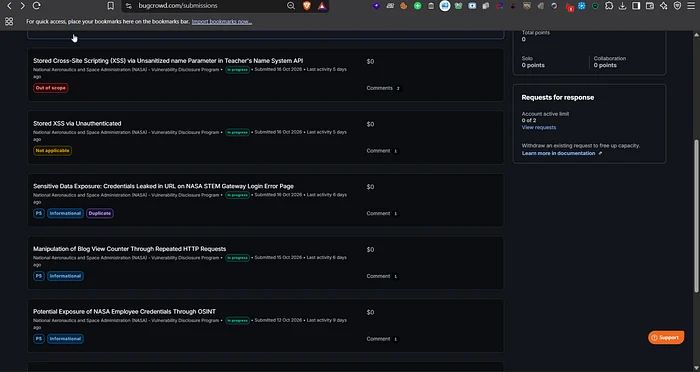
The author found sensitive data exposure and an insecure directory exposure on a NASA-associated target, which was triaged as P4. Earlier findings, including a view counter manipulation, exposed credentials, and a potential stored XSS, were rated P5, duplicate, or out of scope.

medium.com
Published on medium.com
NASA
The full write-up lives on its author's site
It belongs to its author, so we link to it rather than copy it. The other two tabs are our own rewrites, checked against it.
Context
This is an account of a first week of bug hunting on NASA's Vulnerability Disclosure Program (VDP). The author, writing as yash, describes a first week on the program, with four days of hunting before one report was accepted. The write-up does not name the specific hosts, applications or endpoints tested, so the technical detail below is limited to what the author describes: a view counter on a post, an error response on a NASA page, a stored XSS candidate on a related domain, and finally a sensitive data exposure combined with an insecure directory exposure.
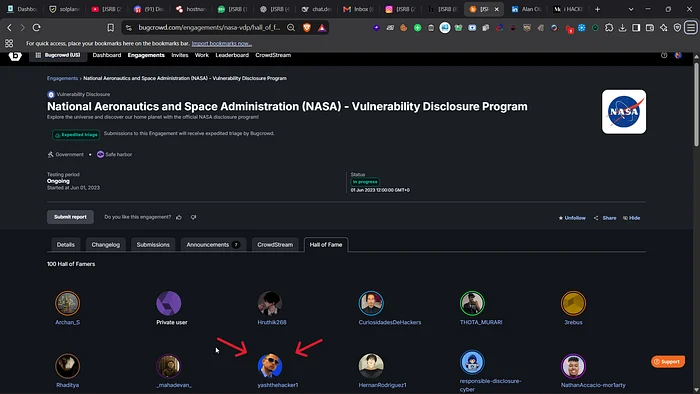
The piece is less a reproduction of a single vulnerability than a record of how four rejected submissions led to a change in method and, on the same day, to a valid P4 report and recognition in NASA's Hall of Fame.
Setup
The author does not describe any tooling, accounts, roles or versions. Testing was carried out against NASA's VDP, and the author states that the scope and rules of the program govern what is eligible. The only preparation the write-up mentions is around three hours spent studying the Vulnerability Rating Taxonomy (VRT) on day four, after the earlier rejections.
Finding it
The author began with the expectation that finding a bug, writing a report and being rewarded would be straightforward.

The first three days produced findings rated P5, or P5 and duplicate, and a fourth that was out of scope. The turning point came when the author stopped searching for anything unusual and started asking what makes a finding meaningful: the difference between discovering something odd and demonstrating a genuine security impact. Returning to reconnaissance with that question, the author looked more deeply at the target's exposed resources and configuration and found sensitive data exposure together with an insecure directory exposure.
Exploitation
Step 1: A first bug within two hours (P5)
Exploring the target, the author found a first issue within two hours of starting. The report was rated P5. The write-up does not describe the issue, the request or the response.
Step 2: Manipulating a view counter (P5)
On day two the author found an issue that allowed the view counter on a post to be manipulated through repeated HTTP requests. The report was submitted and rated P5 again. No request, parameter or response is shown.
Step 3: Credentials in an error response (P5, duplicate)
On day three the author found what appeared to be an email ID and password exposed in a NASA page's error response. This was documented and submitted. The verdict was P5 and duplicate: the severity was low and someone had apparently reported the same issue first.
Step 4: Stored XSS on a related domain (out of scope)
On day four the author investigated another domain connected to NASA and found a potential stored XSS vulnerability on a website associated with NASA. The report was submitted and the verdict was out of scope. No payload or request is shown.
Step 5: Studying the VRT, then finding sensitive data and directory exposure (P4)
After roughly three hours studying the VRT, the author went back to reconnaissance and examined the target's exposed resources and configuration more methodically. This produced a finding described as sensitive data exposure and an insecure directory exposure. The author investigated it, collected evidence and wrote a report explaining the discovery, then submitted it.
Five hours of waiting followed, with repeated refreshes of the submission page.
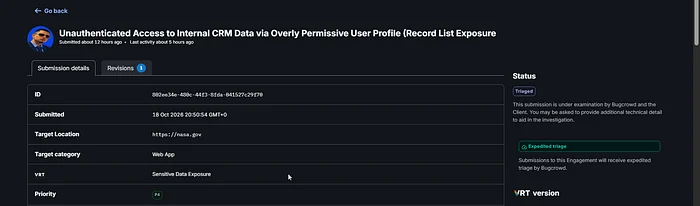
The status then changed to triaged, with a P4 rating: the first valid report on the program.
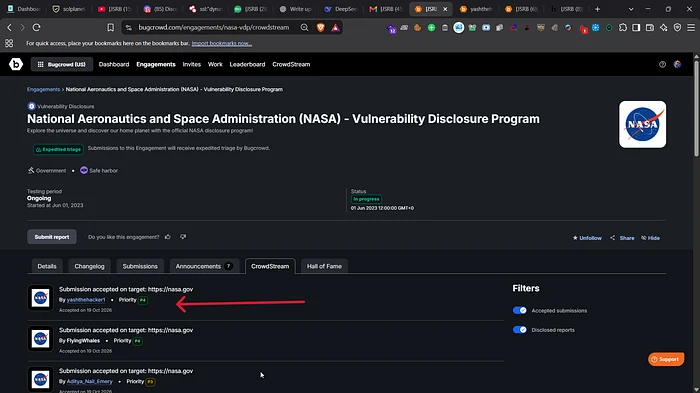
The write-up does not include the affected path, the directory listing, the exposed data, or the triage response.
Root cause
The report does not analyse the underlying defect. The accepted finding was described as sensitive data exposure and an insecure directory exposure, but the author gives no technical detail. The earlier findings suggest different causes, including missing controls on a view counter and credentials appearing in an error response, but the author gives no technical detail on any of them.
Impact
The author does not state what the exposed data was or who could reach it, so the practical impact cannot be assessed from this account. The program's own rating was P4, and the report was triaged as valid. The earlier findings were rated P5, one was a duplicate, and the stored XSS candidate was out of scope.
Fix
Variants to test
- Directory listing on static or backup paths: request common directory names and look for an index listing. A positive result is a response that enumerates files rather than returning a 403 or 404.
- Sensitive files inside exposed directories: where a listing appears, request the files it names. A positive result is content that should not be public, such as configuration or credential material.
- Error responses that leak secrets: trigger errors on input-handling pages and inspect the body and headers. A positive result is credentials, internal paths or stack details in the response.
- View or like counters driven by client requests: replay the increment request repeatedly. A positive result is a counter that changes without the corresponding user action being legitimate.
- Scope checks before testing related domains: confirm each host against the program's stated scope. A positive result is a host that is explicitly listed, which avoids the out-of-scope outcome described here.
- VRT-guided triage of your own findings: before submitting, classify the finding against the VRT and write the impact in those terms. A positive result is a report whose severity you can justify from demonstrated impact rather than novelty.
What happened, in plain words
This is the story of someone's first week trying to find security problems in NASA's systems, through a programme NASA runs called a Vulnerability Disclosure Program. A Vulnerability Disclosure Program, or VDP, is a formal invitation from an organisation saying: if you find a security weakness in our systems, tell us in a responsible way, and we will look at your report. It is not always a competition with cash prizes. Sometimes the reward is recognition, such as having your name listed on a public page.
The author, writing as yash, describes a first week on the programme, with four days of hunting. Over those days they sent in several reports. The first few were rated very low, one turned out to be a duplicate of something someone else had already reported, and one was rejected because it was outside the programme's rules. Then, on the fourth day, after changing how they worked, they found something that was accepted. It was rated P4, and the author was also added to NASA's Hall of Fame, a public list of people who have reported valid issues.
The write-up does not name the specific websites, pages or addresses that were tested. So what follows sticks to what the author describes: a view counter on a post, an error message on a NASA page, a possible stored XSS on a related domain, and finally a sensitive data exposure combined with an insecure directory exposure. If you are brand new to all of this, do not worry: each of those terms is explained as it comes up.
This is less a step-by-step reproduction of one single weakness than a record of how four rejected reports led to a change in method and, on the same day, to a valid report and public recognition.
Setup
The author does not describe any tools, accounts, user roles or software versions. The testing was done against NASA's VDP, and the author makes the point that the programme's scope and rules decide what counts as eligible. "Scope" here means the exact list of systems, domains and pages that the organisation has said you are allowed to test. Anything not on that list is out of bounds, even if it belongs to the same organisation.
The only preparation the write-up mentions is about three hours spent studying the Vulnerability Rating Taxonomy, or VRT, on day four, after the earlier rejections. The VRT is a public reference that sorts security weaknesses into categories and suggests how serious each one usually is. Think of it like a dictionary of known problem types, with a rough severity guide next to each entry. Studying it helped the author understand what makes a finding meaningful rather than merely unusual.
Finding it
The author started with the expectation that finding a bug, writing a report and being rewarded would be straightforward. "Bug" is informal shorthand for a security weakness: a way the software behaves that it should not, which someone could abuse.
The first three days produced findings rated P5, or P5 and duplicate, and a fourth that was out of scope. P5 is the lowest severity band in the rating scheme used here: a real observation, but with little or no security impact. "Duplicate" means someone else had already reported the same issue before you, so your report does not earn credit. "Out of scope" means the thing you tested was not on the programme's approved list.
The turning point came when the author stopped searching for anything unusual and started asking what makes a finding meaningful. The key distinction is between discovering something odd and demonstrating a genuine security impact. "Impact" means the real-world harm that could come from the weakness: could someone read data they should not see, change something they should not change, or take over an account? A finding with no demonstrable impact is interesting but not valuable.
Returning to reconnaissance with that question in mind, the author looked more deeply at the target's exposed resources and configuration. "Reconnaissance" (often shortened to recon) is the information-gathering phase: looking at what a website exposes, what files and folders exist, how it is set up, before you start poking at specific features. "Exposed resources" means files, folders or services that are reachable from the internet when perhaps they should not be. "Configuration" means the settings that control how a server or application behaves. This deeper look produced sensitive data exposure together with an insecure directory exposure. "Sensitive data exposure" means information that should be private (credentials, internal notes, personal data) is reachable by someone who should not have it. "Insecure directory exposure" means a folder on the server is publicly listable or reachable, so anyone can see what is inside it.
Exploitation
Step 1: A first bug within two hours (P5)
Exploring the target, the author found a first issue within two hours of starting. The report was rated P5. The write-up does not describe the issue, the request or the response, so there is nothing more to explain about this one.
Step 2: Manipulating a view counter (P5)
On day two the author found an issue that allowed the view counter on a post to be manipulated through repeated HTTP requests. Let us unpack that.
A "view counter" is the little number on a web page showing how many times a post has been viewed. Behind the scenes, each time someone opens the page, the browser sends a request to the server saying "count one more view". An "HTTP request" is the message your browser sends to a web server to ask for something: a page, an image, an action. The server replies with an "HTTP response".
If the server trusts every request that says "count one more view" without checking whether a real person actually viewed the page, then someone can send that request over and over, artificially inflating the number. That is what the author describes: repeated requests changed the counter. The report was submitted and rated P5 again. No request, parameter or response is shown, so we cannot see exactly how it was done.
Step 3: Credentials in an error response (P5, duplicate)
On day three the author found what appeared to be an email ID and password exposed in a NASA page's error response. An "error response" is what a server sends back when something goes wrong: a page not found, a form submitted incorrectly, a server-side problem. Well-built sites return a short, generic message. Poorly built ones sometimes include internal details, and occasionally secrets, in that message.
"Credentials" means the pair of things used to log in: a username or email address, and a password. If those appear in a response, anyone who can see that response may be able to log in as that user. That is why this kind of finding matters.
This was documented and submitted. The verdict was P5 and duplicate: the severity was low and someone had apparently reported the same issue first.
Step 4: Stored XSS on a related domain (out of scope)
On day four the author investigated another domain connected to NASA and found a potential stored XSS vulnerability on a website associated with NASA. Let us explain the terms.
"XSS" stands for Cross-Site Scripting. It is a class of weakness where an attacker manages to get their own code (usually JavaScript, the language browsers run) to execute inside someone else's browser when that person visits a page. "Stored" XSS means the malicious content is saved on the server, for example in a comment or a profile field, and then served to every visitor who loads that page. Think of it like writing something nasty on a public noticeboard: everyone who reads the board sees it.
The report was submitted and the verdict was out of scope. A related domain is not automatically eligible just because it belongs to the same organisation. No payload or request is shown in the write-up.
Step 5: Studying the VRT, then finding sensitive data and directory exposure (P4)
After roughly three hours studying the VRT, the author went back to reconnaissance and examined the target's exposed resources and configuration more methodically. "Methodically" here means with a plan: not clicking around hoping to stumble on something, but working through categories of things that commonly go wrong, and checking each one.
This produced a finding described as sensitive data exposure and an insecure directory exposure. The author investigated it, collected evidence and wrote a report explaining the discovery, then submitted it. "Evidence" means proof: screenshots, the exact request and response, the steps to reproduce, so the person reviewing your report can confirm it themselves.
Five hours of waiting followed, with repeated refreshes of the submission page. Anyone who has sent an important message and kept checking for a reply will recognise the feeling.
The status then changed to triaged, with a P4 rating: the first valid report on the programme. "Triaged" means the programme's team has looked at the report, confirmed it is real and in scope, and moved it into their handling process. P4 is one band above the lowest: a genuine issue, still on the lower end of severity, but valid.
The write-up does not include the affected path, the directory listing, the exposed data, or the triage response. So there is no code to show for this step either.
Root cause
The report does not analyse the underlying defect. "Root cause" means the underlying reason the weakness exists, as opposed to the symptom you observe. Based on the description, the accepted finding was sensitive data exposure and an insecure directory exposure. That points to a deployment or configuration mistake rather than a flaw in application logic. In plain terms: the code may be fine, but someone left a folder reachable that should have been closed off. It is like leaving the door to a storage room unlocked: nothing is wrong with the lock itself, it just was not used.
The earlier findings suggest different causes. A view counter with missing controls means the server did not check whether a request was legitimate. Credentials appearing in an error response means the error handling was too chatty. But the author gives no technical detail on any of them, so we cannot say more.
Impact
The author does not state what the exposed data was or who could reach it, so the practical impact cannot be assessed from this account. The programme's own rating was P4, and the report was triaged as valid. The earlier findings were rated P5, one was a duplicate, and the stored XSS candidate was out of scope. "Asset" here means a specific system or domain that the programme has listed as fair game.
Fix
"Remediation" means the fix: what the organisation does to close the weakness.
Variants to test
These are the kinds of things a beginner can try, in the same spirit as the author's method. Each one describes what to do and what a positive result looks like.
- Directory listing on static or backup paths: request common directory names and look for an index listing. A positive result is a response that enumerates files rather than returning a 403 or 404. "403" means forbidden, "404" means not found. If instead you get a page listing filenames, the server is showing you what is inside a folder it probably should not.
- Sensitive files inside exposed directories: where a listing appears, request the files it names. A positive result is content that should not be public, such as configuration or credential material. Configuration files often contain database passwords or API keys, which are secret strings that let software talk to other services.
- Error responses that leak secrets: trigger errors on input-handling pages and inspect the body and headers. "Headers" are the extra information sent alongside a request or response, like the envelope around a letter. A positive result is credentials, internal paths or stack details in the response. "Stack details" means the technical trace of what the code was doing when it failed, which can reveal how the system is built.
- View or like counters driven by client requests: replay the increment request repeatedly. "Replay" means sending the same request again, for example by refreshing or using your browser's developer tools. A positive result is a counter that changes without the corresponding user action being legitimate.
- Scope checks before testing related domains: confirm each host against the programme's stated scope. A positive result is a host that is explicitly listed, which avoids the out-of-scope outcome described here.
- VRT-guided triage of your own findings: before submitting, classify the finding against the VRT and write the impact in those terms. A positive result is a report whose severity you can justify from demonstrated impact rather than novelty. "Novelty" means it is unusual or surprising, which is not the same as harmful.
Glossary
- Bug: informal word for a security weakness, a way software behaves that someone could abuse.
- VDP (Vulnerability Disclosure Program): an organisation's formal invitation to report security weaknesses responsibly, sometimes with recognition rather than payment.
- Scope: the exact list of systems, domains and pages a programme allows you to test.
- Out of scope: not on that list, so not eligible, even if related to the organisation.
- VRT (Vulnerability Rating Taxonomy): a public reference that categorises security weaknesses and gives a rough severity guide for each.
- P4 / P5: severity bands in the rating scheme used here, with P5 the lowest and P4 one band above it.
- Duplicate: a report of an issue someone else already reported first.
- Triaged: reviewed by the programme's team and confirmed as real and in scope.
- Impact: the real-world harm a weakness could cause.
- Reconnaissance (recon): the information-gathering phase before testing specific features.
- Exposed resources: files, folders or services reachable from the internet that perhaps should not be.
- Configuration: the settings that control how a server or application behaves.
- Sensitive data exposure: private information being reachable by someone who should not have it.
- Insecure directory exposure: a folder on a server being publicly listable or reachable.
- HTTP request / response: the message your browser sends to a server to ask for something, and the message the server sends back.
- View counter: the number on a page showing how many times a post has been viewed.
- Error response: what a server sends back when something goes wrong, which should be short and generic.
- Credentials: the username or email and password used to log in.
- XSS (Cross-Site Scripting): a weakness where an attacker gets their own code to run in someone else's browser.
- Stored XSS: XSS where the malicious content is saved on the server and served to every visitor.
- Payload: the specific piece of input an attacker sends to try to trigger a weakness.
- Evidence: proof of a finding, such as screenshots and the exact request and response.
- Root cause: the underlying reason a weakness exists, as opposed to the symptom you observe.
- Remediation: the fix applied to close a weakness.
- Asset: a specific system or domain listed by a programme as fair game.
- 403 / 404: HTTP status codes meaning forbidden and not found.
- Headers: extra information sent alongside a request or response.
- Stack details: the technical trace of what the code was doing when it failed.
- Replay: sending the same request again.
- Novelty: being unusual or surprising, which is not the same as being harmful.
- Hall of Fame: a public list of people who have reported valid issues to an organisation.



