I Want that Cookie !!!
The loyalty discount coupon was stored in a cookie after email verification, and the server set this cookie based solely on the submitted email address without any authentication. An attacker could enter any email address that had previous purchases and receive the discount cookie, allowing them to get 50% off without being a loyal customer.
 Published on medium.com
Hi hunters! This is the story of simple bug I found.
The full write-up lives on its author's site
It belongs to its author, so we link to it rather than copy it. The other two tabs are our own rewrites, checked against it.
Context
This is the story of a simple bug I found on a private invitation program on HackerOne. The company, which I will call XYZ, ran an e-commerce store selling apps and software. The scope was a VDP, and I checked it out and fastened my seat belt to hack.
What stood out during the initial walkthrough was that the store had no user account system at all. To buy something you choose the object you want, add it to the cart and give your bank card credentials. That is the whole flow.
The feature at the centre of this write-up is the loyalty discount, something most e-commerce stores offer to customers who make regular purchases. Regular customers are sometimes given high discounts. The interesting question was how XYZ would know whether I had purchased from them before, given there is no account. They have an authentication system for it: you enter your email, they verify it, and if you have made regular previous purchases the discount coupon is applied directly. After verification you pick an object, add it to the cart, give your card credentials, and you see 50% off in your final total at checkout.
Setup
- A private invitation to a HackerOne program (XYZ), scoped as a VDP.
- The target: an e-commerce store selling apps and software, with no user account system.
- Tools: a browser with developer tools (inspect element, storage view) and an intercepting proxy with a repeater, used to capture and replay the loyalty verification request.
- Precondition for the attack: an email address belonging to someone who had made previous purchases with the store. I found one through reconnaissance on LinkedIn, looking for an employee of the company, on the assumption that they would have purchased those products (free or paid). It took about an hour to find one.
Finding it
I went for some low hanging fruits first, but the grapes were sour. The flow itself was simple: choose the object, add to cart, pay.
The loyalty discount grabbed my attention because of a gap in the logic. If there is no user account, how does the store know I have purchased before? The answer is email verification: enter your email, they verify it, and if you have regular previous purchases the coupon is applied and you get 50% off at checkout.
But then a second question: where is the coupon kept after the email address has been verified for previous purchases? Either in my session storage or in cookies. With no account system in the store, it was quite clear they keep that coupon in the cookies.
I badly wanted that cookie. To get it, I needed the email of someone who had previous purchases with XYZ. That is what sent me to LinkedIn.
Exploitation
Step 1: Capture the verification request
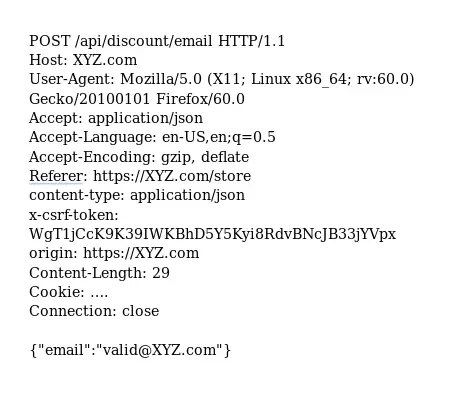
With an employee email in hand, I went straight to the loyalty discount verification feature, put in any random email and caught the request. The request looks like this.
Step 2: Replay with a loyal customer's email
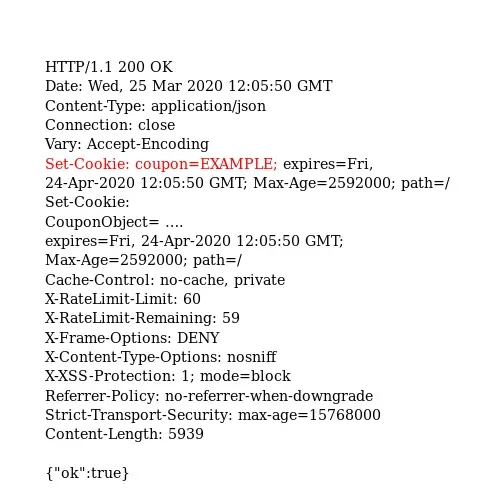
I sent the request to the repeater and replaced the random email with the one having previous purchases. Then I checked the set-cookie in the HTTP response header: game over.
Step 3: Use the coupon
With the cookie updated to carry the coupon, I chose an object, added it to the cart and saw the 50% off in the final total. The coupon value can be checked from the storage portion of inspect element.
That is how anybody can get 50% off on their purchases without being a loyal customer.
Root cause
The store had no user account system, so the loyalty coupon could not be tied to an authenticated account. Instead, the coupon was placed in a cookie set by the server in response to the email verification request. The verification step accepted the submitted email and the response carried the coupon in a set-cookie header. Anyone who knows an email address with previous purchases can ask for the coupon for that address and receive it.
Impact
The regular customers of an online store sometimes get high discounts. Because the store had no user account system to store coupons in session cookies, those coupons could be obtained by anyone. Anyone could get that high discount without having previous purchases. I found another security flaw using the same methodology, but it was marked as a duplicate of this one because the source of the flaw was the same.
Fix
The report does not describe a fix. The design change implied by the root cause is to stop issuing the loyalty coupon as a cookie value that any client can request for an arbitrary email, and to bind the discount to a verified, authenticated identity rather than to an email address supplied in the request.
Variants to test
- Email-based coupon issuance. Submit an email in any verification or discount endpoint and inspect the response headers for
set-cookie. A positive result is a coupon or discount value returned for an address you do not control. - Coupon in client-side storage. After verification, inspect cookies and session storage for a discount or coupon value. A positive result is a discount or coupon value stored client-side after verification.
- Replay across sessions.
- ** A positive result is any address that yields a coupon.
Sometimes the target is as simple as this. All we need is an eye with a focus to see and observe what others cannot.
What happened, in plain words
A security researcher found a simple flaw in an online shop. The shop sold apps and software, and it had a loyalty discount: regular customers could get 50% off. But the shop had no user accounts. Instead, it checked whether you were a loyal customer by asking for your email address. If that email had bought things before, the shop put a discount coupon into a cookie in your browser. The researcher realised that submitting someone else's email address, one that belonged to a person who had bought before, would return the coupon. He found an employee's email on LinkedIn, sent the request with that email, and got the coupon. Then he used it to get 50% off. This article explains every step for someone who has never done security testing before.
Background: the shop and the feature
The company, which the researcher calls XYZ, ran an online store selling apps and software. The researcher had a private invitation to test the store on HackerOne, a platform where companies ask security researchers to look for bugs. The program was a VDP, which stands for Vulnerability Disclosure Program: a way for companies to receive reports about security problems, sometimes without paying a bounty. The researcher checked the scope (the list of what was allowed to be tested) and started testing.
The first thing he noticed was that the store had no user account system. Normally, an online shop lets you create an account with a username and password, and it remembers you. Here, there was nothing like that. To buy something, you chose the item you wanted, added it to a shopping cart, and entered your bank card details. That was the whole process. No login, no profile, no password.

The feature at the centre of this story is the loyalty discount. Many online stores offer discounts to customers who buy from them regularly. The idea is to reward loyal customers, sometimes with large discounts. The researcher wondered: if there are no accounts, how does the store know whether I have bought before? The answer was an email verification system. You type in your email address, the store checks it, and if that email has a history of regular purchases, the store applies a discount coupon. After that, you pick an item, add it to the cart, enter your card details, and at checkout you see 50% off the total.
The key question: where is the coupon kept?
After the email is verified, the store has to remember that you are entitled to the discount. Since there is no account, it cannot store that information in a user profile on the server. The researcher reasoned that the coupon must be kept either in the browser's session storage or in a cookie. Session storage is a small storage area inside the browser that lasts only while the tab is open. A cookie is a small piece of data that a website asks the browser to store and send back with later requests. Because the store had no account system, the researcher concluded it must be using cookies to hold the coupon.
He badly wanted that cookie. But to get it, he needed an email address belonging to someone who had made previous purchases at XYZ. That set off a reconnaissance phase: finding such an email.
Finding a loyal customer's email
The researcher went looking for an employee email address of the company. He assumed that employees would have bought products from their own store, either for free or paid, so their emails would have purchase history. He used LinkedIn, the professional social network, to find employees. After about an hour, he found one email address (not belonging to an intern, as he jokes).
With that email in hand, he went to the loyalty discount verification feature. He entered any random email address and captured the request that the browser sent to the server. The request looked like this.
What that request means, line by line
The report shows the request as an image, so the exact text is not reproduced here. But we can explain what such a request typically contains and why each part matters. The request is an HTTP request, the format browsers use to ask a web server for something or to send data. It has several parts:
- The request line: it starts with a method such as
GETorPOST, followed by the path of the feature on the server, and the HTTP version. The method tells the server what kind of action is wanted.GETis for retrieving something;POSTis for sending data, such as a form. The path identifies the loyalty verification feature. - Headers: these are extra pieces of information, like
Host(which website),User-Agent(which browser), andCookie(any cookies the browser already has for that site). Headers are like the label on an envelope: they tell the server who is asking and how. - Body: for a
POSTrequest, the body carries the data being submitted, for example the email address entered in the form. The body is the contents of the letter inside the envelope.
The researcher captured this request using an intercepting proxy, a tool that sits between the browser and the server and lets you see and change the traffic. He then sent it to the repeater, a part of the proxy that lets you send the same request again and again with modifications.
Exploiting the flaw
Step 1: Capture the verification request
He entered a random email in the loyalty discount form and captured the request, as shown above. The goal was to understand exactly what the browser sends when you verify an email, so he could change it.
Step 2: Replace the email and replay
He sent the captured request to the repeater and replaced the random email with the email address that had previous purchases. Then he looked at the response from the server. In particular, he checked the set-cookie header in the HTTP response. The set-cookie header is how a server tells the browser to store a cookie. If the response contains a set-cookie with the coupon, the server has just given him the discount for that email address.
What the response means, line by line
The report shows the response as an image, so the exact text is not reproduced. But here is what to look for. An HTTP response also has a status line (for example HTTP/1.1 200 OK), headers, and often a body. The set-cookie header is the key: it is where the server hands the browser the coupon. The name and value after coupon= are the coupon data. The other attributes, such as Path or Expires, control when and where the browser sends the cookie back. When the browser receives this header, it stores the cookie and will include it in future requests to the site. That is how the discount follows you to checkout.
Step 3: Use the coupon
With the cookie now carrying the coupon, the researcher chose an item, added it to the cart, and saw the 50% off in the final total. He also notes that the coupon value can be seen in the storage section of the browser's developer tools (inspect element). That is where you can view cookies and other client-side storage.
That is how anybody can get 50% off without being a loyal customer.
Why it worked
The root cause is that the store had no user account system, so it could not tie the loyalty coupon to a logged-in user. Instead, the coupon was placed in a cookie set by the server in response to the email verification request. The verification step trusted whatever email was submitted and returned the coupon for that email in a set-cookie header. Nothing bound the coupon to the person making the request. Anyone who knows an email address with previous purchases can ask for the coupon for that address and receive it.
Impact
Regular customers of an online store sometimes get high discounts. Because the store had no user account system to store coupons in session cookies, those coupons could be obtained by anyone. Anyone could get that high discount without having previous purchases. The researcher also found another security flaw using the same methodology, but it was marked as a duplicate of this one because the source of the flaw was the same.
Fix
The report does not describe a fix. The design change implied by the root cause is to stop issuing the loyalty coupon as a cookie value that any client can request for an arbitrary email, and to bind the discount to a verified, authenticated identity rather than to an email address supplied in the request.
Variants to test
If you want to look for similar issues, here are some variations to try. Each is described in plain terms.
- Email-based coupon issuance. Find any feature that asks for an email, such as a verification or discount form. Submit an email and look at the response headers for
set-cookie. If you see a coupon or discount value returned for an address you do not control, that is a positive result. - Coupon in client-side storage. After verifying, open the browser's developer tools and inspect cookies and session storage for a discount or coupon value. If you find one, note the value and where it is stored.
- Replay across sessions.
- Employee and public email harvesting.
Sometimes the target is as simple as this. All we need is an eye with a focus to see and observe what others cannot.
Glossary
- API: Application Programming Interface; a way for two programs to talk to each other, like a waiter taking your order to the kitchen.
- Cookie: a small piece of data a website asks your browser to store and send back with later requests, like a claim ticket you show to get your coat.
- Session storage: a storage area in the browser that lasts only while the tab is open, like a temporary locker.
- HTTP request: a message a browser sends to a server asking for something or sending data, like an order form.
- HTTP response: the server's reply to a request, like the delivered goods.
- Header: extra information in a request or response, like the label on an envelope.
set-cookie: a response header that tells the browser to store a cookie.- Intercepting proxy: a tool that sits between browser and server and lets you see and change traffic, like a mail sorter who can open letters.
- Repeater: a part of an intercepting proxy that lets you resend a request with changes, like a photocopier that lets you edit the copy.
- VDP: Vulnerability Disclosure Program; a way for companies to receive security reports, sometimes without paying.
- HackerOne: a platform where companies ask researchers to test their systems.
- Reconnaissance: the information-gathering phase, like casing a neighbourhood before a burglary (but legal here).
- LinkedIn: a professional social network used to find people and their email addresses.
- Developer tools / inspect element: features in a browser that let you see and edit the page and its storage, like a mechanic's inspection panel.
- Loyalty discount: a discount given to regular customers.
- Coupon: a code or value that gives a discount.
- Checkout: the final step of an online purchase where you pay.
- Root cause: the underlying reason a vulnerability exists.
- Duplicate: a report that describes the same issue as an earlier one, so it is not counted separately.
- Scope: the list of what is allowed to be tested.
- Bounty: a reward, often money, given for a valid security report.




