Improper error handling leads to exposing internal tokens
An API returned detailed error responses that included a backend Google API access token with administrative scopes. An attacker could use this token to read information about all users and groups in the domain.
 Published on medium.com
Recently I started using a new application for secret management. Let the name be [redacted].
The full write-up lives on its author's site
It belongs to its author, so we link to it rather than copy it. The other two tabs are our own rewrites, checked against it.
Context
The target was a secret management application, referred to in the report only as [redacted]. The researcher had recently started using the application and spent time probing its API for obvious errors. The relevant surface is the application's own API, which sits in front of a backend that calls Google APIs to fetch additional data about users, for example the Google Admin Directory API.
Setup
The report describes no special accounts, roles, tools or versions. The researcher used the application as a normal user and sent requests to its API, including requests without an Authorization header and requests containing characters that the input validation was expected to reject.
Finding it
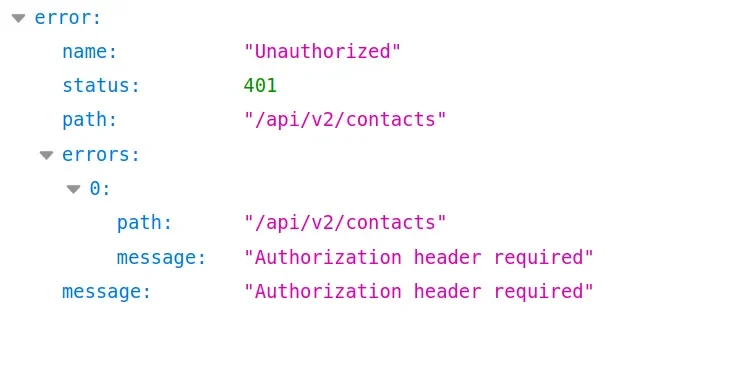
While accessing the API without an Authorization header, the researcher noticed that the response body contained a stack property. The response looked like this:
{"status": 401,"errorCode": "","errorClass": "NotAuthenticated","stack": "NotAuthenticated\n at /usr/src/app/lib/services/userService.js:56:15\n at Generator.throw (<anonymous>)\n at rejected (/usr/src/app/lib/services/userService.js:6:65)\n at runMicrotasks (<anonymous>)\n at processTicksAndRejections (node:internal/process/task_queues:96:5)"}
The stack trace exposes a path inside the application (/usr/src/app/lib/services/userService.js) and function names, which leak information about the libraries in use and sometimes their versions. Error messages of this kind also help an attacker discover undocumented API behaviour.
On its own this did not give the researcher much more to work with, so the next step was to try to cause further crashes. A database error would have been a good match, but the input validation held up. SQL injection attempts were answered with a Bad Request response carrying warnings about illegal characters.
Exploitation
Step 1: provoke an unhandled backend error
Then something unexpected happened: a request passed the backend validation and returned a new type of error. It looked like this:
{"error": {"response": {"config": {"url": "https://admin.googleapis.com/admin/directory/v1/users?query=x%40y.com%22%2BOR%2B1%3D1--&maxResults=500&domain=y.com","method": "GET","userAgentDirectives": [{}],"headers": {}
The backend was sending requests to Google APIs to fetch more data about the user. Google answered with a 400 code that the application did not handle, and the whole error was dumped, including response and request headers.
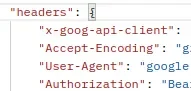
The dumped request headers contained an Authorization header. At first the researcher assumed it was their own token, but it was in fact a backend token used for internal communication. That token carried an additional scope: admin.directory.user.security.
Step 2: validate the leaked token
The researcher validated the token against Google's token_info endpoint. It allowed fetching information about all users and groups in the domain.
Step 3: attempt to reach the more sensitive service
The researcher knew the application also used another Google service holding much more sensitive information. Attempts to break the endpoints that used that functionality did not succeed.
Root cause
The application returned internal error details to the client in two ways. Unauthenticated requests produced a response body with a stack property, exposing file paths and function names. Separately, when the backend called the Google Admin Directory API and Google replied with a 400, the application did not handle that error and serialised the whole error object, including the outgoing request configuration with its headers, into the response. Because the outgoing request carried a backend service token with the admin.directory.user.security scope, that credential reached the client. The input validation that blocked the SQL injection attempts did not prevent a request from reaching the backend call and triggering the unhandled error path.
Impact
An attacker who can trigger the unhandled backend error obtains a backend token for internal communication with Google APIs. In this case the token's admin.directory.user.security scope allowed fetching information about all users and groups in the domain. The report does not describe what the second, more sensitive Google service would have exposed, because the researcher could not reach it. The stack trace disclosure is a lesser issue on its own: it reveals application paths, function names and library information, and helps in mapping undocumented API behaviour.
Fix
The bug was reported and the new version was fixed within a few hours. The stack trace was removed, along with the errors dumped on Bad Request.
Variants to test
- Send requests to API endpoints without the expected authentication header and inspect the body for
stack,traceor similar properties. A positive result is a response containing file paths or function names. - Send inputs that pass validation but cause the backend to call a third-party API with parameters it rejects, and watch for serialised error objects. A positive result is a response body containing the outgoing request URL, method or headers.
- Look for
Authorizationor other credential headers inside any dumped request configuration. A positive result is a token you can validate against the provider's token introspection endpoint. - Check the scopes of any leaked token against the provider's token info endpoint. A positive result is a scope broader than the feature you are using should need, such as directory-wide read access.
- Probe other endpoints that use the same backend integration for the same unhandled error pattern. A positive result is the same error dump on a different feature.
What happened, in plain words
A security researcher was using a website for secret management. The report calls the site only [redacted]. While using it, she poked at the part of the site that programs talk to. That part is called an API, short for Application Programming Interface. Think of the website's visible pages as the front of a shop and the API as the serving hatch round the back: the same goods come through it, but you talk to it in a fixed, machine-friendly way instead of pointing at things on a screen.
When she sent a request to the API without the usual proof of who she was, the site answered with an error message. That is normal. What was not normal was that the error message included a stack trace: a list of the internal steps the program took before it failed, complete with file names and function names from inside the server. That kind of detail is meant for developers reading logs, not for strangers on the internet.
She then tried to make the site fail in other ways, hoping to see more internal detail. Her attempts to sneak database commands in through the input were blocked. But one request got through the checks and made the server call Google's services on her behalf. Google refused that call, and the site passed Google's entire refusal back to her, including the request the server had sent to Google. Inside that request was a credential, a token, that the site's own servers use to talk to Google. That token was more powerful than anything she should ever have been able to see, and it allowed fetching information about every user and group in the organisation's Google domain.
She reported it, and the new version was fixed within a few hours: the stack trace and the dumped errors were removed.
Background you need first
A few ideas come up again and again below, so here they are from zero.
API. A website's API is a set of addresses (called endpoints) that accept requests and return data, usually in a text format called JSON. JSON looks like a set of labels and values in curly brackets, for example {"status": 401}. Programs read it easily, and so can a curious person with a browser or a tool that sends requests.
Request and response. When your browser loads a page, it sends a request to a server and the server sends back a response. The same happens with an API. A request has a method (such as GET, meaning "give me this"), a URL, and often headers, which are extra labelled lines of information attached to the request.
Authorization header. A header is a small piece of labelled information sent along with a request or response. The Authorization header is where a program puts its proof of identity, usually a token. If you leave it out, the server does not know who you are and should refuse the request.
Token. A token is a long string of characters that acts like a temporary key or a cloakroom ticket. You show it, and the server treats you as the person it was issued to. Tokens can carry permissions, called scopes, which say what the holder is allowed to do. A token with a narrow scope can read one thing; a token with a broad scope can read a lot.
Stack trace. When a program crashes, it can print the trail of function calls that led to the crash, like the list of rooms you walked through before tripping over. That list is the stack trace. It is useful to developers and revealing to attackers, because it shows file paths, function names and sometimes which software libraries and versions the server uses.
Status codes. Servers answer with a three-digit number. 401 means "you are not authenticated", that is, you did not prove who you are. 400 means "bad request", that is, the server could not make sense of what you sent.
SQL injection. Many sites keep their data in a database, which is queried with a language called SQL. SQL injection is an attempt to slip database commands into an ordinary input field so the database runs them. Sites defend against it by validating input, rejecting characters and patterns that should never appear in a normal value.
Scope. As above, a scope is a permission attached to a token. A scope like admin.directory.user.security is a broad administrative permission over a Google Workspace directory.
Google Admin Directory API. Google offers a service that lets an organisation manage its users and groups. Programs talk to it through an API at admin.googleapis.com. A site that wants to look up details about its users can ask this service on the user's behalf, using a token of its own.
Finding it
She had recently started using the secret management application and spent time sending requests to its API just to see whether anything obviously broken came back. The report mentions no special accounts, tools or versions: she used the application as a normal customer and sent requests to its API, including requests without an Authorization header and requests containing characters that the input checks were supposed to reject.
The first thing she did was ask the API for something without proving who she was. The server correctly refused, but the refusal carried far too much detail:
{"status": 401,"errorCode": "","errorClass": "NotAuthenticated","stack": "NotAuthenticated\n at /usr/src/app/lib/services/userService.js:56:15\n at Generator.throw (<anonymous>)\n at rejected (/usr/src/app/lib/services/userService.js:6:65)\n at runMicrotasks (<anonymous>)\n at processTicksAndRejections (node:internal/process/task_queues:96:5)"}
Line by line, in plain words:
"status": 401says the server refused the request because it was not authenticated."errorCode": ""is an empty error code, so nothing useful there."errorClass": "NotAuthenticated"names the kind of error the program raised internally."stack": "..."is the stack trace, the trail of internal steps. It names a file inside the server,/usr/src/app/lib/services/userService.js, with line and column numbers, and it names functions such asGenerator.throw,rejectedandrunMicrotasks. Those names hint at which software libraries the server uses, and sometimes their versions.
Why does this matter? Because a stack trace is a map of the inside of the building. It shows where the code lives and what it is built from. Error messages like this also help an attacker work out which API features exist but are not documented, since the errors reveal how the server thinks.
On its own, though, it did not give her much more to work with. So the next step was to try to make the server crash in other ways. A database error would have been a good prize, because database errors often spill query details. But the input checks held up: her SQL injection attempts were answered with a Bad Request response carrying warnings about illegal characters. In other words, the site noticed the suspicious characters and stopped the request before it reached anything important.
Getting the token
Step 1: make the backend fail in a way it did not expect
Then something unexpected happened. One request passed the backend validation and came back with a new kind of error:
{"error": {"response": {"config": {"url": "https://admin.googleapis.com/admin/directory/v1/users?query=x%40y.com%22%2BOR%2B1%3D1--&maxResults=500&domain=y.com","method": "GET","userAgentDirectives": [{}],"headers": {}
Line by line, in plain words:
"error"is the outer label: this is an error report."response"means the error contains the response that came back from somewhere else, namely Google."config"means it also contains the configuration of the request the server had sent out, that is, the details of what it asked Google."url"is the address the server called:https://admin.googleapis.com/admin/directory/v1/users, the Google Admin Directory API's users endpoint. The query string after the question mark containsquery=x%40y.com%22%2BOR%2B1%3D1--, which is the researcher's input, URL-encoded. Decoded,%40is@,%22is a double quote,%2Bis+and%3Dis=, so the value is[redacted]"+OR+1=1--, a classic SQL injection style string. The other parameters aremaxResults=500anddomain=y.com."method": "GET"says the server asked Google to give it data."userAgentDirectives": [{}]and"headers": {}are further parts of the outgoing request's configuration. The snippet is cut off at this point, but the report says the whole error was dumped, including response and request headers.
What had happened? The application's backend, the part of the site that does the real work behind the API, was sending requests to Google APIs to fetch more data about the user. Google answered with a 400 code, meaning it could not make sense of the request. The application did not handle that answer, and instead of a tidy message it serialised the whole error object, including the outgoing request's configuration and headers, and sent it back to the researcher.
The screenshot shows the dumped error with the response and request headers. Among those request headers was an Authorization header. At first she thought the site had used her own token, which would have been bad enough. It had not: this was a backend token, a credential the site's own servers use for internal communication with Google. And this token carried an additional scope, admin.directory.user.security.
Why is that serious? Because a token is a key. This key was not meant to leave the server, and it opened more doors than the feature she was using should ever need. The scope admin.directory.user.security is an administrative permission over the Google directory.
Step 2: check what the leaked token can do
She validated the token against Google's token_info endpoint, a Google service that tells you what a given token is and what it is allowed to do. The result: the token allowed fetching information about all users and groups in the domain. In everyday terms, she had found a master key in a coat pocket and confirmed at the locksmith's that it opens every office in the building.
Step 3: try to reach the more sensitive service
The researcher knew the application also used another Google service holding much more sensitive information. She tried to break the endpoints that used that functionality, but this time she hit the wall: those attempts did not succeed. The report does not say what that second service was or what it would have exposed.
Why it worked
The application leaked internal error details to the client in two separate ways.
- Requests without authentication produced a response body with a
stackproperty, exposing file paths and function names. - When the backend called the Google Admin Directory API and Google replied with a 400, the application did not handle that error and wrote the whole error object, including the outgoing request configuration with its headers, into the response.
Because the outgoing request carried a backend service token with the admin.directory.user.security scope, that credential reached the client. The input validation that blocked the SQL injection attempts did not stop a request from reaching the backend call and triggering the unhandled error path. In other words, the front door was locked, but the window was open.
What it meant
Anyone who can trigger the unhandled backend error obtains a backend token for internal communication with Google APIs. In this case the token's admin.directory.user.security scope allowed fetching information about all users and groups in the domain. The stack trace disclosure is a lesser issue on its own: it reveals application paths, function names and library information, and helps in mapping undocumented API behaviour.
The fix
She reported the bug and the new version was fixed within a few hours. The stack trace was removed, along with the errors dumped on Bad Request.
Things worth trying on other sites
These are the same checks the researcher used, written so you can follow them with a browser and a tool that sends requests.
- Send requests to API endpoints without the expected authentication header and look in the body for
stack,traceor similar properties. A positive result is a response containing file paths or function names. - Send inputs that pass validation but cause the backend to call a third-party API with parameters it rejects, and watch for serialised error objects. A positive result is a response body containing the outgoing request URL, method or headers.
- Look for
Authorizationor other credential headers inside any dumped request configuration. A positive result is a token you can validate against the provider's token introspection endpoint. - Check the scopes of any leaked token against the provider's token info endpoint. A positive result is a scope broader than the feature you are using should need, such as directory-wide read access.
- Probe other endpoints that use the same backend integration for the same unhandled error pattern. A positive result is the same error dump on a different feature.
Glossary
- API: the machine-facing part of a website, a set of addresses that accept requests and return data, usually as JSON.
- Endpoint: one specific address in an API that performs one job.
- Request: a message a client sends to a server asking for something, with a method, a URL and often headers.
- Response: the message the server sends back, including a status code and usually a body.
- Header: a labelled line of extra information attached to a request or response, such as
Authorization. - Authorization header: the header where a client puts its proof of identity, usually a token.
- Token: a string that acts like a temporary key, identifying its holder and carrying permissions.
- Scope: a permission attached to a token that says what the holder may do.
- Stack trace: the list of internal function calls a program made before it failed, often including file paths and line numbers.
- Status code: the three-digit number in a response saying how the request went, such as 401 (not authenticated) or 400 (bad request).
- JSON: a text format for structured data, made of labels and values in curly brackets.
- SQL injection: an attempt to slip database commands into ordinary input so the database runs them.
- Input validation: checks a site applies to incoming data to reject values that should never appear, such as illegal characters.
- Backend: the part of a site that does the real work behind the scenes, as opposed to the pages you see.
- Google Admin Directory API: Google's service, at
admin.googleapis.com, for managing an organisation's users and groups. - Token introspection / token_info endpoint: a provider service that tells you what a token is and what it is allowed to do.
- Serialise: to turn a program's internal object into text that can be sent over the network.
- Information disclosure: a weakness where a system reveals data it should keep private, such as internal paths or credentials.



