Information Disclosure — Intercom Identity Verification secret (HMAC key) is hard-coded in…
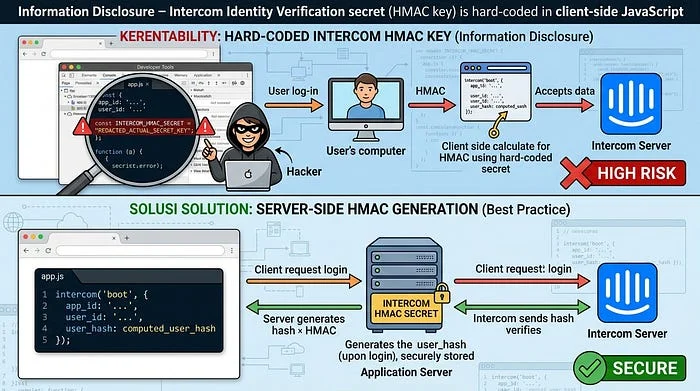
The application computed Intercom identity verification hashes in the browser, so the HMAC secret key was shipped in a public JavaScript bundle. Anyone could extract the key and forge a valid hash for any sequential member ID, letting them open the Messenger as another user and read or send support messages.

Penetration Testing
The full write-up lives on its author's site
It belongs to its author, so we link to it rather than copy it. The other two tabs are our own rewrites, checked against it.
Context
The target is a web application that embeds Intercom's Messenger and uses Intercom's Identity Verification, the HMAC-based anti-impersonation feature. The design intent of Identity Verification is straightforward: the browser should only ever receive a pre-computed user_hash, while the secret key used to compute that hash stays on the server. The browser should only ever receive a pre-computed user_hash, while the secret key used to compute it stays on the server.
The application in this report does the opposite. It computes the user_hash in the browser, which means the HMAC secret is shipped to every visitor inside a JavaScript bundle. The researcher found the key in plaintext in a .js file and confirmed it was the real, currently active key by reproducing, byte for byte, the exact user_hash that their own browser had sent to Intercom.
The report is explicit that this is a misconfiguration on the web application's side, exposing its own Intercom secret, and not a flaw in Intercom itself.
Setup
The work was done against a VDP program. The researcher notes that the key is retrievable without even logging in, because it sits in a public static asset. The key is retrievable without even logging in, because it sits in a public static asset.
Finding it
That is the wrong place for it: if the browser computes the HMAC, the key must be present in the browser. The key was found sitting in plaintext in the bundle, ***.js.
To prove the key was live rather than a stale leftover, the researcher used it to recompute the user_hash that their own browser had sent to Intercom and compared the two. The result matched byte for byte, which confirms the key is the real, currently active one.
Exploitation
Step 1: Read the bundle
The key was located in plaintext in the shipped JavaScript file ***.js. No authentication was needed to fetch it, since it is a public static asset.
Step 2: Confirm the key is live
Using the extracted key, the researcher recomputed the user_hash for their own session and compared it with the value their browser had actually sent to Intercom. The two matched exactly, byte for byte. This confirms the key is the real, currently active one.
Step 3: Show arbitrary hashes are computable
Because the HMAC key is known, a valid user_hash can be computed for any member ID. Member IDs are small sequential integers (the researcher's own is ****), so the ID space can be walked and a valid hash forged for each one. Booting the Intercom Messenger with such a hash would load the Messenger as that user.
The researcher stopped there. No forged identity was sent to Intercom and no one else's conversations were accessed. The proof covers reproducing the researcher's own hash and demonstrating that arbitrary hashes are trivially computable offline.
Root cause
The application computes the Intercom user_hash in the browser, which requires shipping the HMAC secret to every visitor. The client-side computation is visible in the report's remediation as a CryptoJS.HmacSHA256(…) call together with the crypto-js include that supports it. Identity Verification only works if the secret stays server-side; putting the signing step in the client defeats the feature by design.
The secret was placed in a public static asset that any visitor can download.
Impact
Identity Verification exists precisely to stop one user from impersonating another in the Messenger. By shipping the HMAC secret to the browser, the application defeats its own protection:
- Any visitor can extract the key from
****.jsand compute a validuser_hashfor anymember_id. member_ids are sequential integers (the researcher's is****), so the space is enumerable at scale rather than a one-off.- Booting Intercom as a victim would let an attacker read that victim's support conversation history, which on a lending platform frequently contains names, contact details, account and loan specifics, and other PII, and send messages as the victim, which can support social-engineering follow-ons.
- The key is retrievable without logging in, since it is in a public static asset, which lowers the bar further.
Because anyone who has loaded the app already has the secret, it should be treated as compromised and rotated, not merely relocated.
Fix
- Compute
user_hashon the server. Add a small backend endpoint, or include it in an existing authenticated bootstrap response, that returns the already-computeduser_hashfor the logged-in user. Never send the HMAC secret to the browser, and remove the client-sideCryptoJS.HmacSHA256(…)call and the crypto-js include that supports it. - Rotate the exposed secret immediately in the Intercom workspace settings for the app.
- After rotating, double-check that the secret no longer appears in any shipped bundle, for example by grepping the built assets for the app IDs and the new key.
The report describes these as recommended remediation steps; it does not say which of them were applied.
Variants to test
- Other client-side HMAC integrations. Look for any third-party widget that expects a signed identity (support chat, analytics identity stitching, session replay) and check whether the signing happens in the browser. A positive result is a key or signing routine visible in a shipped bundle.
- Bundle grepping for known key formats. Search built assets for strings that look like Intercom secrets or app IDs. A positive result is a plaintext secret in a public file.
- Hash reproduction. Take the
user_hashyour own browser sends and recompute it with the candidate key. A byte-for-byte match confirms the key is live. - Sequential identifier enumeration. Where member IDs are small integers, check whether a forged hash for a neighbouring ID is computable offline. A positive result is the Messenger loading as a different identity; only test against accounts you control.
- Unauthenticated retrieval. Fetch the bundle without a session and confirm the secret is still present. A positive result is the key appearing in a response to an anonymous request.
What happened, in plain words
A website had a live chat box on it, the kind that pops up in the corner so you can talk to support. That chat box was made by a company called Intercom, and the website had switched on an Intercom feature called Identity Verification. The whole job of that feature is to stop one customer from pretending to be another customer inside the chat. It does this with a secret key: the browser should only receive a pre-computed user_hash, and the key must stay on the server.
The website in this report did it backwards. Instead of stamping the signature on its server, it did the stamping inside the visitor's own browser. To stamp something in the browser, the browser needs the secret key, so the key was sent to every single visitor as part of the website's code. The researcher found that key sitting in plain text in a JavaScript file, and proved it was the real, currently working key by using it to recreate, exactly, the signature their own browser had sent to Intercom.
With that key, anyone can make a valid signature for any customer number. Customer numbers are small and run in order, so someone could work through them one by one and pretend to be each customer in the chat. That would mean reading that person's past support conversations and sending messages as them. The researcher stopped at proving the key works and did not actually impersonate anyone.
The report is clear that the mistake belongs to the website, which exposed its own Intercom secret. Intercom itself did nothing wrong.
The background you need first
Before the steps make sense, here are the pieces involved, explained from zero.
A web application is a program you use through your browser. You type an address, the browser downloads some files, and those files make the page work. Some of those files are JavaScript, which is the programming language that runs inside your browser and makes pages interactive. A collection of JavaScript files shipped together is often called a bundle.
A static asset is a file the website hands out to anyone who asks for it, with no login required. Images, stylesheets and JavaScript bundles are usually static assets. If a secret is inside one, the secret is effectively public.
Intercom is a customer support product. A business puts Intercom's chat widget, called the Messenger, on its site so customers can start conversations with support. Those conversations are stored by Intercom and tied to a customer identity.
Identity Verification is an Intercom feature that lets the business prove to Intercom which customer is loading the Messenger. Without it, someone could claim to be any customer. With it, the business's server produces a short value called a user_hash for the logged-in customer, and the browser passes that value to Intercom. Intercom recomputes the same value on its side and checks that the two match. If they match, Intercom trusts the identity.
HMAC is the mathematical recipe used to produce that user_hash. Think of it as a wax seal: you press a special stamp into hot wax, and anyone with the matching stamp can check the seal is genuine. The secret key is the stamp. The user_hash is the seal. Anyone can look at a seal, but only someone holding the stamp can make a new one that passes inspection. That is why the key must never leave the server: if a visitor has the stamp, they can seal any document they like.
A member ID (also written member_id) is the number the website uses to tell customers apart. In this application these are small whole numbers that go up one at a time. That matters later, because it means the numbers are easy to guess and walk through.
A VDP is a vulnerability disclosure programme: a scheme where a company invites people to report security problems to it, usually without paying a bounty. The researcher found this issue through such a programme.
Information disclosure is the name for the kind of bug where something that should have stayed private, such as a password, a key or a document, is handed out to people who should not have it. That is the category this finding falls into.
Impersonation means acting as somebody else. In this context it means loading the chat widget as another customer, so that Intercom shows you their conversations and treats your messages as coming from them.
How the feature is supposed to work
The design is simple once you picture the wax seal.
- A customer logs in to the website.
- The website's server, which holds the secret key, computes a
user_hashfor that customer. - The server sends only the finished
user_hashto the browser. - The browser hands the
user_hashto Intercom when it loads the Messenger. - Intercom checks the hash against its own copy of the key. If it matches, Intercom knows the browser really is speaking for that customer.
The key never leaves the server. The browser only ever carries a finished seal, which is useless for making new seals.
What this website did instead
The application in this report skipped step 2 on the server and did the calculation in the browser. That single change breaks the whole scheme, because a browser cannot compute an HMAC without the key. So the key had to be sent to the browser, inside the JavaScript bundle, where every visitor could read it.
The researcher found the key in plain text in a file named ***.js. To check it was not an old leftover, they used it to recompute the user_hash their own browser had sent to Intercom and compared the two values. They matched byte for byte, meaning every character was identical. That proves the key in the bundle is the real, currently active one.
The report stresses that this is a misconfiguration on the website's side, exposing its own Intercom secret. It is not a flaw in Intercom.
Setting up
The work was done against a VDP programme. The key sits in a public static asset and can be retrieved without even logging in. The researcher notes that the key can be retrieved without even logging in.
Finding it
That is the wrong place for it: if the browser does the HMAC calculation, the key has to be present in the browser. Following that logic, the key was found sitting in plain text in the bundle, ***.js.
To show the key was live rather than a stale copy, the researcher used it to recompute the user_hash their own browser had sent to Intercom, then compared the two. The result matched byte for byte, which confirms the key is the real, currently active one.
Proving it, step by step
Step 1: Read the bundle
The key was located in plain text in the shipped JavaScript file ***.js. No login was needed to fetch it, because it is a public static asset. The reason for this step is simple: if the browser is doing the signing, the signing key must be somewhere in the files the browser downloads, so those files are the first place to look.
Step 2: Confirm the key is live
Using the extracted key, the researcher recomputed the user_hash for their own session and compared it with the value their browser had actually sent to Intercom. The two matched exactly, byte for byte. This step matters because it confirms the key is the real, currently active one.
Step 3: Show arbitrary hashes are computable
Because the HMAC key is known, a valid user_hash can be computed for any member ID. Member IDs are small sequential integers (the researcher's own is ****), so the ID space can be walked and a valid hash forged for each one. Loading the Intercom Messenger with such a hash would open the Messenger as that user.
The researcher stopped there. No forged identity was sent to Intercom and no one else's conversations were accessed. The proof covers reproducing the researcher's own hash and showing that arbitrary hashes are trivially computable offline, meaning on the researcher's own machine without touching Intercom's systems.
Why it works at all
The application computes the Intercom user_hash in the browser, which requires shipping the HMAC secret to every visitor. The report's remediation section points at the client-side computation as a CryptoJS.HmacSHA256(…) call, together with the crypto-js include that supports it. CryptoJS is a JavaScript library that provides cryptographic functions inside the browser, and HmacSHA256 is the specific HMAC recipe used here. Identity Verification only works if the secret stays on the server, so moving the signing step into the client defeats the feature by design.
The secret was placed in a public static asset that any visitor can download.
What an attacker could do with it
Identity Verification exists precisely to stop one user from impersonating another in the Messenger. By shipping the HMAC secret to the browser, the application defeats its own protection:
- Any visitor can extract the key from
****.jsand compute a validuser_hashfor anymember_id. member_ids are sequential integers (the researcher's is****), so the space can be enumerated at scale rather than being a one-off.- Loading Intercom as a victim would let an attacker read that victim's support conversation history, which on a lending platform frequently contains names, contact details, account and loan specifics, and other personal information, and send messages as the victim, which can support follow-on social engineering.
- The key can be retrieved without logging in, since it is in a public static asset, which lowers the bar further.
Because anyone who has loaded the app already has the secret, it should be treated as compromised and rotated, not merely moved somewhere else. Rotating means replacing the key with a new one, so the old one stops working.
How to fix it
- Compute
user_hashon the server. Add a small backend endpoint, or include it in an existing authenticated bootstrap response, that returns the already-computeduser_hashfor the logged-in user. Never send the HMAC secret to the browser, and remove the client-sideCryptoJS.HmacSHA256(…)call and the crypto-js include that supports it. In plain terms: move the wax stamp back into the office and only hand out finished seals. - Rotate the exposed secret immediately in the Intercom workspace settings for the app. The old key is public, so it has to be replaced, not just hidden.
- After rotating, double-check that the secret no longer appears in any shipped bundle, for example by grepping the built assets for the app IDs and the new key. Grepping means searching files for a piece of text.
The report presents these as recommended steps. It does not say which of them were applied.
Similar things to look for elsewhere
- Other client-side HMAC integrations. Look for any third-party widget that expects a signed identity, such as support chat, analytics identity stitching or session replay, and check whether the signing happens in the browser. A positive result is a key or signing routine visible in a shipped bundle.
- Bundle grepping for known key formats. Search built assets for strings that look like Intercom secrets or app IDs. A positive result is a plain text secret in a public file.
- Hash reproduction. Take the
user_hashyour own browser sends and recompute it with the candidate key. A byte-for-byte match confirms the key is live. - Sequential identifier enumeration. Where member IDs are small integers, check whether a forged hash for a neighbouring ID is computable offline. A positive result is the Messenger loading as a different identity. Only test against accounts you control.
- Unauthenticated retrieval. Fetch the bundle without a session and confirm the secret is still present. A positive result is the key appearing in a response to an anonymous request.
Glossary
- Web application: a program you use through a browser, made of files the browser downloads and runs.
- JavaScript: the programming language that runs inside the browser and makes pages interactive.
- Bundle: a collection of JavaScript files shipped together to the browser.
- Static asset: a file a website hands out to anyone who asks, with no login required.
- Intercom: a customer support product whose chat widget businesses put on their sites.
- Messenger: Intercom's chat widget that customers use to talk to support.
- Identity Verification: an Intercom feature that proves which customer is loading the Messenger, using a signed value.
user_hash: the signed value the website produces for a customer and the browser passes to Intercom.- HMAC: a mathematical recipe that uses a secret key to produce a signature, like pressing a wax seal.
- Secret key: the private value used to produce an HMAC signature; it must stay on the server.
- Member ID /
member_id: the number a website uses to tell customers apart. - Sequential integers: whole numbers that go up one at a time, making them easy to guess and walk through.
- VDP: vulnerability disclosure programme, a scheme where a company invites people to report security problems, usually without a bounty.
- Information disclosure: a bug where something private, such as a key or document, is handed to people who should not have it.
- Impersonation: acting as somebody else, here loading the chat widget as another customer.
- Misconfiguration: a setting or design choice on the website's side that leaves it exposed, rather than a flaw in a product it uses.
- CryptoJS: a JavaScript library that provides cryptographic functions inside the browser.
CryptoJS.HmacSHA256(…): the specific CryptoJS call that computes an HMAC signature in the browser.- Byte for byte: identical in every character, with no differences at all.
- Offline: on the researcher's own machine, without sending anything to the target's systems.
- Rotate: replace a secret with a new one so the old one stops working.
- Grepping: searching files for a piece of text.
- Personal information (PII): data that identifies a person, such as names, contact details or account specifics.
- Social engineering: manipulating a person into doing something, often by pretending to be someone they trust.
- Endpoint: a specific address on a server that a program can send a request to.
- Bootstrap response: the data a website sends when a page first loads, used to set the page up.



