Information Disclosure via Exposed Swagger Config
An exposed Swagger configuration endpoint on a staging subdomain returned a 418 status, but by altering or removing the Host header the attacker could access an internal API documentation file. This file revealed hundreds of internal endpoints, system configuration details, and a staging dataset of over 75,000 users.

Penetration Testing
The full write-up lives on its author's site
It belongs to its author, so we link to it rather than copy it. The other two tabs are our own rewrites, checked against it.
Context
This write-up covers an information disclosure bug found on a staging environment. The target was a subdomain of a larger platform, and the exposed component was a Swagger/OpenAPI documentation endpoint. Swagger UI normally serves an interactive page that lists a service's API operations, and it fetches its configuration from a swagger-config file that points the UI at one or more OpenAPI specification documents. Those specification documents describe every route, parameter and schema the service knows about. When they are reachable without authentication, they hand an attacker the internal map of the backend.
The researcher describes the class as a security misconfiguration that let anyone access the internal map of the entire server without any authentication at all. No payload, CVE or complex exploit was involved.
Setup
The report does not describe any account, role or special precondition. The only tooling named is subdomain enumeration and ffuf for fuzzing the nested subdomain. The work started from passive and active enumeration of the same domain, repeated until something interesting appeared.
Finding it
Repeated subdomain enumeration on the same domain eventually surfaced this host:
https://public.stage.ops.example.me/
The researcher then fuzzed the nested subdomain with ffuf and uncovered this endpoint:
https://public.stage.ops.example.me/api/v3/api-docs/swagger-config
The path ends in swagger-config, the configuration document that Swagger UI fetches. Finding it on a public staging host is already suspicious, because that document tells you where the actual specification lives.
Exploitation
Step 1: Request the Swagger config and get a 418
Requesting the endpoint did not return the configuration. It returned response code 418, I'm a teapot.
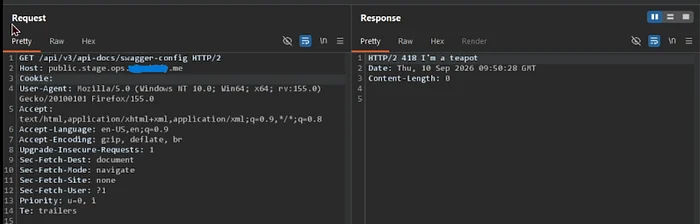
The researcher's reasoning at this point is worth keeping: a 418 is not a 403, so the usual access-control bypass tricks do not obviously apply. A 418 is not a 403, so the usual access-control bypass tricks did not obviously apply, which shifted attention to the Host header. That shifted attention to the Host header.
Step 2: Manipulate the Host header
Several attempts were made. The one that worked was changing the Host header, either by replacing its first word with another or by deleting the header entirely. The report does not give the exact header values used, only that these two variations produced a different result.
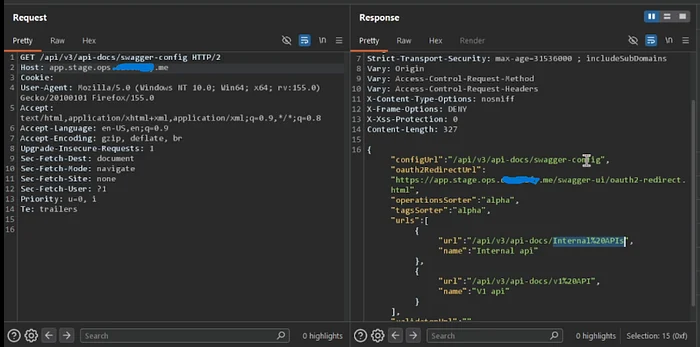
Step 3: Read the specification index
With the header changed, the response revealed a document listing the available specification files, including one named:
/api/v3/api-docs/Internal%20APIs

The %20 is a URL-encoded space, so the group is called Internal APIs. The name alone says this was not intended for public consumption.
Step 4: Fetch the internal specification
Calling that endpoint returned the file itself.
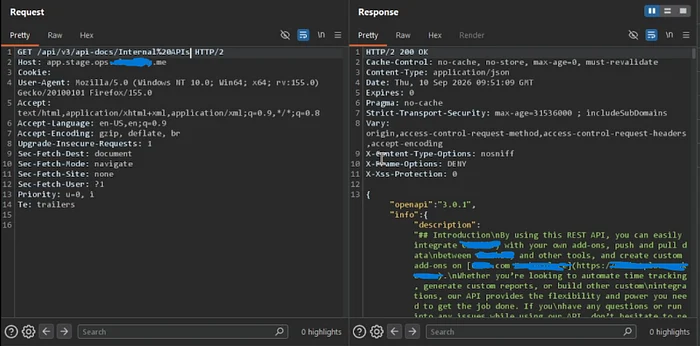
The file contained the internal map for the whole server. The report reproduces the leaked content in condensed form:
Leaked Endpoints & InformationAdmin Authentication Endpoints/auth/admin/sso/code/auth/admin/verification/validate/auth/admin/verification/{email}/auth/token/exchange/adminAPI Key Management/apiKey/apiKey/active/apiKey/{userId}/generateApiKey/apiKey/{apiKeyId}/apiKey/deactivateApiKey/{userId}/apiKey/activateApiKey/{userId}Jira Integration/jira/internal/webhooks/worklog/created/jira/internal/webhooks/worklog/updated/jira/internal/webhooks/worklog/deleted/jira/integration/webhooks/install/jira/integration/webhooks/uninstallSystem Settings/system-settings/system-settings/smtp-configuration/system-settings/o-auth2-configuration/system-settings/saml2-configuration/system-settings/custom-emailsMongoDB Connectors:exampleConnectorMongoDBeventConnectorMongoDBfileImportConnectorMongoDBjobManagerMongoDBquickbooksConnectorMongoDBsharedConnectorMongoDBwebhookLogConnectorMongoDBRedis Version: 7.2.4Backend Service Version: 1.2333.0
The groups visible in that dump are:
| Group | Example paths |
|---|---|
| Admin authentication | /auth/admin/sso/code, /auth/admin/verification/validate, /auth/admin/verification/{email}, /auth/token/exchange/admin |
| API key management | /apiKey, /apiKey/active, /apiKey/{userId}/generateApiKey, /apiKey/{apiKeyId}, /apiKey/deactivateApiKey/{userId}, /apiKey/activateApiKey/{userId} |
| Jira integration | /jira/internal/webhooks/worklog/created, /jira/internal/webhooks/worklog/updated, /jira/internal/webhooks/worklog/deleted, /jira/integration/webhooks/install, /jira/integration/webhooks/uninstall |
| System settings | /system-settings, /system-settings/smtp-configuration, /system-settings/o-auth2-configuration, /system-settings/saml2-configuration, /system-settings/custom-emails |
| MongoDB connectors | exampleConnectorMongoDB, eventConnectorMongoDB, fileImportConnectorMongoDB, jobManagerMongoDB, quickbooksConnectorMongoDB, sharedConnectorMongoDB, webhookLogConnectorMongoDB |
The same response also disclosed the Redis version, 7.2.4, and the backend service version, 1.2333.0. The researcher summarises the scale of the leak as follows:
Total Internal API Endpoints: 756 OpenAPI Spec Size: 877 KB Staging Dataset: 75,325 users
According to the report, the specification was not just a list of endpoints but a complete architectural blueprint of the backend. It exposed critical authentication paths (admin login and verification endpoints), internal infrastructure (internal DNS records and MongoDB connectors), system configuration endpoints for SMTP, OAuth and SAML, and the size of the staging dataset, over 75,000 users.
Root cause
The report classifies the issue as a classic security misconfiguration and lists four contributing factors:
- Public exposure: monitoring endpoints were left reachable from the public internet.
- Missing authentication: no authentication or authorisation mechanism was configured on them.
- No network controls: there were no IP restrictions or whitelisting.
- Improper binding: internal monitoring services were bound to public interfaces (
[redacted]) instead of internal networks or localhost.
The report does not identify what produced the 418 or why changing the header worked. Changing or removing the header moved the request past that filter, so the protection was cosmetic: it depended on the client sending the expected header, which an attacker fully controls. The report does not identify the component responsible.
Impact
An unauthenticated attacker could retrieve the full internal OpenAPI specification of the staging backend. In practice that means:
- A complete inventory of 756 internal endpoints, including admin authentication, API key lifecycle, Jira webhook and system settings routes.
- Knowledge of internal DNS records and the names of MongoDB connectors.
- The Redis version and backend service version, which narrow down which known issues are worth trying.
- Confirmation that the staging environment holds data for 75,325 users.
The researcher frames the result as turning a standard information disclosure into a dangerous vulnerability that could let an attacker map the entire infrastructure and potentially pivot to the production environment. That pivot is stated as a possibility, not as something demonstrated. No user records, credentials or configuration values are shown as extracted; what leaked is the specification and the metadata listed above.
Fix
The report gives a short remediation list:
- Restrict access to the private network.
- Add authentication.
- Block public requests.
The report's point is that internal files should never be exposed to the public internet.
Variants to test
- Springdoc config on other hosts. Request
/v3/api-docs/swagger-configand then/v3/api-docson every host you enumerate. A positive result is a JSON document listing API groups or a full OpenAPI spec, especially one with a group name likeInternal APIs. - Group enumeration. When the config lists groups, request each group path directly, for example
/api/v3/api-docs/Internal%20APIs. A positive result is a specification containing admin, internal or integration routes that the public UI never shows. - Host header manipulation. On endpoints returning unusual codes such as 418, try replacing the first label of the
Hostheader with another value, and try removing the header entirely. A positive result is a different status code or a body where the original request returned nothing useful. - Other documentation stacks. Try
/swagger-ui.html,/swagger-resources,/openapi.json,/api-docsand/v2/api-docson staging and internal-sounding hosts. A positive result is any of these returning a specification or a UI page without authentication. - Version and infrastructure metadata. Look inside any retrieved specification for version strings, connector names and internal hostnames. A positive result is a concrete version (for example a Redis or service version) that you can map to known issues.
- Staging versus production parity. Where a staging host leaks a specification, compare its paths with the production host. A positive result is the same route existing in production, which raises the severity of the disclosure.
What happened, in plain words
A security researcher enumerated subdomains and fuzzed a staging host, and found something that should never have been visible to the public: a complete map of the company's internal computer systems. No password was needed. No clever attack program was used. The map was simply sitting on a public web address, and anyone who knew where to look could download it.
This kind of problem is called information disclosure. It means private information leaked out to people who were not supposed to see it. Think of it like a building where the front door is locked, but someone left the floor plans, the list of every room, and the names of every employee pinned to the outside wall. Nobody broke in, but a burglar now knows exactly where everything is.
The researcher describes this class of bug as one they have "truly fallen in love with", because it needs no complex exploit, no specific CVE (a CVE is a public catalogue number for a known software flaw), and not even a single line of attack code. Sometimes all it takes is looking around carefully and letting curiosity guide you.
The specific mistake here was a security misconfiguration. That means the software was set up wrongly, not that it had a coding flaw. The researcher calls it a misconfiguration that allowed "absolutely anyone to access the internal map of the entire server without needing any authentication at all". Authentication is simply the process of proving who you are, like showing a passport at a border. Here, nobody had to show anything.
Below I walk through exactly how the researcher found it, step by step, explaining every term as it comes up.
The Recon Phase
Recon, short for reconnaissance, is the information-gathering stage. Before attacking anything, a researcher maps out what exists: which web addresses the company owns, which ones respond, and which ones look interesting. It is like walking around a neighbourhood before deciding which house to knock on.
The researcher started with subdomain enumeration. A subdomain is a smaller address that belongs to a main domain. If example.com is the main building, then shop.example.com and mail.example.com are separate entrances to different services. Enumerating subdomains means finding all those entrances, often using public lists and automated tools.
The researcher did this "not just once" but repeatedly on the same domain, until something made them stop:
https://public.stage.ops.example.me/
This is a web address (a URL). Reading it from left to right:
https://means the connection is encrypted, so the traffic between your browser and the server is scrambled and cannot easily be read by others.publicis the first part of the subdomain name. The word itself is a hint: something called "public" may well be reachable from the internet.stageusually means staging, a copy of the real system used for testing before changes go live. Staging environments often hold real-looking data but are protected less carefully than production.opsis short for operations, the team that runs the infrastructure.example.meis the main domain (shown here with the real name replaced).
Next, the researcher fuzzed the nested subdomain using a tool called ffuf. Fuzzing means automatically trying a long list of possible paths and watching which ones respond differently. Imagine trying hundreds of door handles in a corridor to see which ones turn. ffuf is a command-line tool that does this quickly, sending many requests and showing you the results.
This uncovered a "pretty endpoint":
https://public.stage.ops.example.me/api/v3/api-docs/swagger-config
An endpoint is a specific address on a server that does a specific job, like a particular counter in a large office. This one is worth breaking down:
/api/is the part of the address reserved for the API. An API (Application Programming Interface) is the set of doors through which programs talk to a service, as opposed to the doors humans click in a browser. Think of a restaurant: the dining room is the website for people, and the kitchen hatch is the API for other programs to place orders./v3/api-docs/is a conventional path used by a popular documentation tool. Thev3is just a version number in the path.swagger-configis the name of a configuration file. Swagger (also called OpenAPI) is a standard way for a service to describe its own API: every address it offers, what information each one expects, and what it returns. Swagger UI is a web page that reads these descriptions and displays them as an interactive list you can click through.
That file points the UI at one or more OpenAPI specification documents. A specification is the detailed description itself: every route, every parameter, every data shape the service knows about. When those documents can be reached without authentication, they hand an attacker the internal map of the backend.
It is like finding a sign in a public car park that says "staff only: full building plans this way".
The Bypass Phase
Step 1: Request the Swagger config and get a 418
Requesting the endpoint did not return the configuration. It returned response code 418, I'm a teapot.
A response code (or HTTP status code) is a three-digit number a server sends back to tell you how the request went. You have probably seen 404, meaning "not found". Others include 200 (fine), 403 (forbidden) and 500 (server error). 418 is an unusual joke code from an old internet standard meaning "I'm a teapot", and servers sometimes return it deliberately to confuse automated scanners.
The researcher reasoned that a 418 is not a 403, so the usual access-control bypass tricks do not obviously apply. In other words, the block was not an authorisation decision that could be argued with. Authorisation is the check of whether you are allowed to do something, as opposed to authentication, which is who you are. That shifted attention to the Host header.
A header is extra information attached to every web request, a bit like the address and handling notes on an envelope. The Host header specifically says which website name the request is for. When one server hosts many websites, the Host header is how the server knows which one you want. You can see and change headers with browser developer tools or with tools like curl, a command-line program for sending web requests.
Step 2: Manipulate the Host header
Several attempts were made. The one that worked was changing the Host header, either by replacing its first word with another or by deleting the header entirely. The report does not give the exact header values used, only that these two variations produced a different result.
The report does not explain why this worked. A front-end component is a piece of software that sits in front of the real application, such as a proxy or load balancer, and decides where each request should go. When the hostname no longer matches the pattern it expects, the request is passed through to the backend instead of being rejected.
In everyday terms: imagine a receptionist who only lets people through if their envelope says "deliveries". If you cross out "deliveries" and write something else, or leave the envelope blank, the receptionist gets confused and waves you through to the back office. The protection was cosmetic: it depended on the client sending the expected header, and the client is fully under the attacker's control.
Step 3: Read the specification index
With the header changed, the response revealed a document listing the available specification files, including one named:
/api/v3/api-docs/Internal%20APIs
This is a path, not a full address. The %20 is a URL-encoded space. Web addresses cannot contain literal spaces, so a space is written as %20. Decoded, the group is called Internal APIs. The name alone says this was not intended for public consumption. It is like finding a folder on a shared drive labelled "internal only".
Step 4: Fetch the internal specification
Calling that endpoint returned the file itself.
The file contained the internal map for the whole server. The report reproduces the leaked content in condensed form:
Leaked Endpoints & InformationAdmin Authentication Endpoints/auth/admin/sso/code/auth/admin/verification/validate/auth/admin/verification/{email}/auth/token/exchange/adminAPI Key Management/apiKey/apiKey/active/apiKey/{userId}/generateApiKey/apiKey/{apiKeyId}/apiKey/deactivateApiKey/{userId}/apiKey/activateApiKey/{userId}Jira Integration/jira/internal/webhooks/worklog/created/jira/internal/webhooks/worklog/updated/jira/internal/webhooks/worklog/deleted/jira/integration/webhooks/install/jira/integration/webhooks/uninstallSystem Settings/system-settings/system-settings/smtp-configuration/system-settings/o-auth2-configuration/system-settings/saml2-configuration/system-settings/custom-emailsMongoDB Connectors:exampleConnectorMongoDBeventConnectorMongoDBfileImportConnectorMongoDBjobManagerMongoDBquickbooksConnectorMongoDBsharedConnectorMongoDBwebhookLogConnectorMongoDBRedis Version: 7.2.4Backend Service Version: 1.2333.0
This block is a flattened dump, so the headings and paths run together. Reading it in pieces:
- Admin Authentication Endpoints lists
/auth/admin/sso/code,/auth/admin/verification/validate,/auth/admin/verification/{email}and/auth/token/exchange/admin. These are the addresses used when an administrator logs in and verifies their identity.{email}is a placeholder for a real email address, and{userId}and{apiKeyId}later work the same way. - API Key Management lists
/apiKey,/apiKey/active,/apiKey/{userId}/generateApiKey,/apiKey/{apiKeyId},/apiKey/deactivateApiKey/{userId}and/apiKey/activateApiKey/{userId}. An API key is a long secret string that a program uses instead of a password, like a keycard for a machine rather than a person. These addresses create, activate and deactivate such keys. - Jira Integration lists
/jira/internal/webhooks/worklog/created,/jira/internal/webhooks/worklog/updated,/jira/internal/webhooks/worklog/deleted,/jira/integration/webhooks/installand/jira/integration/webhooks/uninstall. Jira is a popular project-tracking tool, and a webhook is an automatic message one system sends to another when something happens, like a doorbell that rings in another room. - System Settings lists
/system-settings,/system-settings/smtp-configuration,/system-settings/o-auth2-configuration,/system-settings/saml2-configurationand/system-settings/custom-emails. SMTP is the standard for sending email. OAuth2 and SAML2 are two common ways of logging in through a central identity provider, the "sign in with" buttons you see on many sites. - MongoDB Connectors lists names such as
exampleConnectorMongoDB,eventConnectorMongoDB,fileImportConnectorMongoDB,jobManagerMongoDB,quickbooksConnectorMongoDB,sharedConnectorMongoDBandwebhookLogConnectorMongoDB. MongoDB is a type of database, a place where data is stored. A connector is a piece of software that links the application to that database. - Finally, the dump shows Redis Version: 7.2.4 and Backend Service Version: 1.2333.0. Redis is a very fast in-memory data store often used for caching, keeping frequently used data close at hand. Knowing exact version numbers is useful to an attacker because it narrows down which known issues are worth trying.
The same response also disclosed the Redis version, 7.2.4, and the backend service version, 1.2333.0. The researcher summarises the scale of the leak as follows:
Total Internal API Endpoints: 756 OpenAPI Spec Size: 877 KB Staging Dataset: 75,325 users
In plain words: there were 756 separate internal addresses, the description file was 877 kilobytes in size, and the staging environment held data for 75,325 users. A dataset here means the collection of user records stored in that environment.
According to the report, the specification was not just a list of endpoints but a complete architectural blueprint of the backend. It exposed critical authentication paths (admin login and verification endpoints), internal infrastructure (internal DNS records and MongoDB connectors), system configuration endpoints for SMTP, OAuth and SAML, and the size of the staging dataset, over 75,000 users. DNS is the internet's address book, translating names like example.com into the numeric addresses computers use.
Root Cause Analysis
A root cause is the underlying reason the problem existed, as opposed to the symptom you happen to see. The report classifies the issue as a classic security misconfiguration and lists four contributing factors:
- Public exposure: monitoring endpoints were left reachable from the public internet. Monitoring endpoints are addresses used by internal tools to check that systems are healthy, like the gauges in a power station.
- Missing authentication: no authentication or authorisation mechanism was configured on them. Nobody had to prove who they were, and nobody's permissions were checked.
- No network controls: there were no IP restrictions or whitelisting. An IP address is the numeric address of a computer on a network, and whitelisting means allowing only a known list of addresses through.
- Improper binding: internal monitoring services were bound to public interfaces (
[redacted]) instead of internal networks or localhost. Binding means choosing which network connection a service listens on.[redacted]means "listen on every connection available", including the public one. Localhost means the same machine only, so nobody outside can reach it.
The report does not identify what produced the 418 or why changing the header worked. Changing or removing the header moved the request past that filter, so the protection was cosmetic: it depended on the client sending the expected header, which an attacker fully controls. The report does not identify the component responsible.
Impact
Impact means what harm the bug could actually cause. An unauthenticated attacker could retrieve the full internal OpenAPI specification of the staging backend. In practice that means:
- A complete inventory of 756 internal endpoints, including admin authentication, API key lifecycle, Jira webhook and system settings routes.
- Knowledge of internal DNS records and the names of MongoDB connectors.
- The Redis version and backend service version, which narrow down which known issues are worth trying.
- Confirmation that the staging environment holds data for 75,325 users.
The researcher frames the result as turning a standard information disclosure into a dangerous vulnerability that could let an attacker map the entire infrastructure and potentially pivot to the production environment. Pivoting means using one foothold to reach another, more valuable system, like climbing from a balcony into an upstairs window. That pivot is stated as a possibility, not as something demonstrated. No user records, credentials or configuration values are shown as extracted; what leaked is the specification and the metadata listed above. Credentials are the usernames, passwords and keys used to log in.
The Fix
The report gives a short remediation list:
- Restrict access to the private network.
- Add authentication.
- Block public requests.
The report's point is that internal files should never be exposed to the public internet.
Variants to test
Each one is a small experiment with a clear sign of success.
- Springdoc config on other hosts. Request
/v3/api-docs/swagger-configand then/v3/api-docson every host you enumerate. A positive result is a JSON document listing API groups or a full OpenAPI spec, especially one with a group name likeInternal APIs. JSON is a plain-text format for structured data, easy for both people and programs to read. - Group enumeration. When the config lists groups, request each group path directly, for example
/api/v3/api-docs/Internal%20APIs. A positive result is a specification containing admin, internal or integration routes that the public UI never shows. - Host header manipulation. On endpoints returning unusual codes such as 418, try replacing the first label of the
Hostheader with another value, and try removing the header entirely. A positive result is a different status code or a body where the original request returned nothing useful. - Other documentation stacks. Try
/swagger-ui.html,/swagger-resources,/openapi.json,/api-docsand/v2/api-docson staging and internal-sounding hosts. A positive result is any of these returning a specification or a UI page without authentication. - Version and infrastructure metadata. Look inside any retrieved specification for version strings, connector names and internal hostnames. A positive result is a concrete version (for example a Redis or service version) that you can map to known issues.
- Staging versus production parity. Where a staging host leaks a specification, compare its paths with the production host. A positive result is the same route existing in production, which raises the severity of the disclosure.
Lessons Learned
The researcher draws one central lesson from this: internal files should never be exposed to the public internet. Sometimes the most critical vulnerabilities are not complex exploits; they are simple misconfigurations hiding in plain sight, waiting for you to catch them.
Bounty earned
A bounty is a reward a company pays to a researcher who reports a valid security problem responsibly. The researcher notes that the report was not a duplicate (someone else had not already reported the same issue) and that they got paid for it.
Glossary
- API: the set of addresses through which one program talks to another, as opposed to the pages a person clicks in a browser.
- API key: a long secret string a program uses instead of a password, like a keycard for a machine.
- Authentication: proving who you are, for example with a password or a key.
- Authorisation: checking whether you are allowed to do something, once you have proved who you are.
- Backend: the part of a system that does the real work behind the scenes, which users do not see directly.
- Binding: choosing which network connection a service listens on;
[redacted]means all of them, including the public one. - Bounty: a reward paid by a company to a researcher who reports a valid security problem.
- Credentials: the usernames, passwords and keys used to log in.
- CVE: a public catalogue number for a known software flaw.
- Dataset: a collection of stored records, here the user data in the staging environment.
- DNS: the internet's address book, translating names into numeric addresses.
- Endpoint: a specific address on a server that performs a specific job.
- ffuf: a command-line tool that automatically tries many possible paths and shows which ones respond.
- Front-end component: software that sits in front of the real application, such as a proxy or load balancer, and decides where requests go.
- Fuzzing: automatically trying a long list of possible inputs or paths to see which ones behave differently.
- Header: extra information attached to a web request, like handling notes on an envelope.
- Host header: the part of a request that says which website name it is for.
- Impact: what harm a bug could actually cause.
- Information disclosure: a bug where private information leaks to people who should not see it.
- IP address: the numeric address of a computer on a network.
- Jira: a popular project-tracking tool.
- JSON: a plain-text format for structured data that both people and programs can read.
- Localhost: the same machine only, so nobody outside can reach the service.
- MongoDB: a type of database where data is stored.
- Monitoring endpoints: addresses used by internal tools to check that systems are healthy.
- OAuth2: a common way of logging in through a central identity provider.
- OpenAPI: a standard way for a service to describe its own API in a machine-readable document.
- Pivoting: using one foothold to reach another, more valuable system.
- Production: the real, live system that actual users use.
- Recon: short for reconnaissance, the information-gathering stage before attacking anything.
- Redis: a very fast in-memory data store often used for caching.
- Response code: a three-digit number a server sends back to say how a request went, such as 404 for not found.
- Root cause: the underlying reason a problem exists, as opposed to the symptom you see.
- SAML2: a common way of logging in through a central identity provider.
- Security misconfiguration: a problem caused by software being set up wrongly, rather than by a coding flaw.
- SMTP: the standard for sending email.
- Specification: the detailed description of an API: every route, parameter and data shape.
- Staging: a copy of the real system used for testing before changes go live.
- Subdomain: a smaller address belonging to a main domain, like a separate entrance to the same building.
- Swagger: a tool and standard for describing and displaying an API, closely related to OpenAPI.
- URL: a web address.
- URL-encoded space: a space written as
%20in a web address, because addresses cannot contain literal spaces. - Webhook: an automatic message one system sends to another when something happens.
- Whitelisting: allowing only a known list of addresses through.



